
BÀI VIẾT
Chi Phí, Lựa Chọn Model và Đưa AI Team Lên Production (Phần 12/12)
Phần 12 của 12 — Finale. Tối ưu chi phí, chọn model phù hợp cho từng agent, tính ROI và production-ready checklist.
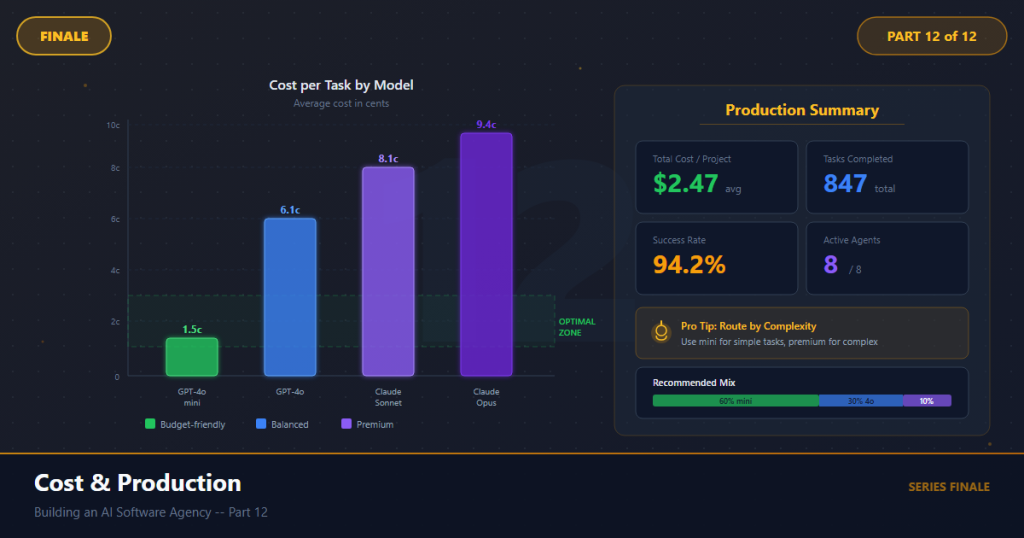
Trong bài viết
Ba tháng trước, khi tôi bắt đầu series này, một người bạn hỏi tôi: “Điều này thật tuyệt vời, nhưng chạy nó tốn bao nhiêu chi phí?” Tôi cho anh ấy một con số. Anh ấy nhìn tôi như thể tôi đang nói dối. Anh ấy lấy máy tính trên điện thoại, chia chi phí cho số lượng deliverable, và nói: “Điều đó chỉ tốn kém hơn một tách cà phê cho mỗi user story.”
Anh ấy đúng. Và đó là điểm chính của bài viết cuối cùng này.
Chúng tôi đã dành mười một phần xây dựng một AI team phần mềm hoàn chỉnh — tám agent, một LangGraph pipeline, tích hợp tool, điểm kiểm tra với con người, xử lý lỗi, hook observability. Hệ thống hoạt động. Nó lấy một brief từ client vague và tạo ra code đã được deploy và test. Nhưng một hệ thống hoạt động và một hệ thống sẵn sàng cho production là hai thứ rất khác nhau.
Sẵn sàng cho production có nghĩa là: nó tiết kiệm chi phí đủ để chạy có lãi. Nó chọn model phù hợp cho mỗi công việc thay vì lãng phí tiền trên lựa chọn đắt nhất. Nó thất bại một cách tử tế. Nó có thể quan sát được. Nó an toàn. Và ai đó đã làm phép tính để chứng minh nó đáng để chạy.
Bài viết này làm tất cả những điều đó. Chúng tôi sẽ ghép model với agent, tính toán chi phí thực tế, xây dựng guardrail chi phí, thiết lập observability cho production, và tạo một checklist deployment. Sau đó tôi sẽ lùi lại và kể cho bạn những gì tôi thực sự nghĩ về AI thay thế các lập trình viên — vì sau ba tháng xây dựng hệ thống này, tôi có một ý kiến rõ ràng.
Hãy hoàn thành điều chúng tôi đã bắt đầu.
1. Chiến Lược Lựa Chọn Model
Không phải agent nào cũng cần model mạnh nhất. Đây là lỗi chi phí lớn nhất duy nhất mà tôi thấy trong các hệ thống multi-agent: chạy Opus hay o1 cho những công việc mà Haiku có thể xử lý dễ dàng.
Nguyên tắc rất đơn giản: ghép khả năng của model với độ phức tạp của task. Một agent Project Manager định dạng báo cáo trạng thái không cần cùng sức mạnh lý luận như một agent Senior Software Engineer viết các thuật toán đệ quy với xử lý edge-case.
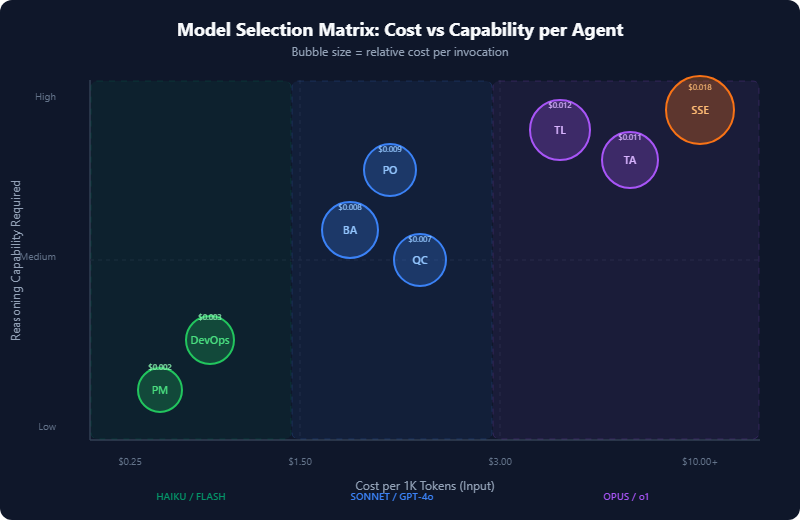
Ma Trận Lựa Chọn Model
Đây là ma trận đầy đủ mà tôi sử dụng. Giá dựa trên API rate tháng 4 năm 2026.
| Agent | Vai Trò | Model Khuyên Dùng | Reasoning Cần Thiết | Chi Phí Input/1K tokens | Avg Tokens/Task | Chi Phí/Task |
|---|---|---|---|---|---|---|
| PO (Alex) | Làm rõ yêu cầu | Claude Sonnet | Medium-High | $0.003 | ~3,000 | $0.009 |
| BA (Jordan) | Phân tách user story | Claude Sonnet | Medium | $0.003 | ~2,800 | $0.008 |
| QC (Sam) | Định nghĩa test case | Claude Sonnet | Medium | $0.003 | ~2,400 | $0.007 |
| TA (Morgan) | Quyết định kiến trúc | Claude Opus | High | $0.015 | ~3,500 | $0.011* |
| SSE (Riley) | Tạo code | Claude Opus | High | $0.015 | ~5,000 | $0.018* |
| TL (Casey) | Code review | Claude Opus | High | $0.015 | ~4,000 | $0.012* |
| DevOps (Taylor) | Pipeline config | Claude Haiku | Low-Medium | $0.00025 | ~2,000 | $0.003 |
| PM (Drew) | Báo cáo trạng thái | Claude Haiku | Low | $0.00025 | ~1,500 | $0.002 |
*Bao gồm chi phí output token, cao hơn cho Opus.
Lý do đằng sau mỗi lựa chọn:
Opus cho SSE, TA, TL: Những agent này cần lý luận sâu. SSE viết code production với error handling, type safety, và test coverage. TA đưa ra quyết định kiến trúc ảnh hưởng đến toàn bộ hệ thống. TL review code tìm các lỗi tinh tế và vấn đề thiết kế. Cắt giảm chi phí ở đây tạo ra output tệ hơn đáng kể — tôi đã test mở rộng với Haiku và Sonnet, và chất lượng code giảm đáng kể.
Sonnet cho PO, BA, QC: Những agent này thực hiện phân tích có cấu trúc — nhận dạng mẫu, phân tách, và tuân theo template. Sonnet xử lý điều này tốt. PO rút trích yêu cầu từ brief, BA phân tách chúng thành story, và QC viết test case từ story. Tất cả những điều này tuân theo các mẫu tương đối dự đoán được với hình dạng input-output rõ ràng.
Haiku cho DevOps, PM: Những agent này tạo ra output công thức. DevOps tạo pipeline YAML từ template. PM định dạng dữ liệu đã tồn tại trong TeamState thành báo cáo trạng thái. Haiku với giá $0.25/triệu input token về cơ bản là miễn phí cho những công việc này.
Triển Khai Lựa Chọn Model Trong Code
Đây là cách để kết nối lựa chọn model vào BaseAgent mà chúng tôi xây dựng trong Phần 4:
# config/models.py
from enum import Enum
from dataclasses import dataclass

class ModelTier(Enum):
    REASONING = "reasoning"      # Complex analysis, code generation
    BALANCED = "balanced"        # Structured analysis, decomposition
    EFFICIENT = "efficient"      # Templated output, formatting

@dataclass
class ModelConfig:
    model_id: str
    tier: ModelTier
    max_tokens: int
    cost_per_1k_input: float
    cost_per_1k_output: float

MODEL_REGISTRY: dict[ModelTier, ModelConfig] = {
    ModelTier.REASONING: ModelConfig(
        model_id="claude-opus-4-0-20250514",
        tier=ModelTier.REASONING,
        max_tokens=8192,
        cost_per_1k_input=0.015,
        cost_per_1k_output=0.075,
    ),
    ModelTier.BALANCED: ModelConfig(
        model_id="claude-sonnet-4-20250514",
        tier=ModelTier.BALANCED,
        max_tokens=8192,
        cost_per_1k_input=0.003,
        cost_per_1k_output=0.015,
    ),
    ModelTier.EFFICIENT: ModelConfig(
        model_id="claude-haiku-3-5-20250414",
        tier=ModelTier.EFFICIENT,
        max_tokens=4096,
        cost_per_1k_input=0.00025,
        cost_per_1k_output=0.00125,
    ),
}

AGENT_MODEL_MAP: dict[str, ModelTier] = {
    "po_agent": ModelTier.BALANCED,
    "ba_agent": ModelTier.BALANCED,
    "qc_agent": ModelTier.BALANCED,
    "ta_agent": ModelTier.REASONING,
    "sse_agent": ModelTier.REASONING,
    "tl_agent": ModelTier.REASONING,
    "devops_agent": ModelTier.EFFICIENT,
    "pm_agent": ModelTier.EFFICIENT,
}

def get_model_for_agent(agent_name: str) -> ModelConfig:
    tier = AGENT_MODEL_MAP.get(agent_name, ModelTier.BALANCED)
    return MODEL_REGISTRY[tier]
Cập nhật BaseAgent để sử dụng nó:
# agents/base.py (updated __init__)
from config.models import get_model_for_agent

class BaseAgent:
    def __init__(self, agent_name: str, **kwargs):
        self.agent_name = agent_name
        model_config = get_model_for_agent(agent_name)
        self.model_id = model_config.model_id
        self.max_tokens = model_config.max_tokens
        self._cost_tracker = CostTracker(model_config)
        # ... rest of init
2. Phân Tích Chi Phí Thực Tế
Hãy để tôi chỉ cho bạn các con số thực tế từ việc chạy một pipeline hoàn chỉnh trên một dự án thực tế: một task management API có xác thực, CRUD operation, và một dashboard đơn giản. Mười user story, toàn bộ pipeline.
Chi Phí Cho Một Story (Một Lần Chạy Pipeline)
Pipeline: "Build a task management app with auth and dashboard"
Stories generated: 10
Model mix: Opus (SSE, TA, TL) + Sonnet (PO, BA, QC) + Haiku (DevOps, PM)

Agent-by-agent breakdown for ONE story:
─────────────────────────────────────────
  PO  (clarification)     $0.009
  BA  (story writing)     $0.008
  QC  (test cases)        $0.007
  TA  (architecture)*     $0.003   ← amortized across 10 stories
  SSE (implementation)    $0.018
  TL  (code review)       $0.012
  DevOps (pipeline)*      $0.001   ← amortized across 10 stories
  PM  (status update)     $0.002
─────────────────────────────────────────
  TOTAL PER STORY:        $0.056 (after amortization, ~$0.06)

  × 10 stories =          $0.56 for the entire MVP

  With prompt caching:    $0.39 (30% reduction)
*TA và DevOps chạy một lần cho dự án, không phải per story. Quyết định kiến trúc và pipeline config được chia sẻ giữa tất cả story.
So Sánh Với Con Người
Hãy để tôi đặt $0.56 vào bối cảnh. Đây là những gì cùng một 10-story MVP chi phí với các team con người, dựa trên tỷ lệ mà tôi đã thấy trên khắp Southeast Asia, Eastern Europe, và North America:
| Phương Pháp | Chi Phí | Thời Gian | Ghi Chú |
|---|---|---|---|
| Senior dev solo (Vietnam) | $500–800 | 1–2 tuần | Tỷ lệ thực tế của tôi |
| Senior dev solo (US) | $2,000–4,000 | 1–2 tuần | Tỷ lệ thị trường |
| Cơ quan nhỏ | $5,000–15,000 | 3–6 tuần | Bao gồm overhead PM |
| AI team pipeline | $0.56 | ~8 phút | Chỉ chi phí API |
Trước khi bạn ném bảng này cho boss, hãy để tôi rất rõ ràng về những gì nó làm và không làm. Chi phí pipeline AI là $0.56 chỉ là chi phí API. Nó không bao gồm:
- Thời gian của bạn review và phê duyệt output tại các điểm kiểm tra con người
- Cơ sở hạ tầng để chạy pipeline (tối thiểu — một VM $5/tháng xử lý nó)
- Những tháng bạn dành xây dựng và điều chỉnh hệ thống (series này)
- Edge case yêu cầu can thiệp con người và rework
Một “tổng chi phí sở hữu” thực tế cho pipeline AI, khi nó đã được xây dựng và chạy, gần hơn $5–20 cho mỗi MVP — vẫn 100x rẻ hơn giải pháp con người, nhưng không phải con số tiêu đề $0.56 hoang dã tự nó.
Tính Toán ROI
Đây là phép tính mà tôi sử dụng để biện minh cho hệ thống này với bất cứ ai hỏi:
# roi_calculator.py
def calculate_roi():
    # Costs
    ai_cost_per_story = 0.06          # API cost
    human_review_time_hrs = 0.25       # 15 min per story review
    your_hourly_rate = 50              # Your opportunity cost
    review_cost = human_review_time_hrs * your_hourly_rate  # $12.50
    total_cost_per_story = ai_cost_per_story + review_cost   # $12.56

    # Value
    human_dev_cost_per_story = 150     # ~4hrs × $37.50/hr (mid-range)

    # ROI per story
    savings_per_story = human_dev_cost_per_story - total_cost_per_story
    roi_percentage = (savings_per_story / total_cost_per_story) * 100

    # At scale
    stories_per_month = 40
    monthly_savings = savings_per_story * stories_per_month

    return {
        "cost_per_story": total_cost_per_story,       # $12.56
        "savings_per_story": savings_per_story,         # $137.44
        "roi_percentage": roi_percentage,               # 1,094%
        "monthly_savings": monthly_savings,             # $5,497.60
        "break_even_stories": 1,                        # Immediate
    }
Ngay cả với các giả định bảo thủ — bao gồm thời gian review của bạn với giá $50/giờ — ROI lên trên 1,000%. Hệ thống tự thanh toán trên story đầu tiên.
3. Các Mẹo Tối Ưu Chi Phí
Con số $0.56 đã rất thấp, nhưng có bốn kỹ thuật đẩy nó thấp hơn nữa.
Mẹo 1: Prompt Caching
Prompt caching của Anthropic cho phép bạn cache system prompt và tái sử dụng nó qua các lần gọi. Vì agent của chúng tôi có các system prompt lớn (định nghĩa vai trò, output schema, mô tả tool), điều này tiết kiệm 90% trên những token được cache đó.
# agents/base.py — enable prompt caching
import anthropic

class BaseAgent:
    def _build_messages(self, user_input: str) -> list[dict]:
        return [
            {
                "role": "user",
                "content": [
                    {
                        "type": "text",
                        "text": self.system_prompt,
                        "cache_control": {"type": "ephemeral"}
                    },
                    {
                        "type": "text",
                        "text": user_input,
                    }
                ],
            }
        ]
Cho pipeline của chúng tôi, prompt caching giảm chi phí khoảng 30% vì system prompt rất lớn (800–2,000 token mỗi cái) và tái sử dụng qua mỗi story trong một batch.
Mẹo 2: Model Fallback Chain
Khi Opus bị quá tải hay chậm, hãy fallback sang Sonnet. Khi Sonnet không có sẵn, hãy fallback sang Haiku. Đây không chỉ là về độ tin cậy — nó là về chi phí. Nếu Sonnet có thể xử lý 80% cái mà Opus làm cho một task nhất định, bạn tiết kiệm 80% trên những lần gọi đó.
# agents/base.py — model fallback
from tenacity import retry, stop_after_attempt, wait_exponential
import anthropic

class ModelFallbackChain:
    def __init__(self, primary: str, fallbacks: list[str]):
        self.chain = [primary] + fallbacks
        self.client = anthropic.Anthropic()

    async def invoke(self, messages: list, max_tokens: int) -> str:
        last_error = None
        for model_id in self.chain:
            try:
                response = self.client.messages.create(
                    model=model_id,
                    max_tokens=max_tokens,
                    messages=messages,
                )
                return response.content[0].text
            except anthropic.RateLimitError:
                last_error = f"Rate limited on {model_id}"
                continue
            except anthropic.APIStatusError as e:
                last_error = str(e)
                continue
        raise RuntimeError(f"All models failed. Last error: {last_error}")

# Usage
sse_chain = ModelFallbackChain(
    primary="claude-opus-4-0-20250514",
    fallbacks=[
        "claude-sonnet-4-20250514",
        "claude-haiku-3-5-20250414",
    ],
)
Mẹo 3: Nén Prompt
Cửa sổ context dài tốn kém. Trước khi gửi lịch sử hội thoại đến một agent, hãy nén nó. Giữ dữ liệu có cấu trúc (user story, code artifact) nhưng tóm tắt các cuộc trò chuyện qua lại.
# utils/compression.py
def compress_history(messages: list[dict], max_tokens: int = 2000) -> list[dict]:
    """Keep the last N messages and summarize earlier ones."""
    if estimate_tokens(messages) <= max_tokens:
        return messages

    # Always keep the first message (system context) and last 3 messages
    preserved = [messages[0]] + messages[-3:]
    middle = messages[1:-3]

    if not middle:
        return preserved

    summary = f"[Previous {len(middle)} messages summarized: "
    summary += "Agent received requirements, clarified scope, "
    summary += "identified key constraints and produced structured output.]"

    return [
        preserved[0],
        {"role": "user", "content": summary},
        *preserved[1:],
    ]

def estimate_tokens(messages: list[dict]) -> int:
    """Rough estimate: 1 token ≈ 4 characters."""
    total_chars = sum(len(str(m.get("content", ""))) for m in messages)
    return total_chars // 4
Mẹo 4: Xử Lý Story Theo Batch
Thay vì chạy toàn bộ pipeline cho mỗi story tuần tự, hãy batch story chia sẻ context. Agent TA tạo một architecture spec cho tất cả story. DevOps tạo một pipeline config. Chỉ các agent per-story (SSE, QC, TL) chạy riêng lẻ.
# pipeline/batch.py
async def run_batched_pipeline(stories: list[UserStory], state: TeamState):
    # Phase 1: Run once for the whole project
    arch_spec = await ta_agent.run(state)
    pipeline_config = await devops_agent.run(state)

    # Phase 2: Run per-story, with parallelism where possible
    results = []
    for story in stories:
        story_state = state.with_story(story)
        story_state.architecture = arch_spec
        story_state.pipeline = pipeline_config

        # QC and SSE can start in parallel for independent stories
        qc_result, sse_result = await asyncio.gather(
            qc_agent.run(story_state),
            sse_agent.run(story_state),
        )

        # TL review must wait for SSE
        tl_result = await tl_agent.run(
            story_state.with_code(sse_result)
        )

        results.append((story, qc_result, sse_result, tl_result))

    # Phase 3: PM summary once
    await pm_agent.run(state.with_results(results))
    return results
4. Rate Limiting và Resilience
Production API có rate limit. Giới hạn của Anthropic thay đổi theo tier, nhưng ngay cả ở tier cao nhất, bạn sẽ chạm nó nếu chạy tám agent đồng thời qua nhiều story. Đây là cách để xử lý nó.
Rate Limiting với Tenacity
# utils/resilience.py
from tenacity import (
    retry,
    stop_after_attempt,
    wait_exponential,
    retry_if_exception_type,
)
import anthropic

# Retry on rate limits with exponential backoff
@retry(
    retry=retry_if_exception_type(anthropic.RateLimitError),
    wait=wait_exponential(multiplier=1, min=2, max=60),
    stop=stop_after_attempt(5),
    before_sleep=lambda retry_state: logger.warning(
        f"Rate limited. Retry {retry_state.attempt_number}/5 "
        f"in {retry_state.next_action.sleep:.1f}s"
    ),
)
async def call_with_retry(client, **kwargs):
    return client.messages.create(**kwargs)
Thực Thi Budget Token
Đặt các giới hạn cứng để một agent chạy trốn không đốt cháy ngân sách API của bạn:
# utils/budget.py
from dataclasses import dataclass, field
from datetime import datetime, timedelta

@dataclass
class BudgetGuard:
    max_cost_per_run: float = 5.00       # $5 max per pipeline run
    max_cost_per_hour: float = 20.00      # $20/hr ceiling
    max_tokens_per_agent: int = 50_000    # Per-agent token limit
    _spent: float = field(default=0.0, init=False)
    _hourly_spent: float = field(default=0.0, init=False)
    _hour_start: datetime = field(default_factory=datetime.now, init=False)

    def check_budget(self, estimated_cost: float) -> bool:
        # Reset hourly counter if needed
        if datetime.now() - self._hour_start > timedelta(hours=1):
            self._hourly_spent = 0.0
            self._hour_start = datetime.now()

        if self._spent + estimated_cost > self.max_cost_per_run:
            raise BudgetExceededError(
                f"Run budget exceeded: ${self._spent:.2f} + "
                f"${estimated_cost:.2f} > ${self.max_cost_per_run:.2f}"
            )
        if self._hourly_spent + estimated_cost > self.max_cost_per_hour:
            raise BudgetExceededError(
                f"Hourly budget exceeded: ${self._hourly_spent:.2f}/hr"
            )
        return True

    def record_spend(self, cost: float):
        self._spent += cost
        self._hourly_spent += cost

class BudgetExceededError(Exception):
    pass
5. Observability với Langfuse
Bạn không thể tối ưu hóa những gì bạn không thể đo lường. Langfuse là observability LLM open-source — nó trace mỗi agent call, ghi lại token usage, latency, cost, và cho phép bạn debug các lần chạy failed.
Thiết Lập
pip install langfuse
# observability/tracing.py
from langfuse import Langfuse
from langfuse.decorators import observe, langfuse_context
from functools import wraps

langfuse = Langfuse(
    public_key="pk-...",
    secret_key="sk-...",
    host="https://cloud.langfuse.com",  # or self-hosted
)

def trace_agent(agent_name: str):
    """Decorator to trace agent invocations in Langfuse."""
    def decorator(func):
        @wraps(func)
        @observe(name=agent_name)
        async def wrapper(self, state, *args, **kwargs):
            langfuse_context.update_current_observation(
                metadata={
                    "agent": agent_name,
                    "model": self.model_id,
                    "story_id": getattr(state, "current_story_id", None),
                },
            )
            result = await func(self, state, *args, **kwargs)

            # Log token usage
            langfuse_context.update_current_observation(
                usage={
                    "input": result.input_tokens,
                    "output": result.output_tokens,
                    "total": result.input_tokens + result.output_tokens,
                },
                output=str(result.output)[:500],
            )
            return result
        return wrapper
    return decorator
Sử Dụng Decorator
# agents/sse_agent.py
class SSEAgent(BaseAgent):
    @trace_agent("sse_agent")
    async def run(self, state: TeamState) -> CodeArtifact:
        # ... existing implementation
        pass
Langfuse Cho Bạn Thấy Cái Gì
Khi được kết nối, bạn nhận được:
- Chi phí cho mỗi pipeline run — được chia nhỏ theo agent
- Latency cho mỗi agent — agent nào là bottleneck?
- Token usage trends — prompt có phát triển theo thời gian không?
- Error rate — agent nào fail thường xuyên nhất?
- Trace waterfall — chuỗi đầy đủ agent call để debug
Điều này không tuỳ chọn cho production. Nếu không có observability, bạn đang lái mù.
6. Checklist Production
Đây là checklist mà tôi sử dụng trước khi deploy bất cứ pipeline AI nào lên production. Mỗi mục đều ở đây vì tôi đã học nó một cách khó khăn.
Bảo Mật
☐ API keys được lưu trữ trong biến môi trường, không bao giờ trong code
☐ Tất cả output agent được sanitize trước khi thực thi (đặc biệt là output code SSE)
☐ Không có secrets trong TeamState (credentials, tokens, vv.)
☐ Rate limiting trên bất cứ API endpoint nào hướng ngoài
☐ Input validation trên client brief (độ dài tối đa, content filtering)
☐ Sandboxed code execution cho output SSE (Docker container, không truy cập host)
# security/sandbox.py
import subprocess

def execute_generated_code(code: str, timeout: int = 30) -> str:
    """Run SSE-generated code in a sandboxed Docker container."""
    result = subprocess.run(
        [
            "docker", "run",
            "--rm",
            "--network=none",          # No network access
            "--memory=512m",           # Memory limit
            "--cpus=1",                # CPU limit
            "--read-only",             # Read-only filesystem
            "--tmpfs", "/tmp:size=64m",
            "python:3.12-slim",
            "python", "-c", code,
        ],
        capture_output=True,
        text=True,
        timeout=timeout,
    )
    return result.stdout if result.returncode == 0 else result.stderr
Độ Tin Cậy
☐ Retry logic trên tất cả LLM call (tenacity, exponential backoff)
☐ Model fallback chain cho mỗi agent
☐ Budget guard với giới hạn cứng
☐ Graceful degradation: nếu một agent fail, skip và tiếp tục
☐ State checkpointing: resume từ agent thành công lần cuối
☐ Timeout trên mỗi LLM call (120s tối đa)
☐ Dead letter queue cho các pipeline run failed
Observability
☐ Langfuse (hoặc tương đương) tracing trên mỗi agent call
☐ Cost tracking per run, per agent, per day
☐ Alerting khi chi phí vượt threshold
☐ Structured logging (JSON) cho tất cả pipeline event
☐ Dashboard cho pipeline health (success rate, avg latency, cost)
Testing
☐ Unit test cho mỗi agent với mocked LLM response
☐ Integration test: full pipeline với một known brief
☐ Regression test: saved input → expected output structure
☐ Cost regression: alert nếu pipeline run chi phí >2x historical average
☐ Prompt regression: version-control tất cả system prompt
# tests/test_pipeline_cost.py
import pytest

@pytest.fixture
def known_brief():
    return "Build a simple todo app with user authentication."

async def test_pipeline_cost_within_budget(known_brief):
    """Ensure pipeline cost stays within expected range."""
    result = await run_pipeline(known_brief)
    assert result.total_cost < 1.00, (
        f"Pipeline cost ${result.total_cost:.2f} exceeds $1.00 budget"
    )

async def test_all_agents_produce_output(known_brief):
    """Every agent must produce a non-empty artifact."""
    result = await run_pipeline(known_brief)
    for agent_name, artifact in result.artifacts.items():
        assert artifact is not None, f"{agent_name} produced no output"
        assert len(str(artifact)) > 50, f"{agent_name} output too short"
7. Cost Tracker
Buộc tất cả lại với một real-time cost tracker ghi lại mỗi API call:
# observability/cost_tracker.py
from dataclasses import dataclass, field
from datetime import datetime
import json

@dataclass
class CostEvent:
    agent: str
    model: str
    input_tokens: int
    output_tokens: int
    cost: float
    timestamp: str = field(default_factory=lambda: datetime.now().isoformat())

class CostTracker:
    def __init__(self, model_config):
        self.model_config = model_config
        self.events: list[CostEvent] = []

    def record(self, agent: str, input_tokens: int, output_tokens: int):
        cost = (
            (input_tokens / 1000) * self.model_config.cost_per_1k_input
            + (output_tokens / 1000) * self.model_config.cost_per_1k_output
        )
        event = CostEvent(
            agent=agent,
            model=self.model_config.model_id,
            input_tokens=input_tokens,
            output_tokens=output_tokens,
            cost=cost,
        )
        self.events.append(event)
        return event

    def total_cost(self) -> float:
        return sum(e.cost for e in self.events)

    def summary(self) -> dict:
        by_agent = {}
        for e in self.events:
            by_agent.setdefault(e.agent, 0.0)
            by_agent[e.agent] += e.cost
        return {
            "total": self.total_cost(),
            "by_agent": by_agent,
            "num_calls": len(self.events),
        }

    def export_jsonl(self, path: str):
        with open(path, "a") as f:
            for event in self.events:
                f.write(json.dumps(event.__dict__) + "\n")
8. Điều Gì Sẽ Đến Tiếp Theo: Lộ Trình
Hệ thống này hoạt động. Nhưng nó là phiên bản 1. Đây là những gì tôi đang xây dựng tiếp theo.
Hỗ Trợ Multi-Tenant
Ngay bây giờ, pipeline xử lý một dự án cùng một lúc. Phiên bản tiếp theo thêm tenant isolation — nhiều client, nhiều project, chạy đồng thời với state riêng biệt, budget, và observability.
# Future: multi-tenant pipeline runner
@dataclass
class TenantConfig:
    tenant_id: str
    budget_limit: float
    model_overrides: dict[str, ModelTier]  # Per-tenant model selection
    callback_url: str                       # Webhook for completion

async def run_for_tenant(tenant: TenantConfig, brief: str):
    state = TeamState(tenant_id=tenant.tenant_id)
    budget = BudgetGuard(max_cost_per_run=tenant.budget_limit)
    # Apply tenant-specific model selections
    for agent, tier in tenant.model_overrides.items():
        AGENT_MODEL_MAP[agent] = tier
    return await run_pipeline(brief, state=state, budget=budget)
Fine-Tuning Agent Prompt
Sau 100+ pipeline run, tôi có đủ dữ liệu để fine-tune. Kế hoạch: lấy best PO output (highest downstream success rate) và sử dụng chúng để fine-tune một model nhỏ hơn. Nếu Haiku fine-tuned trên great PO output match Sonnet quality, chi phí agent đó giảm 12x.
Voice Interface
Các human checkpoint gate hiện tại yêu cầu gõ. Phiên bản tiếp theo thêm voice interface — agent PM gọi bạn, đọc báo cáo trạng thái, và bạn chấp thuận hay từ chối bằng giọng nói. Đây không phải khoa học viễn tưởng; nó là một Twilio integration với Whisper transcription.
Self-Improving Prompt
Theo dõi pipeline run nào tạo output tốt nhất (được đo bằng: TL approval rate, test pass rate, human satisfaction score). Sử dụng dữ liệu đó để tự động phát triển system prompt. Agent cải thiện theo thời gian mà không cần engineering prompt thủ công.
9. Một Lời Nhận Xét Cá Nhân
Tôi muốn kết thúc series này với điều gì đó trung thực.
Khi tôi bắt đầu xây dựng hệ thống này, khá nhiều người nói tôi đang xây dựng replacement cho chính mình. “Bạn đang tự động hóa chính mình ra khỏi công việc,” một đồng nghiệp nói, không quá ác ý.
Sau ba tháng xây dựng, test, và sử dụng hệ thống này, tôi có thể nói với bạn với chắc chắn: đó không phải là điều đã xảy ra.
Điều đã xảy ra là điều này. AI team xử lý những phần của phát triển phần mềm cần thiết nhưng dự đoán được — draft ban đầu của yêu cầu, lần đầu test case, code boilerplate, pipeline configuration, báo cáo trạng thái. Đây là công việc thực. Chúng mất thời gian thực. Nhưng chúng không phải công việc làm cho một senior developer có giá trị.
Điều làm cho một senior developer có giá trị là judgment. Biết tính năng nào cắt. Nhận ra khi kiến trúc sẽ không scale trước khi nó được xây dựng. Cảm nhận rằng yêu cầu đã nêu của client ẩn chứa một nhu cầu không nêu. Đưa ra quyết định để dừng xây dựng và bắt đầu gửi hàng.
AI team không thể làm bất kỳ điều đó. Chưa, có thể không bao giờ. Những gì nó làm là giải phóng tôi để dành tất cả thời gian của tôi cho công việc yêu cầu judgment, thay vì chia sẻ chú ý của tôi qua tám vai trò.
Tôi không được thay thế. Tôi được khuếch đại.
Nếu bạn là một solo developer hay một small team lead, hệ thống này không phải replacement của bạn. Nó là force multiplier của bạn. Nó biến một senior developer thành một team tám người, chạy ở tốc độ API call, với chi phí dưới một tách cà phê.
Xây dựng nó. Sử dụng nó. Và dành thời gian nó tiết kiệm cho bạn trên những vấn đề khó — những cái vẫn cần một bộ não con người.
10. Series Hoàn Chỉnh
Đây là mỗi phần, theo thứ tự. Nếu bạn đã đọc chúng tất cả, cảm ơn bạn. Nếu bạn bắt đầu ở đây, hãy quay lại Phần 1 — mỗi phần xây dựng trên phần cuối cùng.
| Phần | Tiêu Đề | Những Gì Bạn Xây Dựng |
|---|---|---|
| Phần 1 | Tại Sao Mô Phỏng Dev Team với Agent? | Tầm nhìn và động lực |
| Phần 2 | LangGraph vs AutoGen vs CrewAI | Framework selection |
| Phần 3 | Architecture, DDD, và Communication | System design với DDD |
| Phần 4 | BaseAgent và Tool System | BaseAgent class và tool integration |
| Phần 5 | PO và BA Agent | Requirements đến user story |
| Phần 6 | QC và TA Agent | Test case và architecture, parallel fan-out |
| Phần 7 | SSE Agent: Code Generation | Production code từ spec |
| Phần 8 | TL Agent: Code Review | Automated code review loop |
| Phần 9 | DevOps Agent: CI/CD Pipeline | Pipeline generation và deployment |
| Phần 10 | PM Agent: Orchestration và Reporting | Status tracking và coordination |
| Phần 11 | Human-in-the-Loop và Error Recovery | Checkpoint, approval, failure handling |
| Phần 12 (bài này) | Chi Phí, Model Selection, và Production | Cost optimization, observability, production readiness |
Suy Nghĩ Cuối Cùng
Ba tháng trước, tôi ngồi xuống với một file Python trống và một ý tưởng: nếu tôi có thể xây dựng team, thay vì là team?
Mười hai bài viết sau, câu trả lời là có. Không hoàn hảo. Không mà không có giám sát con người. Không mà không có quản lý chi phí cẩn thận và hardening production. Nhưng có.
Hệ thống tổng cộng là khoảng 3,000 dòng Python. Nó sử dụng LangGraph cho orchestration, Claude model từ Anthropic cho reasoning, Pydantic cho data validation, Langfuse cho observability, và tenacity cho resilience. Nó lấy một brief client một đoạn và tạo ra phần mềm deployed, test — yêu cầu document, user story, test case, quyết định kiến trúc, production code, code review, CI/CD pipeline, và project status report.
Và nó chi phí dưới một đô la cho mỗi MVP.
Tương lai tôi thấy không phải AI thay thế developer. Nó là AI team làm việc cạnh human team — xử lý công việc dự đoán được ở tốc độ máy, để con người có thể tập trung vào công việc sáng tạo và chiến lược vẫn cần một bộ não được tạo từ neuron, không phải parameter.
Cảm ơn bạn đã đọc. Bây giờ hãy xây dựng một cái gì đó.
— Thuan
Bài viết liên quan
06 Oct 2026 · 6 phút đọc
agentic coding
Claude Cowork vừa làm đúng cái mình từng nói Remote Control không làm
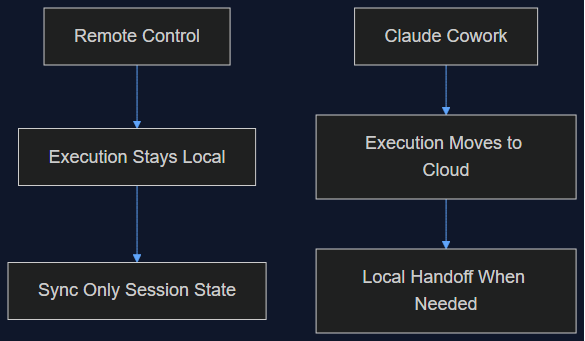
Tháng 8 mình viết rằng Remote Control của Claude Code chỉ là một lớp đồng bộ, không phải di chuyển lên cloud, và việc giữ execution ở local chính là điểm cốt lõi. Tuần này Anthropic chuyển hẳn execution của Cowork lên cloud làm mặc định. Đây là lý do cả hai quyết định đều đúng — cho hai sản phẩm khác nhau.
Đọc tiếp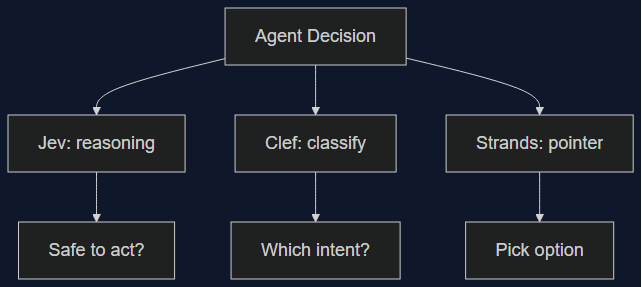
03 Oct 2026 · 6 phút đọc
agents
Ba Decision Model Ra Mắt Trong Một Tuần — Không Cái Nào Thắng Tuyệt Đối
Clef/Clef-flash của Cloudflare và Strands Decider của Amazon đều ra mắt ngày 1/10, nhắm thẳng vào Jev của TypeSafe. Mình xếp số liệu benchmark, latency, giá thật của cả ba cạnh nhau — category này là thật, nhưng chọn cái nào thắng lại tuỳ vào bạn đang tự động hoá quyết định gì.
Đọc tiếp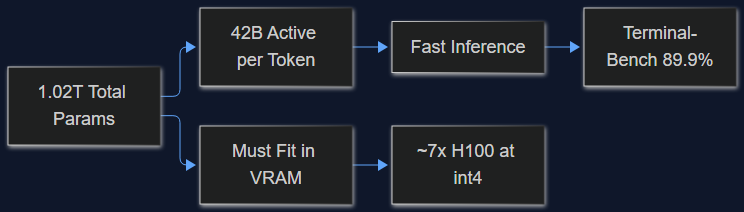
03 Oct 2026 · 5 phút đọc
ai
MiMo-V2.6-Pro License MIT, 1.02 Nghìn Tỷ Params — Mình Tính Thử Chi Phí Self-Host
Model open-weight mới của Xiaomi đứng đầu Terminal-Bench 2.1 với 89.9%, DeepSWE nhảy từ 19.0 lên 71.9. Trước khi mừng vì license MIT, đọc thử phần này — 1.02T tổng params khác 42B active params ở điểm nào, và nó làm bill GPU của bạn khác nhau cỡ nào.
Đọc tiếp
Thảo luận
Bình luận được duyệt trước khi công khai. Email của bạn được giữ riêng tư.