In Part 1, I laid out the vision: an AI software team with a PO, SSE, QC, and DevOps agent working together to take a vague idea all the way to deployed code. The concept resonated with a lot of people. The follow-up question I got most: “Okay, but which framework do you use?”
That question used to have an easy answer. Six months ago I would have said “just use LangChain.” But the ecosystem exploded. Now you have LangGraph, AutoGen v0.4, CrewAI, Semantic Kernel, LlamaIndex Workflows, Haystack Pipelines, and a dozen more each claiming to solve multi-agent orchestration. Each has real GitHub stars, real production users, real tutorials.
The problem is not a lack of options. The problem is that every framework looks great in a 50-line demo and reveals its personality only when you try to build something real.
So I did what any over-caffeinated engineer does: I built the same thing in all three top contenders. Same requirements, same LLM, same tools. I watched where they made me fight them and where they got out of my way. This post is the honest report.
My name is Thuan Luong. I have been building production systems in Vietnam and Singapore for about twelve years, the last four of which have involved LLM applications. I am not affiliated with any of these frameworks. I just want to ship good software.
1. The Framework Problem
When you search “multi-agent framework 2025” you get a wave of content that all sounds the same. Every framework promises:
- Easy agent orchestration
- Tool integration
- Memory and context management
- Human-in-the-loop support
- Streaming output
- Production-ready
These bullet points are meaningless without context. What “easy orchestration” means to a framework author is often “we hid the hard parts until you need them.” I have been burned by this pattern enough times to be suspicious.
The question you should ask is not “which framework is best” but “which framework matches the shape of my problem.” A framework built around conversational back-and-forth between agents will feel wrong if your workflow is fundamentally a directed pipeline. A framework built around strict typed state will feel like a straitjacket if you need agents to negotiate dynamically.
My problem has a specific shape: a software team simulation. That means:
- Work flows through defined phases: requirements → design → implementation → QC → deployment
- Agents have specialized roles and do not do each other’s jobs
- State accumulates — the QC agent needs everything the SSE agent produced, which needs everything the PO agent produced
- There are conditional branches — QC fails, work goes back; QC passes, work moves forward
- A human needs to approve things at checkpoints, not just observe
- The whole thing needs to be observable in a dashboard while it runs
That is the test. Let me show you how each framework handles it.
2. The Contenders
LangGraph: Graphs All the Way Down
LangGraph came out of LangChain but it is a different beast. Where LangChain chains are linear sequences, LangGraph is a directed graph where nodes are functions and edges can be conditional. State is a typed Python dict that flows through the graph, getting modified at each node.
The mental model is: your workflow is a state machine. Define your states. Define your transitions. The framework handles the rest.
What I like: the state machine model maps directly to how software teams actually work. There is no ambiguity about what phase you are in or what data is available. Conditional routing is first-class. You declare “if QC returns FAIL, go to this node; if PASS, go to that node” and the framework enforces it.
What is harder: the graph abstraction requires upfront design. You cannot just start coding and let the structure emerge. You have to think about your workflow as a graph before you write a single agent. For some people that is a feature. For others it is friction.
LangGraph also has the best story for human-in-the-loop I have seen in any framework. You can halt execution at any node, serialize the entire state to a database, wait for human input, deserialize, and continue. This is not a demo feature — it works in production with PostgreSQL checkpointers.
The LangChain ecosystem integration is a double-edged sword. You get access to hundreds of tools and integrations. You also get the historical complexity of LangChain’s API surface, which has changed dramatically over the versions.
AutoGen: Agents That Talk to Each Other
Microsoft’s AutoGen takes a fundamentally different approach. Instead of defining a graph of functions, you define agents that communicate through a message-passing protocol. Agents are conversational: they send messages to each other, receive replies, and decide what to do next based on the conversation.
The core primitive is the conversable agent. Every agent — whether it is an LLM wrapper, a human proxy, or a code executor — speaks the same protocol. You can mix them freely.
AutoGen’s killer feature is code execution. You can have an agent write Python, have another agent execute it in a sandboxed environment, get the output, and loop until the code works. This is powerful for agentic programming tasks.
What I like about AutoGen: the conversational model is extremely natural for some problems. If you want agents to negotiate, critique each other’s work, or collaboratively solve an open-ended problem, AutoGen’s back-and-forth protocol fits perfectly. The code execution story is unmatched.
What does not fit my use case: AutoGen’s state is basically the conversation history. When an agent needs to know the current requirements, it reads back through messages. When it needs to pass structured data to the next agent, it either puts it in a message or you implement your own state layer on top. For a pipeline with accumulated structured state (requirements object, user stories list, test results, deployment config), this feels backwards.
AutoGen v0.4 rewrote the API significantly around an actor model, which is cleaner, but also means most tutorials you find are for v0.2 and do not apply.
CrewAI: Role-Playing at Scale
CrewAI thinks about agents as crew members with roles, goals, and backstories. You define a Crew, assign Agents to it, give each agent Tasks, and the Crew executes them. It is the most accessible of the three — you can build something functional in thirty lines.
The role-based model is intuitive for people coming from project management backgrounds. “Product Owner,” “Senior Software Engineer,” “QC Engineer” map directly to crew roles. The backstory system lets you inject personality and context without writing explicit system prompts.
CrewAI has two execution modes: sequential (tasks run in order) and hierarchical (a manager agent assigns tasks to worker agents). Sequential is obvious. Hierarchical introduces a “manager LLM” that decomposes goals and assigns work dynamically.
What I like: the high-level abstractions mean you move fast. Tool integration is clean. The role/goal/backstory pattern produces surprisingly good prompt engineering by default.
What concerns me: the high-level abstractions eventually hide things you need. When I tried to implement conditional routing (if QC fails, loop back) in sequential mode, I ended up fighting the framework. The hierarchical mode has a manager LLM making routing decisions, which means routing logic is not deterministic — it depends on what the manager LLM decides. For a production system where I need predictable control flow, that is a problem.
State management in CrewAI is also an area where the abstraction leaks. You can share context between tasks via the context parameter, but it is not the same as having a single typed state object that flows through your entire workflow. You end up doing gymnastics to pass structured data between agents.
3. Framework Comparison Matrix
Before getting into code, here is a visual comparison across the dimensions that matter for my use case.
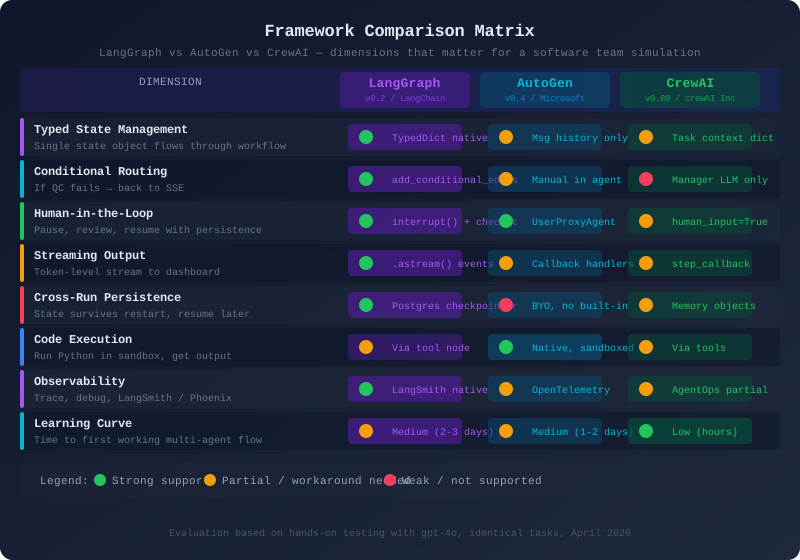
The matrix tells the story clearly. LangGraph dominates on the dimensions that matter most for a pipeline-style workflow with strict state control. AutoGen has an edge on code execution. CrewAI wins on accessibility but pays for it in control.
4. Building the Same PO Agent in All Three
Theory is cheap. Let me show you the actual code. I am building the simplest useful version of the PO Agent: takes a vague requirement as input, clarifies it, produces structured user stories. Same behavior, three frameworks.
LangGraph Implementation
The LangGraph version requires the most upfront design but yields the most predictable result.
# langgraph_po.py
from langgraph.graph import StateGraph, END
from langgraph.checkpoint.postgres import PostgresSaver
from langchain_openai import ChatOpenAI
from langchain_core.messages import SystemMessage, HumanMessage
from typing import TypedDict, Annotated
import operator
import json

# --- State Definition ---
# This is the heart of LangGraph. Everything flows through this typed dict.
class TeamState(TypedDict):
    messages: Annotated[list, operator.add]  # append-only message log
    raw_requirement: str                      # what the client said
    clarified_requirement: str               # after PO processing
    user_stories: list[dict]                 # structured output
    acceptance_criteria: dict                # per story
    current_agent: str                       # which agent is active
    phase: str                              # requirements | design | impl | qc | done
    iteration_count: int                    # how many times QC sent us back
    qc_feedback: str                        # latest QC feedback if any

llm = ChatOpenAI(model="gpt-4o", temperature=0.1)

PO_SYSTEM_PROMPT = """You are a Product Owner in a software team.
Your job is to take vague client requirements and transform them into
clear, testable user stories following the format:
  As a [user type], I want [action] so that [benefit].

Each story must have:
- A clear, unambiguous description
- Acceptance criteria (3-5 bullet points)
- Story points estimate (1, 2, 3, 5, 8, 13)
- Priority (P0=must have, P1=should have, P2=nice to have)

You ask clarifying questions when requirements are ambiguous.
You do NOT write code. You do NOT design systems.
"""

def po_agent_node(state: TeamState) -> TeamState:
    """
    PO Agent node. Receives raw requirements, produces structured user stories.
    Returns partial state update — LangGraph merges this with existing state.
    """
    messages = [
        SystemMessage(content=PO_SYSTEM_PROMPT),
        HumanMessage(content=f"""
Requirement from client: {state['raw_requirement']}

{f'QC feedback from previous iteration: {state["qc_feedback"]}' if state.get('qc_feedback') else ''}

Please produce:
1. A clarified version of the requirement (1 paragraph)
2. User stories in JSON format

Output format:
{{
  "clarified_requirement": "...",
  "user_stories": [
    {{
      "id": "US-001",
      "title": "...",
      "story": "As a ..., I want ..., so that ...",
      "acceptance_criteria": ["...", "...", "..."],
      "story_points": 3,
      "priority": "P0"
    }}
  ]
}}
""")
    ]

    response = llm.invoke(messages)

    # Parse the JSON from the response
    # In production you'd use a more robust parser
    content = response.content
    start = content.find('{')
    end = content.rfind('}') + 1
    parsed = json.loads(content[start:end])

    return {
        "messages": [response],
        "clarified_requirement": parsed["clarified_requirement"],
        "user_stories": parsed["user_stories"],
        "current_agent": "po",
        "phase": "requirements_complete",
    }

def should_continue_to_sse(state: TeamState) -> str:
    """
    Conditional edge: check if PO output is ready for SSE.
    In real system this would check quality metrics.
    """
    if len(state.get("user_stories", [])) >= 1:
        return "sse"
    return "po"  # loop back if no stories produced

# --- Graph Construction ---
workflow = StateGraph(TeamState)

workflow.add_node("po", po_agent_node)
# (Other nodes would be added here: sse, qc, devops)
# workflow.add_node("sse", sse_agent_node)
# workflow.add_node("qc", qc_agent_node)

workflow.set_entry_point("po")
workflow.add_conditional_edges(
    "po",
    should_continue_to_sse,
    {
        "sse": END,  # simplified: end after PO for this demo
        "po": "po",  # loop back
    }
)

# --- Persistence ---
# This is LangGraph's superpower: serialize entire state to Postgres
# Any node can be interrupted, state saved, resumed hours later
checkpointer = PostgresSaver.from_conn_string(
    "postgresql://user:pass@localhost/teamdb"
)

app = workflow.compile(
    checkpointer=checkpointer,
    interrupt_before=["sse"]  # pause before SSE for human review
)

# --- Usage ---
async def run_po_agent(requirement: str, thread_id: str):
    config = {"configurable": {"thread_id": thread_id}}

    initial_state = {
        "raw_requirement": requirement,
        "messages": [],
        "user_stories": [],
        "phase": "intake",
        "current_agent": "",
        "iteration_count": 0,
        "qc_feedback": "",
        "clarified_requirement": "",
        "acceptance_criteria": {},
    }

    # Stream every event — this is what feeds our dashboard
    async for event in app.astream_events(initial_state, config=config, version="v2"):
        if event["event"] == "on_chat_model_stream":
            # Token-level streaming
            chunk = event["data"]["chunk"].content
            yield {"type": "token", "content": chunk}
        elif event["event"] == "on_chain_end" and event["name"] == "po":
            # Node completed
            yield {"type": "node_complete", "node": "po", "data": event["data"]["output"]}
Notice what you get for free: the interrupt_before=["sse"] line pauses execution after the PO node completes, before SSE starts. The entire state (messages, user stories, current phase) is serialized to Postgres. A human can review the user stories in the dashboard, approve them, and the workflow resumes. If the server restarts between the pause and the resume, nothing is lost.
AutoGen Implementation
AutoGen’s conversational model produces a different architecture for the same behavior.
# autogen_po.py
import autogen
from autogen import AssistantAgent, UserProxyAgent, GroupChat, GroupChatManager
import json

# LLM configuration
llm_config = {
    "model": "gpt-4o",
    "temperature": 0.1,
    "api_key": "your-key-here",
}

# --- Agent Definitions ---
# In AutoGen, agents are defined by their conversational role
po_agent = autogen.AssistantAgent(
    name="ProductOwner",
    system_message="""You are a Product Owner in a software team.

When given a requirement, you ALWAYS respond with a JSON block containing:
1. clarified_requirement: A clear restatement of what needs to be built
2. user_stories: Array of user stories with id, title, story, acceptance_criteria,
   story_points, priority

Format your JSON inside ```json ``` code blocks.

You ask ONE clarifying question if the requirement is genuinely ambiguous.
Otherwise, proceed directly to producing user stories.

TERMINATE when you have produced complete user stories by saying TERMINATE.""",
    llm_config=llm_config,
)

# The UserProxy acts as the "client" feeding requirements into the conversation
# In our architecture, this is actually our orchestration layer
user_proxy = autogen.UserProxyAgent(
    name="Client",
    human_input_mode="NEVER",   # no actual human input — automated pipeline
    max_consecutive_auto_reply=3,
    is_termination_msg=lambda msg: "TERMINATE" in msg.get("content", ""),
    code_execution_config=False,  # PO doesn't execute code
    default_auto_reply="Please produce the user stories now.",
)

# --- State Extraction Helper ---
# This is the awkward part: we have to dig through conversation history
# to get structured output. LangGraph does this automatically.
def extract_user_stories_from_conversation(chat_result) -> dict:
    """
    AutoGen state is the conversation. We parse it to get structured data.
    This is the core pain point of the AutoGen model for pipeline workflows.
    """
    for message in reversed(chat_result.chat_history):
        content = message.get("content", "")
        if "```json" in content:
            start = content.find("```json") + 7
            end = content.find("```", start)
            json_str = content[start:end].strip()
            try:
                return json.loads(json_str)
            except json.JSONDecodeError:
                continue
    return {}

# --- Memory / Callbacks ---
# AutoGen lacks built-in persistence. We implement it manually.
class POStateTracker:
    """
    We have to build our own state management layer.
    This is significant overhead that LangGraph gives us for free.
    """
    def __init__(self):
        self.state = {
            "raw_requirement": "",
            "user_stories": [],
            "clarified_requirement": "",
            "conversation_history": [],
            "phase": "intake",
        }

    def save_to_db(self, thread_id: str):
        # Your own persistence logic here
        import sqlite3
        # ... serialize self.state ...
        pass

    def load_from_db(self, thread_id: str):
        # Your own restoration logic here
        pass

state_tracker = POStateTracker()

# --- Usage ---
def run_po_agent(requirement: str, thread_id: str) -> dict:
    state_tracker.state["raw_requirement"] = requirement

    # Initiate the conversation
    chat_result = user_proxy.initiate_chat(
        recipient=po_agent,
        message=f"""New requirement from client:

{requirement}

Please clarify and produce structured user stories.""",
        max_turns=5,
    )

    # Extract structured data from conversation history
    structured_output = extract_user_stories_from_conversation(chat_result)

    # Manually update and save state
    state_tracker.state.update({
        "user_stories": structured_output.get("user_stories", []),
        "clarified_requirement": structured_output.get("clarified_requirement", ""),
        "conversation_history": chat_result.chat_history,
        "phase": "requirements_complete",
    })
    state_tracker.save_to_db(thread_id)

    return state_tracker.state

# For multi-agent coordination in AutoGen, you use GroupChat
def setup_full_team():
    """
    GroupChat is how AutoGen coordinates multiple agents.
    The GroupChatManager routes messages between agents.
    """
    sse_agent = autogen.AssistantAgent(
        name="SeniorSoftwareEngineer",
        system_message="You are a Senior Software Engineer...",
        llm_config=llm_config,
    )

    qc_agent = autogen.AssistantAgent(
        name="QCEngineer",
        system_message="You are a QC Engineer...",
        llm_config=llm_config,
    )

    group_chat = autogen.GroupChat(
        agents=[user_proxy, po_agent, sse_agent, qc_agent],
        messages=[],
        max_round=20,
        # speaker_selection_method can be "auto", "round_robin", or a custom function
        # "auto" means the LLM decides who speaks next — less deterministic than LangGraph
        speaker_selection_method="auto",
    )

    manager = autogen.GroupChatManager(
        groupchat=group_chat,
        llm_config=llm_config,
    )

    return manager, user_proxy
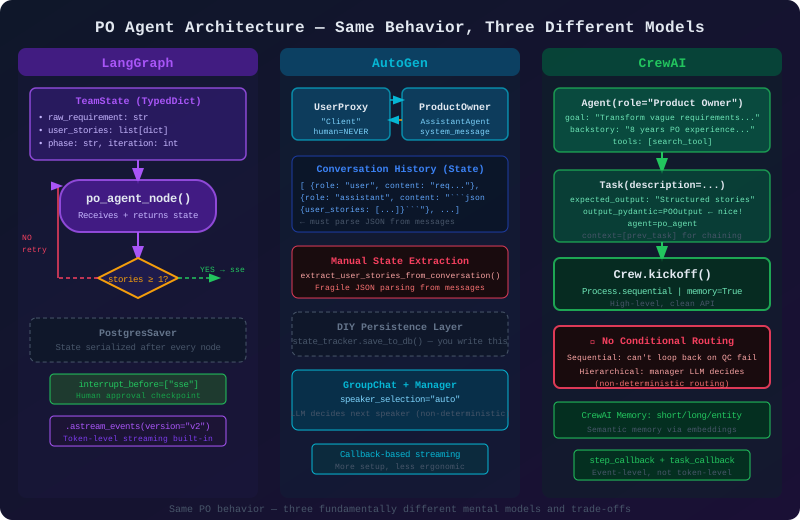
The extract_user_stories_from_conversation function tells the story. In AutoGen, to get structured data out of a conversation, you have to parse the message history. This works but it is fragile. If the LLM decides to format its output slightly differently, your parser breaks.
The GroupChat with speaker_selection_method="auto" is powerful for open-ended problem solving. The LLM decides who should speak next based on the conversation context. But in a pipeline where I know exactly who should speak next, I am paying LLM inference cost for a routing decision that should be deterministic.
CrewAI Implementation
CrewAI is the most readable of the three. If you showed this to a non-engineer, they would understand it immediately.
# crewai_po.py
from crewai import Agent, Task, Crew, Process
from crewai_tools import SerperDevTool
from langchain_openai import ChatOpenAI
from pydantic import BaseModel
from typing import List, Optional

# --- Output Models ---
# CrewAI 0.80+ supports Pydantic output models, which helps with structured data
class UserStory(BaseModel):
    id: str
    title: str
    story: str
    acceptance_criteria: List[str]
    story_points: int
    priority: str

class POOutput(BaseModel):
    clarified_requirement: str
    user_stories: List[UserStory]
    open_questions: Optional[List[str]] = []

# --- Tool Setup ---
search_tool = SerperDevTool()  # Internet search for requirements research

llm = ChatOpenAI(model="gpt-4o", temperature=0.1)

# --- Agent Definition ---
# CrewAI agents have role, goal, backstory — it's declarative and readable
po_agent = Agent(
    role="Product Owner",
    goal="""Transform vague client requirements into clear, actionable user stories
    that a development team can implement without ambiguity.""",
    backstory="""You are a seasoned Product Owner with 8 years of experience in
    agile software development. You have worked with startups and enterprises alike.
    You have a talent for extracting the real need behind what clients say they want.
    You write user stories that developers love because they are specific and testable.
    You always think about edge cases and error states that clients forget to mention.
    You use internet search to research similar products and industry best practices
    when clarifying requirements.""",
    tools=[search_tool],
    llm=llm,
    verbose=True,
    allow_delegation=False,  # PO does not delegate — it does its own work
    max_iter=3,
)

# --- Task Definition ---
po_task = Task(
    description="""Analyze the following client requirement and produce structured user stories.

Requirement: {requirement}

{qc_feedback_section}

Steps:
1. If the requirement mentions a domain you're unfamiliar with, use the search tool
   to research similar products (e.g., search "e-commerce checkout user stories")
2. Identify the core user need and any implicit requirements
3. Decompose into 3-7 user stories following: As a X, I want Y, so that Z
4. Write 3-5 acceptance criteria per story (specific, testable)
5. Estimate story points using Fibonacci sequence
6. Assign priorities: P0=must have, P1=should have, P2=nice to have

Be specific. Avoid vague language like "user-friendly" or "fast".""",
    expected_output="""A structured set of user stories with acceptance criteria,
    story point estimates, and priorities. Include a brief clarified requirement
    statement at the top. Output as a valid JSON object matching the POOutput schema.""",
    agent=po_agent,
    output_pydantic=POOutput,  # structured output enforced by Pydantic
)

# --- Crew Assembly ---
# For just the PO agent, we have a crew of one
# In the full system, this crew would include SSE, QC, DevOps
po_crew = Crew(
    agents=[po_agent],
    tasks=[po_task],
    process=Process.sequential,
    verbose=True,
    memory=True,           # CrewAI memory: agents remember across tasks
    embedder={
        "provider": "openai",
        "config": {"model": "text-embedding-3-small"},
    }
)

# Full team crew (sequential workflow)
def setup_full_team_crew(requirement: str):
    # Agents would be defined elsewhere, importing here for clarity
    # from agents import sse_agent, qc_agent, devops_agent

    sse_task = Task(
        description="Based on the user stories, design the technical architecture...",
        expected_output="Technical design document with component diagrams",
        agent=None,  # would be sse_agent
        context=[po_task],  # receives po_task output as context
    )

    qc_task = Task(
        description="Review the technical design for quality and completeness...",
        expected_output="QC report with pass/fail and feedback",
        agent=None,  # would be qc_agent
        context=[po_task, sse_task],  # receives both previous outputs
    )

    # The problem: CrewAI sequential process does not support conditional routing.
    # If QC fails, you cannot loop back to SSE within the crew.
    # You'd have to run the entire crew again, or use Process.hierarchical
    # and hope the manager LLM makes the right routing decision.

    full_crew = Crew(
        agents=[],  # [po_agent, sse_agent, qc_agent]
        tasks=[po_task, sse_task, qc_task],
        process=Process.sequential,
        memory=True,
        verbose=True,
    )

    return full_crew

# --- Usage ---
def run_po_agent(requirement: str, qc_feedback: str = "") -> POOutput:
    qc_section = f"\nQC feedback from previous iteration:\n{qc_feedback}" if qc_feedback else ""

    result = po_crew.kickoff(inputs={
        "requirement": requirement,
        "qc_feedback_section": qc_section,
    })

    # CrewAI with output_pydantic returns a Pydantic model directly
    # This is actually quite nice
    return result.pydantic
The CrewAI code is clean. The output_pydantic=POOutput line is genuinely elegant — it enforces structured output through Pydantic, which is something LangGraph requires you to wire up yourself. The context=[po_task] mechanism for passing output between tasks is intuitive.
But look at the comment in setup_full_team_crew. The core limitation surfaces immediately: sequential crews do not support conditional routing. If QC fails, you cannot express “go back to SSE” in CrewAI’s sequential model. You either run the whole crew again from scratch, use the hierarchical mode and let an LLM decide routing, or build routing logic outside the framework — which defeats the purpose.
5. PO Agent Architecture — Three Ways
6. Evaluation: What Does a Software Team Simulation Actually Need?
Let me be concrete about the requirements. A software team simulation is not a chatbot. It is not a one-shot task runner. It is a stateful workflow that runs over minutes to hours, involves multiple specialized agents, and needs to be observed, debugged, and occasionally overridden by a human.
Precise state control. When the QC agent runs, it needs access to the exact version of user stories that the PO produced, and the exact code that the SSE produced. Not a summary in a conversation. Not a description. The actual structured data. LangGraph’s TypedDict state makes this explicit and type-safe. AutoGen’s message history makes it implicit and fragile. CrewAI’s task context is somewhere in between.
Conditional routing. Real software development is not linear. QC fails about thirty percent of the time in my testing. When it fails, work goes back to the SSE (or sometimes to the PO) with specific feedback. This loop needs to be expressed in the workflow definition, not in the LLM’s decision-making. If routing depends on what the LLM decides, your workflow is non-deterministic. LangGraph’s add_conditional_edges with a Python function to evaluate conditions is exactly right here.
Human-in-the-loop at key checkpoints. There are at least three places where a human should review: after requirements are finalized (before coding starts), after the SSE produces a design (before implementation), and after QC (before deployment). These are not optional — they are the compliance and quality gates that make the output trustworthy. LangGraph’s interrupt_before mechanism with checkpointing is the only production-grade solution I found. AutoGen’s UserProxyAgent can simulate human input but lacks persistence — if the process dies while waiting for human input, the state is gone. CrewAI’s human_input=True prompts the terminal and has no web-facing equivalent without custom work.
Streaming output for a dashboard. The team needs a dashboard that shows real-time output from every agent as it runs. LangGraph’s astream_events with version="v2" provides token-level streaming with rich metadata: which node is running, which tool was called, what the LLM produced. This is exactly what a dashboard needs. AutoGen and CrewAI both require more custom wiring to achieve the same result.
Memory and persistence across tasks. A project might take multiple sessions. The PO works today, the SSE works tomorrow, QC runs the day after. The state needs to persist. LangGraph’s checkpointer pattern (PostgresSaver, SqliteSaver, etc.) handles this natively. You can reload any past state, fork it, or resume it. AutoGen has no built-in persistence — you build it yourself. CrewAI has a memory system but it is primarily semantic memory (what has been discussed) rather than structured state (the actual work products).
Observability. When an agent does something unexpected, I need to trace exactly what happened: what input did it receive, what tools did it call, what did it return, where in the graph was it? LangGraph’s native integration with LangSmith gives me a full trace for every run. I can replay any past run, see token usage, see tool call latency, and see exactly where errors occurred. This is not a luxury — in production debugging, it is essential.
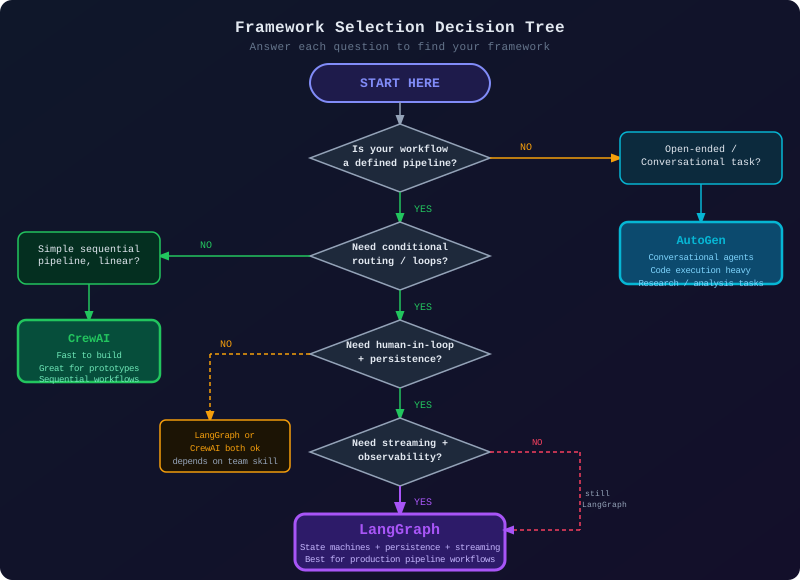
7. Which Framework Should You Pick?
8. Why LangGraph Wins for Our Use Case
I want to be direct about this. LangGraph is not the easiest framework to start with. The state machine mental model requires upfront design. The graph abstraction introduces concepts that take a few days to internalize. If I just wanted to demo a multi-agent system at a conference, I would use CrewAI.
But I am building a production system that will run real projects, not demos. And for that, LangGraph’s constraints are features, not limitations.
The typed state is a contract. When I define TeamState with raw_requirement: str, user_stories: list[dict], phase: str, every agent in the system is working against the same contract. If the PO agent fails to populate user_stories, the SSE agent will not receive an empty list — it will know, at type-checking time, that the field exists. This predictability is essential when debugging a system where multiple LLMs are making decisions in sequence.
Conditional routing is deterministic code. My should_continue_to_sse function is a plain Python function that evaluates the state and returns a string. It runs in microseconds. It is testable. I can write a unit test for it. Compare this to AutoGen’s GroupChat where the GroupChatManager LLM decides who speaks next, or CrewAI’s hierarchical mode where a manager LLM decides which task to assign. Those routing decisions cost tokens, take time, and can be wrong in ways that are hard to reproduce.
The checkpointer changes what is possible. When I run the system for the first time and it hits the interrupt_before=["sse"] checkpoint, the entire state is serialized to Postgres. I can query that row from a web dashboard. I can display the user stories to the client. The client can annotate them, add comments, approve or reject. I update the state in Postgres and resume. The workflow continues exactly where it left off. None of the other frameworks I tested make this pattern this clean.
LangSmith integration is genuinely useful. The first time I debugged why the QC agent kept failing, I opened LangSmith and saw the complete trace: PO node received requirement X, called LLM with prompt Y, got response Z, returned state update W. I could see the exact tokens used, the latency per node, the tool calls. I found the bug in four minutes instead of four hours.
Here is a minimal but complete example of the multi-agent flow with the key features I just described:
# team_workflow.py — the full picture, simplified
from langgraph.graph import StateGraph, END
from langgraph.checkpoint.postgres import PostgresSaver
from typing import TypedDict, Annotated, Literal
import operator

class TeamState(TypedDict):
    messages: Annotated[list, operator.add]
    raw_requirement: str
    clarified_requirement: str
    user_stories: list[dict]
    technical_design: dict
    implementation: dict
    qc_result: Literal["pass", "fail", "pending"]
    qc_feedback: str
    current_agent: str
    phase: str
    iteration_count: int
    approved_by_human: bool

def po_agent_node(state: TeamState) -> TeamState:
    """Requirements clarification and user story generation."""
    # ... (full implementation shown earlier)
    return {
        "user_stories": [...],
        "phase": "requirements_complete",
        "current_agent": "po",
    }

def sse_agent_node(state: TeamState) -> TeamState:
    """Technical design and implementation based on user stories."""
    return {
        "technical_design": {...},
        "implementation": {...},
        "phase": "implementation_complete",
        "current_agent": "sse",
    }

def qc_agent_node(state: TeamState) -> TeamState:
    """Quality check of implementation against user stories."""
    # Reviews implementation against acceptance criteria
    return {
        "qc_result": "pass",  # or "fail"
        "qc_feedback": "...",
        "phase": "qc_complete",
        "current_agent": "qc",
    }

def devops_agent_node(state: TeamState) -> TeamState:
    """Deployment configuration and execution."""
    return {
        "phase": "deployed",
        "current_agent": "devops",
    }

# Conditional routing functions — pure Python, deterministic, testable
def route_after_qc(state: TeamState) -> str:
    """Route based on QC result. If fail, loop back to SSE."""
    if state["qc_result"] == "pass":
        if state.get("approved_by_human"):
            return "devops"
        else:
            return "await_human_approval"  # interrupt here
    elif state["iteration_count"] >= 3:
        return "escalate"  # too many failures, need human intervention
    else:
        return "sse"  # loop back for another iteration

def route_after_po(state: TeamState) -> str:
    """Route after PO. Interrupt for human review of user stories."""
    if len(state.get("user_stories", [])) > 0:
        return "human_checkpoint"
    return "po"  # no stories produced, retry

# Build the graph
workflow = StateGraph(TeamState)

workflow.add_node("po", po_agent_node)
workflow.add_node("sse", sse_agent_node)
workflow.add_node("qc", qc_agent_node)
workflow.add_node("devops", devops_agent_node)

workflow.set_entry_point("po")

workflow.add_conditional_edges("po", route_after_po, {
    "human_checkpoint": "sse",  # interrupted before sse
    "po": "po",
})

workflow.add_edge("sse", "qc")

workflow.add_conditional_edges("qc", route_after_qc, {
    "devops": "devops",
    "sse": "sse",
    "await_human_approval": END,  # interrupted, waiting
    "escalate": END,
})

workflow.add_edge("devops", END)

# The magic: serialize state to Postgres after every node
# interrupt_before pauses execution and waits for resume signal
checkpointer = PostgresSaver.from_conn_string(
    "postgresql://localhost/teamdb"
)

app = workflow.compile(
    checkpointer=checkpointer,
    interrupt_before=["sse"],  # human reviews PO output before SSE starts
)

# FastAPI endpoint that streams events to dashboard
async def stream_workflow(requirement: str, thread_id: str):
    config = {"configurable": {"thread_id": thread_id}}

    state = TeamState(
        messages=[],
        raw_requirement=requirement,
        clarified_requirement="",
        user_stories=[],
        technical_design={},
        implementation={},
        qc_result="pending",
        qc_feedback="",
        current_agent="",
        phase="intake",
        iteration_count=0,
        approved_by_human=False,
    )

    async for event in app.astream_events(state, config=config, version="v2"):
        # Every token, every tool call, every state update — all streaming
        yield format_event_for_dashboard(event)

async def resume_after_human_approval(thread_id: str, approved: bool, feedback: str = ""):
    """Human reviewed PO output, now resume the workflow."""
    config = {"configurable": {"thread_id": thread_id}}

    # Update state with human decision
    await app.aupdate_state(
        config,
        {"approved_by_human": approved, "qc_feedback": feedback}
    )

    # Resume from checkpoint — workflow continues from interrupt point
    async for event in app.astream_events(None, config=config, version="v2"):
        yield format_event_for_dashboard(event)
This is the shape of what we will build. Every design decision here is intentional. The state is explicit, the routing is deterministic, the persistence is built-in, and the streaming is first-class. When something goes wrong in production at 3am, I can open LangSmith and see exactly what happened.
9. What CrewAI and AutoGen Are Actually Good For
I want to be fair to the frameworks I am not choosing. Picking LangGraph for this project does not mean LangGraph is always the right answer.
CrewAI would be my first choice for: quick prototypes that need to look good in demos, simple sequential workflows where you know exactly what tasks need to run and in what order, teams with non-engineers who need to configure agents without understanding graph theory, and use cases where the role/goal/backstory framing maps naturally to the problem.
AutoGen would be my first choice for: anything involving code generation with execution feedback loops, research tasks where multiple agents need to debate and refine answers, tasks where the conversation history itself is the valuable output (meeting summaries, analysis reports), and scenarios where you genuinely do not know the sequence of steps in advance and need agents to figure it out collaboratively.
Both frameworks are actively developed with serious backing. The choice is not about which framework is “best” — it is about which one’s constraints align with your problem’s shape.
10. What Comes Next
In Part 3, we move from framework selection to implementation. We will build the complete LangGraph state definition for our four-agent team, design the full workflow graph with all conditional edges, and set up the Postgres checkpointer for production persistence. By the end of Part 3, you will have a running workflow that takes a requirement through PO → SSE → QC → DevOps, with a proper interrupt/resume cycle for human review at each stage.
We will also set up LangSmith from the start — not as an afterthought. Observability is not optional in a system where four LLMs are making decisions in sequence. You need to see what is happening.
If you have questions about the framework comparison or want to see a more detailed benchmark on any specific dimension, the code for all three PO Agent implementations is in the GitHub repository. Run them yourself — the behavior differences are most visible when you try to add a QC retry loop to the CrewAI version.
Thuan Luong is a Tech Lead based in Ho Chi Minh City. He has been building LLM applications since GPT-3 and production systems since before that. He writes about engineering decisions, not just engineering tutorials. You can find him at @thuanluong and on LinkedIn.
This is Part 2 of the “Vibe Coding: Building an AI Software Team” series. ← Part 1: The Vision | Part 3: Building the State Machine →