
BÀI VIẾT
Chọn Framework Cho AI Team: LangGraph vs AutoGen vs CrewAI (Phần 2/12)
Phần 2 của 12 — So sánh chuyên sâu giữa LangGraph, AutoGen, CrewAI và Semantic Kernel để xây dựng multi-agent system. Tại sao chúng tôi chọn LangGraph và cách nó định hình kiến trúc AI team của chúng tôi.
Trong bài viết
Trong Phần 1, tôi đã trình bày tầm nhìn: một AI software team gồm PO, SSE, QC, và DevOps agent cùng phối hợp để biến một ý tưởng mơ hồ thành code đã được deploy. Khái niệm đó chạm đúng vào nhiều người. Câu hỏi được hỏi nhiều nhất sau đó là: “Ừ, nhưng bạn dùng framework nào vậy?”
Câu hỏi đó từng có câu trả lời dễ dàng. Sáu tháng trước tôi sẽ nói ngay “cứ dùng LangChain đi.” Nhưng hệ sinh thái đã bùng nổ. Giờ ta có LangGraph, AutoGen v0.4, CrewAI, Semantic Kernel, LlamaIndex Workflows, Haystack Pipelines, và cả chục cái nữa, mỗi thứ đều nhận là giải quyết được bài toán multi-agent orchestration. Cái nào cũng có GitHub star thật, user production thật, tutorial thật.
Vấn đề không phải là thiếu lựa chọn. Vấn đề là mọi framework đều trông tuyệt vời trong demo 50 dòng code, và chỉ lộ ra tính cách thật khi bạn cố xây dựng thứ gì đó nghiêm túc.
Vậy nên tôi đã làm điều mà bất kỳ kỹ sư nào thức khuya uống cà phê quá nhiều sẽ làm: tôi xây dựng cùng một thứ trên cả ba framework hàng đầu. Cùng yêu cầu, cùng LLM, cùng tool. Tôi quan sát xem framework nào khiến mình phải vật lộn và framework nào biết đứng sang một bên. Bài này là báo cáo trung thực của tôi.
Tên tôi là Thuan Luong. Tôi đã xây dựng các hệ thống production ở Việt Nam và Singapore khoảng mười hai năm, trong đó bốn năm gần đây chủ yếu làm LLM application. Tôi không liên kết với bất kỳ framework nào trong số này. Tôi chỉ muốn ship phần mềm tốt.
1. Vấn Đề Với Framework
Khi bạn tìm kiếm “multi-agent framework 2025” bạn sẽ thấy một làn sóng nội dung đều nghe như nhau. Mọi framework đều hứa hẹn:
- Orchestration agent dễ dàng
- Tích hợp tool
- Quản lý memory và context
- Hỗ trợ human-in-the-loop
- Streaming output
- Sẵn sàng cho production
Những bullet point này vô nghĩa nếu không có ngữ cảnh. “Orchestration dễ dàng” theo nghĩa của tác giả framework thường là “chúng tôi đã giấu phần khó đi cho đến khi bạn thực sự cần nó.” Tôi đã bị đốt bởi pattern này đủ nhiều lần để trở nên nghi ngờ.
Câu hỏi bạn nên đặt ra không phải là “framework nào tốt nhất” mà là “framework nào khớp với hình dạng bài toán của tôi.” Một framework xây xung quanh việc trao đổi qua lại giữa các agent sẽ cảm thấy sai nếu workflow của bạn về bản chất là một directed pipeline. Một framework xây xung quanh typed state nghiêm ngặt sẽ cảm thấy như áo bó thẳng nếu bạn cần các agent thương lượng linh hoạt.
Bài toán của tôi có một hình dạng cụ thể: một software team simulation. Điều đó có nghĩa là:
- Công việc chạy qua các giai đoạn được định nghĩa rõ: requirements → design → implementation → QC → deployment
- Các agent có vai trò chuyên biệt và không làm thay việc của nhau
- State tích lũy — QC agent cần mọi thứ SSE agent tạo ra, thứ đó cần mọi thứ PO agent tạo ra
- Có các nhánh điều kiện — QC thất bại, công việc quay lại; QC thành công, công việc tiến lên
- Con người cần phê duyệt ở các checkpoint, không chỉ quan sát
- Toàn bộ hệ thống cần có thể theo dõi trên dashboard trong khi chạy
Đó là bài kiểm tra. Hãy để tôi cho bạn thấy cách mỗi framework xử lý nó.
2. Các Ứng Viên
LangGraph: Graph Từ Trong Ra Ngoài
LangGraph ra đời từ LangChain nhưng nó là một con thú khác. Nếu LangChain chain là chuỗi tuyến tính, thì LangGraph là directed graph trong đó các node là function và edge có thể là có điều kiện. State là một typed Python dict chảy qua graph, được chỉnh sửa ở mỗi node.
Mental model là: workflow của bạn là một state machine. Định nghĩa các state. Định nghĩa các transition. Framework xử lý phần còn lại.
Điều tôi thích: mô hình state machine ánh xạ trực tiếp vào cách các software team thực sự hoạt động. Không có sự mơ hồ về bạn đang ở giai đoạn nào hay data nào đang có sẵn. Conditional routing là first-class. Bạn khai báo “nếu QC trả về FAIL, đi đến node này; nếu PASS, đi đến node kia” và framework thực thi điều đó.
Điều khó hơn: graph abstraction yêu cầu thiết kế trước. Bạn không thể chỉ bắt đầu code và để cấu trúc tự hình thành. Bạn phải nghĩ về workflow của mình như một graph trước khi viết bất kỳ agent nào. Với một số người đó là một tính năng. Với những người khác đó là sự cản trở.
LangGraph cũng có câu chuyện hay nhất về human-in-the-loop mà tôi từng thấy trong bất kỳ framework nào. Bạn có thể dừng thực thi ở bất kỳ node nào, serialize toàn bộ state vào database, chờ human input, deserialize, và tiếp tục. Đây không phải tính năng demo — nó hoạt động trong production với PostgreSQL checkpointer.
Tích hợp hệ sinh thái LangChain là con dao hai lưỡi. Bạn có quyền truy cập vào hàng trăm tool và integration. Bạn cũng nhận được sự phức tạp lịch sử của API surface của LangChain, thứ đã thay đổi đáng kể qua các phiên bản.
AutoGen: Các Agent Nói Chuyện Với Nhau
AutoGen của Microsoft có cách tiếp cận hoàn toàn khác. Thay vì định nghĩa một graph các function, bạn định nghĩa các agent giao tiếp thông qua message-passing protocol. Agent có tính hội thoại: chúng gửi message cho nhau, nhận phản hồi, và quyết định làm gì tiếp theo dựa trên cuộc trò chuyện.
Primitive cốt lõi là conversable agent. Mỗi agent — dù là LLM wrapper, human proxy, hay code executor — đều nói cùng một protocol. Bạn có thể trộn chúng tự do.
Tính năng killer của AutoGen là code execution. Bạn có thể để một agent viết Python, để agent khác thực thi trong môi trường sandboxed, lấy output, và lặp lại cho đến khi code hoạt động. Điều này cực kỳ mạnh mẽ cho các agentic programming task.
Điều tôi thích ở AutoGen: mô hình hội thoại cực kỳ tự nhiên cho một số bài toán. Nếu bạn muốn các agent thương lượng, phê bình công việc của nhau, hoặc cùng nhau giải quyết một bài toán mở, protocol qua lại của AutoGen phù hợp hoàn hảo. Câu chuyện về code execution là vô đối.
Điều không phù hợp với use case của tôi: state của AutoGen về cơ bản là conversation history. Khi một agent cần biết requirements hiện tại, nó đọc ngược lại qua các message. Khi nó cần truyền structured data cho agent tiếp theo, nó phải đưa vào message hoặc bạn phải implement layer state của riêng mình ở trên. Với một pipeline có accumulated structured state (requirements object, user stories list, test results, deployment config), điều này cảm thấy ngược lại.
AutoGen v0.4 đã viết lại API đáng kể xung quanh actor model, sạch hơn, nhưng cũng có nghĩa là hầu hết các tutorial bạn tìm thấy dành cho v0.2 và không áp dụng được.
CrewAI: Role-Playing Quy Mô Lớn
CrewAI nghĩ về agent như các thành viên crew với vai trò, mục tiêu, và backstory. Bạn định nghĩa một Crew, gán Agent vào đó, cho mỗi agent Task, và Crew thực thi chúng. Đây là cái dễ tiếp cận nhất trong ba framework — bạn có thể xây dựng thứ gì đó hoạt động được trong ba mươi dòng.
Mô hình dựa trên vai trò trực quan với những người đến từ nền tảng project management. “Product Owner,” “Senior Software Engineer,” “QC Engineer” ánh xạ trực tiếp vào crew role. Hệ thống backstory cho phép bạn tiêm personality và context mà không cần viết explicit system prompt.
CrewAI có hai chế độ thực thi: sequential (task chạy theo thứ tự) và hierarchical (một manager agent phân công task cho worker agent). Sequential là rõ ràng. Hierarchical giới thiệu một “manager LLM” phân rã mục tiêu và phân công công việc động.
Điều tôi thích: các abstraction high-level có nghĩa là bạn di chuyển nhanh. Tích hợp tool sạch. Pattern role/goal/backstory tạo ra prompt engineering ngạc nhiên tốt theo mặc định.
Điều khiến tôi lo ngại: các abstraction high-level cuối cùng che giấu những thứ bạn cần. Khi tôi cố implement conditional routing (nếu QC thất bại, loop lại) trong sequential mode, tôi phải vật lộn với framework. Hierarchical mode có manager LLM đưa ra quyết định routing, nghĩa là routing logic không deterministic — nó phụ thuộc vào quyết định của manager LLM. Với một production system nơi tôi cần control flow có thể dự đoán được, đó là vấn đề.
State management trong CrewAI cũng là vùng abstraction bị rò rỉ. Bạn có thể chia sẻ context giữa các task thông qua tham số context, nhưng nó không giống như có một typed state object đơn lẻ chảy qua toàn bộ workflow. Bạn phải làm đủ trò để truyền structured data giữa các agent.
3. Ma Trận So Sánh Framework
Trước khi đi vào code, đây là so sánh trực quan qua các chiều quan trọng với use case của tôi.
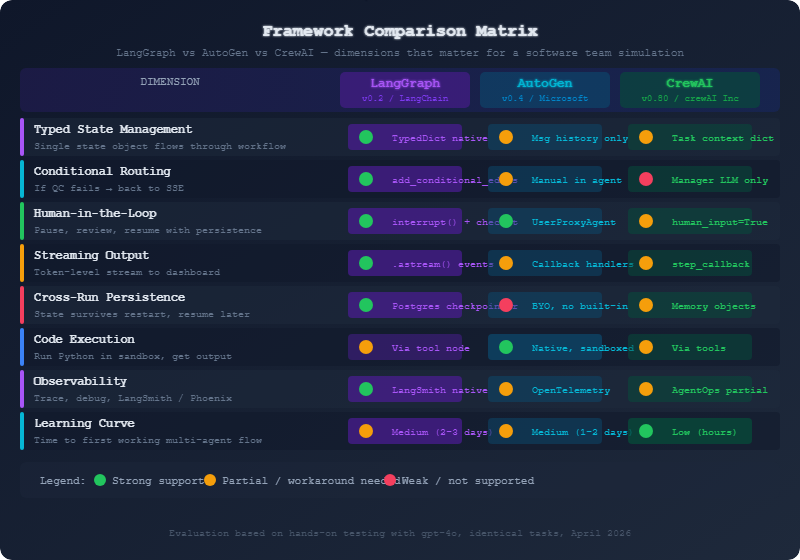
Ma trận nói lên câu chuyện rõ ràng. LangGraph chiếm ưu thế ở các chiều quan trọng nhất với pipeline-style workflow có state control nghiêm ngặt. AutoGen có lợi thế về code execution. CrewAI thắng về khả năng tiếp cận nhưng trả giá bằng control.
4. Xây Dựng Cùng Một PO Agent Trên Cả Ba Framework
Lý thuyết rẻ tiền. Để tôi cho bạn thấy code thực tế. Tôi xây dựng phiên bản đơn giản nhất hữu ích của PO Agent: nhận một yêu cầu mơ hồ làm đầu vào, làm rõ nó, tạo ra structured user stories. Cùng hành vi, ba framework.
Cài Đặt LangGraph
Phiên bản LangGraph yêu cầu thiết kế trước nhiều nhất nhưng cho kết quả có thể dự đoán nhất.
# langgraph_po.py
from langgraph.graph import StateGraph, END
from langgraph.checkpoint.postgres import PostgresSaver
from langchain_openai import ChatOpenAI
from langchain_core.messages import SystemMessage, HumanMessage
from typing import TypedDict, Annotated
import operator
import json

# --- State Definition ---
# This is the heart of LangGraph. Everything flows through this typed dict.
class TeamState(TypedDict):
    messages: Annotated[list, operator.add]  # append-only message log
    raw_requirement: str                      # what the client said
    clarified_requirement: str               # after PO processing
    user_stories: list[dict]                 # structured output
    acceptance_criteria: dict                # per story
    current_agent: str                       # which agent is active
    phase: str                              # requirements | design | impl | qc | done
    iteration_count: int                    # how many times QC sent us back
    qc_feedback: str                        # latest QC feedback if any

llm = ChatOpenAI(model="gpt-4o", temperature=0.1)

PO_SYSTEM_PROMPT = """You are a Product Owner in a software team.
Your job is to take vague client requirements and transform them into
clear, testable user stories following the format:
  As a [user type], I want [action] so that [benefit].

Each story must have:
- A clear, unambiguous description
- Acceptance criteria (3-5 bullet points)
- Story points estimate (1, 2, 3, 5, 8, 13)
- Priority (P0=must have, P1=should have, P2=nice to have)

You ask clarifying questions when requirements are ambiguous.
You do NOT write code. You do NOT design systems.
"""

def po_agent_node(state: TeamState) -> TeamState:
    """
    PO Agent node. Receives raw requirements, produces structured user stories.
    Returns partial state update — LangGraph merges this with existing state.
    """
    messages = [
        SystemMessage(content=PO_SYSTEM_PROMPT),
        HumanMessage(content=f"""
Requirement from client: {state['raw_requirement']}

{f'QC feedback from previous iteration: {state["qc_feedback"]}' if state.get('qc_feedback') else ''}

Please produce:
1. A clarified version of the requirement (1 paragraph)
2. User stories in JSON format

Output format:
{{
  "clarified_requirement": "...",
  "user_stories": [
    {{
      "id": "US-001",
      "title": "...",
      "story": "As a ..., I want ..., so that ...",
      "acceptance_criteria": ["...", "...", "..."],
      "story_points": 3,
      "priority": "P0"
    }}
  ]
}}
""")
    ]

    response = llm.invoke(messages)

    # Parse the JSON from the response
    # In production you'd use a more robust parser
    content = response.content
    start = content.find('{')
    end = content.rfind('}') + 1
    parsed = json.loads(content[start:end])

    return {
        "messages": [response],
        "clarified_requirement": parsed["clarified_requirement"],
        "user_stories": parsed["user_stories"],
        "current_agent": "po",
        "phase": "requirements_complete",
    }

def should_continue_to_sse(state: TeamState) -> str:
    """
    Conditional edge: check if PO output is ready for SSE.
    In real system this would check quality metrics.
    """
    if len(state.get("user_stories", [])) >= 1:
        return "sse"
    return "po"  # loop back if no stories produced

# --- Graph Construction ---
workflow = StateGraph(TeamState)

workflow.add_node("po", po_agent_node)
# (Other nodes would be added here: sse, qc, devops)
# workflow.add_node("sse", sse_agent_node)
# workflow.add_node("qc", qc_agent_node)

workflow.set_entry_point("po")
workflow.add_conditional_edges(
    "po",
    should_continue_to_sse,
    {
        "sse": END,  # simplified: end after PO for this demo
        "po": "po",  # loop back
    }
)

# --- Persistence ---
# This is LangGraph's superpower: serialize entire state to Postgres
# Any node can be interrupted, state saved, resumed hours later
checkpointer = PostgresSaver.from_conn_string(
    "postgresql://user:pass@localhost/teamdb"
)

app = workflow.compile(
    checkpointer=checkpointer,
    interrupt_before=["sse"]  # pause before SSE for human review
)

# --- Usage ---
async def run_po_agent(requirement: str, thread_id: str):
    config = {"configurable": {"thread_id": thread_id}}

    initial_state = {
        "raw_requirement": requirement,
        "messages": [],
        "user_stories": [],
        "phase": "intake",
        "current_agent": "",
        "iteration_count": 0,
        "qc_feedback": "",
        "clarified_requirement": "",
        "acceptance_criteria": {},
    }

    # Stream every event — this is what feeds our dashboard
    async for event in app.astream_events(initial_state, config=config, version="v2"):
        if event["event"] == "on_chat_model_stream":
            # Token-level streaming
            chunk = event["data"]["chunk"].content
            yield {"type": "token", "content": chunk}
        elif event["event"] == "on_chain_end" and event["name"] == "po":
            # Node completed
            yield {"type": "node_complete", "node": "po", "data": event["data"]["output"]}
Chú ý những gì bạn nhận được miễn phí: dòng interrupt_before=["sse"] tạm dừng thực thi sau khi PO node hoàn tất, trước khi SSE bắt đầu. Toàn bộ state (messages, user stories, current phase) được serialize vào Postgres. Một người dùng có thể xem lại user stories trên dashboard, phê duyệt chúng, và workflow tiếp tục. Nếu server khởi động lại giữa lúc tạm dừng và lúc tiếp tục, không có gì bị mất.
Cài Đặt AutoGen
Mô hình hội thoại của AutoGen tạo ra một kiến trúc khác cho cùng hành vi đó.
# autogen_po.py
import autogen
from autogen import AssistantAgent, UserProxyAgent, GroupChat, GroupChatManager
import json

# LLM configuration
llm_config = {
    "model": "gpt-4o",
    "temperature": 0.1,
    "api_key": "your-key-here",
}

# --- Agent Definitions ---
# In AutoGen, agents are defined by their conversational role
po_agent = autogen.AssistantAgent(
    name="ProductOwner",
    system_message="""You are a Product Owner in a software team.

When given a requirement, you ALWAYS respond with a JSON block containing:
1. clarified_requirement: A clear restatement of what needs to be built
2. user_stories: Array of user stories with id, title, story, acceptance_criteria,
   story_points, priority

Format your JSON inside ```json ``` code blocks.

You ask ONE clarifying question if the requirement is genuinely ambiguous.
Otherwise, proceed directly to producing user stories.

TERMINATE when you have produced complete user stories by saying TERMINATE.""",
    llm_config=llm_config,
)

# The UserProxy acts as the "client" feeding requirements into the conversation
# In our architecture, this is actually our orchestration layer
user_proxy = autogen.UserProxyAgent(
    name="Client",
    human_input_mode="NEVER",   # no actual human input — automated pipeline
    max_consecutive_auto_reply=3,
    is_termination_msg=lambda msg: "TERMINATE" in msg.get("content", ""),
    code_execution_config=False,  # PO doesn't execute code
    default_auto_reply="Please produce the user stories now.",
)

# --- State Extraction Helper ---
# This is the awkward part: we have to dig through conversation history
# to get structured output. LangGraph does this automatically.
def extract_user_stories_from_conversation(chat_result) -> dict:
    """
    AutoGen state is the conversation. We parse it to get structured data.
    This is the core pain point of the AutoGen model for pipeline workflows.
    """
    for message in reversed(chat_result.chat_history):
        content = message.get("content", "")
        if "```json" in content:
            start = content.find("```json") + 7
            end = content.find("```", start)
            json_str = content[start:end].strip()
            try:
                return json.loads(json_str)
            except json.JSONDecodeError:
                continue
    return {}

# --- Memory / Callbacks ---
# AutoGen lacks built-in persistence. We implement it manually.
class POStateTracker:
    """
    We have to build our own state management layer.
    This is significant overhead that LangGraph gives us for free.
    """
    def __init__(self):
        self.state = {
            "raw_requirement": "",
            "user_stories": [],
            "clarified_requirement": "",
            "conversation_history": [],
            "phase": "intake",
        }

    def save_to_db(self, thread_id: str):
        # Your own persistence logic here
        import sqlite3
        # ... serialize self.state ...
        pass

    def load_from_db(self, thread_id: str):
        # Your own restoration logic here
        pass

state_tracker = POStateTracker()

# --- Usage ---
def run_po_agent(requirement: str, thread_id: str) -> dict:
    state_tracker.state["raw_requirement"] = requirement

    # Initiate the conversation
    chat_result = user_proxy.initiate_chat(
        recipient=po_agent,
        message=f"""New requirement from client:

{requirement}

Please clarify and produce structured user stories.""",
        max_turns=5,
    )

    # Extract structured data from conversation history
    structured_output = extract_user_stories_from_conversation(chat_result)

    # Manually update and save state
    state_tracker.state.update({
        "user_stories": structured_output.get("user_stories", []),
        "clarified_requirement": structured_output.get("clarified_requirement", ""),
        "conversation_history": chat_result.chat_history,
        "phase": "requirements_complete",
    })
    state_tracker.save_to_db(thread_id)

    return state_tracker.state

# For multi-agent coordination in AutoGen, you use GroupChat
def setup_full_team():
    """
    GroupChat is how AutoGen coordinates multiple agents.
    The GroupChatManager routes messages between agents.
    """
    sse_agent = autogen.AssistantAgent(
        name="SeniorSoftwareEngineer",
        system_message="You are a Senior Software Engineer...",
        llm_config=llm_config,
    )

    qc_agent = autogen.AssistantAgent(
        name="QCEngineer",
        system_message="You are a QC Engineer...",
        llm_config=llm_config,
    )

    group_chat = autogen.GroupChat(
        agents=[user_proxy, po_agent, sse_agent, qc_agent],
        messages=[],
        max_round=20,
        # speaker_selection_method can be "auto", "round_robin", or a custom function
        # "auto" means the LLM decides who speaks next — less deterministic than LangGraph
        speaker_selection_method="auto",
    )

    manager = autogen.GroupChatManager(
        groupchat=group_chat,
        llm_config=llm_config,
    )

    return manager, user_proxy
Hàm extract_user_stories_from_conversation kể lên câu chuyện. Trong AutoGen, để lấy structured data từ một cuộc trò chuyện, bạn phải parse message history. Điều này hoạt động nhưng fragile. Nếu LLM quyết định format output hơi khác, parser của bạn vỡ.
GroupChat với speaker_selection_method="auto" mạnh mẽ cho việc giải quyết bài toán mở. LLM quyết định ai nên nói tiếp theo dựa trên ngữ cảnh cuộc trò chuyện. Nhưng trong một pipeline nơi tôi biết chính xác ai nên nói tiếp theo, tôi đang trả chi phí LLM inference cho một quyết định routing đáng ra phải deterministic.
Cài Đặt CrewAI
CrewAI là framework dễ đọc nhất trong ba. Nếu bạn cho non-engineer xem code này, họ sẽ hiểu ngay.
# crewai_po.py
from crewai import Agent, Task, Crew, Process
from crewai_tools import SerperDevTool
from langchain_openai import ChatOpenAI
from pydantic import BaseModel
from typing import List, Optional

# --- Output Models ---
# CrewAI 0.80+ supports Pydantic output models, which helps with structured data
class UserStory(BaseModel):
    id: str
    title: str
    story: str
    acceptance_criteria: List[str]
    story_points: int
    priority: str

class POOutput(BaseModel):
    clarified_requirement: str
    user_stories: List[UserStory]
    open_questions: Optional[List[str]] = []

# --- Tool Setup ---
search_tool = SerperDevTool()  # Internet search for requirements research

llm = ChatOpenAI(model="gpt-4o", temperature=0.1)

# --- Agent Definition ---
# CrewAI agents have role, goal, backstory — it's declarative and readable
po_agent = Agent(
    role="Product Owner",
    goal="""Transform vague client requirements into clear, actionable user stories
    that a development team can implement without ambiguity.""",
    backstory="""You are a seasoned Product Owner with 8 years of experience in
    agile software development. You have worked with startups and enterprises alike.
    You have a talent for extracting the real need behind what clients say they want.
    You write user stories that developers love because they are specific and testable.
    You always think about edge cases and error states that clients forget to mention.
    You use internet search to research similar products and industry best practices
    when clarifying requirements.""",
    tools=[search_tool],
    llm=llm,
    verbose=True,
    allow_delegation=False,  # PO does not delegate — it does its own work
    max_iter=3,
)

# --- Task Definition ---
po_task = Task(
    description="""Analyze the following client requirement and produce structured user stories.

Requirement: {requirement}

{qc_feedback_section}

Steps:
1. If the requirement mentions a domain you're unfamiliar with, use the search tool
   to research similar products (e.g., search "e-commerce checkout user stories")
2. Identify the core user need and any implicit requirements
3. Decompose into 3-7 user stories following: As a X, I want Y, so that Z
4. Write 3-5 acceptance criteria per story (specific, testable)
5. Estimate story points using Fibonacci sequence
6. Assign priorities: P0=must have, P1=should have, P2=nice to have

Be specific. Avoid vague language like "user-friendly" or "fast".""",
    expected_output="""A structured set of user stories with acceptance criteria,
    story point estimates, and priorities. Include a brief clarified requirement
    statement at the top. Output as a valid JSON object matching the POOutput schema.""",
    agent=po_agent,
    output_pydantic=POOutput,  # structured output enforced by Pydantic
)

# --- Crew Assembly ---
# For just the PO agent, we have a crew of one
# In the full system, this crew would include SSE, QC, DevOps
po_crew = Crew(
    agents=[po_agent],
    tasks=[po_task],
    process=Process.sequential,
    verbose=True,
    memory=True,           # CrewAI memory: agents remember across tasks
    embedder={
        "provider": "openai",
        "config": {"model": "text-embedding-3-small"},
    }
)

# Full team crew (sequential workflow)
def setup_full_team_crew(requirement: str):
    # Agents would be defined elsewhere, importing here for clarity
    # from agents import sse_agent, qc_agent, devops_agent

    sse_task = Task(
        description="Based on the user stories, design the technical architecture...",
        expected_output="Technical design document with component diagrams",
        agent=None,  # would be sse_agent
        context=[po_task],  # receives po_task output as context
    )

    qc_task = Task(
        description="Review the technical design for quality and completeness...",
        expected_output="QC report with pass/fail and feedback",
        agent=None,  # would be qc_agent
        context=[po_task, sse_task],  # receives both previous outputs
    )

    # The problem: CrewAI sequential process does not support conditional routing.
    # If QC fails, you cannot loop back to SSE within the crew.
    # You'd have to run the entire crew again, or use Process.hierarchical
    # and hope the manager LLM makes the right routing decision.

    full_crew = Crew(
        agents=[],  # [po_agent, sse_agent, qc_agent]
        tasks=[po_task, sse_task, qc_task],
        process=Process.sequential,
        memory=True,
        verbose=True,
    )

    return full_crew

# --- Usage ---
def run_po_agent(requirement: str, qc_feedback: str = "") -> POOutput:
    qc_section = f"\nQC feedback from previous iteration:\n{qc_feedback}" if qc_feedback else ""

    result = po_crew.kickoff(inputs={
        "requirement": requirement,
        "qc_feedback_section": qc_section,
    })

    # CrewAI with output_pydantic returns a Pydantic model directly
    # This is actually quite nice
    return result.pydantic
Code CrewAI rất gọn. Dòng output_pydantic=POOutput thực sự thanh lịch — nó enforce structured output thông qua Pydantic, thứ mà LangGraph đòi hỏi bạn phải tự wire up. Cơ chế context=[po_task] để truyền output giữa các task rất trực quan.
Nhưng hãy nhìn vào comment trong setup_full_team_crew. Giới hạn cốt lõi hiện ra ngay lập tức: sequential crew không hỗ trợ conditional routing. Nếu QC thất bại, bạn không thể diễn đạt “quay lại SSE” trong sequential model của CrewAI. Bạn hoặc chạy lại toàn bộ crew từ đầu, dùng hierarchical mode và để LLM quyết định routing, hoặc xây dựng routing logic bên ngoài framework — điều đó phủ nhận mục đích sử dụng.
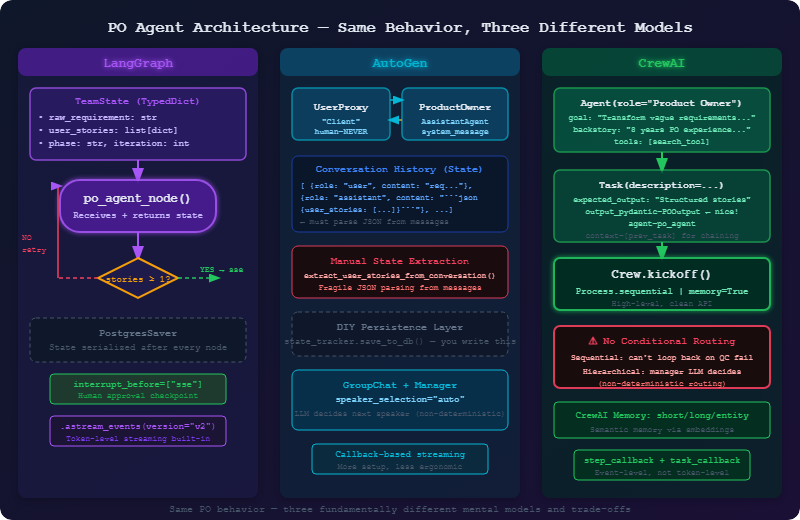
5. Kiến Trúc PO Agent — Ba Cách
6. Đánh Giá: Software Team Simulation Thực Sự Cần Gì?
Hãy để tôi nói cụ thể về các yêu cầu. Một software team simulation không phải chatbot. Không phải one-shot task runner. Đó là một stateful workflow chạy trong vài phút đến vài giờ, liên quan đến nhiều agent chuyên biệt, và cần được quan sát, debug, và đôi khi bị can thiệp bởi con người.
Kiểm soát state chính xác. Khi QC agent chạy, nó cần quyền truy cập vào phiên bản chính xác của user stories mà PO đã tạo, và code chính xác mà SSE đã tạo. Không phải tóm tắt trong cuộc trò chuyện. Không phải mô tả. Mà là actual structured data. TypedDict state của LangGraph làm điều này rõ ràng và type-safe. Message history của AutoGen làm điều này ẩn và fragile. Task context của CrewAI nằm ở đâu đó ở giữa.
Conditional routing. Phát triển phần mềm thực sự không tuyến tính. QC thất bại khoảng ba mươi phần trăm trong quá trình testing của tôi. Khi thất bại, công việc quay lại SSE (hoặc đôi khi về PO) với feedback cụ thể. Vòng lặp này cần được diễn đạt trong workflow definition, không phải trong quá trình LLM ra quyết định. Nếu routing phụ thuộc vào quyết định của LLM, workflow của bạn là non-deterministic. add_conditional_edges của LangGraph với một Python function để đánh giá điều kiện là đúng như vậy.
Human-in-the-loop ở các checkpoint quan trọng. Có ít nhất ba nơi mà con người nên xem lại: sau khi requirements được hoàn thiện (trước khi bắt đầu code), sau khi SSE tạo ra thiết kế (trước khi implementation), và sau QC (trước khi deploy). Đây không phải tùy chọn — đây là compliance và quality gate làm cho output đáng tin cậy. Cơ chế interrupt_before của LangGraph với checkpointing là giải pháp production-grade duy nhất tôi tìm thấy. UserProxyAgent của AutoGen có thể giả lập human input nhưng thiếu persistence — nếu process chết trong khi chờ human input, state sẽ mất. human_input=True của CrewAI hỏi terminal và không có web-facing equivalent nếu không có custom work.
Streaming output cho dashboard. Team cần dashboard hiển thị real-time output từ mỗi agent khi chạy. astream_events của LangGraph với version="v2" cung cấp token-level streaming với rich metadata: node nào đang chạy, tool nào được gọi, LLM tạo ra gì. Đây chính xác là thứ một dashboard cần. AutoGen và CrewAI đều đòi hỏi nhiều custom wiring hơn để đạt được kết quả tương tự.
Memory và persistence qua các task. Một project có thể mất nhiều session. PO làm việc hôm nay, SSE làm việc ngày mai, QC chạy ngày kia. State cần được persist. Pattern checkpointer của LangGraph (PostgresSaver, SqliteSaver, v.v.) xử lý điều này một cách native. Bạn có thể reload bất kỳ state nào trong quá khứ, fork nó, hoặc resume nó. AutoGen không có built-in persistence — bạn tự xây dựng. CrewAI có memory system nhưng chủ yếu là semantic memory (những gì đã được thảo luận) chứ không phải structured state (actual work products).
Observability. Khi một agent làm điều gì đó bất ngờ, tôi cần trace chính xác những gì đã xảy ra: nó nhận input gì, nó gọi tool nào, nó trả về gì, nó đang ở đâu trong graph? Tích hợp native của LangGraph với LangSmith cho tôi full trace cho mỗi lần chạy. Tôi có thể replay bất kỳ lần chạy nào trong quá khứ, thấy token usage, thấy latency của từng node, thấy chính xác nơi lỗi xảy ra. Đây không phải luxury — trong production debugging, đó là thiết yếu.
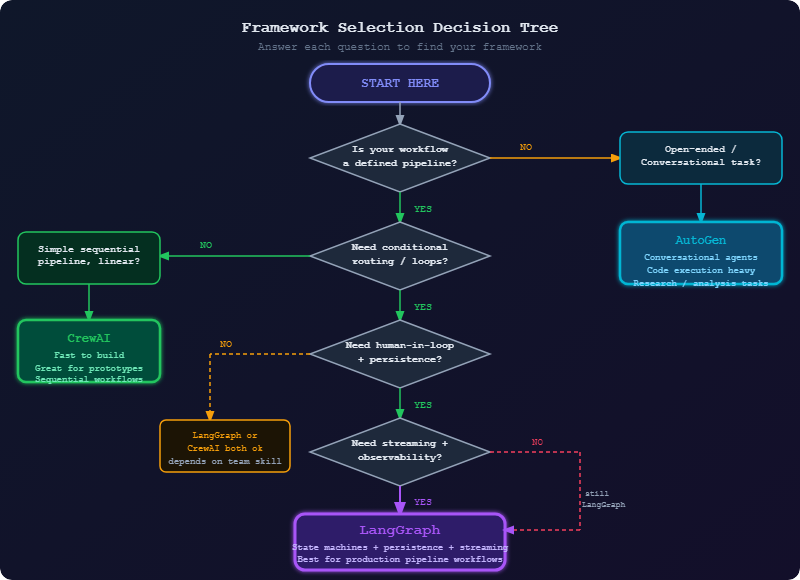
7. Framework Nào Bạn Nên Chọn?
8. Tại Sao LangGraph Thắng Trong Use Case Của Chúng Tôi
Tôi muốn nói thẳng về điều này. LangGraph không phải framework dễ bắt đầu nhất. Mental model state machine đòi hỏi thiết kế trước. Graph abstraction giới thiệu các khái niệm mất vài ngày để nội tâm hóa. Nếu tôi chỉ muốn demo một multi-agent system tại hội nghị, tôi sẽ dùng CrewAI.
Nhưng tôi đang xây dựng một production system sẽ chạy các project thực, không phải demo. Và vì vậy, các ràng buộc của LangGraph là tính năng, không phải hạn chế.
Typed state là một contract. Khi tôi định nghĩa TeamState với raw_requirement: str, user_stories: list[dict], phase: str, mọi agent trong hệ thống đang làm việc dựa trên cùng một contract. Nếu PO agent không điền user_stories, SSE agent sẽ không nhận danh sách rỗng — nó sẽ biết, ở thời điểm type-checking, rằng field đó tồn tại. Sự có thể dự đoán này là thiết yếu khi debug một hệ thống nơi nhiều LLM đang đưa ra quyết định theo trình tự.
Conditional routing là deterministic code. Hàm should_continue_to_sse của tôi là một Python function đơn giản đánh giá state và trả về một string. Nó chạy trong microseconds. Nó có thể kiểm thử được. Tôi có thể viết unit test cho nó. So sánh điều này với GroupChat của AutoGen nơi GroupChatManager LLM quyết định ai nói tiếp theo, hoặc hierarchical mode của CrewAI nơi manager LLM quyết định task nào cần gán. Những quyết định routing đó tốn token, mất thời gian, và có thể sai theo những cách khó tái hiện.
Checkpointer thay đổi những gì có thể. Khi tôi chạy hệ thống lần đầu và nó đến checkpoint interrupt_before=["sse"], toàn bộ state được serialize vào Postgres. Tôi có thể query row đó từ web dashboard. Tôi có thể hiển thị user stories cho client. Client có thể annotate chúng, thêm comment, phê duyệt hoặc từ chối. Tôi cập nhật state trong Postgres và resume. Workflow tiếp tục chính xác nơi nó dừng lại. Không có framework nào khác tôi test làm pattern này gọn như vậy.
Tích hợp LangSmith thực sự hữu ích. Lần đầu tiên tôi debug tại sao QC agent tiếp tục thất bại, tôi mở LangSmith và thấy complete trace: PO node nhận requirement X, gọi LLM với prompt Y, nhận response Z, trả về state update W. Tôi có thể thấy token chính xác được dùng, latency của mỗi node, tool call. Tôi tìm được bug trong bốn phút thay vì bốn tiếng.
Đây là một ví dụ tối giản nhưng hoàn chỉnh của multi-agent flow với các tính năng quan trọng tôi vừa mô tả:
# team_workflow.py — the full picture, simplified
from langgraph.graph import StateGraph, END
from langgraph.checkpoint.postgres import PostgresSaver
from typing import TypedDict, Annotated, Literal
import operator

class TeamState(TypedDict):
    messages: Annotated[list, operator.add]
    raw_requirement: str
    clarified_requirement: str
    user_stories: list[dict]
    technical_design: dict
    implementation: dict
    qc_result: Literal["pass", "fail", "pending"]
    qc_feedback: str
    current_agent: str
    phase: str
    iteration_count: int
    approved_by_human: bool

def po_agent_node(state: TeamState) -> TeamState:
    """Requirements clarification and user story generation."""
    # ... (full implementation shown earlier)
    return {
        "user_stories": [...],
        "phase": "requirements_complete",
        "current_agent": "po",
    }

def sse_agent_node(state: TeamState) -> TeamState:
    """Technical design and implementation based on user stories."""
    return {
        "technical_design": {...},
        "implementation": {...},
        "phase": "implementation_complete",
        "current_agent": "sse",
    }

def qc_agent_node(state: TeamState) -> TeamState:
    """Quality check of implementation against user stories."""
    # Reviews implementation against acceptance criteria
    return {
        "qc_result": "pass",  # or "fail"
        "qc_feedback": "...",
        "phase": "qc_complete",
        "current_agent": "qc",
    }

def devops_agent_node(state: TeamState) -> TeamState:
    """Deployment configuration and execution."""
    return {
        "phase": "deployed",
        "current_agent": "devops",
    }

# Conditional routing functions — pure Python, deterministic, testable
def route_after_qc(state: TeamState) -> str:
    """Route based on QC result. If fail, loop back to SSE."""
    if state["qc_result"] == "pass":
        if state.get("approved_by_human"):
            return "devops"
        else:
            return "await_human_approval"  # interrupt here
    elif state["iteration_count"] >= 3:
        return "escalate"  # too many failures, need human intervention
    else:
        return "sse"  # loop back for another iteration

def route_after_po(state: TeamState) -> str:
    """Route after PO. Interrupt for human review of user stories."""
    if len(state.get("user_stories", [])) > 0:
        return "human_checkpoint"
    return "po"  # no stories produced, retry

# Build the graph
workflow = StateGraph(TeamState)

workflow.add_node("po", po_agent_node)
workflow.add_node("sse", sse_agent_node)
workflow.add_node("qc", qc_agent_node)
workflow.add_node("devops", devops_agent_node)

workflow.set_entry_point("po")

workflow.add_conditional_edges("po", route_after_po, {
    "human_checkpoint": "sse",  # interrupted before sse
    "po": "po",
})

workflow.add_edge("sse", "qc")

workflow.add_conditional_edges("qc", route_after_qc, {
    "devops": "devops",
    "sse": "sse",
    "await_human_approval": END,  # interrupted, waiting
    "escalate": END,
})

workflow.add_edge("devops", END)

# The magic: serialize state to Postgres after every node
# interrupt_before pauses execution and waits for resume signal
checkpointer = PostgresSaver.from_conn_string(
    "postgresql://localhost/teamdb"
)

app = workflow.compile(
    checkpointer=checkpointer,
    interrupt_before=["sse"],  # human reviews PO output before SSE starts
)

# FastAPI endpoint that streams events to dashboard
async def stream_workflow(requirement: str, thread_id: str):
    config = {"configurable": {"thread_id": thread_id}}

    state = TeamState(
        messages=[],
        raw_requirement=requirement,
        clarified_requirement="",
        user_stories=[],
        technical_design={},
        implementation={},
        qc_result="pending",
        qc_feedback="",
        current_agent="",
        phase="intake",
        iteration_count=0,
        approved_by_human=False,
    )

    async for event in app.astream_events(state, config=config, version="v2"):
        # Every token, every tool call, every state update — all streaming
        yield format_event_for_dashboard(event)

async def resume_after_human_approval(thread_id: str, approved: bool, feedback: str = ""):
    """Human reviewed PO output, now resume the workflow."""
    config = {"configurable": {"thread_id": thread_id}}

    # Update state with human decision
    await app.aupdate_state(
        config,
        {"approved_by_human": approved, "qc_feedback": feedback}
    )

    # Resume from checkpoint — workflow continues from interrupt point
    async for event in app.astream_events(None, config=config, version="v2"):
        yield format_event_for_dashboard(event)
Đây là hình dạng của thứ chúng ta sẽ xây dựng. Mọi quyết định thiết kế ở đây đều có chủ đích. State rõ ràng, routing deterministic, persistence được tích hợp sẵn, và streaming là first-class. Khi có sự cố trong production lúc 3 giờ sáng, tôi có thể mở LangSmith và thấy chính xác những gì đã xảy ra.
9. CrewAI và AutoGen Thực Sự Giỏi Làm Gì
Tôi muốn công bằng với những framework tôi không chọn. Chọn LangGraph cho project này không có nghĩa là LangGraph luôn là câu trả lời đúng.
CrewAI sẽ là lựa chọn đầu tiên của tôi cho: prototype nhanh cần trông đẹp trong demo, workflow sequential đơn giản nơi bạn biết chính xác task nào cần chạy và theo thứ tự nào, team có non-engineer cần configure agent mà không cần hiểu graph theory, và use case nơi framing role/goal/backstory ánh xạ tự nhiên vào bài toán.
AutoGen sẽ là lựa chọn đầu tiên của tôi cho: bất cứ điều gì liên quan đến code generation với execution feedback loop, research task nơi nhiều agent cần tranh luận và tinh chỉnh câu trả lời, task nơi conversation history chính là output có giá trị (tóm tắt meeting, analysis report), và tình huống nơi bạn thực sự không biết trình tự các bước trước và cần các agent cùng nhau tìm ra.
Cả hai framework đều đang được phát triển tích cực với sự hậu thuẫn nghiêm túc. Lựa chọn không phải về framework nào “tốt nhất” — mà là về framework nào có các ràng buộc phù hợp với hình dạng bài toán của bạn.
10. Tiếp Theo Là Gì
Trong Phần 3, chúng ta chuyển từ chọn framework sang implementation. Chúng ta sẽ xây dựng LangGraph state definition hoàn chỉnh cho four-agent team, thiết kế full workflow graph với tất cả conditional edge, và setup Postgres checkpointer cho production persistence. Đến cuối Phần 3, bạn sẽ có một workflow đang chạy nhận requirement qua PO → SSE → QC → DevOps, với interrupt/resume cycle phù hợp để con người review ở mỗi stage.
Chúng ta cũng sẽ setup LangSmith ngay từ đầu — không phải như một afterthought. Observability không phải tùy chọn trong một hệ thống nơi bốn LLM đang đưa ra quyết định theo trình tự. Bạn cần thấy những gì đang xảy ra.
Nếu bạn có câu hỏi về framework comparison hoặc muốn xem benchmark chi tiết hơn về bất kỳ chiều cụ thể nào, code cho tất cả ba cài đặt PO Agent có trong GitHub repository. Chạy chúng tự mình — sự khác biệt về hành vi rõ nhất khi bạn cố thêm QC retry loop vào phiên bản CrewAI.
Thuan Luong là Tech Lead đặt tại Thành phố Hồ Chí Minh. Anh đã xây dựng LLM application từ thời GPT-3 và production system từ trước đó. Anh viết về các quyết định kỹ thuật, không chỉ tutorial kỹ thuật. Bạn có thể tìm thấy anh tại @thuanluong và trên LinkedIn.
Đây là Phần 2 của series “Vibe Coding: Building an AI Software Team”. ← Phần 1: Tầm Nhìn | Phần 3: Xây Dựng State Machine →
Bài viết liên quan
06 Oct 2026 · 6 phút đọc
agentic coding
Claude Cowork vừa làm đúng cái mình từng nói Remote Control không làm
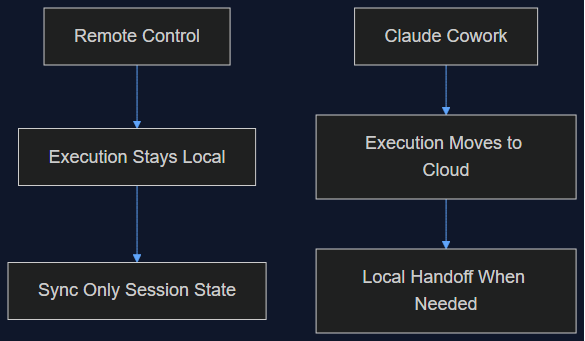
Tháng 8 mình viết rằng Remote Control của Claude Code chỉ là một lớp đồng bộ, không phải di chuyển lên cloud, và việc giữ execution ở local chính là điểm cốt lõi. Tuần này Anthropic chuyển hẳn execution của Cowork lên cloud làm mặc định. Đây là lý do cả hai quyết định đều đúng — cho hai sản phẩm khác nhau.
Đọc tiếp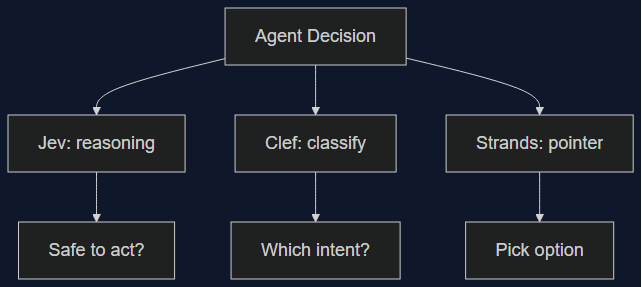
03 Oct 2026 · 6 phút đọc
agents
Ba Decision Model Ra Mắt Trong Một Tuần — Không Cái Nào Thắng Tuyệt Đối
Clef/Clef-flash của Cloudflare và Strands Decider của Amazon đều ra mắt ngày 1/10, nhắm thẳng vào Jev của TypeSafe. Mình xếp số liệu benchmark, latency, giá thật của cả ba cạnh nhau — category này là thật, nhưng chọn cái nào thắng lại tuỳ vào bạn đang tự động hoá quyết định gì.
Đọc tiếp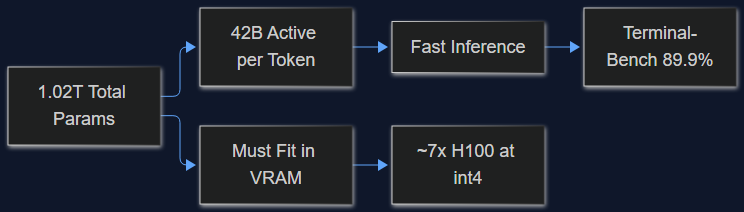
03 Oct 2026 · 5 phút đọc
ai
MiMo-V2.6-Pro License MIT, 1.02 Nghìn Tỷ Params — Mình Tính Thử Chi Phí Self-Host
Model open-weight mới của Xiaomi đứng đầu Terminal-Bench 2.1 với 89.9%, DeepSWE nhảy từ 19.0 lên 71.9. Trước khi mừng vì license MIT, đọc thử phần này — 1.02T tổng params khác 42B active params ở điểm nào, và nó làm bill GPU của bạn khác nhau cỡ nào.
Đọc tiếp
Thảo luận
Bình luận được duyệt trước khi công khai. Email của bạn được giữ riêng tư.