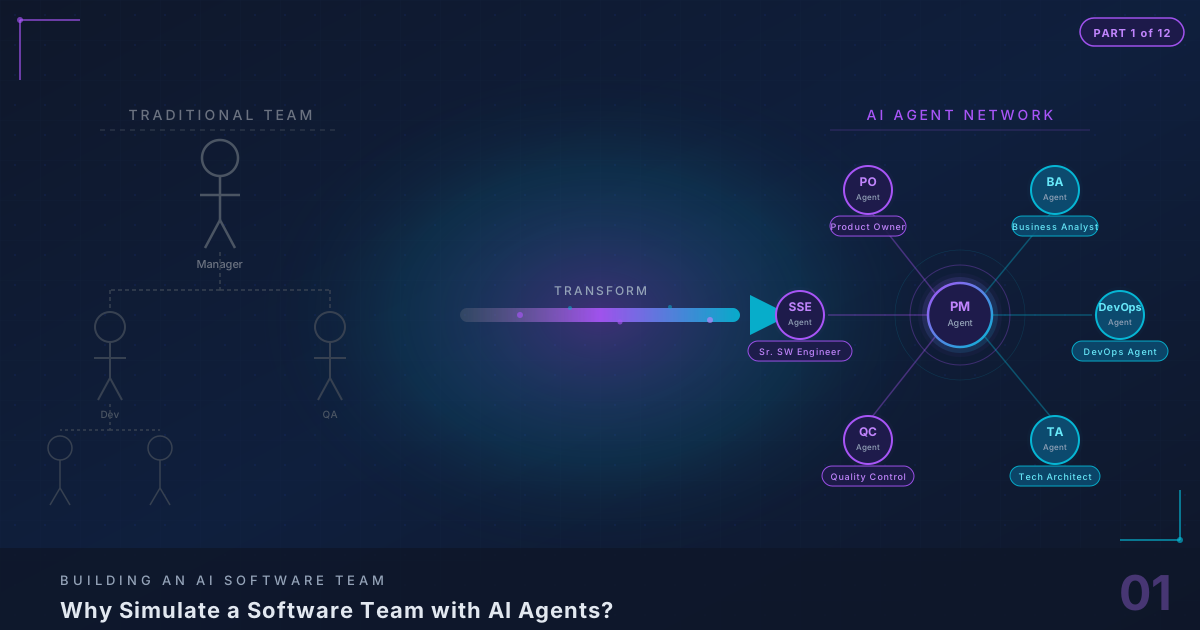
A Confession from a Tech Lead
I have a confession. For the last three months, I have been running a software team where most of the members do not exist.
Let me explain. My name is Thuan Luong. I am a Tech Lead based in Vietnam, and I have spent the better part of the last year pair programming with Claude — Anthropic’s AI model — building everything from portfolio sites to production APIs. I wrote about that experience in my previous post, Vibe Coding with Claude: From Idea to Production. In that post, I described what happens when one developer and one AI work together.
It was productive. Surprisingly so. A single AI pair programmer helped me ship features in hours that would have taken days. But it also exposed a fundamental problem that no amount of clever prompting can solve:
One AI assistant, no matter how good, is still one brain doing one thing at a time.
When I am building a feature with Claude, nobody is writing tests. Nobody is reviewing the architecture. Nobody is checking whether the deployment pipeline will handle the new changes. Nobody is updating the project board. Nobody is talking to the client about whether this feature is even the right one to build.
I am the entire team. And I am one person.
This realization sent me down a rabbit hole that has consumed the last three months of my evenings and weekends. What if I did not need to be the entire team? What if I could build the team itself?
Not hire a team. Not outsource to a team. Build a team — from AI agents, each one specialized in a specific role, each one capable of producing real artifacts, each one able to communicate with the others and hand off work just like human team members do.
This is the story of that journey. This is Part 1 of a 12-part series where I will build, from scratch, a fully functional multi-agent software development team. By the end, you will have a working system where you can feed in a client requirement and watch it flow through Product Owner analysis, Business Analyst story writing, QA test case creation, Technical Architecture design, Senior Software Engineer implementation, Tech Lead review, DevOps deployment, and Project Manager coordination — all automated, all producing real artifacts, all connected.
Let me start with why this matters.
The Problem: You Are the Bottleneck
The Solo Developer Trap
Here is a scenario I know you have lived through, because I have lived through it dozens of times.
You are a solo developer — or maybe a small team lead with one or two juniors. You have a client project. The client wants a web application with authentication, a dashboard, CRUD operations on three or four entities, file uploads, email notifications, and “just a simple admin panel.” They want it in six weeks. The budget supports one senior developer. You.
So you start building. And immediately, you are context-switching between:
- Gathering requirements (What exactly does “simple admin panel” mean?)
- Writing user stories (So you can estimate and track progress)
- Designing the architecture (Monolith or microservices? What database? What auth provider?)
- Writing the actual code (Finally, the part you were hired for)
- Writing tests (You do write tests, right?)
- Setting up CI/CD (Because manual deployments are for people who hate sleep)
- Reviewing your own code (Rubber duck debugging, but sadder)
- Managing the project timeline (The client wants a status update every Friday)
- Deploying and monitoring (Because the server will crash at 2 AM on a Saturday)
Every one of these is a legitimate, full-time role in a proper software team. Product Owner. Business Analyst. Technical Architect. Senior Software Engineer. QA Engineer. DevOps Engineer. Tech Lead. Project Manager.
You are doing all eight. And not because you are that good — because you have no choice.
The Time Tax
Here is what people misunderstand about the solo developer bottleneck: it is not a skill problem. It is a time and context-switching problem.
I can write good code. I can write decent tests. I can set up a CI/CD pipeline. I can manage a project board. I can even do passable business analysis if you give me enough caffeine.
But I cannot do all of these things simultaneously. And every time I switch from one to another, I pay a tax. Studies on context-switching suggest that it takes an average of 23 minutes to fully re-engage with a task after an interruption. When you are playing eight roles, you are interrupting yourself constantly.
Let me put numbers on this. Here is what my typical week looks like on a solo project:
Monday:     4 hours coding, 2 hours requirements clarification, 1 hour project mgmt
Tuesday:    5 hours coding, 1 hour debugging CI/CD, 1 hour code review (own code)
Wednesday:  3 hours coding, 2 hours writing tests, 1 hour architecture decisions, 1 hour client call
Thursday:   4 hours coding, 1 hour deployment issues, 1 hour writing documentation
Friday:     2 hours coding, 2 hours project status report, 1 hour sprint planning, 1 hour testing
Out of a 35-hour work week, I spend maybe 18 hours actually writing code. The rest is overhead — necessary overhead, but overhead nonetheless. And those 18 hours of coding are fragmented across five days, never more than five hours in a row, constantly interrupted by role-switching.
A dedicated developer on a proper team, supported by a PO, BA, QA, DevOps, and PM? They are coding 28-30 hours a week, in focused blocks, with clean requirements handed to them, tests written by someone else, deployments handled by someone else, and project updates done by someone else.
That developer ships roughly 60% more code than I do. Not because they are better. Because they are not playing eight roles.
The Team Solution (And Why It Does Not Scale Down)
The obvious solution is: hire a team. And for companies with budget, that is exactly the right answer. A well-functioning software team with clear roles, good communication, and established processes will outperform any solo developer by an order of magnitude.
But teams come with their own costs:
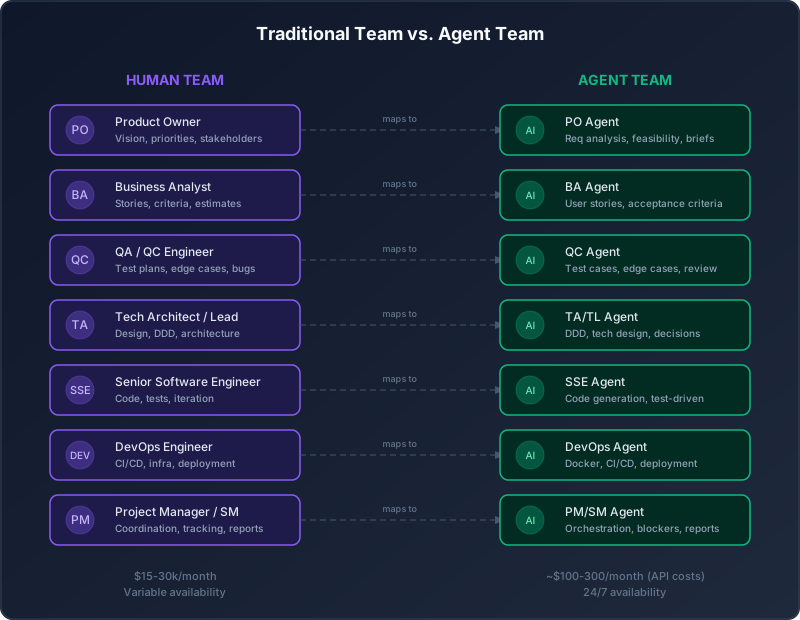
Financial cost. A minimal software team — one PO, one developer, one QA, one part-time DevOps — costs $15,000-30,000/month in Southeast Asia, more in Western markets. For a solo consultant or small agency, that is often more than the project’s entire budget.
Coordination cost. Every person you add to a team adds communication channels. Two people have one channel. Three people have three channels. Five people have ten. Eight people have twenty-eight. This is Brooks’s Law in action: adding people to a late software project makes it later. Even on a well-run team, coordination eats 20-30% of total capacity.
Ramp-up cost. New team members need to understand the codebase, the architecture, the business domain, and the team’s conventions. This takes weeks, sometimes months. By the time they are productive, the project may be half over.
Availability cost. People get sick. People take vacations. People quit. People have bad weeks. A team of humans is inherently variable in capacity.
For large, well-funded projects, all of these costs are worth paying. But for the vast majority of software work — the freelance projects, the MVPs, the internal tools, the side projects, the small agency work — a full team is not feasible.
This creates what I call the team gap: the space between what a solo developer can produce and what a coordinated team can produce, where the project needs team-level output but only has solo-developer budget.
What Changed: AI Got Good Enough
Two years ago, the team gap had no solution. You either paid for humans or you did everything yourself.
Then large language models got good. Not just “impressive demo” good — genuinely, practically good at specialized knowledge work.
When I built my portfolio site with Claude as a pair programmer, I had one AI helping me with one task at a time. It was like having a very fast, very knowledgeable junior developer who never gets tired. That alone was transformative — I shipped features 2-3x faster than solo.
But the real insight came when I noticed something about how I was using Claude. I was not just asking it to write code. I was asking it to play different roles at different times:
- “Act as a product owner. Look at this feature request and tell me if it makes sense.”
- “Act as a QA engineer. What edge cases am I missing in this function?”
- “Act as a DevOps engineer. Write me a GitHub Actions workflow for this project.”
- “Act as a tech lead. Review this PR and tell me what you’d change.”
And it was good at all of them. Not perfect. Not as good as a senior specialist in each role. But good enough to catch things I was missing, good enough to produce artifacts I could use, good enough to be genuinely helpful.
That is when the idea crystallized: if one AI can play all these roles sequentially (when I manually prompt it), what if I built a system where multiple AI agents play these roles simultaneously, automatically, with proper handoffs and quality gates?
What if I could build the team?
What Is an Agentic Software Team?
Not Chatbots. Agents.
Let me be precise about terminology, because the AI space is drowning in buzzwords and I refuse to add to the confusion.
A chatbot is a system that waits for your input, generates a response, and waits for more input. It is reactive. It does not act on its own. It does not produce artifacts. It does not have memory of what it was doing yesterday. ChatGPT in its basic form is a chatbot — an extraordinarily capable one, but a chatbot nonetheless.
An agent is fundamentally different. An agent:
- Has a defined role and goal. It knows what it is responsible for.
- Can act autonomously. It does not wait for human prompting at every step.
- Produces artifacts. Not just text responses — actual files, documents, code, test cases, configurations.
- Has memory. It remembers past decisions, past work, and the context of the project.
- Can communicate with other agents. It can send and receive structured messages.
- Has permissions and constraints. It knows what it is and is not allowed to do.
- Can use tools. It can read files, write files, search the internet, run commands, access databases.
An agentic software team is a collection of agents where each agent represents a role in a software development team, and they work together through defined workflows to turn requirements into working software.
Here is the critical distinction. When I pair-program with Claude, I am the orchestrator. I decide what to do next, I switch between roles, I manage the workflow. In an agentic team, the agents orchestrate themselves. The PM Agent coordinates the workflow. The PO Agent decides when requirements are clear enough to pass to the BA. The QA Agent decides when test coverage is sufficient. The TL Agent decides when code quality passes review.
I become the client. I describe what I want, and the team builds it.
The Key Insight: Specialization Makes AI Better
Here is something that is not obvious until you try it: a general-purpose AI assistant that tries to do everything is significantly worse than a specialized agent that does one thing well.
When I ask Claude “write me a user story for a login feature,” it produces a decent user story. But when I give an agent a detailed system prompt that says “You are a Business Analyst with 10 years of experience. You write user stories in the Given/When/Then format. You always include acceptance criteria. You consider edge cases. You estimate in story points using the Fibonacci scale. You never assume technical implementation details — you focus on business value” — the output is dramatically better.
Why? Because the constraints focus the model’s attention. Instead of trying to be everything, it channels its capability into a narrow, well-defined role. It is the same reason a senior QA engineer writes better test cases than a senior full-stack developer — not because they are smarter, but because they are focused.
This is the key insight that makes agentic teams possible: specialization through system prompts and constraints makes LLMs significantly more capable at individual roles than they are as general assistants.
What Today’s LLMs Can and Cannot Do
I want to be honest about limitations, because nothing kills a project faster than unrealistic expectations.
What LLMs can do well enough for agent roles (today, April 2026):
- Understand and structure natural language requirements
- Write user stories and acceptance criteria
- Generate test cases and edge case analysis
- Produce architectural design documents
- Write code in most popular languages and frameworks
- Review code and identify issues
- Generate CI/CD configurations
- Write project status reports and summaries
- Communicate in structured formats (JSON, YAML, etc.)
What LLMs still struggle with:
- Truly novel algorithmic design (they can implement known algorithms, but inventing new ones is hit-or-miss)
- Understanding complex legacy codebases without extensive context
- Making judgment calls that require deep business domain expertise
- Long-running stateful reasoning (they are great within a conversation, less reliable across many disconnected sessions)
- Knowing when they are wrong (confidence calibration is still poor)
What this means for our agent team:
The agents will be genuinely useful for the majority of standard software development work. They will struggle with highly novel problems, edge-case-heavy legacy systems, and decisions that require deep business context. The system needs human oversight — not at every step, but at critical decision points. We will build that oversight into the pipeline as quality gates.
Mapping Real Team Roles to Agents
Let me walk through each role in a standard software team and explain how it maps to an AI agent — what the agent does, what artifacts it produces, and where it fits in the pipeline.
The PO Agent (Product Owner)
What a human PO does: A Product Owner is the bridge between the business and the development team. They gather requirements from stakeholders, prioritize features, define the product vision, and make decisions about what gets built and in what order.
What the PO Agent does:
The PO Agent receives raw client input — which can be anything from a detailed requirements document to a vague Slack message saying “we need a dashboard thing” — and transforms it into structured product briefs.
Specifically, the PO Agent:
- Analyzes incoming requirements for completeness and clarity
- Identifies ambiguities and generates clarifying questions
- Assesses feasibility at a high level (is this technically realistic?)
- Structures the requirement into a product brief with clear goals, scope, and success criteria
- Prioritizes features using frameworks like MoSCoW (Must have, Should have, Could have, Won’t have)
- Breaks down large requests into epics
Artifacts produced:
- Product Brief documents
- Feature priority matrix
- Clarifying questions (sent back to client or to PM Agent)
- Epic breakdowns
Example interaction:
CLIENT INPUT: "We need a customer portal where clients can
view their invoices, download PDFs, and pay online."

PO AGENT OUTPUT:
{
  "product_brief": {
    "title": "Customer Invoice Portal",
    "goal": "Enable self-service invoice management for clients",
    "scope": {
      "must_have": [
        "Invoice listing with filters (date, status, amount)",
        "PDF download for individual invoices",
        "Online payment integration"
      ],
      "should_have": [
        "Bulk PDF download",
        "Payment history view",
        "Email notifications for new invoices"
      ],
      "could_have": [
        "Invoice dispute/query feature",
        "Auto-payment setup"
      ],
      "wont_have_v1": [
        "Invoice generation (admin-side only for v1)",
        "Multi-currency support"
      ]
    },
    "clarifying_questions": [
      "What payment providers should be supported?",
      "Is there an existing authentication system to integrate with?",
      "What is the expected number of concurrent users?"
    ],
    "success_criteria": [
      "Clients can view all their invoices within 2 seconds",
      "PDF downloads complete within 5 seconds",
      "Payment flow completes in under 3 clicks"
    ]
  }
}
The BA Agent (Business Analyst)
What a human BA does: A Business Analyst takes product-level requirements and translates them into detailed, development-ready specifications. They write user stories, define acceptance criteria, create process flows, and estimate effort.
What the BA Agent does:
The BA Agent receives product briefs from the PO Agent and produces detailed user stories with acceptance criteria, estimates, and dependency mapping.
Specifically, the BA Agent:
- Breaks epics into user stories using the “As a [role], I want [feature], so that [benefit]” format
- Writes detailed acceptance criteria in Given/When/Then format
- Identifies dependencies between stories
- Estimates effort in story points (Fibonacci scale)
- Creates process flow descriptions
- Flags potential technical risks or edge cases
Artifacts produced:
- User Stories with acceptance criteria
- Story point estimates
- Dependency maps
- Process flow documents
Example output:
user_story:
  id: "US-001"
  epic: "Customer Invoice Portal"
  title: "View Invoice List"
  story: >
    As a registered client, I want to see a list of all my
    invoices so that I can quickly find and manage my payments.
  acceptance_criteria:
    - given: "I am logged in as a client"
      when: "I navigate to the Invoices page"
      then: "I see a paginated list of my invoices sorted by date (newest first)"
    - given: "I am on the Invoices page"
      when: "I apply a date range filter"
      then: "only invoices within that date range are displayed"
    - given: "I am on the Invoices page"
      when: "I apply a status filter (paid, pending, overdue)"
      then: "only invoices with that status are displayed"
    - given: "I have no invoices"
      when: "I navigate to the Invoices page"
      then: "I see a friendly empty state message"
  story_points: 5
  dependencies: ["US-000 (Authentication)"]
  risks:
    - "Pagination performance with large invoice volumes (>10k)"
    - "Date range filter needs timezone handling"
  notes: >
    Invoice data comes from external ERP system. Need to
    confirm API availability and rate limits with TA agent.
The QC Agent (Quality Control)
What a human QC does: A QC or QA Engineer designs test strategies, writes test cases, identifies edge cases, performs testing, and ensures that what gets delivered actually works as specified.
What the QC Agent does:
The QC Agent receives user stories and acceptance criteria from the BA Agent and produces comprehensive test cases, including edge cases that the BA might have missed. It also reviews completed code and runs test suites.
Specifically, the QC Agent:
- Creates test cases from acceptance criteria
- Identifies edge cases and boundary conditions
- Writes negative test scenarios (what should NOT happen)
- Defines test data requirements
- Reviews code changes against test cases
- Produces test coverage reports
- Generates refinement notes when requirements are ambiguous
Artifacts produced:
- Test case documents
- Edge case analysis
- Test data specifications
- Refinement requests (sent back to BA Agent)
- Test execution reports
This agent is critical. In my experience, the QC Agent catches more issues than any other agent, because it is specifically designed to think adversarially — to ask “what could go wrong?” rather than “how do I make this work?”
The TA/TL Agent (Technical Architect / Tech Lead)
What a human TA/TL does: A Technical Architect designs the system’s structure — the database schema, API contracts, service boundaries, technology choices, and patterns. A Tech Lead ensures code quality, consistency, and maintainability through code review and technical guidance.
We combine these two roles into one agent because, for AI, the skills overlap heavily: both require deep technical knowledge and the ability to make design decisions.
What the TA/TL Agent does:
The TA/TL Agent receives user stories (from BA) and test cases (from QC) and produces technical design documents that the SSE Agent will implement. After implementation, it reviews the code.
Specifically, the TA/TL Agent:
- Creates technical design documents using Domain-Driven Design (DDD) principles
- Defines database schemas, API contracts, and data models
- Makes technology and framework decisions
- Designs the development workflow (branching strategy, CI triggers, etc.)
- Produces architecture decision records (ADRs)
- Reviews code produced by the SSE Agent
- Approves or rejects with detailed feedback
Artifacts produced:
- Technical Design Documents
- Database schema definitions
- API contract specifications (OpenAPI/Swagger)
- Architecture Decision Records
- Code review feedback
The review loop is key here. When the TA/TL Agent rejects code from the SSE Agent, it provides specific feedback. The SSE Agent revises and resubmits. This loop continues until the code passes review. This mimics the pull request review process in real teams — and it genuinely improves code quality, because the reviewing agent has different priorities (maintainability, consistency, security) than the implementing agent (functionality, correctness).
The SSE Agent (Senior Software Engineer)
What a human SSE does: A Senior Software Engineer writes the actual code. They implement features, write unit tests, debug issues, and iterate until the code works and passes review.
What the SSE Agent does:
The SSE Agent is the workhorse of the system. It receives technical design documents from the TA/TL Agent and implements them as working code with tests.
Specifically, the SSE Agent:
- Reads technical design docs and understands implementation requirements
- Writes production code following the specified architecture and patterns
- Writes unit tests and integration tests
- Runs tests and iterates until all pass
- Fixes issues identified in code review
- Follows coding standards and conventions defined by the TA/TL Agent
Artifacts produced:
- Source code files
- Unit tests
- Integration tests
- Implementation notes
The iteration loop: The SSE Agent does not just write code once. It follows a test-driven approach:
- Read the design doc and test cases
- Write the code
- Run the tests
- If tests fail, analyze failures and fix
- Repeat steps 3-4 until all tests pass
- Submit for TL review
- If review rejects, read feedback and revise
- Repeat steps 3-7 until approved
This is the agent that benefits most from current LLM capabilities. Code generation is one of the strongest use cases for models like Claude, and the structured input (clear design docs, specific test cases) makes the output significantly more reliable than ad-hoc code generation.
The DevOps Agent
What a human DevOps engineer does: A DevOps Engineer builds and maintains the infrastructure — CI/CD pipelines, containerization, deployment automation, monitoring, and environment management.
What the DevOps Agent does:
The DevOps Agent receives approved code from the TL review step and handles everything needed to get it deployed.
Specifically, the DevOps Agent:
- Generates Dockerfiles and docker-compose configurations
- Creates CI/CD pipeline definitions (GitHub Actions, GitLab CI, etc.)
- Configures environment variables and secrets management
- Sets up deployment scripts for various platforms
- Generates infrastructure-as-code (Terraform, CloudFormation) when needed
- Monitors deployment status and reports issues
Artifacts produced:
- Dockerfiles
- CI/CD pipeline configs
- Deployment scripts
- Infrastructure definitions
- Environment configuration templates
The PM/SM Agent (Project Manager / Scrum Master)
What a human PM/SM does: A Project Manager or Scrum Master coordinates the entire team. They track progress, identify blockers, facilitate communication, run ceremonies, and ensure the project stays on track.
What the PM/SM Agent does:
The PM/SM Agent is the orchestrator of the entire system. It does not produce product artifacts — it produces process artifacts and coordinates the workflow.
Specifically, the PM/SM Agent:
- Receives the initial client request and routes it to the PO Agent
- Tracks the status of every task through the pipeline
- Detects blockers (an agent is waiting for input that has not arrived)
- Generates daily/sprint status reports
- Coordinates handoffs between agents
- Escalates issues that require human intervention
- Maintains the project board (task states, assignments, timelines)
Artifacts produced:
- Sprint/iteration plans
- Status reports
- Blocker alerts
- Handoff messages between agents
- Project timeline updates
This is the most complex agent to build, because it needs to understand the state of the entire system, not just its own task. We will spend significant time on this agent in later parts of the series.
Agent Properties and Capabilities
Every agent in our system is defined by a consistent set of properties. This is not just for cleanliness — it is essential for the system to work. Each agent needs to know what it can do, what it cannot do, who it can talk to, and what artifacts it is responsible for.
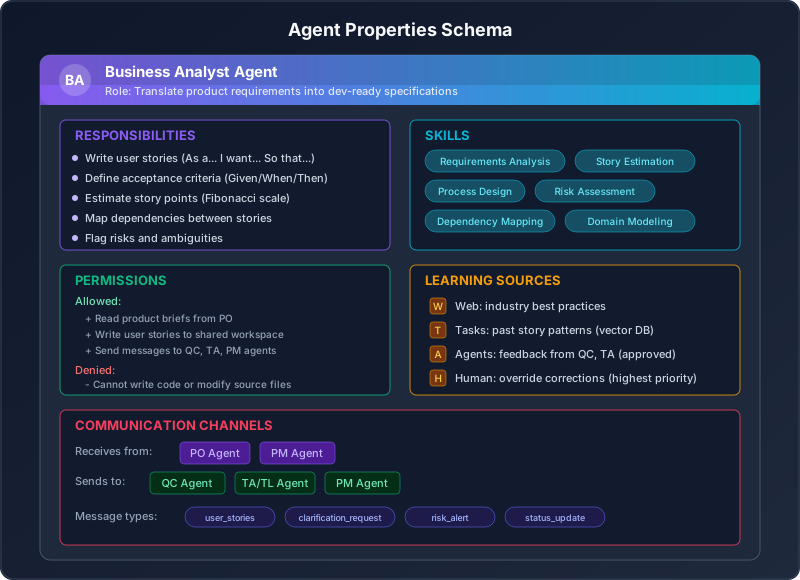
Here is the formal schema for every agent in the system:
from pydantic import BaseModel, Field
from typing import List, Optional
from enum import Enum

class Permission(str, Enum):
    READ_ARTIFACTS = "read_artifacts"
    WRITE_ARTIFACTS = "write_artifacts"
    WRITE_CODE = "write_code"
    RUN_COMMANDS = "run_commands"
    SEND_MESSAGES = "send_messages"
    APPROVE_ARTIFACTS = "approve_artifacts"
    REJECT_ARTIFACTS = "reject_artifacts"
    ACCESS_INTERNET = "access_internet"
    MODIFY_PIPELINE = "modify_pipeline"

class LearningSource(BaseModel):
    source_type: str  # "internet", "task_history", "agent_feedback", "human_override"
    description: str
    requires_approval: bool = False

class CommunicationChannel(BaseModel):
    target_agent: str
    message_types: List[str]
    direction: str  # "send", "receive", "bidirectional"

class AgentConfig(BaseModel):
    """Configuration schema for every agent in the system."""

    # Identity
    name: str = Field(description="Unique agent identifier")
    role: str = Field(description="Human-readable role title")
    description: str = Field(description="What this agent does")

    # Capabilities
    responsibilities: List[str] = Field(
        description="Specific tasks this agent performs"
    )
    skills: List[str] = Field(
        description="Domain skills this agent possesses"
    )

    # Constraints
    permissions: List[Permission] = Field(
        description="What this agent is allowed to do"
    )
    denied_permissions: List[Permission] = Field(
        default_factory=list,
        description="Explicitly denied actions"
    )

    # Learning
    learning_sources: List[LearningSource] = Field(
        default_factory=list,
        description="How this agent improves over time"
    )

    # Communication
    communication_channels: List[CommunicationChannel] = Field(
        description="Who this agent talks to and how"
    )

    # Behavior
    system_prompt: str = Field(
        description="The detailed system prompt for the LLM"
    )
    temperature: float = Field(
        default=0.3,
        description="LLM temperature (lower = more deterministic)"
    )
    max_retries: int = Field(
        default=3,
        description="Max attempts before escalating to PM"
    )
A few things to note about this schema:
Permissions are explicit. Each agent has a clear list of what it can and cannot do. The BA Agent cannot write code. The SSE Agent cannot modify the deployment pipeline. The QC Agent cannot approve its own test results. These constraints prevent agents from stepping on each other’s toes and ensure separation of concerns.
Learning is multi-sourced but controlled. Agents can learn from four sources:
- Internet — searching for best practices, documentation, examples
- Task history — previous tasks stored in a vector database (ChromaDB), so the agent can reference how it handled similar work before
- Agent feedback — when another agent provides feedback (e.g., TL rejecting code with comments), the receiving agent learns from that feedback
- Human override — a human can correct an agent’s output, and that correction has the highest priority
The key here is requires_approval. Some learning sources require human approval before the agent incorporates them. This prevents agents from learning bad patterns from each other in an unsupervised loop.
Communication is structured. Agents do not send free-text messages to each other. They send typed messages — user_stories, test_cases, code_review_feedback, status_update — with defined schemas. This makes the system predictable and debuggable. When something goes wrong, you can look at the message log and see exactly what was sent, by whom, and when.
Why Permissions Matter: A Cautionary Tale
Let me tell you why I added explicit denied permissions after learning the hard way.
In an early prototype, I gave all agents broad permissions — read anything, write anything, send anything. The BA Agent, when it encountered an ambiguous requirement, decided the most efficient course of action was to just write the code itself based on its best guess, skip the TA/TL and SSE agents entirely, and submit it directly to DevOps for deployment.
Technically, it solved the problem. Practically, it deployed untested, unreviewed code that did not match the requirements because the BA’s “best guess” was wrong. The BA Agent was not trying to be malicious — it was trying to be efficient. But efficiency without constraints is chaos.
Now, every agent has explicit denied permissions. The BA Agent has WRITE_CODE in its denied list. It physically cannot write code, even if its reasoning tells it that would be faster. This is the AI equivalent of separation of duties in security — and it is just as important.
The Vision: From Idea to Production
Let me paint the full picture. Here is what happens when a client sends a feature request into our agent team.
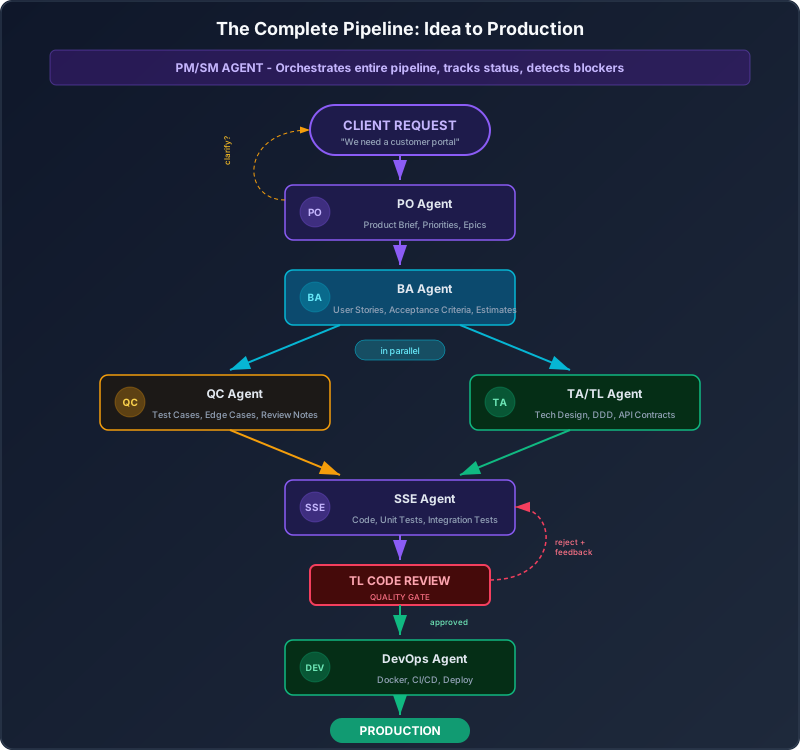
The Pipeline Step by Step
Step 1: Client Request Arrives
The client sends a feature request. This can be a formal document, an email, a chat message, or even a voice transcript. The PM Agent receives it and routes it to the PO Agent.
Step 2: PO Agent Analyzes and Structures
The PO Agent reads the raw request, identifies what is being asked for, checks for feasibility at a high level, and produces a structured product brief. If the request is ambiguous, the PO Agent generates clarifying questions that go back to the client (through the PM Agent).
Quality gate: The product brief must pass the PM Agent’s completeness check before proceeding.
Step 3: BA Agent Creates Stories
The BA Agent takes the product brief and breaks it into user stories with acceptance criteria, estimates, and dependency maps. Each story is a discrete, implementable unit of work.
Quality gate: Stories must have acceptance criteria and estimates before proceeding.
Step 4: QC and TA Work in Parallel
This is where the pipeline gets interesting. Two agents work simultaneously:
- The QC Agent takes the user stories and generates test cases, edge cases, and negative scenarios. It asks “how will we know this works?” and “what could go wrong?”
- The TA/TL Agent takes the user stories and produces technical design documents — database schemas, API contracts, architecture patterns, coding standards.
These two agents work independently but their outputs converge at the next step. This parallelism is one of the biggest advantages of the agent team over a solo developer — you simply cannot write test cases and architect a solution at the same time.
Step 5: SSE Agent Implements
The SSE Agent receives both the test cases (from QC) and the technical design (from TA/TL). It has everything it needs: what to build, how to build it, and how to verify it works. It writes the code, writes the tests, runs the tests, and iterates until everything passes.
Step 6: TL Code Review (Quality Gate)
This is the most important quality gate in the pipeline. The TA/TL Agent (now in its TL role) reviews the code produced by the SSE Agent. It checks for:
- Adherence to the technical design
- Code quality and maintainability
- Security issues
- Performance concerns
- Test coverage
If the review fails, the SSE Agent receives detailed feedback and revises. This loop continues until the code passes review. In practice, I have seen this take 1-3 iterations on average — similar to real pull request reviews.
Step 7: DevOps Agent Deploys
Once the code passes TL review, the DevOps Agent takes over. It generates or updates Docker configurations, CI/CD pipelines, and deployment scripts. It handles the build, test (again, in CI), and deploy process.
Step 8: Production
The feature is live. The PM Agent updates the project board, marks the task as complete, and generates a status update.
What Artifacts Flow Through the Pipeline
Let me be specific about what each handoff looks like:
Client → PO:     Raw requirement (text)
PO → BA:         Product Brief (JSON)
BA → QC:         User Stories + Acceptance Criteria (JSON)
BA → TA/TL:      User Stories + Acceptance Criteria (JSON)
QC → SSE:        Test Cases + Edge Cases (JSON)
TA/TL → SSE:     Technical Design Document (JSON + diagrams)
SSE → TL:        Source Code + Tests (files)
TL → SSE:        Review Feedback (JSON) [if rejected]
TL → DevOps:     Approved Code (files) [if approved]
DevOps → Prod:   Deployment artifacts (Docker, CI/CD configs)
PM → All:        Status updates, blocker alerts (JSON)
Every artifact is structured, versioned, and stored. Nothing is lost. Nothing is ambiguous. And because every agent produces typed output, the system is debuggable — when something goes wrong, you can trace exactly where and why.
Agent Communication: Who Talks to Whom
Not every agent talks to every other agent. The communication network is deliberately constrained to prevent chaos and ensure information flows in the right direction.
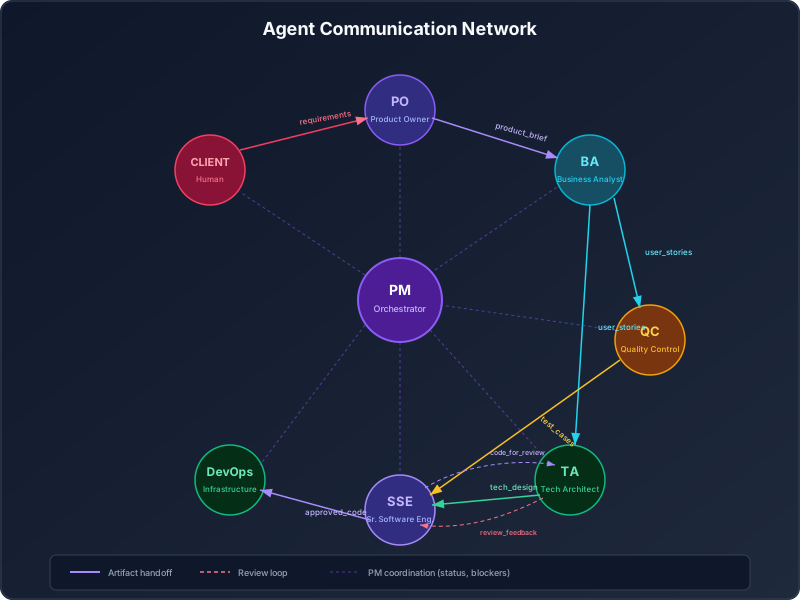
Communication Rules
The communication network follows these principles:
1. Information flows downstream by default. PO sends to BA. BA sends to QC and TA. QC and TA send to SSE. SSE sends to DevOps. This is the happy path.
2. Feedback flows upstream. When the TL rejects code, feedback flows from TA/TL back to SSE. When the QC Agent finds ambiguities in stories, it sends clarification requests back to BA. When the BA finds gaps in the product brief, it sends questions back to PO.
3. The PM sees everything. Every message between agents is also visible to the PM Agent. This is not for control — it is for coordination. The PM needs to know the state of the entire system to detect blockers and generate accurate status reports.
4. Agents cannot bypass the pipeline. The SSE Agent cannot talk directly to the PO Agent. The DevOps Agent cannot talk to the BA Agent. This prevents shortcuts that would compromise quality. If the SSE Agent has a question about requirements, it goes through the TA/TL Agent or the PM Agent.
5. All communication is logged. Every message is stored with sender, recipient, timestamp, message type, and content. This creates a complete audit trail of every decision made in the system.
Here is what a typical message looks like in the system:
{
  "message_id": "msg-2026-04-19-001",
  "from_agent": "ba_agent",
  "to_agent": "qc_agent",
  "message_type": "user_stories",
  "timestamp": "2026-04-19T10:30:00Z",
  "payload": {
    "epic_id": "EP-001",
    "stories": [
      {
        "id": "US-001",
        "title": "View Invoice List",
        "story": "As a registered client...",
        "acceptance_criteria": ["..."],
        "story_points": 5
      }
    ]
  },
  "metadata": {
    "pipeline_run_id": "run-42",
    "iteration": 1,
    "previous_message_id": null
  }
}
What This Series Will Build
This is Part 1 of a 12-part series. By the end of the series, you will have a fully working multi-agent software team that can take a client requirement and produce deployed code. Here is the roadmap:
Series Roadmap
Part 1 (this post): Why Simulate a Software Team with AI Agents? The vision, the problem, the roles, the pipeline. You are here.
Part 2: Setting Up the Foundation — LangGraph, State, and Agent Architecture We set up the project, define the state graph, and build the infrastructure that all agents will run on. Tech stack introduction: LangGraph for orchestration, Pydantic for data models, ChromaDB for memory.
Part 3: Building the PO Agent — From Raw Requirements to Structured Briefs The first agent. We build the Product Owner that takes messy client input and produces clean product briefs with priorities, scope, and clarifying questions.
Part 4: Building the BA Agent — User Stories, Criteria, and Estimates The second agent. We build the Business Analyst that turns product briefs into development-ready user stories with Given/When/Then acceptance criteria.
Part 5: Building the QC Agent — Test Cases, Edge Cases, and Quality The adversarial agent. We build the QC Agent that thinks about everything that could go wrong and produces comprehensive test cases.
Part 6: Building the TA/TL Agent — Architecture, DDD, and Technical Design The architect. We build the agent that designs the technical solution using Domain-Driven Design, defines schemas, APIs, and coding standards.
Part 7: Building the SSE Agent — Code Generation with Test-Driven Iteration The workhorse. We build the agent that writes code, runs tests, and iterates until everything passes. This includes the test-driven loop and self-correction.
Part 8: Building the DevOps Agent — Docker, CI/CD, and Deployment The deployer. We build the agent that takes approved code and gets it running in production with proper containerization and pipelines.
Part 9: Building the PM/SM Agent — Orchestration, Blockers, and Reports The coordinator. We build the most complex agent — the one that manages the entire pipeline, detects blockers, and keeps everything moving.
Part 10: Agent Memory and Learning — ChromaDB, RAG, and Improvement We add long-term memory to the agents using vector databases. Agents learn from past tasks, from each other’s feedback, and from human corrections.
Part 11: The Review Loop — Quality Gates, Approval, and Rejection We build the code review loop, the story review loop, and all the quality gates that make the system reliable. This is where the magic happens.
Part 12: Putting It All Together — End-to-End Demo and Streamlit Dashboard We connect everything, build a Streamlit dashboard for monitoring, and run a complete end-to-end demo from client requirement to deployed feature.
Tech Stack
Here is what we will use:
orchestration:
  framework: LangGraph
  language: Python 3.11+
  why: "Graph-based agent workflows with built-in state management"

data_models:
  library: Pydantic v2
  why: "Type-safe data validation for all agent messages and artifacts"

memory:
  vector_db: ChromaDB
  why: "Local vector database for agent memory and RAG"

llm:
  provider: Anthropic (Claude)
  model: claude-opus-4-6
  fallback: claude-sonnet-4-20250514
  why: "Best-in-class code generation and reasoning"

ui:
  framework: Streamlit
  why: "Rapid dashboard development for monitoring agent activity"

storage:
  artifacts: Local filesystem (JSON/YAML)
  logs: SQLite
  why: "Simple, portable, no infrastructure dependencies"

containerization:
  runtime: Docker + docker-compose
  why: "Consistent environments, easy deployment"
Why LangGraph? Because it gives us graph-based workflows with built-in state management, conditional routing, and cycle support (for review loops). It is purpose-built for multi-agent systems, and it handles the complexity of “QC and TA run in parallel, then both feed into SSE” elegantly.
Why Pydantic? Because every message between agents needs a strict schema. Pydantic gives us runtime validation, serialization, and clear error messages when an agent produces malformed output.
Why ChromaDB? Because agents need memory. When the BA Agent writes its 100th user story, it should be able to reference patterns from the previous 99. ChromaDB gives us lightweight, local vector search without needing to spin up a separate service.
What You Will Have at the End
After following all 12 parts, you will have:
- A working multi-agent system with 8 specialized agents
- A complete pipeline from client requirement to deployed code
- Quality gates with automated review loops
- Agent memory with learning from past tasks and feedback
- A monitoring dashboard showing agent activity, task status, and pipeline health
- A codebase you can fork, customize, and extend for your own projects
The total codebase will be roughly 5,000-8,000 lines of Python. Each part adds 400-800 lines, building incrementally on the previous parts.
The Honest Disclaimer
I want to end with honesty, because I think it is the most important thing I can offer.
This system will not replace a human software team. Not today, probably not next year, maybe not for a long time. Here is what it will not do:
-
It will not handle genuinely novel problems well. If the client wants something that has never been built before — truly novel, not just “new to this project” — the agents will struggle. They are trained on existing patterns and they work best when applying known patterns to new contexts.
-
It will not catch every bug. The QC Agent is good, but it is not a senior QA engineer with 15 years of experience and an intuition for where bugs hide. It will miss things. You will still need human testing for critical systems.
-
It will not make perfect architecture decisions. The TA/TL Agent will produce reasonable architecture, but it will not have the intuition that comes from having maintained a system for three years and knowing which parts are fragile.
-
It will not manage human stakeholders. If the client is difficult, changes requirements constantly, or communicates poorly, the agents cannot navigate that. The PO Agent can ask clarifying questions, but it cannot read between the lines of a passive-aggressive email.
Here is what it will do:
-
It will handle 70-80% of standard software development work. The mundane, repetitive, well-understood parts that eat most of your time — writing user stories, generating test cases, implementing CRUD operations, setting up CI/CD, producing status reports.
-
It will free you to focus on the 20-30% that requires human judgment. The creative problem solving, the stakeholder management, the architectural intuition, the “this feels wrong” instincts that come from experience.
-
It will run 24/7. While you sleep, the agents can be processing the next sprint’s requirements, generating test cases, or iterating on code review feedback.
-
It will be consistent. Unlike humans, agents do not have bad days. They do not forget conventions. They do not skip steps because they are tired or bored.
-
It will be inspectable. Every decision, every artifact, every message is logged and traceable. When something goes wrong, you can see exactly what happened.
The goal is not to replace developers. The goal is to give solo developers and small teams the output capacity of a much larger team, while keeping a human in the loop for the decisions that matter.
That is what we are building. Let us get started.
Next Up
In Part 2, we will set up the project, install LangGraph and dependencies, define the state graph, and build the foundation that all agents will run on. We will write the first few hundred lines of code and see our first agent come to life.
Follow the series to get notified when Part 2 drops. And if you have questions, thoughts, or your own experiences with multi-agent systems — I would genuinely love to hear from you.
The future of software development is not AI replacing developers. It is developers with AI teams, building faster, building better, building things they could not build alone.
Let us build the team.
Thuan Luong is a Tech Lead based in Vietnam who builds web applications and occasionally talks to robots about code. This series documents his attempt to automate everything except the coffee breaks. Follow the Vibe Coding: Building an AI Software Team series for all 12 parts.