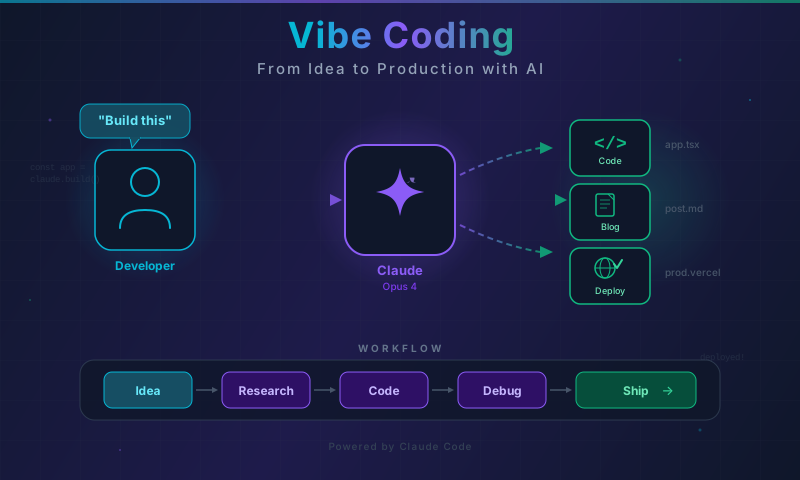
What Even Is Vibe Coding?
Let me start by being honest: the first time I heard “vibe coding,” I thought it was just another buzzword. Another thing to throw on the LinkedIn pile next to “10x developer” and “thought leader.”
Then I spent three months building my portfolio site with Claude Opus 4 as my pair programmer, and I realized: vibe coding is not a buzzword. It is a fundamentally different way of building software. And it is messy, frustrating, brilliant, and surprisingly productive — sometimes all within the same hour.
My name is Thuan Luong. I am a Tech Lead based in Vietnam, and this is my honest account of what happens when you stop writing code line-by-line and start describing what you want to an AI that can research, write, debug, and deploy alongside you.
No hype. No cherry-picked demos. Just the real thing — including the parts where everything breaks.
The Vibe Coding Workflow
Before we get into the war stories, let me explain what a typical vibe coding session looks like with Claude Code (the CLI tool) and Claude Opus 4.
The workflow is deceptively simple:
- You describe what you want — in plain language, as specifically or vaguely as you like
- Claude researches — reads your codebase, understands existing patterns, checks dependencies
- Claude writes code — across multiple files if needed, respecting your project conventions
- You review and iterate — accept, reject, or redirect
- Claude debugs — when something breaks, you describe the problem, Claude investigates
- You deploy — and sometimes debug the deployment together too
Here is how that flow looks in practice:
flowchart TD
    A[You have an idea] --> B[Describe it to Claude]
    B --> C[Claude reads your codebase]
    C --> D[Claude proposes an approach]
    D --> E{You agree?}
    E -->|Yes| F[Claude writes code]
    E -->|No| G[You refine the direction]
    G --> D
    F --> H[You review the changes]
    H --> I{Looks good?}
    I -->|Yes| J[Commit and deploy]
    I -->|Needs work| K[Describe what to fix]
    K --> F
    J --> L{Works in production?}
    L -->|Yes| M[Ship it]
    L -->|No| N[Debug together]
    N --> F
Sounds clean, right? In reality, you spend a lot of time in that feedback loop between “Claude writes code” and “Describe what to fix.” And that is where the magic happens — or where you lose an hour chasing a ghost.
Let me show you both.
Real Example 1: Building a 1200-Line Bilingual Blog Post from Scratch
The Task
I wanted to write a deep technical blog post about Qwen’s voice AI capabilities — their speech-to-text, text-to-speech, and real-time voice interaction models. The post needed to be:
- Deeply researched with accurate technical details
- Bilingual (English and Vietnamese versions)
- Visually rich with Mermaid diagrams and an SVG hero image
- Properly formatted for my Astro-based blog on Cloudflare Pages
- Around 1200 lines per language version
This is the kind of task that would normally take me two full days: one day of research and outlining, another day of writing, formatting, creating diagrams, and deploying.
With Claude, it took one session. About three hours.
How It Went Down
Step 1: The research prompt
I started simple:
Research Qwen's voice AI models — Qwen2-Audio, Qwen-TTS,
and their real-time voice capabilities. I need accurate
technical details: model architectures, supported languages,
benchmark results, API availability. Focus on what makes
them interesting for developers building voice applications.
Claude came back with a structured overview covering model architectures, training approaches, benchmark comparisons, and API endpoints. Some of it I already knew, some was new to me. Importantly, Claude flagged areas where information was uncertain or where official documentation was sparse — which I appreciate more than confident hallucination.
Step 2: The outline and structure
Based on this research, create a detailed outline for a
technical blog post. Target audience: developers and tech
leads evaluating voice AI solutions. Include sections for
architecture deep-dives, practical code examples,
comparison with alternatives (OpenAI Whisper, ElevenLabs),
and a "when to use what" decision framework.
Step 3: The full draft
This is where things got interesting. I asked Claude to write the complete post, and here is where the “vibe” part of vibe coding comes in. I did not micromanage each paragraph. Instead, I described the tone I wanted:
Write this like a senior engineer explaining to a colleague
over coffee, not like a documentation page. Include honest
assessments — where Qwen excels and where it falls short.
Use code examples that actually work, not pseudocode.
Add Mermaid diagrams for the architecture sections.
Claude generated the full post. It was… 80% there. The structure was solid, the technical details were accurate, the code examples were functional. But the tone was too formal in places, some diagrams needed restructuring, and a few sections needed more depth.
Step 4: The iteration loop
This is where vibe coding earns its name. Instead of rewriting sections myself, I gave directional feedback:
The section on Qwen2-Audio architecture is too surface-level.
Go deeper on the dual-encoder approach and explain why it
matters for multilingual scenarios. Also, the comparison
table with Whisper needs a row for real-time latency.
And:
The Mermaid diagram for the TTS pipeline is too complex.
Simplify it — show the high-level flow, not every
internal component.
After three rounds of iteration, the English version was done. Then came the Vietnamese version.
Step 5: Bilingual generation
Now create the Vietnamese version. Do not just translate —
localize. Vietnamese developers have different context and
priorities. Adjust examples where relevant, and make sure
all Mermaid diagrams use ASCII-only text (no Vietnamese
diacritics in diagram labels).
This is a subtle but important point. Machine translation of technical content is almost always terrible. What I needed was localization — and Claude handled it surprisingly well. The Vietnamese version read naturally, used appropriate technical terminology (we use a mix of Vietnamese and English technical terms in Vietnam), and adjusted cultural references.
The Mermaid diagram constraint was something I learned the hard way. Mermaid rendering engines choke on diacritical marks in node labels. So every diagram needed ASCII-only text, even in the Vietnamese version. Claude remembered this constraint across the entire session without me repeating it.
The Result
Two complete blog posts, each around 1200 lines. Properly formatted Astro frontmatter. Working Mermaid diagrams. An SVG hero image prompt that I could use with an image generator. Both deployed to Cloudflare Pages in the same session.
Total time: about 3 hours.
Would I have written better prose myself? In places, yes. Was the overall quality good enough to publish? Absolutely. And the research compilation alone saved me a full day.
Code That Actually Shipped
Here is an example of the Astro frontmatter and component structure Claude generated:
---
import BlogLayout from '../../layouts/BlogLayout.astro';
import { getCollection } from 'astro:content';

const post = await getCollection('blog').then(posts =>
  posts.find(p => p.slug === 'qwen-voice-ai-complete-guide')
);

const { Content } = await post.render();
---

<BlogLayout
  title={post.data.title}
  description={post.data.description}
  pubDate={post.data.pubDate}
  heroImage={post.data.heroImage}
  tags={post.data.tags}
  lang={post.data.lang}
>
  <Content />
</BlogLayout>
And a snippet from the actual Mermaid diagram in the post:
flowchart LR
    A[Audio Input] --> B[Audio Encoder]
    A --> C[Whisper Encoder]
    B --> D[Fusion Layer]
    C --> D
    D --> E[LLM Backbone]
    E --> F[Text Response]
    E --> G[Audio Understanding]
Simple, clean, accurate. The kind of diagram that takes 5 minutes to write yourself but that Claude generates correctly on the first try about 70% of the time.
Real Example 2: The Cloudflare Cache Debugging Saga
This is my favorite story because it captures the full spectrum of AI pair programming — the brilliance and the frustration.
The Problem
After deploying an update to my blog, the live site was still showing old content. Specifically, an older version of a blog post was being served despite the new version being correctly built and uploaded to Cloudflare Pages.
I had seen this before with browser caching, so I did the obvious things first:
- Hard refresh (Ctrl+Shift+R)
- Cleared browser cache
- Checked in an incognito window
- Tried a different browser
Same old content everywhere. This was not a browser cache issue.
Bringing Claude Into the Debug Session
My Cloudflare Pages site is serving stale content after
deployment. I have verified it is not browser cache.
Help me debug this.
Claude immediately suggested checking the response headers:
curl -I https://thuanluong.com/blog/qwen-voice-ai/The output was revealing:
HTTP/2 200
content-type: text/html; charset=utf-8
cf-cache-status: HIT
age: 14523
cache-control: public, max-age=604800
Two things jumped out: cf-cache-status: HIT meant Cloudflare’s edge CDN had cached the page, and age: 14523 meant the cached version was about 4 hours old. The max-age=604800 meant Cloudflare would keep serving this cached version for up to 7 days.
The Debugging Journey
Here is where it got interesting. Claude and I went through several approaches:
Attempt 1: Purge Cloudflare cache via dashboard
Claude walked me through the Cloudflare dashboard cache purge. I purged everything. Checked again.
cf-cache-status: HIT
age: 2
Wait, what? The cache was purged and immediately re-populated with the old content? That did not make sense.
Attempt 2: The _headers file approach
Claude suggested adding a _headers file to control cache behavior:
# public/_headers
/blog/*
  Cache-Control: public, max-age=0, must-revalidate
  CDN-Cache-Control: max-age=60
This would tell Cloudflare to cache for only 60 seconds and tell browsers not to cache at all. We deployed this change.
Result: The _headers file was deployed, but Cloudflare Pages was not picking it up for the affected URLs. The old cache headers persisted.
Attempt 3: Going deeper into Cloudflare Pages configuration
Claude suggested checking if there was a _redirects file or any Page Rules overriding the headers. We checked — nothing. Claude then suggested the issue might be with Cloudflare’s tiered caching (where edge caches pull from a shared regional cache that also had stale content).
This was an interesting theory, but it led us down a rabbit hole of Cloudflare’s caching infrastructure that, while educational, was not solving the problem.
Attempt 4: The simple solution
After about 45 minutes of debugging, I stepped back and asked Claude a different question:
Forget about fixing the cache. What if we just change the
URL of the page? Would that bypass all caching issues?
Claude’s response was essentially: “Yes, that would work. A new URL means no cached version exists anywhere in Cloudflare’s CDN.”
So we renamed the URL from /blog/qwen-voice-ai/ to /blog/qwen-voice-ai-complete-guide/, updated all internal links, added a redirect from the old URL, and deployed.
It worked immediately. Fresh content, no cache issues.
The Lesson
This story illustrates something important about vibe coding with AI: Claude was technically correct at every step but did not suggest the simplest solution first. It went for the “proper” fix (cache headers, cache purging, CDN configuration) instead of the pragmatic fix (just change the URL).
This is a pattern I have seen repeatedly. AI pair programmers tend to overcomplicate solutions. They reach for the architecturally correct approach when a quick hack would solve the problem in 30 seconds.
As the human in the loop, that is your job: to know when to say “forget the proper fix, let us just work around it.”
flowchart TD
    A[Problem: Stale content after deploy] --> B[Check browser cache]
    B --> C[Not browser cache]
    C --> D[Check CF response headers]
    D --> E[cf-cache-status: HIT]
    E --> F[Purge CF cache]
    F --> G[Still stale -- cache repopulated]
    G --> H[Try _headers file]
    H --> I[Headers not picked up]
    I --> J[Research CF tiered caching]
    J --> K[Rabbit hole -- 30 min lost]
    K --> L[Step back and think]
    L --> M[Just rename the URL]
    M --> N[Problem solved in 2 minutes]

    style K fill:#ff9999
    style N fill:#99ff99
The pink box is where we wasted time. The green box is where we should have started. Hindsight is 20/20, but this is exactly the kind of judgment call that separates effective vibe coding from just letting the AI drive.
Real Example 3: Expanding Existing Content Across Multiple Files
The Task
I had an existing series of blog posts about Agentic AI — covering concepts like autonomous agents, tool use, planning loops, and multi-agent systems. The posts were solid but needed expansion:
- Adding real-world application examples
- Including usability assessments for different developer skill levels
- Adding sections on advanced features like memory management and error recovery
- Updating code examples to reflect newer API patterns
The tricky part: this involved modifying 4 files simultaneously, and the changes needed to be consistent across all of them.
Why This Is a Perfect Vibe Coding Task
Editing multiple related files while maintaining consistency is one of the things AI pair programming does genuinely well. A human doing this manually would need to:
- Open all 4 files
- Read through each to understand the current structure
- Plan the additions to ensure consistency
- Make changes one file at a time, cross-referencing the others
- Review everything for consistency
With Claude, the process was:
I have 4 blog posts about Agentic AI in /src/content/blog/.
They are:
- agentic-ai-part1-fundamentals.md
- agentic-ai-part2-tool-use.md
- agentic-ai-part3-planning.md
- agentic-ai-part4-multi-agent.md

I want to add the following to each post:
1. A "Real-World Applications" section with 3-4 concrete
   examples relevant to that post's topic
2. A "Usability Assessment" section rating complexity
   on a scale (beginner/intermediate/advanced)
3. An "Advanced Features" section covering edge cases
   and production considerations

Make sure cross-references between posts are consistent
and use the same terminology throughout.
Claude read all four files, understood the existing structure and voice, and generated additions that matched the existing content’s tone and technical depth. It even caught an inconsistency in how I was using the terms “agent” vs “assistant” across the posts and suggested standardizing.
The Multi-File Edit in Action
Here is what a multi-file change looks like in Claude Code. Claude proposes edits to each file, showing you exactly what will be added and where:
<!-- In agentic-ai-part2-tool-use.md -->

## Real-World Applications

### 1. Automated Code Review Pipelines

Tool-using agents excel at code review workflows where the
agent needs to:
- Read files from a repository (file system tools)
- Run linters and test suites (shell execution tools)
- Query documentation APIs (HTTP tools)
- Post review comments (GitHub API tools)

This is not theoretical. Teams at companies like Stripe and
Shopify are running variations of this pattern in production
today, processing hundreds of pull requests per day with
agent-assisted review.

### 2. Customer Support Triage

When a support ticket comes in, a tool-using agent can:
- Query the customer database for account context
- Search the knowledge base for relevant articles
- Check system status dashboards for ongoing incidents
- Draft a response with all relevant context attached

The key insight is that each of these actions maps to a
specific tool the agent can invoke, and the agent decides
which tools to use based on the ticket content.

### 3. Data Pipeline Monitoring

Agents with access to monitoring tools can:
- Query metrics databases (Prometheus, Datadog)
- Read log files from distributed systems
- Execute diagnostic scripts
- Create incident tickets when thresholds are breached
- Page on-call engineers for critical issues

This use case demonstrates why tool permissions matter —
you want the agent to read metrics and create tickets,
but probably not to restart production services autonomously.
Claude generated similar sections for all four files, maintaining consistent quality and cross-referencing correctly. When Part 3 (Planning) referenced concepts from Part 2 (Tool Use), the references matched the actual content.
The Review Process
I reviewed each file’s changes, asked for adjustments in two places:
The usability assessment in Part 3 rates planning loops
as "intermediate" but I think the implementation complexity
is genuinely "advanced" — especially the re-planning and
error recovery parts. Adjust the rating and explanation.
And:
The real-world applications in Part 4 (multi-agent) are
too similar to Part 3. Replace the second example with
something about multi-agent testing — where different
agents play different roles in a test scenario.
Claude made both changes, and the result was consistent across all four files. Total time: about 90 minutes for what would have been a full day of careful editing.
The Good, The Bad, and The Ugly
After three months of daily vibe coding sessions, here is my honest assessment.
The Good
Research compilation is outstanding. When I need to understand a new technology, library, or API, Claude can synthesize information from its training data faster than I can read documentation. It is not always right, but it gives me a starting point that is 80% there.
Multi-file changes with consistency. As shown in Example 3, editing multiple related files while maintaining consistency is where AI pair programming truly shines. The AI holds all the files in context simultaneously, which humans struggle with.
Boilerplate and patterns. Setting up a new component, writing test scaffolding, creating configuration files — anything that follows established patterns is dramatically faster with Claude. I estimate it saves me 60-70% of time on these tasks.
Explaining your own code back to you. This sounds silly, but it is genuinely useful. When I come back to code I wrote months ago, I ask Claude to explain what it does. It reads the code, understands the context, and gives me a summary that is faster than re-reading it myself.
Error messages and debugging. Pasting an error message and asking “what does this mean and how do I fix it” works surprisingly well. Claude correctly diagnoses the issue about 75% of the time on the first try.
Here is a real example from a debugging session:
Error: [astro] Cannot read properties of undefined
(reading 'slug')
  at getStaticPaths (/src/pages/blog/[...slug].astro:8:34)
My prompt: “This error started appearing after I added a new blog post. What is going on?”
Claude’s response identified that the new blog post was missing the slug field in its frontmatter, which caused the dynamic route to break. Correct diagnosis, 10-second fix.
The Bad
Network and deployment infrastructure. Claude understands code very well. It understands deployment infrastructure… less well. The Cloudflare cache debugging saga is a perfect example. Claude knows about CDN caching conceptually but does not have the practical experience of debugging production caching issues that a seasoned DevOps engineer would have.
Context window limitations. Despite having a large context window, Claude can lose track of details in very long sessions. After about 2 hours of continuous work, I have noticed it occasionally forgets constraints I mentioned earlier. The fix is simple — restate important constraints periodically — but it is something to be aware of.
Overconfident suggestions. Sometimes Claude suggests a fix with complete confidence and it is wrong. This is particularly common with version-specific behavior. Claude might suggest a solution that worked in version X of a library but does not work in version Y. Always verify.
The “let me restructure everything” tendency. When you ask Claude to fix a small bug, it sometimes wants to refactor the entire file. You ask for a bandage, and it proposes surgery. Learning to say “just fix this one thing, do not change anything else” is an essential vibe coding skill.
The Ugly
Hallucinated APIs. This has gotten much better with Opus 4 compared to earlier models, but it still happens. Claude sometimes references API endpoints, function signatures, or configuration options that do not exist. In one session, it confidently told me about a Cloudflare Pages configuration option that I spent 20 minutes searching for before realizing it was hallucinated.
The “works in theory” problem. Claude can generate code that is logically correct but does not work in your specific environment. For example, it once generated a Node.js script that used a top-level await in a context where the project was not configured for ES modules. The code was correct ES2022 JavaScript. It just did not run in my setup.
Infinite debugging loops. Sometimes Claude and I get stuck in a loop where each attempted fix creates a new problem. This usually means we are approaching the problem from the wrong angle entirely. The fix is to stop, step back, explain the problem from scratch, and start over. But recognizing when you are in this loop takes experience.
Understanding the Vibe Coding Economy
One thing nobody talks about is the economics of vibe coding. It is not free, and understanding the cost structure matters.
Each Claude Code session consumes tokens. A typical 2-hour session building a feature might use:
| Activity | Approximate Token Usage |
|---|---|
| Codebase reading (initial) | 20,000-50,000 tokens |
| Research and planning | 10,000-30,000 tokens |
| Code generation | 30,000-80,000 tokens |
| Review and iteration | 20,000-40,000 tokens |
| Debugging | 10,000-50,000 tokens |
| Total per session | 90,000-250,000 tokens |
Is it worth it? For me, absolutely. A feature that takes 8 hours to build manually takes 2-3 hours with Claude. Even accounting for API costs, the time savings are significant. But this is assuming you are already a competent developer who can review and guide the AI effectively.
If you are a junior developer, the math is different. You might spend more time understanding and verifying Claude’s suggestions than you would save. Vibe coding works best when you have enough experience to know if the AI’s output is correct.
Practical Tips for Effective Vibe Coding Sessions
After hundreds of hours of pair programming with Claude, here are the patterns that consistently work:
1. Start With Context, Not Instructions
Bad:
Create a React component for user authentication.Good:
I am building a Next.js 14 app with App Router.
Authentication is handled by NextAuth.js v5 with GitHub
and Google providers. The existing components use
Tailwind CSS and follow a pattern where each component
has a corresponding .test.tsx file. Create a sign-in
component that fits this existing pattern.
The more context you give upfront, the fewer iterations you need later.
2. Review in Chunks, Not All at Once
When Claude generates a large amount of code, do not try to review it all at once. Ask Claude to explain each section:
Walk me through the changes you made to the auth
middleware. What does each section do and why did
you implement it that way?
This catches issues that a quick skim would miss.
3. Use Checkpoints
After each significant milestone, commit your changes. This gives you a rollback point if the next round of changes goes sideways.
git add -A
git commit -m "feat: add user auth flow - working state"
I have been saved by this practice more times than I can count.
4. Know When to Take Over
There are times when it is faster to write the code yourself than to explain what you want to Claude. Small, surgical changes — renaming a variable, adjusting a CSS value, fixing a typo — are often faster to do manually.
My rule of thumb: if I can describe the change in fewer words than the change itself, I just do it manually.
5. Restate Constraints Periodically
In long sessions, remind Claude of important constraints:
Remember: all Mermaid diagrams must use ASCII-only text,
no special characters. And all new components need
corresponding test files.
This prevents drift in long sessions where Claude might forget earlier instructions.
6. Use the Error-First Approach for Debugging
Instead of describing what you expected to happen, show Claude what actually happened:
Bad:
The login is not working.Good:
When I click the sign-in button, I get this error in
the console:

TypeError: Cannot read property 'session' of undefined
  at AuthProvider (auth-provider.tsx:23:15)

Here is the relevant code from auth-provider.tsx:
[paste the code]

The session object should be provided by NextAuth but
it appears to be undefined in this context.
7. Separate Research from Implementation
Do not ask Claude to research and implement in the same prompt. Split it:
- First, research: “What are the best practices for X?”
- Review the research, decide on an approach
- Then, implement: “Based on what we discussed, implement approach B”
This gives you a decision point between research and implementation, which produces better results.
8. Keep a Session Log
I keep brief notes during each vibe coding session:
Session: 2026-04-15
- Goal: Add dark mode to blog
- What worked: Component generation, CSS variables
- What failed: Theme persistence (localStorage issue)
- Time spent: 2.5 hours
- Outcome: Dark mode shipped, persistence fixed
These logs help me improve my prompting over time and track which types of tasks benefit most from AI pair programming.
The Workflow in Practice: A Full Session Timeline
Let me give you a concrete timeline of an actual session to show what vibe coding looks like in practice:
| Phase | Task | Duration |
|---|---|---|
| Research | Describe feature to Claude | 10 min |
| Claude reads codebase | 15 min | |
| Review Claude approach | 10 min | |
| Implement | Claude writes first draft | 20 min |
| Review and iterate | 15 min | |
| Claude applies changes | 10 min | |
| Debug | Test locally | 5 min |
| Fix issues with Claude | 10 min | |
| Deploy | Commit and push | 2 min |
| Verify on production | 5 min | |
| Total | ~102 min |
Total: about 2.5 hours from idea to production. And this is for a real feature, not a toy example.
The important thing to notice is the distribution of time:
- Research and planning: ~35 minutes (23%)
- Implementation: ~60 minutes (40%)
- Testing: ~30 minutes (20%)
- Deployment and fixes: ~30 minutes (20%)
Compare this to my pre-AI workflow where implementation alone would take 3-4 hours. The time savings are real, but they come from faster iteration, not from skipping steps. You still need to plan, test, and debug. You just do it faster because the code generation step is nearly instant.
Common Patterns and Anti-Patterns
After dozens of sessions, I have identified patterns that consistently lead to good outcomes and anti-patterns that waste time. Here they are in a format you can reference quickly:
Patterns That Work
The Scaffold-Then-Refine pattern. Ask Claude to generate the full structure first, even if it is rough. Then iterate on individual sections. This is faster than trying to get perfection on the first pass.
Step 1: "Create the full component with all the sections
        I described. Do not worry about edge cases yet."

Step 2: "Now let us improve the error handling in the
        form submission section."

Step 3: "Add loading states to the submit button and
        the results display."
The Show-Me-Your-Thinking pattern. Before Claude writes code, ask it to explain its approach. This catches architectural mistakes before they become code:
Before you write any code, explain:
1. What approach you will take
2. What files you will modify
3. What edge cases you are considering
4. What assumptions you are making
I have caught several bad assumptions this way — like Claude assuming my API returned paginated results when it actually returned everything in one response.
The Rubber Duck Upgrade pattern. Traditional rubber duck debugging means explaining your problem to an inanimate object. With Claude, the duck talks back. And sometimes it asks the right question:
Me: "This function returns undefined when the user
     has no permissions."

Claude: "What should happen when a user has no
        permissions? Should it return an empty array,
        throw an error, or redirect to a different page?"
That question forced me to think about a flow I had not designed yet. The bug was not in the code — it was in the requirements.
Anti-Patterns to Avoid
The “fix it” loop. You say “fix it.” Claude makes a change. It breaks something else. You say “fix that too.” Claude makes another change. It breaks the original thing again. This happens because you are treating symptoms instead of causes. Break the loop by stepping back and describing the root problem.
The kitchen sink prompt. Asking Claude to do too many things at once:
Create a user dashboard with charts, add authentication,
set up a database, write tests, add dark mode, and deploy
to production.
This produces mediocre results across the board. Break it into focused sessions.
The “make it better” trap. Vague improvement requests lead to unpredictable changes:
Bad: "Make this code better."
Good: "Reduce the cyclomatic complexity of this function
      by extracting the validation logic into a separate
      helper function."
Ignoring the diff. Claude Code shows you exactly what it changed. Read the diff. Every time. I once accepted a change without reading it carefully, and Claude had helpfully “improved” my database query by removing a WHERE clause that filtered out deleted records. All the deleted users suddenly reappeared in the admin dashboard.
When Not to Vibe Code
Vibe coding is not always the answer. Here are situations where I go back to traditional coding:
Security-critical code. Authentication flows, encryption, permission checks — I write these myself and have them reviewed by humans. AI-generated security code is a liability until you have verified every line.
Performance-critical hot paths. When I need code that runs in a tight loop millions of times, I want to understand every allocation, every branch, every cache line. AI-generated code optimizes for readability, not performance.
Simple mechanical changes. If I need to rename a variable across 3 files, I use my IDE’s refactoring tools. Firing up an AI session for this is overkill.
When I need to learn. If I am working with a new technology and want to deeply understand it, I write the code myself. Using AI to generate code for a technology I do not understand creates a knowledge gap that will bite me later.
The Future of Vibe Coding
Three months ago, I was skeptical. Now I cannot imagine going back to writing every line of code myself.
But let me be clear about what I mean: vibe coding does not replace programming skill. It amplifies it. A skilled developer with Claude is dramatically more productive than either one alone. But Claude without a skilled developer is a code generation machine with no judgment — and judgment is what turns code into software.
The developers who will thrive are not the ones who write the most code. They are the ones who can most effectively direct an AI to write the right code, catch its mistakes, and know when to take over the keyboard.
That is vibe coding. It is not about the vibe. It is about the partnership.
Comparing AI Pair Programming to Traditional Pair Programming
Since I have done both, let me draw a fair comparison:
| Aspect | Human Pair Programming | AI Pair Programming |
|---|---|---|
| Speed of code generation | Slower but more intentional | Much faster, sometimes too fast |
| Domain knowledge | Deep in their specialty | Broad but shallow |
| Catching logic errors | Excellent | Good for obvious ones, misses subtle ones |
| Code review quality | High — understands business context | Good for patterns, weak on business logic |
| Availability | Limited by schedules | Available 24/7 |
| Learning from sessions | Both people learn | Only you learn, AI resets each session |
| Handling ambiguity | Asks clarifying questions | Sometimes guesses and proceeds |
| Cost | Engineer salary | API token costs |
| Social dynamics | Can be tiring, requires social energy | No social overhead |
| Patience | Varies | Infinite |
The honest conclusion: AI pair programming does not replace human pair programming. They serve different purposes. I still do human pair programming for architectural decisions, code reviews, and knowledge sharing. I use AI pair programming for implementation velocity, research compilation, and tedious multi-file changes.
The ideal setup, if you have the luxury, is both: pair with a human to decide what to build, then pair with Claude to build it.
Quick Reference: My Vibe Coding Setup
For those who want to try this workflow, here is my setup:
Tools:
- Claude Code (CLI) — the primary interface for pair programming
- Claude Opus 4 — the model, selected for its code quality and reasoning
- VS Code — for manual edits and reviewing diffs
- Astro — static site framework for my blog
- Cloudflare Pages — hosting and CDN
- Git — version control with frequent commits (seriously, commit often)
Project structure:
my-blog/
  src/
    content/
      blog/
        en/       # English posts
        vi/       # Vietnamese posts
    components/   # Astro components
    layouts/      # Page layouts
    pages/        # Route pages
    styles/       # Global styles
  public/
    blog-images/  # SVGs and optimized images
  astro.config.mjs
  package.json
Claude Code configuration:
I use a .claude/config.json to set project-specific context:
{
  "projectContext": "Astro blog with Cloudflare Pages. Bilingual EN/VI. Uses Tailwind CSS, MDX for blog posts. Mermaid diagrams must be ASCII-only. All blog posts need frontmatter with title, description, pubDate, tags, heroImage, lang, and translationRef fields."
}
This project context is loaded automatically at the start of each session, so Claude already knows the key constraints before I type anything.
Metrics From Three Months of Vibe Coding
I have been tracking my productivity loosely over the past three months. Here are the numbers, warts and all:
Sessions tracked: 47 vibe coding sessions
Average session length: 2.1 hours
Task completion rate in single session: 78% (the other 22% required a follow-up session, usually due to deployment issues or discovering new requirements mid-build)
Estimated time savings vs manual coding:
- Content creation (blog posts, docs): 60-70% faster
- Feature implementation: 40-50% faster
- Bug debugging: 30-40% faster (but with higher variance — sometimes AI debugging is slower)
- Configuration and setup: 50-60% faster
Times Claude led me down a wrong path: 8 out of 47 sessions (17%)
Times I learned something new from Claude: 31 out of 47 sessions (66%)
That last metric surprises people. Two-thirds of my sessions, Claude showed me a pattern, API, or approach I was not aware of. Sometimes it was a small thing — a CSS property I had never used, or a more elegant way to structure an async function. Sometimes it was significant — like introducing me to Cloudflare’s HTMLRewriter API for edge-side content transformation.
Vibe coding is not just about speed. It is about learning surface area. When you pair with an AI that has been trained on a vast amount of code, you encounter patterns and solutions you would never find on your own, simply because you would never think to search for them.
Final Thoughts
If you had told me a year ago that I would be writing a blog post about pair programming with an AI, I would have laughed. The AI tools back then were impressive for demos but frustrating for real work.
Claude Opus 4 is different. Not because it is perfect — it is not. But because it is good enough to be genuinely useful, and it is getting better at a pace that makes me think about what development will look like in two years.
For now, vibe coding is a skill. Like any skill, it takes practice. You need to learn how to prompt effectively, when to trust the AI’s judgment and when to override it, and how to structure your sessions for maximum productivity.
But the payoff is real. I am shipping features faster, writing more comprehensive documentation, maintaining higher consistency across my codebase, and spending less time on the parts of programming I find tedious.
The code still needs to be correct. The architecture still needs to be sound. The user experience still needs to be thoughtful. AI does not change any of that.
It just means I spend more of my time on the parts that matter — and less time typing.
Thuan Luong is a Tech Lead based in Vietnam, building web applications and writing about the intersection of AI and practical software development. You can find his bilingual blog at thuanluong.com.
This post was, yes, written with the help of Claude. But every technical claim has been verified, every example is real, and the opinions are entirely my own. The irony of writing about vibe coding using vibe coding is not lost on me.