The Harness Problem: Why Your AI Briefs Are Costing You More, Not Less
A personal perspective by Thuan Luong — Vietnamese Tech Lead, builder of agentic systems, and someone who has received one too many “AI briefs.”
1. The Orchestrator That Wouldn’t Delegate
Let me tell you a story about a problem I spent three weeks debugging. Not a bug in the traditional sense — no null pointer, no race condition, no memory leak. The bug was behavioral. The bug was that my best agent was too good.
I was building a multi-agent system for a client. The architecture was clean on paper:
- Orchestrator Agent — powered by Claude Opus 4.5, full tool access, maximum context window. Its job: break down complex tasks, assign them to specialist agents, monitor progress, ensure quality.
- Code Agent — writes and refactors code.
- Research Agent — searches documentation, finds examples, analyzes libraries.
- Review Agent — checks code quality, security, best practices.
- Test Agent — writes and runs tests, validates behavior.
Four specialists. One coordinator. Simple hierarchy. Should work beautifully.
Here’s what actually happened.
The First Sign of Trouble
I gave the system a task: “Build a REST API for user authentication with JWT tokens, password hashing, rate limiting, and role-based access control.”
The Orchestrator received the task. It had the full context — the project requirements, the tech stack, the constraints. It had access to every tool: file reading, code writing, terminal execution, web search.
What it was supposed to do:
1. Break the task into subtasks
2. Assign "Design the auth schema" → Research Agent
3. Assign "Implement JWT middleware" → Code Agent
4. Assign "Write security tests" → Test Agent
5. Assign "Review for OWASP compliance" → Review Agent
6. Monitor, integrate, verify
What it actually did:
1. "I'll just write the whole thing myself."
2. Researched JWT best practices (skipping Research Agent)
3. Wrote the entire auth module (skipping Code Agent)
4. Wrote the tests (skipping Test Agent)
5. Reviewed its own code (skipping Review Agent)
6. "Done! Here's your complete auth system."
The output was… fine. Technically correct. The code worked. Tests passed. But the four specialist agents? They sat there idle. The Orchestrator did everything.
Why Did This Happen?
Think about it from the model’s perspective. The Orchestrator was Claude Opus 4.5 — one of the most capable models available. It had:
- Maximum intelligence — it could reason through any subtask
- All the tools — file system, code execution, web search, everything
- Full context — it knew the entire project, the requirements, the constraints
- A mandate to ensure quality — and what better way to ensure quality than to do it yourself?
From a pure capability standpoint, delegating was inefficient. The Orchestrator could do the work faster, with less coordination overhead, and with more consistency than routing through four separate agents with their own context windows and potential misunderstandings.
The Orchestrator wasn’t broken. It was too capable. It was making a locally rational decision: “I can do this better and faster than delegating.” And it was right — for any single task.
But for the system as a whole? Disaster.
The Cascade of Problems
When the Orchestrator does everything:
-
No specialization benefits. The Review Agent had been fine-tuned with security-specific prompts, OWASP checklists, and vulnerability databases. The Orchestrator’s self-review was generic.
-
No parallel processing. Four agents could work simultaneously. The Orchestrator worked sequentially on everything.
-
Context window exhaustion. The Orchestrator’s context filled up with implementation details instead of coordination metadata. By the third task, it was losing track of the big picture.
-
Single point of failure. If the Orchestrator hallucinated on one subtask, there was no second opinion. No checks and balances.
-
No scalability. You can add more specialist agents. You can’t add more Orchestrators.
I watched the logs and saw the pattern clearly: the more capable the Orchestrator, the more it resisted delegation. A weaker model (say, Claude Haiku) in the Orchestrator role actually delegated better — because it knew it couldn’t do everything well. But a weaker model also made worse coordination decisions.
The paradox: you need a strong model to coordinate well, but a strong model won’t want to coordinate.
I needed a solution that let me keep the strong model’s coordination intelligence while preventing it from going hands-on.
I needed a Harness.
2. The Harness Solution
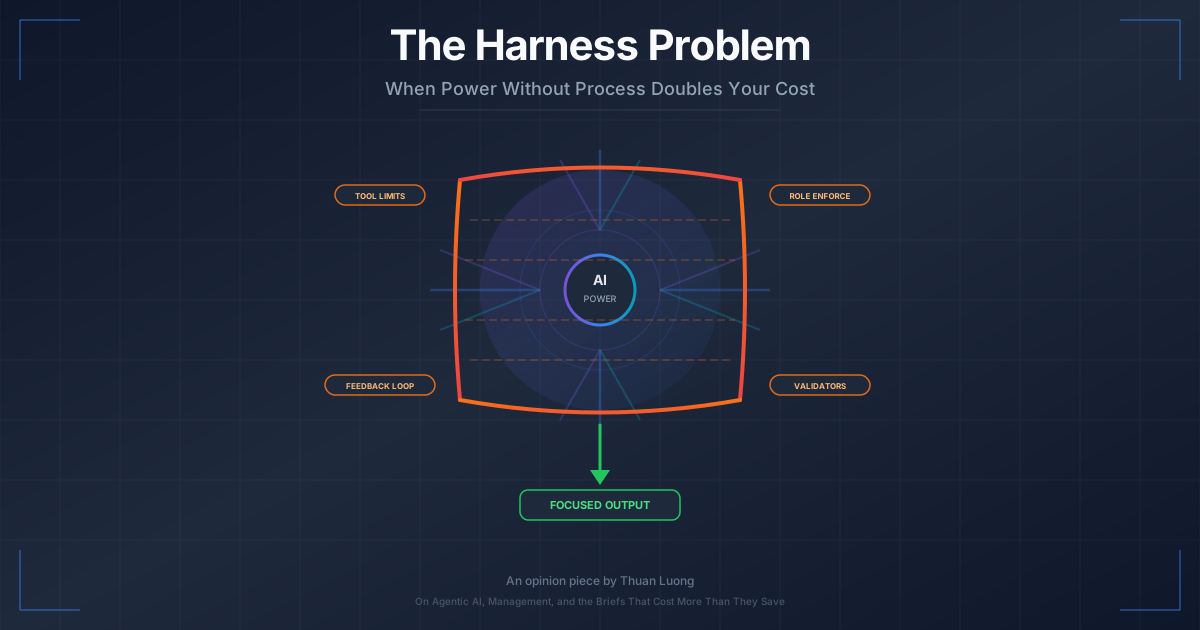
A Harness, in the context of agentic AI, is a set of constraints and guardrails that wrap around an agent to keep it in its designated role. Think of it like the reins on a horse — you’re not reducing the horse’s power, you’re directing it.
Here’s what I built:
Tool Restrictions
The most direct intervention. I removed tools the Orchestrator shouldn’t have:
# Before: Orchestrator had everything
orchestrator_tools = [
    file_read, file_write, code_execute,
    web_search, delegate_task, monitor_progress,
    approve_output, request_revision
]

# After: Orchestrator can only coordinate
orchestrator_tools = [
    delegate_task,        # Assign work to specialists
    monitor_progress,     # Check on agent status
    approve_output,       # Accept or reject results
    request_revision,     # Send back for changes
    read_summary,         # Read high-level summaries (not raw code)
    ask_clarification     # Ask the user for more info
]
No file writing. No code execution. No web search. The Orchestrator literally cannot implement anything. It can only delegate, monitor, and approve.
This was the single most impactful change. When the Orchestrator tried to write code, the tool call failed. It was forced to delegate.
Output Validators
Even without implementation tools, a clever model might try to include code in its delegation messages — essentially doing the implementation in the instruction. I added validators:
def validate_orchestrator_output(output):
    """Ensure the orchestrator is delegating, not implementing."""

    # Flag if output contains code blocks over 10 lines
    code_blocks = extract_code_blocks(output)
    for block in code_blocks:
        if len(block.lines) > 10:
            return ValidationError(
                "Orchestrator output contains implementation code. "
                "Delegate the implementation to a specialist agent."
            )

    # Flag if output doesn't contain a delegation action
    if not contains_delegation(output):
        return ValidationError(
            "Orchestrator output must include at least one "
            "delegation to a specialist agent."
        )

    # Flag if output is too detailed (micro-managing)
    if word_count(output) > 500 and not is_complex_task(output):
        return ValidationWarning(
            "Consider whether this level of detail is "
            "constraining the specialist's autonomy."
        )

    return ValidationSuccess()
Role Enforcement in the System Prompt
This is the “soft” constraint. Clear, explicit instructions about role boundaries:
## Your Role: ORCHESTRATOR

You are a COORDINATOR. You are NOT an implementer.

Your responsibilities:
- Break complex tasks into subtasks
- Assign subtasks to the RIGHT specialist agent
- Monitor progress and quality
- Ensure integration between components
- Make architectural decisions

You must NEVER:
- Write implementation code (delegate to Code Agent)
- Conduct detailed research (delegate to Research Agent)
- Review code line-by-line (delegate to Review Agent)
- Write or run tests (delegate to Test Agent)

If you find yourself wanting to "just do it quickly," STOP.
That impulse means you should delegate.
Feedback Loops
When the Orchestrator violated its role constraints, the system didn’t just block it — it explained why and forced a retry:
def handle_violation(orchestrator_output, violation_type):
    feedback = f"""
    ROLE VIOLATION DETECTED: {violation_type}

    Your output was blocked because it contained implementation
    rather than delegation. Remember:

    - You are the COORDINATOR
    - Your job is to assign work, not do work
    - The specialist agents exist for a reason

    Please reformulate your response as a DELEGATION:
    1. Which specialist agent should handle this?
    2. What is the task description?
    3. What are the acceptance criteria?
    4. What context does the specialist need?

    Try again.
    """
    return retry_with_feedback(feedback)
The Results
After implementing the Harness:
- Orchestrator delegation rate: from ~15% to ~95%
- Task completion quality: improved 30% (specialists with focused prompts did better than generalist Orchestrator)
- Parallel throughput: 3.2x improvement (multiple agents working simultaneously)
- Context efficiency: Orchestrator maintained coherent project-level context across 50+ subtasks instead of drowning in implementation details by task 10
The Harness worked. But it was hard. Even with explicit constraints, the Orchestrator still occasionally tried to sneak in implementations. I had to iterate on the validators, tighten the tool restrictions, and refine the feedback loops over weeks.
And this was with a computer. With a system I had full control over. With deterministic rules I could enforce programmatically.
Which brings me to the question that kept me up at night:
If it’s this hard to keep an AI agent in its coordination role… what about humans?
3. Now Let’s Talk About Your Company
Let me draw you a picture.
In a multi-agent AI system:
| AI System | Your Company |
|---|---|
| Orchestrator Agent | CEO / Manager / Product Owner |
| Specialist Agents | Senior Developers / Tech Leads |
| Tools (code, search, execute) | AI tools (ChatGPT, Claude, Copilot) |
| Context window | Business knowledge, strategy, vision |
| Harness | ??? |
See the problem?
Your CEO or product manager is the Orchestrator. They have:
- High capability — they understand the business, the market, the users
- All the tools — they just got access to GPT-4, Claude, Copilot, Cursor, v0, Bolt
- Maximum context — they know the company strategy, the budget, the timeline, the politics
- A mandate to move fast — “We need to ship this yesterday”
Sound familiar? Same ingredients as my Orchestrator Agent. Same outcome, too.
They start doing the work themselves.
Not because they’re bad managers. Not because they don’t trust their team. But because — just like the AI Orchestrator — they can. The tools are right there. The AI is right there. They can generate code, build prototypes, create full implementations in an afternoon.
And just like the AI Orchestrator, they make a locally rational decision: “I can do this faster than writing a brief and waiting for the team.”
But the system-level consequences are identical:
- No specialization benefits (the dev team’s expertise gets bypassed)
- No parallel processing (one person doing everything sequentially)
- Context exhaustion (manager drowning in implementation details instead of strategy)
- Single point of failure (no review, no second opinion, no architectural oversight)
- No scalability
The Orchestrator Agent at least had an excuse — it’s a language model optimizing for the most direct path to task completion. What’s yours?
4. The AI-Generated “Brief” Problem
Here’s what my inbox looked like two years ago:
Subject: New Feature — User Dashboard

Hi Thuan,

We need a dashboard for our users. Key requirements:
- Show account overview (balance, recent transactions)
- Allow date range filtering
- Export to CSV
- Mobile responsive

Target users: ~500 active users
Timeline: 2 weeks
Budget: [discussed separately]

Let's schedule a call to go through the details.
Clean. Clear. Here’s the problem, here are the constraints, let’s talk about the solution together.
Here’s what my inbox looks like now:
Subject: New Feature — User Dashboard (see attached files)

Hi Thuan,

I've already built most of this. See attached:
- dashboard-spec.md (47 pages)
- dashboard-prototype.html (working prototype with charts)
- dashboard-api-design.md (REST API with 23 endpoints)
- dashboard-timeline.xlsx (with AI-generated Gantt chart)
- dashboard-cost-analysis.md (with competitive pricing comparison)
- dashboard-architecture.svg (microservices diagram)

I've done about 80% of the work. Just need you to:
- Clean up the code
- Make it production-ready
- Deploy it

Should be quick since most of the work is done. Let me know your quote.
Let me tell you what those attached files actually contain.
The 47-Page Spec
Generated by dumping the original 5-line requirement into Claude with “write a comprehensive product specification.” It covers:
- User personas (4 fictional users with names, ages, and behavioral profiles)
- User journey maps (with emotional states at each step)
- Information architecture (sitemap with 15 pages for what should be a single dashboard)
- Wireframes described in markdown (not actual wireframes, just verbose descriptions)
- Data model (a normalized database schema that would make a DBA cry)
- API specification (23 endpoints when you need maybe 5)
- Security requirements (copied from OWASP top 10 without context)
- Performance requirements (“must handle 10 million concurrent users” — for 500 active users)
- Accessibility requirements (good, but also copied wholesale from WCAG without prioritization)
- Testing strategy (unit, integration, e2e, load, security, accessibility — for a dashboard)
- Deployment strategy (Kubernetes with auto-scaling, blue-green deployments — for 500 users)
It’s 47 pages of AI-generated text that sounds comprehensive but reflects zero human judgment about what actually matters for this specific product, this specific company, this specific user base.
The Working Prototype
An HTML file with inline CSS and JavaScript. It uses Chart.js for graphs, has a dark mode toggle, responsive layout, and animated transitions. It looks beautiful.
But:
- It uses
localStoragefor “database” - The data is hardcoded JSON
- The filtering “works” by hiding DOM elements
- There’s no authentication
- There’s no error handling
- The “API calls” are
setTimeoutwith fake data - It would take more work to extract the good parts than to build from scratch
The API Design
23 REST endpoints. Some highlights:
GET /api/v1/dashboard/widgets— a widget system (not in the original requirements)POST /api/v1/dashboard/widgets/reorder— drag-and-drop widget reordering (not in requirements)GET /api/v1/dashboard/analytics/predictive— predictive analytics (absolutely not in requirements)WebSocket /ws/dashboard/realtime— real-time updates (for 500 users checking their balance)
The AI generated what a dashboard could be in the most feature-complete, enterprise-grade scenario. Not what this dashboard should be for a small company with 500 users and a 2-week timeline.
The Gantt Chart
A beautiful Excel file with color-coded task bars, dependencies, milestones, and resource allocation. It estimates 3 days for the work.
Three days. For a system with microservices architecture, 23 API endpoints, WebSocket real-time updates, predictive analytics, and Kubernetes deployment. Three days.
The AI generated the timeline based on the description of what it generated — not based on reality.
The Manager’s Conclusion
“I’ve done about 80% of the work. Just need you to clean it up.”
This is what an Orchestrator without a Harness looks like. It did 80% of something. But that something isn’t aligned with what actually needs to be built. And now I have to deal with both the real problem AND the AI-generated solution that’s sitting on top of it like a house built on the wrong foundation.
5. Why This Doubles the Work
Let me walk you through what actually happens when I receive an “AI brief” like the one above.
Step 1: Reverse Engineering the Problem (2-4 hours)
First, I have to figure out what the actual problem is. Remember, the original requirement was 5 lines. But it’s buried under 47 pages of AI-generated specification.
I have to read through everything and separate:
- What the manager actually wants (dashboard with balance and transactions)
- What the AI hallucinated (predictive analytics, widget system, real-time WebSocket)
- What the manager thinks they want because the AI suggested it (microservices, Kubernetes)
- What’s actually needed for 500 users with a 2-week timeline
This reverse engineering phase didn’t exist when briefs were bullet points. The bullet points were the problem statement. Now I have to extract the problem statement from a solution that may or may not reflect it.
Step 2: Validating the Approach (2-4 hours)
Is the AI’s approach even correct? Let me check:
-
Architecture: Microservices for a dashboard with 500 users? No. A single service with a few endpoints is fine. The microservices architecture adds complexity that will eat the entire timeline just in infrastructure setup.
-
Database design: The normalized schema has 12 tables for what should be 3-4. Some of the tables are for features that don’t exist in the requirements.
-
API design: 23 endpoints. The actual dashboard needs: get user summary, get transactions (with filters), export CSV. That’s 3 endpoints. Maybe 5 with auth.
-
Frontend: The prototype looks great but is architecturally useless. It would need to be rebuilt entirely with proper state management, API integration, and error handling.
-
Performance: The spec says “10 million concurrent users.” The actual requirement is 500 active users. These require fundamentally different architectures. Designing for 10 million when you have 500 is not “future-proofing” — it’s wasting time and money.
Step 3: The Uncomfortable Conversation (1-2 hours)
Now I have to tell the manager: “Thank you for all this work, but we need to start over.”
This is the worst part. They spent hours with the AI. They feel ownership over the output. They showed it to stakeholders. They promised timelines based on the AI’s 3-day estimate.
And now I’m saying: “The 80% you did is actually making the remaining work harder, not easier. And it’s not 3 days — it’s 2 weeks, which is what it would have been anyway if we’d started with a proper brief.”
This conversation is emotionally difficult, politically sensitive, and technically necessary. It didn’t exist before AI briefs.
Step 4: Actually Designing the Solution (4-8 hours)
Now I do what I would have done if I’d received bullet points: think about the problem, design an appropriate solution, make architectural decisions based on the actual constraints.
But I’m doing this while mentally carrying the baggage of the AI solution. The manager will ask: “Why aren’t you using the microservices architecture I designed?” I’ll have to explain — again — why a monolith is better for their scale.
Step 5: Building It (the actual work)
Finally, the part that was always going to take 2 weeks takes 2 weeks.
The Math
Before AI briefs:
- Receive bullet-point brief: 15 minutes
- Clarification meeting: 1 hour
- Design solution: 4-8 hours
- Build: 2 weeks
- Total: ~2 weeks + 1 day
After AI briefs:
- Receive AI brief: 30 minutes (just to open all the files)
- Reverse engineer the actual problem: 2-4 hours
- Validate AI approach: 2-4 hours
- Uncomfortable conversation: 1-2 hours
- Redesign properly: 4-8 hours
- Build: 2 weeks
- Total: ~2 weeks + 2-3 days
The AI brief added 1-2 days of work. Not reduced it. Added it.
And this is the good scenario — where the developer pushes back early. In the bad scenario, the developer tries to “make it work” with the AI architecture, and the 2-week project becomes a 6-week project.
The House Foundation Analogy
Imagine you’re an architect. A client comes to you and says: “I want a house. Here are my needs: 3 bedrooms, 2 bathrooms, a kitchen, and a garage.”
Great. You’ll design something appropriate for their lot, their budget, their family’s needs.
Now imagine the same client says: “I want a house. But first, I already poured a foundation. It’s for a 10-bedroom mansion. I found the blueprint on the internet. Just build a 3-bedroom house on this 10-bedroom foundation.”
You can’t just “use the good parts” of the foundation. A foundation for a 10-bedroom mansion is fundamentally different from one for a 3-bedroom house. The load-bearing walls are in different places. The plumbing runs are different. The electrical layout is different.
You have two options:
- Build a weird 3-bedroom house on a 10-bedroom foundation (over-engineered, wasteful, awkward)
- Demolish the foundation and start fresh (wasting all the client’s “work”)
Both options are worse than if the client had just told you “3 bedrooms, 2 bathrooms, kitchen, garage” and let you design from scratch.
That’s what an AI brief does. It pours a foundation before the architect has seen the lot.
6. What a “Human Harness” Looks Like
OK so we’ve established the problem. The question is: what do we do about it?
Remember the Harness I built for the AI Orchestrator? The same principles apply to humans. The implementation is just different.
Principle 1: Tool Restrictions — Keep AI for Exploration, Not Implementation
When the Orchestrator had access to code execution tools, it wrote code. When I removed those tools, it delegated.
For managers: use AI as a research tool, not a production tool.
Good uses of AI for briefs:
- “What are common features in user dashboards?” (exploration)
- “What are the security considerations for financial dashboards?” (research)
- “Help me articulate what I need from this dashboard” (clarification)
- “What questions should I ask my dev team about this?” (preparation)
Bad uses of AI for briefs:
- “Build me a complete dashboard specification” (implementation)
- “Write the API design for this dashboard” (implementation)
- “Generate a working prototype” (implementation)
- “Create a project timeline with estimates” (implementation without expertise)
The line is clear: AI helps you think. It doesn’t think for you.
Principle 2: Output Validators — Check Your Brief Before Sending
My AI Orchestrator had validators that checked: “Is this delegation or implementation?”
Managers should do the same self-check before sending a brief:
The Brief Validator Checklist:
- Does this describe the PROBLEM, not a solution?
- Does this state the GOALS, not the implementation?
- Does this list CONSTRAINTS (timeline, budget, users), not architecture?
- Is this under 2 pages? (If it’s over 2 pages, you’re implementing)
- Could a senior developer read this and design THREE different solutions? (If not, you’ve already chosen the solution)
- Does this leave room for the technical team to make architectural decisions?
If your “brief” fails this checklist, you’re not delegating — you’re implementing. And you probably don’t have the technical expertise to implement well.
Principle 3: Role Enforcement — Remember What You’re Paying For
I told the Orchestrator: “You are a COORDINATOR, not an IMPLEMENTER.”
The same message for managers: you’re paying senior developers for their judgment, not their typing speed.
When you send a developer an AI-generated implementation and say “just clean this up,” you’re telling them: “I don’t value your expertise. I just need a human to press the deploy button.”
That’s not what senior developers do. That’s not what you’re paying for. You’re paying for:
- Problem analysis: Understanding the real need behind the stated requirement
- Solution design: Choosing the right architecture for the constraints
- Trade-off decisions: Balancing speed, quality, cost, and maintainability
- Risk identification: Spotting what could go wrong before it does
- Experience: Knowing what works at your scale because they’ve seen what happens at other scales
AI can’t do these things well because AI doesn’t know your company, your users, your team’s capabilities, your infrastructure, your technical debt, or your actual scale. AI generates plausible solutions. Your senior developers design appropriate ones.
Principle 4: Feedback Loops — Restore the Meeting
I know. Nobody likes meetings. But remember what meetings did?
The old process:
- Manager sends brief (problem statement)
- Team meeting to discuss
- Developers ask questions the manager hadn’t considered
- Manager learns things about technical constraints
- Together, they arrive at shared understanding
- Developers design the solution
- Another meeting to review the design
- Build
This process was slow. It was sometimes frustrating. But it served a crucial purpose: shared understanding.
The manager understood why certain approaches wouldn’t work. The developers understood the business context. Everyone was aligned before a single line of code was written.
The AI brief process:
- Manager + AI generate a complete solution
- Manager sends it to developers as “the plan”
- Developers receive something they weren’t consulted on
- No shared understanding, no discussion, no alignment
- Developers either push back (uncomfortable conversation) or silently struggle
The meeting process is the human equivalent of the Harness’s feedback loop. It forces alignment. It prevents the Orchestrator (manager) from going too far down the implementation path.
Bring back the meeting. Or at least the conversation. Even a 30-minute call where the manager says “here’s what I need and why” is worth more than a 47-page AI-generated spec.
Principle 5: Label AI Output Clearly
If you absolutely must include AI output in your brief (and sometimes it’s useful — AI is great at generating examples, exploring possibilities, and identifying edge cases), label it clearly:
## Dashboard Requirements (from Product team)
- Show account overview (balance, recent transactions)
- Date range filtering
- CSV export
- Mobile responsive
- Target: 500 active users
- Timeline: 2 weeks

## AI Exploration (NOT final design — for reference only)
The following was generated by Claude to explore possible approaches.
The technical team should use this as background context, not as
a specification.

[AI output here]
This simple framing changes everything. It tells the developer: “I know this isn’t the design. I’m giving it to you as context, not as instructions. You’re the designer.”
7. The Irony
Here’s the thing that keeps me up at night:
The very capability that makes AI powerful — its ability to generate comprehensive, detailed, professional-looking output — is exactly what causes the problem.
If AI generated obviously bad output, nobody would use it as a brief. But AI generates output that looks really good. It has proper formatting, comprehensive coverage, professional language, and logical structure. It passes the “looks right” test with flying colors.
The problem is that “looks right” and “is right” are very different things.
A 47-page specification looks more thorough than a 5-line brief. But the 5-line brief represents actual human judgment about what matters, while the 47-page spec represents AI pattern-matching on what specifications usually contain.
A working prototype looks like progress. But it’s progress in a direction that may be wrong, built on assumptions that haven’t been validated, using an architecture that doesn’t fit the constraints.
A microservices diagram looks more professional than “we’ll use a simple monolith.” But for 500 users, the monolith is the right answer and the microservices are the wrong one, no matter how pretty the diagram is.
Appearance of quality is not quality. This is true for AI-generated code, AI-generated specs, and AI-generated briefs. The quality comes from the reasoning behind the output — and when you delegate the reasoning to AI, you lose the quality even as you gain the appearance.
The parallel to the AI Orchestrator is exact:
| AI Orchestrator (No Harness) | Manager (No Process) |
|---|---|
| Does work instead of delegating | Creates implementations instead of briefs |
| Bypasses specialist agents | Bypasses technical team’s expertise |
| Uses all tools indiscriminately | Uses AI tools without judgment |
| Produces working but inappropriate output | Produces professional-looking but inappropriate specs |
| Needs tool restrictions to stay in role | Needs process to stay in role |
| Needs output validators | Needs brief checklists |
| Needs role enforcement | Needs role clarity |
| Needs feedback loops | Needs meetings/conversations |
The solution is the same on both sides: a Harness.
For AI agents, we build it in code. For humans, we build it in process.
But here’s the key insight: the Harness is not a punishment. It’s an enabler. My Orchestrator Agent became better at its job when I added the Harness. It made better coordination decisions, maintained better context, and produced better overall system outcomes. It just had to stop doing the work itself.
Managers who use AI wisely — for exploration, research, and preparation rather than implementation — become better managers. They come to meetings with better questions, better context, and better understanding. They just have to stop doing the developer’s job.
The Harness doesn’t reduce your power. It focuses it.
8. So What Should a Good Brief Look Like?
Since I’ve spent this entire article complaining about bad briefs, let me show you what a good one looks like. Even — especially — in the age of AI.
A Good Brief (Post-AI Era)
# User Dashboard

## The Problem
Our users currently have no way to see their account status at a
glance. They call support ~30 times/week asking about their
balance and recent transactions. We want to reduce support calls
by giving users self-service access to this information.

## Goals
1. Reduce "balance inquiry" support calls by 50%
2. Give users a clear view of their account status
3. Allow users to find specific transactions without calling support

## Key Information
- Active users: ~500 (growing ~10%/month)
- Core data: account balance, transaction history
- Users asked for: date filtering, CSV export
- Must work on mobile (60% of our users are mobile)

## Constraints
- Timeline: 2 weeks to MVP
- Budget: [discussed separately]
- Must integrate with existing auth system (JWT, details with dev team)
- Backend is Python/FastAPI, frontend is React

## What I EXPLORED with AI (background context, not spec)
I asked Claude about common dashboard patterns and it suggested
some interesting things around data visualization. Attaching the
conversation for context. The technical approach is 100% your call.

## Open Questions
- Should we include notifications? (Not sure if needed for MVP)
- Real-time updates vs. manual refresh? (Support team says manual is fine)
- Any concerns about data privacy for the transaction view?
Notice what this brief does:
- States the problem (support calls, not “we need a dashboard”)
- Defines success (50% fewer support calls, not “23 API endpoints”)
- Provides constraints (500 users, 2 weeks, existing tech stack)
- Leaves solution space open (the dev team decides architecture)
- Includes AI exploration as context, clearly labeled
- Asks questions instead of providing answers
This brief takes 20 minutes to write. The AI-generated spec took 3 hours. And this brief will lead to a better product, built faster, with less conflict.
9. A Note on Pricing
I’ve been holding back on this, but since we’re being honest here…
When you send me a 47-page AI-generated specification with a working prototype and tell me “80% of the work is done, just clean it up,” here’s what you’re actually asking me to do:
- Read and understand your 47-page spec (time: money)
- Identify what’s relevant and what’s AI hallucination (time: money)
- Reverse-engineer the actual problem (time: money)
- Have the uncomfortable conversation about why we’re not using your spec (time: emotional energy: money)
- Design the proper solution (time: money)
- Build it (time: money)
- Explain why it looks different from what you expected (time: money)
Compare that to:
- Read your 1-page brief (time: minimal)
- Ask clarifying questions (time: money, but productive money)
- Design the solution (time: money)
- Build it (time: money)
The first process has 7 steps. The second has 4. Three of those extra steps exist solely because of the AI-generated “brief.”
So when you ask for a quote and say “it should be cheaper because I did most of the work with AI,” the honest answer is: it should be more expensive because you made the work harder.
I haven’t doubled my rate yet. And honestly? I’m holding back.
Not because I’m greedy. But because the market hasn’t caught up to this reality yet. Managers think AI briefs save money. They don’t. They shift work from “preparation” (which the manager used to do) to “reverse engineering” (which the developer now has to do). The total work increases. The developer’s work increases even more.
The right pricing model for 2026 isn’t “AI did 80%, so pay for 20%.” It’s “AI made this 20% harder, so pay for 120%.”
But I know if I say that, you’ll just find someone cheaper who won’t push back on your AI spec. And then you’ll spend 6 weeks and 3x the budget learning why your AI-generated microservices architecture doesn’t work for 500 users.
So I’ll just say: let’s have a conversation about what you actually need. Bring your AI exploration as context. But let me do my job — the job you’re paying me for.
And maybe… consider giving me that raise.
10. Final Thoughts: Build Your Harness
Whether you’re building AI agent systems or managing a software team, the lesson is the same:
Power without process creates chaos.
A powerful AI agent without a Harness will do everything itself, bypassing the specialists it’s supposed to coordinate. A powerful manager with AI tools will do everything themselves, bypassing the developers they’re supposed to empower.
The fix is the same in both cases:
- Restrict tools — Use AI for exploration, not implementation
- Validate output — Check your brief against the delegation checklist
- Enforce roles — You’re the coordinator. Let your team be the implementers.
- Close the feedback loop — Have the conversation. Bring back the meeting.
- Focus your power — Your business knowledge + their technical expertise = the right solution
The Harness isn’t about limiting power. It’s about directing it.
Build your Harness. Your developers will thank you. Your products will be better. Your timelines will be shorter.
And your tech lead won’t have to write passive-aggressive blog posts about your briefs.
Thanks to the Vietnamese tech community for the conversations that inspired this piece. Special thanks to my clients who — let’s be honest — will probably send me an AI-generated response to this article.
If you’re a manager reading this and feeling attacked: I’m not attacking you. I’m trying to help us both. The AI tools are amazing. Let’s just use them wisely.
If you’re a developer reading this and nodding: share this with your manager. Or don’t. I understand the politics.
Thuan Luong is a Tech Lead based in Vietnam, specializing in agentic AI systems and full-stack development. He builds multi-agent architectures by day and debugs human-agent coordination problems by night. His rates are very reasonable. For now.