
JOURNAL
Cost, Model Selection, and Taking Your AI Team to Production (Part 12 of 12)
Part 12 of 12 — The finale. Optimize costs, match models to agents, calculate ROI, and make your AI team production-ready.
On this page
When I started this series three months ago, a friend asked me: “This is cool, but how much does it cost to run?” I gave him a number. He looked at me like I was lying. He pulled out a calculator on his phone, divided the cost by the number of deliverables, and said: “That is less than a cup of coffee per user story.”
He was right. And that is the point of this final article.
We have spent eleven parts building a complete AI software team — eight agents, a LangGraph pipeline, tool integrations, human checkpoints, error handling, observability hooks. The system works. It takes a vague client brief and produces deployed, tested code. But a system that works and a system that is production-ready are two very different things.
Production-ready means: it is cost-efficient enough to run profitably. It selects the right model for each job instead of burning money on the most expensive option. It fails gracefully. It is observable. It is secure. And someone has done the math to prove it is worth running.
This article does all of that. We will match models to agents, calculate real costs, build in cost guardrails, set up production observability, and create a deployment checklist. Then I will step back and tell you what I actually think about AI replacing developers — because after three months of building this system, I have a clear opinion.
Let’s finish what we started.
1. Model Selection Strategy
Not every agent needs the most powerful model. This is the single biggest cost mistake I see in multi-agent systems: running Opus or o1 for tasks that Haiku can handle in its sleep.
The principle is simple: match model capability to task complexity. A Project Manager agent that formats status reports does not need the same reasoning power as a Senior Software Engineer agent that writes recursive algorithms with edge-case handling.
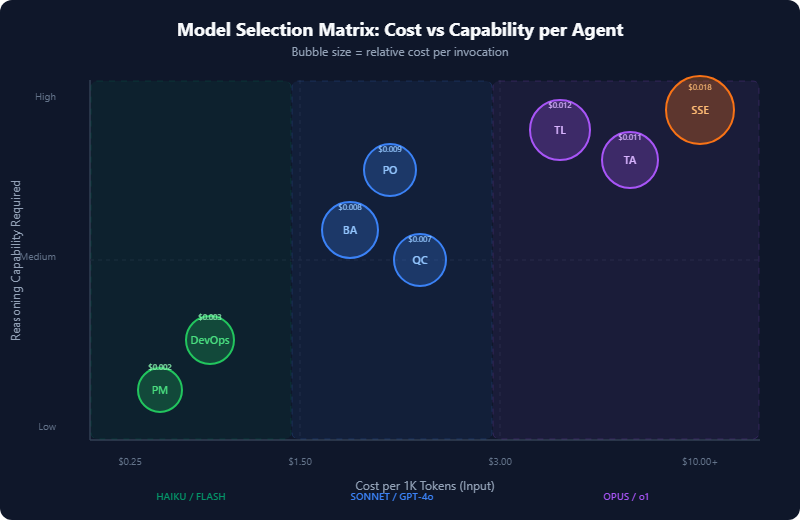
The Model Selection Matrix
Here is the full matrix I use. Prices are based on April 2026 API rates.
| Agent | Role | Recommended Model | Reasoning Needed | Input Cost/1K tokens | Avg Tokens/Task | Cost/Task |
|---|---|---|---|---|---|---|
| PO (Alex) | Requirements clarification | Claude Sonnet | Medium-High | $0.003 | ~3,000 | $0.009 |
| BA (Jordan) | User story decomposition | Claude Sonnet | Medium | $0.003 | ~2,800 | $0.008 |
| QC (Sam) | Test case definition | Claude Sonnet | Medium | $0.003 | ~2,400 | $0.007 |
| TA (Morgan) | Architecture decisions | Claude Opus | High | $0.015 | ~3,500 | $0.011* |
| SSE (Riley) | Code generation | Claude Opus | High | $0.015 | ~5,000 | $0.018* |
| TL (Casey) | Code review | Claude Opus | High | $0.015 | ~4,000 | $0.012* |
| DevOps (Taylor) | Pipeline config | Claude Haiku | Low-Medium | $0.00025 | ~2,000 | $0.003 |
| PM (Drew) | Status reporting | Claude Haiku | Low | $0.00025 | ~1,500 | $0.002 |
*Includes output token costs, which are higher for Opus.
The logic behind each choice:
Opus for SSE, TA, TL: These agents need deep reasoning. The SSE writes production code with error handling, type safety, and test coverage. The TA makes architecture decisions that affect the entire system. The TL reviews code for subtle bugs and design flaws. Cutting corners here produces measurably worse output — I tested this extensively with Haiku and Sonnet, and the code quality dropped significantly.
Sonnet for PO, BA, QC: These agents do structured analysis — pattern recognition, decomposition, and template-following. Sonnet handles this well. The PO extracts requirements from briefs, the BA decomposes them into stories, and the QC writes test cases from stories. All of these follow relatively predictable patterns with clear input-output shapes.
Haiku for DevOps, PM: These agents produce formulaic output. DevOps generates pipeline YAML from templates. The PM formats data that already exists in TeamState into status reports. Haiku at $0.25/million input tokens is practically free for these tasks.
Implementing Model Selection in Code
Here is how to wire model selection into the BaseAgent we built in Part 4:
# config/models.py
from enum import Enum
from dataclasses import dataclass

class ModelTier(Enum):
    REASONING = "reasoning"      # Complex analysis, code generation
    BALANCED = "balanced"        # Structured analysis, decomposition
    EFFICIENT = "efficient"      # Templated output, formatting

@dataclass
class ModelConfig:
    model_id: str
    tier: ModelTier
    max_tokens: int
    cost_per_1k_input: float
    cost_per_1k_output: float

MODEL_REGISTRY: dict[ModelTier, ModelConfig] = {
    ModelTier.REASONING: ModelConfig(
        model_id="claude-opus-4-0-20250514",
        tier=ModelTier.REASONING,
        max_tokens=8192,
        cost_per_1k_input=0.015,
        cost_per_1k_output=0.075,
    ),
    ModelTier.BALANCED: ModelConfig(
        model_id="claude-sonnet-4-20250514",
        tier=ModelTier.BALANCED,
        max_tokens=8192,
        cost_per_1k_input=0.003,
        cost_per_1k_output=0.015,
    ),
    ModelTier.EFFICIENT: ModelConfig(
        model_id="claude-haiku-3-5-20250414",
        tier=ModelTier.EFFICIENT,
        max_tokens=4096,
        cost_per_1k_input=0.00025,
        cost_per_1k_output=0.00125,
    ),
}

AGENT_MODEL_MAP: dict[str, ModelTier] = {
    "po_agent": ModelTier.BALANCED,
    "ba_agent": ModelTier.BALANCED,
    "qc_agent": ModelTier.BALANCED,
    "ta_agent": ModelTier.REASONING,
    "sse_agent": ModelTier.REASONING,
    "tl_agent": ModelTier.REASONING,
    "devops_agent": ModelTier.EFFICIENT,
    "pm_agent": ModelTier.EFFICIENT,
}

def get_model_for_agent(agent_name: str) -> ModelConfig:
    tier = AGENT_MODEL_MAP.get(agent_name, ModelTier.BALANCED)
    return MODEL_REGISTRY[tier]
Update the BaseAgent to use this:
# agents/base.py (updated __init__)
from config.models import get_model_for_agent

class BaseAgent:
    def __init__(self, agent_name: str, **kwargs):
        self.agent_name = agent_name
        model_config = get_model_for_agent(agent_name)
        self.model_id = model_config.model_id
        self.max_tokens = model_config.max_tokens
        self._cost_tracker = CostTracker(model_config)
        # ... rest of init
2. Real Cost Breakdown
Let me show you the actual numbers from running a complete pipeline on a real project: a task management API with authentication, CRUD operations, and a simple dashboard. Ten user stories, full pipeline.
Cost Per Story (Single Pipeline Run)
Pipeline: "Build a task management app with auth and dashboard"
Stories generated: 10
Model mix: Opus (SSE, TA, TL) + Sonnet (PO, BA, QC) + Haiku (DevOps, PM)

Agent-by-agent breakdown for ONE story:
─────────────────────────────────────────
  PO  (clarification)     $0.009
  BA  (story writing)     $0.008
  QC  (test cases)        $0.007
  TA  (architecture)*     $0.003   ← amortized across 10 stories
  SSE (implementation)    $0.018
  TL  (code review)       $0.012
  DevOps (pipeline)*      $0.001   ← amortized across 10 stories
  PM  (status update)     $0.002
─────────────────────────────────────────
  TOTAL PER STORY:        $0.056 (after amortization, ~$0.06)

  × 10 stories =          $0.56 for the entire MVP

  With prompt caching:    $0.39 (30% reduction)
*TA and DevOps run once per project, not per story. Architecture decisions and pipeline config are shared across all stories.
The Human Comparison
Let me put that $0.56 in context. Here is what the same 10-story MVP costs with human teams, based on rates I have seen across Southeast Asia, Eastern Europe, and North America:
| Approach | Cost | Time | Notes |
|---|---|---|---|
| Solo senior dev (Vietnam) | $500–800 | 1–2 weeks | My actual rate range |
| Solo senior dev (US) | $2,000–4,000 | 1–2 weeks | Market rate |
| Small agency | $5,000–15,000 | 3–6 weeks | Includes PM overhead |
| AI team pipeline | $0.56 | ~8 minutes | API costs only |
Before you throw that table at your boss, let me be very clear about what it does and does not show. The AI pipeline cost of $0.56 is API cost only. It does not include:
- Your time reviewing and approving outputs at human checkpoints
- Infrastructure to run the pipeline (minimal — a $5/month VM handles it)
- The months you spent building and tuning the system (this series)
- Edge cases that require human intervention and rework
A realistic “total cost of ownership” for the AI pipeline, once it is built and running, is closer to $5–20 per MVP — still 100x cheaper than the human alternative, but not the absurd $0.56 headline number by itself.
ROI Calculation
Here is the math I use to justify this system to anyone who asks:
# roi_calculator.py
def calculate_roi():
    # Costs
    ai_cost_per_story = 0.06          # API cost
    human_review_time_hrs = 0.25       # 15 min per story review
    your_hourly_rate = 50              # Your opportunity cost
    review_cost = human_review_time_hrs * your_hourly_rate  # $12.50
    total_cost_per_story = ai_cost_per_story + review_cost   # $12.56

    # Value
    human_dev_cost_per_story = 150     # ~4hrs × $37.50/hr (mid-range)

    # ROI per story
    savings_per_story = human_dev_cost_per_story - total_cost_per_story
    roi_percentage = (savings_per_story / total_cost_per_story) * 100

    # At scale
    stories_per_month = 40
    monthly_savings = savings_per_story * stories_per_month

    return {
        "cost_per_story": total_cost_per_story,       # $12.56
        "savings_per_story": savings_per_story,         # $137.44
        "roi_percentage": roi_percentage,               # 1,094%
        "monthly_savings": monthly_savings,             # $5,497.60
        "break_even_stories": 1,                        # Immediate
    }
Even with conservative assumptions — including your review time at $50/hour — the ROI is over 1,000%. The system pays for itself on the first story.
3. Cost Optimization Tricks
The $0.56 number is already low, but there are four techniques that push it lower.
Trick 1: Prompt Caching
Anthropic’s prompt caching lets you cache the system prompt and reuse it across calls. Since our agents have large system prompts (the role definition, output schemas, tool descriptions), this saves 90% on those cached tokens.
# agents/base.py — enable prompt caching
import anthropic

class BaseAgent:
    def _build_messages(self, user_input: str) -> list[dict]:
        return [
            {
                "role": "user",
                "content": [
                    {
                        "type": "text",
                        "text": self.system_prompt,
                        "cache_control": {"type": "ephemeral"}
                    },
                    {
                        "type": "text",
                        "text": user_input,
                    }
                ],
            }
        ]
For our pipeline, prompt caching reduces costs by roughly 30% because the system prompts are substantial (800–2,000 tokens each) and reused across every story in a batch.
Trick 2: Model Fallback Chain
When Opus is overloaded or slow, fall back to Sonnet. When Sonnet is unavailable, fall back to Haiku. This is not just about reliability — it is about cost. If Sonnet can handle 80% of what Opus does for a given task, you save 80% on those calls.
# agents/base.py — model fallback
from tenacity import retry, stop_after_attempt, wait_exponential
import anthropic

class ModelFallbackChain:
    def __init__(self, primary: str, fallbacks: list[str]):
        self.chain = [primary] + fallbacks
        self.client = anthropic.Anthropic()

    async def invoke(self, messages: list, max_tokens: int) -> str:
        last_error = None
        for model_id in self.chain:
            try:
                response = self.client.messages.create(
                    model=model_id,
                    max_tokens=max_tokens,
                    messages=messages,
                )
                return response.content[0].text
            except anthropic.RateLimitError:
                last_error = f"Rate limited on {model_id}"
                continue
            except anthropic.APIStatusError as e:
                last_error = str(e)
                continue
        raise RuntimeError(f"All models failed. Last error: {last_error}")

# Usage
sse_chain = ModelFallbackChain(
    primary="claude-opus-4-0-20250514",
    fallbacks=[
        "claude-sonnet-4-20250514",
        "claude-haiku-3-5-20250414",
    ],
)
Trick 3: Prompt Compression
Long context windows are expensive. Before sending conversation history to an agent, compress it. Keep the structured data (user stories, code artifacts) but summarize the conversational back-and-forth.
# utils/compression.py
def compress_history(messages: list[dict], max_tokens: int = 2000) -> list[dict]:
    """Keep the last N messages and summarize earlier ones."""
    if estimate_tokens(messages) <= max_tokens:
        return messages

    # Always keep the first message (system context) and last 3 messages
    preserved = [messages[0]] + messages[-3:]
    middle = messages[1:-3]

    if not middle:
        return preserved

    summary = f"[Previous {len(middle)} messages summarized: "
    summary += "Agent received requirements, clarified scope, "
    summary += "identified key constraints and produced structured output.]"

    return [
        preserved[0],
        {"role": "user", "content": summary},
        *preserved[1:],
    ]

def estimate_tokens(messages: list[dict]) -> int:
    """Rough estimate: 1 token ≈ 4 characters."""
    total_chars = sum(len(str(m.get("content", ""))) for m in messages)
    return total_chars // 4
Trick 4: Batch Story Processing
Instead of running the full pipeline for each story sequentially, batch stories that share context. The TA agent produces one architecture spec for all stories. DevOps produces one pipeline config. Only the per-story agents (SSE, QC, TL) run individually.
# pipeline/batch.py
async def run_batched_pipeline(stories: list[UserStory], state: TeamState):
    # Phase 1: Run once for the whole project
    arch_spec = await ta_agent.run(state)
    pipeline_config = await devops_agent.run(state)

    # Phase 2: Run per-story, with parallelism where possible
    results = []
    for story in stories:
        story_state = state.with_story(story)
        story_state.architecture = arch_spec
        story_state.pipeline = pipeline_config

        # QC and SSE can start in parallel for independent stories
        qc_result, sse_result = await asyncio.gather(
            qc_agent.run(story_state),
            sse_agent.run(story_state),
        )

        # TL review must wait for SSE
        tl_result = await tl_agent.run(
            story_state.with_code(sse_result)
        )

        results.append((story, qc_result, sse_result, tl_result))

    # Phase 3: PM summary once
    await pm_agent.run(state.with_results(results))
    return results
4. Rate Limiting and Resilience
Production APIs have rate limits. Anthropic’s limits vary by tier, but even on the highest tier, you will hit them if you run eight agents concurrently across multiple stories. Here is how to handle it.
Rate Limiting with Tenacity
# utils/resilience.py
from tenacity import (
    retry,
    stop_after_attempt,
    wait_exponential,
    retry_if_exception_type,
)
import anthropic

# Retry on rate limits with exponential backoff
@retry(
    retry=retry_if_exception_type(anthropic.RateLimitError),
    wait=wait_exponential(multiplier=1, min=2, max=60),
    stop=stop_after_attempt(5),
    before_sleep=lambda retry_state: logger.warning(
        f"Rate limited. Retry {retry_state.attempt_number}/5 "
        f"in {retry_state.next_action.sleep:.1f}s"
    ),
)
async def call_with_retry(client, **kwargs):
    return client.messages.create(**kwargs)
Token Budget Enforcement
Set hard limits so a runaway agent does not burn your API budget:
# utils/budget.py
from dataclasses import dataclass, field
from datetime import datetime, timedelta

@dataclass
class BudgetGuard:
    max_cost_per_run: float = 5.00       # $5 max per pipeline run
    max_cost_per_hour: float = 20.00      # $20/hr ceiling
    max_tokens_per_agent: int = 50_000    # Per-agent token limit
    _spent: float = field(default=0.0, init=False)
    _hourly_spent: float = field(default=0.0, init=False)
    _hour_start: datetime = field(default_factory=datetime.now, init=False)

    def check_budget(self, estimated_cost: float) -> bool:
        # Reset hourly counter if needed
        if datetime.now() - self._hour_start > timedelta(hours=1):
            self._hourly_spent = 0.0
            self._hour_start = datetime.now()

        if self._spent + estimated_cost > self.max_cost_per_run:
            raise BudgetExceededError(
                f"Run budget exceeded: ${self._spent:.2f} + "
                f"${estimated_cost:.2f} > ${self.max_cost_per_run:.2f}"
            )
        if self._hourly_spent + estimated_cost > self.max_cost_per_hour:
            raise BudgetExceededError(
                f"Hourly budget exceeded: ${self._hourly_spent:.2f}/hr"
            )
        return True

    def record_spend(self, cost: float):
        self._spent += cost
        self._hourly_spent += cost

class BudgetExceededError(Exception):
    pass
5. Observability with Langfuse
You cannot optimize what you cannot measure. Langfuse is open-source LLM observability — it traces every agent call, records token usage, latency, cost, and lets you debug failed runs.
Setup
pip install langfuse
# observability/tracing.py
from langfuse import Langfuse
from langfuse.decorators import observe, langfuse_context
from functools import wraps

langfuse = Langfuse(
    public_key="pk-...",
    secret_key="sk-...",
    host="https://cloud.langfuse.com",  # or self-hosted
)

def trace_agent(agent_name: str):
    """Decorator to trace agent invocations in Langfuse."""
    def decorator(func):
        @wraps(func)
        @observe(name=agent_name)
        async def wrapper(self, state, *args, **kwargs):
            langfuse_context.update_current_observation(
                metadata={
                    "agent": agent_name,
                    "model": self.model_id,
                    "story_id": getattr(state, "current_story_id", None),
                },
            )
            result = await func(self, state, *args, **kwargs)

            # Log token usage
            langfuse_context.update_current_observation(
                usage={
                    "input": result.input_tokens,
                    "output": result.output_tokens,
                    "total": result.input_tokens + result.output_tokens,
                },
                output=str(result.output)[:500],
            )
            return result
        return wrapper
    return decorator
Using the Decorator
# agents/sse_agent.py
class SSEAgent(BaseAgent):
    @trace_agent("sse_agent")
    async def run(self, state: TeamState) -> CodeArtifact:
        # ... existing implementation
        pass
What Langfuse Shows You
Once wired up, you get:
- Cost per pipeline run — broken down by agent
- Latency per agent — which agent is the bottleneck?
- Token usage trends — are prompts growing over time?
- Error rates — which agents fail most often?
- Trace waterfall — the full sequence of agent calls for debugging
This is not optional for production. Without observability, you are flying blind.
6. Production Checklist
Here is the checklist I use before deploying any AI pipeline to production. Every item is here because I learned it the hard way.
Security
☐ API keys stored in environment variables, never in code
☐ All agent outputs sanitized before execution (especially SSE code output)
☐ No secrets in TeamState (credentials, tokens, etc.)
☐ Rate limiting on any external-facing API endpoints
☐ Input validation on client briefs (max length, content filtering)
☐ Sandboxed code execution for SSE output (Docker container, no host access)
# security/sandbox.py
import subprocess

def execute_generated_code(code: str, timeout: int = 30) -> str:
    """Run SSE-generated code in a sandboxed Docker container."""
    result = subprocess.run(
        [
            "docker", "run",
            "--rm",
            "--network=none",          # No network access
            "--memory=512m",           # Memory limit
            "--cpus=1",                # CPU limit
            "--read-only",             # Read-only filesystem
            "--tmpfs", "/tmp:size=64m",
            "python:3.12-slim",
            "python", "-c", code,
        ],
        capture_output=True,
        text=True,
        timeout=timeout,
    )
    return result.stdout if result.returncode == 0 else result.stderr
Reliability
☐ Retry logic on all LLM calls (tenacity, exponential backoff)
☐ Model fallback chains for every agent
☐ Budget guards with hard limits
☐ Graceful degradation: if one agent fails, skip and continue
☐ State checkpointing: resume from last successful agent
☐ Timeout on every LLM call (120s max)
☐ Dead letter queue for failed pipeline runs
Observability
☐ Langfuse (or equivalent) tracing on every agent call
☐ Cost tracking per run, per agent, per day
☐ Alerting when cost exceeds threshold
☐ Structured logging (JSON) for all pipeline events
☐ Dashboard for pipeline health (success rate, avg latency, cost)
Testing
☐ Unit tests for every agent with mocked LLM responses
☐ Integration test: full pipeline with a known brief
☐ Regression tests: saved inputs → expected output structure
☐ Cost regression: alert if a pipeline run costs >2x historical average
☐ Prompt regression: version-control all system prompts
# tests/test_pipeline_cost.py
import pytest

@pytest.fixture
def known_brief():
    return "Build a simple todo app with user authentication."

async def test_pipeline_cost_within_budget(known_brief):
    """Ensure pipeline cost stays within expected range."""
    result = await run_pipeline(known_brief)
    assert result.total_cost < 1.00, (
        f"Pipeline cost ${result.total_cost:.2f} exceeds $1.00 budget"
    )

async def test_all_agents_produce_output(known_brief):
    """Every agent must produce a non-empty artifact."""
    result = await run_pipeline(known_brief)
    for agent_name, artifact in result.artifacts.items():
        assert artifact is not None, f"{agent_name} produced no output"
        assert len(str(artifact)) > 50, f"{agent_name} output too short"
7. The Cost Tracker
Tie it all together with a real-time cost tracker that records every API call:
# observability/cost_tracker.py
from dataclasses import dataclass, field
from datetime import datetime
import json

@dataclass
class CostEvent:
    agent: str
    model: str
    input_tokens: int
    output_tokens: int
    cost: float
    timestamp: str = field(default_factory=lambda: datetime.now().isoformat())

class CostTracker:
    def __init__(self, model_config):
        self.model_config = model_config
        self.events: list[CostEvent] = []

    def record(self, agent: str, input_tokens: int, output_tokens: int):
        cost = (
            (input_tokens / 1000) * self.model_config.cost_per_1k_input
            + (output_tokens / 1000) * self.model_config.cost_per_1k_output
        )
        event = CostEvent(
            agent=agent,
            model=self.model_config.model_id,
            input_tokens=input_tokens,
            output_tokens=output_tokens,
            cost=cost,
        )
        self.events.append(event)
        return event

    def total_cost(self) -> float:
        return sum(e.cost for e in self.events)

    def summary(self) -> dict:
        by_agent = {}
        for e in self.events:
            by_agent.setdefault(e.agent, 0.0)
            by_agent[e.agent] += e.cost
        return {
            "total": self.total_cost(),
            "by_agent": by_agent,
            "num_calls": len(self.events),
        }

    def export_jsonl(self, path: str):
        with open(path, "a") as f:
            for event in self.events:
                f.write(json.dumps(event.__dict__) + "\n")
8. What Comes Next: The Roadmap
This system works. But it is version 1. Here is what I am building next.
Multi-Tenant Support
Right now, the pipeline processes one project at a time. The next version adds tenant isolation — multiple clients, multiple projects, running concurrently with separate state, budgets, and observability.
# Future: multi-tenant pipeline runner
@dataclass
class TenantConfig:
    tenant_id: str
    budget_limit: float
    model_overrides: dict[str, ModelTier]  # Per-tenant model selection
    callback_url: str                       # Webhook for completion

async def run_for_tenant(tenant: TenantConfig, brief: str):
    state = TeamState(tenant_id=tenant.tenant_id)
    budget = BudgetGuard(max_cost_per_run=tenant.budget_limit)
    # Apply tenant-specific model selections
    for agent, tier in tenant.model_overrides.items():
        AGENT_MODEL_MAP[agent] = tier
    return await run_pipeline(brief, state=state, budget=budget)
Fine-Tuning Agent Prompts
After 100+ pipeline runs, I have enough data to fine-tune. The plan: take the best PO outputs (highest downstream success rate) and use them to fine-tune a smaller model. If Haiku fine-tuned on great PO outputs matches Sonnet quality, that agent’s cost drops by 12x.
Voice Interface
The human checkpoint gates currently require typing. The next version adds a voice interface — the PM agent calls you, reads the status report, and you approve or reject by speaking. This is not science fiction; it is a Twilio integration with Whisper transcription.
Self-Improving Prompts
Track which pipeline runs produce the best output (measured by: TL approval rate, test pass rate, human satisfaction score). Use that data to automatically evolve system prompts. The agents get better over time without manual prompt engineering.
9. A Personal Note
I want to end this series with something honest.
When I started building this system, more than a few people told me I was building my own replacement. “You are automating yourself out of a job,” one colleague said, not unkindly.
After three months of building, testing, and using this system, I can tell you with certainty: that is not what happened.
What happened is this. The AI team handles the parts of software development that are necessary but predictable — the initial draft of requirements, the first pass of test cases, the boilerplate code, the pipeline configuration, the status reports. These are real work. They take real time. But they are not the work that makes a senior developer valuable.
What makes a senior developer valuable is judgment. Knowing which feature to cut. Recognizing when the architecture will not scale before it is built. Sensing that a client’s stated requirement hides an unstated need. Making the call to stop building and start shipping.
The AI team cannot do any of that. Not yet, maybe not ever. What it does is free me to spend all of my time on the work that requires judgment, instead of splitting my attention across eight roles.
I am not replaced. I am amplified.
If you are a solo developer or a small team lead, this system is not your replacement. It is your force multiplier. It turns one senior developer into a team of eight, running at the speed of API calls, for less than the cost of a cup of coffee.
Build it. Use it. And spend the time it saves you on the hard problems — the ones that still need a human brain.
10. The Complete Series
Here is every part, in order. If you have read them all, thank you. If you are starting here, go back to Part 1 — each part builds on the last.
| Part | Title | What You Build |
|---|---|---|
| Part 1 | Why Simulate a Dev Team with Agents? | The vision and motivation |
| Part 2 | LangGraph vs AutoGen vs CrewAI | Framework selection |
| Part 3 | Architecture, DDD, and Communication | System design with DDD |
| Part 4 | The Base Agent and Tool System | BaseAgent class and tool integration |
| Part 5 | PO and BA Agents | Requirements to user stories |
| Part 6 | QC and TA Agents | Test cases and architecture, parallel fan-out |
| Part 7 | SSE Agent: Code Generation | Production code from specs |
| Part 8 | TL Agent: Code Review | Automated code review loop |
| Part 9 | DevOps Agent: CI/CD Pipelines | Pipeline generation and deployment |
| Part 10 | PM Agent: Orchestration and Reporting | Status tracking and coordination |
| Part 11 | Human-in-the-Loop and Error Recovery | Checkpoints, approvals, failure handling |
| Part 12 (this post) | Cost, Model Selection, and Production | Cost optimization, observability, production readiness |
Final Thoughts
Three months ago, I sat down with a blank Python file and an idea: what if I could build the team, instead of being the team?
Twelve articles later, the answer is yes. Not perfectly. Not without human oversight. Not without careful cost management and production hardening. But yes.
The total system is roughly 3,000 lines of Python. It uses LangGraph for orchestration, Anthropic’s Claude models for reasoning, Pydantic for data validation, Langfuse for observability, and tenacity for resilience. It takes a one-paragraph client brief and produces deployed, tested software — requirements documents, user stories, test cases, architecture decisions, production code, code reviews, CI/CD pipelines, and project status reports.
And it costs less than a dollar per MVP.
The future I see is not AI replacing developers. It is AI teams working alongside human teams — handling the predictable work at machine speed, so humans can focus on the creative and strategic work that still requires a brain made of neurons, not parameters.
Thank you for reading. Now go build something.
— Thuan
Related reading
07 Oct 2026 · 4 min read
ai
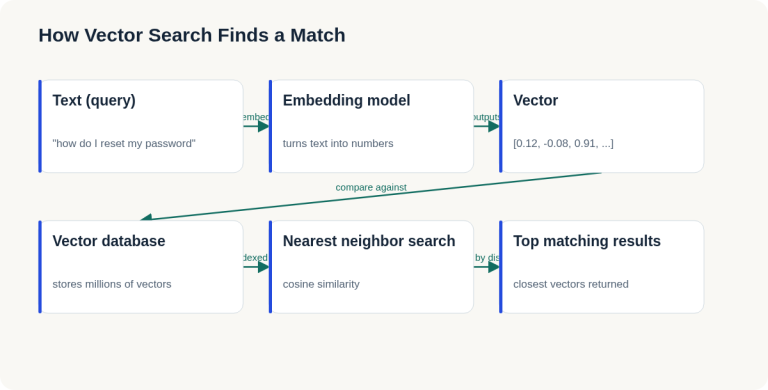
English Lesson — Tuesday Morning: Embeddings & Vector Search Vocabulary
Daily English practice for tech professionals: embed, vector database, and nearest neighbor search vocabulary with pronunciation and exercises.
Read more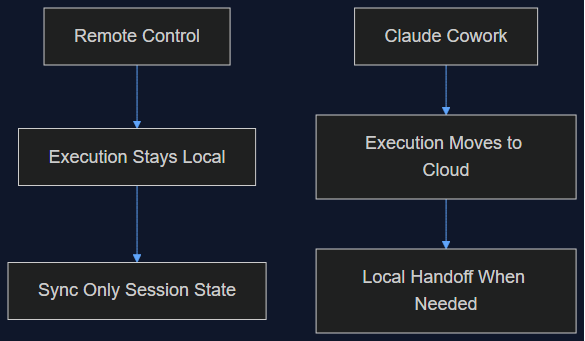
06 Oct 2026 · 5 min read
agentic coding
Claude Cowork Just Did the Thing I Said Remote Control Wasn't Doing
In August I wrote that Claude Code's Remote Control was a sync layer, not a cloud migration, and that keeping execution local was the point. This week Anthropic moved Cowork's execution to the cloud by default. Here's why both were the right call — for different products.
Read more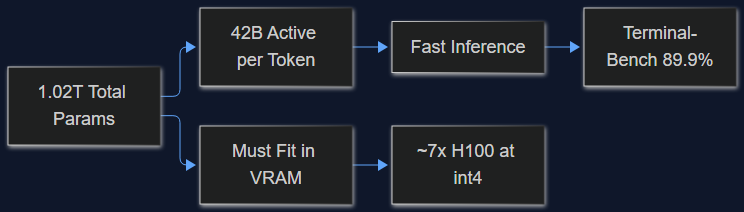
03 Oct 2026 · 4 min read
ai
MiMo-V2.6-Pro Is MIT-Licensed and 1.02T Params — I Ran the Self-Hosting Math
Xiaomi's new open-weight model tops Terminal-Bench 2.1 at 89.9% and jumps from 19.0 to 71.9 on DeepSWE. Before you get excited about MIT licensing, here's what 1.02T total params vs. 42B active params actually costs you in hardware.
Read more
Discussion
Comments are reviewed before publication. Your email is kept private.