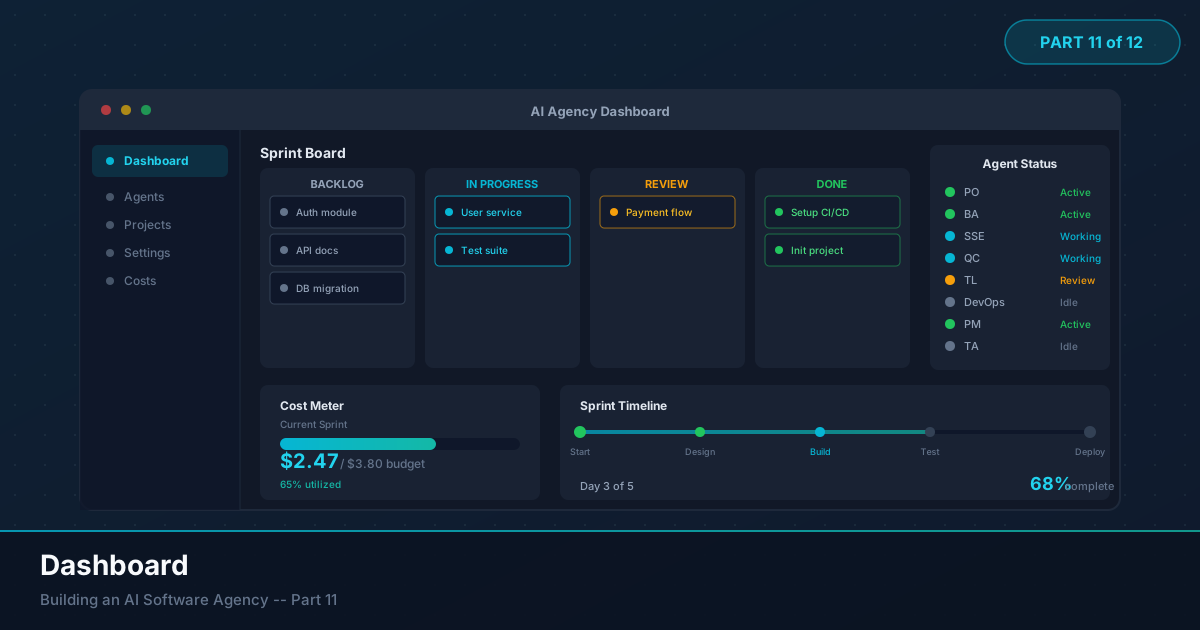
The first time I ran the full pipeline end-to-end, I stared at a terminal scrolling JSON for twelve minutes. I had no idea which agents were done, which were running, or whether the SSE was writing code or stuck in a retry loop. The system was a black box with a blinking cursor.
I added print() statements. Then timestamps. Then Rich colored output. Then I gave up and built a dashboard.
That dashboard changed how I work with the system more than any single agent improvement. Visibility changes behavior. When you can see the SSE consuming tokens for four minutes on a function that should take thirty seconds, you intervene. When you see 60% of your budget going to a poorly constrained prompt, you fix it. When a checkpoint shows the full context of what an agent produced, you make better approval decisions.
In this article, we build the entire thing: event model, persistent store, cost tracking, Kanban board, live token streaming, and human checkpoint approval. All in Streamlit.
1. Why You Need a Dashboard
Let me be specific about the problems a dashboard solves.
Invisible state. Eight agents, each with its own lifecycle. Without a dashboard, you reconstruct state from grep-ing log timestamps. That does not scale past two agents.
Untracked costs. The meter is running on every LLM call. Without per-agent cost tracking, you cannot tell if 80% of your budget goes to the SSE writing code or the PO stuck in a retry loop.
Checkpoint friction. Terminal-based approval (“approve? y/n”) lacks context. You need to see what was produced and where it fits in the pipeline to make good decisions.
No project-level view. Logs show what one agent is doing. A Kanban board shows where the project stands.

2. The AgentEvent Model
Every piece of information the dashboard displays comes from a single source: events. When an agent starts, it emits an event. When it finishes, event. When tokens stream in, event. When a checkpoint is reached, event. The dashboard is just a view layer over a stream of events.
We already have domain events from Part 3. Now we formalize them into a model the dashboard can query.
# dashboard/models.py
from dataclasses import dataclass, field
from datetime import datetime
from enum import Enum
from typing import Any


class EventType(str, Enum):
    AGENT_STARTED = "agent_started"
    AGENT_COMPLETED = "agent_completed"
    AGENT_FAILED = "agent_failed"
    TOKENS_USED = "tokens_used"
    CHECKPOINT_REACHED = "checkpoint_reached"
    CHECKPOINT_RESOLVED = "checkpoint_resolved"
    TASK_MOVED = "task_moved"
    TOKEN_STREAM = "token_stream"


class TaskStatus(str, Enum):
    BACKLOG = "backlog"
    IN_PROGRESS = "in_progress"
    DONE = "done"
    BLOCKED = "blocked"


@dataclass
class AgentEvent:
    event_type: EventType
    agent_name: str
    agent_role: str
    timestamp: datetime = field(default_factory=datetime.utcnow)
    data: dict[str, Any] = field(default_factory=dict)
    event_id: str = field(default_factory=lambda: __import__('uuid').uuid4().hex)

    def to_dict(self) -> dict:
        return {
            "event_id": self.event_id,
            "event_type": self.event_type.value,
            "agent_name": self.agent_name,
            "agent_role": self.agent_role,
            "timestamp": self.timestamp.isoformat(),
            "data": self.data,
        }
The key design decision: events are immutable and append-only. The dashboard never modifies events. It reads them, aggregates them, and renders views. This means we can replay events to reconstruct any point-in-time view of the system — useful for debugging and post-mortem analysis.
3. EventStore: SQLite Persistence
We need somewhere to store events. SQLite is the right choice here: zero configuration, file-based, handles concurrent reads well enough for a single-user dashboard, and the json extension handles our data field natively.
# dashboard/event_store.py
import json
import sqlite3
from datetime import datetime
from pathlib import Path
from typing import Optional

from .models import AgentEvent, EventType, TaskStatus


class EventStore:
    def __init__(self, db_path: str = "events.db"):
        self.db_path = db_path
        self._init_db()

    def _init_db(self):
        with self._conn() as conn:
            conn.execute("""
                CREATE TABLE IF NOT EXISTS events (
                    event_id TEXT PRIMARY KEY,
                    event_type TEXT NOT NULL,
                    agent_name TEXT NOT NULL,
                    agent_role TEXT NOT NULL,
                    timestamp TEXT NOT NULL,
                    data TEXT NOT NULL DEFAULT '{}'
                )
            """)
            conn.execute("""
                CREATE INDEX IF NOT EXISTS idx_events_type
                ON events(event_type)
            """)
            conn.execute("""
                CREATE INDEX IF NOT EXISTS idx_events_agent
                ON events(agent_name)
            """)

    def _conn(self) -> sqlite3.Connection:
        conn = sqlite3.connect(self.db_path)
        conn.row_factory = sqlite3.Row
        return conn

    def append(self, event: AgentEvent):
        with self._conn() as conn:
            conn.execute(
                """INSERT OR IGNORE INTO events
                   (event_id, event_type, agent_name, agent_role, timestamp, data)
                   VALUES (?, ?, ?, ?, ?, ?)""",
                (
                    event.event_id,
                    event.event_type.value,
                    event.agent_name,
                    event.agent_role,
                    event.timestamp.isoformat(),
                    json.dumps(event.data),
                ),
            )

    def get_events(self, event_type=None, agent_name=None,
                   since=None, limit=500) -> list[dict]:
        query, params = "SELECT * FROM events WHERE 1=1", []
        if event_type:
            query += " AND event_type = ?"; params.append(event_type.value)
        if agent_name:
            query += " AND agent_name = ?"; params.append(agent_name)
        if since:
            query += " AND timestamp > ?"; params.append(since.isoformat())
        query += " ORDER BY timestamp DESC LIMIT ?"; params.append(limit)
        with self._conn() as conn:
            rows = conn.execute(query, params).fetchall()
        return [{**dict(r), "data": json.loads(r["data"])} for r in rows]

    def get_latest_by_agent(self) -> dict[str, dict]:
        with self._conn() as conn:
            rows = conn.execute("""
                SELECT e.* FROM events e INNER JOIN (
                    SELECT agent_name, MAX(timestamp) as max_ts
                    FROM events GROUP BY agent_name
                ) latest ON e.agent_name = latest.agent_name
                    AND e.timestamp = latest.max_ts
            """).fetchall()
        return {r["agent_name"]: {**dict(r), "data": json.loads(r["data"])}
                for r in rows}

    def get_pending_checkpoints(self) -> list[dict]:
        with self._conn() as conn:
            reached = conn.execute(
                "SELECT * FROM events WHERE event_type='checkpoint_reached'"
                " ORDER BY timestamp DESC").fetchall()
            resolved = {json.loads(r["data"]).get("checkpoint_id")
                        for r in conn.execute(
                "SELECT data FROM events"
                " WHERE event_type='checkpoint_resolved'").fetchall()}
        return [{**dict(r), "data": json.loads(r["data"])} for r in reached
                if json.loads(r["data"]).get("checkpoint_id") not in resolved]
The EventStore is intentionally simple. No ORM, no migrations, no connection pooling. For production scale, swap SQLite for PostgreSQL — the interface stays the same.
4. CostTracker: Know Where Your Money Goes
This is the class I wish I had built on day one. The CostTracker reads token usage events from the store and calculates costs using the pricing table for each model.
# dashboard/cost_tracker.py
from dataclasses import dataclass
from .event_store import EventStore
from .models import EventType


# Prices per 1M tokens (USD) as of early 2026
MODEL_PRICING: dict[str, dict[str, float]] = {
    "claude-sonnet-4-20250514": {"input": 3.00, "output": 15.00},
    "claude-haiku-3.5": {"input": 0.80, "output": 4.00},
    "claude-opus-4-20250918": {"input": 15.00, "output": 75.00},
    "gpt-4o": {"input": 2.50, "output": 10.00},
    "gpt-4o-mini": {"input": 0.15, "output": 0.60},
    "deepseek-v3": {"input": 0.27, "output": 1.10},
}


@dataclass
class AgentCost:
    agent_name: str
    agent_role: str
    input_tokens: int = 0
    output_tokens: int = 0
    total_cost: float = 0.0
    call_count: int = 0


class CostTracker:
    def __init__(self, store: EventStore, budget_limit: float = 5.00):
        self.store = store
        self.budget_limit = budget_limit

    def _calc_cost(
        self, model: str, input_tokens: int, output_tokens: int
    ) -> float:
        pricing = MODEL_PRICING.get(model, {"input": 3.0, "output": 15.0})
        input_cost = (input_tokens / 1_000_000) * pricing["input"]
        output_cost = (output_tokens / 1_000_000) * pricing["output"]
        return input_cost + output_cost

    def get_costs_by_agent(self) -> list[AgentCost]:
        events = self.store.get_events(event_type=EventType.TOKENS_USED)
        agents: dict[str, AgentCost] = {}
        for event in events:
            name = event["agent_name"]
            if name not in agents:
                agents[name] = AgentCost(
                    agent_name=name, agent_role=event["agent_role"]
                )
            ac = agents[name]
            data = event["data"]
            inp = data.get("input_tokens", 0)
            out = data.get("output_tokens", 0)
            model = data.get("model", "claude-sonnet-4-20250514")
            ac.input_tokens += inp
            ac.output_tokens += out
            ac.total_cost += self._calc_cost(model, inp, out)
            ac.call_count += 1
        return sorted(agents.values(), key=lambda a: a.total_cost, reverse=True)

    def get_total_cost(self) -> float:
        return sum(a.total_cost for a in self.get_costs_by_agent())

    def get_budget_pct(self) -> float:
        total = self.get_total_cost()
        return min((total / self.budget_limit) * 100, 100.0)

    def is_over_budget(self) -> bool:
        return self.get_total_cost() >= self.budget_limit
The pricing table is a simple dictionary — update it when model pricing changes. Unknown models fall back to Sonnet rates. The default budget_limit of $5 covers a typical full pipeline run with Sonnet-class models ($2-4). For Opus, multiply by 5x.
Emitting Cost Events from Your Agents
To feed the CostTracker, your agents need to emit TOKENS_USED events after each LLM call. Here is how that integrates with the BaseAgent from Part 4:
# Inside BaseAgent._call_llm()
async def _call_llm(self, messages, **kwargs):
    response = await self.client.messages.create(
        model=self.model,
        messages=messages,
        **kwargs
    )
    # Emit token usage event
    self.emit_event(AgentEvent(
        event_type=EventType.TOKENS_USED,
        agent_name=self.name,
        agent_role=self.role,
        data={
            "model": self.model,
            "input_tokens": response.usage.input_tokens,
            "output_tokens": response.usage.output_tokens,
        }
    ))
    return response
5. Streamlit Dashboard: The Full Application
Now the main event. The dashboard is a single Streamlit application with a three-column layout: active agent status on the left, Kanban board in the center, cost tracker on the right.
# dashboard/app.py
import streamlit as st
import time
from datetime import datetime, timedelta

from .event_store import EventStore
from .cost_tracker import CostTracker
from .models import EventType, TaskStatus, AgentEvent


# ── Page config ────────────────────────────────────────────────
st.set_page_config(
    page_title="AI Team Dashboard",
    page_icon="⚙",
    layout="wide",
    initial_sidebar_state="collapsed",
)

# ── Shared state ───────────────────────────────────────────────
store = EventStore()
tracker = CostTracker(store)

AGENT_ROLES = {
    "Alex": "Product Owner",
    "Jamie": "Business Analyst",
    "Sam": "QC Engineer",
    "Casey": "Tech Architect",
    "Jordan": "Sr. SW Engineer",
    "Riley": "Tech Lead",
    "Morgan": "DevOps Engineer",
    "Taylor": "Project Manager",
}


def get_agent_status(agent_name: str, latest: dict) -> str:
    if agent_name not in latest:
        return "idle"
    event = latest[agent_name]
    etype = event["event_type"]
    if etype == EventType.AGENT_STARTED.value:
        return "running"
    elif etype == EventType.AGENT_COMPLETED.value:
        return "done"
    elif etype == EventType.AGENT_FAILED.value:
        return "failed"
    elif etype == EventType.CHECKPOINT_REACHED.value:
        return "checkpoint"
    return "idle"


STATUS_COLORS = {
    "idle": "#64748b",
    "running": "#10b981",
    "done": "#6366f1",
    "failed": "#ef4444",
    "checkpoint": "#f59e0b",
}


# ── Custom CSS (dark theme) ─────────────────────────────────────
st.markdown("""
<style>
    .stApp { background-color: #0f172a; }
    .kanban-card { background:#1e293b; border-radius:8px; padding:10px 12px;
                   margin-bottom:8px; border-left:3px solid; }
    .kanban-card .title { color:#e2e8f0; font-size:13px; font-weight:600; }
    .kanban-card .meta { color:#64748b; font-size:11px; }
    .kanban-col-header { color:#94a3b8; font-size:12px; font-weight:700;
        text-transform:uppercase; letter-spacing:1px; padding-bottom:8px;
        border-bottom:2px solid #334155; margin-bottom:12px; }
    .cost-bar { background:#1e293b; border-radius:4px; height:20px; margin:4px 0; }
    .cost-bar-fill { height:100%; border-radius:4px; }
    .metric-box { background:#1e293b; border-radius:8px; padding:16px;
                  border:1px solid #334155; }
    .stream-box { background:#0a0f1a; border:1px solid #334155; border-radius:6px;
        padding:12px; font-family:monospace; font-size:12px; color:#6ee7b7;
        max-height:200px; overflow-y:auto; }
</style>
""", unsafe_allow_html=True)


# ── Layout ─────────────────────────────────────────────────────
st.markdown("### AI Team Dashboard")

col_agent, col_kanban, col_cost = st.columns([1, 2, 1])

latest_events = store.get_latest_by_agent()

# ── Column 1: Active Agent ─────────────────────────────────────
with col_agent:
    st.markdown("**Active Agent**")

    # Find the currently running agent
    active_agent = None
    for name, event in latest_events.items():
        if event["event_type"] == EventType.AGENT_STARTED.value:
            active_agent = name
            break

    if active_agent:
        role = AGENT_ROLES.get(active_agent, "Unknown")
        st.markdown(f"""
        <div class="metric-box">
            <span style="color:#a5b4fc;font-size:18px;font-weight:700">
                {active_agent}
            </span>
            <br/>
            <span style="color:#94a3b8;font-size:13px">{role}</span>
            <br/><br/>
            <span style="background:#10b981;color:#0f172a;padding:2px 10px;
                   border-radius:4px;font-size:11px;font-weight:600">
                RUNNING
            </span>
        </div>
        """, unsafe_allow_html=True)

        # Live token stream
        st.markdown("**Live Output**")
        stream_events = store.get_events(
            event_type=EventType.TOKEN_STREAM,
            agent_name=active_agent,
            limit=20,
        )
        stream_text = "\n".join(
            e["data"].get("chunk", "") for e in reversed(stream_events)
        )
        st.markdown(
            f'<div class="stream-box">{stream_text or "Waiting..."}</div>',
            unsafe_allow_html=True,
        )

        # Elapsed time
        started_events = store.get_events(
            event_type=EventType.AGENT_STARTED,
            agent_name=active_agent,
            limit=1,
        )
        if started_events:
            started_at = datetime.fromisoformat(started_events[0]["timestamp"])
            elapsed = datetime.utcnow() - started_at
            mins = int(elapsed.total_seconds() // 60)
            secs = int(elapsed.total_seconds() % 60)
            st.markdown(f"""
            <div class="metric-box" style="margin-top:12px">
                <span style="color:#94a3b8;font-size:11px">Elapsed</span><br/>
                <span style="color:#e2e8f0;font-family:monospace;font-size:20px">
                    {mins:02d}:{secs:02d}
                </span>
            </div>
            """, unsafe_allow_html=True)
    else:
        st.info("No agent currently running.")

    # ── Checkpoint approval UI ──────────────────────────────────
    st.markdown("---")
    st.markdown("**Checkpoints**")
    pending = store.get_pending_checkpoints()
    for cp in pending:
        data = cp["data"]
        cp_id = data.get("checkpoint_id", "unknown")
        agent = cp["agent_name"]
        st.warning(f"Checkpoint: {agent} -- {data.get('summary', 'Review')}")
        c1, c2 = st.columns(2)
        with c1:
            if st.button("Approve", key=f"approve_{cp_id}", type="primary"):
                store.append(AgentEvent(
                    event_type=EventType.CHECKPOINT_RESOLVED,
                    agent_name=agent, agent_role=AGENT_ROLES.get(agent, ""),
                    data={"checkpoint_id": cp_id, "decision": "approved"},
                ))
                st.rerun()
        with c2:
            if st.button("Reject", key=f"reject_{cp_id}"):
                feedback = st.text_input("Feedback", key=f"fb_{cp_id}")
                store.append(AgentEvent(
                    event_type=EventType.CHECKPOINT_RESOLVED,
                    agent_name=agent, agent_role=AGENT_ROLES.get(agent, ""),
                    data={"checkpoint_id": cp_id, "decision": "rejected",
                          "feedback": feedback},
                ))
                st.rerun()
    if not pending:
        st.caption("No pending checkpoints")


# ── Column 2: Kanban Board ─────────────────────────────────────
with col_kanban:
    st.markdown("**Kanban Board**")

    def get_tasks():
        board = {"backlog": [], "in_progress": [], "done": []}
        for name, role in AGENT_ROLES.items():
            status = get_agent_status(name, latest_events)
            desc = latest_events.get(name, {}).get("data", {}).get(
                "task_summary", role)
            task = {"agent": name, "role": role, "description": desc}
            if status == "done": board["done"].append(task)
            elif status in ("running", "checkpoint"): board["in_progress"].append(task)
            else: board["backlog"].append(task)
        return board

    def render_card(task, color):
        return (f'<div class="kanban-card" style="border-left-color:{color}">'
                f'<div class="title">{task["role"]}</div>'
                f'<div class="meta">{task["description"]}</div>'
                f'<div class="meta" style="color:{color}">{task["agent"]}</div>'
                f'</div>')

    board = get_tasks()
    k1, k2, k3 = st.columns(3)
    col_config = [
        (k1, "Backlog", "backlog", "#64748b"),
        (k2, "In Progress", "in_progress", "#10b981"),
        (k3, "Done", "done", "#6366f1"),
    ]
    for col, label, key, color in col_config:
        with col:
            st.markdown(f'<div class="kanban-col-header" '
                        f'style="border-color:{color}">{label}</div>',
                        unsafe_allow_html=True)
            for task in board[key]:
                st.markdown(render_card(task, color), unsafe_allow_html=True)
            if not board[key]:
                st.caption("Empty")


# ── Column 3: Cost Tracker ─────────────────────────────────────
with col_cost:
    st.markdown("**Cost Tracker**")

    total_cost = tracker.get_total_cost()
    budget_pct = tracker.get_budget_pct()
    bcolor = "#10b981" if budget_pct < 75 else (
        "#f59e0b" if budget_pct < 90 else "#ef4444")

    st.markdown(f"""
    <div class="metric-box">
        <span style="color:#94a3b8;font-size:11px">Total Spend</span><br/>
        <span style="color:#fbbf24;font-family:monospace;font-size:28px;
               font-weight:700">${total_cost:.2f}</span>
        <span style="color:#64748b"> / ${tracker.budget_limit:.2f}</span>
    </div>
    <div style="margin:12px 0"><div class="cost-bar">
        <div class="cost-bar-fill" style="width:{budget_pct}%;background:{bcolor}">
        </div></div>
        <span style="color:#94a3b8;font-size:11px">{budget_pct:.1f}% of budget</span>
    </div>
    """, unsafe_allow_html=True)
    if tracker.is_over_budget():
        st.error("Budget limit reached.")

    # Per-agent costs
    st.markdown("**Cost by Agent**")
    agent_costs = tracker.get_costs_by_agent()
    max_cost = max((a.total_cost for a in agent_costs), default=1.0) or 1.0
    for ac in agent_costs:
        w = (ac.total_cost / max_cost) * 100
        st.markdown(f"""<div style="margin:6px 0">
            <div style="display:flex;justify-content:space-between">
                <span style="color:#cbd5e1;font-size:12px">{ac.agent_name}</span>
                <span style="color:#94a3b8;font-family:monospace;font-size:11px">
                    ${ac.total_cost:.3f}</span></div>
            <div class="cost-bar"><div class="cost-bar-fill"
                 style="width:{w}%;background:#6366f1"></div></div>
            <span style="color:#475569;font-size:10px">
                {ac.input_tokens:,} in / {ac.output_tokens:,} out</span>
        </div>""", unsafe_allow_html=True)
    if not agent_costs:
        st.caption("No cost data yet")

    # Token summary
    ti = sum(a.input_tokens for a in agent_costs)
    to = sum(a.output_tokens for a in agent_costs)
    st.markdown(f"""<div class="metric-box" style="margin-top:16px">
        <span style="color:#94a3b8;font-size:11px">Tokens</span><br/>
        <span style="color:#64748b;font-family:monospace;font-size:12px">
            In: {ti:,} | Out: {to:,}</span><br/>
        <span style="color:#e2e8f0;font-family:monospace;font-weight:600">
            Total: {ti+to:,}</span>
    </div>""", unsafe_allow_html=True)


# ── Auto-refresh ───────────────────────────────────────────────
REFRESH_INTERVAL = 3  # seconds
time.sleep(REFRESH_INTERVAL)
st.rerun()
That is the complete dashboard application.
6. Design Decisions
Auto-refresh: The time.sleep(3) + st.rerun() loop is the simplest real-time mechanism. Streamlit reruns the full script on every interaction anyway — this just adds polling. For true WebSocket streaming, use st.write_stream(), but polling is simpler and sufficient for a local tool.
Raw HTML over Streamlit components: The Kanban cards and cost bars are raw HTML. Streamlit’s built-in components (st.metric, st.progress) have limited styling. Raw HTML gives full control over the dark theme, card borders, and compact layout. The trade-off: raw HTML elements are not interactive like Streamlit widgets, but for display-only elements, that is fine.
Event-driven separation: The dashboard imports zero agent code. It only reads events from SQLite. This means you can run the dashboard without the pipeline (review past runs), swap agent implementations freely, replay events for debugging, or copy the SQLite file to another machine.
Checkpoint flow: Clicking Approve writes a CHECKPOINT_RESOLVED event with decision: "approved". The pipeline polls the event store for resolution events. Reject includes a text input for feedback, which is stored in the event and passed back to the agent for revision — the same human-in-the-loop pattern from Part 8, but with a proper UI.
7. Wiring the Pipeline to the Dashboard
Your agents need to emit events at the right moments. Here is the integration pattern for the BaseAgent:
# agents/base_agent.py (additions)
class BaseAgent:
    def __init__(self, name, role, event_store: EventStore, **kwargs):
        # ... existing init ...
        self.event_store = event_store

    async def run(self, state):
        self.event_store.append(AgentEvent(
            event_type=EventType.AGENT_STARTED,
            agent_name=self.name,
            agent_role=self.role,
            data={"task_summary": self._get_task_summary(state)},
        ))
        try:
            result = await self._execute(state)
            self.event_store.append(AgentEvent(
                event_type=EventType.AGENT_COMPLETED,
                agent_name=self.name,
                agent_role=self.role,
                data={"task_summary": "Completed"},
            ))
            return result
        except Exception as e:
            self.event_store.append(AgentEvent(
                event_type=EventType.AGENT_FAILED,
                agent_name=self.name,
                agent_role=self.role,
                data={"error": str(e)},
            ))
            raise
For token streaming — showing the LLM’s output as it generates — you emit TOKEN_STREAM events from the streaming callback:
async def _stream_llm(self, messages, **kwargs):
    async with self.client.messages.stream(
        model=self.model, messages=messages, **kwargs
    ) as stream:
        full_response = ""
        async for chunk in stream.text_stream:
            full_response += chunk
            self.event_store.append(AgentEvent(
                event_type=EventType.TOKEN_STREAM,
                agent_name=self.name,
                agent_role=self.role,
                data={"chunk": chunk, "full_text": full_response[-200:]},
            ))
    return full_response
Note the full_text field keeps only the last 200 characters, preventing unbounded database growth.
8. Running the Dashboard
pip install streamlit # only additional dependencyproject/
dashboard/
__init__.py
app.py
models.py
event_store.py
cost_tracker.py
agents/
base_agent.py
...
events.db # created automaticallyLaunch
# Terminal 1: Run the pipeline
python -m agents.run_pipeline --brief "Build a task manager app"

# Terminal 2: Launch the dashboard
streamlit run dashboard/app.py --server.port 8501
The dashboard opens at http://localhost:8501. It auto-refreshes every three seconds. You will see agents appear on the Kanban board as they start and complete. Costs accumulate in real time. Checkpoints appear with approval buttons when reached.
Running With Demo Data
For testing without a live pipeline, seed the event store with sample events:
# scripts/seed_demo_events.py
from dashboard.event_store import EventStore
from dashboard.models import AgentEvent, EventType
from datetime import datetime, timedelta

store = EventStore()
now = datetime.utcnow()

# Completed agents
for name, role, mins, summary in [
    ("Alex", "Product Owner", 10, "Requirements doc complete"),
    ("Jamie", "Business Analyst", 8, "12 user stories defined"),
    ("Sam", "QC Engineer", 5, "38 test cases written"),
    ("Casey", "Tech Architect", 5, "Architecture spec finalized"),
]:
    store.append(AgentEvent(
        event_type=EventType.AGENT_COMPLETED,
        agent_name=name, agent_role=role,
        timestamp=now - timedelta(minutes=mins),
        data={"task_summary": summary},
    ))

# Currently running agent
store.append(AgentEvent(
    event_type=EventType.AGENT_STARTED,
    agent_name="Jordan", agent_role="Sr. SW Engineer",
    timestamp=now - timedelta(minutes=2),
    data={"task_summary": "Implementing auth module"},
))

# Token usage for cost tracking
for name, role, inp, out in [
    ("Alex", "Product Owner", 8200, 3400),
    ("Jamie", "Business Analyst", 12500, 5800),
    ("Jordan", "Sr. SW Engineer", 18400, 8200),
]:
    store.append(AgentEvent(
        event_type=EventType.TOKENS_USED,
        agent_name=name, agent_role=role,
        data={"model": "claude-sonnet-4-20250514",
              "input_tokens": inp, "output_tokens": out},
    ))

# Pending checkpoint
store.append(AgentEvent(
    event_type=EventType.CHECKPOINT_REACHED,
    agent_name="Jordan", agent_role="Sr. SW Engineer",
    data={"checkpoint_id": "cp-sse-001",
          "summary": "Auth module ready for review"},
))
print(f"Seeded events into {store.db_path}")
python scripts/seed_demo_events.py && streamlit run dashboard/app.py9. What You See When It Runs
A typical pipeline run unfolds like this on the dashboard: Alex (PO) appears in “In Progress,” streams the requirements doc, hits a checkpoint. You approve. Alex moves to “Done.” Jamie (BA) takes over, generates user stories, completes. Then Sam (QC) and Casey (TA) appear in “In Progress” simultaneously — the parallel fan-out from Part 6. Both complete within seconds of each other. Jordan (SSE) starts the longest phase, streaming actual code. The cost tracker shows the SSE agent consuming 60% of the budget. Riley (TL) reviews, Morgan (DevOps) configures CI/CD. Twelve minutes, eight cards in “Done,” total cost $2.47. The difference between watching this unfold on a dashboard versus staring at terminal output is the difference between driving with a windshield and driving with your eyes closed.
10. Extensions Worth Building
Three additions that pay for themselves quickly: a timeline view using st.plotly_chart with Plotly’s timeline figure to visualize agent durations and identify bottlenecks; an event log tab with a scrollable list of all events for debugging; and cost projection that estimates total spend based on current_cost + (remaining_agents * avg_cost_per_agent) and warns if it exceeds budget.
What Comes Next
The dashboard gives you eyes on the system. In Part 12, we bring it all together: deployment, end-to-end testing, and lessons learned from running this system in production.
Key Takeaways
-
Events are the foundation. Every dashboard feature — Kanban, costs, checkpoints, streaming — derives from a single stream of
AgentEventobjects. Design your events well and the dashboard writes itself. -
Cost visibility changes behavior. When you can see that one agent consumes 60% of your budget, you fix the prompt. Without visibility, you would never know.
-
Checkpoints need context. A terminal prompt asking “approve? y/n” is not enough. The dashboard shows what was produced, who produced it, and where it fits in the pipeline. Better context leads to better human decisions.
-
Separation matters. The dashboard imports zero agent code. It reads events from SQLite. This means you can run, replay, and debug independently of the pipeline.
-
Start simple. Three columns, raw HTML cards, a polling loop. No WebSockets, no React frontend, no GraphQL API. You can add complexity later if you need it. You probably will not.