My team spent three days watching an AI generate beautiful, production-quality code for a feature nobody asked for. We had clear acceptance criteria for the sprint. We had a well-structured backlog. But when the new AI coding tools arrived, everyone got excited and started prompting instead of planning. That’s when I realized we had a workflow problem, not a tooling problem.
That experience changed how I think about AI in software development. Not because the tools were bad — they were genuinely impressive. But because impressive tools in the hands of an undisciplined process produce impressive waste. And over the past year of integrating AI into real production workflows, I’ve found that the teams getting actual results aren’t the ones with the best tools. They’re the ones with the best habits.
This is the first post in a 13-part series where I’ll share everything I’ve learned — the wins, the failures, and the frameworks that actually hold up under pressure. Whether you’re a CTO evaluating AI adoption, a tech lead trying to make it work for your team, or a developer figuring out how to use these tools without losing your edge, this series is for you.
The Productivity Paradox
Let’s start with the uncomfortable truth. The marketing says 10x productivity. The conference talks say “the future of coding.” The vendor demos are genuinely stunning. But when you look at the actual data from teams in production, the picture is far more nuanced.
Some studies have found that experienced developers actually slow down initially when using AI coding assistants. That sounds counterintuitive until you’ve lived it. Senior developers have highly optimized workflows. They know their codebase. They have mental models of the architecture. When you insert an AI into that flow, there’s a context-switching cost. You’re now reading and evaluating AI suggestions instead of writing code you already know how to write. For routine tasks in familiar territory, the AI can feel like a well-meaning colleague who keeps interrupting you with suggestions you’ve already considered.
Other studies show real gains, but they’re concentrated in specific task types: boilerplate generation, writing tests for existing code, exploring unfamiliar APIs, and translating between languages. These are legitimate productivity improvements. But they’re a far cry from “AI writes your app while you drink coffee.”
Here’s what I’ve observed across several teams and projects. The productivity gains from AI tools follow a rough distribution:
- About 20% of teams see meaningful, sustained improvement (1.5x-3x for targeted tasks)
- About 50% of teams see marginal improvement that roughly breaks even with the overhead
- About 30% of teams actually lose productivity due to rework, debugging AI-generated code, and architectural drift
The gap between the first group and the last group isn’t the AI tool they chose. It’s not whether they’re using Claude, Copilot, Cursor, or something else. The difference is entirely in how they structured the work around the AI. The winning teams didn’t just adopt a tool — they adapted their process.
The real question isn’t “which AI coding tool should we buy?” It’s “what does our development workflow look like when AI is part of it?” And almost nobody is asking that question before they swipe the corporate card.
Introducing the 40-40-20 Model
After watching multiple teams succeed and fail with AI tools, I started noticing a pattern. The teams that got real value spent their time very differently from the teams that didn’t. I’ve distilled this into what I call the 40-40-20 model.
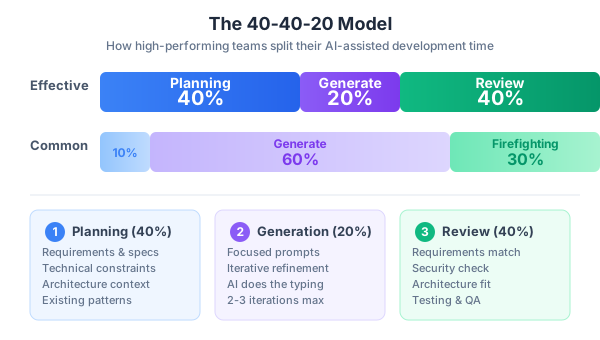
40% Planning. Before anyone opens an AI chat or writes a prompt, you invest serious time in requirements, context, constraints, and architecture decisions. This means writing clear acceptance criteria. It means documenting the interfaces your new code needs to conform to. It means identifying the patterns already in your codebase. It means thinking about edge cases, error handling, and security implications before the first line of code is generated.
20% Generation. This is the actual AI interaction — the prompting, iterating, and refining. Notice that this is the smallest slice. The AI interaction itself, when done well, is fast. But it’s only fast and effective when the planning has been thorough. A well-crafted prompt with clear context and constraints can produce usable code in minutes. A vague prompt produces code that looks right but is subtly wrong in ways that take hours to discover.
40% Review. After generation comes the hard work: testing the output, reviewing it line by line, checking it against your architecture, verifying security implications, and ensuring it matches your codebase conventions. This isn’t optional. This isn’t something you do “if you have time.” This is where you catch the bugs that AI confidently introduced. This is where you spot the dependency it imported that you don’t use anywhere else. This is where you notice it chose a pattern that contradicts what the rest of your team is doing.
Now here’s the problem. Most teams invert this model. What I typically see in practice looks more like:
- 10% Planning (“just prompt the AI and see what happens”)
- 60% Generation (endless prompt-refine cycles trying to get the AI to read your mind)
- 30% Firefighting (debugging AI code that almost works, fixing integration issues, dealing with inconsistent patterns)
The 60% generation time is the tell. When teams spend most of their time in the generation loop — prompting, reading output, prompting again, tweaking, prompting again — it’s almost always because the planning was insufficient. They’re trying to use the AI interaction itself as a substitute for thinking. And the AI is happy to oblige. It will generate code all day. It just won’t generate the right code unless you’ve done the upfront work to define what “right” means.
Planning time is the highest-leverage investment you can make in AI-assisted development. Every minute you spend clarifying requirements, documenting constraints, and defining interfaces before you prompt saves five minutes of rework after. I’ve seen this ratio play out consistently enough that I’d bet my quarterly bonus on it.
Here’s a concrete example. Let’s say you need to add a user notification system. The under-planned approach:
Prompt: "Add a notification system to my app"The AI will happily generate a complete notification system. It might be beautiful. It might even work in isolation. But it won’t know that your app uses a specific event bus pattern. It won’t know that notifications need to be persisted for compliance. It won’t know that your team decided last month to standardize on a specific library for real-time features. You’ll spend hours adapting the output or, worse, ship something inconsistent.
The planned approach starts with a document:
## Notification System Requirements
- Must integrate with existing EventBus (src/lib/events.ts)
- Notifications persisted to PostgreSQL (existing Drizzle ORM setup)
- Real-time delivery via existing Socket.io infrastructure
- Types: info, warning, error, success
- Users can mark as read, dismiss, or snooze
- Retention: 90 days per compliance requirement
- Must follow existing API pattern in src/routes/api/
Now when you prompt the AI with this context, the output is dramatically more useful. Not perfect — you’ll still review every line — but the gap between “generated” and “production-ready” shrinks from a canyon to a crack.
Meet the BuildRight Team
To make the concepts in this series concrete, I’m going to introduce a scenario that we’ll follow across all 10 posts. It’s fictional, but it’s built from the real situations I’ve encountered.
Meet Mei and Dan. Mei is a product owner with sharp business instincts and a clear vision. Dan is a senior developer with 10 years of experience and strong opinions about code quality. They’re building BuildRight, a project management SaaS for small construction companies — think of it as a purpose-built tool for contractors who’ve outgrown spreadsheets but find enterprise project management software overwhelming.
Mei has the market research. She knows the pain points: contractors lose track of change orders, material costs spiral without visibility, and project timelines slip because nobody has a unified view of dependencies. She’s mapped out the MVP: project dashboards, cost tracking, change order management, and a simple scheduling view.
Dan has the technical chops. He’s set up the stack, chosen the architecture, and started building the foundation. He’s also excited about AI tools. He’s been experimenting with AI coding assistants on side projects and he’s seen what they can do. He believes they can ship the MVP in half the time.
Here’s the tension. Mei wants speed — the market window is closing. Dan wants quality — his reputation is attached to this code. Both of them believe AI is the answer. And they’re both right, but only if they approach it correctly.
Speed without direction is just chaos with good syntax highlighting. That’s the lesson Mei and Dan will learn through this series, sometimes the hard way. They’ll make the mistakes I’ve seen real teams make: prompting before planning, accepting output without review, letting AI decisions drive architecture instead of the other way around. And they’ll course-correct using the frameworks and practices I’ll share in each post.
By following their journey, you’ll see AI-assisted development in context — not as isolated tricks and tips, but as a complete workflow applied to a realistic product build. When Mei and Dan argue about whether to trust an AI-generated database schema (and they will), you’ll recognize the same arguments happening on your own team.
Three Principles This Series Will Prove
Everything in the next nine posts builds on three core principles. I’m stating them upfront because I want you to test them against your own experience as you read.
Principle 1: AI is a multiplier, not magic
A multiplier amplifies what’s already there. Multiply a clear requirement by AI and you get useful code fast. Multiply confusion by AI and you get confident-sounding confusion — which is arguably worse than regular confusion, because it looks like progress.
If your team has strong engineering fundamentals — clean architecture, good testing habits, clear requirements — AI will accelerate you. If your team has weak fundamentals, AI will help you produce more poorly-architected, untested code faster. That’s not a productivity gain. That’s a liability acceleration.
This principle matters for leaders especially. The temptation is to think of AI tools as a way to compensate for process gaps. “We don’t have time for thorough requirements — the AI will figure it out.” “We’re behind on test coverage — but the AI can write tests.” These sound reasonable but they miss the point. The AI needs the same inputs that a skilled developer needs: clear context, defined constraints, and explicit acceptance criteria. Garbage in, garbage out hasn’t been repealed just because the garbage now comes with syntax highlighting.
Principle 2: Workflow before tools
This is the central thesis of the entire series. I’ve seen teams agonize over which AI tool to adopt — comparing features, running benchmarks, reading every blog post and tweet. Then they pick a tool and drop it into their existing workflow with zero adaptation. Six weeks later, they’re disappointed.
The right process with a mediocre tool beats the wrong process with the best tool. Every time. A team with clear planning habits, disciplined review practices, and well-defined coding standards will get value from almost any AI coding assistant. A team without those things will struggle with all of them.
This doesn’t mean tools don’t matter. They do. But tools are the easy part. You can evaluate and switch tools in a week. Building the habits and discipline to use them effectively takes months. Start with the workflow.
Principle 3: Human responsibility
This is the one that makes people uncomfortable. When AI generates code and you commit it, it’s your code now. You’re responsible for it. Not the AI company. Not the tool. You.
If the AI-generated code has a security vulnerability, it’s your security vulnerability. If it mishandles user data, it’s your data incident. If it uses a license-incompatible dependency, it’s your legal problem. The AI is a tool, like a compiler or a framework. You don’t blame your IDE when you ship a bug.
This principle has practical implications for how you structure your review process, how you think about testing, and how you document AI-assisted decisions. We’ll dig into all of this in later posts. For now, just internalize the mindset: every line of code you deploy, you own.
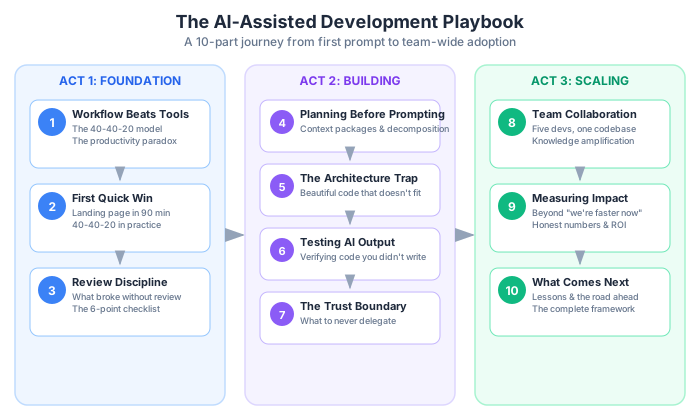
What This Series Covers
Here’s a quick roadmap of where we’re headed. Each post builds on the previous ones, but they’re also designed to stand alone if you want to jump to a specific topic.
In Post 2, we start with a quick win — Mei and Dan build a landing page for BuildRight in 90 minutes using AI, demonstrating what’s possible when the scope is small and well-defined. This is where you’ll see AI-assisted development work beautifully and learn the conditions that make it work.
Post 3 covers the review discipline — what happened when Dan got overconfident after that quick win and started skipping thorough reviews. Spoiler: things broke. You’ll learn a systematic review process that catches the subtle issues AI introduces.
Post 4 tackles the hardest sell in the entire series: planning before prompting. This is the 40% that nobody wants to invest in. You’ll get concrete templates and practices for the upfront work that makes everything downstream faster.
In Post 5, we confront the architecture trap — the seductive danger of AI generating code that’s technically correct but architecturally wrong. Dan will learn this lesson when a beautifully generated module doesn’t fit the rest of the system.
Post 6 focuses on testing AI-generated output. How do you verify code you didn’t write? How do you write tests for logic that was generated? We’ll cover strategies that go beyond “run the tests and see if they pass.”
Post 7 explores the trust boundary — the critical decisions and code paths where you should never delegate to AI. Security, authentication, financial calculations, and data handling all have patterns where human judgment is non-negotiable.
Post 8 scales from individual to team. When five developers are all using AI with different habits and conventions, your codebase becomes a Frankenstein. You’ll learn how to establish shared norms and consistent practices across a team.
Post 9 addresses measurement — because “we feel faster” isn’t evidence. You’ll get frameworks for measuring the actual impact of AI tools on your team’s output, quality, and velocity, going beyond vanity metrics to numbers that matter.
Finally, Post 10 steps back to look at what we’ve learned and where this is all heading. I’ll share my honest assessment of what AI-assisted development is good at today, where it still falls short, and what I’m watching for in the next 12-18 months.
The Bottom Line
If you take one thing from this post, let it be this: the teams winning with AI tools didn’t start by picking the best tool. They started by building the discipline to use any tool well. The 40-40-20 model — heavy investment in planning and review, with focused and efficient generation in between — is the foundation everything else rests on.
Before you read the rest of this series, run a quick diagnostic on your own situation. Here are five signs your AI workflow needs fixing:
-
You start prompting before writing requirements. If your first instinct when starting a new feature is to open the AI chat, you’re skipping the most valuable phase of the work. Write down what you’re building, why, and what constraints matter before you write a single prompt.
-
You accept AI output without reading every line. The AI is confident. Its code compiles. It even has comments. None of that means it’s correct. If you’re not reading every line of generated code with the same scrutiny you’d apply to a junior developer’s pull request, you’re accumulating hidden risk.
-
Your AI-generated code uses different patterns than your existing codebase. Open three recent AI-generated files and three human-written files from your project. If they look like they were written by different teams — different naming conventions, different error handling approaches, different structural patterns — your workflow is missing a critical alignment step.
-
You can’t explain why the AI made specific implementation choices. Pick a function the AI generated. Can you explain why it chose that data structure? Why it handled errors that way? Why it used that particular library method? If you can’t, you don’t understand the code well enough to maintain it, debug it, or extend it safely.
-
You measure AI productivity by lines of code generated. Lines of code is a vanity metric even for human-written code. For AI-generated code, it’s actively misleading. The AI can generate 500 lines in seconds. The question is whether those 500 lines move you closer to shipping a working product, or whether they create 500 lines of future maintenance burden.
If three or more of these ring true, you’re not alone. Most teams start here. The good news is that the fix isn’t complicated — it just requires discipline and a willingness to slow down in order to speed up.
For a detailed review of specific AI coding tools and how they fit into different workflows, see my companion post on AI coding assistants.
In the next post, we’ll watch Mei and Dan put AI-assisted development to work for the first time, building a landing page for BuildRight. It’s a small, contained task — the perfect starting point. You’ll see the 40-40-20 model in action, and you’ll get a feel for the rhythm of effective AI-assisted work. The results might surprise you. What they build in 90 minutes is genuinely good. What happens next, when they try to scale that success to bigger features without adapting their approach, is where the real lessons begin.
Let’s get to work.
This is Part 1 of a 13-part series: The AI-Assisted Development Playbook.
Series outline:
- Why Workflow Beats Tools — The productivity paradox and the 40-40-20 model (this post)
- Your First Quick Win — Landing page in 90 minutes (Part 2)
- The Review Discipline — What broke when I skipped review (Part 3)
- Planning Before Prompting — The 40% nobody wants to do (Part 4)
- The Architecture Trap — Beautiful code that doesn’t fit (Part 5)
- Testing AI Output — Verifying code you didn’t write (Part 6)
- The Trust Boundary — What to never delegate (Part 7)
- Team Collaboration — Five devs, one codebase, one AI workflow (Part 8)
- Measuring Real Impact — Beyond “we’re faster now” (Part 9)
- What Comes Next — Lessons and the road ahead (Part 10)
- Prompt Patterns — How to talk to AI effectively (Part 11)
- Debugging with AI — When AI code breaks in production (Part 12)
- AI Beyond Code — Requirements, docs, and decisions (Part 13)