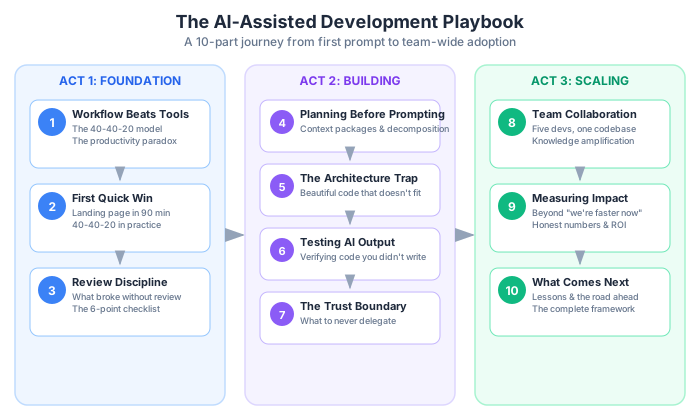
Ten posts ago, I said AI is a multiplier, not magic. After building an entire product with AI assistance — a landing page, an authentication system, a dashboard, team invitations, notifications, payment processing, and a team of five developers — I still believe that. But I’d add a caveat: AI is a multiplier that demands MORE discipline than working without it, not less. The teams that succeed with AI aren’t the ones using the fanciest tools. They’re the ones with the clearest processes.
This is the final post in the series. No new frameworks, no new techniques. Just an honest look back at everything we built, what we learned, what we got wrong, and where this is all heading.
Let’s close the book on BuildRight.
The BuildRight Retrospective
Over nine posts, Mei and Dan built a real product. Not a toy demo, not a tutorial project — a project management SaaS with paying users as the goal. Here’s what actually shipped:
- A landing page (Post 2) — shipped in 90 minutes. The first taste of the 40-40-20 workflow. Clean, fast, and confidence-building.
- User registration (Post 3) — shipped after a security incident that taught the team why review isn’t optional. The password stored in plain text. The redirect that leaked tokens. The lessons that stuck.
- Team invitations (Post 4) — the first feature where planning was done properly before a single prompt was written. Context packages, technical specs, constraints documented. It shipped cleanly.
- A notification system (Post 5) — originally generated as a beautiful microservice architecture that didn’t fit the monolith. Refactored. The Architecture Fit Checklist was born from this pain.
- A dashboard with tests (Post 6) — 47 tests generated by AI that all passed and tested almost nothing. Then real tests, written from requirements, that caught actual bugs.
- Payment processing (Post 7) — human-written, start to finish. Red zone. No AI generation for code that handles money. The trust boundary was drawn here.
- Team scaling to five developers (Post 8) — conventions documented, ADRs established, a shared workflow that turned individual productivity into team productivity.
- Measured results (Post 9) — 35% faster for standard features. Higher defect density in Month 1, lower by Month 3. Honest numbers, not marketing numbers.
Here’s my honest assessment: BuildRight is not perfect. Some of the generated code is elegant. Some of it is merely adequate. There are places where the architecture could be cleaner, where tests could be more thorough, where documentation could be more complete. That’s software development. It was true before AI, and it’s true with AI. The difference is that BuildRight shipped faster than it would have without AI assistance, and the team learned a workflow that compounds over time.
The product isn’t the point. The process is.
10 Lessons — One Per Post
If you read nothing else in this entire series, read this section. Every post distilled into one actionable lesson.
1. Workflow beats tools (from Part 1). The 40-40-20 model — 40% planning, 20% generation, 40% review — isn’t a suggestion. It’s the minimum discipline for AI-assisted development. I’ve watched teams try every AI tool on the market and still produce mediocre results because they had no process. Any AI tool works better when you plan before you prompt. This is the foundation everything else is built on.
2. Start with quick wins (from Part 2). Build confidence with low-risk, high-visibility tasks. A landing page in 90 minutes teaches the workflow without the stakes. Don’t start with your payment system. Don’t start with your authentication layer. Start with something where mistakes are cheap and success is visible. The goal of your first AI-assisted project isn’t productivity — it’s learning.
3. Review is non-negotiable (from Part 3). AI-generated code passes the “looks right” test. Your job is to apply the “is right” test. Every. Single. Time. This was the hardest lesson in the series. Dan skipped review because the code looked professional, the variable names were clean, the structure was logical. And it had a security vulnerability that would have exposed user data. Looking right and being right are different things. The review phase isn’t overhead. It’s the entire point.
4. Planning is the highest-leverage activity (from Part 4). A context package is worth more than a clever prompt. Requirements, technical spec, constraints, existing patterns — this is the input that determines the output quality. I’ve seen developers spend 30 minutes crafting the perfect prompt when they could have spent 30 minutes writing a clear spec and gotten better results with a simple prompt. The AI doesn’t need you to be clever. It needs you to be clear.
5. Architecture context prevents the most expensive mistakes (from Part 5). AI doesn’t know your codebase. It doesn’t know that you’re running a monolith, that you use a specific ORM, that your team agreed to avoid microservices for the first year. Tell it. Show it existing patterns. List what NOT to do. The Architecture Fit Checklist — does it match our patterns, scale, deployment model, and team knowledge — catches problems before they become rewrites. A 10-minute checklist saves weeks of refactoring.
6. Test what the AI can’t see (from Part 6). Write tests from requirements, not from implementation. AI tests happy paths because that’s what it’s been trained on — examples of things working correctly. You test edge cases, error states, and security boundaries because that’s where production code actually breaks. If your tests are generated from the same context as your implementation, they share the same blind spots. That’s not testing. That’s confirmation bias with extra steps.
7. Define your trust boundary before you need it (from Part 7). Green, yellow, red zones. Not everything should be AI-generated. Know where the line is before pressure makes you cross it. When the deadline is tomorrow and the payment integration isn’t done, that’s the wrong time to decide whether AI should write it. Define your boundaries when you’re calm and thinking clearly. Then respect them when you’re stressed and tempted to cut corners.
8. Team conventions scale; individual tricks don’t (from Part 8). Five documents: ADRs, code style guide, project context, PR checklist, onboarding guide. These turn individual AI productivity into team AI productivity. Dan was twice as productive with AI by Month 3. But when three new developers joined, they weren’t. Not until the team had shared conventions. Individual expertise is wonderful. Documented conventions are what actually scale.
9. Measure what matters, not what’s easy (from Part 9). Cycle time, defect rate, rework rate, team satisfaction, knowledge distribution. Not lines of code, not “time saved,” not how many prompts you ran. Vanity metrics tell you what you want to hear. Real metrics tell you what you need to know. The 35% improvement for BuildRight was real, but it only showed up in the numbers after accounting for the learning curve and the Month 1 defect spike.
10. Stay curious, stay skeptical, stay responsible (from Part 10 — this post). AI tools will change. New models, new capabilities, new paradigms. Some of the specific techniques in this series will become outdated. But the discipline of clear requirements, honest review, and personal responsibility won’t change. These are engineering fundamentals wearing new clothes. The developers who thrive will be the ones who stay curious about new tools, skeptical about new hype, and responsible for their output regardless of how it was generated.
What Mei Learned
I asked Mei to share her perspective after nine months with AI-assisted development. Here’s what she said, in her own words.
“The first thing I learned is that AI doesn’t replace planning — it rewards planning. Teams that plan well get exponential returns from AI. Teams that don’t plan get exponential mess. It’s that simple. Every hour we invested in clear requirements and context packages came back as hours saved in development and review. Every time we skipped planning to ‘move fast,’ we paid for it in rework.”
“The second thing — and this was a hard lesson — is that the biggest mistake is treating AI as a cost reduction tool. When I first pitched AI-assisted development to our stakeholders, I framed it as doing more with fewer developers. That was wrong. We didn’t reduce headcount. We increased output quality and speed. But that only happened because we invested in process. If I’d cut the team and relied on AI to fill the gap, we would have shipped worse software faster. That’s not a win.”
“The ROI is real but not instant. Budget for a 2-3 month learning curve. Our numbers looked worse in Month 1 than they did before we started. If I’d been measuring week-by-week, I might have killed the initiative. Instead, we gave the team space to learn, and by Month 3, the improvement was undeniable. Patience isn’t glamorous, but it’s necessary.”
“Here’s the thing nobody talks about: the most valuable artifact wasn’t the code AI generated — it was the team documentation we created to provide context to AI. The project context document, the architecture decision records, the code style guide — we wrote these to make AI more effective. But they made the humans more effective too. New team members onboarded faster. Code reviews were more consistent. Architectural decisions were traceable. The documentation we wrote for AI was really documentation we should have been writing all along.”
“Bottom line: I’d invest in AI again. But I’d invest in the workflow first. Buy the tools second. Build the process first.”
What Dan Learned
Dan’s perspective, also in his own words.
“The most important AI skill I developed wasn’t prompting. It was knowing when NOT to use AI. Payment processing, authentication, security-critical flows — these were all human-written. Every line, every test. That’s not a failure of AI. That’s wisdom about risk. The trust boundary we established in Post 7 wasn’t a limitation. It was a feature. Knowing what to delegate and what to own is the core competency of working with AI.”
“I’ll be honest about what AI actually changed for me day to day: it made boring tasks tolerable. CRUD endpoints, boilerplate configurations, repetitive data transformation patterns — these used to drain my energy. Two hours of tedious typing that required attention but not creativity. Now they’re a 20-minute task. And because the boring stuff takes less energy, I have more mental capacity for the interesting problems. Architecture decisions. Security analysis. Performance optimization. The work that actually matters.”
“The fear that AI would make me obsolete was wrong. Completely wrong. AI amplified the skills I already had. My architecture knowledge became more valuable because someone needs to evaluate whether AI-generated architecture fits the system. My security awareness became more valuable because someone needs to catch the vulnerabilities AI introduces. My code review expertise became more valuable because there’s more code to review and the bar for review quality is higher. The developers who should worry aren’t the experienced ones. They’re the ones who never developed these skills in the first place.”
“The learning curve was real, though. Month 1 was frustrating. I was slower with AI than without it. I was writing prompts, reviewing output, throwing away bad generations, rewriting context, and still ending up doing half the work manually. I almost gave up. Month 2 was break-even — I could feel the workflow clicking into place but the numbers didn’t show it yet. Month 3 was the payoff. The context packages were established, my review instincts were calibrated, and I could predict which tasks would benefit from AI and which wouldn’t. It took patience I wasn’t sure I had.”
“The biggest surprise? Writing project context documents made ME a better developer. When I had to articulate our naming conventions, our error handling patterns, our architectural constraints — I had to actually understand them deeply. There were patterns I’d been following unconsciously for months that I couldn’t explain until I tried to write them down for an AI. The act of documentation forced a level of understanding that made me better at the craft, not just better at using tools.”
“Bottom line: AI is the best pair programmer I’ve ever had. But I’d never let it work unsupervised.”
What Comes Next — A Grounded Look Forward
I’m going to resist the urge to make grand predictions. Instead, here’s what I believe based on trends I can actually see, grounded in the work we’ve done over this series.
AI tools will get better. Models will become more capable, more context-aware, more integrated into development environments. They’ll understand larger codebases, maintain longer context, and generate more sophisticated code. This is not speculation — it’s the trajectory we’ve been on for years, and there’s no reason to expect it to stop.
Here’s what that means practically:
The 20% generation phase will shrink. AI will generate code faster, more accurately, and with fewer iterations. Great. But the 40% planning and 40% review will remain essential. Better generation doesn’t eliminate the need for clear requirements. It doesn’t eliminate the need to verify output. If anything, it raises the stakes — more capable AI generates more sophisticated code that requires more sophisticated review. The failure modes get subtler, not simpler.
Better AI doesn’t mean less discipline. It means higher stakes when discipline fails. When AI could only generate basic functions, the worst case was a bug in a utility method. When AI can generate entire systems, the worst case is an architectural mistake that takes months to unwind. The more powerful the tool, the more important the process around it.
The fundamentals — requirements, architecture, testing, security — become MORE important as AI handles more of the implementation. These are the things AI still can’t do well: understanding business context, making tradeoff decisions, thinking adversarially about security, ensuring that a system serves the humans who use it. As the implementation layer gets automated, the thinking layer becomes the differentiator.
The developers who thrive will be those who understand systems, not just syntax. Who can evaluate AI output critically. Who write clear requirements and architectural context. Who think about security and edge cases proactively. Who lead teams through process change, not just tool adoption. These skills were valuable before AI. They’ll be essential after.
The business leaders who benefit will be those who invest in process before tools. Who budget for the learning curve instead of expecting instant returns. Who measure real outcomes — cycle time, defect rate, customer satisfaction — not vanity metrics like “AI adoption rate.” Who trust their technical teams to set boundaries around what should and shouldn’t be AI-generated.
What won’t change, regardless of how capable AI becomes:
Users don’t care how the code was written. They care that it works, that it’s fast, that it doesn’t lose their data. The production environment doesn’t grade on process — it grades on results.
Security vulnerabilities are equally damaging whether human-written or AI-generated. An SQL injection is an SQL injection. A leaked credential is a leaked credential. The attack doesn’t care about the origin of the code.
Technical debt accumulates regardless of who — or what — writes the code. AI-generated code with no documentation, no tests, and no architectural coherence is still technical debt. Generating it faster just means you accumulate it faster.
The best software is built by teams with clear communication and shared understanding. That was true in 1990, it’s true in 2026, and it’ll be true in 2036. The tools change. The fundamentals don’t.
Your Starting Point
If you’ve read this entire series — all ten posts — thank you. Genuinely. But reading isn’t doing. Here’s how to actually apply what we covered, based on where you’re starting from.
If you’re a solo developer:
- Start with the 40-40-20 model (Part 1). Internalize the ratio. Plan before you prompt. Review everything.
- Try a quick win project (Part 2). Pick something low-risk. A landing page, a documentation site, a utility script. Learn the workflow where mistakes are cheap.
- Establish your personal review checklist (Part 3). What do you check every time? Security? Error handling? Edge cases? Write it down. Follow it.
- Create a context package template (Part 4). A reusable format for how you describe tasks to AI. Requirements, constraints, existing patterns, what not to do. Refine it over time.
You don’t need a team to benefit from this workflow. You just need the discipline to plan and review even when nobody’s watching.
If you’re a tech lead:
- Start with team conventions (Part 8). The five documents — ADRs, code style guide, project context, PR checklist, onboarding guide. These are the foundation for team-wide AI productivity.
- Define your trust boundary (Part 7). Green, yellow, red zones for your specific product. Get the team to agree before the first line of AI-generated code enters production.
- Set up measurement (Part 9). Baseline your current metrics. Cycle time, defect rate, rework rate. You can’t prove improvement without a baseline.
- Then let individual developers find their workflow (Parts 2-6). Give people space to experiment within the conventions you’ve established. Not everyone will use AI the same way, and that’s fine.
Your job isn’t to mandate a specific tool or technique. It’s to create the environment where AI assistance produces reliable results.
If you’re a business leader:
- Read Part 1 (why workflow matters) and Part 9 (how to measure). These two posts give you the strategic framing without the technical details.
- Give your team 3 months to develop the workflow. Not 3 weeks. Not “show me results by Friday.” Three months. The learning curve is real, and rushing it produces worse outcomes than not adopting AI at all.
- Measure cycle time and defect rate, not AI usage. You don’t care how many prompts your team runs. You care whether features ship faster with fewer bugs. Keep your eyes on the outcomes.
- Trust the process, not the hype. Every vendor will tell you their tool is the one that changes everything. Your team will tell you what actually works. Listen to them.
The Bottom Line — For Real This Time
This series started with a simple observation: AI can help us build software faster, but only if we have the right workflow.
After 10 posts, 30,000+ words, and one fictional SaaS product, that observation hasn’t changed. If anything, it’s gotten stronger. Every post reinforced the same core truth from a different angle. Planning matters. Review matters. Architecture matters. Security matters. Team conventions matter. Measurement matters. None of these are new ideas. They’re engineering fundamentals that become more important — not less — when you add AI to the process.
AI is the most powerful development tool I’ve used in 15 years. And like every powerful tool before it — version control, CI/CD, cloud infrastructure, containerization — it rewards discipline and punishes shortcuts. The teams that approach AI with clear processes, honest review, and appropriate boundaries will build better products. The ones that don’t will just generate technical debt faster.
The playbook is simple. Not easy, but simple:
Plan before you prompt. Review what AI generates. Test what matters. Protect what’s sensitive. And take responsibility for the result.
That’s it. That’s the whole playbook.
Thank you for reading. Now go build something.
This is the final post of a 13-part series: The AI-Assisted Development Playbook. Thank you for reading.
Complete series:
- Why Workflow Beats Tools — The productivity paradox and the 40-40-20 model (Part 1)
- Your First Quick Win — Landing page in 90 minutes (Part 2)
- The Review Discipline — What broke when I skipped review (Part 3)
- Planning Before Prompting — The 40% nobody wants to do (Part 4)
- The Architecture Trap — Beautiful code that doesn’t fit (Part 5)
- Testing AI Output — Verifying code you didn’t write (Part 6)
- The Trust Boundary — What to never delegate (Part 7)
- Team Collaboration — Five devs, one codebase, one AI workflow (Part 8)
- Measuring Real Impact — Beyond “we’re faster now” (Part 9)
- Honest Lessons & What Comes Next — The full retrospective (this post)
- Prompt Patterns — How to talk to AI effectively (Part 11)
- Debugging with AI — When AI code breaks in production (Part 12)
- AI Beyond Code — Requirements, docs, and decisions (Part 13)