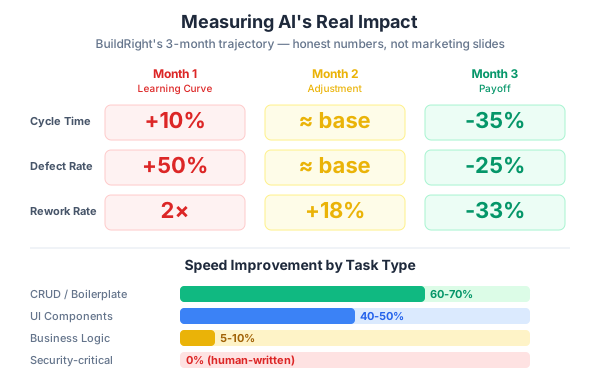
My manager asked me to prove that AI tools were making our team faster. So I pulled up our actual project data from the last three months. The answer was… complicated. For standard CRUD features, we were 35% faster. For complex business logic, roughly the same. For the first month, we were actually 15% SLOWER because of the learning curve and the rewrites. The full picture wasn’t a hockey stick chart. It was a messy, honest story about where AI helps and where it doesn’t.
This is the conversation every team using AI tools eventually has. Someone in leadership asks for numbers. And if you don’t have real data, you end up in one of two traps: either you oversell with cherry-picked anecdotes (“Dan built a landing page in 90 minutes!”), or you undersell because you’re only looking at the rough first month. Neither tells the truth.
On the BuildRight project — our project management SaaS — we’ve been running AI-assisted development for three months now with a team of five. We’ve established the 40-40-20 workflow, built review discipline, created project context documents, and shipped real features to real users. When Mei’s boss asked “Was this worth it?”, we had actual data to share. Not a marketing slide. A measured, nuanced picture.
Here’s what we learned about measuring AI’s impact — the metrics that matter, the metrics that lie, and the honest numbers from our experience.
What NOT to Measure (and Why Most Claims Are Misleading)
Before I share what works, let me save you from the metrics that will actively mislead you. I’ve seen all of these used in blog posts, conference talks, and vendor pitches. They sound convincing. They’re mostly noise.
Lines of Code Generated
This is the metric that refuses to die. “Our AI tool generated 40,000 lines of code this quarter!” Great. How much of it was good?
AI generates verbose code. That’s not a criticism — it’s a characteristic. A 50-line AI-generated solution with extensive null checks, verbose variable names, and defensive patterns might be functionally worse than a 15-line human solution that uses the right abstraction. Measuring lines of code incentivizes bloated code. It always has, long before AI entered the picture. Adding AI to this bad metric just makes it worse.
On BuildRight, Dan once asked AI to generate a data transformation utility. It produced 120 lines of code. He refactored it down to 30 lines using a well-known library function the AI didn’t know was already in the project’s dependencies. The 30-line version was better in every way — more readable, more testable, fewer edge cases. By the “lines generated” metric, the AI was productive. By any meaningful standard, the output needed significant rework.
“Time Saved” (Self-Reported)
Developers are terrible at estimating how long things would have taken without AI. I include myself in this. When you finish a feature in 3 hours with AI assistance, the natural instinct is to think “that would have taken me 8 hours manually.” But would it really? Or are you comparing against the worst-case scenario in your head?
Self-reported time savings suffer from confirmation bias. People want AI to be valuable — they’re invested in the tool, they’ve spent time learning it, they’ve advocated for it to their team. So they unconsciously inflate the “without AI” estimate. In studies on estimation accuracy, developers routinely overestimate task difficulty by 30-50% after completing the task. Add the desire for AI to be useful, and those estimates become even less reliable.
On BuildRight, we tried self-reported time savings for two weeks. The numbers ranged from “saved me 2 hours” to “saved me an entire day” for similar tasks. The variance alone told us the data was useless.
“10x Productivity” Claims
Every few months, someone posts a viral thread claiming 10x productivity with AI. It’s almost always the same pattern: one task, one developer, one very specific use case where AI happens to excel. Usually boilerplate generation, repetitive CRUD operations, or converting between formats — exactly the tasks where AI is strongest.
Nobody mentions the three tasks that same week where AI produced unusable output. Nobody talks about the debugging session where AI confidently pointed them in the wrong direction for two hours. The 10x claim is selection bias presented as a general truth. It’s like measuring a basketball player’s shooting percentage using only their highlight reel.
AI Tool Usage Metrics
“Our team made 500 AI requests this month!” So what? High usage doesn’t mean high value. It might mean high frustration and constant retrying. It might mean developers are using AI as a crutch instead of thinking through problems. It might mean one person on the team is generating a lot of throwaway experiments.
Usage metrics tell you adoption happened. They tell you nothing about whether that adoption produced value. It’s like measuring a sales team’s performance by how many emails they sent instead of how many deals they closed.
What TO Measure — 5 Metrics That Actually Matter
After discarding the noise, here’s what we settled on for BuildRight. These five metrics are objective, measurable, and actually correlated with the outcomes you care about: shipping quality software efficiently.
1. Cycle Time (time from requirement to deployed feature)
This is the single most important metric. It’s measurable, objective, and tracks actual throughput — not proxy measures or self-reported estimates. Cycle time captures everything: planning, coding, review, testing, deployment.
On BuildRight, here’s what we measured:
- Before AI: average 5.2 days per feature
- After AI (month 1): average 5.7 days per feature (yes, slower)
- After AI (month 2): average 5.0 days per feature (back to baseline)
- After AI (month 3): average 3.4 days per feature
That month 3 number — a 35% improvement — is real and significant. But it only applied to standard features. Complex business logic features stayed at roughly 5 days. The improvement was concentrated in well-understood, pattern-based work.
How to measure this: track it in your project management tool. Start = ticket moves to “In Progress.” End = merged to main and deployed. Don’t overcomplicate it. If your tool tracks these state changes, you already have this data.
2. Defect Rate (bugs per feature)
Speed without quality is just moving faster toward failure. We tracked bugs found in QA and production per feature shipped.
- Before AI: 0.8 bugs per feature
- After AI, month 1: 1.2 bugs per feature (UP by 50%)
- After AI, month 2: 0.85 bugs per feature (back to baseline)
- After AI, month 3: 0.6 bugs per feature (DOWN by 25%)
That month 1 spike is the most important number in this entire post. When you first adopt AI, your defect rate will probably go up. Ours did. The reasons were exactly what you’d expect: developers were skipping reviews because the code “looked right,” architecture mismatches slipped through because nobody was checking AI output against the system design, and the team hadn’t yet built the habits described in Parts 3 through 8 of this series.
The eventual improvement to 0.6 bugs per feature came from the review discipline, not from AI getting better. The AI was the same. Our process around it matured.
3. Rework Rate (how often code needs significant rewriting)
This measures the quality of first-pass code. A feature that ships quickly but needs significant rework the following sprint isn’t actually saving time — it’s borrowing time from the future.
- Before AI: 15% of features required significant rework
- After AI, month 1: 30% rework (doubled)
- After AI, month 2: 18% rework
- After AI, month 3: 10% rework
The month 1 doubling is not a typo. We had features where AI generated code that worked but didn’t fit the architecture. It passed tests but created maintenance problems. The rework wasn’t fixing bugs — it was restructuring code that was functionally correct but architecturally wrong. This is exactly the problem we discussed in Part 5 (The Architecture Trap), and it took us a full month to develop the planning discipline to prevent it.
4. Developer Satisfaction (quarterly survey)
This is not a vanity metric. Satisfied developers produce better work, stay longer, and collaborate more effectively. Dissatisfied developers cut corners, disengage, and leave. We ran a simple survey across our five-person BuildRight team at the end of month 3.
Results (scale of 1-5):
| Statement | Average Score |
|---|---|
| ”AI makes boring tasks tolerable” | 4.2 / 5 |
| ”AI helps me learn new patterns” | 3.8 / 5 |
| ”I trust AI-generated code” | 2.9 / 5 |
| ”AI makes me more productive overall” | 3.6 / 5 |
The breakdown by experience level was revealing. Senior developers were enthusiastic — they used AI to eliminate boilerplate and focused their freed-up time on architecture, code review, and mentoring. They saw AI as handling the parts of the job they’d outgrown. Junior developers were conflicted. They appreciated the speed gains but worried about not learning fundamentals. One junior developer told us: “I can ship features faster, but I’m not sure I understand them as deeply as I would have if I’d written everything myself.”
That 2.9/5 trust score is worth noting. Even after three months of successful AI-assisted development, the team doesn’t fully trust AI output. And honestly, that’s the right attitude. The trust score shouldn’t be 5/5. A healthy skepticism is exactly what keeps the review discipline working.
5. Knowledge Distribution (can more people work on more parts of the codebase?)
This is the sleeper metric that nobody talks about. One of the hidden costs in software development is knowledge silos — when only one or two people understand a critical module. If they’re sick, on vacation, or leave the company, the team is stuck.
- Before AI: 2 out of 5 developers could work on the payment module
- After AI (with project context docs): 4 out of 5 can make changes safely
This improvement came from the combination of AI assistance and project context documents (described in Part 8). When a developer who’s never touched the payment module needs to make a change, they can feed the project context document into their AI tool along with their task. The AI helps them understand the existing patterns, and the context document ensures the AI’s suggestions align with the module’s architecture.
AI plus good documentation equals broader codebase coverage per developer. This is perhaps the most strategically valuable outcome — more resilient teams, fewer bottlenecks, less single-point-of-failure risk.
BuildRight’s Honest Numbers — The Full Picture
Let me lay out the complete three-month trajectory, because the trend matters more than any single data point.
Month 1: The Learning Curve
- Cycle time: INCREASED by 10%
- Defect rate: INCREASED by 50%
- Rework rate: DOUBLED to 30%
- Team morale: mixed (excitement plus frustration)
Month 1 was rough. The team was excited about AI, which led to over-reliance. Developers were generating entire features with AI and submitting them for review without carefully examining the output. Dan caught a set of security vulnerabilities in AI-generated authentication code — the incident that became the basis for Part 3 (The Review Discipline). We also had two features that had to be substantially rewritten because the AI-generated code didn’t match our architectural patterns.
If we had been measuring only month 1, the conclusion would have been: “AI makes us slower and buggier.” That conclusion would have been correct for that month and completely wrong as a long-term assessment.
Month 2: The Adjustment
- Cycle time: Back to baseline (5.0 days, roughly where we started)
- Defect rate: Back to baseline (0.85 bugs per feature)
- Rework rate: Slightly above baseline (18%)
- Team morale: stabilizing, cautiously optimistic
Month 2 was when the process improvements kicked in. We established the review discipline from Part 3. We started requiring planning documents before AI generation, per Part 4. We created the project context documents from Part 8. The team was learning which tasks AI excels at and which ones still need human-first approaches.
The numbers weren’t impressive yet. We were basically back to where we started, but with a new workflow. From the outside, it looked like a lot of effort for no gain. From the inside, we could feel the foundation being laid.
Month 3: The Payoff
- Cycle time: 35% improvement for standard features
- Defect rate: 25% improvement
- Rework rate: 33% improvement
- Complex features: roughly same speed, slightly better quality
- Team satisfaction: positive overall, specific concerns remain
Month 3 is when the investment started paying returns. The team had internalized the workflow. Planning happened naturally. Reviews were thorough. AI was being used where it helps and avoided where it doesn’t. The numbers reflected a team that had learned to work with AI effectively, not just a team that had installed an AI tool.
The Breakdown by Task Type
This is the table I showed Mei’s boss, and it’s the most useful way to understand AI’s actual impact:
| Task Type | Speed Improvement | Quality Impact |
|---|---|---|
| CRUD / Boilerplate | 60-70% faster | Neutral (needs review) |
| UI Components | 40-50% faster | Slightly better (more consistent) |
| API Endpoints | 30-40% faster | Neutral |
| Business Logic | 5-10% faster | Slightly worse (needs more review) |
| Security-critical code | No change (human-written) | No change |
| Debugging | 20-30% faster | Better (AI helps identify patterns) |
The headline number — “35% faster overall” — is the weighted average across these categories. But the variation within the categories is enormous. If your project is 80% CRUD operations, AI will transform your throughput. If your project is 80% complex business logic, the impact will be modest.
This is why generic “AI makes you X% faster” claims are meaningless without knowing the task mix. A team building a data entry application will see completely different results than a team building a real-time trading system.
The Learning Investment
The month 1 dip isn’t a failure. It’s tuition.
AI-assisted development is a skill. Like any skill, it has a learning curve. On BuildRight, that learning curve looked like this:
- Week 1-2: Excitement and over-reliance. Everyone is generating code with AI. Review discipline is low. The feeling is “this is amazing, we’re going to be so much faster.” Reality hasn’t caught up yet.
- Week 3-4: First failures. The security vulnerability incident. A feature that has to be rewritten. The realization that AI output requires just as much scrutiny as human code — maybe more, because you didn’t write it and might miss subtle issues. Morale dips.
- Week 5-8: Building habits. The 40-40-20 workflow starts becoming natural. Planning documents before generation. Thorough reviews after. Testing strategies for AI-generated code. The team is slower than their peak excitement phase but producing much better work.
- Week 9-12: Consistent workflow. The team knows when to use AI and when not to. The process is internalized, not forced. Measurable improvements start appearing. The gains are real and sustainable.
Teams that skip this learning phase — “just install the AI tool and go faster” — never see the real gains. They stay in the week 1-2 phase permanently: occasional impressive demos, inconsistent quality, no sustainable improvement. Or worse, they hit the week 3-4 failures and abandon AI entirely, concluding “it doesn’t work for us.”
When you’re calculating ROI, factor the learning period in. If you’re presenting to leadership, set expectations clearly: “Month 1 will be flat or slightly negative. Month 2 will be back to baseline. Month 3 is where we expect to see gains.” If leadership expects hockey-stick improvement from day one, you’ll both be disappointed.
The learning investment isn’t just about learning the AI tool. It’s about learning new team habits: how to plan for AI generation, how to review AI output, how to write effective prompts, how to maintain project context, how to decide what AI should and shouldn’t do. Those habits take 8-12 weeks to solidify, regardless of which AI tool you’re using.
When AI Is NOT Worth the Investment
Honesty demands that I acknowledge the cases where AI-assisted development isn’t worth it. Not every team, project, or organization will benefit equally.
Very small teams (1-2 developers) with deep domain knowledge. If you’re a solo developer or a pair who knows the codebase inside and out, the overhead of maintaining project context documents, establishing review protocols, and building AI workflows may exceed the speed gains. You already know the patterns. You already know the architecture. The knowledge distribution benefit is irrelevant because there’s no knowledge to distribute. AI might still help with boilerplate, but the full workflow investment may not pay off.
Highly regulated industries without clear AI policies. If your organization is in healthcare, finance, defense, or another regulated space, and you don’t have clear policies on AI-generated code, the compliance risk may outweigh the productivity gains. Questions like “who is liable for AI-generated code?” and “does AI-generated code meet our audit requirements?” need answers before you start. Get legal review first. The productivity gains don’t matter if you can’t ship the code.
Codebases that are too messy. AI learns from patterns in your codebase. If your codebase has no consistent patterns — three different naming conventions, four different approaches to error handling, no clear architectural style — AI will generate inconsistent code that reflects the inconsistency it sees. You’ll spend more time fixing AI output than you would writing code manually. Fix the codebase first. Establish patterns. Then bring in AI.
Teams that won’t invest in the process. This is the most common failure mode. A team adopts AI tools but doesn’t adopt the 40-40-20 workflow, doesn’t establish review discipline, doesn’t create project context documents. They just generate more code, faster. The result is more code to maintain, more bugs to fix, more architectural drift to manage. More code is not more value. Without the process investment, AI is just a faster way to create technical debt.
How to Present This to Leadership
When Mei sat down with her boss to discuss the AI investment, she didn’t lead with “we’re 35% faster.” She led with the full picture, and here’s the framework she used.
Start with the honest timeline. “Month 1 was a learning investment. We were slightly slower and had more defects. Month 2 we recovered to baseline. Month 3 we saw measurable improvements.” Leadership respects honesty more than hype. If you oversell month 1, you’ll lose credibility when the numbers don’t match.
Show the task-type breakdown. The aggregate number (35% faster) is useful but masks important variation. Show which types of work improved and which didn’t. This helps leadership understand where AI fits into the team’s future workload planning.
Include quality metrics alongside speed metrics. Speed without quality is worthless. Show that defect rates went down alongside cycle time improvements. This demonstrates that the team isn’t cutting corners for speed — they’re genuinely more effective.
Highlight the strategic benefits. Knowledge distribution doesn’t show up in sprint velocity, but it shows up in team resilience. When four people can work on a module instead of two, vacation coverage is easier, onboarding is faster, and the team isn’t held hostage by any single developer’s availability.
Set expectations for the future. The improvements from month 3 aren’t going to double in month 6. The gains will plateau. The team will find a new normal that’s meaningfully better than the old normal, but the rate of improvement will slow. Set that expectation now so leadership doesn’t keep expecting acceleration.
The Measurement Framework
Here’s a template you can implement on your own team. Start tracking these before you adopt AI tools so you have a genuine baseline, not a retroactive estimate.
Weekly tracking:
- Cycle time per feature (from your project management tool)
- Defect count (bugs found in QA + production)
- Features requiring significant rework (>25% of the code rewritten within 2 weeks)
Monthly tracking:
- Average cycle time trend
- Defect rate per feature trend
- Rework rate trend
- Knowledge distribution assessment (how many developers can work on each module?)
Quarterly tracking:
- Developer satisfaction survey (the four questions from our survey are a good starting point)
- Task-type breakdown analysis (which categories improved, which didn’t?)
- Overall ROI assessment (time invested in AI workflow vs. time saved)
The key is to start measuring before you adopt AI. If you don’t have a baseline, you have nothing to compare against. And “I think we used to be slower” is not a baseline — it’s a feeling.
The Bottom Line
The honest answer to “is AI-assisted development worth it?” is: yes, if you invest in the workflow. No, if you just install the tool and expect magic.
Our numbers on BuildRight tell a clear story:
- Month 1 was an investment (slightly worse on all metrics)
- Month 2 was a recovery (back to baseline)
- Month 3 was the payoff (35% faster cycle time, 25% fewer defects, 33% less rework)
But those month 3 numbers only happened because of everything described in Parts 1 through 8 of this series: the 40-40-20 workflow, the review discipline, the planning habits, the architecture awareness, the testing strategy, the trust boundaries, and the team collaboration framework.
AI is a multiplier. If your development process is solid, AI multiplies its effectiveness. If your process has gaps, AI multiplies those too. The measurement framework isn’t just about proving ROI — it’s about identifying where AI helps, where it doesn’t, and where your process still needs work.
Measure what matters: cycle time, defect rate, rework rate, developer satisfaction, knowledge distribution. Expect a learning curve. Accept that AI’s impact is task-dependent — transformative for boilerplate, modest for complex logic. And present the honest numbers, because the honest numbers are compelling enough. You don’t need to exaggerate.
In Part 10, we look back at everything we’ve learned and look forward to what comes next. The lessons, the mistakes, and the framework that ties it all together.
This is Part 9 of a 13-part series: The AI-Assisted Development Playbook. Start from the beginning with Part 1: Why Workflow Beats Tools.
Series outline:
- Why Workflow Beats Tools — The productivity paradox and the 40-40-20 model (Part 1)
- Your First Quick Win — Landing page in 90 minutes (Part 2)
- The Review Discipline — What broke when I skipped review (Part 3)
- Planning Before Prompting — The 40% nobody wants to do (Part 4)
- The Architecture Trap — Beautiful code that doesn’t fit (Part 5)
- Testing AI Output — Verifying code you didn’t write (Part 6)
- The Trust Boundary — What to never delegate (Part 7)
- Team Collaboration — Five devs, one codebase, one AI workflow (Part 8)
- Measuring Real Impact — Beyond “we’re faster now” (this post)
- What Comes Next — Lessons and the road ahead (Part 10)
- Prompt Patterns — How to talk to AI effectively (Part 11)
- Debugging with AI — When AI code breaks in production (Part 12)
- AI Beyond Code — Requirements, docs, and decisions (Part 13)