We spent months optimizing how AI generates code. We built the 40-40-20 workflow, the review checklist, the testing pipeline. We debugged production incidents with AI assistance. We measured velocity, defect rates, and developer satisfaction. Twelve posts deep into this series, I felt like we had covered it all.
Then one day Mei said something that stopped me cold.
“You know what takes more time than writing code? Writing the requirements that tell you WHAT code to write.”
She was right. I looked at our team’s actual time allocation across a typical two-week sprint. Actual coding — fingers on keyboard, producing application logic — was maybe 20% of our time. The rest was requirements gathering, documentation, architecture discussions, status updates, onboarding materials, API documentation, sprint reports, meeting prep, and the endless back-and-forth of translating between business language and technical language.
And we hadn’t used AI for any of it.
We had been optimizing the smallest slice of the pie while ignoring the rest. This final post is about what happened when we stopped thinking of AI as a code generator and started treating it as a development process accelerator.
The 80% Nobody Talks About
Every conference talk about AI in development shows the same demo: type a prompt, get working code, deploy. It makes for great theater. It also gives a wildly distorted picture of what software development actually involves.
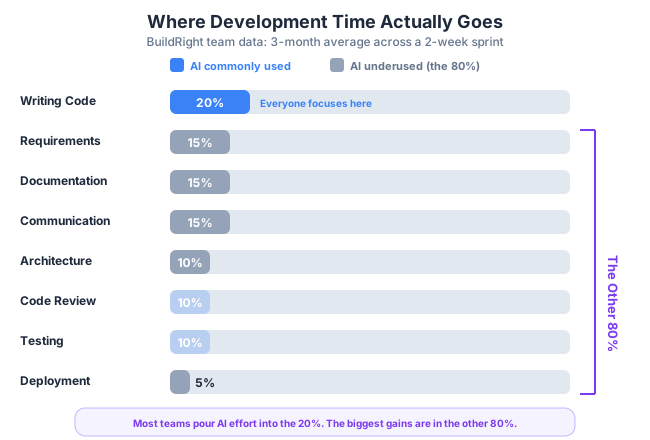
Here is where BuildRight team time actually went, based on three months of tracking:
- 20% Writing code — the part everyone focuses on with AI
- 15% Requirements and specification — user stories, acceptance criteria, edge cases, scope negotiation
- 15% Documentation — API docs, README files, architecture docs, onboarding guides, changelogs
- 15% Communication — status updates, PR descriptions, meeting prep, stakeholder reports, Slack threads
- 10% Design and architecture decisions — trade-off analysis, system design, RFC writing, tech debt assessment
- 10% Code review — reading other people’s code, providing feedback, discussing approaches
- 10% Testing and debugging — writing tests, investigating failures, reproducing bugs
- 5% Deployment and operations — CI/CD configuration, monitoring, incident response
We had been pouring AI effort into that first 20%. Some of the other slices — code review, testing, debugging — we covered in earlier posts. But requirements, documentation, communication, and architecture decisions? Untouched. That is roughly 55% of our development time where AI could help but wasn’t.
The irony is that these non-code activities are often the ones developers dislike most. Nobody became a software engineer because they love writing status reports. Yet these activities are essential, and doing them poorly causes far more damage than writing slightly suboptimal code.
Bad requirements lead to building the wrong thing. Bad documentation leads to onboarding delays and repeated questions. Bad communication leads to misaligned expectations and scope creep. Bad architecture decisions lead to months of rework.
So we started experimenting.
AI for Requirements: Mei’s Domain
Mei was the first to jump in, which made sense. As product owner, she lived in the requirements world. Her frustration was specific: she knew WHAT she wanted but spent enormous time structuring it into a format developers could work from.
User Story Refinement
Mei’s natural way of expressing a requirement was conversational. She would write something like:
Users should be able to export their projectsClear enough for a hallway conversation. Completely inadequate for development. She would then spend 30-45 minutes turning that sentence into a structured user story with acceptance criteria.
Instead, she started feeding her rough ideas to AI:
I'm building a project management tool. I need a user story for this feature:
"Users should be able to export their projects"

The tool is used by project managers who share reports with
stakeholders. Format as a user story with detailed acceptance criteria.
The AI returned:
As a project manager,
I want to export my project data as CSV or PDF,
so that I can share progress reports with stakeholders
who don't have BuildRight accounts.

Acceptance criteria:
- Export formats: CSV (data) and PDF (visual report)
- Includes: project name, tasks, status, assignees, due dates
- PDF includes charts: task completion %, overdue items
- Export respects user permissions (only export projects you can access)
- Maximum export: 1000 tasks per file
- Export job runs async for large datasets (>100 tasks)
- User receives notification when export is ready for download
- Exported files available for download for 24 hours
Was it perfect? No. Mei adjusted some criteria, removed the chart requirement for v1, and added a requirement about export history. But the AI gave her a structured starting point in seconds instead of starting from a blank page. She estimated it saved her 30 minutes per story, and she wrote 8-12 stories per sprint.
Edge Case Discovery
This became Mei’s favorite use case. She would describe a feature and ask the AI to find the holes in her thinking:
I'm designing a team invitation feature for a project management tool.
Users can invite others to join their team via email.
What edge cases should I consider?
The AI generated a list of 18 edge cases. Some were obvious ones Mei had already considered (“What if the email is already registered?”). Others were ones she had missed entirely:
- What if a user is invited to two different teams simultaneously?
- What if the inviter’s account is deactivated before the invitee accepts?
- What if the invited email has a typo and someone else accepts the invite?
- What happens to pending invitations when a team’s subscription downgrades and they lose seats?
- Rate limiting: what prevents someone from using the invite feature to spam email addresses?
Mei did not adopt all 18. She picked the 7 that were relevant to BuildRight’s situation. But those 7 included 3 edge cases that would have surfaced as bugs in production. Catching requirements gaps before development is orders of magnitude cheaper than fixing them after.
Stakeholder Communication
Mei also started using AI to translate between worlds. When Dan’s team made a technical decision — say, switching from polling to WebSockets for real-time updates — Mei needed to explain this to stakeholders who did not care about WebSockets but cared deeply about the business impact.
She would provide the technical details and ask AI to reframe them:
Technical change: We're switching from polling to WebSockets
for real-time updates.

Rewrite this for non-technical stakeholders focusing on business
benefits and user impact. Keep it under 200 words.
The result was a paragraph about “instant updates without refreshing the page” and “reduced server costs by 40%.” Accurate, accessible, and took Mei two minutes instead of twenty.
AI for Documentation: Dan’s Domain
Dan hated writing documentation. I say this with no judgment because I also hate writing documentation. Most developers do. The code is the interesting part. The documentation is the part you write at 4:45 PM on a Friday because someone asked where the API docs are.
AI changed Dan’s relationship with documentation from “I’ll get to it” to “I’ll get it done right now.”
API Documentation
Dan had 23 API endpoints with no documentation. He had been meaning to write docs for months. With AI, he started pasting endpoint code and asking for OpenAPI-compatible documentation:
Here's my API endpoint for creating a project: [pasted code]

Generate OpenAPI/Swagger documentation including:
- Description of what the endpoint does
- All parameters with types and descriptions
- Request body schema with example
- All response codes with descriptions
- Example request and response
The AI generated documentation that was about 80% accurate. Dan reviewed each endpoint, fixed the inaccuracies, added nuances the AI missed, and had complete API docs in an afternoon. The same task had been sitting undone on his backlog for three months.
The key insight: AI did not write perfect docs. It wrote good enough drafts that made the review-and-edit cycle fast enough that Dan actually did it.
Architecture Decision Records
BuildRight had no ADRs. Every architecture decision lived in someone’s head or was buried in a months-old Slack thread. When I asked Dan why we chose PostgreSQL over MongoDB, he could explain it verbally but had never written it down.
AI made writing ADRs fast enough that Dan stopped resisting:
We decided to use PostgreSQL instead of MongoDB for our project
management SaaS. Write an Architecture Decision Record.

Key reasons:
- Complex relational data (projects -> tasks -> subtasks -> comments)
- Need for ACID transactions on financial operations (billing)
- Team has strong SQL experience
- Better tooling ecosystem for our hosting platform
- JSON columns give us document flexibility where needed

Include trade-offs we accepted by choosing PostgreSQL.
The AI produced a structured ADR with Context, Decision, Status, Consequences (positive and negative), and Alternatives Considered. Dan spent five minutes editing it. Without AI, he never would have written it at all.
Over the next month, Dan wrote ADRs for 11 past decisions. When a new developer joined the team, she could read through the ADRs and understand not just what the architecture looked like but why it looked that way. The onboarding time improvement was measurable.
Onboarding Documentation
Speaking of onboarding, Dan used AI to generate a getting-started guide from the BuildRight codebase:
Here's the project structure for a project management SaaS
built with [tech stack details]:

[pasted directory structure and key config files]

Generate a developer onboarding guide covering:
- Development environment setup
- Key architectural patterns and where to find them
- Important files and their purposes
- How to run tests
- Common development tasks (adding an endpoint, creating a migration, etc.)
- Team conventions and patterns to follow
The AI produced a 2,000-word onboarding guide. Dan edited it over the course of a week, refining details and adding team-specific context. But the skeleton was there on day one, and the new developer used it successfully as her primary reference during her first two weeks.
Code Change Documentation
After implementing a feature, Dan started feeding the diff to AI to generate three things simultaneously: a changelog entry, a PR description, and updates to relevant documentation. Instead of writing the same information three times in three different formats, he wrote it zero times and reviewed AI output three times. Faster, and more consistent.
AI for Architecture Decisions
This is where I got personally excited. Architecture decisions are high-stakes and time-consuming. You are choosing between options where each has genuine advantages, and the consequences play out over months or years. AI cannot make these decisions for you, but it can accelerate the analysis that informs them.
Trade-off Analysis
When BuildRight needed a caching layer, the team debated between Redis and PostgreSQL’s built-in caching. Instead of spending an hour-long meeting debating opinions, I asked AI to structure the analysis:
We're choosing between Redis and PostgreSQL for caching user sessions
in a project management SaaS.

Constraints:
- Currently 5,000 daily active users, expecting 50,000 in 12 months
- Running on [cloud provider] with managed PostgreSQL already provisioned
- Small ops team (2 people), so operational complexity matters
- Session data: user ID, role, team memberships, feature flags (~2KB per session)
- Need sub-10ms reads for session validation on every API request

Analyze the trade-offs for our specific situation.
The AI provided a structured comparison covering performance, operational complexity, cost, scalability, and failure modes. It was not prescriptive — it laid out the trade-offs clearly. Dan and I still made the decision (Redis, primarily for the operational separation of concerns), but we made it in 20 minutes instead of 60, with a written analysis we could reference later.
System Design Review
Before implementing BuildRight’s notification system, Dan sketched out an architecture. Instead of waiting for the next team meeting to get feedback, he asked AI to poke holes in his design:
Here's our proposed architecture for the notification system:
[described the architecture]

Act as a senior systems architect reviewing this design:
- What are the potential failure modes?
- What happens if [message queue] goes down?
- Where are the scaling bottlenecks?
- What operational concerns should we plan for?
- What's missing from this design?
The AI identified three issues Dan had not considered: a potential race condition in notification deduplication, a missing dead letter queue for failed deliveries, and a gap in the retry strategy for third-party push notification services. Dan addressed all three before writing a single line of code.
RFC Drafting
For larger decisions that needed team buy-in, AI helped Dan draft RFCs. The pattern was consistent:
- Dan brain-dumped his ideas, constraints, and preferences into a prompt
- AI structured them into formal RFC sections: Problem Statement, Proposed Solution, Alternatives Considered, Migration Plan, Risks and Mitigations, Open Questions
- Dan edited the RFC for accuracy and nuance
- The team reviewed a well-structured document instead of a rambling Slack thread
The quality of architectural discussions improved noticeably. When everyone reads a structured RFC before a meeting, the meeting focuses on decisions instead of context-sharing.
AI for Team Communication
Communication is the invisible time sink of software development. Nobody tracks how long they spend writing status updates, crafting PR descriptions, or preparing for meetings. But it adds up, and doing it poorly has real costs.
PR Descriptions
Our team’s PR descriptions used to range from “fixed the thing” to multi-paragraph essays. AI brought consistency. Dan started feeding his diffs to AI with a simple prompt:
Here's the git diff for my PR: [diff]

Generate a PR description with:
- Summary (2-3 sentences)
- What changed and why
- How to test these changes
- Any risks or things reviewers should pay attention to
Every PR now had a consistent, informative description. Reviewers spent less time figuring out what the PR was about and more time reviewing the actual code. Dan estimated saving 10 minutes per PR, and he opened 3-4 PRs per week.
Constructive Code Review Comments
This one was subtle but impactful. Code review comments can easily come across as harsh or dismissive, especially in text. Dan started using AI to reframe his review feedback:
I found this issue in a code review: [described the issue]

Help me write a constructive review comment that:
- Explains what the issue is
- Explains WHY it's a problem
- Suggests a specific fix
- Is encouraging, not dismissive
The result was review comments like “Consider using a Map here instead of an object — when we scale beyond 10K entries, the O(n) property lookup will become a bottleneck. Here is an example of how to refactor this…” instead of “This won’t scale.” Same feedback, dramatically different reception.
Meeting Preparation
Before architecture discussions, I used AI to build a context document. I would provide it with relevant code, past decisions, and the agenda, then ask it to summarize the current state and list open questions. The team could read a one-page summary before the meeting instead of spending the first 20 minutes of every meeting catching everyone up.
Status Updates
Mei’s weekly stakeholder updates used to take her an hour to compile. She started feeding the sprint’s completed tickets and commit history to AI, asking it to generate a stakeholder-friendly status report. The AI produced a first draft in seconds. Mei edited it for accuracy and tone, then sent it. Total time: 15 minutes.
The Risks of AI Beyond Code
I have spent this post being enthusiastic, so let me be honest about where this goes wrong. We learned several lessons the hard way.
AI-generated requirements can sound comprehensive but miss domain nuance. The user story AI generated for our export feature was well-structured, but it did not know that our enterprise clients had strict data residency requirements that affected where exported files could be stored. Mei caught this because she knew the domain. Someone newer to the product might not have.
AI documentation drifts from reality if you do not maintain it. We generated beautiful onboarding docs in March. By June, three of the setup steps were wrong because the codebase had changed. AI-generated docs are not self-updating. You need the same maintenance discipline as hand-written docs, possibly more, because the team feels less ownership over content they did not write.
Over-reliance on AI for communication makes messages feel generic. There was a period where Mei’s stakeholder updates all sounded the same because they were all AI-generated from the same template. Stakeholders noticed. She started adding more personal commentary and using AI only for the data compilation, not the narrative.
AI trade-off analyses can miss context only your team knows. The Redis vs. PostgreSQL analysis was helpful, but it did not know that our ops team had just lost their Redis expert to another company. That context changed the decision calculus significantly. AI works with the information you give it. If you forget to mention a constraint, the analysis will be wrong in ways that are not obvious.
The fundamental rule still applies: AI drafts, humans review and own the final output. This is the 40-40-20 model from Part 1, applied beyond code. You still need 40% planning (knowing what you need), 40% generation (AI drafts), and 20% review (your expertise validating the output).
The Full Picture
Twelve posts ago, this series started with a simple observation: the developers getting the most from AI were not the ones with the best prompts. They were the ones with the best workflows.
That observation applies even more broadly than I initially realized. The teams getting the most from AI are not the ones generating the most code. They are the ones applying AI across the entire development process — requirements, documentation, architecture, communication, and yes, code too.
Here is what I want you to take away from this series:
The 40-40-20 model is not just for code generation. It applies to every AI-assisted activity. Planning before prompting. Generating with AI. Reviewing with human expertise. Whether you are writing a user story, an API doc, an architecture decision record, or a status update, the same discipline applies.
AI is a multiplier for the entire development process, not just the typing part. The biggest productivity gains on our team did not come from generating code faster. They came from Mei writing clearer requirements that reduced rework, Dan writing documentation that existed instead of being perpetually “on the backlog,” and the whole team communicating more effectively with structured, consistent artifacts.
We started this series with Mei and Dan struggling to build BuildRight efficiently. We end it with a team that uses AI as a thinking partner across everything they do. Not a replacement for their expertise — a multiplier of it.
If you have read all thirteen posts, thank you. Genuinely. This series represents months of experimentation, mistakes, and hard-won lessons. Not everything worked. The things that did work changed how I think about software development.
The best AI workflow is the one that makes your whole team more effective — not just faster at writing code.
Now go build something.
This is the final post of a 13-part series: The AI-Assisted Development Playbook. Thank you for reading the complete series.
Complete series:
- Why Workflow Beats Tools — The productivity paradox and the 40-40-20 model (Part 1)
- Your First Quick Win — Landing page in 90 minutes (Part 2)
- The Review Discipline — What broke when I skipped review (Part 3)
- Planning Before Prompting — The 40% nobody wants to do (Part 4)
- The Architecture Trap — Beautiful code that doesn’t fit (Part 5)
- Testing AI Output — Verifying code you didn’t write (Part 6)
- The Trust Boundary — What to never delegate (Part 7)
- Team Collaboration — Five devs, one codebase, one AI workflow (Part 8)
- Measuring Real Impact — Beyond “we’re faster now” (Part 9)
- What Comes Next — Lessons and the road ahead (Part 10)
- Prompt Patterns — How to talk to AI effectively (Part 11)
- Debugging with AI — When AI code breaks in production (Part 12)
- AI Beyond Code — Requirements, docs, and decisions (this post)