Mei spent 45 minutes writing a Slack message explaining a feature she wanted. She chose her words carefully, added bullet points, even included a screenshot of a competitor’s implementation. Dan read it, thought about it for ten minutes, then asked 12 clarifying questions. Mei answered them over three days of back-and-forth across Slack, email, and two impromptu video calls. When Dan finally started coding, the feature took two hours to build.
The communication took ten times longer than the code.
This is the story of every team where business and technical people collaborate. Not because anyone is bad at their job — Mei is a brilliant product owner who understands her market deeply, and Dan is a senior developer who can architect systems in his sleep. The problem is that they think in fundamentally different languages, and translating between those languages is brutally expensive.
After a year of building BuildRight with AI assistance, we discovered something unexpected: the biggest productivity gain from AI wasn’t faster code generation. It was faster translation between business thinking and technical thinking. This post is about how we built that bridge.
The Translation Gap
Here’s what happens when Mei says “Users should be able to export their projects”:
What Mei means: Project managers need to share progress reports with stakeholders who don’t have BuildRight accounts. A button that creates something they can email to their boss. Probably a PDF or a spreadsheet. Should look professional.
What Dan hears: Export. Export what exactly? All project data? Just the summary? What format — CSV, PDF, JSON, Excel? What about permissions — can you export projects you can view but don’t own? Large projects with 10,000 tasks — async job or synchronous? Where does the file go — download, email, cloud storage? What about the project’s attachments and comments? Rate limiting? File size limits? Retention policy for generated files?
Neither of them is wrong. Mei is describing a customer outcome. Dan is listing implementation decisions. The gap between those two things is where projects go sideways.
Industry data backs this up. A study of an $8.2 billion multinational found that 78% of AI project failures traced back to misaligned objectives and communication breakdowns — not technical limitations. In my experience with smaller teams, the ratio is similar. The code is rarely the hard part. The understanding is.
The traditional approach to closing this gap is meetings. Lots of meetings. Requirements workshops, refinement sessions, demo reviews, stakeholder syncs. Each one costs hours and produces documents that are either too vague for developers or too technical for business stakeholders. The result is a game of telephone where meaning degrades at every handoff.
AI changes the economics of this translation. Not by replacing either person’s expertise, but by making the translation fast enough that it stops being a bottleneck.
AI as the Universal Translator
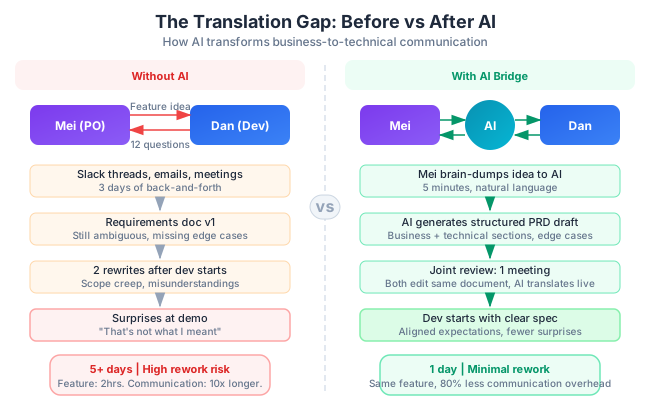
The shift is structural. Instead of Mei writing requirements in her language and Dan translating them into his, both of them work with AI as an intermediary that speaks both dialects fluently.
The old workflow:
- Mei writes feature request in business language
- Dan reads it, has questions
- 3 days of back-and-forth (Slack, meetings, emails)
- Dan writes technical spec based on his interpretation
- Development begins
- Demo reveals misunderstandings
- Rework
The AI-mediated workflow:
- Mei brain-dumps her idea to AI (5 minutes, natural language)
- AI generates structured draft with both business context and technical considerations
- Mei and Dan review the same document in one meeting
- AI translates their edits and questions in real-time
- Development begins with aligned expectations
- Fewer surprises
The key insight is that AI doesn’t replace the conversation — it upgrades it. Instead of spending the meeting explaining what “export” means, Mei and Dan spend it debating whether v1 needs PDF or just CSV. The AI handled the translation; the humans handle the decisions.
Four Documents That Bridge the Gap
Over six months, BuildRight converged on four document types that eliminated most of our translation overhead. Each one has a specific AI prompt pattern that makes it fast to produce and useful for both sides.
a) The AI-Enhanced PRD
This is Mei’s starting point. She describes what she wants in her own words, and AI structures it into a document that both she and Dan can work from.
The prompt:
I'm the product owner of a project management SaaS called BuildRight.
I need a PRD for this feature:

"Users should be able to export their projects to share with
stakeholders who don't have BuildRight accounts."

Generate a PRD with these sections:
1. Executive Summary (2-3 sentences, business language, focus on
   customer value and business opportunity)
2. User Stories (3-5, in "As a [role], I want [action] so that
   [outcome]" format, with acceptance criteria for each)
3. Edge Cases (list 5-8 scenarios that could cause problems)
4. Technical Considerations (questions for the development team
   about implementation approach, NOT decisions)
5. Success Metrics (how we'll know this feature is working)
6. Open Questions (things we haven't decided yet)

Write the executive summary for a VP who doesn't know what an API is.
Write the technical considerations for a senior developer who doesn't
need hand-holding.
What Mei got back was a structured document she could review in five minutes. The executive summary talked about “reducing friction for stakeholder communication” — language she could paste directly into her quarterly roadmap presentation. The technical considerations asked the right questions: sync vs async processing, file format priorities, permission model for shared exports. Dan could read the same document and immediately start estimating.
The critical detail: the prompt explicitly asks for two reading levels in one document. “Write the summary for a VP” and “write the technical section for a senior developer.” This dual-audience instruction is what makes AI-generated PRDs actually useful instead of mediocre for everyone.
Mei estimated this saved her 30-45 minutes per feature, and she refined 8-12 features per sprint. That’s 4-9 hours per sprint recovered from document wrestling.
b) BDD Scenarios as Shared Language
This became our secret weapon. Behavior-Driven Development uses Gherkin syntax — Given/When/Then — to describe features in a way that is readable by both business and technical people. It turns out AI is excellent at generating these from natural language descriptions.
The prompt:
Convert this feature description into BDD scenarios using
Gherkin syntax (Given/When/Then):

"Team members can invite new people to join their team by email.
The invited person gets an email with a link to accept."

Include:
- 1 happy path scenario
- 3 edge case scenarios (think about what could go wrong)
- 1 security-related scenario

Write the scenarios so a product owner can validate the business
logic AND a developer can use them as test specifications.
What came back:
Feature: Team Invitation

  Scenario: Successful invitation to new user
    Given I am a team admin on the "BuildRight" team
    When I invite "newuser@example.com" to join my team
    Then the invitee should receive an email with a join link
    And the invitation should expire after 7 days
    And I should see "newuser@example.com" in my pending invitations list

  Scenario: Invitation to existing user on another team
    Given "existinguser@example.com" is already a member of "Team Alpha"
    When I invite "existinguser@example.com" to join "Team Beta"
    Then they should receive an invitation to join a second team
    And their existing "Team Alpha" membership should not be affected

  Scenario: Inviter's account deactivated before acceptance
    Given I sent an invitation to "newuser@example.com"
    And my account is deactivated by an admin
    When "newuser@example.com" clicks the invitation link
    Then they should see "This invitation is no longer valid"
    And the invitation should be marked as expired

  Scenario: Duplicate invitation
    Given I already sent an invitation to "newuser@example.com"
    When I try to invite "newuser@example.com" again
    Then I should see "An invitation is already pending for this email"
    And no duplicate email should be sent

  Scenario: Rate limiting invitation abuse
    Given I have sent 20 invitations in the last hour
    When I try to send another invitation
    Then I should see "You've reached the invitation limit. Try again later."
    And the invitation should not be sent
Mei could read every one of these scenarios and validate whether they matched her intent. Dan could read them and know exactly what to implement and test. The same document served both audiences without any translation needed.
The edge cases were particularly valuable. “Inviter’s account deactivated before acceptance” was something neither Mei nor Dan had thought of. AI caught it because it pattern-matched against common invitation system failures in its training data. That single edge case would have been a production bug if discovered later.
c) Architecture Decision Records for Business
This solved Dan’s problem. He frequently made technical decisions — choosing PostgreSQL over MongoDB, using Redis for caching, adopting a service layer pattern — that had business implications Mei needed to understand. But ADRs are traditionally written in technical language that business stakeholders skip.
The prompt (Dan’s “metaprompt” pattern):
I'm a senior developer. I made this technical decision:

"We decided to use Redis instead of PostgreSQL's built-in caching
for user session storage because we expect to scale from 5,000 to
50,000 daily active users in 12 months."

Generate an Architecture Decision Record with:
1. Context (what problem we faced, in both business and technical terms)
2. Decision (what we chose and why)
3. Alternatives Considered (what else we evaluated, with trade-offs)
4. Business Impact (translate the technical consequences for a
   product owner who doesn't know what Redis is — use analogies)
5. Risks (what could go wrong, in terms a non-technical stakeholder
   would understand)
6. Cost Implications (infrastructure cost changes, developer time)

The Business Impact section should be understandable by someone
who has never written a line of code.
The AI generated a Business Impact section that said: “Think of our current caching as keeping frequently used files on your desk instead of walking to the filing cabinet every time. We’re essentially getting a bigger, dedicated desk for this purpose. Users will notice that pages load faster and the system stays responsive during peak hours, even as we grow 10x.”
Mei read that and immediately understood both the value and the risk. Dan read the technical sections and had a permanent record of his reasoning. One document, zero translation meetings.
Dan told me later that the “metaprompt” pattern — feeding AI a one-sentence decision kernel and getting a full ADR back — changed his relationship with documentation. He went from zero ADRs to 11 retrospective ADRs in a single afternoon. When a new developer joined the team, she could read through them and understand not just what the architecture looked like but why.
d) Dual-Audience Status Updates
Mei’s weekly stakeholder update used to take an hour. She would compile sprint data from Jira, translate Dan’s technical updates into business language, add context about roadmap progress, and format it for executives who scan-read everything.
The prompt:
Here is our sprint data for this week:

Completed:
- Export feature MVP (CSV format, async processing for large projects)
- Fixed session timeout bug affecting 12% of users
- Migrated authentication to Redis-backed sessions

In progress:
- PDF export with visual charts (70% complete)
- Team invitation system (design review done, implementation starting)

Blocked:
- Third-party analytics integration waiting on vendor API access

Generate TWO versions of a status update:

VERSION 1 — EXECUTIVE (for VP and CEO):
- 3 bullet points maximum
- Focus on business impact and customer value
- Mention risks only if they affect timelines or revenue
- No technical jargon

VERSION 2 — ENGINEERING (for the dev team Slack channel):
- Technical details, blockers, and dependencies
- What's shipping, what's not, and why
- Action items with owners
Two documents, generated in seconds, reviewed in minutes. Mei’s stakeholder update went from one hour to fifteen minutes. Over a year, that’s roughly 40 hours recovered — an entire work week spent on translation that AI now handles.
The BRIDGE Workflow
After months of iterating on these document types, we formalized our process into a six-step workflow we call BRIDGE. It’s not revolutionary — it’s just a structured way of using AI to keep business and technical perspectives aligned throughout a sprint.
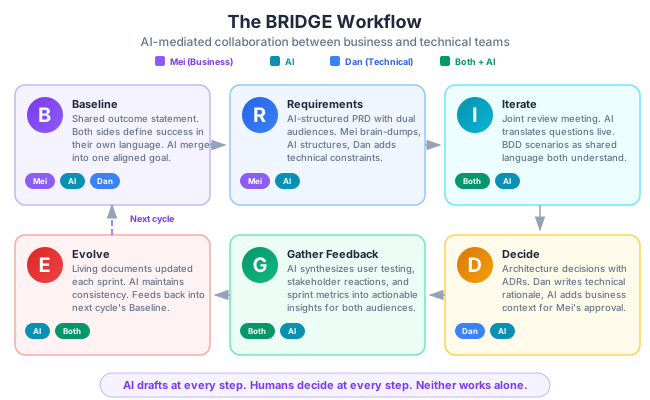
B — Baseline. At the start of a feature or sprint, Mei and Dan each describe what success looks like in their own language. Mei says “customers can share reports without giving people BuildRight accounts.” Dan says “async file generation with permission-scoped data access and downloadable URLs with expiration.” AI merges these into a single shared outcome statement that both sign off on.
R — Requirements. Mei brain-dumps her feature idea to AI, which generates a dual-audience PRD. Dan reviews the technical considerations section and adds constraints (“must use existing storage service, no new infrastructure”). The PRD becomes the single source of truth.
I — Iterate. Mei and Dan review the PRD together in one meeting. When Mei asks “can we add charts to the PDF export?” Dan says “that adds significant complexity.” AI immediately generates a revised estimate showing the trade-off: “Adding charts increases development time from 3 days to 8 days and requires a new dependency (chart rendering library). Alternative: include a data summary table that takes 1 additional day.” Both sides see the trade-off in their own terms.
D — Decide. When Dan makes architecture decisions during implementation, he writes a one-line decision kernel. AI generates the full ADR with business context. Mei reviews and approves (or pushes back) without needing a translation meeting.
G — Gather Feedback. After demo, AI synthesizes stakeholder feedback, user testing notes, and sprint metrics into a single report. Business stakeholders see adoption numbers and customer quotes. Developers see performance data and bug counts. Same sprint, same data, different lenses.
E — Evolve. Documents stay alive. AI flags when the PRD doesn’t match what was actually shipped. ADRs get updated when decisions change. The status update template incorporates lessons from previous sprints. Everything feeds back into the next cycle’s Baseline.
The loop is the important part. BRIDGE isn’t a one-time process — it’s a continuous translation engine that gets better as AI accumulates context about your project.
Prompt Patterns for Both Sides
Here are the most useful prompt patterns we discovered, organized by who initiates and who receives.
Mei → AI → Dan (Business to Technical)
Market Research to Requirements:
I have these customer interview notes:
[paste 3-5 key quotes or observations]

Generate:
1. Top 3 Jobs-to-be-Done (format: "When [situation],
   I want to [motivation], so I can [outcome]")
2. For each JTBD, suggest 1-2 product features that would
   serve this job
3. For each feature, list technical questions the dev team
   should answer before estimating
4. Priority recommendation based on pain severity
Stakeholder Request to Developer Spec:
My CEO asked for this: "[paste the request in their words]"

Translate this into a developer-ready specification:
1. What the CEO actually wants (the business outcome,
   not the literal request)
2. User flow (happy path + 2 error states)
3. Acceptance criteria in Given/When/Then format
4. Technical constraints I should mention to the dev team
5. What is explicitly NOT included in this request
Dan → AI → Mei (Technical to Business)
Technical Debt Explanation:
I need to explain this technical situation to our product owner
who controls the roadmap:

[describe the technical debt]

Generate:
1. A financial metaphor (use "interest payments" concept)
2. Business risk if we don't address it (customer impact,
   not system metrics)
3. Cost of fixing it now vs. later (in sprint capacity terms)
4. A one-sentence elevator pitch for why this matters

Tone: honest and urgent, but not alarmist. She needs to
understand the trade-off, not panic.
Sprint Progress for Stakeholders:
Here's what my team shipped this sprint:
[list completed items with technical descriptions]

Rewrite each item for a non-technical stakeholder:
- Lead with user/business impact
- Replace all technical terms with plain language
- If the item is infrastructure/invisible to users,
  explain what it enables
- Keep each item to 1-2 sentences
Joint Sessions
Event Storming to User Stories:
We just finished a domain discovery session. Here are the
domain events we identified:

[list events: "Order Placed", "Payment Processed", "Invoice Sent", etc.]

Generate:
1. User stories for each event (who triggers it, what happens)
2. Group stories by feature area
3. Suggest a dependency order for implementation
4. Flag any events that seem to have missing preceding
   or following events

Format so both the product owner and the development team
can use this as a sprint planning input.
What Goes Wrong
I’ve painted a rosy picture. Let me be honest about where this breaks down, because we learned several lessons the hard way.
AI-generated requirements sound comprehensive but miss domain nuance. The export feature PRD that AI generated was well-structured, but it didn’t know that our enterprise clients had strict data residency requirements affecting where exported files could be stored. Mei caught this because she knew the domain. A newer product owner might not have. Domain expertise is not replaceable by AI — it’s amplifiable by AI.
The telephone game risk is real. When Mei tells AI what she wants, and AI tells Dan, there’s a translation step where meaning can shift. We caught a subtle example early: Mei wanted “real-time updates” meaning “I don’t want to refresh the page.” AI translated this to “implement WebSocket-based real-time synchronization,” which Dan scoped as a multi-sprint infrastructure project. What Mei actually needed could have been solved with a 30-second polling interval. AI tends to upgrade casual language into enterprise requirements. The fix is simple: Mei and Dan must both review the AI output, not just their respective sections.
Over-reliance on AI makes communication feel generic. There was a period where Mei’s stakeholder updates all sounded the same because they were all AI-generated from the same template. Her VP noticed. “These feel like they were written by a bot,” he said — not accusingly, but accurately. Mei started adding her own commentary on top of AI’s data compilation. AI handles the structure and data; humans provide the voice and judgment.
AI trade-off analyses miss context only your team knows. The Redis vs PostgreSQL analysis was helpful, but it didn’t know that the team’s Redis expert had just left the company. That context changed the decision calculus significantly. If you forget to tell AI a constraint, the analysis will be wrong in ways that aren’t obvious.
The fundamental rule from the 40-40-20 model still applies: 40% planning (knowing what you need to translate), 20% generation (AI drafts), 40% review (your expertise validating the output). AI drafts. Humans own.
The Bottom Line
The gap between product owners and developers isn’t a people problem. It’s a translation problem. Both sides are experts in their domains. The cost is in converting between those domains — and that cost is paid in meetings, misunderstandings, rework, and features that don’t quite match what anyone wanted.
AI doesn’t eliminate the need for conversation between Mei and Dan. What it does is make every conversation more productive. Instead of spending a meeting explaining what “export” means, they spend it deciding whether v1 needs PDF or just CSV. Instead of three days of back-and-forth on requirements, they review a structured draft in thirty minutes. Instead of technical decisions that business stakeholders can’t evaluate, they read ADRs with business context sections that make the trade-offs clear.
If you take one thing from this post, start with BDD scenarios. They are the single most effective bridge document because both audiences can read them without translation. Take your next feature, describe it in plain English, ask AI to generate Gherkin scenarios with edge cases, and review them with your developer in the same meeting. You’ll be amazed at how many misunderstandings surface — and get resolved — in that single session.
The best AI workflow isn’t the one that generates the most code. It’s the one that gets the right people to the right understanding in the least time. Everything else follows from that.
This post is a companion to The AI-Assisted Development Playbook, a 13-part series covering AI workflow best practices for software teams. For more on requirements planning, see Part 4: Planning Before Prompting. For team collaboration patterns, see Part 8: Team Collaboration. For AI beyond code generation, see Part 13: AI Beyond Code.