Dan asked the AI to write tests for the dashboard components. It generated 47 tests. All passed. Green across the board. He felt great about the coverage until I asked one question: “What happens when the API returns an empty array?”
Long pause.
None of the 47 tests covered empty states. None tested error responses. None tested what happens when a user has no projects. The AI had written 47 variations of “it works when everything works.”
That’s not testing — that’s a false sense of security.
This is Part 6 of The AI-Assisted Development Playbook. If you’ve been following along, you know Dan and Mei have been building BuildRight — a project management tool for small teams. They’ve learned the 40-40-20 model, shipped a landing page in 90 minutes, learned review discipline the hard way, understood planning, and avoided the architecture trap.
Now we need to talk about something that should scare you: most teams using AI-assisted development have no systematic approach to testing AI output. They generate code, generate tests for that code, see green checkmarks, and ship. The entire verification pipeline is AI all the way down, with no human checkpoint anywhere.
That’s not a workflow. That’s a prayer.
The Testing Paradox
Here’s the fundamental problem: AI can generate tests for AI-generated code, but who tests the tests?
When you write code yourself, you understand the assumptions you made. You know where you cut corners, where you weren’t sure about an edge case, where you hardcoded something that should be configurable. Your tests naturally probe those weak spots because you know where they are.
AI doesn’t have that self-awareness. And worse, AI-generated tests often mirror AI-generated code — same assumptions, same blind spots, same gaps.
Think about it. If the AI assumed that email addresses always contain an @ symbol when it wrote the validation function, its tests will also assume email addresses always contain an @ symbol. You’ll get a test like:
it('validates a correct email', () => {
  expect(validateEmail('user@example.com')).toBe(true);
});

it('rejects an invalid email', () => {
  expect(validateEmail('not-an-email')).toBe(false);
});
Looks reasonable, right? But what about user@, @domain.com, user@.com, user@domain, emails with spaces, emails with Unicode characters, emails longer than 254 characters? The AI’s validation function probably doesn’t handle all of these, and its tests definitely don’t check for them.
This creates what I call circular validation: the code does what the code does, confirmed by tests that test what the code does. It’s like asking someone to proofread their own essay — they’ll read what they meant to write, not what they actually wrote.
The AI-generated tests verify the implementation, not the requirements. There’s a massive difference. Implementation tests say “the function returns what the function returns.” Requirement tests say “the function does what the user needs it to do.”
We need humans in the loop. Not everywhere — but at the right checkpoints.
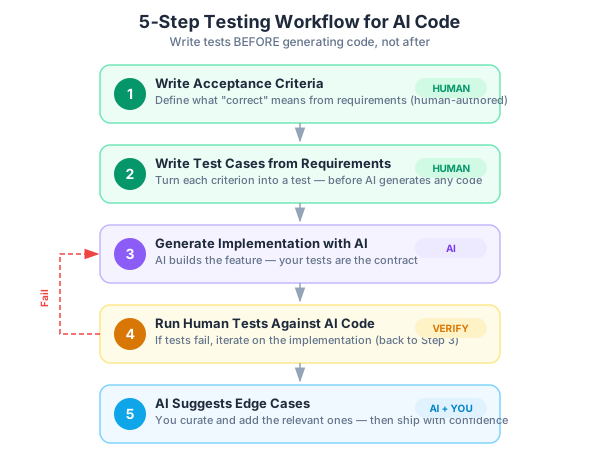
A 5-Step Testing Workflow for AI Code
After Dan’s 47-green-tests-that-tested-nothing incident, we built a workflow. It’s not complicated, but it requires discipline. Here’s what we settled on.
Step 1: Write Acceptance Criteria FIRST
Before any code is generated, before any prompt is written, define what “correct” means. This comes straight from the planning phase we covered in Part 4.
For the project dashboard feature, Mei wrote these acceptance criteria:
Feature: Project Dashboard
- Shows list of user's projects with name, status, last updated
- Shows "No projects yet" message when user has no projects
- Shows loading state while fetching
- Shows error state if API fails
- Sorts by last updated, newest first
- Pagination: 10 projects per page
Six bullet points. Plain language. No implementation details. This is the contract that both the code and the tests must satisfy.
If you skip this step, you have no anchor. You’ll end up evaluating the AI’s output against… the AI’s output. That’s the circular validation trap.
Step 2: Write Test Cases from Requirements (Human-Authored)
Turn each acceptance criterion into a test case. These are written before the AI generates any code:
describe('ProjectDashboard', () => {
  it('displays projects with name, status, and last updated date');
  it('shows "No projects yet" when user has zero projects');
  it('shows loading spinner while fetching data');
  it('shows error message when API returns 500');
  it('displays projects sorted by last updated, newest first');
  it('displays only 10 projects per page');
  it('shows pagination controls when more than 10 projects exist');
  it('does not show pagination when fewer than 10 projects');
});
Eight test cases for six acceptance criteria. Notice that the pagination criterion generated two tests — the “with pagination” and “without pagination” cases.
You don’t need to write the test implementations yet. Just the descriptions. These are your specification. The AI’s code must satisfy these, not the other way around.
Step 3: Generate Implementation with AI
Now ask the AI to build the feature. Give it the acceptance criteria as context. The test cases already exist as the contract the code must fulfill.
This is the key inversion: tests define the target, AI code tries to hit it. Not the other way around.
Step 4: Run Human-Authored Tests Against AI Code
Now implement the test cases and run them. If the AI code passes your human-written tests, it meets the requirements. If not, iterate.
When Dan ran his human-written tests against the AI-generated dashboard, three failed immediately:
- The “no projects” empty state wasn’t handled — the component just rendered an empty list with table headers and no rows
- The error state showed a generic browser error instead of a user-friendly message
- Sorting was ascending instead of descending
Three real bugs caught by eight human-written tests. The AI’s 47 auto-generated tests missed all three because they never tested those scenarios.
Step 5: Use AI to Suggest ADDITIONAL Edge Cases
After your tests pass, ask the AI: “What edge cases did I miss for this feature?” This is where AI genuinely shines — brainstorming edge cases is one of AI’s strongest testing contributions.
For the dashboard, the AI suggested:
- What if project names contain HTML or script tags? (XSS vulnerability)
- What if the
lastUpdateddate is in the future? - What if two projects have the exact same timestamp?
- What if the user’s session expires while the dashboard is loading?
- What if the API returns a 200 but with malformed JSON?
- What if the project list contains 10,000 items?
Not all of these matter equally. Dan added three of them to the test suite — the XSS check, the malformed JSON handling, and the same-timestamp sorting stability. The others were either handled at a different layer or not realistic for their use case.
You decide which edge cases matter. The AI brainstorms. You curate.
Why Testing AI Code Is Different
Let me be specific about what makes testing AI-generated code different from testing code you wrote yourself. These aren’t theoretical concerns — they’re patterns I’ve seen repeatedly across teams adopting AI workflows.
1. AI Tests Happy Paths Obsessively
Ask an AI to write tests for a user creation function and you’ll get something like this:
// AI-generated tests (typical)
describe('createUser', () => {
  it('creates a user with valid data', async () => {
    const user = await createUser({
      name: 'John Doe',
      email: 'john@example.com',
      password: 'SecurePass123!'
    });
    expect(user.name).toBe('John Doe');
    expect(user.email).toBe('john@example.com');
    expect(user.id).toBeDefined();
  });

  it('creates a user with a different name', async () => {
    const user = await createUser({
      name: 'Jane Smith',
      email: 'jane@example.com',
      password: 'AnotherPass456!'
    });
    expect(user.name).toBe('Jane Smith');
  });

  it('creates a user with minimal data', async () => {
    const user = await createUser({
      name: 'Bob',
      email: 'bob@test.com',
      password: 'Pass789!'
    });
    expect(user).toBeDefined();
  });
});
Three tests, three happy paths, three variations of “it works when you give it valid data.” What’s missing?
// What a human tester would add
it('rejects duplicate email addresses');
it('rejects empty name');
it('rejects password shorter than 8 characters');
it('rejects email without valid domain');
it('handles database connection failure gracefully');
it('hashes password before storing');
it('does not return password in the response object');
it('trims whitespace from name and email');
it('rejects name containing only whitespace');
it('handles concurrent creation with same email');
The human tests probe boundaries, failures, and security concerns. The AI tests probe “does it work with obviously valid input?” Those are fundamentally different questions.
2. AI Tests Often Mirror Implementation
This is subtle but dangerous. If the AI implemented email validation with a specific regex pattern, its test will often use that same approach to generate test data:
// AI implementation
function validateEmail(email) {
  return /^[^\s@]+@[^\s@]+\.[^\s@]+$/.test(email);
}

// AI-generated test
it('validates email format', () => {
  // These all match the regex above — of course they pass
  expect(validateEmail('user@domain.com')).toBe(true);
  expect(validateEmail('name@company.org')).toBe(true);
  expect(validateEmail('test@test.co')).toBe(true);
});
This test confirms the regex matches strings that match the regex. It tests nothing. A meaningful test would include inputs that should fail but might not, or inputs that should pass but might not:
it('handles edge cases in email validation', () => {
  // These should be valid but might fail with a naive regex
  expect(validateEmail('user+tag@domain.com')).toBe(true);
  expect(validateEmail('user.name@domain.com')).toBe(true);
  expect(validateEmail('user@sub.domain.co.uk')).toBe(true);

  // These should be invalid but might pass with a loose regex
  expect(validateEmail('user@')).toBe(false);
  expect(validateEmail('@domain.com')).toBe(false);
  expect(validateEmail('user@domain')).toBe(false);
  expect(validateEmail('user @domain.com')).toBe(false);
  expect(validateEmail('')).toBe(false);
});
3. AI-Generated Assertions Are Often Too Weak
This one is pervasive. AI-generated tests frequently use the weakest possible assertions:
// AI-generated (weak assertions)
it('returns user data', async () => {
  const result = await getUser(1);
  expect(result).toBeDefined();
  expect(result).not.toBeNull();
  expect(result).toBeTruthy();
});
These assertions pass for almost any non-null return value. The function could return { error: 'not found' } and all three assertions would pass. Compare with specific assertions:
// Human-written (strong assertions)
it('returns complete user data', async () => {
  const result = await getUser(1);
  expect(result.statusCode).toBe(200);
  expect(result.body.user.id).toBe(1);
  expect(result.body.user.email).toBe('john@example.com');
  expect(result.body.user.name).toBe('John Doe');
  expect(result.body.user.id).toMatch(/^[a-f0-9-]{36}$/);
  expect(result.body.user).not.toHaveProperty('password');
  expect(result.body.user).not.toHaveProperty('passwordHash');
});
Every assertion should be specific enough that changing the implementation in a meaningful way would break the test. If your assertion passes for any truthy value, it’s not testing anything.
4. AI Doesn’t Test Integration Boundaries
AI is excellent at testing individual functions in isolation. It’s terrible at testing how things interact across boundaries:
// AI tests the function in isolation (good but insufficient)
it('formats date correctly', () => {
  expect(formatDate(new Date('2026-01-15'))).toBe('January 15, 2026');
});

// What's missing: integration with the actual data flow
it('displays formatted dates from API response', async () => {
  // Mock API returns ISO date string, not Date object
  const apiResponse = { createdAt: '2026-01-15T10:30:00Z' };
  const rendered = renderProjectCard(apiResponse);
  // Does the component handle the string-to-Date conversion?
  expect(rendered.querySelector('.date').textContent).toBe('January 15, 2026');
});
The unit test passes, but when the API returns a date as an ISO string instead of a Date object, the component breaks. AI tests individual functions well but rarely tests how data flows between them, how they interact with real databases, real APIs, or real file systems.
5. AI Optimizes for Coverage Numbers, Not Coverage Quality
Ask an AI to “increase test coverage to 90%” and it will generate tests that hit every line. But 100% line coverage means nothing if no edge cases are tested.
// AI-generated test to "cover" the error handling branch
it('handles errors', async () => {
  try {
    await riskyOperation();
  } catch (e) {
    expect(e).toBeDefined(); // Weak: any error passes
  }
});
This test “covers” the error branch but verifies nothing about the error. Does it have the right error code? The right message? Does it clean up resources? Does it roll back the transaction? Coverage tools say “covered.” Reality says “untested.”
Property-Based Testing as a Defense
There’s a testing approach that defends against both your blind spots and the AI’s: property-based testing.
Instead of testing specific inputs and outputs, you define properties that should always be true, and the testing framework generates hundreds of random inputs to verify those properties hold.
The concept is straightforward. Instead of writing:
it('sorts projects by date descending', () => {
  const projects = [
    { name: 'A', updatedAt: '2026-01-01' },
    { name: 'B', updatedAt: '2026-03-01' },
    { name: 'C', updatedAt: '2026-02-01' },
  ];
  const sorted = sortProjects(projects);
  expect(sorted[0].name).toBe('B');
  expect(sorted[1].name).toBe('C');
  expect(sorted[2].name).toBe('A');
});
You define the property:
// Property: for any list of projects, after sorting,
// each project's date should be >= the next project's date
it('always sorts projects in descending date order', () => {
  // Generate 100 random project lists
  for (let i = 0; i < 100; i++) {
    const projects = generateRandomProjects(randomInt(0, 50));
    const sorted = sortProjects(projects);

    for (let j = 0; j < sorted.length - 1; j++) {
      const current = new Date(sorted[j].updatedAt);
      const next = new Date(sorted[j + 1].updatedAt);
      expect(current.getTime()).toBeGreaterThanOrEqual(next.getTime());
    }
  }
});
Some other properties you might define:
// Property: sanitized output never contains HTML tags
it('sanitization always removes HTML', () => {
  for (let i = 0; i < 100; i++) {
    const input = generateRandomStringWithHtml();
    const sanitized = sanitizeInput(input);
    expect(sanitized).not.toMatch(/<[^>]*>/);
  }
});

// Property: for any valid email, validation returns true
it('accepts all valid email formats', () => {
  for (let i = 0; i < 100; i++) {
    const email = generateRandomValidEmail();
    expect(validateEmail(email)).toBe(true);
  }
});

// Property: encoding then decoding returns the original
it('encode/decode is reversible', () => {
  for (let i = 0; i < 100; i++) {
    const original = generateRandomString();
    const encoded = encode(original);
    const decoded = decode(encoded);
    expect(decoded).toBe(original);
  }
});
Property-based testing catches edge cases that neither you nor the AI thought of. The random input generation will find the weird Unicode character that breaks your parser, the empty string that causes a null reference, the extremely long input that triggers a timeout.
There are property-based testing libraries for most languages. The specific tool doesn’t matter — the concept does. Define invariants. Throw random data at them. See what breaks.
The Test Budget — How Much Testing Is Enough?
Not all code deserves the same testing effort. Dan learned this when he spent an entire afternoon writing 22 tests for a static “About” page component. Twenty-two tests for a component that displays text and an image.
Meanwhile, the authentication flow had four tests, two of which were AI-generated happy-path checks.
This is backwards. You need a test budget based on risk:
| Risk Level | Examples | Testing Approach |
|---|---|---|
| Critical | Auth, payments, PII handling, data deletion | Human-written tests, manual review, security scan, penetration testing |
| High | Core business logic, data mutations, user permissions | Human-written tests + AI edge cases, integration tests |
| Medium | UI components, CRUD operations, form validation | Human acceptance tests + AI-generated unit tests |
| Low | Static pages, styling, non-interactive display | AI-generated snapshot tests, visual regression |
The rule is simple: the higher the risk of the code, the more human involvement in the tests.
Don’t spend 4 hours testing a button’s hover color. Do spend 4 hours testing your authentication flow. Don’t write 22 tests for a static page. Do write 22 tests for the payment processing pipeline.
For AI-generated code specifically, the budget also depends on how verifiable the output is. A sorting function is easy to verify — you can see the output. A security sanitization function is hard to verify — the failure mode is invisible until someone exploits it. The harder it is to verify visually, the more rigorous your tests need to be.
Here’s a quick heuristic we use on the team:
- Can a user see if it’s broken? (UI rendering, layout) → Lower test priority
- Can a developer see if it’s broken? (API responses, data format) → Medium test priority
- Can nobody see if it’s broken until it’s exploited? (Security, data integrity) → Highest test priority
A Real Example — Testing BuildRight’s Team Invitation
Let me walk you through the complete testing workflow for a real feature: the team invitation system from Part 4. This is the feature where team admins can invite new members via email.
1. Acceptance Criteria (from Planning)
Mei defined these during the planning phase:
Feature: Team Invitation
- Admin can invite users by email address
- Invitation email is sent with a unique link
- Link expires after 72 hours
- Clicking a valid link adds user to the team
- Expired links show "invitation expired" message
- Duplicate invitations to same email are rejected
- Non-admin users cannot send invitations
- Admin can revoke pending invitations
2. Human-Written Test Cases
Dan wrote these before any AI code was generated:
describe('Team Invitation', () => {
  describe('sending invitations', () => {
    it('allows admin to invite a user by email', async () => {
      const result = await sendInvitation({
        teamId: 'team-1',
        email: 'newuser@example.com',
        invitedBy: adminUser
      });
      expect(result.status).toBe('sent');
      expect(result.invitation.email).toBe('newuser@example.com');
      expect(result.invitation.expiresAt).toBeDefined();
    });

    it('rejects invitation from non-admin user', async () => {
      const result = await sendInvitation({
        teamId: 'team-1',
        email: 'another@example.com',
        invitedBy: regularUser
      });
      expect(result.status).toBe('forbidden');
      expect(result.error).toContain('admin');
    });

    it('rejects duplicate invitation to same email', async () => {
      await sendInvitation({
        teamId: 'team-1',
        email: 'duplicate@example.com',
        invitedBy: adminUser
      });
      const result = await sendInvitation({
        teamId: 'team-1',
        email: 'duplicate@example.com',
        invitedBy: adminUser
      });
      expect(result.status).toBe('conflict');
      expect(result.error).toContain('already invited');
    });
  });

  describe('accepting invitations', () => {
    it('adds user to team when clicking valid link', async () => {
      const invitation = await createTestInvitation('team-1', 'join@example.com');
      const result = await acceptInvitation(invitation.token);
      expect(result.status).toBe('accepted');
      const team = await getTeam('team-1');
      expect(team.members).toContainEqual(
        expect.objectContaining({ email: 'join@example.com' })
      );
    });

    it('rejects expired invitation link', async () => {
      const invitation = await createTestInvitation('team-1', 'late@example.com');
      // Fast-forward time past the 72-hour expiration
      advanceTimeByHours(73);
      const result = await acceptInvitation(invitation.token);
      expect(result.status).toBe('expired');
      expect(result.error).toContain('expired');
    });

    it('rejects invitation with invalid token', async () => {
      const result = await acceptInvitation('invalid-token-abc123');
      expect(result.status).toBe('not_found');
    });
  });

  describe('revoking invitations', () => {
    it('allows admin to revoke a pending invitation', async () => {
      const invitation = await createTestInvitation('team-1', 'revoke@example.com');
      const result = await revokeInvitation(invitation.id, adminUser);
      expect(result.status).toBe('revoked');
      // Verify the invitation link no longer works
      const acceptResult = await acceptInvitation(invitation.token);
      expect(acceptResult.status).toBe('not_found');
    });
  });
});
Seven human-written tests, each testing a specific acceptance criterion. Notice these test behavior and outcomes, not implementation details.
3. AI Generates the Implementation
We gave the AI the acceptance criteria and asked it to build the invitation system. It generated the route handlers, database queries, email sending logic, and token generation — about 400 lines of code.
4. Run Human-Authored Tests
Results: 5 passed, 2 failed.
Failure 1: The expiration check test failed. The AI generated the invitation with an expiresAt timestamp, but the acceptInvitation function never actually checked whether the current time was past expiresAt. It just checked if the token existed. Every invitation was accepted regardless of expiration.
Failure 2: The duplicate invitation test failed with an “off by one” issue. The AI checked if a confirmed member with that email existed, but not if a pending invitation to that email existed. So you could send 50 invitations to the same email address.
Two real bugs. Both would have shipped if we relied only on AI-generated tests, which tested neither expiration logic nor duplicate checking.
5. Fix the Issues
The expiration fix took about 10 minutes — adding a date comparison before accepting the token:
// AI's original code (missing expiration check)
async function acceptInvitation(token) {
  const invitation = await db.findInvitationByToken(token);
  if (!invitation) return { status: 'not_found' };
  // Missing: no expiration check here
  await db.addMemberToTeam(invitation.teamId, invitation.email);
  return { status: 'accepted' };
}

// Fixed version
async function acceptInvitation(token) {
  const invitation = await db.findInvitationByToken(token);
  if (!invitation) return { status: 'not_found' };

  if (new Date() > new Date(invitation.expiresAt)) {
    return { status: 'expired', error: 'This invitation has expired' };
  }

  await db.addMemberToTeam(invitation.teamId, invitation.email);
  await db.markInvitationAccepted(invitation.id);
  return { status: 'accepted' };
}
The duplicate check fix took another 10 minutes — querying pending invitations, not just confirmed members. Twenty minutes total to fix both issues.
6. Ask AI for Additional Edge Cases
After all seven tests passed, we asked the AI: “What edge cases should we test for this team invitation feature?”
It suggested:
- Concurrent invitations — Two admins invite the same email simultaneously (race condition)
- Self-invitation — Admin invites their own email address
- Already registered user — Invitation sent to someone who already has an account and is already on the team
- Team at max capacity — What happens when the team has reached its member limit?
- Unicode in email — Email addresses with international characters
- Token collision — Two generated tokens happen to be identical (astronomically unlikely but worth considering)
7. Curate and Add Relevant Edge Cases
We evaluated each suggestion against our actual risk profile:
- Concurrent invitations: Yes, add it. Race conditions are real in web apps.
- Self-invitation: Yes, add it. Easy to test, easy to overlook.
- Already on team: Skip for now. The acceptance flow already checks membership.
- Team at max capacity: Skip. We don’t have team size limits yet.
- Unicode in email: Skip. Our email library handles this.
- Token collision: Skip. We use UUIDs; the probability is negligible.
Two tests added:
it('prevents race condition with concurrent invitations to same email', async () => {
  const results = await Promise.all([
    sendInvitation({ teamId: 'team-1', email: 'race@example.com', invitedBy: adminUser }),
    sendInvitation({ teamId: 'team-1', email: 'race@example.com', invitedBy: adminUser }),
  ]);
  const successes = results.filter(r => r.status === 'sent');
  const conflicts = results.filter(r => r.status === 'conflict');
  expect(successes).toHaveLength(1);
  expect(conflicts).toHaveLength(1);
});

it('prevents admin from inviting themselves', async () => {
  const result = await sendInvitation({
    teamId: 'team-1',
    email: adminUser.email,
    invitedBy: adminUser
  });
  expect(result.status).toBe('invalid');
  expect(result.error).toContain('cannot invite yourself');
});
The concurrent invitation test actually caught another bug — there was no database-level uniqueness constraint on pending invitations, so both would succeed. We added a unique index and a retry mechanism.
8. All Tests Pass. Ship It.
Final count: 9 human-written tests, 2 AI-suggested edge case tests. Eleven tests total for a critical feature. Three bugs caught before shipping. Total testing time: about 90 minutes. Time it would have taken to debug these bugs in production: a lot more than 90 minutes.
Building a Testing Culture for AI-Assisted Development
I want to zoom out for a moment. Everything I’ve described — the 5-step workflow, the test budget, the property-based approach — only works if you treat testing AI output as a non-negotiable part of the development process.
Here are the ground rules we established for the team:
Rule 1: No AI-generated code ships without at least one human-written test. For low-risk code, one acceptance test is enough. For critical code, you need comprehensive coverage.
Rule 2: AI-generated tests are supplementary, never primary. AI tests can expand coverage. They cannot be the foundation.
Rule 3: When AI tests and human tests disagree, investigate. If the AI’s test passes but yours fails, the code has a bug. If yours passes but the AI’s fails, either the AI test is wrong or you missed a requirement.
Rule 4: Test the contract, not the implementation. This applies to all testing, but it’s especially important with AI code because the implementation might change completely on the next generation. Your tests should survive implementation changes as long as the behavior stays the same.
Rule 5: Review AI test assertions with the same scrutiny as AI code. When AI generates tests and you include them in your suite, read every assertion. Replace toBeDefined() with specific value checks. Replace toBeTruthy() with exact expectations. Weak assertions are worse than no assertions because they give false confidence.
The Bottom Line
Testing AI-generated code is not optional. It’s not a nice-to-have. It’s the verification layer that makes AI-assisted development trustworthy.
Without systematic testing, you’re shipping code that nobody fully understands, verified by tests that nobody critically reviewed, into production where real users will find the bugs you didn’t.
Here’s what to take from this post:
Write your tests BEFORE generating code, not after. Acceptance criteria become test cases. Test cases become the contract. AI code must satisfy the contract.
Use AI to brainstorm edge cases, but write the assertions yourself. AI is excellent at thinking of scenarios. It’s mediocre at writing meaningful assertions. Combine AI’s breadth with your judgment.
Apply a test budget. Not all code deserves the same testing rigor. Spend your testing effort where the risk is highest — authentication, data mutations, security boundaries. Let AI handle the snapshot tests for your about page.
Property-based testing catches what neither you nor the AI imagined. Define invariants, throw random data at them, see what breaks. This is your safety net for unknown unknowns.
The goal isn’t perfect test coverage. The goal is confidence that the code does what the requirements say it should do. AI can help you get there faster, but you’re still the one responsible for defining “correct.”
For tool-specific approaches to AI-assisted testing, check out my series on AI Test Automation with Playwright, where I go deep on using AI to write end-to-end tests.
In Part 7, we draw the line. There are things AI should help with and things it should never touch. The Trust Boundary is where you decide what to delegate and what to protect. We’ll talk about security, privacy, architecture decisions, and the code that must stay human-written — no matter how good the AI gets.
This is Part 6 of a 13-part series: The AI-Assisted Development Playbook. Start from the beginning with Part 1: Why Workflow Beats Tools.
Series outline:
- Why Workflow Beats Tools — The productivity paradox and the 40-40-20 model (Part 1)
- Your First Quick Win — Landing page in 90 minutes (Part 2)
- The Review Discipline — What broke when I skipped review (Part 3)
- Planning Before Prompting — The 40% nobody wants to do (Part 4)
- The Architecture Trap — Beautiful code that doesn’t fit (Part 5)
- Testing AI Output — Verifying code you didn’t write (this post)
- The Trust Boundary — What to never delegate (Part 7)
- Team Collaboration — Five devs, one codebase, one AI workflow (Part 8)
- Measuring Real Impact — Beyond “we’re faster now” (Part 9)
- What Comes Next — Lessons and the road ahead (Part 10)
- Prompt Patterns — How to talk to AI effectively (Part 11)
- Debugging with AI — When AI code breaks in production (Part 12)
- AI Beyond Code — Requirements, docs, and decisions (Part 13)