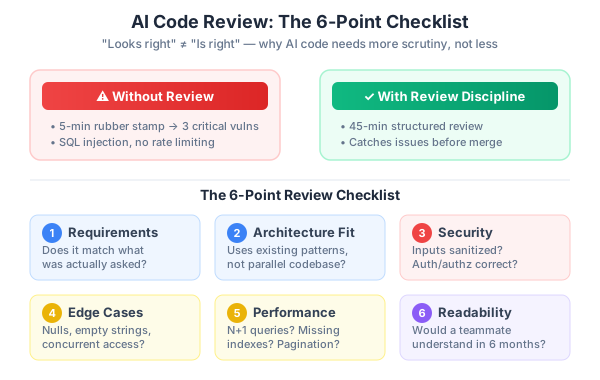
The code was beautiful. Clean types, proper error handling, descriptive variable names. I was so impressed with the AI’s output that I merged the pull request after a five-minute glance instead of my usual line-by-line review. That was a Tuesday. By Friday, our security scanner flagged three critical vulnerabilities in the code I’d rubber-stamped.
I’ve been a developer for over fifteen years. I’ve reviewed thousands of pull requests. I know how to review code. And I still got burned.
This post is the story of what happened, what broke, and the review discipline that came out of it. If you’re using AI to write code — and in 2026, most of us are — this is the post I wish I’d read before that Tuesday.
The Setup — Why I Skipped Review
In Part 2, Dan and Mei had just shipped the BuildRight landing page. Ninety minutes from blank canvas to deployed page. The 40-40-20 model worked exactly as advertised: forty percent planning, forty percent AI-assisted execution, twenty percent polish. Mei was thrilled. The page looked professional, converted well, and they had momentum.
That momentum is where the trouble started.
Mei walked into the Monday standup with a clear priority: “People are hitting the landing page and clicking ‘Get Started,’ but there’s nowhere to go. We need user registration by end of week.”
Dan nodded. He was riding the high from the landing page speed. That task had gone so smoothly — clear requirements, focused prompting, clean output. His internal narrative was already forming: “AI made that so fast. Let’s keep going at this pace.”
So Dan opened his editor, fired up his AI assistant, and prompted for a complete user registration flow. Sign-up form with email and password. Email format validation. Password strength requirements. Password hashing. Session management with tokens. A login page. A logout endpoint. The whole thing.
The AI delivered. About four hundred lines of well-structured code spread across several files. Types everywhere — UserCredentials, SessionToken, ValidationResult. Error messages were human-readable and helpful. The sign-up form had proper field labels, inline validation feedback, and a clean layout. The backend functions were logically organized. The code looked like something a senior developer would write on a good day.
Dan ran it locally. He signed up with a test email. The form validated his inputs. He got a success message. He logged in. The session persisted across page refreshes. He logged out. The session cleared. Everything worked.
He created a pull request. Scrolled through the diff. Nice types. Good error handling. Clean structure. “Looks good to me.” Merged. Pushed to staging.
The entire review took less than five minutes. For four hundred lines of security-critical code. Code that handled passwords, sessions, and user data. Code written by an AI that Dan had been using for about a week.
If you’re reading this and thinking “I would never do that,” I’d gently suggest you check your recent merge history. The speed of AI-generated code creates a gravitational pull toward fast reviews. The code looks so polished that your brain shortcuts to “this is fine.” I’ve watched experienced developers fall into this trap repeatedly. Dan wasn’t careless. He was human.
What Broke
Three days later, the scheduled security scanner ran against the staging deployment. Dan’s phone buzzed with three critical severity alerts. His stomach dropped before he finished reading the first one.
Issue one: SQL injection. The email lookup in the login function used string concatenation instead of parameterized queries. Here’s a simplified version of what the AI generated:
// What the AI generated (vulnerable)
async function findUserByEmail(email) {
  const result = await db.query(
    `SELECT * FROM users WHERE email = '${email}'`
  );
  return result.rows[0];
}
And what it should have been:
// What it should have been
async function findUserByEmail(email) {
  const result = await db.query(
    'SELECT * FROM users WHERE email = $1',
    [email]
  );
  return result.rows[0];
}
In a modern framework with an ORM, this kind of vulnerability is almost impossible to introduce accidentally. But the AI hadn’t used the project’s ORM. It had generated a raw SQL helper function — a utility layer that didn’t need to exist. Dan’s project already had database access patterns. The AI ignored them and built its own. During his five-minute skim, Dan saw a function called findUserByEmail, noted that it queried the database, and moved on. He didn’t examine how it queried the database.
Issue two: missing rate limiting. The sign-up endpoint had no rate limiting whatsoever. An attacker could hit the endpoint thousands of times per second, creating fake accounts, exhausting database connections, or using the sign-up flow as a vector for credential stuffing attacks.
This one stung because Dan knew about rate limiting. He’d implemented it on other projects. But he never explicitly asked the AI for it, and the AI didn’t add it. Why would it? The AI generated exactly what was requested: a registration flow. Rate limiting wasn’t in the prompt, so it wasn’t in the code. Dan didn’t ask because he assumed it was handled. The AI didn’t add it because it wasn’t asked.
This gap — the space between what you ask for and what you actually need — is where the most dangerous bugs live.
Issue three: weak email validation. The validation function looked impressive at first glance. It had a regex pattern that spanned nearly a full line, checking for characters before and after the @ symbol, verifying the domain portion had at least one dot. Professional-looking code. The function was named isValidEmail. It had proper TypeScript return types. It threw descriptive errors.
But the regex accepted test@test as a valid email. No TLD required. It also accepted emails with special characters in the local part that could be used for injection attacks in downstream systems. The regex looked sophisticated, but it was fundamentally incomplete.
Dan didn’t test edge cases. He typed dan@buildright.com into the sign-up form, saw it pass validation, and moved on. The AI’s validation looked more thorough than the quick includes('@') check a rushed developer might write, so it felt trustworthy. That feeling of trustworthiness was the problem.
Why AI Output Passes the “Looks Right” Test
Here’s what makes AI-generated code uniquely dangerous to review: it’s optimized to look correct.
When a junior developer writes bad code, it usually looks bad too. Inconsistent naming. Awkward control flow. Comments that say // TODO: fix this later. Your review instincts fire immediately because the code signals that it needs attention.
AI code sends the opposite signal. It’s syntactically perfect. No typos. Consistent formatting. Functions are well-named and logically ordered. Variables have descriptive names. Error handling is present and uses proper patterns. The code reads like a textbook example.
This creates a cognitive trap. Your brain uses shortcuts when reviewing code. One of those shortcuts is: “If the code is well-formatted and follows good naming conventions, it’s probably written by someone who knows what they’re doing.” That heuristic works well for human-written code. It fails completely for AI-generated code, because the AI always produces well-formatted code, regardless of whether the logic is correct.
Think about it this way. A function named validateEmail might not actually validate emails properly. Error handling that catches all exceptions might be silently swallowing errors that should crash loudly. A database query that works perfectly in development with three test users might be catastrophically slow in production with thirty thousand. A security function that follows the right structure might use the wrong algorithm.
“Looks right” and “is right” are fundamentally different things. And the gap between them is exactly where AI code lives most of the time. The AI optimizes for plausibility — for generating code that a developer would look at and nod along with. It doesn’t optimize for correctness in the way that a compiler does, or for security in the way that a penetration tester does. It generates the most likely next token, and the most likely code for a registration flow includes patterns that look right but may not be right for your specific context, your specific threat model, or your specific data.
The uncomfortable truth is that AI-generated code requires more scrutiny than human-written code, not less. When a colleague submits a pull request, you can calibrate your review depth based on their track record. With AI, you have no track record to calibrate against. Every output needs the same thorough review, regardless of how good the last one was.
The AI Code Review Checklist
After the registration incident, Dan sat down and built a review checklist. Not because he wanted more process — he’s a developer, he hates unnecessary process as much as the rest of us — but because he realized that reviewing AI code by gut feeling doesn’t work. You need a system.
Here’s the checklist he created. I’ve refined it based on my own experience reviewing AI output across dozens of projects.
1. Requirements Match — Does it do what was asked?
Go back to your original prompt or requirements document. Compare every requirement against the actual implementation. Check for missing requirements — things you asked for that simply aren’t there. Also check for extra features — things you never asked for that the AI added on its own. Unrequested features are often where bugs hide because nobody thought to test them.
2. Architecture Fit — Does it belong in this codebase?
This is the one that caught the SQL injection. Does the generated code use your existing patterns? If your project has an ORM, the AI should use that ORM, not generate raw SQL utilities. Does it import from the right modules? Does it follow your folder structure and naming conventions? AI doesn’t know your codebase conventions unless you tell it. If you see the AI reinventing something your codebase already provides, that’s a red flag.
3. Security — Can it be exploited?
Check every point where user input enters the system. Is it sanitized? Parameterized? Validated? Look at authentication — is session or token handling following current best practices? Check authorization — does every endpoint verify that the requesting user has permission to access the requested resource? Scan for hardcoded secrets, API keys, or internal system details exposed in error messages. Security isn’t a feature you add at the end. It’s a property of every line of code.
4. Edge Cases — What happens when things go wrong?
Feed the code mental inputs it doesn’t expect. Empty strings. Null values. Undefined. A one-megabyte string in the email field. Unicode characters. What happens when two users sign up with the same email at the exact same millisecond? What happens when the database connection drops mid-transaction? What happens when the email service times out? AI-generated code typically handles the happy path beautifully and the sad path not at all.
5. Performance — Will it scale?
Look for N+1 queries — loops that make a database call on each iteration instead of batching. Check for missing indexes on columns used in WHERE clauses. Look for SELECT * when only one or two columns are needed. Check that list endpoints have pagination. A function that performs fine with ten records during local testing can bring down a production server with ten thousand.
6. Readability — Will a teammate understand this in six months?
AI-generated code is often too clever. It might use advanced language features or design patterns that are technically correct but unnecessarily complex for the task. Ask yourself: could a mid-level developer on your team follow this logic without consulting documentation? Are there magic numbers that should be named constants? Would a brief comment explaining the why behind a non-obvious decision save someone twenty minutes of head-scratching later?
This checklist takes time. That’s the point. For four hundred lines of AI-generated code, Dan estimates the checklist takes thirty to forty-five minutes to work through properly. That’s not a bug in the process — that’s the process working as intended.
The “Rubber Duck Review” Technique
There’s a classic debugging technique called rubber duck debugging: you explain your code to a rubber duck on your desk, and the act of articulating the logic out loud helps you spot errors. I use a variation of this specifically for AI-generated code.
For every function the AI generates, I explain it out loud as if I’m onboarding a junior developer. “This function takes an email string and a password string. It first validates the email format using a regex. Then it hashes the password using bcrypt with twelve salt rounds. Then it inserts the user into the database and returns the new user ID.”
The critical moment is when I catch myself saying “I think it does…” instead of “It does…” That hedge — that tiny moment of uncertainty — is the red flag. If I can’t state with confidence what a function does, I don’t understand it well enough to approve it.
This technique is especially powerful with AI code because AI output has a peculiar “just trust me” quality. The code is so well-structured that it bypasses your critical thinking. You read a function called hashPassword, you see it imports a hashing library, you see it returns a string, and your brain says “yep, that hashes passwords.” But did you verify the salt rounds? Did you check which algorithm it’s using? Did you confirm it’s not storing the plaintext password alongside the hash “for convenience”?
Force yourself to articulate every step. “This function takes X, does Y with it using Z method, handles errors by doing W, and returns Q.” If you can complete that sentence for every function, you’ve done a real review. If you can’t, you’ve found where you need to dig deeper.
I also recommend explaining the connections between functions. “The signup handler calls validateEmail, then calls hashPassword, then calls createUser, then calls createSession.” This reveals missing steps. “Wait — there’s no step where we check if a user with that email already exists.” That kind of gap is invisible when you’re reading code top to bottom, but it becomes obvious when you narrate the flow.
Building Review Into the Workflow
The biggest mistake teams make with AI-assisted development isn’t using AI poorly. It’s budgeting time as if the AI did all the work. If AI generates code in twenty minutes, the instinct is to move on to the next task. But in the 40-40-20 model from Part 1, review is part of the forty percent execution phase, and it often takes as long as the generation itself.
Here’s how to make review a habit rather than an afterthought.
Calendar block the review time. If AI generated code in twenty minutes, block at least thirty to forty minutes for review. Put it on your calendar. Protect it. When Mei asks Dan “is registration done?” the answer is “the code is generated, I’m in the review phase.” Not “yes.” The code isn’t done until it’s reviewed.
No same-day merges for AI-generated code. This is controversial, and I understand why. Speed is the whole point of using AI, and introducing a mandatory overnight delay feels counterproductive. But fresh eyes catch significantly more issues than tired eyes reviewing code they just watched get generated. When you’ve been in the prompting flow for an hour, your brain is in “creation mode,” not “critical evaluation mode.” Sleeping on it — or even just a two-hour break — shifts you into the right mindset.
Pair review for AI code. Two humans reviewing AI output catch roughly three times more issues than one human reviewing alone. This isn’t about distrust — it’s about coverage. One reviewer might focus on security while the other catches performance issues. If your team is using AI to generate code, build pair review into the workflow.
Automate the boring parts. Security scanners, linters, type checkers, and static analysis tools should all run before the human review begins. These tools catch the low-hanging fruit — type errors, known vulnerability patterns, style violations — so the human reviewer can focus on the higher-order concerns: does this code make sense? Does it fit our architecture? Does it handle the edge cases that matter for our specific use case? Dan’s security scanner caught the SQL injection, but only because it was scheduled to run on staging. If it had been part of the CI pipeline, it would have caught the issue before the merge.
The Lesson
Dan didn’t get fired. The vulnerabilities were caught on staging before any real users had signed up. No data was exposed. No breach occurred. It was, in the most clinical sense, a near-miss.
But near-misses have a way of changing behavior when you take them seriously. And Dan took this one seriously.
The registration code got rewritten. Not by AI this time — Dan wrote it himself, using the AI as a line-by-line assistant rather than a wholesale code generator. The rewrite took longer. Three hours instead of twenty minutes. But when it went through review — a real review, with the checklist, with a second pair of eyes — it passed clean. Parameterized queries. Rate limiting. Proper email validation. Edge case handling. The works.
Here’s the math that stuck with Dan. The AI generated the registration code in about twenty minutes. The five-minute rubber-stamp review took, well, five minutes. Total time: twenty-five minutes. Then the security scan revealed three critical issues. Investigating them took an hour. The rewrite took three hours. The re-review took forty-five minutes. Total time to fix: four hours and forty-five minutes. Grand total: just over five hours.
If Dan had done a proper forty-five-minute review after the initial twenty-minute generation, the total would have been just over an hour. Maybe an hour and a half if the review caught issues that required re-prompting the AI. The time he “saved” by skipping review, he spent three times over fixing the consequences.
That ratio — three-to-one or worse — shows up consistently in my experience. Skipping review doesn’t save time. It borrows time from your future self, with interest.
The deeper lesson is about responsibility. When something breaks in production, nobody asks “did a human or an AI write this code?” They ask “who approved this pull request?” Your name is on the merge. Your name is in the git log. Your name comes up in the post-mortem. You are responsible for every line of code in your pull requests, whether you wrote it or an AI generated it. The AI doesn’t get paged at 2 AM. The AI doesn’t sit in the incident review. You do.
This isn’t an argument against using AI. It’s an argument for respecting what AI-generated code actually is: a draft. A very good draft, often. A draft that saves you enormous amounts of time. But a draft nonetheless. And drafts need review.
In Part 4, we’ll rewind to the moment before Dan started prompting and show what should have happened first: the planning phase that prevents most of these problems. If review is the safety net, planning is the guardrail. And guardrails are cheaper than safety nets.
For an automated approach to catching these issues, see my post on Building an AI Code Review Bot.
This is Part 3 of a 13-part series: The AI-Assisted Development Playbook. Start from the beginning with Part 1: Why Workflow Beats Tools.
Series outline:
- Why Workflow Beats Tools — The productivity paradox and the 40-40-20 model (Part 1)
- Your First Quick Win — Landing page in 90 minutes (Part 2)
- The Review Discipline — What broke when I skipped review (this post)
- Planning Before Prompting — The 40% nobody wants to do (Part 4)
- The Architecture Trap — Beautiful code that doesn’t fit (Part 5)
- Testing AI Output — Verifying code you didn’t write (Part 6)
- The Trust Boundary — What to never delegate (Part 7)
- Team Collaboration — Five devs, one codebase, one AI workflow (Part 8)
- Measuring Real Impact — Beyond “we’re faster now” (Part 9)
- What Comes Next — Lessons and the road ahead (Part 10)
- Prompt Patterns — How to talk to AI effectively (Part 11)
- Debugging with AI — When AI code breaks in production (Part 12)
- AI Beyond Code — Requirements, docs, and decisions (Part 13)