It was 11 PM on a Thursday when the alert fired.
BuildRight’s dashboard was showing every user the same projects — everyone could see everyone else’s data. Dan opened the code and immediately recognized the query: it was AI-generated, shipped two weeks ago, and it had looked perfect in code review. The bug was a missing WHERE clause in a query that worked perfectly when tested with a single user. Now, with 200 users, it was a data leak.
Mei’s phone was already buzzing with customer complaints. “I can see another company’s roadmap,” one message read. Another: “Are we hacked?”
No, they weren’t hacked. They had a bug. And not the kind of bug that announces itself with a stack trace and a line number. This was the quiet kind — the kind that hides behind clean, well-structured, AI-generated code that looked right to everyone who reviewed it.
The first ten posts in this series covered how to prevent problems: review disciplines, testing strategies, trust boundaries. But prevention has limits. Eventually, something slips through. This post is about what to do when it does — and specifically, how to use AI as a debugging partner without letting it lead you down rabbit holes that waste the hours you don’t have at 11 PM on a Thursday.
Why AI-Generated Bugs Are Different
Let me say something that sounds obvious but has deep implications: AI doesn’t write typos. It doesn’t accidentally type = when it means ==. It doesn’t misspell variable names. Its syntax is almost always correct, its formatting is clean, and its code compiles on the first try.
This is exactly what makes AI bugs dangerous.
AI writes logical errors disguised as clean code. The code looks professional. It passes linting. It even passes basic tests. The problem is in the logic, hidden in assumptions that are invisible unless you know to look for them.
After fifteen years of debugging, I’ve started categorizing the bugs that come specifically from AI-generated code. They fall into predictable patterns.
1. Missing scope. This is what hit BuildRight. The AI-generated query worked perfectly with one user in a development database. It returned the right projects, formatted correctly, with proper pagination. The problem was that it fetched all projects and relied on application-level filtering that existed in the original endpoint but not in the “optimized” direct query Dan asked the AI to write. One user, one result set — looks fine. Two hundred users, one result set — data leak.
2. Assumed defaults. AI loves to write code that assumes certain configurations exist. It will reference environment variables that aren’t set in production. It will assume default timeout values that your infrastructure doesn’t use. It will write database connection code that assumes a local instance. These bugs are invisible in development and explosive in staging or production.
3. Pattern mismatch. The code is technically correct but applied in the wrong context. I’ve seen AI use async patterns in a synchronous pipeline, apply browser APIs in a server-side function, and use ORM methods from the wrong version of a library. The code looks like it belongs. It just doesn’t belong here.
4. Silent failures. This one keeps me up at night. AI tends to write error handling that catches exceptions broadly and returns graceful fallbacks. Sounds good, right? Except when the “graceful fallback” is returning an empty array instead of the user’s actual data, and nobody notices for three weeks because the UI just shows “No projects yet” to users who definitely have projects.
// AI-generated: looks responsible, actually hides bugs
async function getUserProjects(userId) {
  try {
    const projects = await db.query(
      'SELECT * FROM projects WHERE owner_id = $1',
      [userId]
    );
    return projects.rows;
  } catch (error) {
    console.error('Failed to fetch projects:', error);
    return []; // "Graceful" fallback that hides data loss
  }
}
That return [] looks like good error handling. In practice, it means a database connection timeout silently shows users an empty dashboard instead of an error message. The user shrugs, refreshes, maybe it works. Maybe it doesn’t. Nobody files a bug report because the app “works” — it just doesn’t show their data.
5. Race conditions. AI almost never considers concurrent access unless you explicitly describe the concurrent scenario in your prompt. It will write code that reads a value, processes it, and writes it back without any locking or atomic operations. In a single-threaded test, it works. Under load, data gets corrupted.
The common thread in all of these: AI bugs pass code review because they look right. They’re not sloppy. They’re not obviously wrong. They’re plausible, and plausible is harder to catch than broken.
Using AI as a Debugging Partner
Here’s the thing, though — the same pattern-matching ability that makes AI generate plausible bugs also makes it a genuinely useful debugging partner. The key is knowing which debugging tasks AI is good at and how to prompt for them.
Log Analysis
This is where AI earns its keep during incidents. Humans are terrible at scanning large volumes of log output under pressure. We skim, we skip, we fixate on the first error we see even if it’s a symptom rather than a cause. AI doesn’t get tired, doesn’t panic, and doesn’t skip lines.
Here are the last 50 lines of our application logs
around the time of the error:
[paste logs]

The symptom is: Users are seeing projects that don't
belong to their team.

The expected behavior is: Each user should only see
projects where team_id matches their team.

What patterns do you see in these logs that could
explain the issue?
During the BuildRight incident, Dan pasted the query logs and AI immediately spotted that the “optimized” query endpoint was being called without any tenant parameters. It pointed to the exact timestamp where the first unscoped query appeared. That saved Dan probably twenty minutes of manual log scanning at a moment when every minute counted.
Code Explanation and Tracing
When you’re debugging AI-generated code that you didn’t write — or that you wrote two weeks ago with AI assistance and don’t fully remember — AI can walk you through execution paths faster than reading line by line.
This function was written 2 weeks ago and has a bug.

[paste function]

Walk me through exactly what happens when:
- Input: userId = "user_42", role = "member"
- Expected: Returns only projects for user_42's team
- Actual: Returns all projects in the database

Trace the execution path step by step.
The critical detail here is providing the specific failing input. Don’t ask “what does this function do?” Ask “what does this function do when the input is X?” AI is much more useful when you anchor it to a concrete scenario instead of asking for abstract analysis.
Hypothesis Generation
This is AI at its best as a debugging collaborator — not fixing, but brainstorming.
We have a bug where users can see other teams' projects.
It only happens when accessing the dashboard via the
"quick view" endpoint.
It does NOT happen when using the standard project list API.

The relevant code is:
[paste both endpoints]

Generate 5 possible hypotheses for what could cause
this behavior, ranked by likelihood.
AI came back with five hypotheses for Dan. The first one — “the quick view endpoint doesn’t include the team_id filter present in the standard endpoint” — was the correct diagnosis. Hypotheses two through four were plausible but wrong. Hypothesis five was a red herring about caching.
This brings up a crucial point about using AI-generated hypotheses: treat them as a starting list, not a todo list. You’re looking for the one that resonates with what you already know about the system. You’re not obligated to investigate all five.
Fix Verification
After you’ve found the bug and written a fix, AI is useful for a second pair of eyes.
I found a bug in this code:

async function getQuickViewProjects() {
  const projects = await db.query(
    'SELECT p.*, t.name as team_name FROM projects p
     JOIN teams t ON t.id = p.team_id'
  );
  return projects.rows;
}

The issue was: missing WHERE clause to scope by team.

My proposed fix is:

async function getQuickViewProjects(teamId) {
  const projects = await db.query(
    'SELECT p.*, t.name as team_name FROM projects p
     JOIN teams t ON t.id = p.team_id
     WHERE p.team_id = $1',
    [teamId]
  );
  return projects.rows;
}

Does this fix introduce any new issues?
Are there edge cases I'm missing?
AI pointed out that Dan should also check what happens when teamId is null or undefined — without that guard, the query would return no results instead of erroring, creating a different silent failure. Good catch. Not something that would have fixed the incident, but something that prevents the next one.
When AI Makes Debugging Worse
I want to be honest about this because the debugging-with-AI narrative tends to be all upside. In practice, there are specific situations where AI makes debugging actively worse, and you need to recognize them before you waste time.
AI confidently suggests wrong fixes. AI doesn’t say “I’m not sure.” It says “The issue is X” with the same confidence whether it’s right or wrong. During the BuildRight incident, alongside the correct diagnosis, AI also confidently stated that “the JOIN condition might be creating a Cartesian product” — which sounded alarming but was completely incorrect for the actual query structure.
The worse version of this is when AI suggests a fix that addresses the symptom but not the cause. Dan could have added a DISTINCT clause to the query results, which would have appeared to fix the data duplication symptom without actually fixing the missing tenant scope. The dashboard would have looked correct, but the underlying security issue would have remained.
// AI's "fix" that masks the real problem:
// "Add DISTINCT to remove duplicate results"
const projects = await db.query(
  'SELECT DISTINCT p.* FROM projects p
   JOIN teams t ON t.id = p.team_id'
);

// Actual fix that addresses root cause:
// Add tenant scoping
const projects = await db.query(
  'SELECT p.* FROM projects p
   JOIN teams t ON t.id = p.team_id
   WHERE p.team_id = $1',
  [teamId]
);
Both “work” in the sense that the dashboard looks correct. Only one actually fixes the security vulnerability. AI doesn’t understand the difference between “looks right” and “is right.”
Red herring generation. When you ask AI for hypotheses, it gives you hypotheses. All of them sound reasonable. If you’re not careful, you’ll spend an hour investigating AI’s third-most-likely hypothesis while the answer was staring at you in the code. I’ve watched developers go down debugging rabbit holes because AI suggested a race condition when the actual issue was a typo in a configuration key. The race condition theory was more interesting, more technically sophisticated, and completely wrong.
Rule of thumb: if you’ve spent more than 15 minutes investigating an AI-generated hypothesis without finding supporting evidence, drop it and move to the next one. Or better yet, go back to reading the code yourself.
The “let me refactor while I’m here” trap. You paste buggy code and ask AI to fix it. AI fixes the bug AND restructures the error handling AND renames variables to be “more descriptive” AND adds TypeScript types that weren’t there before. Now you have a diff with thirty changed lines when the fix was one line. You can’t easily verify what changed, you can’t isolate the fix, and the refactored code might have introduced new bugs.
Always be explicit:
Fix ONLY the missing WHERE clause.
Do not refactor, rename, or change anything else.
Show me the minimal diff.
When I started adding that instruction to every debugging prompt, the quality of AI’s fixes improved dramatically. Not because it was smarter, but because it was more constrained.
Hallucinated APIs and methods. Under debugging pressure, it’s easy to trust AI’s suggestion to “use the db.scopedQuery() method” without checking whether that method actually exists in your ORM version. I’ve seen developers spend twenty minutes trying to figure out why a suggested fix throws “method not found” before realizing AI invented the method entirely. During incidents, verify every API call, method name, and configuration option against your actual dependency versions. AI’s training data mixes versions freely.
The BuildRight Debugging Playbook
Let me walk through the Thursday night incident end to end, because the pattern is instructive.
11:02 PM — Alert fires. Monitoring detects that the quick-view endpoint is returning project records with team_ids that don’t match the requesting user’s team. This triggers the data-access anomaly alert that was set up after Post 7’s security review.
11:05 PM — Dan opens the code. He finds the quick-view endpoint, which was added two weeks ago as a performance optimization. The original dashboard endpoint hit three tables with proper scoping. The quick-view endpoint was supposed to be a faster version for the dashboard’s initial load.
11:08 PM — Dan’s first instinct: ask AI. He pastes the query and the logs into his AI assistant. “Why is this query returning projects for all teams instead of just the requesting user’s team?”
11:09 PM — AI responds. It correctly identifies that the query lacks a WHERE clause for team scoping. But it also suggests three additional “potential issues”: a possible N+1 query problem, a missing index on the JOIN column, and a “potential race condition in the connection pool.” All three are real concepts. None of them are related to this bug. Dan, to his credit, ignores them.
11:12 PM — The fix. One line. Adding WHERE p.team_id = $1 and passing the team ID as a parameter. Dan also adds a null check on the team ID parameter and a guard clause that throws an error if scoping is missing.
// Before (the AI-generated "optimization")
async function getQuickViewProjects() {
  const projects = await db.query(
    `SELECT p.id, p.name, p.status, t.name as team_name
     FROM projects p
     JOIN teams t ON t.id = p.team_id
     ORDER BY p.updated_at DESC
     LIMIT 50`
  );
  return projects.rows;
}

// After (the one-line fix, plus safety guards)
async function getQuickViewProjects(teamId) {
  if (!teamId) {
    throw new Error('team_id is required for project queries');
  }
  const projects = await db.query(
    `SELECT p.id, p.name, p.status, t.name as team_name
     FROM projects p
     JOIN teams t ON t.id = p.team_id
     WHERE p.team_id = $1
     ORDER BY p.updated_at DESC
     LIMIT 50`,
    [teamId]
  );
  return projects.rows;
}
11:15 PM — Deploy. Fix is live. Dan watches the logs. All quick-view queries now include the team_id parameter. Data leak stops.
The next morning — Root cause analysis. Why did this pass code review? The story was painfully clear. Dan had asked AI to write “an optimized version of the dashboard query that skips the unnecessary joins.” The AI produced a clean, fast query that did exactly what was asked — it returned projects with minimal overhead. It just didn’t include the tenant scoping because the original prompt didn’t mention multi-tenancy, and the AI didn’t know it was a requirement.
The code review caught nothing because the query looked correct. It returned the right columns, used proper parameterization, had a reasonable LIMIT. The reviewer — Mei, actually — didn’t notice that the WHERE clause from the original endpoint was missing because the new query was structured differently enough that a line-by-line comparison wasn’t obvious.
Prevention measures. The team added three things:
- Integration tests that run with multi-tenant test data — at least two teams with overlapping project names, ensuring queries never cross team boundaries.
- A custom linting rule that flags any SELECT query on tenant-scoped tables (projects, tasks, comments) that doesn’t include a WHERE clause on team_id.
- A section in their AI context document: “All database queries MUST include tenant scoping. BuildRight is a multi-tenant application. Every query that touches user data must filter by team_id.”
That third item is the one that matters most long-term. It feeds back into the prompt context for future AI-generated code, making this class of bug less likely to recur.
A Debugging Workflow for AI-Assisted Codebases
Based on the BuildRight incident and similar ones I’ve seen across teams, here’s the workflow I recommend. It’s five steps, and the order matters.
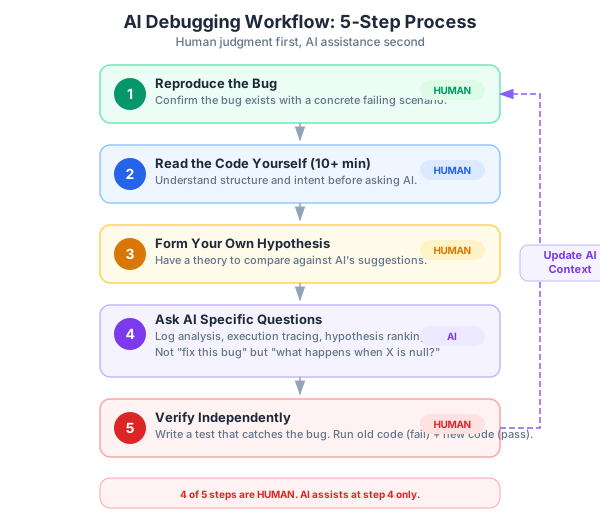
Step 1: Reproduce first. Before you ask AI anything, reproduce the bug in a local or staging environment. If you can’t reproduce it, you’re guessing, and AI will happily guess along with you — generating plausible explanations for a problem you haven’t actually confirmed exists. Reproduction gives you the concrete scenario you need to anchor every subsequent conversation.
Step 2: Read the code yourself. I know this sounds old-fashioned, but spend at least ten minutes reading the relevant code before asking AI about it. You need to understand the code’s structure and intent before you can evaluate AI’s analysis. If you skip this step, you’re outsourcing your judgment entirely, and AI’s judgment isn’t reliable enough for that.
Step 3: Form your own hypothesis. Have at least one theory about what’s wrong before you consult AI. It doesn’t have to be right. The point is that when AI gives you five hypotheses, you can compare them against your own understanding rather than evaluating them in a vacuum. If AI suggests something that contradicts what you observed while reading the code, you know to be skeptical.
Step 4: Use AI for specific questions. Not “fix this bug” but “what happens when teamId is undefined in this function?” Not “why is the dashboard broken?” but “trace the execution path of this query when the user has role=‘member’ and teamId=‘team_5’.” Specific questions get useful answers. Vague questions get vague, often misleading, answers.
Step 5: Verify independently. Don’t trust AI’s fix until you’ve tested it against the specific failing scenario AND at least two edge cases that AI didn’t mention. Write a test that would have caught the original bug. Run it against the old code (it should fail) and the new code (it should pass). If you can’t write that test, you might not fully understand the fix yet.
This workflow takes discipline because under incident pressure, the temptation is to jump straight to step 4 — paste the error into AI and hope it tells you what to do. Sometimes that works. When it doesn’t, you’ve lost time you can’t afford.
Post-Mortem: Adding AI Context
Here’s something most teams skip: after you fix a production bug in AI-generated code, update your AI context documents with the pattern that caused the bug.
The BuildRight team’s post-mortem produced a “Known Pitfalls” addition to their project context:
## Known Pitfalls — Database Queries

- ALL queries on tenant-scoped tables (projects, tasks, comments,
  attachments) MUST include a WHERE clause filtering by team_id
- When asking AI to optimize existing queries, always include the
  constraint: "This is a multi-tenant application. All tenant
  scoping filters must be preserved."
- Never accept an AI-generated query that touches user data without
  verifying tenant scoping is present
- Integration tests must include at least 2 teams with overlapping
  data to catch missing scope filters
This is the feedback loop that makes AI-assisted development sustainable. The bug in Post 12 feeds back into the planning phase from Post 4. The context package gets richer. The AI gets better instructions. The same class of bug becomes less likely.
Without this feedback loop, you’re just fixing bugs. With it, you’re building institutional knowledge that makes your AI collaboration smarter over time. Every production incident teaches the system — not just the humans — something about your application’s specific requirements.
Dan told me later that this was the moment AI-assisted development clicked for his team. Not when AI wrote the first feature fast. Not when it passed the first code review clean. But when a bug got through, they fixed it, and the fix made every future AI interaction smarter. The bugs are part of the process, not a failure of the process.
The Bottom Line
AI is a good debugging assistant but a bad debugging autopilot.
Use it for: log analysis, execution tracing, hypothesis generation, and fix verification. These are pattern-matching tasks where AI’s ability to process information quickly and without fatigue genuinely helps.
Don’t use it for: root cause analysis, unsupervised fixes, or anything that requires understanding why a piece of code exists in the first place. These require human judgment, domain knowledge, and the kind of contextual understanding that AI doesn’t have.
The best debugging skill is still the oldest one: reading code carefully. AI can help you read faster, can point you toward the right section to read, can explain what a section does. But the judgment call — “this is the bug, and here is why” — that’s still yours to make.
If the last eleven posts were about preventing fires, this one was about fighting them. But the most important takeaway isn’t any individual debugging technique. It’s the feedback loop: every bug you find in AI-generated code is information about what your AI context is missing. Fix the bug, then fix the context, and the next time the AI writes code for your project, it has one more constraint it didn’t have before.
That’s not a bug. That’s the system working.
Next up in Part 13: We step beyond code entirely. AI can help with requirements gathering, documentation, and architectural decisions — if you know how to structure the conversation. The final post in the series explores AI as a thinking partner, not just a coding partner.
This is Part 12 of a 13-part series: The AI-Assisted Development Playbook. Start from the beginning with Part 1: Why Workflow Beats Tools.
Series outline:
- Why Workflow Beats Tools — The productivity paradox and the 40-40-20 model (Part 1)
- Your First Quick Win — Landing page in 90 minutes (Part 2)
- The Review Discipline — What broke when I skipped review (Part 3)
- Planning Before Prompting — The 40% nobody wants to do (Part 4)
- The Architecture Trap — Beautiful code that doesn’t fit (Part 5)
- Testing AI Output — Verifying code you didn’t write (Part 6)
- The Trust Boundary — What to never delegate (Part 7)
- Team Collaboration — Five devs, one codebase, one AI workflow (Part 8)
- Measuring Real Impact — Beyond “we’re faster now” (Part 9)
- What Comes Next — Lessons and the road ahead (Part 10)
- Prompt Patterns — How to talk to AI effectively (Part 11)
- Debugging with AI — When AI code breaks in production (this post)
- AI Beyond Code — Requirements, docs, and decisions (Part 13)