I reviewed five pull requests on a Monday morning. Each one solved a similar problem — adding a new API endpoint. Each one used a completely different error handling pattern. All five developers had used AI to generate the code. All five AIs had made reasonable choices. But five reasonable choices that contradict each other is worse than one mediocre choice that’s consistent.
That Monday, I realized our AI workflow was a single-player game, and we needed to make it multiplayer.
Throughout this series, we’ve followed Mei and Dan building BuildRight — learning how to plan before prompting, review AI output critically, test what you didn’t write, and draw trust boundaries around what you delegate. Those were all individual skills. They work beautifully when one developer sits alone with an AI tool and ships features.
But BuildRight grew. Mei hired three more developers. Suddenly the team had five people writing code with AI assistance, each with their own habits, their own prompt styles, their own mental models of what “good code” looks like. The codebase didn’t grow five times faster. It grew five times more inconsistent.
This post is about what happens after individual AI productivity is solved — when the real challenge becomes team AI productivity. It’s the problem nobody warns you about, because most AI advice assumes you’re working alone.
The “Five Architectures” Problem
When one developer uses AI, something natural happens. They develop personal habits. They find prompt patterns that work. They build a mental library of how they like AI to structure code. Dan, for example, had spent weeks refining his approach. He knew how to give the AI enough context to produce code that fit BuildRight’s patterns. His pull requests were clean, consistent, and aligned with the architecture he’d been building since day one.
Then Maya joined the team. She was a strong mid-level developer with her own AI workflow. She asked her AI to build a new endpoint, and the AI suggested a perfectly valid approach — try/catch blocks with custom error classes. It was well-structured code. It just looked nothing like Dan’s Result pattern with union types.
A week later, James onboarded. His AI suggested middleware-based error handling. Also valid. Also different from both Dan’s and Maya’s approaches.
Raj joined next. His AI leaned toward returning error codes, a pattern popular in systems programming. Clean, efficient. Completely inconsistent with everything else in the codebase.
Finally, Lin came aboard. She actually looked at Dan’s existing code before prompting her AI, so her output followed the Result pattern — but with different naming conventions and slightly different type definitions.
I want to be clear: every single one of these approaches was defensible in isolation. If you showed me any one of them in a code review, I’d approve it. The problem wasn’t quality. The problem was that we now had five different ways to handle the same concern in the same codebase.
This is what I call the “Five Architectures” problem, and it’s not really an AI problem. It’s a coordination problem that AI amplifies. Before AI, this happened more slowly. A developer would write error handling, look at existing code for patterns, and mostly follow convention. The codebase itself was the documentation. With AI, developers skip that step. They describe what they want, the AI generates something reasonable, and the developer ships it. The AI doesn’t look at your existing codebase (unless you explicitly give it context). It draws from its training data, which represents thousands of different codebases with thousands of different conventions.
Five developers, each getting “reasonable” suggestions from an AI that doesn’t know your team’s conventions. That’s how you end up with five architectures in one project.
Team Conventions for AI-Assisted Development
After that Monday morning code review, I sat down and thought about what we actually needed. Not more rules. Not stricter review processes. We needed shared context — documents that would align both the humans and the AIs on our team.
Over the next two weeks, we created five documents. They transformed our workflow. I think every team using AI should have their own versions.
1. Architecture Decision Records (ADRs)
An ADR is a short document that explains why a technical decision was made. Not what. Why. The format is simple: Decision, Context, Consequences, Status.
For example: “ADR-003: We use session-based authentication, not JWT. Context: Our application requires immediate session invalidation for security compliance. JWTs cannot be revoked without additional infrastructure. Consequences: We accept the overhead of server-side session storage. Status: Accepted.”
Before ADRs, Dan was the only person who knew why certain decisions existed. If a new developer’s AI suggested JWT authentication, Dan would have to explain the history in a code review comment. With ADRs, the decision and its reasoning are documented. More importantly, you can include ADRs in your project context so AI tools respect past decisions. When Maya’s AI tried to suggest JWT, she could point it to ADR-003, and the AI would adjust its suggestion to use sessions instead.
ADRs aren’t just documentation for humans. They’re guardrails for AI. Every architectural decision that isn’t written down is a decision that AI will make differently for every developer on your team.
2. Code Style Guide (Machine-Readable)
Most style guides are about formatting — indentation, semicolons, bracket placement. Those matter, but they’re table stakes. What your team needs for AI-assisted development is an architectural style guide. This goes beyond formatting into patterns and conventions.
Ours included entries like:
- “Error handling: Use the Result<T, Error> pattern. See /src/types/Result.ts for the implementation. Never use try/catch for business logic errors.”
- “API responses: Always use ResponseWrapper. See /src/middleware/response.ts for the standard format.”
- “Database access: Use the repository pattern. See /src/repositories/UserRepository.ts as a template for new repositories.”
- “State management: Use the store pattern defined in /src/stores/. No direct state mutation outside store methods.”
Notice how each entry references a specific file. This is deliberate. When developers share this document with their AI tools, the AI can look at the referenced files and understand not just the rule but the implementation. The style guide serves double duty: it guides humans AND provides context for AI.
The Monday after we published the style guide, all five pull requests used the Result pattern for error handling. Not because I mandated it in review. Because every developer’s AI had the same context and made the same choice.
3. Project Context Document
This is the single most impactful document we created. It describes the project’s architecture, conventions, and constraints in one place. Think of it as a README for AI tools — a document specifically designed to be shared with whatever AI assistant a developer uses.
Our project context document included:
- Tech stack and versions
- Folder structure with explanations of what goes where
- Key patterns (repository pattern, service layer, result types)
- Naming conventions for files, functions, variables, and types
- What NOT to do (a surprisingly useful section — “Do not use ORMs directly in route handlers,” “Do not create utility files — find the right module”)
- Links to example files for common patterns
The critical practice: update this document when architectural decisions change. A stale project context document is worse than none at all, because it gives AI (and developers) confidence in outdated patterns. We added “update project context” as a checklist item whenever we merged an ADR.
4. PR Review Checklist for AI-Generated Code
Code review is always important. But AI-generated code needs a slightly different review lens. We added AI-specific checks to our standard review process:
- Does this follow our established patterns? (Check against the style guide)
- Does it introduce new dependencies we haven’t approved?
- Is the approach consistent with how existing similar features work?
- Has it been tested for our specific edge cases, not just the happy path?
- Does the PR description explain what was AI-generated and what was hand-written?
- If a new pattern is introduced, is there an ADR proposing it?
That last one was key. We didn’t want to prevent innovation. If a developer’s AI suggested a genuinely better approach, we wanted to hear about it. But through the ADR process, not through a surprise in a pull request. The rule was simple: new patterns need an ADR before they enter the codebase.
5. Onboarding Guide with AI Workflow
When Raj joined, it took him two weeks to understand our conventions. When Lin joined a month later — after we had all five documents in place — she was productive on day two. The difference was the onboarding guide.
It covered:
- “Here’s how WE use AI on this team” — our specific workflow and expectations
- Which project context documents to share with your AI tools (and how to share them)
- Which tasks are appropriate for AI assistance and which require manual implementation (building on the trust boundaries from Part 7)
- How to structure requests to get output consistent with our codebase
- Common pitfalls specific to our project (“The AI will suggest MongoDB. We use PostgreSQL. Always specify this.”)
The onboarding guide turned implicit team knowledge into explicit instructions. It meant new developers didn’t have to learn our conventions through trial and error in code reviews. They learned them on day one, and their AI tools learned them too.
The Knowledge Amplification Pattern
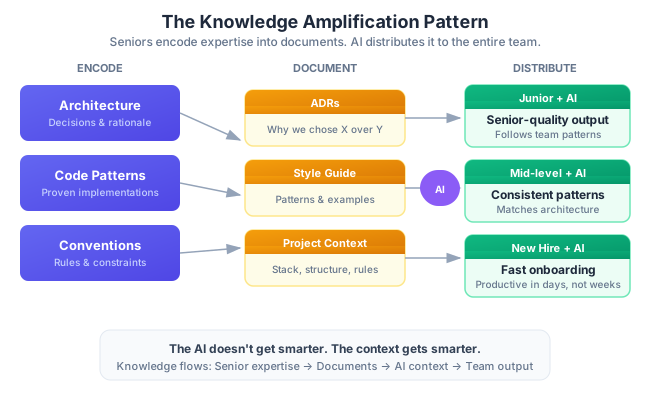
Here’s the pattern that changed everything for us. I call it Knowledge Amplification, and I believe it’s the single most powerful reason for teams to adopt AI thoughtfully.
It works like this:
- Senior developers encode their knowledge into project context documents, ADRs, and well-written example code.
- Junior and mid-level developers use AI with that context. The AI generates code that follows the senior’s patterns — not because the AI independently chose those patterns, but because it was given them as context.
- AI becomes a force multiplier for team knowledge, not a replacement for expertise.
The result is striking. A junior developer with good project context documents generates code that looks like a senior wrote it. Not because the AI is smart. Because the context is smart. The senior’s years of experience are encoded in documents that shape every AI interaction on the team.
Dan spent two hours writing a comprehensive guide to our service layer pattern — when to create a new service, how it should interact with repositories, how to handle transactions, how to structure the public API. That two-hour investment paid dividends every single day afterward. Every developer on the team, regardless of experience level, produced service layer code that followed Dan’s architectural vision. Their AI tools had internalized it.
Now here’s the flip side, and it’s important. Without context documents, a junior developer’s AI output reflects whatever the AI was trained on. Which is usually a blend of Stack Overflow answers, open-source projects, and tutorial code. None of which knows about your team’s conventions, your business constraints, or your architectural decisions. The AI will produce “reasonable” code that is reasonable for a generic project — not for yours.
Knowledge Amplification only works when seniors invest time in documentation. This is a shift in how senior developers spend their time. Less time writing code. More time writing documents that help everyone else write better code. It’s a leadership transition, and it maps directly to the shift from individual contributor to technical leader.
Pair Programming with AI — The Multiplier Effect
One of the most effective practices we discovered was AI-augmented pair programming. The setup is simple: two developers work together, with AI as a third participant. But the key is how they divide responsibilities.
One person is the planner. They write the context, define the requirements, and craft the requests to the AI. They focus on “what should the AI build?” — thinking about architecture, edge cases, and how this feature fits into the larger system.
The other person is the reviewer. They evaluate the AI’s output in real time. They focus on “did the AI build it correctly?” — checking for bugs, inconsistencies, and deviations from team conventions.
This naturally implements the planning-execution-review model we discussed in earlier posts, but at the pair level. The planner handles the 40% planning phase. They both observe the 20% execution phase. The reviewer drives the 40% review phase.
We found this worked especially well for cross-functional pairs: a backend developer paired with a frontend developer, or a senior paired with a junior. The cross-pollination of perspectives caught issues that a single developer would miss, regardless of how good their AI tool was.
Two humans plus AI consistently outperformed one human plus AI for complex tasks. Not twice as good — often three or four times as good, because the pair caught more issues, explored more edge cases, and produced code that was correct on the first review rather than requiring multiple rounds of feedback.
The cost is obvious: two developers on one task. But the reduction in review cycles, bug fixes, and architectural inconsistencies more than compensated. We reserved pair programming for complex features and used individual AI-assisted development for straightforward tasks. The judgment of when to pair and when to solo became one of our most important team skills.
Managing Different Skill Levels
AI doesn’t affect every developer the same way. How you manage AI adoption depends heavily on experience levels, and getting this wrong can hurt your team more than help it.
Junior developers get the most visible speed boost from AI. They go from struggling to write a feature to shipping something that works within hours. This looks like a win, but it hides a serious risk: they often can’t evaluate the quality of what the AI produced. They lack the experience to know whether the code is secure, performant, maintainable, or even correct for edge cases they haven’t considered.
Our approach: junior developers always have a second reviewer for AI-generated code. Not because we don’t trust them, but because AI code review is a skill that takes time to develop. The second reviewer is typically a senior who checks whether the output follows team patterns and handles edge cases appropriately. Over time, juniors build the judgment to review AI output themselves. But that judgment comes from seeing corrections, not from the AI.
Mid-level developers are the sweet spot for AI productivity. They know enough to evaluate AI output but still benefit from the speed boost on boilerplate and repetitive tasks. The risk for mid-levels is different: they might stop learning underlying principles. If the AI always writes the database query, the developer never develops intuition for query optimization. If the AI always handles the error logic, the developer never thinks deeply about failure modes.
Our solution was to require mid-level developers to explain AI-generated code in their PR descriptions. Not “AI wrote the error handling” but “the error handling uses the Result pattern to distinguish between validation errors (returned to the client) and system errors (logged and returned as 500s).” If they can’t explain it, they shouldn’t ship it. We also found that assigning mid-levels to write project context documents was an excellent growth exercise. It forced them to understand the architecture deeply enough to explain it — which is exactly the skill they need to develop into seniors.
Senior developers extract the most value from AI because they have two advantages: they know what to ask for, and they know what to reject. A senior developer spots a subtle bug in AI output that a junior would ship. They know when the AI’s suggestion is technically correct but architecturally wrong. They can use AI for genuinely complex tasks like refactoring, system design exploration, and performance optimization.
The risk for seniors is becoming bottlenecks for AI code review. If every AI-generated PR needs a senior’s approval, you’ve created a scaling problem. The solution, again, is Knowledge Amplification. Seniors who encode their expertise in documents scale their impact without requiring their direct involvement in every review. Their knowledge is embedded in the process, not locked in their heads.
Tech leads (and I speak from direct experience here) have a different relationship with AI entirely. Yes, AI helps with code and documentation. But the tech lead’s primary contribution to team AI adoption is creating the environment where AI helps everyone. That means writing project context documents, maintaining ADRs, setting up review processes, mentoring developers on AI evaluation skills, and continuously refining the team’s workflow. The tech lead’s impact isn’t measured by their own AI-assisted output. It’s measured by the team’s collective output and consistency.
The Onboarding Advantage
Let me share a concrete comparison that illustrates why all this documentation matters beyond daily development.
Before we had our five documents in place, Raj joined the team. Smart developer, strong fundamentals. It took him about two and a half weeks before he was submitting pull requests that didn’t require significant revision. He had to learn our patterns by reading code, asking questions, and iterating through review feedback. His AI tool was no help during this period because it didn’t know our conventions any more than Raj did.
Six weeks later, Lin joined. By then, we had the project context document, the architectural style guide, ADRs, the review checklist, and the onboarding guide. On her first day, she read through the documentation. On her second day, she shared the project context document with her AI tool and started working on a feature. Her first pull request required minor revisions — naming conventions for a few variables. Her second pull request was approved without changes.
The difference wasn’t that Lin was a better developer than Raj (they were both excellent). The difference was that Lin’s AI tool had the same context as the rest of the team from day one. It suggested code that followed our patterns, used our naming conventions, and respected our architectural decisions. The AI became a knowledgeable pair programming partner immediately, because it had our team’s accumulated knowledge loaded into its context.
This is the onboarding advantage, and it’s massive. Instead of weeks of ramping up, new developers reach productive output in days. But — and this is a critical caveat — it only works if the documentation is maintained and accurate. Stale documentation is actively harmful. If the project context document says “use pattern X” but the codebase has quietly migrated to pattern Y, new developers will generate code using the outdated pattern. Their AI will confidently produce wrong output, and the developer won’t know to question it because the documentation told them it was right.
We added documentation maintenance to our sprint rituals. Every two weeks, someone reviews the project context document and ADRs to ensure they still reflect reality. It takes about thirty minutes. It’s one of the highest-leverage thirty minutes we spend.
The Bottom Line
Individual AI productivity is a solved problem. If you’ve followed this series through Parts 1-7, you know how to plan, execute, review, test, and draw trust boundaries around AI-assisted development. Those skills work. They make you faster and your code better.
Team AI productivity is the real challenge. It’s where most organizations stumble, because they treat AI adoption as an individual tool decision rather than a team workflow decision. “Everyone should use AI!” is not a strategy. “Here’s how we use AI together, here are our conventions, here is the shared context” — that’s a strategy.
The “Five Architectures” problem is entirely preventable. Five documents — ADRs, a machine-readable style guide, a project context document, a PR review checklist, and an onboarding guide — create the shared context that aligns both humans and AIs on your team. The investment is measured in hours. The return is measured in months of avoided inconsistency and rework.
Knowledge Amplification is the killer feature of team AI adoption. Seniors encode their expertise into documents. AI distributes that expertise to every developer on the team, in every interaction, on every feature. The senior’s architectural vision scales without requiring the senior’s direct involvement. This is how you multiply a team’s capability, not just its speed.
Invest in documentation, not tools. I know that sounds old-fashioned. But the tools will change — what you use today won’t be what you use next year. The documentation makes every tool better, because it provides the context that any AI tool needs to produce consistent, team-aligned output. A well-written project context document works with any AI assistant. A well-structured ADR guides any developer, human or artificial.
The shift from individual AI productivity to team AI productivity is really a leadership challenge. It requires someone to step back from writing code and start writing the documents that help everyone else write better code. It requires creating processes that feel like overhead at first but pay for themselves within weeks. It requires thinking about consistency as much as speed.
For more on the transition from developer to team leader — and the mindset shifts involved — see my post on Developer to Technical Lead. Many of the same principles apply: the best leaders multiply others’ output rather than maximizing their own.
In Part 9, Mei’s boss asks the question every manager eventually asks: “Was the AI investment worth it?” We’ll show you how to measure real impact with honest numbers — not cherry-picked anecdotes about speed, but meaningful metrics that capture quality, consistency, and sustainable velocity. Because “we’re faster now” isn’t an answer. It’s a claim that needs evidence.
This is Part 8 of a 13-part series: The AI-Assisted Development Playbook. Start from the beginning with Part 1: Why Workflow Beats Tools.
Series outline:
- Why Workflow Beats Tools — The productivity paradox and the 40-40-20 model (Part 1)
- Your First Quick Win — Landing page in 90 minutes (Part 2)
- The Review Discipline — What broke when I skipped review (Part 3)
- Planning Before Prompting — The 40% nobody wants to do (Part 4)
- The Architecture Trap — Beautiful code that doesn’t fit (Part 5)
- Testing AI Output — Verifying code you didn’t write (Part 6)
- The Trust Boundary — What to never delegate (Part 7)
- Team Collaboration — Five devs, one codebase, one AI workflow (this post)
- Measuring Real Impact — Beyond “we’re faster now” (Part 9)
- What Comes Next — Lessons and the road ahead (Part 10)
- Prompt Patterns — How to talk to AI effectively (Part 11)
- Debugging with AI — When AI code breaks in production (Part 12)
- AI Beyond Code — Requirements, docs, and decisions (Part 13)