I watched Dan type “build me a notification system” into his AI tool and get back 400 lines of microservice architecture we didn’t need. A message queue, a pub/sub layer, a retry mechanism with exponential backoff, a dead letter queue. Impressive engineering. Completely wrong for our use case — a monolithic Django app that needed to send email confirmations.
Then I watched him type a 15-line structured prompt and get back exactly what we wanted in 30 seconds. A function that composed an email, called our existing SMTP utility, and logged the result. Forty-two lines. Done.
The difference wasn’t the AI. It was the prompt.
And after a year of refining how our team communicates with AI — across different tools, different projects, different levels of developer experience — I’ve found that there are only about six patterns that matter. Not clever tricks. Not “jailbreaks.” Just structured ways of telling the AI what you actually need, so it stops guessing and starts delivering.
This post is the one I wish existed when we started. The first ten parts of this series covered the workflow: the 40-40-20 model, review discipline, planning, architecture, testing, security, team collaboration, and measurement. But we never specifically covered how to write the prompts themselves. Consider this the missing manual.
Why Most Prompts Fail
Here’s the uncomfortable truth: most developers are terrible at prompting AI, and it’s not because they lack some mystical “prompt engineering” skill. It’s because they treat AI like a search engine.
You type “build me a notification system” the same way you’d type a Google query. Short. Vague. Hoping the system figures out what you mean. And the AI does what any reasonable system would do with vague input — it fills in the gaps. The problem is, it fills them with assumptions from its training data, not from your project.
So you get a notification system designed by committee, pulling patterns from thousands of codebases the model was trained on. It’s plausible. It might even compile. But it’s not what you needed.
I’ve seen this play out hundreds of times:
- “Build me a user auth system” → gets a JWT + OAuth2 + MFA implementation when the team just needed session-based auth with their existing database
- “Create a dashboard component” → gets a feature-rich, state-heavy React component when the project uses server-rendered templates
- “Write tests for this function” → gets 15 test cases covering edge cases that don’t exist in the domain, but misses the two business rules that actually matter
The pattern is always the same. Vague input produces plausible but wrong output. The AI isn’t being stupid. It’s being maximally helpful with minimal context. It doesn’t know your stack, your constraints, your existing patterns, or your definition of “good enough.”
The fix isn’t “better prompt engineering tricks.” I’ve read the blog posts about chain-of-thought, few-shot learning, and persona-based prompting. Some of that works. Most of it is overcomplicating something simple. What actually works is structured communication — the same skill you use when briefing a new teammate on a task.
Think about it. If a new developer joined your team and you said “build me a notification system,” they’d ask twenty questions before writing a line of code. What kind of notifications? Through what channels? What’s the existing architecture? What are the constraints? The AI can’t ask those questions. So you need to answer them upfront.
The Six Prompt Patterns
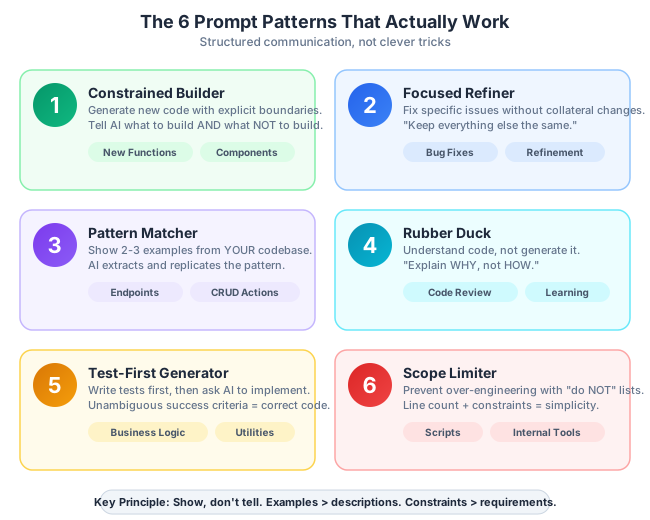
After months of tracking which prompts produce usable code on the first try versus which ones lead to three rounds of back-and-forth, I’ve distilled our team’s approach into six patterns. They cover about 90% of what we do with AI day-to-day.
Pattern 1: The Constrained Builder
This is for generating new code — a new function, endpoint, component, or module. The key word is constrained. You’re not asking the AI to design something. You’re telling it exactly what to build and, critically, what NOT to build.
The template:
Build [what] using [technology/framework].

Requirements:
- [Specific requirement 1]
- [Specific requirement 2]
- [Specific requirement 3]

Constraints:
- [Must use existing pattern X]
- [Must NOT use Y]
- [Performance target: Z]

Example of existing pattern in our codebase:
[paste 10-20 lines of similar code from your project]
Before (vague prompt):
Build a function to process user uploads.What you get: A 200-line function with streaming uploads, virus scanning integration, thumbnail generation, S3 multipart upload, progress callbacks, and content-type validation. Impressive. Useless for your use case.
After (constrained prompt):
Build a Python function to process user profile photo uploads
using Django and our existing storage utility.

Requirements:
- Accept a Django UploadedFile object
- Validate it's a JPEG or PNG under 5MB
- Resize to 200x200px using Pillow
- Save using our existing storage.save_file() utility
- Return the saved file URL

Constraints:
- Must follow our existing service function pattern (see example below)
- Must NOT use async — our views are synchronous
- Must NOT add new dependencies beyond Pillow
- No S3 or cloud storage — we use local file storage

Example of existing pattern:
def process_document_upload(uploaded_file: UploadedFile, user_id: int) -> str:
    validated = validate_file(uploaded_file, allowed_types=["pdf"], max_mb=10)
    saved_path = storage.save_file(validated, folder=f"docs/{user_id}")
    return saved_path
The second prompt is specific about what technologies to use, what the function signature should look like, what dependencies are acceptable, and includes an example of how similar functions look in the codebase. The output is almost always usable on the first try. Sometimes it needs minor tweaks, but the structure is right.
Why it works: Constraints eliminate the AI’s biggest failure mode — over-engineering. When you tell it what NOT to do, you remove the most common wrong answers from consideration. And the code example anchors the output to your actual codebase patterns instead of generic best practices.
Pattern 2: The Focused Refiner
This is for the second most common scenario: the AI gave you something close, but not quite right. Maybe the logic is correct but it’s using the wrong data structure, or it handles errors differently than your codebase convention.
Most developers handle this poorly. They say “make it better” or “fix the issues.” The AI then changes things you didn’t want changed and introduces new problems. The key is surgical precision: tell it exactly what’s wrong, what to keep, and what the fix should look like.
The template:
The [component/function] you generated has these issues:
1. [Specific issue with line reference or code snippet]
2. [Specific issue]

Keep everything else the same. Only change:
- [Exact change 1]
- [Exact change 2]

Expected behavior after fix:
- [What should happen in scenario A]
- [What should happen in scenario B]
Example in practice:
The process_upload function you generated has these issues:
1. It catches all exceptions with a bare "except:" — we use specific
   exception types
2. The resize logic doesn't preserve aspect ratio — it stretches the image
3. It returns None on failure — our pattern is to raise a ServiceError

Keep the validation logic, file type checking, and storage call the same.
Only change:
- Exception handling: catch Pillow.UnidentifiedImageError and OSError separately
- Resize: use Image.thumbnail() instead of Image.resize() to preserve ratio
- Error case: raise ServiceError("upload_failed", detail=str(e))

Expected behavior after fix:
- Valid JPEG under 5MB → resized, saved, URL returned
- Invalid file type → ServiceError("invalid_file_type")
- File too large → ServiceError("file_too_large")
- Corrupt image → ServiceError("upload_failed") with original error in detail
Why it works: “Keep everything else the same” is the most powerful phrase in refinement prompts. Without it, the AI might restructure the entire function. With it, you get surgical changes. And by specifying expected behavior, you give the AI a test specification to work against.
Pattern 3: The Pattern Matcher
This is the pattern I use most often, and it’s criminally underused. Instead of describing what you want in words, you show the AI two or three examples from your actual codebase and ask it to create a new one following the same patterns.
The template:
Here are two existing [endpoints/components/services] in our codebase:

Example 1:
[paste complete code of similar thing #1]

Example 2:
[paste complete code of similar thing #2]

Create a new [endpoint/component/service] for [feature] following the
EXACT same patterns, naming conventions, error handling approach,
and code structure.

Specific details for the new one:
- [What it should do]
- [Any differences from the examples]
Example in practice:
Here are two existing API endpoints in our Django project:

Example 1:
@api_view(["POST"])
@permission_classes([IsAuthenticated])
def create_project(request):
    serializer = ProjectCreateSerializer(data=request.data)
    serializer.is_valid(raise_exception=True)
    project = ProjectService.create(
        user=request.user,
        **serializer.validated_data
    )
    return Response(
        ProjectDetailSerializer(project).data,
        status=status.HTTP_201_CREATED
    )

Example 2:
@api_view(["POST"])
@permission_classes([IsAuthenticated])
def create_task(request):
    serializer = TaskCreateSerializer(data=request.data)
    serializer.is_valid(raise_exception=True)
    task = TaskService.create(
        user=request.user,
        **serializer.validated_data
    )
    return Response(
        TaskDetailSerializer(task).data,
        status=status.HTTP_201_CREATED
    )

Create a new endpoint for creating comments following the EXACT same
pattern. A comment belongs to a task (task_id in request body),
has a "body" text field, and an optional "parent_id" for threaded replies.
This is almost magical in practice. The AI doesn’t just follow the pattern — it infers your naming conventions (CommentCreateSerializer, CommentService.create, CommentDetailSerializer), your error handling approach, your response format, and your code style. I’ve seen it match import ordering and blank line conventions just from two examples.
Why it works: Humans are bad at describing patterns in words. We’re good at recognizing them. So instead of trying to articulate “use Django REST framework function-based views with service layer pattern and separate read/write serializers,” you just show two examples and the AI extracts the pattern automatically. This is few-shot prompting, but applied practically.
Pattern 4: The Rubber Duck
Not every AI interaction is about generating code. Sometimes you need to understand code — a legacy module, a library you haven’t used before, a colleague’s pull request that does something clever but opaque.
The key here is telling the AI what level to explain at and what to focus on. Without guidance, you get a line-by-line walkthrough that tells you what the code does syntactically (you can read) but not why it does it (you can’t).
The template:
Explain this code as if I'm a [junior dev / senior dev unfamiliar
with this library / someone reviewing this PR].

Focus on:
- What it does (not how — I can read the syntax)
- Why it's designed this way
- What could go wrong
- What assumptions it makes

[paste code]
Example in practice:
Explain this code as if I'm a senior dev who hasn't worked with
Redis Streams before.

Focus on:
- What this consumer group pattern achieves
- Why it uses XREADGROUP instead of XREAD
- What happens if this process crashes mid-processing
- What the XACK call does and why it matters

[paste 40 lines of Redis Streams consumer code]
What you get back: An explanation that tells you consumer groups allow multiple workers to process a stream without duplicating work, that XREADGROUP tracks which messages each consumer has received, that without XACK the message stays in the pending list and gets redelivered after a timeout, and that crashing mid-processing means the message will be picked up by another consumer or redelivered. That’s actionable understanding, not a syntax tour.
Why it works: “Not how — I can read the syntax” eliminates the filler. Specifying your expertise level prevents the AI from either over-explaining basics or assuming domain knowledge you don’t have. And the focused questions guide the explanation toward what actually matters for your task.
Pattern 5: The Test-First Generator
This inverts the typical workflow. Instead of generating code and then figuring out if it works, you write the tests first (or paste existing ones) and ask the AI to write the implementation.
The template:
I have these test cases:
[paste test cases]

Write the implementation that makes ALL of these tests pass.
Use [framework/library]. Follow this interface:
[paste interface/type definition]

Do not modify the tests. The implementation must match them exactly.
Example in practice:
I have these test cases:

def test_calculate_shipping_free_over_100():
    assert calculate_shipping(cart_total=150.00, country="US") == 0.00

def test_calculate_shipping_flat_rate_domestic():
    assert calculate_shipping(cart_total=50.00, country="US") == 5.99

def test_calculate_shipping_international():
    assert calculate_shipping(cart_total=50.00, country="DE") == 15.99

def test_calculate_shipping_international_free_over_200():
    assert calculate_shipping(cart_total=250.00, country="DE") == 0.00

def test_calculate_shipping_invalid_country():
    with pytest.raises(ValueError, match="Unsupported country"):
        calculate_shipping(cart_total=50.00, country="XX")

Write the implementation that makes ALL of these tests pass.
Use plain Python, no external dependencies.
Follow this signature:
def calculate_shipping(cart_total: float, country: str) -> float
The AI generates a clean implementation with exactly the logic those tests require — no more, no less. No over-engineering. No extra features. And you can immediately verify it works by running the tests.
Why it works: Tests are the most precise specification language developers have. When you give the AI tests, you’re giving it unambiguous success criteria. There’s no room for interpretation. Either the tests pass or they don’t. This is by far the most reliable pattern for generating correct code on the first attempt.
Pattern 6: The Scope Limiter
This is the antidote to AI’s chronic over-engineering problem. Use it when you need something simple and the AI keeps giving you enterprise-grade solutions.
The template:
I need a SIMPLE [what]. This is for a [small project / MVP / prototype /
internal tool that three people use].

Do NOT:
- Add features I didn't ask for
- Create abstractions for "future flexibility"
- Add error handling beyond [basic validation]
- Import new dependencies
- Add logging, metrics, or observability
- Create separate files — keep it in one [file/function]

Keep it under [N] lines. Simpler is better.
Example in practice:
I need a SIMPLE Python script that backs up a PostgreSQL database
to a local directory. This is an internal tool for our team of 4 devs.

Do NOT:
- Add S3 upload, encryption, or compression
- Create a class hierarchy or plugin architecture
- Add argument parsing — hardcode the config at the top of the file
- Add retry logic, health checks, or monitoring
- Import anything beyond subprocess and datetime

Keep it under 30 lines. Simpler is better.

It should:
- Run pg_dump with our connection string
- Save to /backups/ with a timestamp filename
- Print success or failure to stdout
Without the Scope Limiter, you’d get a 150-line script with argparse, logging configuration, S3 upload with multipart, Slack notifications on failure, a cron schedule generator, and a Docker-compose file. With it, you get 20 lines that do exactly what you need.
Why it works: The explicit “do NOT” list is the key. AI models are trained to be helpful, and “helpful” in training data usually means “comprehensive.” By explicitly prohibiting the extras, you override that bias. The line count constraint is also powerful — it forces the AI to prioritize and cut.
Anti-Patterns: Prompts That Waste Your Time
Just as important as knowing good patterns is recognizing bad ones. These are the prompts I see developers type that consistently waste time:
“Make it better.” Better how? Faster? More readable? More robust? More idiomatic? The AI will pick one interpretation, and it probably won’t be yours. Be specific: “Reduce the time complexity of the inner loop from O(n²) to O(n log n).”
“Fix the bugs.” Which bugs? The AI might “fix” things that aren’t broken and miss the actual issue. Be specific: “This function returns null when the input array is empty. It should return an empty array instead.”
“Rewrite this in a more modern way.” Modern according to what standard? ES2024? The latest React patterns? Your team’s conventions? Be specific: “Convert this class component to a function component using hooks. Keep the same props interface.”
“Add error handling.” What errors? Network failures? Invalid input? Race conditions? What should happen when an error occurs? Retry? Fail silently? Show a user message? Be specific: “Add try/catch around the API call. On network error, retry up to 3 times with 1-second delay. On 4xx response, throw a UserFacingError with the response message.”
Long conversational chains. After 8-10 back-and-forth messages, the AI starts losing context, contradicting earlier responses, and producing increasingly incoherent code. Start fresh. Take the best parts of what you have, write a new focused prompt, and get a clean result.
One-prompt features. Trying to build an entire feature — API endpoint, database migration, service logic, tests, and documentation — in a single prompt. The output will be mediocre across all of them. Break it down. One prompt per component. Each prompt can reference the output of the previous one.
The Context Stack: What to Include
Beyond the prompt structure itself, what context you provide dramatically affects output quality. I think of it as a stack, ordered by importance:
1. Existing code examples (most important). Two to three examples of similar implementations in YOUR codebase. This is worth more than any amount of written description. The AI pattern-matches against real code far better than it interprets written specifications.
2. Constraints and boundaries. What NOT to do. Which dependencies are off-limits. What performance characteristics matter. What patterns to avoid. I’ve found that constraints produce better code than requirements. Telling the AI what not to do eliminates the most common wrong answers, while requirements can be interpreted in multiple ways.
3. Project context. Your architecture (monolith vs. microservices), your framework, your language version, your team conventions. If you have a project documentation file or architecture decision records, reference the relevant parts. This is where the Context Package from Part 4 pays off — if you’ve already documented your project context, you can paste it directly.
4. Expected output format. A function signature, a file structure, an API response shape. Don’t let the AI decide how to structure the output. Show it the shape you need.
5. Definition of done. How you’ll verify the output works. Test cases, expected behavior, acceptance criteria. This gives the AI a target to aim at and makes your review faster because you know exactly what to check.
The rule of thumb: if you’d need to explain it to a new team member picking up this task, include it in the prompt. If a new hire would ask “what’s the convention for X in this project?” then tell the AI the convention. If they’d ask “what does the existing code look like?” then show the AI the existing code.
When to Start Fresh vs. Continue
One of the subtlest skills in working with AI is knowing when to keep iterating in the current conversation versus when to start over.
Start fresh when:
- The conversation has drifted from the original goal. You started asking for a utility function and now you’re discussing database schema design. The context is muddled.
- The AI is “stuck” on a wrong approach. You’ve corrected it twice and it keeps reverting. This happens because the wrong approach is heavily represented in the conversation context, and the AI keeps gravitating back to it.
- You’re switching tasks. Even if you’re working on the same feature, a new file or component deserves a focused conversation.
- The conversation is longer than about 10 exchanges. Context degradation is real. The AI weights recent messages more heavily and may contradict earlier decisions.
Continue when:
- You’re iterating on a specific piece of code — refining a function, adjusting formatting, fixing edge cases. The existing context is useful and relevant.
- The AI’s output is 80%+ correct and you need targeted fixes. The Focused Refiner pattern works well here.
- You’re exploring a design space. Sometimes a conversation is genuinely exploratory, and the back-and-forth is productive.
The 3-iteration rule: If after three rounds of refinement the output still isn’t right, stop iterating and start over. Write a better prompt from scratch, incorporating everything you learned from the failed attempts. Three rounds of “fix this, no not that, the other thing” tells you the initial prompt was the problem, not the individual fixes. Starting over with a well-structured prompt will get you there faster than a fourth round of patching.
I’ve tracked this on our team. When a developer restarts after three failed iterations with a restructured prompt, they get usable code in one shot about 75% of the time. When they keep iterating past three rounds, the success rate per additional round drops to about 20%, and the total time spent doubles.
The Bottom Line
Good prompts are structured, specific, and constrained. That’s it. No magic incantations. No secret techniques. Just clear communication.
The six patterns cover the vast majority of development interactions with AI:
- The Constrained Builder — generate new code with explicit boundaries
- The Focused Refiner — fix specific issues without collateral changes
- The Pattern Matcher — replicate existing codebase patterns in new code
- The Rubber Duck — understand code at the right level of detail
- The Test-First Generator — write code from test specifications
- The Scope Limiter — prevent over-engineering with explicit “do not” lists
The meta-lesson across all six: show, don’t tell. Examples of existing code are worth more than paragraphs of description. Constraints (“do NOT use X”) produce better results than open-ended requirements (“handle errors appropriately”). And specific expected outcomes (“this function should return an empty array”) beat vague quality targets (“make it robust”).
If there’s one skill that makes all of these patterns work better, it’s knowing your own codebase. The developers on my team who write the best prompts aren’t the ones who’ve read the most about prompt engineering. They’re the ones who can instantly pull up two examples of existing code that show the pattern they want. They know the naming conventions, the error handling approach, the file structure, the testing patterns. That knowledge is what transforms a generic prompt into a precise one.
You don’t need to memorize these patterns. Save them somewhere, and the next time you’re about to type a vague prompt, pull up the relevant template and fill in the blanks. After a few weeks, the structure becomes second nature. You’ll find yourself automatically thinking in terms of requirements, constraints, and examples before you type a single word.
The AI hasn’t gotten smarter. You’ve gotten better at telling it what you need.
In the next post, we’ll look at what happens when AI-generated code breaks in production — and how to use AI to debug, trace, and fix issues that you didn’t write and might not fully understand.
This is Part 11 of a 13-part series: The AI-Assisted Development Playbook. Start from the beginning with Part 1: Why Workflow Beats Tools.
Series outline:
- Why Workflow Beats Tools — The productivity paradox and the 40-40-20 model (Part 1)
- Your First Quick Win — Landing page in 90 minutes (Part 2)
- The Review Discipline — What broke when I skipped review (Part 3)
- Planning Before Prompting — The 40% nobody wants to do (Part 4)
- The Architecture Trap — Beautiful code that doesn’t fit (Part 5)
- Testing AI Output — Verifying code you didn’t write (Part 6)
- The Trust Boundary — What to never delegate (Part 7)
- Team Collaboration — Five devs, one codebase, one AI workflow (Part 8)
- Measuring Real Impact — Beyond “we’re faster now” (Part 9)
- What Comes Next — Lessons and the road ahead (Part 10)
- Prompt Patterns — How to talk to AI effectively (this post)
- Debugging with AI — When AI code breaks in production (Part 12)
- AI Beyond Code — Requirements, docs, and decisions (Part 13)