I asked Dan how long the authentication feature would take with AI.
“Two hours,” he said confidently.
I asked if he’d written the requirements yet. He hadn’t.
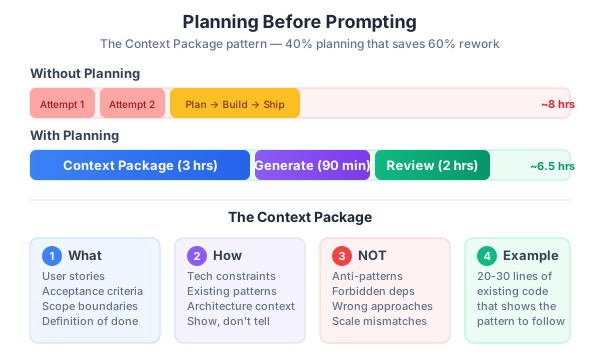
Three days and two complete rewrites later, we had authentication. The first version used a third-party auth service we’d already decided against in an architecture decision record from three months prior. The second used JWT when our infrastructure team had mandated session-based auth. The third version — the one that actually shipped — took 90 minutes of AI generation. But it took three hours of planning to get there.
That experience crystallized something I’d been sensing since we started using AI tools on BuildRight: the biggest bottleneck in AI-assisted development isn’t the AI. It’s the absence of clear thinking before the AI gets involved.
In Part 1, I introduced the 40-40-20 model — 40% planning, 20% generation, 40% review. Part 2 showed a quick win with a landing page. Part 3 showed what happens when you skip review. Now it’s time to talk about the other neglected phase: the 40% that nobody wants to do.
Planning.
Why Developers Hate Planning
Let me be honest. I’ve been a developer for over 15 years, and for most of that time, I hated planning too. Planning feels like the opposite of productivity. You’re not shipping anything. You’re not writing code. You’re sitting there, thinking, writing documents that nobody reads, attending meetings where people argue about edge cases that may never happen.
And then AI tools came along and made this instinct ten times worse.
Before AI, at least writing code took effort. You had to think about implementation as you typed. The act of coding was itself a form of incremental discovery — you’d hit a wall, realize you didn’t understand the requirement, go ask someone, come back with clarity. The friction was the forcing function.
AI removes that friction entirely. You type a prompt. Code appears. Dopamine hits. You feel productive. You see a result on your screen in seconds. The instant gratification of AI generation is the enemy of thoughtful planning. Why spend an hour writing a technical spec when you can have working code in five minutes?
Here’s why: because that “working code” only works in isolation. It works in the context of your prompt. It doesn’t work in the context of your project, your team’s decisions, your existing architecture, or your production infrastructure.
The trap is seductive and it sounds like this: “I’ll figure out the requirements as I go.” What that actually means is: “I’ll rewrite this three times because I didn’t know what I wanted.”
Dan’s reaction after the authentication disaster was exactly right. “I spent more time fixing AI code that solved the wrong problem than I would have spent just writing the right code myself.” And he wasn’t wrong. But the lesson isn’t that AI is useless for complex features. The lesson is that AI amplifies whatever you feed it — including confusion.
After the landing page win in Part 2, Dan thought every task would be that simple. The landing page worked because it was self-contained, had obvious requirements (copy + design + responsiveness), and didn’t need to integrate with anything. Authentication is the opposite of that. It touches the database, the API layer, the frontend, the middleware, the infrastructure. It has security implications. It has to match decisions the team already made. No single prompt can capture all of that context.
Teams I’ve worked with and talked to over the past year report a consistent pattern: those that invest 30-40% of their task time in planning before AI generation see roughly 60% fewer rewrites. That’s not a published study — it’s the accumulated observation from dozens of teams trying to make AI development actually work. The planning investment isn’t overhead. It’s the thing that makes AI generation productive instead of wasteful.
Requirements as AI Context
There’s a mental model shift that changed everything for how our team works: your requirements aren’t just documentation. They’re AI context.
The quality of AI output is directly proportional to the quality of your input. And I don’t just mean the prompt. I mean the entire body of context that informs the prompt — the user stories, the technical constraints, the existing patterns, the architecture decisions.
On BuildRight, we have two distinct “languages” for requirements. Mei, our product owner, writes in user stories. Dan and the dev team write in technical specs. For AI-assisted development to work, you need both — and you need them before you start prompting.
Mei’s Language (User Stories):
As a team lead, I want to invite team members by email,
so that I can onboard my team quickly.

Acceptance criteria:
- Invitation email contains a unique signup link
- Link expires after 72 hours
- Invited user skips the waitlist
- Maximum 10 pending invitations per account (free tier)
This tells the AI what the feature should do from the user’s perspective. It defines the boundaries. Without it, the AI will make assumptions about user flows — and those assumptions will be wrong in ways that are expensive to fix later.
Dan’s Language (Technical Spec):
Feature: Team Invitations
Auth: Requires authenticated session (not JWT — see ADR-003)
Database: New `invitations` table with columns: id, email, token,
  team_id, invited_by, expires_at, accepted_at
API: POST /api/teams/{id}/invitations
Validation: Email format, duplicate check, rate limit (10/team)
Email: Use existing SendGrid integration (see /lib/email.ts)
Architecture: Follow repository pattern (see /src/repositories/)
This tells the AI how the feature should be built. What technology. What patterns. What existing code to integrate with. Without it, the AI will pick whatever approach its training data favors — which may be completely wrong for your project.
The shared language — acceptance criteria and definition of done — is where Mei and Dan align. Both agree on what “done” means before any code is written. This shared understanding is the single most important artifact in the planning phase. Not because it’s beautifully documented, but because it prevents the most common failure mode: building the wrong thing correctly.
I’ve seen AI generate flawless code that implements the wrong requirements. Beautiful TypeScript, perfect test coverage, elegant architecture — for a feature that doesn’t match what the product owner asked for. That’s not an AI problem. That’s a planning problem.
The “Context Package” Pattern
Over the past several months of AI-assisted development, our team evolved a practice we call the “Context Package.” It’s not revolutionary. It’s essentially a structured brief that contains everything the AI needs to generate code that actually fits your project.
The key insight is that a Context Package is not a prompt. It’s the environment around the prompt. You might use pieces of it in different prompts for different subtasks, but the package itself is a planning artifact that exists before any prompting begins.
Here’s the template we use:
## Context Package: [Feature Name]

### What We're Building
[1-2 sentences, plain English]

### User Stories
[From Mei / product owner]

### Technical Constraints
- Framework: [e.g., Express.js with TypeScript]
- Database: [e.g., PostgreSQL via Prisma ORM]
- Auth: [e.g., session-based, stored in Redis]
- Existing patterns to follow: [links to example files]
- Architecture decisions: [relevant ADRs]

### What Already Exists
- [List existing files/functions to build on, not replace]
- [Show the AI WHERE the new code should fit]

### What NOT to Do
- Do NOT use [third-party auth services / microservices / etc.]
- Do NOT add new dependencies without discussion
- Do NOT change existing database schema without migration

### Acceptance Criteria
- [ ] [Criterion 1]
- [ ] [Criterion 2]

### Example of Existing Pattern
[Show 20-30 lines of an existing similar feature so AI matches the style]
Let me walk through why each section matters.
“What We’re Building” seems obvious, but you’d be surprised how often developers skip the plain-English summary and jump straight into technical details. This section forces you to articulate the feature in terms a non-developer would understand. If you can’t explain what you’re building in two sentences, you don’t understand it well enough to prompt an AI about it.
“What Already Exists” is the section most teams skip — and it’s arguably the most important. AI doesn’t know your codebase. It will generate new utility functions when you already have them. It will create new patterns when you have established ones. It will build from scratch when it should be extending. Telling the AI what already exists is how you prevent it from creating a parallel codebase inside your codebase.
“What NOT to Do” is the section that would have saved Dan three days on authentication. If the Context Package had said “Do NOT use JWT — see ADR-003” and “Do NOT use third-party auth services — this was decided in sprint 12,” the AI would never have generated those first two wrong versions.
“Example of Existing Pattern” is your style guide for AI. Show it 20-30 lines of a similar feature that your team already built and approved. The AI will mimic that pattern. Without this, it will use whatever pattern it considers “best practice” — which may be perfectly valid in general but completely inconsistent with your codebase.
We keep Context Packages in a /docs/context/ folder in BuildRight’s repo. They’re versioned alongside the code. They’re living documents — when the tech stack changes, the Context Packages get updated. This isn’t busywork. These documents are the reason our AI generation sessions produce usable code on the first try instead of the third.
Progressive Decomposition: Breaking Features into AI-Sized Tasks
Even with a perfect Context Package, throwing a big feature at AI in a single prompt is a recipe for mediocre output. AI produces its best code when the task is focused, specific, and bounded. I think of this as “AI-sized tasks” — chunks of work small enough that the AI can hold the entire problem in context and produce a coherent solution.
Here’s the decomposition for our team invitation feature:
Bad prompt: “Build the complete team invitation system for BuildRight”
Good decomposition — six discrete tasks, each with its own AI generation session:
- Database migration: Create the invitations table with the schema from the Context Package
- Repository layer: CRUD operations for invitations following the existing repository pattern in
/src/repositories/ - API endpoint: POST
/api/teams/{id}/invitationswith validation, rate limiting, and duplicate checking - Email service: Send invitation email using the existing SendGrid integration in
/lib/email.ts - Accept flow: GET
/api/invitations/{token}/accept— verify token, create user, add to team - UI component: Invitation management page in team settings, following existing component patterns
Each task gets its own slice of the Context Package. Each gets its own AI generation session. Each gets its own review cycle. Each produces a focused pull request with a small, reviewable diff.
Why progressive decomposition works:
First, AI produces better code for focused tasks. When you ask it to build an entire system, it has to make dozens of interconnected decisions. Some of those decisions will conflict with each other. Some will conflict with your architecture. The probability of a correct result decreases exponentially with the scope of the request.
Second, each piece can be reviewed independently. A 50-line diff for a database migration is easy to review. A 500-line diff for an entire feature system is not. Smaller diffs mean better reviews, which means fewer bugs in production. We covered this in Part 3, and it applies doubly when the code was AI-generated.
Third, if one piece is wrong, you only rewrite that piece. When Dan’s monolithic authentication prompt produced code with the wrong auth approach, he had to throw away everything. If he’d decomposed it, only the auth middleware piece would have been wrong. The database schema, the repository layer, the API structure — all of that would have been fine.
Fourth, you can test incrementally. Each piece should work on its own. The database migration can be verified before you build the repository. The repository can be tested before you build the API endpoint. This incremental verification catches problems early, when they’re cheap to fix.
The general rule we follow: if a task would produce more than 150 lines of code, it’s too big for a single AI generation session. Break it down further.
When NOT to Use AI
This is the section that gets me the most pushback when I talk to other teams. “If AI can generate code faster, why wouldn’t we use it for everything?”
Because faster isn’t the same as better. And for certain categories of code, “better” matters more than “faster” by orders of magnitude.
Write yourself — don’t delegate to AI:
-
Security-critical logic. Authentication flows, authorization checks, encryption implementations, token validation. These are the places where a subtle bug becomes a data breach. AI can generate plausible-looking security code that has vulnerabilities no static analysis tool will catch. I’ve seen AI generate CSRF protection that looked correct but had a timing vulnerability. I’ve seen it generate password hashing that used a deprecated algorithm. The risk isn’t worth the time savings.
-
Complex business rules that require domain expertise. BuildRight has billing logic that accounts for mid-cycle plan changes, prorated refunds, team seat adjustments, and annual vs. monthly pricing. This logic was defined in conversations between Mei, the finance team, and the engineering team over several weeks. No AI prompt can capture the nuance and edge cases that emerged from those discussions. Write it yourself. Comment it heavily. Test it exhaustively.
-
Performance-critical hot paths. If a function runs millions of times per request, you need to understand every line. AI-generated code tends to be correct but not optimal. It favors readability and common patterns over performance. That’s fine for 99% of your codebase. It’s not fine for the 1% where performance is the feature.
-
Anything involving money. Payment processing, billing calculations, invoice generation. The cost of a bug here isn’t a bad user experience — it’s financial liability. Write it yourself.
-
Novel algorithms your team invented. If it’s genuinely new, the AI’s training data doesn’t include it. It will generate something that looks similar but isn’t what you need.
AI is excellent for:
- CRUD operations and boilerplate. This is AI’s sweet spot. Repetitive, pattern-based code that follows established conventions. Let the AI handle it.
- Data validation and input sanitization — but verify the edge cases yourself.
- UI components following established patterns. Give it an example component, ask for a new one. It’ll match the style.
- Test scaffolding. AI is great at generating the structure of tests. But add the meaningful assertions yourself — the ones that test the actual business logic, not just “does the function return something.”
- Database migrations from schema definitions. Straightforward transformations.
- API endpoint structure when you have existing patterns to follow.
The gray zone — use AI, but review with extra care:
- Data transformations. AI handles the happy path well but often misses edge cases with null values, empty arrays, or unexpected types.
- Error handling patterns. AI tends to either over-catch or under-catch. Review the error boundaries.
- Caching logic. AI will generate caching code that works but may not account for your specific invalidation requirements.
- Search and filter implementations. AI generates functional search code, but the performance characteristics may not match your data scale.
The key principle is this: use AI for code where a bug is annoying. Write yourself where a bug is catastrophic. The line between those two categories is a judgment call that requires experience and domain knowledge. If you’re not sure which side a task falls on, err on the side of writing it yourself.
The Planning Investment Pays Off Exponentially
Let me show you the actual numbers from the BuildRight authentication feature. These aren’t hypothetical — these are the hours Dan tracked.
Attempt 1 (no planning):
- 0 minutes planning
- 45 minutes AI generation
- Result: Used third-party auth service we’d decided against
- Outcome: Scrapped entirely
Attempt 2 (minimal planning):
- 15 minutes planning
- 30 minutes AI generation
- Result: Used JWT when team mandated session-based auth
- Outcome: Scrapped entirely
Attempt 3 (proper planning):
- 3 hours planning (Context Package, decomposition, architecture review)
- 90 minutes AI generation (across 6 decomposed tasks)
- 2 hours review and testing
- Outcome: Shipped
Total time without planning: approximately 8 hours, including the two failed attempts, context switching, frustration, and the final successful attempt.
Total time with proper planning: 6.5 hours, no rewrites, shipped on the first complete attempt.
The 1.5-hour savings on a single feature is nice but not transformative. Here’s what is transformative: the compound effect across subsequent features.
The Context Package Dan created for authentication established patterns that every subsequent feature built on. The repository pattern, the API endpoint structure, the validation approach, the test scaffolding — all of it became reusable context for future features. By the fifth feature we built with AI assistance, the planning phase had shrunk from 3 hours to 45 minutes. Not because we were cutting corners, but because the architectural decisions were already made, the patterns were already documented, and the Context Package templates were already filled in.
Feature 1 took 6.5 hours with planning. Feature 5 took 3 hours. Feature 10 took under 2 hours. The planning foundation creates a flywheel effect — each feature is faster than the last because the planning artifacts accumulate.
This is what I mean when I say planning isn’t the opposite of speed. It’s the prerequisite for sustainable speed. Without planning, every feature takes roughly the same amount of time (or gets worse, as the codebase grows more complex and AI-generated inconsistencies pile up). With planning, every feature benefits from the decisions and patterns established by previous features.
Teams that skip planning look faster in week one. Teams that invest in planning are dramatically faster by month three. The curve crosses somewhere around the third or fourth feature, and after that, the planning-first teams never look back.
The Bottom Line
I know this post doesn’t have the satisfying immediacy of Part 2, where we built a landing page in 90 minutes. Planning isn’t exciting. Nobody tweets about their Context Package. Nobody demos their progressive decomposition at the team standup.
But here’s what I’ve learned after fifteen years of building software and the past year of integrating AI into that process:
The 40-40-20 model isn’t a suggestion. It’s the minimum viable discipline for AI-assisted development. Teams that treat AI as a shortcut around thinking end up slower than teams that don’t use AI at all. Teams that use AI as an accelerator for well-planned work end up genuinely, sustainably faster.
Your Context Package is as important as your code. Treat it like a project artifact. Version it. Review it. Update it when things change. It’s the interface between human judgment and AI capability — and like any interface, it needs to be well-designed.
Know when to use AI and when to write code yourself. The line isn’t always obvious, but the principle is simple: delegate the predictable, own the critical.
Break big features into AI-sized tasks. The overhead of decomposition is trivial compared to the cost of reviewing or rewriting a monolithic AI output.
And if someone on your team says “I don’t need to plan, AI will figure it out” — show them this post. Or better yet, let them learn the way Dan did. Some lessons stick better when you live them.
In Part 5, we’ll look at what happens when AI generates beautiful code that completely ignores your architecture. The Architecture Trap is the most expensive mistake in AI-assisted development — and the easiest to prevent once you know what to look for.
This is Part 4 of a 13-part series: The AI-Assisted Development Playbook. Start from the beginning with Part 1: Why Workflow Beats Tools.
Series outline:
- Why Workflow Beats Tools — The productivity paradox and the 40-40-20 model (Part 1)
- Your First Quick Win — Landing page in 90 minutes (Part 2)
- The Review Discipline — What broke when I skipped review (Part 3)
- Planning Before Prompting — The 40% nobody wants to do (this post)
- The Architecture Trap — Beautiful code that doesn’t fit (Part 5)
- Testing AI Output — Verifying code you didn’t write (Part 6)
- The Trust Boundary — What to never delegate (Part 7)
- Team Collaboration — Five devs, one codebase, one AI workflow (Part 8)
- Measuring Real Impact — Beyond “we’re faster now” (Part 9)
- What Comes Next — Lessons and the road ahead (Part 10)
- Prompt Patterns — How to talk to AI effectively (Part 11)
- Debugging with AI — When AI code breaks in production (Part 12)
- AI Beyond Code — Requirements, docs, and decisions (Part 13)