
JOURNAL
Qwen3.8-27B’s Reasoning-Effort Trap: 22,000 Tokens to Draw a Circle
Qwen3.8-27B ships with reasoning effort defaulted to xhigh, and it shows: a trivial SVG request burns 22,000+ reasoning tokens and 21 minutes. A Technical Lead's guide to reasoning-effort as a hidden cost knob in agent pipelines.
On this page
Alibaba’s Qwen3.8-27B landed on August 14 with genuinely strong numbers — Terminal-Bench 2.1 up from 63.4 to 73.0 over its predecessor, DeepSWE 1.1 jumping from 13.3 to 42.2, beating Meta’s Muse Glimmer on all eight head-to-head benchmarks Qwen’s team published. It’s a 27.8B dense multimodal model, Apache 2.0, native 262K context extendable to 1M via YaRN, and it runs on a single 24GB GPU. On paper, it’s one of the most capable open-weight models you can self-host today.
Then Simon Willison asked it to draw an SVG circle, and it took 21 minutes.
The default that eats your latency budget
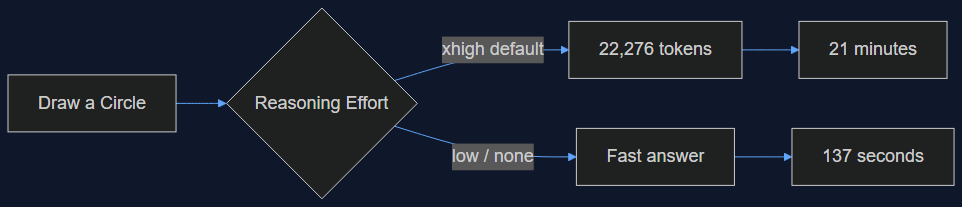
The root cause is a single config decision: Qwen3.8-27B ships with reasoning effort defaulted to xhigh. For a “draw a circle” prompt, that meant 22,276 reasoning tokens before it produced any output — 21 minutes end to end. Disable reasoning entirely and the same prompt finishes in 137 seconds. That’s not a 2x or 3x gap, it’s roughly a 9x gap, on a task that shouldn’t require any reasoning tokens at all.
I’ve hit this class of bug before, just never this severe. Reasoning-effort settings are a relatively new knob across the model landscape — Claude, GPT, and now open-weight releases all expose some version of it — and vendors are still calibrating what the default should be for a general-purpose release. Qwen’s team clearly optimized the default for benchmark performance (xhigh almost certainly pads those Terminal-Bench and DeepSWE numbers) rather than for the median real-world request, which for most agent pipelines looks nothing like a competition-math problem.
What this actually costs you in production
If you’re running Qwen3.8-27B as a coding-agent backend — and Willison confirms it works well in that role once tuned, tested via the Pi agent — the xhigh default isn’t just a latency annoyance, it’s a token-cost multiplier hiding inside every single call. Picture a CI pipeline running an agent against every PR: at xhigh defaults, you’re paying for tens of thousands of throwaway reasoning tokens on requests that a low or disabled setting would answer identically, just faster and cheaper.
The fix is one parameter, but you have to know to set it:
from openai import OpenAI

client = OpenAI(base_url="http://localhost:1234/v1", api_key="lm-studio")

response = client.chat.completions.create(
    model="qwen3.8-27b",
    messages=[{"role": "user", "content": "Draw an SVG circle, 100x100, red fill."}],
    extra_body={
        "reasoning_effort": "low"  # or "none" — xhigh is the shipped default
    },
)
If you’re running this through LM Studio or Ollama rather than a raw OpenAI-compatible endpoint, the equivalent is a model-load flag or a per-request override in your server config — check your runtime’s docs specifically for reasoning_effort or thinking_budget before you ship anything against this model. Don’t assume the shipped default is production-appropriate just because it’s the default; that assumption is exactly what cost Willison 21 minutes.
The other half of the story: it’s actually good once tuned
This isn’t a “skip this model” post. Once reasoning effort is dialed down, Willison found genuinely strong vision and bounding-box detection, and confirmed it functions well as a coding-agent backend. There’s also a concrete throughput win worth knowing about: Multi-Token Prediction in LM Studio gives roughly a 72% throughput boost on this model specifically — MTP predicts multiple tokens per forward pass instead of one, and Qwen3.8-27B’s architecture apparently takes well to it. If you’re self-hosting, that’s a bigger lever than most quantization tricks you’d otherwise reach for.
What I’d actually do before deploying this
Three things, in order, before this model touches a production agent pipeline:
- Benchmark your own workload at each reasoning-effort tier, not the vendor’s benchmark suite. A circle-drawing prompt and a multi-file refactor have wildly different reasoning needs —
lowmight be fine for 80% of your agent’s traffic and genuinely undershoot for the other 20%. Measure, don’t guess. - Set reasoning effort explicitly in every request, never rely on the model’s shipped default. This is true for every reasoning-capable model you deploy, not just this one — defaults optimize for the vendor’s benchmark story, not your latency SLA.
- Turn on Multi-Token Prediction if you’re on LM Studio. A 72% throughput gain is large enough that it should be part of your baseline config, not an opt-in tweak you discover three weeks into running this in production.
The bigger lesson for anyone evaluating open models right now
Benchmark leaderboards increasingly reward aggressive reasoning-effort defaults, because more thinking tokens generally means better scores on hard eval suites. That creates a structural incentive for model releases to ship “smart but slow and expensive” out of the box, then rely on users to discover the tuning knob themselves — exactly what happened here. When you evaluate a new open-weight release, don’t just read the benchmark table. Read (or run) a trivial-task latency test first. If a “draw a circle” prompt takes more than a few seconds, you’ve found the same default trap Willison did, and it’s worth knowing before you wire the model into anything that runs at scale.
Source: Simon Willison — Qwen3.8-27B, Qwen3.8-27B specs and benchmarks
Related reading
07 Oct 2026 · 4 min read
ai
English Lesson — Tuesday Morning: Embeddings & Vector Search Vocabulary
Daily English practice for tech professionals: embed, vector database, and nearest neighbor search vocabulary with pronunciation and exercises.
Read more
06 Oct 2026 · 5 min read
agentic coding
Claude Cowork Just Did the Thing I Said Remote Control Wasn't Doing
In August I wrote that Claude Code's Remote Control was a sync layer, not a cloud migration, and that keeping execution local was the point. This week Anthropic moved Cowork's execution to the cloud by default. Here's why both were the right call — for different products.
Read more
06 Oct 2026 · 5 min read
agentic coding
My Agent Didn't Forget. It Never Wrote Anything Down.
A Hacker News post about agent memory landed the same week I'd debugged a real dedup failure caused by exactly the problem it describes. I tested the fix against my own incident — here's what held up and what didn't.
Read more
Discussion
Comments are reviewed before publication. Your email is kept private.