In Part 3, you wrote your first Playwright tests. They worked. They were exciting. And if you kept going, you’d end up with 50 test files that all share the same CSS selectors, duplicated setup code, and a growing sense that something isn’t quite right.
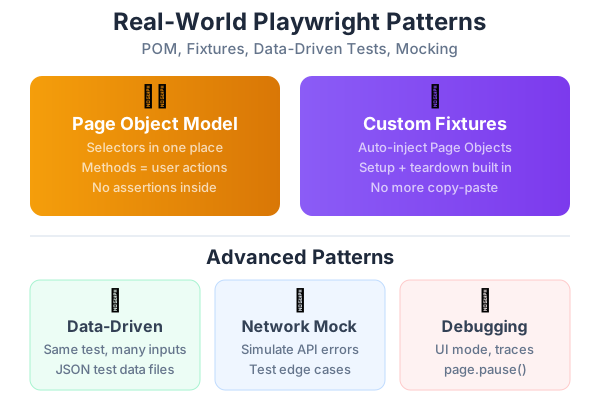
That feeling is correct. Raw tests without structure become unmaintainable fast. This post teaches you the patterns that separate beginners from professionals: Page Object Model, custom fixtures, data-driven tests, and network mocking. These aren’t academic concepts — they’re the patterns I wish someone had shown me on day two.
Why Raw Tests Break Down
Look at this pattern you’ve probably already started writing:
test('can filter posts by tag', async ({ page }) => {
  await page.goto('/blog');
  await page.getByRole('button', { name: 'ai' }).click();
  await expect(page.locator('.card-link')).not.toHaveCount(0);
});

test('can search for posts', async ({ page }) => {
  await page.goto('/blog');
  await page.getByPlaceholder('Search posts...').fill('playwright');
  await expect(page.locator('.card-link')).not.toHaveCount(0);
});

test('shows no results message', async ({ page }) => {
  await page.goto('/blog');
  await page.getByPlaceholder('Search posts...').fill('xyznonexistent');
  await expect(page.getByText('No posts found')).toBeVisible();
});
Three tests, and already you see the problems:
/blogappears three times — if the URL changes, you update three places.card-linkappears twice — if the CSS class changes, you hunt through every testSearch posts...appears twice — if the placeholder text changes, same problem
Now imagine 50 tests. Then imagine the UI redesign that changes every selector. You’d spend days fixing tests instead of testing.
The Page Object Model — Your First Real Pattern
The Page Object Model (POM) solves this by putting all page-specific knowledge in one class. The test uses the class; the class knows the selectors.
Before POM: Each test knows how the page is built. After POM: Each test knows what to do on the page. Only the Page Object knows the selectors.
Creating Your First Page Object
// tests/pages/BlogPage.ts
import { type Page, type Locator } from '@playwright/test';

export class BlogPage {
  // The page instance
  readonly page: Page;

  // All selectors live here — one place to update
  readonly searchInput: Locator;
  readonly postCards: Locator;
  readonly noResultsMessage: Locator;

  constructor(page: Page) {
    this.page = page;
    this.searchInput = page.getByPlaceholder('Search posts...');
    this.postCards = page.locator('.card-link');
    this.noResultsMessage = page.getByText('No posts found');
  }

  // Navigation
  async goto() {
    await this.page.goto('/blog');
  }

  // Actions
  async filterByTag(tagName: string) {
    await this.page.getByRole('button', { name: tagName }).click();
  }

  async searchFor(query: string) {
    await this.searchInput.fill(query);
  }

  // Queries (no assertions — let the test decide what to check)
  async getVisiblePostCount(): Promise<number> {
    return await this.postCards.count();
  }
}
Using the Page Object in Tests
Now your tests read like manual test cases:
// tests/e2e/blog.spec.ts
import { test, expect } from '@playwright/test';
import { BlogPage } from '../pages/BlogPage';

test.describe('Blog Page', () => {
  let blogPage: BlogPage;

  test.beforeEach(async ({ page }) => {
    blogPage = new BlogPage(page);
    await blogPage.goto();
  });

  test('filters posts by tag', async () => {
    await blogPage.filterByTag('ai');
    const count = await blogPage.getVisiblePostCount();
    expect(count).toBeGreaterThan(0);
  });

  test('searches for posts', async () => {
    await blogPage.searchFor('playwright');
    const count = await blogPage.getVisiblePostCount();
    expect(count).toBeGreaterThan(0);
  });

  test('shows no results for invalid search', async () => {
    await blogPage.searchFor('xyznonexistent');
    await expect(blogPage.noResultsMessage).toBeVisible();
  });
});
What changed:
- Selectors are defined once in
BlogPage.ts - Tests use descriptive methods like
filterByTag('ai')instead of raw selectors - If the search placeholder changes, you update one line in one file
- Tests read like natural language: “filter by tag AI, check post count is greater than zero”
Page Object Rules
- One Page Object per page/component —
LoginPage.ts,BlogPage.ts,DashboardPage.ts - No assertions in Page Objects — The test decides what to verify
- Methods should describe user actions —
login(email, password), notfillEmailField(email) - Return useful information —
getVisiblePostCount()returns data the test can assert on
A More Complete Example: LoginPage
// tests/pages/LoginPage.ts
import { type Page, type Locator } from '@playwright/test';

export class LoginPage {
  readonly page: Page;
  readonly emailInput: Locator;
  readonly passwordInput: Locator;
  readonly signInButton: Locator;
  readonly errorMessage: Locator;
  readonly forgotPasswordLink: Locator;

  constructor(page: Page) {
    this.page = page;
    this.emailInput = page.getByLabel('Email');
    this.passwordInput = page.getByLabel('Password');
    this.signInButton = page.getByRole('button', { name: 'Sign In' });
    this.errorMessage = page.getByRole('alert');
    this.forgotPasswordLink = page.getByRole('link', { name: 'Forgot password' });
  }

  async goto() {
    await this.page.goto('/login');
  }

  async login(email: string, password: string) {
    await this.emailInput.fill(email);
    await this.passwordInput.fill(password);
    await this.signInButton.click();
  }

  async getErrorText(): Promise<string> {
    return (await this.errorMessage.textContent()) ?? '';
  }
}
// tests/e2e/auth.spec.ts
import { test, expect } from '@playwright/test';
import { LoginPage } from '../pages/LoginPage';
test.describe('Authentication', () => {
let loginPage: LoginPage;
test.beforeEach(async ({ page }) => {
loginPage = new LoginPage(page);
await loginPage.goto();
});
test('successful login redirects to dashboard', async ({ page }) => {
await loginPage.login('user@example.com', 'correctpassword');
await expect(page).toHaveURL(/\/dashboard/);
});
test('invalid credentials show error', async () => {
await loginPage.login('user@example.com', 'wrongpassword');
const error = await loginPage.getErrorText();
expect(error).toContain('Invalid email or password');
});
test('empty email shows validation error', async () => {
await loginPage.login('', 'password123');
await expect(loginPage.errorMessage).toBeVisible();
});
});Custom Test Fixtures — No More Copy-Paste
Notice how every test file creates Page Objects in beforeEach? Fixtures eliminate that repetition. They inject pre-built dependencies into your tests automatically.
What Fixtures Are
Think of fixtures as a kit that’s prepared before each test. Instead of writing:
let blogPage: BlogPage;
test.beforeEach(async ({ page }) => {
  blogPage = new BlogPage(page);
});
You create a fixture once and every test gets it for free:
test('filters posts', async ({ blogPage }) => {
  // blogPage is already created and ready to use
});
Creating Your First Fixture
// tests/fixtures/base.fixture.ts
import { test as base } from '@playwright/test';
import { LoginPage } from '../pages/LoginPage';
import { BlogPage } from '../pages/BlogPage';
import { DashboardPage } from '../pages/DashboardPage';

// Define the types for your fixtures
type MyFixtures = {
  loginPage: LoginPage;
  blogPage: BlogPage;
  dashboardPage: DashboardPage;
};

// Extend the base test with your fixtures
export const test = base.extend<MyFixtures>({
  loginPage: async ({ page }, use) => {
    const loginPage = new LoginPage(page);
    await use(loginPage);
  },

  blogPage: async ({ page }, use) => {
    const blogPage = new BlogPage(page);
    await use(blogPage);
  },

  dashboardPage: async ({ page }, use) => {
    const dashboardPage = new DashboardPage(page);
    await use(dashboardPage);
  },
});

// Re-export expect so tests only import from one place
export { expect } from '@playwright/test';
Using Fixtures in Tests
// tests/e2e/blog.spec.ts
import { test, expect } from '../fixtures/base.fixture';

test.describe('Blog Page', () => {
  test.beforeEach(async ({ blogPage }) => {
    await blogPage.goto();
  });

  test('filters posts by tag', async ({ blogPage }) => {
    await blogPage.filterByTag('ai');
    const count = await blogPage.getVisiblePostCount();
    expect(count).toBeGreaterThan(0);
  });
});
The difference is subtle but powerful:
import { test, expect } from '../fixtures/base.fixture'— Uses your custom testasync ({ blogPage })— The fixture is injected automatically- No manual
new BlogPage(page)— it’s done for you
Fixtures Can Do Setup and Teardown
Fixtures can perform setup before the test and cleanup after:
export const test = base.extend<MyFixtures>({
  authenticatedPage: async ({ page }, use) => {
    // SETUP: Log in before the test
    await page.goto('/login');
    await page.getByLabel('Email').fill('test@example.com');
    await page.getByLabel('Password').fill('password');
    await page.getByRole('button', { name: 'Sign In' }).click();
    await page.waitForURL(/\/dashboard/);

    // Give the authenticated page to the test
    await use(page);

    // TEARDOWN: Log out after the test (optional)
    await page.goto('/logout');
  },
});
Now any test that needs a logged-in user just requests authenticatedPage:
test('dashboard shows user name', async ({ authenticatedPage }) => {
  await authenticatedPage.goto('/dashboard');
  await expect(authenticatedPage.getByText('Welcome, Test User')).toBeVisible();
});
Data-Driven Testing — Same Test, Many Inputs
Manual testers often test the same feature with different inputs: valid email, invalid email, empty email, email with special characters. Data-driven testing automates this pattern.
Simple Parameterized Tests
const loginScenarios = [
  {
    name: 'valid credentials',
    email: 'user@example.com',
    password: 'correct123',
    expectSuccess: true,
  },
  {
    name: 'wrong password',
    email: 'user@example.com',
    password: 'wrong',
    expectSuccess: false,
  },
  {
    name: 'empty email',
    email: '',
    password: 'password',
    expectSuccess: false,
  },
  {
    name: 'invalid email format',
    email: 'not-an-email',
    password: 'password',
    expectSuccess: false,
  },
];

for (const scenario of loginScenarios) {
  test(`login with ${scenario.name}`, async ({ page }) => {
    const loginPage = new LoginPage(page);
    await loginPage.goto();
    await loginPage.login(scenario.email, scenario.password);

    if (scenario.expectSuccess) {
      await expect(page).toHaveURL(/\/dashboard/);
    } else {
      await expect(loginPage.errorMessage).toBeVisible();
    }
  });
}
This generates four tests from one template. When you need to add a new scenario, add one object to the array. No duplicate code.
Loading Test Data from Files
For larger datasets, store test data in JSON:
// tests/data/search-tests.json
{
  "scenarios": [
    { "query": "playwright", "expectResults": true, "minResults": 1 },
    { "query": "testing guide", "expectResults": true, "minResults": 2 },
    { "query": "xyznonexistent", "expectResults": false, "minResults": 0 },
    { "query": "", "expectResults": true, "minResults": 10 }
  ]
}
import searchData from '../data/search-tests.json';
for (const scenario of searchData.scenarios) {
test(`search: "${scenario.query}" → ${scenario.expectResults ? 'results' : 'empty'}`, async ({ blogPage }) => {
await blogPage.goto();
if (scenario.query) {
await blogPage.searchFor(scenario.query);
}
if (scenario.expectResults) {
const count = await blogPage.getVisiblePostCount();
expect(count).toBeGreaterThanOrEqual(scenario.minResults);
} else {
await expect(blogPage.noResultsMessage).toBeVisible();
}
});
}Network Mocking — Testing Without the Backend
This is one of the most powerful features for QC testers. You can simulate any backend response without touching the server:
Testing Error States
How do you manually test what happens when the server returns a 500 error? You can’t without network mocking:
test('shows error message when API fails', async ({ page }) => {
  // Intercept any request to /api/products and return a 500 error
  await page.route('**/api/products', (route) => {
    route.fulfill({
      status: 500,
      contentType: 'application/json',
      body: JSON.stringify({ error: 'Internal Server Error' }),
    });
  });

  await page.goto('/products');
  await expect(page.getByText('Something went wrong')).toBeVisible();
});
Testing Slow Networks
What happens when the API takes 10 seconds? Does the loading spinner appear?
test('shows loading state for slow responses', async ({ page }) => {
  await page.route('**/api/products', async (route) => {
    // Delay the response by 5 seconds
    await new Promise(resolve => setTimeout(resolve, 5000));
    route.fulfill({
      status: 200,
      contentType: 'application/json',
      body: JSON.stringify({ products: [] }),
    });
  });

  await page.goto('/products');
  // The loading spinner should appear while waiting
  await expect(page.getByText('Loading...')).toBeVisible();
  // Eventually the content appears
  await expect(page.getByText('No products found')).toBeVisible({ timeout: 10000 });
});
Testing Empty States
What does the page look like when there’s no data?
test('shows empty state when no products exist', async ({ page }) => {
  await page.route('**/api/products', (route) => {
    route.fulfill({
      status: 200,
      contentType: 'application/json',
      body: JSON.stringify({ products: [] }),
    });
  });

  await page.goto('/products');
  await expect(page.getByText('No products found')).toBeVisible();
  await expect(page.getByRole('link', { name: 'Add your first product' })).toBeVisible();
});
Network mocking lets you test scenarios that are impossible or time-consuming to reproduce manually. This is where automation goes from “faster clicking” to genuinely better testing.
The Debugging Toolkit
When tests fail (and they will), here’s your debugging progression:
Level 1: Read the Error Message
Playwright’s error messages are excellent. They tell you exactly what was expected vs. what happened:
Error: expect(locator).toBeVisible()
  Locator: getByText('Welcome back')
  Expected: visible
  Call log:
    - waiting for getByText('Welcome back')
    - locator resolved to 0 elements
Translation: “I looked for text ‘Welcome back’ but couldn’t find it on the page.”
Level 2: Run in UI Mode
npx playwright test --uiWatch the test execute step by step. You can pause at any point and inspect the page. This is the single most useful debugging tool.
Level 3: Use Trace Viewer
If a test only fails in CI (not locally), download the trace file and open it:
npx playwright show-trace trace.zipThe trace shows:
- Every action performed
- What the page looked like at each step
- All network requests and responses
- The accessibility tree at each point
Level 4: Add page.pause()
Insert a pause in your test to freeze execution:
test('debug this flow', async ({ page }) => {
  await page.goto('/blog');
  await page.pause(); // Opens Playwright Inspector
  await page.getByRole('button', { name: 'ai' }).click();
});
Level 5: Screenshot on Failure
Take a screenshot when something unexpected happens:
test('verify dashboard loads', async ({ page }) => {
  await page.goto('/dashboard');

  try {
    await expect(page.getByText('Welcome')).toBeVisible({ timeout: 5000 });
  } catch {
    await page.screenshot({ path: 'debug-dashboard.png', fullPage: true });
    throw new Error('Dashboard did not load — screenshot saved');
  }
});
Putting It All Together: A Complete Test Project Structure
Here’s the folder structure for a mature test project:
tests/
├── pages/                    ← Page Object classes
│   ├── LoginPage.ts
│   ├── BlogPage.ts
│   ├── DashboardPage.ts
│   └── ProductPage.ts
├── fixtures/                 ← Custom test fixtures
│   └── base.fixture.ts
├── e2e/                      ← End-to-end test specs
│   ├── auth.spec.ts
│   ├── blog.spec.ts
│   ├── dashboard.spec.ts
│   └── products.spec.ts
├── data/                     ← Test data files
│   ├── search-tests.json
│   └── login-scenarios.json
└── playwright.config.ts      ← Configuration
Rules for this structure:
- One Page Object per page/component
- One spec file per feature area
- Fixtures shared across all specs
- Test data in JSON for data-driven tests
- Configuration at the root level
Series Navigation
- Part 1: From Manual Tester to Automation Engineer — The Mindset Shift
- Part 2: How to Plan Automation for Any Project — A Practical Framework
- Part 3: Your First Playwright Test — A Step-by-Step Guide for Manual Testers
- Part 4: Page Objects, Fixtures, and Real-World Playwright Patterns (you are here)
- Part 5: BDD with Cucumber and Playwright — Writing Tests in Plain English
- Part 6: Using AI to Write Tests — Claude, GitHub Copilot, and Antigravity
- Part 7: The QC Tester’s Prompt Engineering Playbook
- Part 8: Sharing the Work — How Dev and QC Teams Collaborate on Test Automation
- Part 9: Measuring and Improving Quality — Metrics That Actually Matter
- Part 10: The Complete Best Practices Checklist for Automation, AI, and Quality
In Part 5, we’ll explore BDD with Cucumber and Playwright — writing tests in plain English using Given/When/Then syntax that everyone on your team can read, including product owners and business analysts.