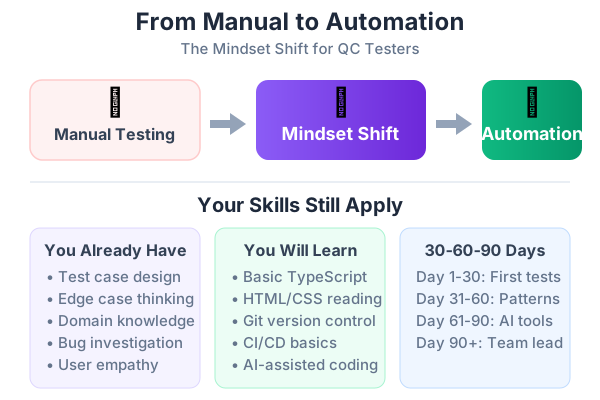
I spent eight years as a manual tester before writing my first automated test. I was terrified. I thought automation meant learning to code like a developer, and I barely understood HTML. I thought the robots were coming for my job. I was wrong about all of it.
This is Part 1 of a 10-part series designed specifically for manual QC testers who want to learn automation — and use AI to accelerate the journey. No computer science degree required. No judgment if you’ve never opened a terminal. Just practical, honest guidance from someone who’s been exactly where you are.
Automation Doesn’t Replace You — It Frees You
Let’s address the elephant in the room: automation is not here to take your job. It’s here to take the boring parts of your job.
Think about your typical day. How much time do you spend:
- Clicking through the same login flow for the 50th time this sprint?
- Re-testing features that haven’t changed since last month?
- Running the same regression checklist before every release?
- Verifying that a bug fix didn’t break three other things?
That’s the work automation handles. The repetitive, predictable, soul-crushing clicking that you do on autopilot. Once those tests run themselves, you’re free to focus on what humans are genuinely better at:
- Exploratory testing — Finding bugs that no one anticipated
- Usability assessment — “This flow is confusing” is something no script can tell you
- Edge case discovery — Your domain knowledge catches things automated checks miss
- Test design — Deciding what to test is harder than running the tests
The best QC teams I’ve worked with have both: automated regression suites that run in minutes, and skilled manual testers who explore the edges. You’re not being replaced. You’re being upgraded.
The Skills You Already Have (That Developers Don’t)
Here’s what nobody tells you: manual testers are better positioned for automation than developers in many ways. You already have the hardest skills — the ones that can’t be taught in a bootcamp.
1. You Think in Test Scenarios
When a developer sees a login form, they think about the implementation — database queries, session tokens, password hashing. When you see a login form, you think:
- What if the email has spaces?
- What if the password is 200 characters?
- What if I submit an empty form?
- What if the network drops mid-login?
- What if I paste a script tag into the email field?
That “what if” thinking is the foundation of every good automated test suite. Developers write tests for the happy path. You write tests for the 47 ways it can break.
2. You Know the Product
You’ve tested every feature, every edge, every quirky behavior. You know that the search bar fails on special characters. You know that the dashboard chart takes 3 seconds to load on staging. You know that the export function generates a corrupt file if the report has more than 10,000 rows.
That domain knowledge is invaluable. When you write automated tests, they’ll cover the real failure modes — not just the obvious ones.
3. You Understand User Behavior
You test the application the way users actually use it, not the way developers intended it to be used. You know users will double-click the submit button. You know they’ll paste formatted text from Word into a plain-text field. You know they’ll try to upload a 500MB file.
Automated tests written by someone who understands real user behavior are far more valuable than tests written by someone who only understands the code.
4. You Spot Visual Issues
“The button is 2 pixels off.” “The font looks different on this page.” “The spacing is inconsistent in the navigation.” This visual attention translates directly to visual regression testing — one of the most powerful automation techniques.
What Actually Changes
Let’s be honest about what the transition involves. Here are the new skills you’ll need, and how challenging each one really is:
| New Skill | Difficulty | How Long to Learn | Why It Matters |
|---|---|---|---|
| Basic JavaScript/TypeScript | Medium | 2-4 weeks | Test scripts are written in code |
| HTML/CSS fundamentals | Easy | 1 week | You need to understand web page structure |
| Command line basics | Easy | 2-3 days | Running test commands and installations |
| Git version control | Medium | 1 week | Saving and sharing your test code |
| Reading error messages | Easy | Ongoing | Understanding why tests fail |
| Debugging test failures | Medium | Ongoing | Fixing flaky or broken tests |
What doesn’t change:
- ✅ Your test design skills — still the most important skill
- ✅ Your exploratory testing ability — still essential
- ✅ Your domain knowledge — automation makes it more powerful
- ✅ Your eye for detail — now backed by automated checks
- ✅ Your understanding of user behavior — your tests will be better for it
The Automation Mindset
The biggest shift isn’t technical — it’s how you think about testing. Here are the key mindset changes:
Think in Repeatable Patterns
When you test manually, you adapt in real-time. The page loaded slowly? You wait. The button moved? You find it. The text changed? You adjust.
Automated tests don’t adapt. They follow exact instructions. This means you need to think about your test steps as precise, repeatable recipes:
Manual thinking: “Click the login button” Automation thinking: “Find the button element with the text ‘Sign In’ and click it. Wait for the page URL to change to ‘/dashboard’. Verify the welcome message is visible.”
Every implicit step you do unconsciously (waiting for the page to load, scrolling to find an element, ignoring irrelevant popups) must become an explicit instruction.
Separate What from How
As a manual tester, you naturally combine the what (test the login) with the how (open the browser, navigate to the URL, type in the fields…). Automation requires separating these:
- What to test — This is your test case. “Verify that a user can log in with valid credentials.”
- How to test — This is your test script. The actual code that navigates, clicks, and asserts.
This separation is powerful because the “what” rarely changes, but the “how” changes whenever the UI is updated. Good test architecture keeps them apart so you only update one layer when things change.
Embrace Failure as Information
When a manual test fails, you investigate immediately. You know the context, you saw the screen, you can judge if it’s a real bug or a test environment issue.
When an automated test fails, you get an error message. Learning to read these messages, interpret stack traces, and distinguish real failures from environment issues is a core skill. The good news: AI tools like Claude can help you understand any error message instantly.
Think About Maintenance from Day One
The biggest mistake new automation engineers make is writing tests without thinking about maintenance. Every test you write is code you’ll need to update when the application changes.
Ask yourself:
- “If the button text changes from ‘Submit’ to ‘Save’, how many tests break?”
- “If this feature gets redesigned, can I update one file or twenty?”
- “Will someone else on my team understand this test in 6 months?”
These questions lead you naturally to patterns like the Page Object Model (covered in Part 4) — but the mindset starts now.
Common Fears (And Why They’re Overblown)
“I’m not a developer. I can’t write code.”
You don’t need to be a developer. Playwright tests look like this:
test('user can search for products', async ({ page }) => {
  await page.goto('/shop');
  await page.getByPlaceholder('Search products...').fill('laptop');
  await page.getByRole('button', { name: 'Search' }).click();
  await expect(page.getByText('laptop')).toBeVisible();
});
Can you read that? Navigate to the shop. Type “laptop” in the search box. Click Search. Verify “laptop” appears. That’s it. Test code reads more like instructions than programming. And with AI tools like GitHub Copilot and Claude, you describe what you want in plain English, and the AI writes the code.
”I’ll break something.”
Tests run in isolation. They don’t modify production data. They don’t change the application. The worst thing a test can do is fail — and that’s literally its job. Your test environment is your sandbox. Experiment freely.
”I’ll slow down the team.”
In the first 2-4 weeks, yes — you’ll be slower. You’re learning something new. But by week 6, you’ll be faster than manual testing for repetitive regression. By month 3, you’ll wonder how you ever managed without automation.
”The tech changes too fast. I’ll never keep up.”
You don’t need to keep up with every tool and framework. Learn Playwright — it’s the industry standard, backed by Microsoft, and isn’t going anywhere. Then learn to use AI tools to amplify your work. That’s the entire modern testing stack.
”AI will write all the tests. Why should I learn?”
AI generates test code, but it doesn’t know your product. It doesn’t know that the checkout flow requires a Canadian postal code for the Canada region, or that the discount field only accepts whole numbers. Your domain knowledge plus AI’s code generation is the winning combination. Neither alone is sufficient.
Your 30-60-90 Day Learning Roadmap
Here’s a realistic plan. Each phase builds on the previous one. Don’t skip ahead.
Days 1-30: Foundation
| Week | Focus | Outcomes |
|---|---|---|
| 1 | Set up VS Code, Node.js, run your first Playwright test | ”Hello world” test passes |
| 2 | Learn locators: getByRole(), getByText(), getByPlaceholder() | Can write basic navigation tests |
| 3 | Write 5 smoke tests for your application’s critical paths | Login, homepage, one key feature automated |
| 4 | Learn to read test results, debug simple failures | Can fix a broken locator independently |
End of Month 1: You have 5-10 automated smoke tests running locally. You can write a basic test from scratch and debug simple failures.
Days 31-60: Intermediate
| Week | Focus | Outcomes |
|---|---|---|
| 5 | Page Object Model — organize your tests | Tests are maintainable, not spaghetti code |
| 6 | Data-driven testing, test.describe(), beforeEach | Can test the same flow with multiple inputs |
| 7 | Git basics — commit, push, pull, branching | Your tests live in the team repository |
| 8 | Basic CI — run tests in GitHub Actions | Tests run automatically on every code change |
End of Month 2: You have 20-30 tests, organized with Page Objects, running in CI. Your team sees green/red test results on every PR.
Days 61-90: Advanced
| Week | Focus | Outcomes |
|---|---|---|
| 9 | AI-assisted test generation (Claude, Copilot) | Can generate tests 3x faster |
| 10 | BDD with Cucumber — write tests in Gherkin | Non-technical stakeholders can read your tests |
| 11 | Network mocking, API testing | Can test error states and API endpoints |
| 12 | Visual regression, performance testing basics | Catch visual bugs and slow pages automatically |
End of Month 3: You’re an automation engineer. You have 50+ tests covering critical paths, AI helps you write tests faster, and your regression suite runs in CI. Manual regression testing time drops by 60-70%.
A Real Transition Story
When I first started, my team had a 47-page spreadsheet of regression test cases. Every release, two testers spent 4 hours clicking through them. We missed bugs regularly — not because we were bad testers, but because 4 hours of clicking makes you go blind to subtle issues.
I started automating the top 10 most critical scenarios. It took me 3 weeks, and the tests were ugly. Hard-coded selectors, no Page Objects, no real structure. But they ran in 4 minutes instead of 4 hours.
Then something interesting happened. Because the regression tests were automated, I had time to actually explore the application. I found bugs I’d never have found while grinding through a checklist — a race condition in the payment flow, a memory leak that only appeared after 30 minutes of use, a security issue where session tokens weren’t expiring.
Automation didn’t make me a worse tester. It made me a dramatically better one. The spreadsheet caught the obvious stuff automatically. I caught the interesting stuff by actually thinking.
Getting Started Right Now
You don’t need permission from your manager. You don’t need a training budget. You don’t need to finish this entire series first. Here’s what you can do today:
- Install VS Code — It’s free: code.visualstudio.com
- Install Node.js — It’s free: nodejs.org
- Read Part 3 of this series — I’ll walk you through your first Playwright test step by step, assuming zero coding experience
That’s it. Three installations and one blog post. By tomorrow, you’ll have your first automated test running.
What’s Coming in This Series
This is Part 1 of 10. Here’s the full roadmap:
- Part 1: From Manual Tester to Automation Engineer — The Mindset Shift (you are here)
- Part 2: How to Plan Automation for Any Project — A Practical Framework
- Part 3: Your First Playwright Test — A Step-by-Step Guide for Manual Testers
- Part 4: Page Objects, Fixtures, and Real-World Playwright Patterns
- Part 5: BDD with Cucumber and Playwright — Writing Tests in Plain English
- Part 6: Using AI to Write Tests — Claude, GitHub Copilot, and Antigravity
- Part 7: The QC Tester’s Prompt Engineering Playbook
- Part 8: Sharing the Work — How Dev and QC Teams Collaborate on Test Automation
- Part 9: Measuring and Improving Quality — Metrics That Actually Matter
- Part 10: The Complete Best Practices Checklist for Automation, AI, and Quality
In Part 2, I’ll show you exactly how to plan automation for different types of projects — web apps, APIs, mobile, and legacy systems. You’ll learn what to automate first, how to estimate ROI, and how to present your automation plan to stakeholders.