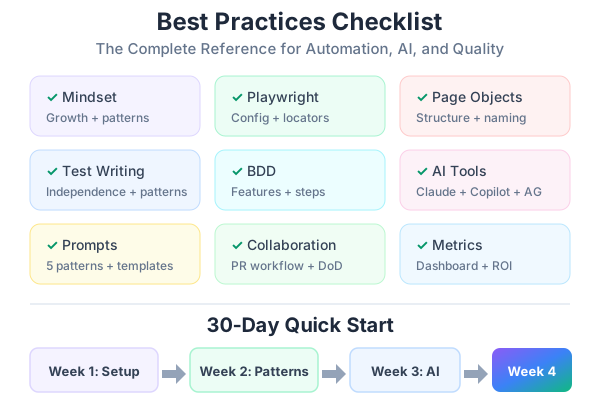
You’ve made it to the end. Over 9 posts, we’ve covered the mindset shift, planning, Playwright, Page Objects, BDD, AI tools, prompt engineering, collaboration, and metrics. This final post distills everything into checklists you can print, pin to your wall, and reference every day.
Bookmark this page. Come back to it when you start a new project, onboard a new team member, or need a quick refresher on the right approach.
Checklist 1: Automation Mindset
## Mindset Checklist

### Before Starting Automation
- [ ] Automation augments manual testing — it doesn't replace it
- [ ] I focus on high-value, repeatable test cases first
- [ ] I accept that learning takes time — the 30-60-90 day roadmap is realistic
- [ ] I understand test design is my superpower — code is just the tool

### Daily Habits
- [ ] I think in patterns: "Can this be parameterized? Reused? Automated?"
- [ ] I review CI results before standup
- [ ] I flag flaky tests within 24 hours
- [ ] I pair with developers on test-related issues

### Growth Mindset
- [ ] I ask for code reviews on my test code
- [ ] I read my teammates' tests to learn new patterns
- [ ] I experiment with AI tools for test generation
- [ ] I share what I learn with the team
Checklist 2: Playwright Configuration
## Playwright Setup Checklist

### Project Structure
- [ ] Tests in `tests/` directory (not mixed with source)
- [ ] Page Objects in `tests/pages/`
- [ ] Fixtures in `tests/fixtures/`
- [ ] Test data in `tests/data/`
- [ ] BDD features in `tests/features/`

### playwright.config.ts
- [ ] baseURL configured
- [ ] Retries set (0 locally, 2 in CI)
- [ ] Parallel execution enabled
- [ ] HTML reporter configured
- [ ] Trace enabled on first retry
- [ ] Projects defined (smoke, regression, mobile)
- [ ] Timeout set appropriately (30s default)

### Locator Priority (in order)
- [ ] getByRole() — buttons, links, headings, form elements
- [ ] getByLabel() — form inputs with labels
- [ ] getByPlaceholder() — search fields, inputs
- [ ] getByText() — static text content
- [ ] getByTestId() — last resort, requires data-testid attribute
- [ ] ⛔ NEVER use CSS class selectors (.btn-primary)
- [ ] ⛔ NEVER use XPath unless absolutely forced
- [ ] ⛔ NEVER use IDs that might change (#generated-id-123)

### Assertions
- [ ] Use auto-retrying assertions (toBeVisible, toHaveURL, toContainText)
- [ ] ⛔ NEVER use page.waitForTimeout()
- [ ] ⛔ NEVER use manual polling loops
- [ ] Set reasonable assertion timeouts (not too short, not too long)
Checklist 3: Page Object Model
## Page Object Checklist

### Structure
- [ ] One Page Object per page or major component
- [ ] All locators defined as class properties
- [ ] All user actions as methods
- [ ] ⛔ NO assertions inside Page Objects
- [ ] Constructor takes Page instance

### Naming
- [ ] File: [PageName]Page.ts (e.g., LoginPage.ts)
- [ ] Class: [PageName]Page (e.g., LoginPage)
- [ ] Methods: describe user actions (login(), searchFor(), filterByTag())
- [ ] Properties: describe UI elements (emailInput, signInButton)

### Methods Should
- [ ] Describe WHAT the user does, not HOW the page works
- [ ] Return useful data (getVisiblePostCount() → number)
- [ ] Handle navigation if the action causes it (login → wait for redirect)
- [ ] Be composable (small, single-purpose methods)

### Example for Reference
```typescript
export class LoginPage {
  readonly page: Page;
  readonly emailInput: Locator;      // getByLabel('Email')
  readonly passwordInput: Locator;    // getByLabel('Password')
  readonly signInButton: Locator;     // getByRole('button', { name: 'Sign In' })
  readonly errorMessage: Locator;     // getByRole('alert')

  constructor(page: Page) { /* assign locators */ }
  async goto() { /* navigate */ }
  async login(email: string, password: string) { /* fill + click */ }
  async getErrorText(): Promise<string> { /* return error */ }
}
## Checklist 4: Test Writing

```markdown
## Test Writing Checklist

### Test Independence
- [ ] Each test can run alone — no dependency on other tests
- [ ] beforeEach handles navigation and setup
- [ ] State is reset between tests
- [ ] ⛔ NEVER share mutable state between tests

### Test Structure
- [ ] Use test.describe() to group related tests
- [ ] Test names describe the scenario and expected outcome
- [ ] One logical assertion per test (multiple expect() is OK if checking one behavior)
- [ ] Use data-driven patterns for repetitive scenarios

### Common Patterns
- [ ] Happy path: feature works correctly with valid input
- [ ] Validation: wrong input shows appropriate error
- [ ] Error states: API failures show user-friendly messages (use page.route)
- [ ] Empty states: no data shows helpful empty state
- [ ] Edge cases: boundary values, special characters, long inputs
- [ ] Mobile: critical flows work on mobile viewports

### Anti-Patterns to Avoid
- [ ] ⛔ Tests that sleep (waitForTimeout)
- [ ] ⛔ Tests that depend on execution order
- [ ] ⛔ Tests that use production data
- [ ] ⛔ Tests that are longer than 30 lines
- [ ] ⛔ Tests with commented-out code
- [ ] ⛔ Tests with no assertions
Checklist 5: BDD with Cucumber
## BDD Checklist

### When to Use BDD
- [ ] Multiple stakeholders need to understand tests
- [ ] Acceptance criteria need formal definition
- [ ] QC team is stronger in domain knowledge than code
- [ ] You want tests as living documentation
- [ ] ⛔ DON'T use BDD for API tests, performance tests, or unit tests

### Feature Files
- [ ] One feature per file
- [ ] Feature description explains the user story (As a... I want... So that...)
- [ ] Background section for common setup
- [ ] Scenario names are descriptive and unique
- [ ] Scenario Outline used for data-driven scenarios
- [ ] Tags for filtering (@smoke, @regression, @wip)

### Step Definitions
- [ ] Reusable across features where possible
- [ ] Use parameters ({string}, {int}) for flexibility
- [ ] Each step is small and focused
- [ ] Step definitions use Page Objects (not raw Playwright)

### Gherkin Best Practices
- [ ] Write in business language, not technical language
- [ ] Given = precondition, When = action, Then = expected result
- [ ] And/But for additional steps within the same type
- [ ] Keep scenarios under 10 steps
Checklist 6: AI-Assisted Testing
## AI Tools Checklist

### Choosing the Right Tool
- [ ] Claude + MCP for: new page exploration, accurate selector generation
- [ ] Copilot for: inline completion, boilerplate, following existing patterns
- [ ] Antigravity for: codebase-wide generation, autonomous test creation

### Using AI Effectively
- [ ] ⛔ NEVER commit AI-generated tests without running them
- [ ] ⛔ NEVER commit without reviewing the review checklist
- [ ] Always explore before generating (Pattern 1)
- [ ] Specify architecture in prompts (Pattern 2)
- [ ] Provide edge case context from domain knowledge (Pattern 3)
- [ ] Iterate with failure context (Pattern 4)
- [ ] Use data-driven patterns for variations (Pattern 5)

### AI Output Review
- [ ] Locators use getByRole/getByLabel (not CSS selectors)
- [ ] No waitForTimeout() calls
- [ ] Tests are independent
- [ ] Page Objects used (not inline selectors)
- [ ] Assertions are meaningful
- [ ] Edge cases covered (not just happy path)
Checklist 7: Prompt Engineering
## Prompting Checklist

### Before Prompting
- [ ] I know what page/feature I'm testing
- [ ] I've identified the test scenarios
- [ ] I know the edge cases from my domain knowledge
- [ ] I know the code patterns I want (POM, fixtures, etc.)

### Prompt Structure
- [ ] Specify the architecture (POM, fixtures, imports)
- [ ] List locator priority (getByRole first)
- [ ] Define assertion patterns (no waitForTimeout)
- [ ] List specific test cases (happy path + edge cases)
- [ ] Mention existing patterns to follow

### After Receiving Output
- [ ] Run the review checklist
- [ ] Fix any incorrect selectors
- [ ] Add missing edge cases
- [ ] Run the tests
- [ ] Iterate with error context if tests fail

### Prompt Library
- [ ] Team maintains shared prompt templates in tests/prompts/
- [ ] Templates exist for: Page Objects, E2E tests, API tests, BDD features
- [ ] Templates are updated when patterns change
Checklist 8: Team Collaboration
## Collaboration Checklist

### Repository
- [ ] Tests live in the same repo as application code
- [ ] CONTRIBUTING-TESTS.md exists with team conventions
- [ ] Folder structure follows the agreed pattern
- [ ] Naming conventions are documented

### PR Process
- [ ] QC test PRs reviewed by at least one developer
- [ ] Dev PRs reviewed by at least one QC member
- [ ] 24-hour SLA for test PR reviews
- [ ] Test failures on Dev PRs fixed by the PR author

### Communication
- [ ] Weekly test review meeting (30 min)
- [ ] Dedicated #test-automation channel
- [ ] data-testid requests tracked and fulfilled within 2 days
- [ ] CI failures investigated within 24 hours

### Definition of Done
- [ ] E2E tests written for new user flows
- [ ] Existing tests pass (CI green)
- [ ] Page Objects updated for UI changes
- [ ] data-testid attributes added where needed
- [ ] BDD feature files reflect acceptance criteria
Checklist 9: Quality Metrics
## Metrics Checklist

### What to Track
- [ ] Critical path coverage (target: >80%)
- [ ] Defect escape rate (target: <10%)
- [ ] Test reliability / flakiness (target: <2%)
- [ ] Test execution time
- [ ] Automation ROI (hours saved × hourly cost)

### Dashboard
- [ ] Updated weekly with current metrics
- [ ] Trend charts visible (direction matters more than absolute numbers)
- [ ] Shared with the entire team (not just QC)
- [ ] Presented monthly to stakeholders

### Continuous Improvement
- [ ] Monthly quality retrospective (1 hour)
- [ ] 3 action items per retro with owners and deadlines
- [ ] Action items reviewed at next retro
- [ ] Celebrate wins (bugs caught, time saved)
Common Pitfalls & Solutions
The Top 10 Mistakes
| # | Pitfall | Solution |
|---|---|---|
| 1 | Automating everything at once | Start with critical paths. Automate 5 tests well, then expand. |
| 2 | Copy-pasting test code | Use Page Objects, fixtures, and data-driven patterns. |
| 3 | Using CSS selectors | Use getByRole(), getByLabel(), getByText() always. |
| 4 | Ignoring flaky tests | Fix within 48 hours or quarantine. Never ignore. |
| 5 | Tests depend on each other | Every test must run independently with its own setup. |
| 6 | Using waitForTimeout() | Use auto-retrying assertions (toBeVisible(), toHaveURL()). |
| 7 | No code review for tests | Treat test code like product code. Same standards. |
| 8 | Blindly trusting AI output | Always review, always run, always verify selectors. |
| 9 | No metrics or tracking | You can’t improve what you don’t measure. Track the 5 metrics. |
| 10 | Working in isolation | Share tests, share knowledge, share prompts. Collaborate. |
Your 30-Day Quick Start Plan
## Week 1: Foundation
- [ ] Install Playwright and write 3 tests for the login page
- [ ] Create a LoginPage Page Object
- [ ] Run tests in UI mode and headed mode
- [ ] Read Parts 1-3 of this series

## Week 2: Patterns
- [ ] Create Page Objects for 2 more pages
- [ ] Set up custom fixtures
- [ ] Write 1 data-driven test with 5+ scenarios
- [ ] Try network mocking for an error state
- [ ] Read Parts 4-5

## Week 3: AI Integration
- [ ] Set up Claude Code + Playwright MCP
- [ ] Generate tests for a new page using AI
- [ ] Review and fix AI-generated tests
- [ ] Create 2 prompt templates for your team
- [ ] Read Parts 6-7

## Week 4: Team & Metrics
- [ ] Add tests to CI pipeline
- [ ] Create CONTRIBUTING-TESTS.md
- [ ] Set up the quality dashboard
- [ ] Run your first quality retrospective
- [ ] Read Parts 8-10
Resources for Continued Learning
Official Documentation
- Playwright Documentation
- Cucumber.js Documentation
- Claude Code Documentation
- GitHub Copilot Documentation
Community
This Series (Bookmark for Reference)
- From Manual Tester to Automation Engineer — The Mindset Shift
- How to Plan Automation for Any Project — A Practical Framework
- Your First Playwright Test — A Step-by-Step Guide for Manual Testers
- Page Objects, Fixtures, and Real-World Playwright Patterns
- BDD with Cucumber and Playwright — Writing Tests in Plain English
- Using AI to Write Tests — Claude, GitHub Copilot, and Antigravity
- The QC Tester’s Prompt Engineering Playbook
- Sharing the Work — How Dev and QC Teams Collaborate on Test Automation
- Measuring and Improving Quality — Metrics That Actually Matter
- The Complete Best Practices Checklist for Automation, AI, and Quality (you are here)
You’ve reached the end of the series. What started as a question — “Can a manual tester learn automation?” — now has a clear answer: yes, and with AI tools, faster than ever before.
Your test design skills, domain knowledge, and attention to edge cases are exactly what automation needs. The tools and patterns in this series are the bridge. Start with Week 1, iterate, and in 30 days you’ll be writing tests that catch bugs before they reach users.
The best time to start was yesterday. The second best time is today.