The difference between mediocre AI-generated tests and production-ready ones isn’t the AI model — it’s the prompt. I’ve seen the same AI tool produce brittle, unmaintainable tests from vague prompts and excellent, well-structured tests from specific ones. The prompt is the new skill.
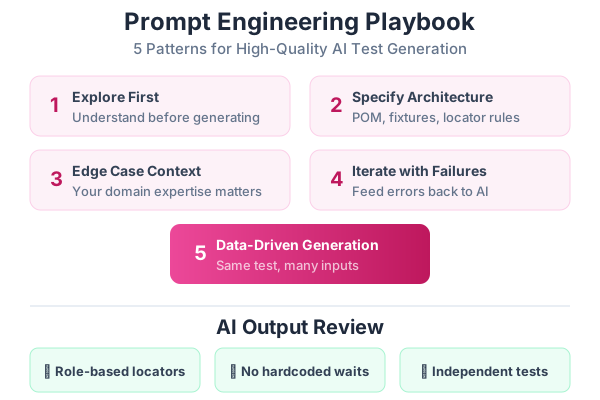
This post is your playbook. Five patterns that consistently produce good test code, a review checklist for AI output, the most common mistakes, and reusable templates you can copy and customize.
Pattern 1: Explore First, Generate Second
The most important pattern. Never ask AI to write tests without first understanding the page.
Bad Prompt ❌
Write Playwright tests for the blog page.Result: The AI guesses at selectors, invents features that don’t exist, and uses brittle CSS class selectors.
Good Prompt ✅
First, use Playwright MCP to navigate to http://localhost:4321/blog.
Explore the page:
- What interactive elements are there?
- What does the search do?
- What are the tag filters?
- How many posts are visible?
- What happens when you click a post?

DO NOT write any code yet. Report what you find.
Then, after the AI reports back:
Based on what you found, write Playwright tests using:
- Page Object Model in tests/pages/BlogPage.ts
- Tests in tests/e2e/blog.spec.ts
- Import { test, expect } from '../fixtures/base.fixture'
- Use getByRole() and getByText() locators only
Why this works: The AI has real data about the page. It uses accurate selectors from the accessibility tree instead of guessing.
Pattern 2: Specify the Architecture You Want
AI tools default to the simplest approach — inline tests with hardcoded selectors. You need to tell them the pattern you want.
Bad Prompt ❌
Write a test for the login page.Result:
test('login', async ({ page }) => {
  await page.goto('/login');
  await page.locator('#email').fill('test@test.com');
  await page.locator('#password').fill('pass');
  await page.locator('.submit-btn').click();
  await page.waitForTimeout(2000);
  expect(page.url()).toContain('dashboard');
});
Problems: CSS selectors, hardcoded wait, no Page Object, no proper assertions.
Good Prompt ✅
Write Playwright tests for the login page following these conventions:

ARCHITECTURE:
- Create a LoginPage class in tests/pages/LoginPage.ts
- Tests in tests/e2e/auth.spec.ts
- Import { test, expect } from '../fixtures/base.fixture'

LOCATORS (in priority order):
1. getByRole() — for buttons, links, headings
2. getByLabel() — for form inputs
3. getByPlaceholder() — for search fields
4. getByText() — for static text
5. getByTestId() — last resort

ASSERTIONS:
- Use expect(page).toHaveURL() for navigation checks
- Use expect(locator).toBeVisible() for visibility
- Use expect(locator).toContainText() for content
- NEVER use page.waitForTimeout()
- NEVER use expect with raw string comparison

TEST CASES:
1. Successful login with valid credentials → redirects to /dashboard
2. Invalid password → shows error message
3. Empty email → shows validation error
4. Empty password → shows validation error
5. Login button is disabled while request is in progress

Each test must be independent — no test should depend on another.
Why this works: You’ve defined the architecture, locator strategy, assertion patterns, and specific test cases. The AI has clear constraints to follow.
Pattern 3: Provide Edge Case Context
AI generates happy-path tests naturally. The edge cases — the ones that catch real bugs — come from your domain knowledge.
Prompt Template
Write tests for the [FEATURE] feature.

HAPPY PATH:
- [describe the normal flow]

EDGE CASES (from my experience as QC):
- What happens when [edge case 1]?
- What happens when [edge case 2]?
- What happens when [edge case 3]?

ERROR STATES:
- Use page.route() to mock API failures
- Test: API returns 500 → error message visible
- Test: API returns empty data → empty state visible
- Test: API times out (10s delay) → loading state then timeout message

BOUNDARY VALUES:
- Test with empty string input
- Test with maximum length input (500 characters)
- Test with special characters: <script>alert('xss')</script>
- Test with unicode characters: 日本語テスト
Real Example: Product Search
Write tests for the product search feature.

HAPPY PATH:
- User types "laptop" in search, sees laptop results

EDGE CASES (from my QC experience):
- User pastes a very long string (500+ characters) into search
- User types special characters: @#$%^&*()
- User searches while previous search is still loading
- User clears search after filtering by tag
- User presses Enter with empty search field
- User searches with leading/trailing spaces: "  laptop  "

ERROR STATES (use page.route to mock):
- Search API returns 500 → "Search is temporarily unavailable" message
- Search API returns empty array → "No products found" with suggestion to try different keywords
- Search API takes >5 seconds → loading spinner appears

MOBILE CONSIDERATIONS:
- Search on mobile viewport (375x667)
- Virtual keyboard doesn't cover results
Why this works: You’re combining your domain knowledge (the edge cases you know about from manual testing) with AI’s ability to quickly write the code for each scenario.
Pattern 4: Iterate with Failure Context
When AI-generated tests fail, don’t rewrite them manually. Feed the error back to the AI with context.
The Iteration Loop
Step 1: Run the tests
npx playwright test --project=e2eStep 2: Copy the failure
The test "user can filter by tag" failed:

Error: Timed out 5000ms waiting for expect(locator).toBeVisible()

  Locator: getByRole('button', { name: 'ai' })
  Expected: visible
  Received: <element not found>

  Call log:
    - waiting for getByRole('button', { name: 'ai' })

Test ran on: http://localhost:4321/blog
Step 3: Ask for a fix
This Playwright test failed. The error says it can't find
a button with name 'ai'.

I checked the page manually — the tag filters are actually
rendered as <span> elements with class "tag-pill", not buttons.
The text is lowercase "ai".

Fix the locator and update the Page Object accordingly.
Step 4: Verify and repeat
npx playwright test --project=e2ePro Tip: Copy as Prompt from Playwright
Playwright’s HTML report has a “Copy as Prompt” button on every failed test. This copies the failure context in a format optimized for AI tools:
npx playwright show-reportClick the failing test → click “Copy as Prompt” → paste into Claude or Copilot Chat. The AI gets the full error context and fixes the test accurately.
Pattern 5: Generate Data-Driven Tests
This pattern is perfect for scenarios with many input variations — the kind that take hours to test manually.
Prompt Template
Generate a data-driven Playwright test for the [FEATURE].

Test the same flow with these inputs:
| Input | Expected Result |
|-------|----------------|
| [input 1] | [result 1] |
| [input 2] | [result 2] |
| [input 3] | [result 3] |
| ...       | ...         |

Use a scenarios array and iterate with for...of.
Each row should be a separate test with a descriptive name.
Follow the Page Object Model pattern.
Real Example
Generate a data-driven test for the registration form.

Test these scenarios:
| Email | Password | Confirm | Expected |
|-------|----------|---------|----------|
| valid@email.com | Strong123! | Strong123! | Success redirect to /welcome |
| | password | password | "Email is required" error |
| not-an-email | password | password | "Invalid email format" error |
| valid@email.com | short | short | "Password must be at least 8 characters" |
| valid@email.com | password | different | "Passwords do not match" |
| existing@email.com | Strong123! | Strong123! | "Email already registered" |
| valid@email.com | NoSpecial1 | NoSpecial1 | "Password must contain a special character" |

Structure the scenarios array with clear types.
Use LoginPage page object for the form interactions.
Controlling AI Output Quality
The Review Checklist
Before committing any AI-generated test, check these:
## AI Test Review Checklist

### Locators
- [ ] Uses getByRole() or getByLabel() — NOT CSS selectors
- [ ] No hardcoded IDs unless using data-testid
- [ ] Locators are specific enough (won't match multiple elements)

### Assertions
- [ ] Uses expect() with auto-retrying matchers (toBeVisible, toHaveURL, etc.)
- [ ] NO page.waitForTimeout() calls
- [ ] Assertions are meaningful (not just "element exists")
- [ ] Negative cases tested (error states, empty states)

### Structure
- [ ] Test is independent — doesn't depend on other tests
- [ ] Uses beforeEach for navigation, not beforeAll
- [ ] No shared mutable state between tests
- [ ] Descriptive test names that explain the scenario

### Page Objects
- [ ] All selectors live in Page Object, not in test file
- [ ] No assertions inside Page Objects
- [ ] Methods describe user actions, not implementation details

### Maintenance
- [ ] Would I understand this test in 6 months?
- [ ] If the UI changes, how many files need updating? (Should be 1)
- [ ] Is there unnecessary duplication?
Common AI Mistakes to Fix
| AI Mistake | How to Spot | Fix |
|---|---|---|
| CSS selectors | .btn-primary, #email-input | Replace with getByRole(), getByLabel() |
| Hardcoded waits | waitForTimeout(3000) | Replace with expect().toBeVisible() |
| Non-specific locators | page.locator('button') | Add { name: 'Submit' } |
| Tests depend on order | Test 2 assumes Test 1’s state | Add proper setup in beforeEach |
| Missing error handling | Only happy path tested | Add error state tests with page.route() |
| Duplicate selectors | Same selector in multiple tests | Create a Page Object |
| String assertions | expect(text).toBe('exact match') | Use toContainText() for flexibility |
Reusable Prompt Templates
Template: Page Object + Tests
Create a Playwright Page Object and tests for the [PAGE_NAME] page
at [URL].

Page Object (tests/pages/[PageName]Page.ts):
- Locators for all interactive elements
- Methods for common user actions
- No assertions

Tests (tests/e2e/[page-name].spec.ts):
- Import test from '../fixtures/base.fixture'
- Use test.describe('[Page Name]') grouping
- beforeEach navigates to the page
- Test these scenarios:
  1. [Happy path scenario]
  2. [Validation scenario]
  3. [Error state scenario]
  4. [Edge case scenario]

Use getByRole/getByLabel/getByText locators only.
Template: BDD Feature File + Steps
Write a Cucumber BDD feature file and step definitions for [FEATURE].

Feature file (tests/features/[feature].feature):
- Write in Given/When/Then format
- Include a Background section for common setup
- Include Scenario Outline with Examples table for data variations
- Use @smoke tag for critical scenarios

Step definitions (tests/steps/[feature].steps.ts):
- Import CustomWorld from '../support/world'
- Use existing Page Objects from tests/pages/
- Use Playwright assertions (expect from @playwright/test)
Template: API Test Suite
Write Playwright API tests for the [ENDPOINT] endpoint.

File: tests/api/[endpoint].spec.ts

Test these HTTP scenarios:
- GET [path] → 200 with expected response shape
- GET [path] with filters → filtered results
- POST [path] with valid data → 201 with created resource
- POST [path] with invalid data → 400 with error message
- POST [path] without auth → 401
- DELETE [path]/:id → 204
- DELETE [path]/:nonexistent → 404

Use Playwright's request fixture.
Assert response status, content-type, and body structure.
How to Build Your Prompt Library
Create a folder in your test project for prompt templates:
tests/
├── prompts/                ← Your team's prompt library
│   ├── page-object.md      ← Template for generating Page Objects
│   ├── e2e-test.md         ← Template for E2E tests
│   ├── api-test.md         ← Template for API tests
│   ├── bdd-feature.md      ← Template for BDD feature files
│   └── debug-fix.md        ← Template for debugging failing tests
When anyone on the team needs to generate tests with AI, they grab the template, fill in the specifics, and get consistent, high-quality output every time.
Series Navigation
- Part 1: From Manual Tester to Automation Engineer — The Mindset Shift
- Part 2: How to Plan Automation for Any Project — A Practical Framework
- Part 3: Your First Playwright Test — A Step-by-Step Guide for Manual Testers
- Part 4: Page Objects, Fixtures, and Real-World Playwright Patterns
- Part 5: BDD with Cucumber and Playwright — Writing Tests in Plain English
- Part 6: Using AI to Write Tests — Claude, GitHub Copilot, and Antigravity
- Part 7: The QC Tester’s Prompt Engineering Playbook (you are here)
- Part 8: Sharing the Work — How Dev and QC Teams Collaborate on Test Automation
- Part 9: Measuring and Improving Quality — Metrics That Actually Matter
- Part 10: The Complete Best Practices Checklist for Automation, AI, and Quality
In Part 8, we’ll tackle the collaboration challenge — how Dev and QC teams share test automation work effectively, including repo structure, code reviews, task splitting, and the Definition of Done.