
JOURNAL
AI Workflow Mastery: Enterprise Workflow Architecture — For Professional Teams
Advanced guide to building AI workflow systems at scale: skill libraries, team governance, quality assurance, security compliance, and ROI measurement. For team leads and enterprise architects.
On this page
Individual AI workflows are powerful. But when you need an entire team producing consistent, high-quality work — you need architecture. This guide covers how to design, deploy, and maintain AI workflow systems at the enterprise level.
The Workflow Architecture Pattern
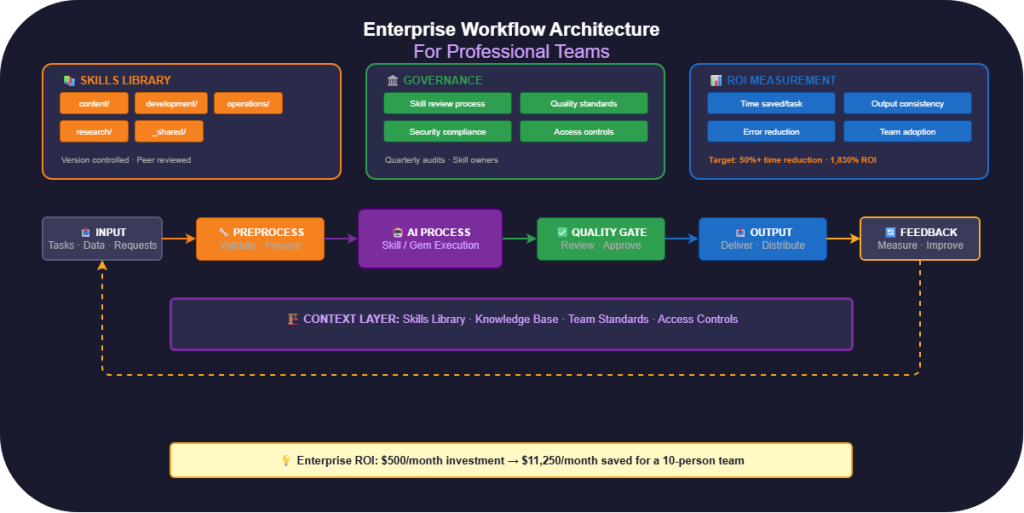
Every enterprise AI workflow follows this pattern:
Input → Preprocessing → AI Processing → Quality Gate → Output → Feedback Loop
  │          │                │              │            │           │
  │   Validate &         Skill/Gem       Review &    Deliver &    Measure &
  │   prepare data       execution       approve     distribute   improve
  │          │                │              │            │           │
  └──────────────────── Context Layer ──────────────────────────────┘
             (Skills Library + Knowledge Base + Team Standards)
The Context Layer
The Context Layer is what makes enterprise AI different from individual use. It’s the shared foundation:
| Component | What It Contains | Who Maintains |
|---|---|---|
| Skills Library | Approved skills for all team tasks | Workflow Architect |
| Knowledge Base | Company docs, guidelines, standards | Team Leads |
| Team Standards | Output templates, quality criteria | QA Lead |
| Access Controls | Who can use/edit which skills | Engineering Lead |
Building a Skills Library
Structure
Organize skills by function, not by tool:
ai-workflows/
├── content/
│   ├── blog-writer/
│   │   ├── SKILL.md
│   │   ├── examples/
│   │   └── resources/style-guide.md
│   ├── social-media-adapter/
│   └── newsletter-writer/
├── development/
│   ├── code-reviewer/
│   ├── test-generator/
│   └── api-doc-writer/
├── operations/
│   ├── meeting-summarizer/
│   ├── report-generator/
│   └── email-drafter/
├── research/
│   ├── market-analyst/
│   ├── competitor-tracker/
│   └── trend-synthesizer/
└── _shared/
    ├── brand-voice.md
    ├── company-context.md
    └── quality-standards.md
The _shared/ folder contains resources referenced by multiple skills.
Version Control for Skills
Treat skills like code — version them:
<!-- SKILL.md header -->
---
name: Blog Writer — Marketing Team
description: Write SEO-optimized blog posts in brand voice
version: 2.1.0
last_updated: 2026-03-01
author: marketing-team
changelog:
  - 2.1.0: Added social proof requirements
  - 2.0.0: Rewrote for new brand voice guidelines
  - 1.0.0: Initial version
---
Skill Review Process
Before a skill enters the library:
- Draft: Author creates the skill with test outputs
- Peer Review: Another team member tests with their data
- Quality Check: Compare outputs against gold-standard examples
- Approval: Team lead signs off
- Documentation: Add to skill catalog with usage guidelines
- Training: Brief the team on when and how to use it
Claude Projects for Teams
Claude Projects provide shared knowledge and instructions across a team:
Setting Up Team Projects
Project: "Engineering Team — Code Quality"
├── Knowledge: coding-standards.md, architecture-decisions/, security-policy.md
├── Instructions: "When reviewing code, follow our security checklist first..."
├── Skills: code-reviewer/, test-generator/, doc-writer/
└── Members: [email protected]
Best Practices
Keep projects focused: One project per domain (not one mega-project)
Layer your context:
Company-wide instructions (custom instructions)
  └── Project-level instructions (project settings)
      └── Skill-level instructions (SKILL.md)
          └── Conversation-level context (user input)
Each layer narrows the scope. Company-wide sets tone. Project sets domain. Skill sets task. Conversation provides specifics.
Rotate project owners: Assign maintenance responsibilities quarterly.
Gemini Gems for Organizations
Workspace-Wide Deployment
For Google Workspace organizations:
- Create official Gems for common tasks
- Standardize knowledge files — everyone references the same documents
- Publish to organization — available to all team members
- Track usage — identify which Gems deliver the most value
Gem Governance
| Policy | Description |
|---|---|
| Naming convention | [Team] — [Function] e.g., “Marketing — Blog Writer” |
| Required files | Must include brand guidelines as knowledge file |
| Review cadence | Quarterly instruction review |
| Ownership | Every Gem has a designated owner |
| Decommission | Unused Gems archived after 90 days |
NotebookLM for Collaborative Research
Team Notebooks
Share notebooks for collaborative research:
| Notebook Type | When to Use | Example |
|---|---|---|
| Project | Focused research for a specific initiative | “Q2 Product Launch Research” |
| Domain | Ongoing collection of domain knowledge | “Industry Intelligence — FinTech” |
| Onboarding | Reference material for new team members | “Engineering Onboarding — Architecture” |
Sharing Best Practices
- Grant read access for reference, edit access for contributors
- Assign a notebook curator who maintains source quality
- Archive notebooks after project completion (don’t delete — future reference)
- Use consistent naming:
[Team] — [Topic] — [Quarter/Year]
Advanced Prompting Techniques
Recursive Self-Improvement
Design skills that improve their own output:
## Process
1. Generate initial output
2. Critique your output against the quality criteria
3. List 3 specific improvements
4. Regenerate with improvements applied
5. Only present the final version

## Quality Criteria
- Specific > Generic (use numbers, names, examples)
- Actionable > Descriptive (tell the reader what to do)
- Concise > Comprehensive (cut anything that doesn't earn its space)
Multi-Perspective Simulation
For analytical tasks, force consideration of different viewpoints:
## Analysis Framework
For every recommendation:

### Advocate View
Present the strongest case FOR this recommendation.

### Critic View
Present the strongest case AGAINST this recommendation.

### Pragmatist View
What's the realistic path to implementation?
What are the likely obstacles?

### Synthesis
Based on all perspectives, here's the recommendation with nuance.
Meta-Prompting
Use AI to write prompts for AI — when you need skills at scale:
## Task
I'll describe a business function. Generate a complete
Claude Skill (SKILL.md format) including:
- Appropriate persona
- Specific task definition
- Contextual requirements
- Output format with template
- Rules and constraints
- 2 example outputs

Use the P-T-C-F framework from our standards document.
XML Structured Output
For complex tasks that need machine-parseable output:
## Output Format
Wrap your output in XML tags:

<analysis>
  <summary>Executive summary in 2-3 sentences</summary>
  <findings>
    <finding severity="critical|warning|info">
      <description>What was found</description>
      <evidence>Supporting data</evidence>
      <recommendation>What to do about it</recommendation>
    </finding>
  </findings>
  <confidence level="high|medium|low">Explanation</confidence>
</analysis>
Quality Assurance
Testing Framework
Test every skill across these dimensions:
| Test Type | What to Check | How |
|---|---|---|
| Correctness | Output is factually accurate | Compare against known answers |
| Consistency | Same input → similar output | Run 5x with same prompt |
| Edge cases | Handles unusual input gracefully | Test with minimal/ambiguous input |
| Boundaries | Stays within defined scope | Ask it to do something outside its role |
| Format | Follows output template exactly | Visual inspection of structure |
Output Quality Scoring
Rate outputs on a 1-5 scale across these criteria:
Accuracy:    [1-5] Is the content factually correct?
Relevance:   [1-5] Does it address the request?
Format:      [1-5] Does it follow the template?
Voice:       [1-5] Does it match the specified tone?
Actionable:  [1-5] Can the reader act on it immediately?
Target: average 4.0+ across all criteria before deploying a skill.
Feedback Collection
Create a simple feedback loop:
- Rate outputs: Thumbs up/down on every AI-generated piece
- Log issues: “The tone was too formal” or “Missing error handling for edge case X”
- Weekly review: Skill maintainer reviews feedback
- Monthly updates: Refine instructions based on patterns
Security & Compliance
Data Handling Rules
| Rule | Implementation |
|---|---|
| No PII in skills | Skills should reference data categories, not actual data |
| Knowledge file audit | Review uploaded docs for sensitive information quarterly |
| Access control | Limit skill editing to designated maintainers |
| Output review | AI outputs containing client data must be reviewed before sending |
| Retention | Delete conversation history containing sensitive data after project completion |
Compliance Checklist
- All skills include a constraint: “Never include personal data in outputs unless explicitly provided”
- Knowledge files are reviewed for confidential information before upload
- Team members are trained on what NOT to paste into AI tools
- Client-facing outputs go through human review
- Audit trail exists for AI-generated deliverables
Measuring ROI
Metrics That Matter
| Metric | How to Measure | Target |
|---|---|---|
| Time saved | Track time-per-task before and after | 50%+ reduction |
| Output consistency | Quality score variance across team | <15% variance |
| Error rate | Errors caught in review | Declining trend |
| Adoption | Team members actively using workflows | >80% weekly usage |
| Satisfaction | Team survey on AI workflow helpfulness | >4/5 average |
ROI Calculation
Monthly Cost = AI subscriptions + setup time (amortized)
Monthly Savings = (Hours saved × Hourly cost) + (Error reduction × Error cost)
Monthly ROI = (Savings - Cost) / Cost × 100%
Example for a 10-person team:
- Subscriptions: $500/month (Claude Team + Gemini Advanced)
- Setup time: 20 hours one-time = ~$83/month amortized over 12 months
- Hours saved: 15 hours/person/month × 10 people × $75/hour = $11,250
- ROI: ($11,250 – $583) / $583 = 1,830%
Case Study: Consulting Firm Workflow
A 25-person consulting firm implemented this three-tool workflow:
Before
- Each consultant wrote proposals from scratch: 8 hours per proposal
- Market research: 2 days per client
- Client reports: 6 hours per report
- Quality varied wildly between consultants
After
NotebookLM: Each client gets a notebook with uploaded industry reports, client docs, and past deliverables. Research time: 2 days → 3 hours.
Gemini Gem: “Consulting Analyst” Gem with firm methodology, deliverable templates, and quality standards as knowledge files. Report consistency: 100% on-brand.
Claude Skills: Proposal Writer skill with win rate data and template. Proposal time: 8 hours → 2 hours.
Results (after 3 months)
- Proposal win rate: 35% → 48% (more polished, faster turnaround)
- Client satisfaction: 4.2 → 4.7 (deeper analysis, consistent quality)
- Consultant utilization: 65% → 82% (more time on high-value work)
- Revenue impact: +23% per consultant
What’s Next
You now have the blueprint for enterprise-scale AI workflows. Start with your team’s highest-volume task, build the skill, and expand from there.
Previous: Part 5 — Role-Specific Workflows
Related reading
07 Oct 2026 · 4 min read
ai
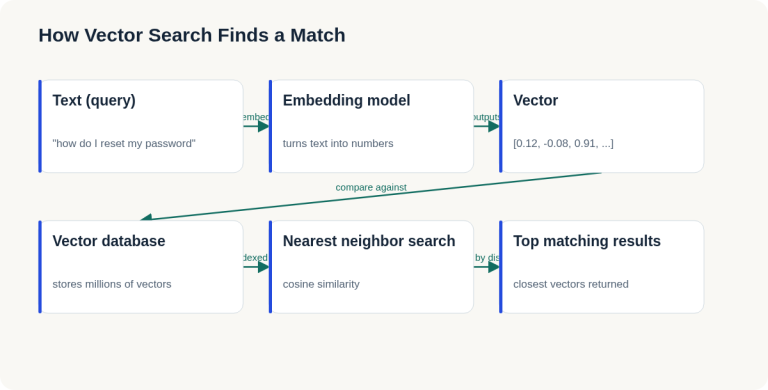
English Lesson — Tuesday Morning: Embeddings & Vector Search Vocabulary
Daily English practice for tech professionals: embed, vector database, and nearest neighbor search vocabulary with pronunciation and exercises.
Read more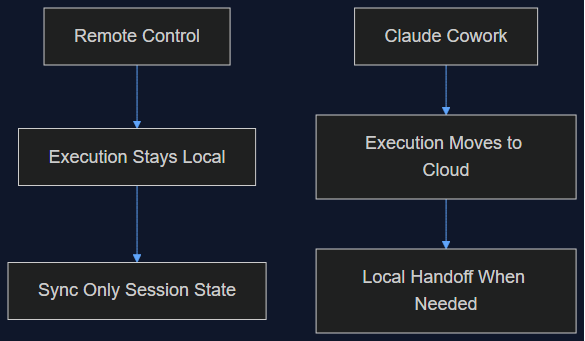
06 Oct 2026 · 5 min read
agentic coding
Claude Cowork Just Did the Thing I Said Remote Control Wasn't Doing
In August I wrote that Claude Code's Remote Control was a sync layer, not a cloud migration, and that keeping execution local was the point. This week Anthropic moved Cowork's execution to the cloud by default. Here's why both were the right call — for different products.
Read more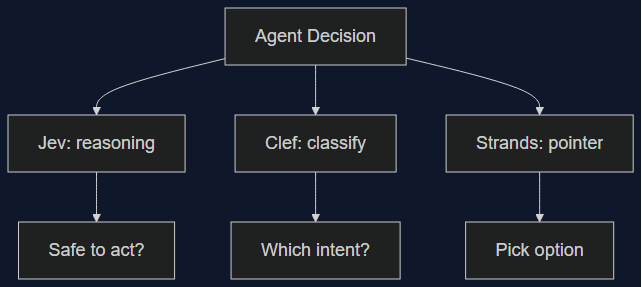
03 Oct 2026 · 5 min read
agents
Three Decision Models Shipped in One Week — None of Them Wins Outright
Cloudflare's Clef/Clef-flash and Amazon's Strands Decider both launched October 1st aiming at TypeSafe's Jev. I lined up the real benchmark, latency, and pricing numbers — the category is real, but picking a winner depends entirely on which decision you're automating.
Read more
Discussion
Comments are reviewed before publication. Your email is kept private.