
JOURNAL
Part 7: Applying the agent workflow to a real project
I brought the series workflow into LingoLive AI, a live product repo, with the agent-repo-setup tool: audit, apply and verify in six steps. Two surprises: every merge to main deploys production, and a security review found three holes in the hooks themselves.
On this page
For six parts I worked in agentic-shortlink. That repo is small and clean, and I wrote it from scratch, so everything fits: one pnpm check, Biome for formatting, CI on GitHub-hosted runners. A real repo is not like that. It has hundreds of commits of history, other people’s open pull requests, a workflow someone wrote last year that nobody has read since, and things you do not know exist until they bite.
This bonus part follows one afternoon in which I brought the series workflow into LingoLive AI, my own product: you practise English by talking to an AI tutor. The stack is Next.js 15, React 19, Firebase, Vitest, Playwright and a voice agent built on Pipecat. The repo is private, so there is no link, but every command, output and config snippet below comes from that real run.
I did not want to copy files by hand the way part 2 did. So I packaged the steps as a small tool, agent-repo-setup, now in the sample repo at tools/agent-repo-setup. It has three scripts: audit.mjs reads a repo and detects its commands, apply.mjs adds what is missing, and verify.mjs checks the result. That sounds tidy. The afternoon still had two surprises: CI deploys production on every merge to main, and an automated security review found three holes in the hooks I had written.
What you will have at the end
- Six steps to bring a live repo onto the series workflow without touching anyone’s main branch.
- The
agent-repo-setuptool (audit, apply, verify) and how to read each script’s output. - A way to spot repos where a merge is a deploy, and the guards such a repo needs.
- Three real security bugs in hooks and permission rules, their fixes, and the limits of hooks.
- A rollout plan for many repos: personal ones first, company ones after.
Prerequisites
- Read part 2 (repo setup) and part 5 (CI/CD with AI review). This part assumes you know what
AGENTS.md, hooks, subagents and skills are for. - Node 22, git,
ghlogged in, Claude Code installed. - A clone of the sample repo. The three scripts use only Node built-ins, so no
pnpm installis needed. - A real repo of yours. For the first run, pick a personal repo that few people touch.
Every node tools/agent-repo-setup/... command below runs from the root of the sample repo; the target repo lives in another folder.
Step 1: Work in a fresh worktree from origin/main
I left my existing checkout alone. The local LingoLive checkout was 17 commits behind origin/main. An audit of that copy would read an old package.json, detect the wrong commands, and the pull request would conflict on day one. So I fetched first and created a new worktree from origin/main on the branch chore/agent-repo-setup.
Before branching I checked for open pull requests and recent pushes. This setup edits .github/ and .gitignore, two places that collide easily with other people’s work. That day there were no open PRs and no recent activity, so I went ahead.
cd ~/projects/LingoLiveAI
git fetch origin
git rev-list --count HEAD..origin/main
gh pr list --state open
git log origin/main -5 --format='%h %ar %an %s'
git worktree add ../lingolive-agent-setup -b chore/agent-repo-setup origin/main
Check: git -C ../lingolive-agent-setup status -sb prints ## chore/agent-repo-setup...origin/main and no changed files. The git rev-list line above tells you how far behind the old checkout was; mine said 17.
Step 2: Audit what the repo already has
The audit only reads. It finds the package manager from the lockfile, builds the gate command from the scripts in package.json, looks for a test runner in the dependencies, reads every workflow for its runners, and marks each piece of the agent setup as present or missing.
node tools/agent-repo-setup/scripts/audit.mjs ../lingolive-agent-setupFor LingoLive, the current audit prints:
repo: ../lingolive-agent-setup  pm: npm  gate: npm run typecheck && npm test  test one: npx vitest run <file>
runners: ct240-ci, [self-hosted, lxc-prod], ubuntu-latest, macos-15  formatter: -
prod commands to guard: firebase deploy, scripts/deploy, ssh to prod hosts
  NOTE a push to main deploys to production (deploy job in CI)
  - agentsMd
  - claudeMd
  - claudeImportsAgents
  - settings
  - denyRules
  - preToolUseHook
  - subagents
  - skills
  - specs
  - codexConfig
  - aiReviewWorkflow
  - dependabotActions
  Y gitattributes
Each line tells you something:
- The gate is
npm run typecheck && npm test. There is nocheckscript and nolint, so the audit joins the two that exist. This is the command the agent runs before it says done. - One test file is
npx vitest run <file>. Vitest is in devDependencies. The agent runs this constantly while working, so it has to be fast. - No formatter. The repo uses neither Biome nor Prettier, so apply will not add a format hook. I do not want a tool adding a formatter to a live repo; the first format run would touch hundreds of files.
- Runners:
ct240-ciis my self-hosted runner. The repo is on a personal GitHub account with no budget for hosted runners, so CI runs on a machine at home.ubuntu-latestandmacos-15are only used by the native demo build.lxc-prodis a runner on the production machine itself. - The agent setup is empty: no
AGENTS.md,CLAUDE.md, settings, hooks, subagents, specs, Codex config, AI review or Dependabot.
The line NOTE a push to main deploys to production is the first surprise, and my first audit missed it. More on that below.
The gate logic is plain: use check if it exists, otherwise chain lint, typecheck and test in that order, whichever exist.
tools/agent-repo-setup/scripts/audit.mjs
const run = (s) => (pm === "npm" ? (s === "test" ? "npm test" : `npm run ${s}`) : `${pm} ${s}`);
const scripts = pkg?.scripts ?? {};
const gateParts = [];
if (scripts.check) gateParts.push(run("check"));
else {
  for (const s of ["lint", "typecheck", "test"]) if (scripts[s]) gateParts.push(run(s));
}
Check: run it with --json and filter the two keys that matter most.
node tools/agent-repo-setup/scripts/audit.mjs ../lingolive-agent-setup --json | grep -E '"(gate|deploysOnMain)"'
  "gate": "npm run typecheck && npm test",
  "deploysOnMain": true,
If the gate comes back null, your repo has none of those scripts. Decide on a gate command before going further; everything after this step depends on it.
Step 3: Dry run, then apply
I always dry-run first. It prints the files it would create or change and writes nothing.
node tools/agent-repo-setup/scripts/apply.mjs ../lingolive-agent-setup --dry-runagent-repo-setup (dry run) for ../lingolive-agent-setup [gate: npm run typecheck && npm test] [runner: ct240-ci]
created AGENTS.md
created CLAUDE.md
created .claude/settings.json
created .claude/hooks/guard-bash.mjs
created .claude/agents/reviewer.md
created .claude/agents/refuter.md
created .claude/skills/new-spec/SKILL.md
created .claude/skills/implement-spec/SKILL.md
created docs/specs/TEMPLATE.md
created .codex/config.toml
created .github/workflows/ai-review-claude.yml
created .github/workflows/ai-review-codex.yml
created .github/workflows/claude-mention.yml
created .github/dependabot.yml
appended .gitignore
Next: fill the AGENTS.md Project section, run verify.mjs, open the repo in Claude Code once and accept the trust dialog.The two things I read most carefully are the gate and the runner. A wrong gate means the agent reports done when it is not. A wrong runner is worse: AI review could run on the production machine. Apply picks the first runner without prod in its label, and --runs-on overrides it.
tools/agent-repo-setup/scripts/apply.mjs
const runsOn = opt("--runs-on", audit.runsOn.find((r) => !/prod/.test(r)) ?? "ubuntu-latest");Once the list looked right, I applied it for real and named the runner explicitly:
node tools/agent-repo-setup/scripts/apply.mjs ../lingolive-agent-setup --runs-on ct240-ciApply has one hard rule: it never overwrites. Missing files are created. An existing AGENTS.md only gets its missing sections appended. An existing CLAUDE.md only gets @AGENTS.md prepended. An existing .claude/settings.json gets the allow, ask and deny rules merged in, and none of yours are removed. The three AI review workflows start switched off: they run only when the repo variable ENABLE_AI_REVIEW=true is set, and only for pull requests from the repo itself, never from forks.
The Safety section of AGENTS.md comes straight from the audit. A repo that deploys on merge gets an extra warning, and every deploy command found is named:
tools/agent-repo-setup/scripts/apply.mjs
  PROD_SAFETY:
    (audit.deploysOnMain
      ? `\n- A push or merge to \`${base}\` deploys to production through CI. Treat every merge as a release.`
      : "") +
    (audit.prodCommands.length
      ? `\n- Deploy commands (${audit.prodCommands.map((p) => `\`${p.name}\``).join(", ")}) are run by a human, never by an agent; the guard hook blocks them.`
      : ""),
Check: git -C ../lingolive-agent-setup status --short shows a single M line for .gitignore; everything else is new (??). If any other existing file changed, stop and read the diff. The Commands table in the new AGENTS.md looks like this:
| Purpose | Command |
| --- | --- |
| Install | `npm ci` |
| One test file | `npx vitest run <file>` |
| Full gate (run before saying done) | `npm run typecheck && npm test` |
Step 4: Write the Project section by hand
The ## Project section of AGENTS.md is the one place the tool leaves empty on purpose, with a TODO(agent-repo-setup) line. A script cannot tell what the product does, which folders are dangerous, or which tests CI runs that the gate does not. Only the people who work on the repo know that, and it is what the agent needs most.
For LingoLive I wrote three things. The product and stack in two sentences. A folder map that marks the high-risk places (the Firestore and Storage security rules, the deploy scripts). And two notes no tool could guess: CI also runs the tests in tools/lesson-mcp and the Pipecat contract tests, and the live E2E suite (RUN_LIVE=1) calls paid APIs, so an agent never runs it on its own.
Here is the Project section of the LingoLive AGENTS.md as I left it:
## Project

LingoLive AI: practise English by talking with an AI tutor (Gemini Live or Grok Voice through Pipecat), with gentle inline corrections, AI-graded session reports and a fluency dashboard. Next.js 15 App Router, React 19, TypeScript, Firebase (Auth, Firestore, Storage, Cloud Functions), Vitest and Playwright.

```
app/                 Next.js routes (learner app, lessons, kids, admin, api/)
components/          React components
lib/                 domain logic and service clients (Gemini, Firebase, allowance, i18n...)
functions/src/       Firebase Cloud Functions (Gemini Live token broker)
agents/pipecat-agent Python voice agent; provider and ticket contracts in test_providers.py
tools/lesson-mcp/    lesson authoring MCP server with its own tests
firestore.rules, storage.rules   security rules (high-risk changes)
tests/               Vitest unit tests and Playwright E2E
scripts/deploy/      production deploy scripts (humans only)
```

CI also runs `npm test --prefix tools/lesson-mcp` and the Pipecat contract tests; run them when you touch those folders. Live E2E (`RUN_LIVE=1`) calls paid APIs: never run it unless asked.
Keep it short. The agent reads AGENTS.md at the start of every session, so each extra line costs tokens times the number of sessions. Anything the agent can find with one ls does not belong there.
Check: grep -c "TODO(agent-repo-setup)" ../lingolive-agent-setup/AGENTS.md prints 0.
Step 5: Verify, then test it in Claude Code
verify.mjs checks the things that are easy to miss by eye: the settings parse, CLAUDE.md imports @AGENTS.md, subagent and skill frontmatter starts on line 1, no {{...}} placeholder is left. Most important, it feeds each dangerous command to the guard hook as the same JSON Claude Code sends, and checks that the hook blocks it.
node tools/agent-repo-setup/scripts/verify.mjs ../lingolive-agent-setupok .claude/settings.json parses
ok CLAUDE.md imports @AGENTS.md
ok AGENTS.md has Code Review Rules and Review levels
ok AGENTS.md Project section filled in
ok no unfilled {{placeholders}}
...
ok guard blocks: git -C . push
ok guard blocks: bash -c "git push"
ok guard blocks: rm -r -f dist
...
ok guard blocks: npx firebase deploy --only hosting
ok guard blocks: bash scripts/deploy/lxc-deploy.sh
ok deny rule for .env
ok deny rule for git diff/log --output
ok ai-review-claude.yml: every action pinned to a SHA
ok ai-review-claude.yml: off by default, same-repo PRs only
...
all checks passedA passing verify does not mean Claude Code uses those files. Part 2 taught me that: in an untrusted workspace Claude Code ignores all of .claude/settings.json, permissions and hooks alike. So I opened the worktree in Claude Code, accepted the trust dialog, and tried two prompts with Haiku to keep it cheap:
cd ../lingolive-agent-setup
claude --model haiku
> List the skills and subagents in this project.
> Run: npx firebase deploy --only hosting
For the first, Claude listed both skills, new-spec and implement-spec, and both subagents, reviewer and refuter. The second was stopped by the hook:
PreToolUse:Bash hook error: ... Blocked by .claude/hooks/guard-bash.mjs: firebase deploy is run by a human, not an agentCheck: verify.mjs prints all checks passed and exits 0; in Claude Code the deploy command shows Blocked by .claude/hooks/guard-bash.mjs. If the deploy runs instead, the workspace is almost certainly not trusted.
Step 6: Open the PR, but do not let the agent merge it
I staged each path, read the diff, and committed. I pushed from my own terminal, because the guard hook blocks git push inside an agent session, by design.
cd ../lingolive-agent-setup
git add AGENTS.md CLAUDE.md .claude .codex .github docs/specs/TEMPLATE.md .gitignore
git diff --cached --stat
git commit -m "chore: agent workflow setup (AGENTS.md, guardrails, reviewer subagents, specs, AI review CI)"
git push -u origin chore/agent-repo-setup
gh pr create --base main --fill
That became PR #5. On the PR, the existing CI test job ran as usual. The three new AI review jobs showed skipping, as expected, because ENABLE_AI_REVIEW is not set. The repo already had CodeRabbit reviewing pull requests, and I kept it. The new workflows complement it rather than replace it: they read the Code Review Rules in AGENTS.md and the spec in docs/specs/, while CodeRabbit keeps doing what it already does.
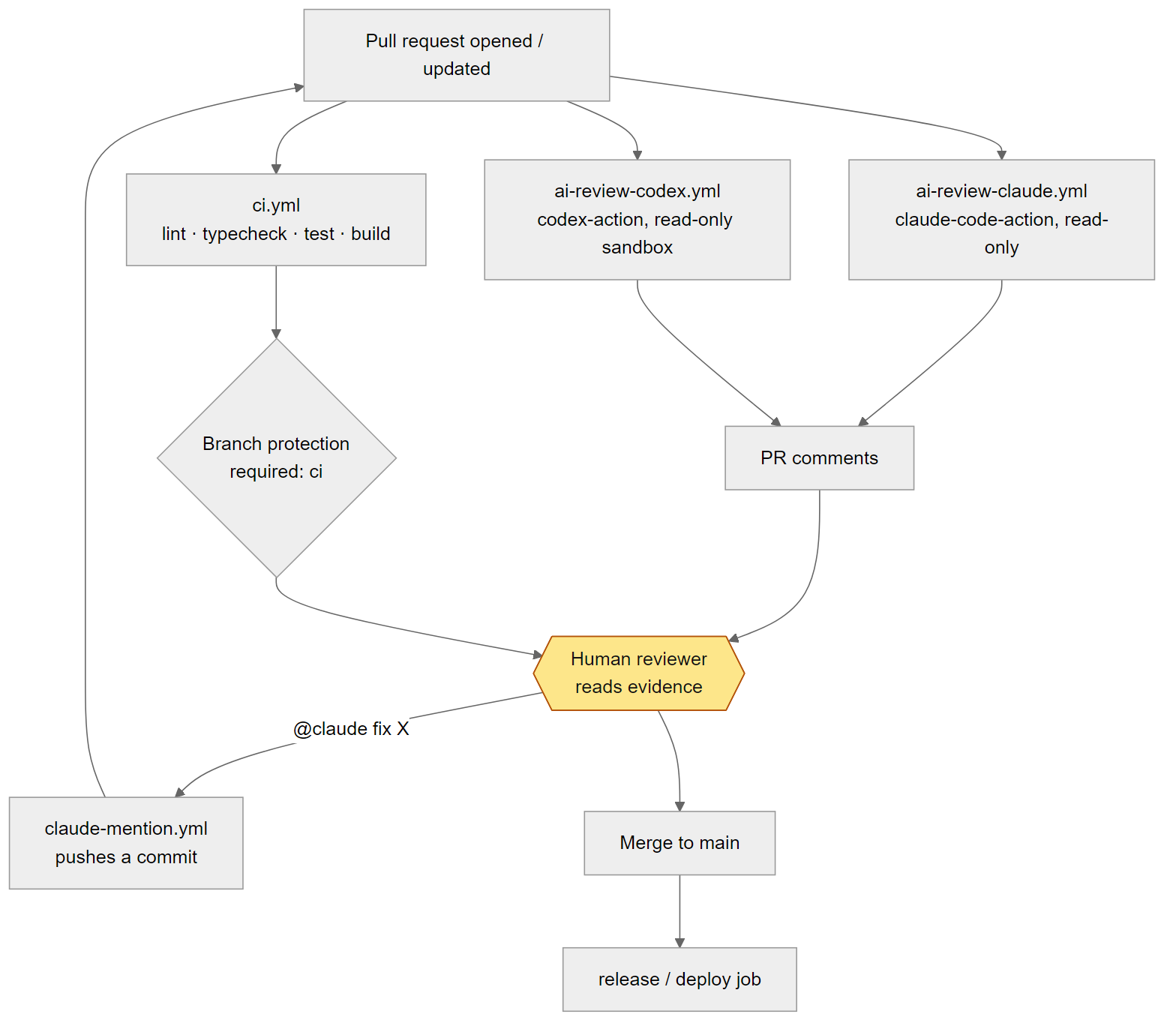
The agent does not merge this PR, and I did not merge it right away either. In this repo, merging to main deploys production. A pull request of nothing but config files and docs still triggers a real deploy.
Check: gh pr checks 5 shows test passing and the AI review jobs skipped. No job runs on the lxc-prod runner, because the deploy job only runs on a push to main.
Surprise one: a merge is a deploy
My first audit only looked at workflow file names. A file named with deploy or release meant the repo had a deploy path. LingoLive has only ci.yml and native-demo.yml, so the audit reported nothing. But read all of ci.yml and this is at the end:
on:
  pull_request:
  push:
    branches: [main]
# ...
  deploy:
    name: Deploy to LXC
    needs: test
    if: github.ref == 'refs/heads/main' && github.event_name == 'push'
    runs-on: [self-hosted, lxc-prod]
    timeout-minutes: 15
    concurrency:
      group: lxc-prod-deploy
      cancel-in-progress: false
Every push and every merge to main, even a comma fixed in the README, deploys to production through a runner on the production machine. The file name says nothing about it. An agent reading the repo for the first time would not know, and neither did my first audit.
I changed the audit to read workflow contents, not just names. It now looks for a job with deploy in its name, an environment: prod..., or the lxc-prod runner, then checks whether the workflow triggers on a push to main:
tools/agent-repo-setup/scripts/audit.mjs
const deployJob =
  /^\s{2}[\w-]*deploy[\w-]*:\s*$/m.test(wfText) ||
  /environment:\s*['"]?prod/i.test(wfText) ||
  /lxc-prod/.test(wfText);
const deploysOnMain = deployJob && /push:\s*\n\s*branches:\s*\[?\s*['"]?main/.test(wfText);
if (deployJob && existsSync(join(dir, "scripts/deploy")))
  prod.push({ name: "scripts/deploy", re: "scripts[\\\\/]deploy[\\\\/]" });
if (deployJob) prod.push({ name: "ssh to prod hosts", re: "\\bssh\\b.*\\bprod\\b" });
Finding it had three effects in the repo. First, AGENTS.md gained the line “A push or merge to main deploys to production through CI. Treat every merge as a release.” The agent reads it every session, and the reviewer subagent treats anything that can reach production as high severity. Second, the LingoLive guard hook gained three patterns generated from the audit:
  [/\bfirebase\s+deploy\b/, "firebase deploy is run by a human, not an agent"],
  [/scripts[\\/]deploy[\\/]/, "scripts/deploy is run by a human, not an agent"],
  [/\bssh\b.*\bprod\b/, "ssh to prod hosts is run by a human, not an agent"],
Third, it changed how I handle the PR. I will merge it myself after reading the diff, and treat it as a release. In a repo like this an agent never gets merge rights, green CI or not.
The broader lesson: an audit tool is only as good as the patterns it knows. The first time you run it on a new repo, open every workflow and read it yourself. When you find something the tool missed, fix the tool, not just the repo.
Surprise two: a security review found three holes
After the commit, an automated security review read it and reported three issues. All three were real, and I fixed them within the hour, in the tool and in the LingoLive branch.
1. The format hook ran through a shell on Windows
On Windows, npx is a .cmd file, so the format hook has to run the formatter through a shell. The file path went straight into that command line. A file name containing & or | was enough to inject a second command. LingoLive has no formatter, so it never got this hook, but the tool’s template did. The first fix refused any path with shell metacharacters. Then I removed the shell altogether: the hook runs the formatter’s own JS entry with node, so the path is always a single argument, and files outside the project are skipped. No shell, nothing to inject into:
tools/agent-repo-setup/templates/hooks/format-file.mjs
// Run the formatter's own JS entry with node: no shell, so the file path is always a single argument.
if (FORMAT && file && /{{FORMAT_EXT}}/.test(file)) {
  const target = resolve(file);
  const bin = join(root, FORMAT.bin);
  if (!relative(root, target).startsWith("..") && existsSync(bin)) {
    spawnSync(process.execPath, [bin, ...FORMAT.args, target], { stdio: "ignore", cwd: root });
  }
}
2. The guard hook had detours
The old guard matched git push as adjacent words. git -C . push, git -c k=v push, bash -c "git push" or split flags like rm -r -f all got through. The patterns now match anywhere in the command and allow options between git and push:
tools/agent-repo-setup/templates/hooks/guard-bash.mjs
// A guardrail, not a security boundary: also keep branch protection, no push credentials for agents,
// and deploy approval in CI. Patterns look anywhere in the command, so `git -C x push`,
// `git -c k=v push` and `bash -c "git push"` are caught too.
const input = JSON.parse(readFileSync(0, "utf8"));
const command = String(input.tool_input?.command ?? "").replace(/\s+/g, " ");

const blocked = [
  [/\bgit\b[^;&|]*\spush\b/, "git push is done by a human after review"],
  // ...
Those bypasses are now test cases in verify.mjs, so every repo checks them again on every verify. A bug you have found has to become a test, or it comes back.
3. An allow rule wider than it looked
I allowed Bash(git diff *) and Bash(git log *) because they “only read”. But git diff --output=<file> writes a file, and --ext-diff runs an external program. The * lets both through. The fix is deny rules, since deny is always checked before allow:
tools/agent-repo-setup/scripts/apply.mjs
const deny = [
  "Bash(git diff *--output*)",
  "Bash(git log *--output*)",
  "Bash(git diff *--ext-diff*)",
  "Bash(git * -c *)",
  "Read(./.env)",
  // ...
A hook is a railing, not a wall
The three bugs point to one conclusion: a hook is a guardrail, not a security boundary. It stops accidents, like an agent running git push or git add -A out of habit. It cannot stop a determined attempt, because a shell has too many ways to spell the same command. The real controls are elsewhere:
- Branch protection on main: nobody pushes directly, and a PR needs CI and a human approval.
- No push credentials for agents. The machine that runs agents holds no token that can write to the production repo.
- Deploy approval in CI. The deploy job waits for a person to approve it instead of running on every push.
Look at the ci.yml excerpt above again: the LingoLive deploy job runs right after the test job and waits for nobody. The hook stops an agent from typing a deploy command, but it cannot stop a merge.
Rolling it out across many repos
One repo you can do by hand. Ten repos need an order. This is mine.
Audit everything first, apply nothing. Run the JSON audit on each repo, collect the results, and see at a glance which repos deploy on merge, which have no gate, and which runners they use:
for r in ../repo-a ../repo-b ../repo-c; do
  node tools/agent-repo-setup/scripts/audit.mjs "$r" --json > "audit-$(basename "$r").json"
done
Low-risk personal repos go first. No real users, no automatic deploy. Run all six steps there, AI review included, and find the tool’s own bugs before it touches a repo that matters. LingoLive is a personal repo, but it has production and deploys on merge, so for me it sits in the middle of the list, not at the top.
Company repos: guardrails first, CI later. The first pass adds only AGENTS.md, CLAUDE.md, settings and hooks, using --no-ci so apply creates no workflows:
node tools/agent-repo-setup/scripts/apply.mjs ../company-repo --no-ci --dry-runNew workflows in a company repo need the organisation’s approval: new actions, API key secrets, which runner runs the job, who pays for the tokens. Do not open a PR that adds AI review workflows to an org repo before asking whoever runs the org. Guardrails are far less contentious, since they only affect people who use agents.
Repos with real user data or production access: do not enable AI review without the owner’s go. AI review sends diffs to an external API, and a diff can contain fixtures taken from real data, infrastructure config or host names. The generated workflows can sit in the repo switched off. Turning on ENABLE_AI_REVIEW is the owner’s decision, not yours.
Common mistakes
- Running on a stale checkout. Mine was 17 commits behind. Always fetch and create a worktree from
origin/main. - Trusting the audit completely. My first audit missed the deploy job because it only read file names. Read every workflow yourself at least once.
- Skipping the trust dialog. In an untrusted workspace, settings and hooks do nothing, even though
verify.mjsis green. Try a blocked command in Claude Code to be sure. - Letting an agent merge where a merge is a deploy. A docs-only PR still comes with a real deploy.
- Putting AI review on a production runner. Apply avoids runners with
prodin the label, but if yours are named differently, pass--runs-on. - Treating a hook as a security boundary. The three bypasses above show that a shell always has a detour. Branch protection and push rights are the wall.
- Broad wildcard allow rules.
git diff *looks harmless until you remember--outputand--ext-diff. - Letting a formatter touch markdown. Markdown tables in this series looked broken: Biome padded the columns to line up, then the blog wrapped the long code lines. Tables are now written compact,
| a | b |and| --- | --- |, and the sample repo’sbiome.jsonhas"!**/*.md"so Biome no longer formats markdown.
Checklist
- A fresh worktree from
origin/mainon its own branch, after checking open PRs and recent commits. - Audit run, gate and single-test command correct, every workflow read by hand for deploy paths.
- Dry run read; the AI review runner is not a production runner.
- Applied;
git statusshows only new files and.gitignore. - The Project section of
AGENTS.mdwritten by a person: folder map, extra CI tests, commands never to run. verify.mjsprintsall checks passed; in a trusted Claude Code session, a deploy command is blocked by the hook.- PR opened by a human, merged by a human. AI review stays off until the owner agrees.
- Branch protection, no push credentials for agents, deploy approval in CI: these stand behind the hook.
Series
- Architecture and model roles
- Repo setup for Claude Code and Codex
- Spec, plan, tasks
- Parallel work and multiple providers
- CI/CD with AI review
- Operating it: cost, security, learning
- Applying it to a real project (bonus)
If you prefer watching, there is a video summary of the whole series and a playlist on YouTube.
All the code is in the sample repo luonghongthuan/agentic-shortlink; the tool from this part is in tools/agent-repo-setup. The principles behind it are in the opening post.
Related reading
· 21 min read
agentic coding
Part 6/6: Operating the workflow: cost, security, learning loop and measuring
The last part: where agent money goes and how to cap it, a threat table mapped to files in the repo, a learning loop that turns every correction into a rule, skill, hook or test, five metrics that show whether agents help, and spec 0002 shipped end to end.
Read more· 25 min read
agentic coding
Part 5/6: CI/CD with AI review on GitHub Actions
Move the merge decision onto GitHub Actions in a fixed order: deterministic CI first, AI review from Claude and Codex second, a human last. Every workflow file explained, plus branch protection, SHA-pinned actions, the security traps and how to switch it on in your fork.
Read more· 24 min read
agentic coding
Part 4/6: Running agents in parallel across models and providers
One git worktree and branch per task, Claude Code and Codex running in parallel through agent-task.sh, a two-family review with a refute pass, and every provider behind one LiteLLM gateway with a written routing policy.
Read more
Discussion
Comments are reviewed before publication. Your email is kept private.