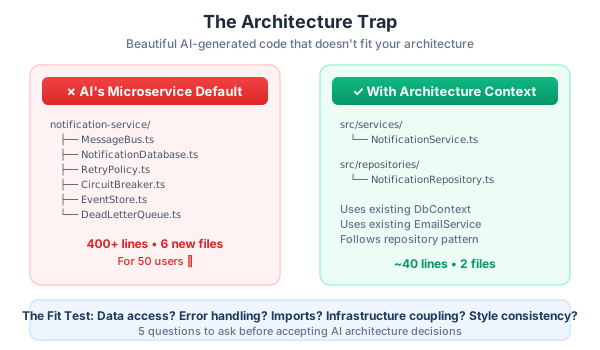
The notification service was a work of art. Event-driven architecture with a message bus, retry logic with exponential backoff, dead letter queues, comprehensive observability hooks, and a complete test suite. Dan stared at it for a full minute, genuinely impressed.
Then he looked at our monolith’s folder structure and sighed.
The AI had delivered a Ferrari engine for a bicycle.
Every function was clean. Every abstraction was justified. The error handling was better than what most senior engineers would write from scratch. If you showed this code in a conference talk about notification system design, people would nod approvingly. It was textbook-perfect distributed systems engineering.
It was also completely unusable.
BuildRight is a monolith. A simple, deliberate, perfectly adequate monolith serving fifty users. It uses a shared database context, a straightforward service layer, and the repository pattern. There is no message queue. There is no event bus. There is no reason for either.
The AI didn’t know any of that. And Dan hadn’t told it.
This is Part 5 of the AI-Assisted Development Playbook, and we’re covering what I consider the most expensive mistake you can make with AI-assisted development. Not buggy code — that’s caught in review. Not security holes — those are caught by scanners and discipline. The most expensive mistake is impressive code that doesn’t fit your architecture, because it wastes hours of development time, passes superficial review (it looks great!), and creates maintenance nightmares that surface months later.
How This Happens
Let me walk you through the exact scenario, because I guarantee some version of this has happened to you — or will.
Dan was working on BuildRight’s notification feature. Users needed to receive alerts when tasks were assigned to them, when deadlines approached, and when comments were added to their items. Straightforward stuff. He opened his AI tool and typed something like:
“Build a notification system for BuildRight. It should handle task assignments, deadline reminders, and comment notifications. Users should be able to mark notifications as read and configure their preferences.”
Reasonable prompt. Clear requirements. And the AI delivered — oh, did it deliver.
What came back was a fully architected notification microservice. It had:
-
Its own database connection with a dedicated
NotificationDatabaseclass, connection pooling, and migration scripts. BuildRight uses a sharedDbContextfor everything. -
Its own dependency injection container with a custom service locator, factory registrations, and lifecycle management. BuildRight uses the framework’s built-in DI and it works fine.
-
Event sourcing patterns with an event store, event replay capabilities, and projection builders. BuildRight uses simple CRUD operations with a repository layer.
-
A message queue integration with RabbitMQ bindings, consumer groups, and dead letter exchange configuration. BuildRight has no message queue. BuildRight has never had a message queue. BuildRight does not need a message queue.
-
A complete retry mechanism with exponential backoff, circuit breakers, and fallback strategies. BuildRight’s existing email service does a try-catch with a single retry.
Every individual piece was excellent. If you were starting a greenfield notification platform expected to handle millions of events per day, this is exactly what you’d want. The code was clean, well-documented, properly typed, and thoroughly tested.
It was also for a completely different system than the one we were building.
Dan spent about three hours trying to integrate this into BuildRight before he stopped and messaged Mei: “I think I need to start over. The AI built a spaceship and I need a skateboard.”
Three hours. Gone. And that’s actually a best-case scenario — Dan is experienced enough to recognize the mismatch quickly. A junior developer might have spent days trying to make it work, installing RabbitMQ, adding new configuration files, restructuring the project to accommodate the AI’s architectural decisions. They might have succeeded in getting it running. And then, six months later, the team would discover they have a Frankenstein codebase: half monolith, half microservice, fully nobody-understands-how-this-works.
Why AI Generates for the Wrong Architecture
This isn’t a bug in the AI. It’s a fundamental characteristic of how these tools work, and understanding the “why” helps you prevent the “what.”
AI draws from millions of code examples across every architecture imaginable. When you say “notification system,” the AI has seen notification systems in microservice architectures, monoliths, serverless setups, event-driven systems, and everything in between. Without explicit direction, it has to pick one. And it tends to pick the most “complete” version it can generate, because completeness scores well in its training data.
Without explicit constraints, AI defaults to “best practice” patterns from training data. Here’s the thing — the microservice notification system the AI generated IS the best practice. For notifications at scale. In a distributed system. With a team of twenty engineers. “Best practice” doesn’t mean “best for your project.” It means “best for the average of all the projects this pattern has been applied to.” Your project is not the average.
AI optimizes for LOCAL correctness, not SYSTEM coherence. Ask yourself: does this function work? Yes. Does this class have the right responsibilities? Yes. Are the interfaces clean? Yes. Is the error handling robust? Yes. Does it fit into a monolith that uses a shared database context and simple service objects? Absolutely not. The AI verified every tree but missed the forest entirely.
Overengineering is an AI default. Think about the training data. What gets written about? What gets shared in blog posts and conference talks? Complex, sophisticated solutions. Nobody writes a blog post about their simple CRUD notification table with a read boolean column. They write about event sourcing with CQRS and saga patterns. The AI learned from the content that gets published, and what gets published skews toward complexity.
BuildRight has fifty users. Fifty. The AI designed a notification system that could comfortably handle fifty million events per day. That’s not a sign of AI intelligence — it’s a sign that the AI had no idea what it was building for.
The Architecture Context Approach
Here’s the good news: the Architecture Trap is the easiest AI mistake to prevent. It just requires giving the AI something it can’t infer on its own: your architectural context.
I’ve developed a four-part approach that Dan now uses for every significant feature request. It takes about ten minutes to set up, and it saves hours of wasted generation and refactoring.
1. Project Structure Documentation
Give the AI a map of your codebase. Not the entire thing — just the structural overview that tells it what kind of system it’s working with.
## Architecture Overview
BuildRight is a monolithic application:
- `/src/controllers/` — API endpoints (thin controllers, no business logic)
- `/src/services/` — Business logic layer
- `/src/repositories/` — Data access (repository pattern, shared DbContext)
- `/src/models/` — Domain models
- `/src/middleware/` — Auth, logging, error handling

We do NOT use: microservices, event sourcing, message queues,
separate databases per feature.
That “we do NOT use” section is critical. It’s just as important to tell the AI what patterns to avoid as it is to tell it what patterns to follow. Without it, the AI will helpfully introduce exactly those patterns because they’re “best practice.”
Some teams keep this as a file in their repo — an ARCHITECTURE.md or a CLAUDE.md or whatever fits their workflow. The format doesn’t matter. What matters is that the information is ready to paste into a prompt whenever you’re asking for something architectural.
2. Pattern Examples (Show, Don’t Tell)
This is the single most effective technique I’ve found. Instead of describing your patterns in words, show the AI existing implementations and tell it to follow them.
"Here's how our existing email service is structured:

// src/services/EmailService.ts
class EmailService {
  constructor(
    private readonly userRepo: UserRepository,
    private readonly config: AppConfig
  ) {}

  async sendWelcome(userId: string): Promise<void> {
    const user = await this.userRepo.findById(userId);
    if (!user) throw new NotFoundError('User', userId);

    await this.sendEmail(user.email, 'welcome', { name: user.name });
  }

  private async sendEmail(to: string, template: string, data: Record<string, string>): Promise<void> {
    // ... uses shared email transport from config
  }
}

Here's how our existing payment service is structured:

// src/services/PaymentService.ts
class PaymentService {
  constructor(
    private readonly paymentRepo: PaymentRepository,
    private readonly userRepo: UserRepository
  ) {}

  async processPayment(userId: string, amount: number): Promise<Payment> {
    const user = await this.userRepo.findById(userId);
    if (!user) throw new NotFoundError('User', userId);

    const payment = await this.paymentRepo.create({
      userId, amount, status: 'pending', createdAt: new Date()
    });

    return payment;
  }
}

Build the notification service following the SAME patterns."
When you show the AI two or three existing services, it picks up on the patterns immediately: constructor injection with repositories, the error handling style, the naming conventions, the level of abstraction. You don’t need to explain that your services use constructor injection with the repository classes — the AI sees it and replicates it.
Show, don’t tell isn’t just good writing advice. It’s the best prompting strategy for architectural consistency.
3. Explicit Constraints
Even with good examples, it helps to be direct about boundaries. Think of these as guardrails that prevent the AI from “improving” your code in ways you don’t want.
CONSTRAINTS:
- Use the existing DbContext, do NOT create new database connections
- Use the existing DI container, do NOT add new DI frameworks
- Follow the repository pattern in /src/repositories/UserRepository.ts as reference
- No new npm packages without prior approval
- Keep it simple — we have 50 users, not 50,000
That last line matters more than you’d think. Telling the AI about scale gives it a calibration point. When the AI knows the scale is fifty users, it won’t design for horizontal scaling, eventual consistency, or distributed caching. It’ll build something appropriately simple.
4. Anti-Patterns to Avoid
This is the negative space of your constraints. Call out the specific patterns you do NOT want, especially the ones the AI is likely to reach for.
DO NOT:
- Create microservice-style isolated modules
- Add message queues or event buses
- Implement event sourcing
- Create separate configuration files for this feature
- Over-abstract with factory patterns or strategy patterns
- Add middleware or interceptors that don't already exist
- Build a plugin system or extension points
I know this feels like nagging the AI. It is. But it works. Without explicit “do not” instructions, the AI’s definition of “good code” includes all of these things. With them, the AI stays within the boundaries of your system.
When Dan re-prompted the AI with all four of these context blocks, the notification service that came back was about forty lines long. It used the existing repository pattern, the existing email service, and the existing DI container. It was boring. It was perfect.
The “Fit Test” — 5 Questions Before You Accept
Even with great prompting, AI-generated code sometimes drifts from your architecture in subtle ways. Before accepting any AI-generated code into your codebase, run it through these five questions:
1. Does it use the same data access pattern?
If your app uses an ORM and the AI generated raw SQL queries, it doesn’t fit. If your app uses the repository pattern and the AI created a standalone data access class with its own connection, it doesn’t fit. Data access is the foundation of your architecture — mismatches here ripple through everything.
2. Does it follow the same error handling approach?
If your app returns error codes and the AI throws exceptions, it doesn’t fit. If your app uses a custom Result<T> type and the AI returns nullable values, it doesn’t fit. Error handling inconsistency is one of the most common sources of production bugs, because different error patterns don’t compose cleanly at the boundaries.
3. Does it import from the right places?
If the AI created new utility files instead of using existing shared utilities, it doesn’t fit. If the AI imported a new logging library instead of using the project’s existing logger, it doesn’t fit. Imports tell you everything about whether the AI understood your project’s dependency structure.
4. Could you remove it without changing infrastructure?
If removing the feature would require uninstalling a message queue, removing a Docker container, or deleting a separate configuration file that nothing else uses, it’s too coupled to new infrastructure. Features in a monolith should be additive at the code level, not the infrastructure level.
5. Would a new team member be confused by the style difference?
This is the gut-check question. If someone new joined the team, looked at the user service, then looked at the notification service, would they think they’re in the same project? If the notification service looks like it was copy-pasted from a different codebase with different conventions, it doesn’t fit — no matter how good it is.
Score your AI-generated code against these five questions. If it fails even one, you need to refactor before merging. If it fails three or more, you’re better off re-prompting with better context than trying to fix what you have.
Refactoring AI Output to Fit — A Walkthrough
Let me show you the actual transformation Dan made with BuildRight’s notification service. This isn’t theoretical — this is the practical, line-by-line refactoring process.
Before: The AI’s microservice approach
// notification-service/src/NotificationService.ts
import { MessageBus } from './infrastructure/MessageBus';
import { NotificationDatabase } from './infrastructure/NotificationDatabase';
import { RetryPolicy } from './infrastructure/RetryPolicy';
import { NotificationEvent, NotificationChannel } from './types';

class NotificationService {
  private readonly messageBus: MessageBus;
  private readonly notificationDb: NotificationDatabase;
  private readonly retryPolicy: RetryPolicy;

  constructor(
    messageBus: MessageBus,
    notificationDb: NotificationDatabase,
    retryPolicy: RetryPolicy
  ) {
    this.messageBus = messageBus;
    this.notificationDb = notificationDb;
    this.retryPolicy = retryPolicy;
  }

  async sendNotification(event: NotificationEvent): Promise<void> {
    const enrichedEvent = await this.enrichEvent(event);
    await this.notificationDb.save(enrichedEvent);
    await this.retryPolicy.execute(() =>
      this.messageBus.publish('notifications', enrichedEvent)
    );
  }

  async processNotification(event: NotificationEvent): Promise<void> {
    const channels = await this.resolveChannels(event);
    await Promise.all(
      channels.map(channel =>
        this.retryPolicy.execute(() => this.deliverToChannel(channel, event))
      )
    );
  }

  private async enrichEvent(event: NotificationEvent): Promise<NotificationEvent> {
    // ... 30 lines of event enrichment logic
  }

  private async resolveChannels(event: NotificationEvent): Promise<NotificationChannel[]> {
    // ... 20 lines of channel resolution with preference lookup
  }

  private async deliverToChannel(channel: NotificationChannel, event: NotificationEvent): Promise<void> {
    // ... 40 lines of multi-channel delivery with circuit breakers
  }
}
Note the warning signs: it lives in its own notification-service/ directory. It imports from its own infrastructure/ folder. It has its own database class. It uses a message bus. None of these things exist in BuildRight.
After: Refactored to fit BuildRight’s monolith
// src/services/NotificationService.ts
import { NotificationRepository } from '../repositories/NotificationRepository';
import { EmailService } from './EmailService';
import { NotificationType } from '../models/Notification';

class NotificationService {
  constructor(
    private readonly notificationRepo: NotificationRepository,
    private readonly emailService: EmailService
  ) {}

  async notify(userId: string, message: string, type: NotificationType): Promise<void> {
    const notification = await this.notificationRepo.create({
      userId,
      message,
      type,
      read: false,
      createdAt: new Date()
    });

    if (type === 'urgent') {
      await this.emailService.send(userId, message);
    }
  }

  async markAsRead(notificationId: string, userId: string): Promise<void> {
    const notification = await this.notificationRepo.findById(notificationId);
    if (!notification || notification.userId !== userId) {
      throw new NotFoundError('Notification', notificationId);
    }
    await this.notificationRepo.update(notificationId, { read: true });
  }

  async getUserNotifications(userId: string): Promise<Notification[]> {
    return this.notificationRepo.findByUserId(userId);
  }
}
Let me walk through the refactoring decisions, because each one reflects an architectural judgment that the AI couldn’t make on its own:
Removed the message bus, replaced with direct method calls. BuildRight handles fifty users. When a task is assigned, the controller calls notificationService.notify() directly. There’s no need for asynchronous event processing when the entire operation takes 20 milliseconds. If BuildRight grows to 50,000 users, we can revisit this. Today, a direct call is simpler, faster to debug, and fits the existing codebase.
Used the existing repository pattern instead of a separate database class. The AI created a NotificationDatabase with its own connection pool, its own query builder, and its own migration system. BuildRight already has a NotificationRepository pattern that plugs into the shared DbContext. We created NotificationRepository following the exact same structure as UserRepository and TaskRepository. One file. Fifteen lines.
Used the existing email service instead of building new notification infrastructure. The AI designed a multi-channel delivery system with support for push notifications, SMS, webhooks, and email. BuildRight has an email service. Users get emails. That’s the notification channel. If we ever need push notifications, we’ll add them to the existing email service pattern, not build a new delivery infrastructure.
Simplified from event-driven to straightforward procedural logic. The AI’s version had event enrichment, channel resolution, retry policies, circuit breakers, and dead letter queues. The refactored version has an if statement: if the notification is urgent, also send an email. That’s the entire routing logic. It handles every case BuildRight actually has.
The result: Same functionality. Seventy percent less code. Fits the existing system. Any team member can read it and immediately understand it. No new infrastructure. No new packages. No new patterns to learn.
This is the key insight: the AI’s code wasn’t wrong, it was wrong for us. The microservice version would be the correct choice for a team of twenty building a notification platform. For a team of three building a project management tool with fifty users, it was three layers of abstraction too many.
When to Accept AI’s Architecture Suggestion
I’ve spent this entire post telling you to make AI conform to your architecture. But I’d be dishonest if I didn’t mention the exceptions.
Sometimes, the AI’s “wrong” architecture is actually a signal worth listening to.
When the AI’s suggestion solves a recurring problem you’ve been ignoring. If the AI keeps generating separate error handling middleware and your current approach is try-catch blocks scattered everywhere, maybe the AI is pointing at a genuine weakness. Not every AI suggestion is overengineering — sometimes it’s addressing technical debt you’ve been living with.
When your current architecture has a known limitation the AI’s approach addresses. If your team has been saying “we really should add a caching layer” for six months and the AI generates code with caching built in, that’s a data point. The AI didn’t read your team’s Slack channel — it just independently arrived at the same conclusion because the pattern genuinely calls for it.
When the team has been considering that pattern anyway. If Dan had been planning to introduce event-driven notifications because BuildRight was about to onboard a major client with 10,000 users, the AI’s microservice suggestion would have been premature but directionally right. Sometimes the AI is early, not wrong.
But even when the AI is right, adopt the IDEA, not the implementation. If you decide that yes, BuildRight does need a caching layer, don’t use the AI’s caching implementation verbatim. Take the concept, understand why it’s valuable, and then implement it in a way that fits your existing patterns. The AI can tell you “what” but your team needs to decide “how.”
I think of it like getting architectural advice from a brilliant consultant who has never seen your codebase. They might identify a real problem and propose a valid solution. But they’ll propose it in the style of their last project, not yours. The insight is valuable. The specific implementation needs translation.
The Real Cost of the Architecture Trap
I want to put concrete numbers on this because “wasted time” sounds vague until you quantify it.
Dan’s first attempt at the notification service — the one where the AI generated a microservice — cost three hours of implementation time before he realized it didn’t fit. Then he spent thirty minutes writing architectural context and re-prompting. The second version took twenty minutes to generate and fifteen minutes to review and adjust.
Without architectural context: 3 hours wasted + rework time = ~4 hours total. With architectural context: 30 minutes context + 20 minutes generation + 15 minutes review = ~65 minutes total.
That’s a 3.7x difference on a single feature. Across a project with fifty features, that’s the difference between shipping in six weeks and shipping in four months.
But the time cost isn’t even the worst part. The worst part is the invisible cost of architectural drift. If Dan had been less experienced and had forced the microservice notification system into the monolith, the codebase would have two architectural styles. Every new developer would need to learn both. Every new feature would face the question: “Do we follow the monolith pattern or the notification pattern?” The codebase would slowly fracture into inconsistent subsystems, each following different conventions, each making the others harder to understand.
I’ve seen this happen. I’ve inherited codebases where every major feature was clearly generated by a different tool, or a different developer using the same tool with different prompts, and none of them followed the same patterns. These codebases are among the hardest to maintain. Not because any individual piece is bad, but because nothing is consistent.
Consistency is architecture. Architecture is consistency. When you let AI break your consistency, you’re letting it erode your architecture one feature at a time.
Building Your Architecture Context Template
Here’s a reusable template you can adapt for your own project. Fill this in once, keep it updated, and paste the relevant sections into your prompts whenever you’re asking the AI for something that touches your architecture.
## Project Architecture Context

### System Type
[Monolith / Microservices / Serverless / Modular monolith / etc.]

### Tech Stack
[Language, framework, database, key libraries]

### Directory Structure
[List your main directories and what goes in each one]

### Patterns We Use
- Data Access: [ORM / Repository / Active Record / Raw SQL / etc.]
- Error Handling: [Exceptions / Result types / Error codes / etc.]
- Dependency Injection: [Framework DI / Manual / Service locator / etc.]
- Testing: [Unit + Integration / TDD / etc.]

### Patterns We Do NOT Use
[List architectural patterns your project explicitly avoids]

### Scale Context
[Number of users, requests per day, data volume — helps AI calibrate complexity]

### Example Implementation
[Paste a representative service/module that shows your patterns in action]
This template works for any language, any framework, any project size. The specific content changes, but the structure stays the same: tell the AI what your system IS, what patterns it follows, what patterns it avoids, how big it is, and show it an example.
Ten minutes of preparation. Hours of saved rework.
The Bottom Line
The Architecture Trap is the most expensive AI mistake because it wastes the most time. Not minutes — hours. Not on broken code that fails tests, but on beautiful code that passes every test and still doesn’t belong in your codebase.
It’s also the easiest to prevent. Give the AI your architectural context. Show it existing code to follow. Tell it what not to do. Calibrate its understanding of your scale.
Your codebase has opinions. Every directory structure is an opinion. Every naming convention is an opinion. Every pattern you chose — and every pattern you rejected — is an opinion. The AI doesn’t know any of those opinions unless you share them. When you don’t, it substitutes the opinions of its training data, which skew toward complexity, toward “best practices” designed for systems ten times your size, toward architectural patterns that solve problems you don’t have.
AI is a multiplier. But it multiplies whatever patterns you feed it. Feed it your architecture, and it multiplies your architecture. Feed it nothing, and it multiplies the internet’s collective “best practices” — which may have nothing to do with what’s best for you.
Before you close this post, do one thing: write a one-page architecture context document for your current project. You don’t need a template. You don’t need to make it pretty. Just answer four questions:
- What kind of system is this?
- What patterns do we follow?
- What patterns do we avoid?
- How big is this thing, really?
Keep that document next to your AI tool. Paste the relevant sections every time you ask for something beyond a simple utility function. It’ll pay for itself the first time you use it.
In Part 6, we shift from reviewing code by eye to testing it systematically. How do you write tests for code you didn’t write? It turns out to be a different skill than testing your own code — you’re looking for different things, asking different questions, and catching different kinds of bugs. We’ll cover the specific testing strategies that work when the AI wrote the implementation and you’re responsible for verifying it actually does what it claims.
This is Part 5 of a 13-part series: The AI-Assisted Development Playbook. Start from the beginning with Part 1: Why Workflow Beats Tools.
Series outline:
- Why Workflow Beats Tools — The productivity paradox and the 40-40-20 model (Part 1)
- Your First Quick Win — Landing page in 90 minutes (Part 2)
- The Review Discipline — What broke when I skipped review (Part 3)
- Planning Before Prompting — The 40% nobody wants to do (Part 4)
- The Architecture Trap — Beautiful code that doesn’t fit (this post)
- Testing AI Output — Verifying code you didn’t write (Part 6)
- The Trust Boundary — What to never delegate (Part 7)
- Team Collaboration — Five devs, one codebase, one AI workflow (Part 8)
- Measuring Real Impact — Beyond “we’re faster now” (Part 9)
- What Comes Next — Lessons and the road ahead (Part 10)
- Prompt Patterns — How to talk to AI effectively (Part 11)
- Debugging with AI — When AI code breaks in production (Part 12)
- AI Beyond Code — Requirements, docs, and decisions (Part 13)