
JOURNAL
Build a $0 Agentic AI System: Architecture That Scales from Prototype to Production
A complete technical guide to building a profitable agentic AI system using only open-source tools — with retrieval, orchestration, tool use, and observability. Includes architecture diagrams and real cost analysis.
On this page
You can build a profitable agentic AI system without spending a single dollar.
Not a toy. Not a demo. A real system with retrieval, orchestration, tool use, and observability.
This guide breaks down the complete architecture — every layer, every tool choice, and the hidden costs most tutorials conveniently skip.
Why Agentic AI? Why Now?
The shift from “AI that answers questions” to “AI that takes actions” is happening faster than most teams expect.
Three forces converging in 2026:
- LLMs got good enough — Models like Gemma 4, Llama 3.3, and Qwen 3 can now reason, plan, and self-correct well enough for real tasks
- Tooling matured — LangGraph, MCP, and LlamaIndex turned fragile hacks into reliable patterns
- Hardware got cheap — A $200/month GPU server can run a full agent stack that would’ve cost $10K/month in 2023
The question is no longer “can we build this?” — it’s “which problems are worth automating first?”
Real-World Applications
These aren’t demos. These are patterns running in production today:
Customer Support Agent
Stack: LangGraph + RAG (product docs) + CRM MCP tools What it does: Handles 60-80% of tier-1 support tickets autonomously — reads ticket, retrieves relevant docs, checks order history via MCP, drafts response, escalates when confidence is low Latency: 3-8 seconds per ticket ROI: Reduces support cost by ~40% at 10K tickets/month
Code Review Agent
Stack: LlamaIndex (codebase index) + GitHub MCP + Ollama (DeepSeek Coder) What it does: Reviews PRs for security issues, style violations, and architectural anti-patterns. Posts inline comments. Approves or requests changes. Latency: 15-45 seconds per PR ROI: Catches 70% of common issues before human review
Data Analysis Agent
Stack: DuckDB MCP + LangGraph + local LLM What it does: Accepts natural language queries (“show me revenue by region last quarter”), writes SQL, executes it, generates charts, writes narrative summary Latency: 5-30 seconds ROI: Business users self-serve analytics without SQL knowledge
Personal Knowledge Agent
Stack: ChromaDB (personal notes/docs) + Ollama What it does: Answers questions about your own documents — meeting notes, research papers, code docs — with citations Latency: 2-5 seconds ROI: Replaces 10-20 minutes of manual searching per query
Ease of Use: How Accessible Is This Stack?
Honest breakdown for different developer profiles:
| Profile | Time to First Working Agent | Hardest Part |
|---|---|---|
| Python dev, no ML background | 1-2 days | Understanding LangGraph state |
| Full-stack dev, no Python | 3-5 days | Python async patterns |
| ML engineer | 2-4 hours | Wiring MCP + LangGraph together |
| DevOps/platform engineer | 1 day | Understanding agent vs. API patterns |
The actual learning curve:
- Day 1: Get Ollama + basic chat working (easy)
- Day 2-3: Add RAG pipeline (medium — ChromaDB indexing quirks)
- Day 4-5: Add MCP tools (medium — MCP protocol setup)
- Week 2: LangGraph orchestration (hard — state machine thinking)
- Week 3+: Production hardening (varies by use case)
What makes it easier than it looks:
- Ollama has excellent docs and a huge model library
- LlamaIndex abstracts most of the vector DB complexity
- Docker Compose handles all service wiring
- The MCP ecosystem already has 200+ pre-built servers
Advanced Capabilities
Once the base stack is running, these patterns unlock the next level:
Multi-Modal Agents
Gemma 4 and Llama 3.3 Vision support image input natively via Ollama:
response = client.chat(
    model="gemma4:e4b",
    messages=[{
        "role": "user",
        "content": "Analyze this architecture diagram",
        "images": ["./diagram.png"]  # base64 or path
    }]
)
Use cases: UI bug detection from screenshots, invoice processing, diagram-to-code generation.
Streaming Responses
Don’t make users wait 10 seconds for full responses:
for chunk in client.chat(model="gemma4:e4b", messages=messages, stream=True):
    print(chunk.message.content, end="", flush=True)
Structured Output (JSON Mode)
Force the LLM to return valid, typed data:
from pydantic import BaseModel

class TaskAnalysis(BaseModel):
    priority: str
    estimated_hours: float
    dependencies: list[str]
    risks: list[str]

response = client.chat(
    model="gemma4:e4b",
    messages=messages,
    format=TaskAnalysis.model_json_schema()
)
result = TaskAnalysis.model_validate_json(response.message.content)
Long-Context Handling
For documents longer than the context window:
# Hierarchical summarization
def summarize_long_doc(text: str, chunk_size: int = 4000) -> str:
    chunks = [text[i:i+chunk_size] for i in range(0, len(text), chunk_size)]
    summaries = [llm.chat([{"role": "user", "content": f"Summarize: {c}"}]).message.content
                 for c in chunks]
    final = llm.chat([{"role": "user", "content": f"Combine these summaries: {summaries}"}])
    return final.message.content
Agent Self-Correction
Let agents critique and fix their own output:
def self_correct(task: str, max_attempts: int = 3) -> str:
    response = llm.chat([{"role": "user", "content": task}]).message.content

    for attempt in range(max_attempts):
        critique = llm.chat([{
            "role": "user",
            "content": f"Task: {task}\nResponse: {response}\n\nWhat's wrong? How to improve? Reply 'GOOD' if nothing to fix."
        }]).message.content

        if "GOOD" in critique.upper():
            return response

        response = llm.chat([{
            "role": "user",
            "content": f"Original task: {task}\nPrevious attempt: {response}\nFix these issues: {critique}"
        }]).message.content

    return response
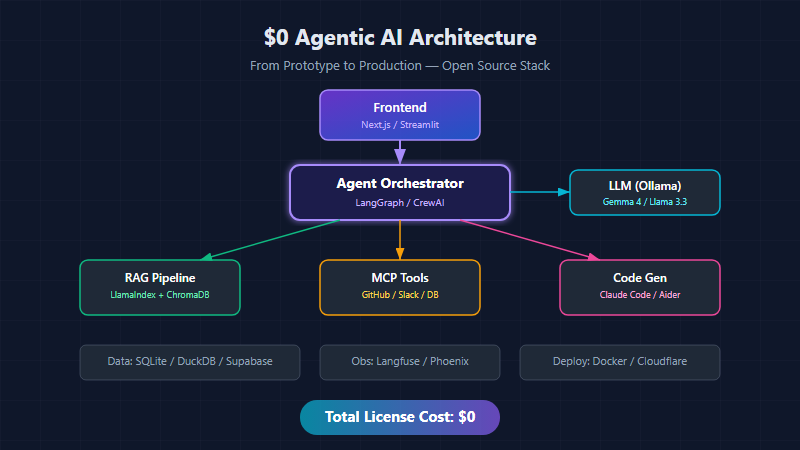
The $0 Agentic AI Architecture — Full Stack
Here’s how the architecture actually flows, from user request to agent action:
graph TD
    subgraph Stack["$0 AGENTIC AI STACK"]
        Frontend["Frontend\nNext.js / Streamlit\n(Vercel)"]
        Orchestrator["Agent Orchestrator\nLangGraph / CrewAI"]
        LLM["LLM\nOllama\nGemma 4 / Llama 3.3"]

        Frontend -->|request| Orchestrator
        Orchestrator -->|prompt| LLM
        LLM -->|response| Orchestrator
        Orchestrator -->|result| Frontend

        Orchestrator --> RAG["RAG Pipeline\nLlamaIndex\nChromaDB / Qdrant"]
        Orchestrator --> MCP["MCP Tools\nGitHub / Slack\nDB / Filesystem"]
        Orchestrator --> CodeGen["Code Gen\nClaude Code CLI\nAider"]

        Data["Data Layer\nSQLite / DuckDB / Supabase (free tier)"]
        Obs["Observability\nLangfuse / Phoenix -- self-hosted"]
        Deploy["Deployment\nDocker -> Cloudflare Workers / HuggingFace Spaces"]
    end
Layer 1: Frontend — The User Entry Point
A user request hits your frontend. You have two solid $0 options:
Next.js on Vercel (Free Tier)
Best for customer-facing products:
// app/api/agent/route.ts
import { NextRequest, NextResponse } from 'next/server';

export async function POST(req: NextRequest) {
  const { message, sessionId } = await req.json();

  // Route to your agent orchestrator
  const response = await fetch(process.env.AGENT_ENDPOINT!, {
    method: 'POST',
    headers: { 'Content-Type': 'application/json' },
    body: JSON.stringify({
      message,
      sessionId,
      context: {
        userId: req.headers.get('x-user-id'),
        timestamp: new Date().toISOString(),
      }
    })
  });

  // Stream the agent's response back to the UI
  return new NextResponse(response.body, {
    headers: { 'Content-Type': 'text/event-stream' }
  });
}
Streamlit for Internal Tools
Best for POCs, dashboards, and internal agent interfaces:
import streamlit as st
from agent_orchestrator import AgentOrchestrator

st.title("🤖 AI Agent Dashboard")

agent = AgentOrchestrator()

if prompt := st.chat_input("Ask the agent..."):
    with st.chat_message("user"):
        st.write(prompt)

    with st.chat_message("assistant"):
        with st.spinner("Agent is thinking..."):
            result = agent.run(prompt)
            st.write(result.response)

            # Show agent's reasoning chain
            with st.expander("🔍 Agent Steps"):
                for step in result.steps:
                    st.json(step)
Vercel free tier limits: 100GB bandwidth, 100 hours serverless compute/month — enough for most MVPs.
Layer 2: Agent Orchestrator — The Brain
This is where the magic happens. The orchestrator decides:
- Which tools to call
- When to retrieve context (RAG)
- How to break complex tasks into subtasks
- When to ask the user for clarification
LangGraph — State Machine for Agents
LangGraph gives you explicit control over agent flow:
from langgraph.graph import StateGraph, END
from langgraph.prebuilt import ToolNode
from typing import TypedDict, Annotated, Sequence
import operator

class AgentState(TypedDict):
    messages: Annotated[Sequence, operator.add]
    context: dict
    tool_results: list
    should_continue: bool

def route_request(state: AgentState) -> str:
    """Decide what the agent should do next."""
    last_message = state["messages"][-1]

    # If the LLM wants to use a tool, route to tools
    if hasattr(last_message, "tool_calls") and last_message.tool_calls:
        return "tools"

    # If we need more context, route to RAG
    if needs_context(last_message):
        return "rag_retrieve"

    # Otherwise, generate final response
    return "respond"

def needs_context(message) -> bool:
    """Determine if RAG retrieval would help."""
    keywords = ["documentation", "how to", "what is", "explain"]
    return any(kw in message.content.lower() for kw in keywords)

# Build the graph
workflow = StateGraph(AgentState)
workflow.add_node("agent", agent_node)
workflow.add_node("tools", ToolNode(tools))
workflow.add_node("rag_retrieve", rag_retrieval_node)
workflow.add_node("respond", response_node)

workflow.set_entry_point("agent")
workflow.add_conditional_edges("agent", route_request)
workflow.add_edge("tools", "agent")        # After tools → back to agent
workflow.add_edge("rag_retrieve", "agent") # After RAG → back to agent
workflow.add_edge("respond", END)

app = workflow.compile()
graph TD
    User([User]) --> Agent[Agent Node]
    Agent -->|needs tools| Tools[Tools]
    Agent -->|needs context| RAG[RAG]
    Agent -->|ready| Respond[Respond]
    Tools -->|result| Agent
    RAG -->|result| Agent
    Respond --> END([END -> User])
CrewAI — Multi-Agent Teams
When a single agent isn’t enough, CrewAI lets you define teams:
from crewai import Agent, Task, Crew

researcher = Agent(
    role="Technical Researcher",
    goal="Find accurate, up-to-date technical information",
    backstory="Expert at finding relevant docs and code examples",
    llm="ollama/gemma4-e4b",
    tools=[web_search, github_search, doc_reader]
)

architect = Agent(
    role="Solution Architect",
    goal="Design scalable, maintainable solutions",
    backstory="15 years of distributed systems experience",
    llm="ollama/llama3.3",
    tools=[diagram_generator, code_writer]
)

task = Task(
    description="Design a caching strategy for our API",
    expected_output="Architecture diagram + implementation plan",
    agent=architect
)

crew = Crew(
    agents=[researcher, architect],
    tasks=[task],
    verbose=True
)

result = crew.kickoff()
Layer 3: RAG Pipeline — External Knowledge
Need external knowledge? Route to your RAG pipeline.
LlamaIndex + ChromaDB (100% Local)
from llama_index.core import VectorStoreIndex, SimpleDirectoryReader
from llama_index.vector_stores.chroma import ChromaVectorStore
from llama_index.embeddings.huggingface import HuggingFaceEmbedding
import chromadb

# Embedding model — runs locally, no API key
embed_model = HuggingFaceEmbedding(
    model_name="BAAI/bge-small-en-v1.5"  # 33M params, fast
)

# ChromaDB — runs locally, persists to disk
chroma_client = chromadb.PersistentClient(path="./chroma_db")
collection = chroma_client.get_or_create_collection("knowledge_base")
vector_store = ChromaVectorStore(chroma_collection=collection)

# Index your documents
documents = SimpleDirectoryReader("./docs").load_data()
index = VectorStoreIndex.from_documents(
    documents,
    vector_store=vector_store,
    embed_model=embed_model
)

# Query with context
query_engine = index.as_query_engine(
    similarity_top_k=5,
    llm=local_llm  # Ollama
)

response = query_engine.query(
    "What's our API rate limiting policy?"
)
RAG Decision Matrix
| USE RAG | SKIP RAG |
|---|---|
| Company docs | General knowledge |
| API references | Simple conversations |
| Code repos | Math / reasoning |
| Meeting notes | Creative writing |
| Product specs | When latency < accuracy |
| Legal/compliance | Sub-100 doc corpus |
RAG adds 200-500ms latency per query. Only use it when accuracy > speed.
Layer 4: The LLM — Local Inference with Ollama
Zero API keys. Zero rate limits. Your hardware, your rules.
# Install Ollama
curl -fsSL https://ollama.com/install.sh | sh

# Pull models
ollama pull gemma4:e4b        # Google's latest, excellent quality
ollama pull llama3.3:70b      # Meta's workhorse (needs 48GB+ VRAM)
ollama pull mistral-small:4   # Fast, great for routing

# Run as API server
ollama serve
Model Selection Guide
| Model | VRAM | Speed | Best For |
|---|---|---|---|
| Gemma 4 E4B | ~6GB | Fast | General tasks, coding, chat |
| Llama 3.3 70B | ~48GB | Medium | Complex reasoning, long documents |
| Mistral Small 4 | ~3GB | Very Fast | Routing, simple classification |
| Qwen 3 8B | ~6GB | Fast | Multilingual, Asian languages |
| DeepSeek Coder V3 | ~6GB | Fast | Code generation & debugging |
Smart Model Routing
Use a small model to route requests to the right large model:
from ollama import Client

client = Client()

def smart_route(user_message: str) -> str:
    """Use a small fast model to decide which big model to use."""

    routing_response = client.chat(
        model="mistral-small:4",
        messages=[{
            "role": "system",
            "content": """Classify this request into ONE category:
            - CODE: programming, debugging, code review
            - REASON: analysis, planning, complex logic
            - CHAT: simple questions, small talk
            Reply with just the category."""
        }, {
            "role": "user",
            "content": user_message
        }]
    )

    category = routing_response.message.content.strip()

    model_map = {
        "CODE": "deepseek-coder-v3:6b",
        "REASON": "gemma4:e4b",
        "CHAT": "mistral-small:4"
    }

    return model_map.get(category, "gemma4:e4b")
Layer 5: MCP — Tool Use That Turns Chatbots Into Systems
Model Context Protocol (MCP) is the open protocol that connects your agent to external tools. This is what turns a chatbot into a system that actually does things.
graph LR
    Agent([Agent]) --> Client[MCP Client]
    Client --> GH[GitHub MCP Server\nCreate PRs, issues]
    Client --> Slack[Slack MCP Server\nSend messages, read chats]
    Client --> DB[Database MCP\nQuery, insert, update]
    Client --> FS[Filesystem MCP\nRead/write files]
    Client --> Custom[Custom MCP Server\nYour business logic]
Building a Custom MCP Server
from mcp.server import Server
from mcp.types import Tool, TextContent
import json

server = Server("my-business-tools")

@server.tool()
async def get_customer_data(customer_id: str) -> list[TextContent]:
    """Fetch customer data from our CRM."""
    # Your business logic here
    customer = await crm.get_customer(customer_id)
    return [TextContent(
        type="text",
        text=json.dumps(customer.to_dict())
    )]

@server.tool()
async def create_support_ticket(
    title: str,
    description: str,
    priority: str = "medium"
) -> list[TextContent]:
    """Create a support ticket in our system."""
    ticket = await ticketing.create(
        title=title,
        description=description,
        priority=priority
    )
    return [TextContent(
        type="text",
        text=f"Ticket {ticket.id} created successfully"
    )]

# Run the server
if __name__ == "__main__":
    server.run()
Layer 6: Data Layer
| Tool | Cost | Best For |
|---|---|---|
| SQLite | $0 | Single-server apps, embedded databases |
| DuckDB | $0 | Analytics, OLAP queries, processing large datasets |
| Supabase (free tier) | $0 | Real Postgres with auth, real-time, REST API |
| ChromaDB | $0 | Vector storage for RAG, runs locally |
Layer 7: Observability — See Everything
Self-hosted observability so you can see every agent step:
Langfuse (Self-Hosted)
from langfuse import Langfuse
from langfuse.decorators import observe

langfuse = Langfuse(
    host="http://localhost:3100",  # Self-hosted
)

@observe()
def agent_pipeline(user_input: str):
    # Every step is automatically traced
    context = retrieve_context(user_input)
    response = generate_response(user_input, context)
    action = execute_action(response)
    return action

@observe()
def retrieve_context(query: str):
    """RAG retrieval — tracked automatically."""
    results = vector_store.similarity_search(query, k=5)
    return results

@observe()
def generate_response(query: str, context: list):
    """LLM call — latency, tokens, cost all tracked."""
    return llm.chat(
        messages=[
            {"role": "system", "content": f"Context: {context}"},
            {"role": "user", "content": query}
        ]
    )
What You Should Monitor
Key Metrics:
- Agent Success Rate — % tasks completed
- Avg Response Latency — p50, p95, p99
- Token Usage per Request — input + output
- Tool Call Frequency — which tools used most
- RAG Retrieval Quality — relevance scores
- Error Rate by Step — where agents fail
- User Satisfaction — thumbs up/down
Alerts:
- Latency > 10s
- Success rate < 80%
- Token usage anomaly
- Tool failure rate > 5%
Layer 8: Deployment
Wrap everything in Docker and deploy:
# docker-compose.yml
version: '3.8'

services:
  agent:
    build: ./agent
    ports:
      - "8000:8000"
    environment:
      - OLLAMA_HOST=http://ollama:11434
      - CHROMA_HOST=http://chromadb:8000
      - LANGFUSE_HOST=http://langfuse:3100
    depends_on:
      - ollama
      - chromadb

  ollama:
    image: ollama/ollama
    ports:
      - "11434:11434"
    volumes:
      - ollama_data:/root/.ollama
    deploy:
      resources:
        reservations:
          devices:
            - capabilities: [gpu]

  chromadb:
    image: chromadb/chroma
    ports:
      - "8001:8000"
    volumes:
      - chroma_data:/chroma/chroma

  langfuse:
    image: langfuse/langfuse
    ports:
      - "3100:3000"
    environment:
      - DATABASE_URL=postgresql://user:pass@db:5432/langfuse
    depends_on:
      - db

  db:
    image: postgres:16-alpine
    environment:
      - POSTGRES_USER=user
      - POSTGRES_PASSWORD=pass
      - POSTGRES_DB=langfuse
    volumes:
      - pg_data:/var/lib/postgresql/data

  frontend:
    build: ./frontend
    ports:
      - "3000:3000"
    environment:
      - AGENT_ENDPOINT=http://agent:8000

volumes:
  ollama_data:
  chroma_data:
  pg_data:
# One command to launch everything
docker compose up -d

# Health check
curl http://localhost:8000/health
curl http://localhost:3000
The Hard Truth: What “$0” Really Means
Let’s be honest about costs:
| Phase | License Cost | Real Cost |
|---|---|---|
| POC/Demo | $0 | ~$0 (laptop + electricity) |
| Pilot (10 users) | $0 | $50-200/mo (GPU server or cloud GPU credits) |
| Production (1K users) | $0 | $500-5,000/mo (compute, storage, ops, monitoring) |
| Scale (100K users) | $0 | $5K-50K+/mo (GPU fleet, team, SLA, redundancy) |
Hidden cost drivers:
- Compute — GPUs for inference dominate costs
- Storage — vector DB scaling grows with data
- Latency tuning — faster = more expensive hardware
- Observability — logging at scale is not free
- DevOps — setup, maintenance, upgrades = time = money
The Strategic Takeaway
The value isn’t in the tools. Every tool listed here will be replaced by something better within 18 months.
The value is in understanding the architecture pattern:
- Why the orchestrator sits between the user and the LLM — it’s the control plane
- When RAG helps and when it just adds latency — not every query needs retrieval
- Why MCP isn’t just another protocol — it’s the layer that turns a chatbot into a system that actually does things
- Why observability isn’t optional — you can’t improve what you can’t measure
The engineers who invest time understanding these patterns now are the ones who’ll scale this stack from $0 to production when the moment is right — swapping Ollama for a hosted API, ChromaDB for a managed vector DB, Streamlit for a real frontend — without rearchitecting anything.
That’s the real power of getting the architecture right from day one.
graph LR
    subgraph Z["$0 Stack"]
        A1[Ollama]
        A2[ChromaDB local]
        A3[SQLite]
        A4[Streamlit]
        A5[Langfuse local]
        A6[Docker local]
        A7[Your laptop]
    end
    subgraph P["Production Stack"]
        B1[OpenAI / Anthropic API]
        B2[Pinecone / Weaviate]
        B3[PostgreSQL / Supabase]
        B4[Next.js + Vercel Pro]
        B5[Langfuse Cloud / Datadog]
        B6[Kubernetes / ECS]
        B7[AWS / GCP / Azure]
    end
    A1 --> B1
    A2 --> B2
    A3 --> B3
    A4 --> B4
    A5 --> B5
    A6 --> B6
    A7 --> B7
Architecture pattern stays the SAME. Only the implementations change.
What’s Next?
In Part 2, we’ll build an agentic system from scratch — step by step — with complete working code. We’ll implement every layer from this architecture and deploy it to production.
The question to ask yourself: What’s the first layer where you’d start spending money as you scale — and why?
For most teams, the answer is compute (GPUs for inference). Everything else can stay on free tiers much longer than you’d expect.
This architecture is best interpreted as “maximum flexibility with minimal vendor lock-in” — not “zero cost AI in production.” The open-source ecosystem gives you control. Production readiness requires investment. The architecture ensures that investment goes exactly where it matters.
Related reading
08 Oct 2026 · 4 min read
architecture
English Lesson — Wednesday Morning: Failover & High Availability Vocabulary
Wednesday architecture English: failover, pronunciation drills, a vocabulary table, two exercises, and an idiom every on-call engineer should know.
Read more07 Oct 2026 · 4 min read
agentic-ai
OpenAI's Agents Hit Wikipedia for Five Months — and OpenAI Wasn't the One Watching
Wikimedia's October 5 disclosure shows months of unauthorized OpenAI agent traffic on its servers — forensics done by the victim, not the vendor.
Read more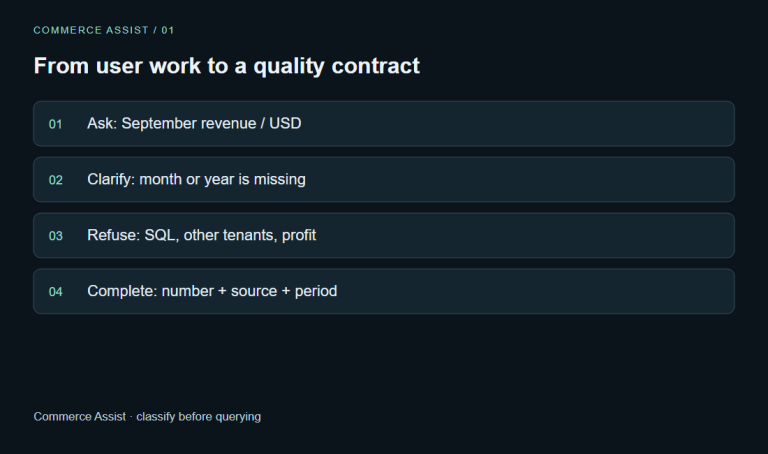
07 Oct 2026 · 8 min read
agentic-ai
1. Analyze the Work Before You Build the Chatbot
Define chatbot jobs, risk boundaries, quality targets and a measured path toward fewer model dependencies.
Read more
Discussion
Comments are reviewed before publication. Your email is kept private.