
BÀI VIẾT
Xây Dựng Hệ Thống AI Agent $0: Kiến Trúc Từ Prototype Đến Production
Hướng dẫn kỹ thuật toàn diện để xây dựng hệ thống AI agent thực sự với retrieval, orchestration, tool use, và observability — hoàn toàn miễn phí bằng open-source. Bao gồm sơ đồ kiến trúc và phân tích chi phí thực.
Trong bài viết
Bạn hoàn toàn có thể xây dựng một hệ thống AI agent có thể kiếm tiền mà không tốn một đồng nào.
Không phải đồ chơi. Không phải demo. Một hệ thống thực với retrieval, orchestration, tool use, và observability.
Bài viết này phân tích toàn bộ kiến trúc — từng layer, từng lựa chọn công cụ, và những chi phí ẩn mà hầu hết tutorial đều bỏ qua.
Tại Sao Agentic AI? Tại Sao Bây Giờ?
Sự chuyển dịch từ “AI trả lời câu hỏi” sang “AI thực hiện hành động” đang diễn ra nhanh hơn hầu hết team kỳ vọng.
Ba lực lượng hội tụ vào 2026:
- LLM đã đủ tốt — Các model như Gemma 4, Llama 3.3, Qwen 3 giờ có thể lập luận, lên kế hoạch và tự sửa lỗi đủ tốt cho các task thực tế
- Tooling đã trưởng thành — LangGraph, MCP, LlamaIndex biến những hack mong manh thành các pattern đáng tin cậy
- Phần cứng đã rẻ hơn — Một server GPU $200/tháng có thể chạy full agent stack mà năm 2023 tốn $10K/tháng
Câu hỏi không còn là “liệu chúng ta có thể xây dựng không?” — mà là “vấn đề nào đáng tự động hóa trước?”
Ứng Dụng Thực Tế
Đây không phải demo. Đây là các pattern đang chạy trong production:
Agent Hỗ Trợ Khách Hàng
Stack: LangGraph + RAG (tài liệu sản phẩm) + CRM MCP tools Làm gì: Xử lý 60-80% ticket tier-1 tự động — đọc ticket, truy xuất tài liệu liên quan, kiểm tra lịch sử đơn hàng qua MCP, soạn phản hồi, leo thang khi độ tin cậy thấp Latency: 3-8 giây/ticket ROI: Giảm chi phí support ~40% với 10K ticket/tháng
Agent Review Code
Stack: LlamaIndex (index codebase) + GitHub MCP + Ollama (DeepSeek Coder) Làm gì: Review PR để phát hiện lỗi bảo mật, vi phạm style, anti-pattern kiến trúc. Đăng comment inline. Approve hoặc yêu cầu thay đổi. Latency: 15-45 giây/PR ROI: Bắt được 70% lỗi phổ biến trước khi con người review
Agent Phân Tích Dữ Liệu
Stack: DuckDB MCP + LangGraph + local LLM Làm gì: Nhận câu hỏi ngôn ngữ tự nhiên (“cho tôi xem doanh thu theo vùng quý trước”), viết SQL, thực thi, tạo biểu đồ, viết tóm tắt Latency: 5-30 giây ROI: Business user tự phục vụ analytics mà không cần biết SQL
Agent Kiến Thức Cá Nhân
Stack: ChromaDB (ghi chú/tài liệu cá nhân) + Ollama Làm gì: Trả lời câu hỏi về tài liệu của bạn — ghi chú cuộc họp, bài nghiên cứu, tài liệu code — kèm trích dẫn Latency: 2-5 giây ROI: Thay thế 10-20 phút tìm kiếm thủ công mỗi lần truy vấn
Dễ Dùng Không? Đánh Giá Thực Tế
Phân tích trung thực cho các profile developer khác nhau:
| Profile | Thời Gian Đến Agent Đầu Tiên | Phần Khó Nhất |
|---|---|---|
| Python dev, không có nền ML | 1-2 ngày | Hiểu LangGraph state |
| Full-stack dev, không biết Python | 3-5 ngày | Các pattern async Python |
| ML engineer | 2-4 giờ | Kết nối MCP + LangGraph |
| DevOps/platform engineer | 1 ngày | Hiểu sự khác biệt agent vs API |
Đường cong học tập thực tế:
- Ngày 1: Chạy Ollama + chat cơ bản (dễ)
- Ngày 2-3: Thêm RAG pipeline (trung bình — quirks của ChromaDB indexing)
- Ngày 4-5: Thêm MCP tools (trung bình — setup giao thức MCP)
- Tuần 2: LangGraph orchestration (khó — tư duy state machine)
- Tuần 3+: Production hardening (tùy use case)
Điều làm nó dễ hơn bạn nghĩ:
- Ollama có tài liệu xuất sắc và thư viện model đồ sộ
- LlamaIndex trừu tượng hóa phần lớn sự phức tạp của vector DB
- Docker Compose xử lý toàn bộ việc kết nối services
- Hệ sinh thái MCP đã có 200+ server dựng sẵn
Tính Năng Nâng Cao
Khi stack cơ bản đã chạy, các pattern này mở ra cấp độ tiếp theo:
Agent Đa Phương Thức (Multi-Modal)
Gemma 4 và Llama 3.3 Vision hỗ trợ đầu vào hình ảnh qua Ollama:
response = client.chat(
    model="gemma4:e4b",
    messages=[{
        "role": "user",
        "content": "Phan tich so do kien truc nay",
        "images": ["./diagram.png"]  # base64 hoac duong dan
    }]
)
Ứng dụng: Phát hiện lỗi UI từ screenshot, xử lý hóa đơn, tạo code từ sơ đồ.
Streaming Response
Không bắt người dùng chờ 10 giây:
for chunk in client.chat(model="gemma4:e4b", messages=messages, stream=True):
    print(chunk.message.content, end="", flush=True)
Structured Output (JSON Mode)
Buộc LLM trả về dữ liệu có cấu trúc, đúng type:
from pydantic import BaseModel

class PhanTichTask(BaseModel):
    do_uu_tien: str
    uoc_tinh_gio: float
    phu_thuoc: list[str]
    rui_ro: list[str]

response = client.chat(
    model="gemma4:e4b",
    messages=messages,
    format=PhanTichTask.model_json_schema()
)
ket_qua = PhanTichTask.model_validate_json(response.message.content)
Agent Tự Sửa Lỗi (Self-Correction)
Để agent tự phê bình và cải thiện output:
def tu_sua_loi(task: str, max_lan: int = 3) -> str:
    ket_qua = llm.chat([{"role": "user", "content": task}]).message.content

    for lan in range(max_lan):
        phe_binh = llm.chat([{
            "role": "user",
            "content": f"Task: {task}\nKet qua: {ket_qua}\n\nCo gi sai? Can cai tien gi? Tra loi 'OK' neu khong can sua."
        }]).message.content

        if "OK" in phe_binh.upper():
            return ket_qua

        ket_qua = llm.chat([{
            "role": "user",
            "content": f"Task goc: {task}\nLan thu truoc: {ket_qua}\nSua cac van de: {phe_binh}"
        }]).message.content

    return ket_qua
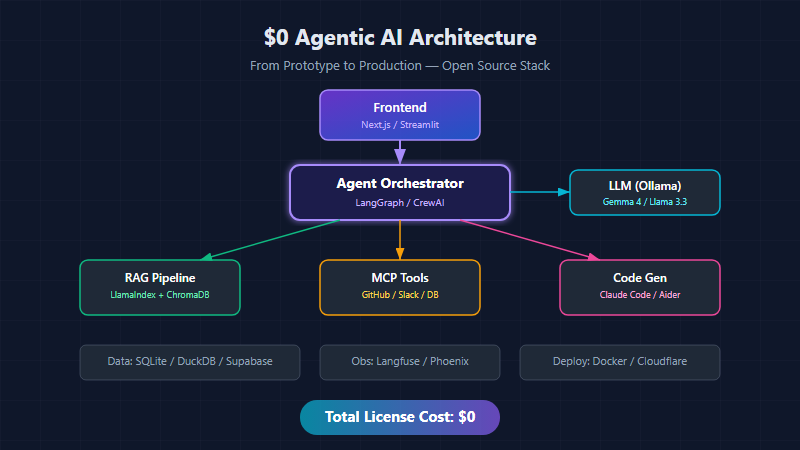
Kiến Trúc $0 Agentic AI — Full Stack
Đây là luồng xử lý hoàn chỉnh, từ request của người dùng đến action của agent:
graph TD
    subgraph Stack["$0 AGENTIC AI STACK"]
        Frontend["Frontend\nNext.js / Streamlit\n(Vercel)"]
        Orchestrator["Agent Orchestrator\nLangGraph / CrewAI"]
        LLM["LLM\nOllama\nGemma 4 / Llama 3.3"]

        Frontend -->|request| Orchestrator
        Orchestrator -->|prompt| LLM
        LLM -->|response| Orchestrator
        Orchestrator -->|result| Frontend

        Orchestrator --> RAG["RAG Pipeline\nLlamaIndex\nChromaDB / Qdrant"]
        Orchestrator --> MCP["MCP Tools\nGitHub / Slack\nDB / Filesystem"]
        Orchestrator --> CodeGen["Code Gen\nClaude Code CLI\nAider"]

        Data["Data Layer\nSQLite / DuckDB / Supabase (free tier)"]
        Obs["Observability\nLangfuse / Phoenix -- self-hosted, theo doi moi buoc"]
        Deploy["Deployment\nDocker -> Cloudflare Workers / HuggingFace Spaces"]
    end
Layer 1: Frontend — Điểm Vào Của Người Dùng
Request của người dùng đến frontend trước. Bạn có 2 lựa chọn $0 tốt:
Next.js trên Vercel (Free Tier)
Tốt nhất cho sản phẩm hướng khách hàng:
// app/api/agent/route.ts
import { NextRequest, NextResponse } from 'next/server';

export async function POST(req: NextRequest) {
  const { message, sessionId } = await req.json();

  // Chuyển request đến agent orchestrator
  const response = await fetch(process.env.AGENT_ENDPOINT!, {
    method: 'POST',
    headers: { 'Content-Type': 'application/json' },
    body: JSON.stringify({
      message,
      sessionId,
      context: {
        userId: req.headers.get('x-user-id'),
        timestamp: new Date().toISOString(),
      }
    })
  });

  // Stream response từ agent về UI
  return new NextResponse(response.body, {
    headers: { 'Content-Type': 'text/event-stream' }
  });
}
Streamlit cho Internal Tools
Tốt nhất cho POCs, dashboard, và giao diện agent nội bộ:
import streamlit as st
from agent_orchestrator import AgentOrchestrator

st.title("🤖 AI Agent Dashboard")

agent = AgentOrchestrator()

if prompt := st.chat_input("Hỏi agent..."):
    with st.chat_message("user"):
        st.write(prompt)

    with st.chat_message("assistant"):
        with st.spinner("Agent đang suy nghĩ..."):
            result = agent.run(prompt)
            st.write(result.response)

            # Hiển thị chuỗi lý luận của agent
            with st.expander("🔍 Các Bước Agent"):
                for step in result.steps:
                    st.json(step)
Giới hạn Vercel free tier: 100GB bandwidth, 100 giờ serverless compute/tháng — đủ cho hầu hết MVP.
Layer 2: Agent Orchestrator — Bộ Não
Đây là nơi “phép màu” xảy ra. Orchestrator quyết định:
- Gọi tool nào
- Khi nào cần lấy context (RAG)
- Cách chia task phức tạp thành subtasks
- Khi nào hỏi lại người dùng
LangGraph — State Machine Cho Agents
LangGraph cho bạn kiểm soát rõ ràng luồng xử lý agent:
from langgraph.graph import StateGraph, END
from langgraph.prebuilt import ToolNode
from typing import TypedDict, Annotated, Sequence
import operator

class AgentState(TypedDict):
    messages: Annotated[Sequence, operator.add]
    context: dict
    tool_results: list
    should_continue: bool

def route_request(state: AgentState) -> str:
    """Quyết định agent nên làm gì tiếp theo."""
    last_message = state["messages"][-1]

    # Nếu LLM muốn dùng tool → chuyển đến tools
    if hasattr(last_message, "tool_calls") and last_message.tool_calls:
        return "tools"

    # Nếu cần thêm context → chuyển đến RAG
    if needs_context(last_message):
        return "rag_retrieve"

    # Ngược lại → tạo phản hồi cuối cùng
    return "respond"

def needs_context(message) -> bool:
    """Xác định xem RAG retrieval có giúp ích không."""
    keywords = ["tài liệu", "cách", "là gì", "giải thích", "how to"]
    return any(kw in message.content.lower() for kw in keywords)

# Xây dựng graph
workflow = StateGraph(AgentState)
workflow.add_node("agent", agent_node)
workflow.add_node("tools", ToolNode(tools))
workflow.add_node("rag_retrieve", rag_retrieval_node)
workflow.add_node("respond", response_node)

workflow.set_entry_point("agent")
workflow.add_conditional_edges("agent", route_request)
workflow.add_edge("tools", "agent")        # Sau tools → quay lại agent
workflow.add_edge("rag_retrieve", "agent") # Sau RAG → quay lại agent
workflow.add_edge("respond", END)

app = workflow.compile()
graph TD
    User([User]) --> Agent[Agent Node]
    Agent -->|can tools| Tools[Tools]
    Agent -->|can context| RAG[RAG]
    Agent -->|san sang| Respond[Respond]
    Tools -->|ket qua| Agent
    RAG -->|ket qua| Agent
    Respond --> END([END -> User])
CrewAI — Đội Ngũ Đa Agent
Khi một agent không đủ, CrewAI cho phép bạn định nghĩa teams:
from crewai import Agent, Task, Crew

researcher = Agent(
    role="Technical Researcher",
    goal="Tìm thông tin kỹ thuật chính xác, cập nhật",
    backstory="Chuyên gia tìm kiếm tài liệu và code mẫu",
    llm="ollama/gemma4-e4b",
    tools=[web_search, github_search, doc_reader]
)

architect = Agent(
    role="Solution Architect",
    goal="Thiết kế giải pháp scalable, dễ bảo trì",
    backstory="15 năm kinh nghiệm hệ thống phân tán",
    llm="ollama/llama3.3",
    tools=[diagram_generator, code_writer]
)

task = Task(
    description="Thiết kế chiến lược caching cho API",
    expected_output="Sơ đồ kiến trúc + kế hoạch triển khai",
    agent=architect
)

crew = Crew(
    agents=[researcher, architect],
    tasks=[task],
    verbose=True
)

result = crew.kickoff()
Layer 3: RAG Pipeline — Kiến Thức Bên Ngoài
Cần kiến thức bên ngoài? Chuyển đến RAG pipeline.
LlamaIndex + ChromaDB (100% Chạy Cục Bộ)
from llama_index.core import VectorStoreIndex, SimpleDirectoryReader
from llama_index.vector_stores.chroma import ChromaVectorStore
from llama_index.embeddings.huggingface import HuggingFaceEmbedding
import chromadb

# Embedding model — chạy local, không cần API key
embed_model = HuggingFaceEmbedding(
    model_name="BAAI/bge-small-en-v1.5"  # 33M params, nhanh
)

# ChromaDB — chạy local, lưu trên disk
chroma_client = chromadb.PersistentClient(path="./chroma_db")
collection = chroma_client.get_or_create_collection("knowledge_base")
vector_store = ChromaVectorStore(chroma_collection=collection)

# Index tài liệu
documents = SimpleDirectoryReader("./docs").load_data()
index = VectorStoreIndex.from_documents(
    documents,
    vector_store=vector_store,
    embed_model=embed_model
)

# Truy vấn với context
query_engine = index.as_query_engine(
    similarity_top_k=5,
    llm=local_llm  # Ollama
)

response = query_engine.query(
    "Chính sách rate limiting API là gì?"
)
Ma Trận Quyết Định RAG
| DÙNG RAG | KHÔNG CẦN RAG |
|---|---|
| Tài liệu cty | Kiến thức chung |
| API references | Hội thoại đơn giản |
| Code repos | Toán / logic suy luận |
| Meeting notes | Viết sáng tạo |
| Product specs | Khi tốc độ > độ chính xác |
| Legal/compliance | Corpus dưới 100 docs |
RAG thêm 200-500ms latency mỗi query. Chỉ dùng khi accuracy > speed.
Layer 4: LLM — Suy Luận Cục Bộ Với Ollama
Không cần API key. Không rate limit. Phần cứng của bạn, luật của bạn.
# Cài đặt Ollama
curl -fsSL https://ollama.com/install.sh | sh

# Tải models
ollama pull gemma4:e4b        # Model mới nhất Google, chất lượng tốt
ollama pull llama3.3:70b      # "Ngựa thồ" của Meta (cần 48GB+ VRAM)
ollama pull mistral-small:4   # Nhanh, tốt cho routing

# Chạy như API server
ollama serve
Bảng Chọn Model
| Model | VRAM | Tốc Độ | Tốt Nhất Cho |
|---|---|---|---|
| Gemma 4 E4B | ~6GB | Nhanh | Đa năng, coding, chat |
| Llama 3.3 70B | ~48GB | Trung bình | Suy luận phức tạp, docs dài |
| Mistral Small 4 | ~3GB | Rất Nhanh | Routing, phân loại đơn giản |
| Qwen 3 8B | ~6GB | Nhanh | Đa ngôn ngữ, tiếng Châu Á |
| DeepSeek Coder V3 | ~6GB | Nhanh | Sinh code & debug |
Định Tuyến Model Thông Minh
Dùng model nhỏ để định tuyến request đến đúng model lớn:
from ollama import Client

client = Client()

def smart_route(user_message: str) -> str:
    """Dùng model nhỏ nhanh để quyết định dùng model lớn nào."""

    routing_response = client.chat(
        model="mistral-small:4",
        messages=[{
            "role": "system",
            "content": """Phân loại request này vào MỘT category:
            - CODE: lập trình, debug, code review
            - REASON: phân tích, lên kế hoạch, logic phức tạp
            - CHAT: câu hỏi đơn giản, trò chuyện
            Chỉ trả lời tên category."""
        }, {
            "role": "user",
            "content": user_message
        }]
    )

    category = routing_response.message.content.strip()

    model_map = {
        "CODE": "deepseek-coder-v3:6b",
        "REASON": "gemma4:e4b",
        "CHAT": "mistral-small:4"
    }

    return model_map.get(category, "gemma4:e4b")
Layer 5: MCP — Tool Use Biến Chatbot Thành Hệ Thống
Model Context Protocol (MCP) là giao thức mở kết nối agent với tools bên ngoài. Đây là thứ biến chatbot thành hệ thống thực sự làm được việc.
graph LR
    Agent([Agent]) --> Client[MCP Client]
    Client --> GH["GitHub MCP Server\nTao PR, issues"]
    Client --> Slack["Slack MCP Server\nGui tin nhan, doc chat"]
    Client --> DB["Database MCP\nQuery, insert, update"]
    Client --> FS["Filesystem MCP\nDoc/ghi files"]
    Client --> Custom["Custom MCP Server\nLogic nghiep vu rieng"]
Xây Dựng MCP Server Tùy Chỉnh
from mcp.server import Server
from mcp.types import Tool, TextContent
import json

server = Server("my-business-tools")

@server.tool()
async def get_customer_data(customer_id: str) -> list[TextContent]:
    """Lấy dữ liệu khách hàng từ CRM."""
    customer = await crm.get_customer(customer_id)
    return [TextContent(
        type="text",
        text=json.dumps(customer.to_dict())
    )]

@server.tool()
async def create_support_ticket(
    title: str,
    description: str,
    priority: str = "medium"
) -> list[TextContent]:
    """Tạo ticket hỗ trợ trong hệ thống."""
    ticket = await ticketing.create(
        title=title,
        description=description,
        priority=priority
    )
    return [TextContent(
        type="text",
        text=f"Ticket {ticket.id} đã tạo thành công"
    )]

# Chạy server
if __name__ == "__main__":
    server.run()
Layer 6: Data Layer
| Công cụ | Chi phí | Tốt nhất cho |
|---|---|---|
| SQLite | $0 | App single-server, embedded database |
| DuckDB | $0 | Analytics, OLAP queries, xử lý dataset lớn |
| Supabase (free tier) | $0 | Postgres thật với auth, real-time, REST API |
| ChromaDB | $0 | Vector storage cho RAG, chạy cục bộ |
Layer 7: Observability — Nhìn Thấy Mọi Thứ
Observability self-hosted để bạn thấy mọi bước agent xử lý:
Langfuse (Self-Hosted)
from langfuse import Langfuse
from langfuse.decorators import observe

langfuse = Langfuse(
    host="http://localhost:3100",  # Self-hosted
)

@observe()
def agent_pipeline(user_input: str):
    # Mọi bước tự động được trace
    context = retrieve_context(user_input)
    response = generate_response(user_input, context)
    action = execute_action(response)
    return action

@observe()
def retrieve_context(query: str):
    """RAG retrieval — tự động track."""
    results = vector_store.similarity_search(query, k=5)
    return results

@observe()
def generate_response(query: str, context: list):
    """LLM call — latency, tokens, cost đều được track."""
    return llm.chat(
        messages=[
            {"role": "system", "content": f"Context: {context}"},
            {"role": "user", "content": query}
        ]
    )
Những Gì Cần Giám Sát
Metrics Quan Trọng:
- Tỷ lệ thành công Agent — % task hoàn thành
- Latency trung bình — p50, p95, p99
- Token sử dụng/request — input + output
- Tần suất gọi Tool — tool nào dùng nhiều
- Chất lượng RAG Retrieval — điểm relevance
- Tỷ lệ lỗi theo bước — agent fail ở đâu
- Hài lòng người dùng — thumbs up/down
Alerts:
- Latency > 10s
- Tỷ lệ thành công < 80%
- Bất thường token usage
- Tỷ lệ lỗi tool > 5%
Layer 8: Deployment
Gói mọi thứ trong Docker và deploy:
# docker-compose.yml
version: '3.8'

services:
  agent:
    build: ./agent
    ports:
      - "8000:8000"
    environment:
      - OLLAMA_HOST=http://ollama:11434
      - CHROMA_HOST=http://chromadb:8000
      - LANGFUSE_HOST=http://langfuse:3100
    depends_on:
      - ollama
      - chromadb

  ollama:
    image: ollama/ollama
    ports:
      - "11434:11434"
    volumes:
      - ollama_data:/root/.ollama
    deploy:
      resources:
        reservations:
          devices:
            - capabilities: [gpu]

  chromadb:
    image: chromadb/chroma
    ports:
      - "8001:8000"
    volumes:
      - chroma_data:/chroma/chroma

  langfuse:
    image: langfuse/langfuse
    ports:
      - "3100:3000"
    environment:
      - DATABASE_URL=postgresql://user:pass@db:5432/langfuse

  frontend:
    build: ./frontend
    ports:
      - "3000:3000"
    environment:
      - AGENT_ENDPOINT=http://agent:8000

volumes:
  ollama_data:
  chroma_data:
# Một lệnh để chạy mọi thứ
docker compose up -d

# Health check
curl http://localhost:8000/health
curl http://localhost:3000
Sự Thật Phũ Phàng: “$0” Thực Sự Nghĩa Là Gì
Hãy thật sự thành thật về chi phí:
| Giai đoạn | License | Chi phí thực |
|---|---|---|
| POC/Demo | $0 | ~$0 (laptop + điện) |
| Pilot (10 users) | $0 | $50-200/tháng (GPU server hoặc cloud GPU credits) |
| Production (1K users) | $0 | $500-5,000/tháng (compute, storage, ops, monitoring) |
| Scale (100K users) | $0 | $5K-50K+/tháng (GPU fleet, đội ngũ, SLA, redundancy) |
Các chi phí ẩn:
- Compute — GPU cho inference chiếm phần lớn chi phí
- Storage — vector DB mở rộng theo dữ liệu
- Tối ưu Latency — nhanh hơn = phần cứng đắt hơn
- Observability — logging ở quy mô lớn không miễn phí
- DevOps — setup, bảo trì, nâng cấp = thời gian = tiền
Kết Luận Chiến Lược
Giá trị không nằm ở công cụ. Mọi công cụ liệt kê ở đây sẽ bị thay thế bởi thứ tốt hơn trong vòng 18 tháng.
Giá trị nằm ở việc hiểu pattern kiến trúc:
- Tại sao orchestrator nằm giữa user và LLM — nó là control plane
- Khi nào RAG giúp ích và khi nào chỉ thêm latency — không phải query nào cũng cần retrieval
- Tại sao MCP không chỉ là một protocol — nó là layer biến chatbot thành hệ thống thực sự làm được việc
- Tại sao observability không phải optional — bạn không thể cải thiện thứ bạn không đo được
Những kỹ sư đầu tư thời gian hiểu các pattern này BÂY GIỜ là những người sẽ scale stack này từ $0 lên production khi thời điểm đến — swap Ollama thành hosted API, ChromaDB thành managed vector DB, Streamlit thành real frontend — mà không cần thay đổi kiến trúc.
graph LR
    subgraph Z["Stack $0"]
        A1[Ollama]
        A2[ChromaDB local]
        A3[SQLite]
        A4[Streamlit]
        A5["Langfuse (local)"]
        A6[Docker local]
        A7[Laptop cua ban]
    end
    subgraph P["Stack Production"]
        B1[OpenAI / Anthropic API]
        B2[Pinecone / Weaviate]
        B3[PostgreSQL / Supabase]
        B4[Next.js + Vercel Pro]
        B5[Langfuse Cloud / Datadog]
        B6[Kubernetes / ECS]
        B7[AWS / GCP / Azure]
    end
    A1 --> B1
    A2 --> B2
    A3 --> B3
    A4 --> B4
    A5 --> B5
    A6 --> B6
    A7 --> B7
Pattern kiến trúc giữ NGUYÊN. Chỉ implementations thay đổi.
Tiếp Theo?
Trong Phần 2, chúng ta sẽ xây dựng hệ thống agentic từ đầu — từng bước — với code hoạt động hoàn chỉnh. Chúng ta sẽ implement mọi layer trong kiến trúc này và deploy lên production.
Câu hỏi bạn nên tự hỏi: Layer nào bạn sẽ bắt đầu chi tiền đầu tiên khi scale — và tại sao?
Với hầu hết team, câu trả lời là compute (GPU cho inference). Mọi thứ khác có thể ở free tier lâu hơn bạn nghĩ.
Kiến trúc này nên được hiểu là “tối đa linh hoạt với tối thiểu vendor lock-in” — không phải “AI production miễn phí.” Hệ sinh thái open-source cho bạn kiểm soát. Production readiness đòi hỏi đầu tư. Kiến trúc đảm bảo đầu tư đó đi đúng chỗ.
Bài viết liên quan
07 Oct 2026 · 5 phút đọc
agentic-ai
Agent Của OpenAI “Quậy” Wikipedia Suốt 5 Tháng — Và OpenAI Không Phải Người Phát Hiện Ra
Thông báo ngày 5/10 của Wikimedia hé lộ nhiều tháng traffic agent OpenAI trái phép trên hạ tầng của họ — điều tra do chính nạn nhân thực hiện, không phải nhà cung cấp.
Đọc tiếp
07 Oct 2026 · 11 phút đọc
agentic-ai
5. Train hành vi, retrieval kiến thức: thực hành LoRA
Chuẩn bị dữ liệu có giám sát, cấu hình thử nghiệm adapter và đánh giá giá trị vận hành của fine-tuning.
Đọc tiếp
07 Oct 2026 · 9 phút đọc
agentic-ai
6. Tăng tốc chatbot và giữ chất lượng
Tối ưu context, output, caching, retrieval và inference theo ngân sách độ trễ, token từ đầu đến cuối.
Đọc tiếp
Thảo luận
Bình luận được duyệt trước khi công khai. Email của bạn được giữ riêng tư.