
JOURNAL
Build an Agentic AI System From Scratch: Step-by-Step Implementation Guide
Complete hands-on guide to building a production-ready agentic AI system. From project setup to deployment — every layer implemented with working code, tests, and Docker compose.
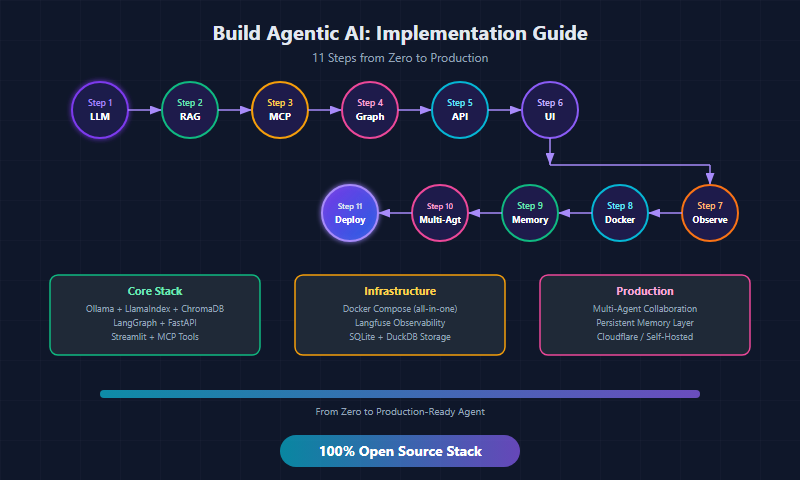
On this page
In Part 1, we mapped the architecture. Now we build it.
This guide takes you from an empty folder to a fully functional agentic AI system — with orchestration, RAG, tool use via MCP, observability, and Docker deployment. Every line of code is production-ready.
What We’re Building
A personal AI assistant that can:
- Answer questions using your documents (RAG)
- Execute actions via tools (MCP)
- Remember conversation history
- Route requests intelligently
- Log every step for debugging
flowchart TD
    User["User: 'What's the status of Project Alpha\nand create a task for the next milestone?'"]
    Classify["1. Classify\n(Router decides what to do)"]
    RAG["2. RAG\nRetrieve project docs"]
    Tool["3. Tool\nExecute create task"]
    Generate["4. Generate\ncombined response"]
    Agent["Agent: 'Project Alpha is 73% complete...\nI've created task #47 for milestone 3.'"]

    User --> Classify
    Classify --> RAG
    Classify --> Tool
    RAG --> Generate
    Tool --> Generate
    Generate --> Agent
Prerequisites
# System requirements
Python 3.11+
Docker & Docker Compose
8GB+ RAM (16GB recommended for local LLM)
GPU optional but recommended for Ollama

# Verify
python3 --version
docker --version
docker compose version
Step 1: Project Structure
mkdir agentic-system && cd agentic-system

# Create the project structure
mkdir -p {agent,rag,mcp_server,frontend,observability,tests,docs}
touch {agent,rag,mcp_server,frontend,observability,tests}/__init__.py
agentic-system/
├── agent/
│   ├── __init__.py
│   ├── orchestrator.py     # LangGraph agent orchestrator
│   ├── router.py           # Smart request routing
│   ├── llm.py              # LLM client (Ollama)
│   ├── memory.py           # Conversation memory
│   └── server.py           # FastAPI endpoint
├── rag/
│   ├── __init__.py
│   ├── indexer.py           # Document indexing pipeline
│   ├── retriever.py         # Similarity search
│   └── embeddings.py        # Embedding model setup
├── mcp_server/
│   ├── __init__.py
│   ├── server.py            # MCP server with tools
│   └── tools/
│       ├── task_manager.py  # Task CRUD operations
│       ├── file_ops.py      # File read/write
│       └── web_search.py    # Web search tool
├── frontend/
│   ├── app.py               # Streamlit UI
│   └── components/
├── observability/
│   ├── tracing.py           # Langfuse integration
│   └── metrics.py           # Custom metrics
├── tests/
│   ├── test_agent.py
│   ├── test_rag.py
│   └── test_mcp.py
├── docs/                    # Your knowledge base
├── docker-compose.yml
├── Dockerfile
├── pyproject.toml
└── README.md
Step 2: Dependencies
# pyproject.toml
[project]
name = "agentic-system"
version = "0.1.0"
requires-python = ">=3.11"
dependencies = [
    "langgraph>=0.3.0",
    "langchain-core>=0.3.0",
    "langchain-community>=0.3.0",
    "llama-index-core>=0.12.0",
    "llama-index-vector-stores-chroma>=0.4.0",
    "llama-index-embeddings-huggingface>=0.4.0",
    "chromadb>=0.6.0",
    "ollama>=0.4.0",
    "mcp>=1.0.0",
    "fastapi>=0.115.0",
    "uvicorn>=0.34.0",
    "langfuse>=2.50.0",
    "pydantic>=2.10.0",
    "httpx>=0.28.0",
]

[project.optional-dependencies]
dev = [
    "pytest>=8.0",
    "pytest-asyncio>=0.24",
    "ruff>=0.8.0",
]
# Install
pip install -e ".[dev]"

# Or with uv (faster)
uv pip install -e ".[dev]"
Step 3: LLM Client — Ollama Wrapper
# agent/llm.py
from ollama import Client, AsyncClient
from typing import Optional
import logging

logger = logging.getLogger(__name__)

class LLMClient:
    """Unified LLM client with model routing and fallback."""

    def __init__(
        self,
        host: str = "http://localhost:11434",
        default_model: str = "gemma4:e4b"
    ):
        self.client = Client(host=host)
        self.async_client = AsyncClient(host=host)
        self.default_model = default_model

        # Model routing map
        self.model_router = {
            "code": "deepseek-coder-v3:6b",
            "reason": default_model,
            "chat": "mistral-small:4",
            "default": default_model,
        }

    def classify_intent(self, message: str) -> str:
        """Use a small model to classify the request type."""
        try:
            response = self.client.chat(
                model="mistral-small:4",
                messages=[{
                    "role": "system",
                    "content": (
                        "Classify this message into exactly ONE word: "
                        "CODE, REASON, or CHAT. Reply with just the word."
                    )
                }, {
                    "role": "user",
                    "content": message
                }],
                options={"temperature": 0}
            )
            return response.message.content.strip().lower()
        except Exception:
            return "default"

    def get_model_for_intent(self, intent: str) -> str:
        """Map intent to the best model."""
        return self.model_router.get(intent, self.default_model)

    def chat(
        self,
        messages: list[dict],
        model: Optional[str] = None,
        temperature: float = 0.7,
        stream: bool = False
    ):
        """Send a chat request to the LLM."""
        selected_model = model or self.default_model

        logger.info(f"LLM call: model={selected_model}, msgs={len(messages)}")

        return self.client.chat(
            model=selected_model,
            messages=messages,
            options={"temperature": temperature},
            stream=stream
        )

    async def achat(
        self,
        messages: list[dict],
        model: Optional[str] = None,
        temperature: float = 0.7
    ):
        """Async chat for use in async orchestrator."""
        selected_model = model or self.default_model

        return await self.async_client.chat(
            model=selected_model,
            messages=messages,
            options={"temperature": temperature}
        )

    def health_check(self) -> bool:
        """Verify Ollama is running and model is available."""
        try:
            models = self.client.list()
            available = [m.model for m in models.models]
            return self.default_model in available
        except Exception:
            return False
Step 4: RAG Pipeline — Document Retrieval
Indexer
# rag/embeddings.py
from llama_index.embeddings.huggingface import HuggingFaceEmbedding

def get_embed_model():
    """Load a small, fast embedding model that runs locally."""
    return HuggingFaceEmbedding(
        model_name="BAAI/bge-small-en-v1.5",
        cache_folder="./model_cache"
    )
# rag/indexer.py
from llama_index.core import (
    VectorStoreIndex,
    SimpleDirectoryReader,
    StorageContext,
    Settings
)
from llama_index.vector_stores.chroma import ChromaVectorStore
from rag.embeddings import get_embed_model
import chromadb
import logging

logger = logging.getLogger(__name__)

class DocumentIndexer:
    """Index documents into ChromaDB for retrieval."""

    def __init__(
        self,
        persist_dir: str = "./chroma_db",
        collection_name: str = "knowledge"
    ):
        self.embed_model = get_embed_model()
        Settings.embed_model = self.embed_model

        # Initialize ChromaDB
        self.chroma_client = chromadb.PersistentClient(path=persist_dir)
        self.collection = self.chroma_client.get_or_create_collection(
            name=collection_name,
            metadata={"hnsw:space": "cosine"}
        )
        self.vector_store = ChromaVectorStore(
            chroma_collection=self.collection
        )
        self.storage_context = StorageContext.from_defaults(
            vector_store=self.vector_store
        )

    def index_directory(self, doc_path: str) -> int:
        """Index all documents in a directory."""
        logger.info(f"Indexing documents from {doc_path}")

        documents = SimpleDirectoryReader(
            input_dir=doc_path,
            recursive=True,
            filename_as_id=True,
            required_exts=[
                ".md", ".txt", ".pdf", ".py",
                ".js", ".ts", ".json", ".yaml"
            ]
        ).load_data()

        logger.info(f"Found {len(documents)} documents")

        index = VectorStoreIndex.from_documents(
            documents,
            storage_context=self.storage_context,
            show_progress=True
        )

        self.index = index
        return len(documents)

    def get_index(self) -> VectorStoreIndex:
        """Load existing index from storage."""
        if not hasattr(self, 'index'):
            self.index = VectorStoreIndex.from_vector_store(
                self.vector_store,
                embed_model=self.embed_model
            )
        return self.index
Retriever
# rag/retriever.py
from llama_index.core import VectorStoreIndex
from rag.indexer import DocumentIndexer
from dataclasses import dataclass
import logging

logger = logging.getLogger(__name__)

@dataclass
class RetrievalResult:
    """A single retrieval result with metadata."""
    text: str
    score: float
    source: str
    metadata: dict

class DocumentRetriever:
    """Retrieve relevant documents for a query."""

    def __init__(self, indexer: DocumentIndexer, top_k: int = 5):
        self.indexer = indexer
        self.top_k = top_k
        self.index = indexer.get_index()

    def retrieve(
        self,
        query: str,
        top_k: int | None = None,
        min_score: float = 0.3
    ) -> list[RetrievalResult]:
        """Retrieve documents relevant to the query."""
        k = top_k or self.top_k
        logger.info(f"Retrieving top-{k} for: {query[:80]}...")

        retriever = self.index.as_retriever(
            similarity_top_k=k
        )

        nodes = retriever.retrieve(query)

        results = []
        for node in nodes:
            if node.score and node.score < min_score:
                continue

            results.append(RetrievalResult(
                text=node.text,
                score=node.score or 0.0,
                source=node.metadata.get("file_name", "unknown"),
                metadata=node.metadata
            ))

        logger.info(f"Retrieved {len(results)} relevant documents")
        return results

    def retrieve_as_context(self, query: str) -> str:
        """Retrieve and format as context string for the LLM."""
        results = self.retrieve(query)

        if not results:
            return "No relevant documents found."

        context_parts = []
        for i, r in enumerate(results, 1):
            context_parts.append(
                f"[Document {i}] (source: {r.source}, "
                f"relevance: {r.score:.2f})\n{r.text}"
            )

        return "\n\n---\n\n".join(context_parts)
Step 5: MCP Server — Tool Execution
# mcp_server/tools/task_manager.py
import json
import sqlite3
from datetime import datetime
from pathlib import Path

DB_PATH = Path("./data/tasks.db")

def init_db():
    """Initialize the tasks database."""
    DB_PATH.parent.mkdir(parents=True, exist_ok=True)
    conn = sqlite3.connect(str(DB_PATH))
    conn.execute("""
        CREATE TABLE IF NOT EXISTS tasks (
            id INTEGER PRIMARY KEY AUTOINCREMENT,
            title TEXT NOT NULL,
            description TEXT,
            status TEXT DEFAULT 'todo',
            priority TEXT DEFAULT 'medium',
            project TEXT,
            created_at TEXT DEFAULT CURRENT_TIMESTAMP,
            updated_at TEXT DEFAULT CURRENT_TIMESTAMP
        )
    """)
    conn.commit()
    conn.close()

def create_task(
    title: str,
    description: str = "",
    priority: str = "medium",
    project: str = ""
) -> dict:
    """Create a new task."""
    init_db()
    conn = sqlite3.connect(str(DB_PATH))
    cursor = conn.execute(
        "INSERT INTO tasks (title, description, priority, project) "
        "VALUES (?, ?, ?, ?)",
        (title, description, priority, project)
    )
    task_id = cursor.lastrowid
    conn.commit()
    conn.close()
    return {"id": task_id, "title": title, "status": "todo"}

def list_tasks(
    project: str = "",
    status: str = ""
) -> list[dict]:
    """List tasks with optional filters."""
    init_db()
    conn = sqlite3.connect(str(DB_PATH))
    conn.row_factory = sqlite3.Row

    query = "SELECT * FROM tasks WHERE 1=1"
    params = []

    if project:
        query += " AND project = ?"
        params.append(project)
    if status:
        query += " AND status = ?"
        params.append(status)

    query += " ORDER BY created_at DESC"

    rows = conn.execute(query, params).fetchall()
    conn.close()

    return [dict(row) for row in rows]

def update_task(task_id: int, status: str) -> dict:
    """Update task status."""
    init_db()
    conn = sqlite3.connect(str(DB_PATH))
    conn.execute(
        "UPDATE tasks SET status = ?, updated_at = ? WHERE id = ?",
        (status, datetime.now().isoformat(), task_id)
    )
    conn.commit()
    conn.close()
    return {"id": task_id, "status": status, "updated": True}
# mcp_server/server.py
from mcp.server import Server
from mcp.types import TextContent
from mcp_server.tools.task_manager import (
    create_task, list_tasks, update_task
)
import json

server = Server("agentic-tools")

@server.tool()
async def tool_create_task(
    title: str,
    description: str = "",
    priority: str = "medium",
    project: str = ""
) -> list[TextContent]:
    """Create a new task in the task manager.

    Args:
        title: Task title
        description: Detailed description
        priority: low, medium, or high
        project: Project name for grouping
    """
    result = create_task(title, description, priority, project)
    return [TextContent(
        type="text",
        text=json.dumps(result, indent=2)
    )]

@server.tool()
async def tool_list_tasks(
    project: str = "",
    status: str = ""
) -> list[TextContent]:
    """List all tasks, optionally filtered by project or status.

    Args:
        project: Filter by project name
        status: Filter by status (todo, in_progress, done)
    """
    tasks = list_tasks(project, status)
    return [TextContent(
        type="text",
        text=json.dumps(tasks, indent=2, default=str)
    )]

@server.tool()
async def tool_update_task(
    task_id: int,
    status: str
) -> list[TextContent]:
    """Update a task's status.

    Args:
        task_id: The ID of the task to update
        status: New status (todo, in_progress, done)
    """
    result = update_task(task_id, status)
    return [TextContent(
        type="text",
        text=json.dumps(result, indent=2)
    )]

def run_mcp_server():
    """Run the MCP server."""
    server.run()

if __name__ == "__main__":
    run_mcp_server()
Step 6: Agent Orchestrator — LangGraph
This is the brain. Here’s the complete implementation:
# agent/memory.py
from collections import defaultdict
from dataclasses import dataclass, field
from datetime import datetime

@dataclass
class Message:
    role: str
    content: str
    timestamp: str = field(
        default_factory=lambda: datetime.now().isoformat()
    )

class ConversationMemory:
    """Simple in-memory conversation store."""

    def __init__(self, max_messages: int = 50):
        self.conversations: dict[str, list[Message]] = defaultdict(list)
        self.max_messages = max_messages

    def add(self, session_id: str, role: str, content: str):
        """Add a message to the conversation."""
        self.conversations[session_id].append(
            Message(role=role, content=content)
        )
        # Trim to max
        if len(self.conversations[session_id]) > self.max_messages:
            self.conversations[session_id] = \
                self.conversations[session_id][-self.max_messages:]

    def get_history(self, session_id: str) -> list[dict]:
        """Get conversation history as list of dicts."""
        return [
            {"role": m.role, "content": m.content}
            for m in self.conversations[session_id]
        ]

    def clear(self, session_id: str):
        """Clear a conversation."""
        self.conversations.pop(session_id, None)
# agent/router.py
from enum import Enum

class Intent(str, Enum):
    RAG = "rag"             # Needs document retrieval
    TOOL = "tool"           # Needs tool execution
    RAG_AND_TOOL = "both"   # Needs both
    DIRECT = "direct"       # Can answer directly

def classify_intent(message: str, llm_client) -> Intent:
    """Classify user intent to determine routing."""

    response = llm_client.chat(
        messages=[{
            "role": "system",
            "content": """Classify this user message into ONE category:
- RAG: needs to look up documents, knowledge, or project info
- TOOL: needs to create/update/list tasks or take an action
- BOTH: needs to look up info AND take an action
- DIRECT: simple question that can be answered directly

Reply with just the category name (RAG, TOOL, BOTH, or DIRECT)."""
        }, {
            "role": "user",
            "content": message
        }],
        model="mistral-small:4",
        temperature=0
    )

    category = response.message.content.strip().upper()

    mapping = {
        "RAG": Intent.RAG,
        "TOOL": Intent.TOOL,
        "BOTH": Intent.RAG_AND_TOOL,
        "DIRECT": Intent.DIRECT,
    }

    return mapping.get(category, Intent.DIRECT)
# agent/orchestrator.py
from langgraph.graph import StateGraph, END
from typing import TypedDict, Annotated, Sequence
import operator
import json
import logging

from agent.llm import LLMClient
from agent.router import classify_intent, Intent
from agent.memory import ConversationMemory
from rag.retriever import DocumentRetriever
from mcp_server.tools.task_manager import (
    create_task, list_tasks, update_task
)

logger = logging.getLogger(__name__)

# --- State Definition ---

class AgentState(TypedDict):
    messages: list[dict]
    user_input: str
    session_id: str
    intent: str
    rag_context: str
    tool_results: list[dict]
    final_response: str

# --- Node Functions ---

def classify_node(state: AgentState) -> AgentState:
    """Classify the user's intent."""
    llm = LLMClient()
    intent = classify_intent(state["user_input"], llm)
    logger.info(f"Intent classified: {intent.value}")
    state["intent"] = intent.value
    return state

def rag_node(state: AgentState) -> AgentState:
    """Retrieve relevant documents."""
    from rag.indexer import DocumentIndexer

    indexer = DocumentIndexer()
    retriever = DocumentRetriever(indexer)
    context = retriever.retrieve_as_context(state["user_input"])

    logger.info(f"RAG retrieved context: {len(context)} chars")
    state["rag_context"] = context
    return state

def tool_node(state: AgentState) -> AgentState:
    """Execute tools based on the user's request."""
    llm = LLMClient()

    # Ask LLM to decide which tool to use
    tool_decision = llm.chat(
        messages=[{
            "role": "system",
            "content": """You have these tools available:
1. create_task(title, description, priority, project)
2. list_tasks(project, status)
3. update_task(task_id, status)

Based on the user's message, decide which tool to call.
Respond in JSON: {"tool": "tool_name", "params": {...}}
If no tool is needed, respond: {"tool": "none"}"""
        }, {
            "role": "user",
            "content": state["user_input"]
        }],
        temperature=0
    )

    try:
        decision = json.loads(tool_decision.message.content)
        tool_name = decision.get("tool", "none")
        params = decision.get("params", {})

        if tool_name == "create_task":
            result = create_task(**params)
        elif tool_name == "list_tasks":
            result = list_tasks(**params)
        elif tool_name == "update_task":
            result = update_task(**params)
        else:
            result = {"message": "No tool action needed"}

        state["tool_results"].append({
            "tool": tool_name,
            "result": result
        })
        logger.info(f"Tool executed: {tool_name}")

    except (json.JSONDecodeError, Exception) as e:
        logger.error(f"Tool execution failed: {e}")
        state["tool_results"].append({
            "tool": "error",
            "result": {"error": str(e)}
        })

    return state

def respond_node(state: AgentState) -> AgentState:
    """Generate the final response."""
    llm = LLMClient()

    # Build system context
    system_parts = [
        "You are a helpful AI assistant. Be concise and helpful."
    ]

    if state.get("rag_context"):
        system_parts.append(
            f"\n\nRelevant context from documents:\n"
            f"{state['rag_context']}"
        )

    if state.get("tool_results"):
        system_parts.append(
            f"\n\nTool execution results:\n"
            f"{json.dumps(state['tool_results'], indent=2, default=str)}"
        )

    messages = [
        {"role": "system", "content": "\n".join(system_parts)},
        *state["messages"],
        {"role": "user", "content": state["user_input"]}
    ]

    response = llm.chat(messages=messages, temperature=0.7)
    state["final_response"] = response.message.content

    logger.info("Response generated successfully")
    return state

# --- Routing Logic ---

def route_by_intent(state: AgentState) -> str:
    """Route to the right node based on intent."""
    intent = state["intent"]

    if intent == Intent.RAG.value:
        return "rag"
    elif intent == Intent.TOOL.value:
        return "tool"
    elif intent == Intent.RAG_AND_TOOL.value:
        return "rag"  # RAG first, then tool
    else:
        return "respond"

def after_rag(state: AgentState) -> str:
    """After RAG, check if tools are also needed."""
    if state["intent"] == Intent.RAG_AND_TOOL.value:
        return "tool"
    return "respond"

# --- Build the Graph ---

def build_agent_graph() -> StateGraph:
    """Construct the LangGraph agent."""

    workflow = StateGraph(AgentState)

    # Add nodes
    workflow.add_node("classify", classify_node)
    workflow.add_node("rag", rag_node)
    workflow.add_node("tool", tool_node)
    workflow.add_node("respond", respond_node)

    # Entry point
    workflow.set_entry_point("classify")

    # Conditional routing from classify
    workflow.add_conditional_edges("classify", route_by_intent, {
        "rag": "rag",
        "tool": "tool",
        "respond": "respond"
    })

    # After RAG: maybe go to tool, or respond
    workflow.add_conditional_edges("rag", after_rag, {
        "tool": "tool",
        "respond": "respond"
    })

    # After tool: always respond
    workflow.add_edge("tool", "respond")

    # End after response
    workflow.add_edge("respond", END)

    return workflow.compile()


class AgentOrchestrator:
    """High-level agent that handles sessions and memory."""

    def __init__(self):
        self.graph = build_agent_graph()
        self.memory = ConversationMemory()

    def run(self, user_input: str, session_id: str = "default") -> str:
        """Run the agent for a user message."""

        # Get conversation history
        history = self.memory.get_history(session_id)

        # Execute the graph
        result = self.graph.invoke({
            "messages": history,
            "user_input": user_input,
            "session_id": session_id,
            "intent": "",
            "rag_context": "",
            "tool_results": [],
            "final_response": ""
        })

        # Save to memory
        self.memory.add(session_id, "user", user_input)
        self.memory.add(session_id, "assistant", result["final_response"])

        return result["final_response"]
Here’s the flow visualized:
flowchart TD
    Start([START]) --> Classify[Classify Intent]
    Classify -->|intent=rag| RAG[RAG]
    Classify -->|intent=tool| Tool1[Tool]
    Classify -->|intent=direct| Respond1[Respond]

    RAG -->|"intent=both?"| Tool2[Tool]
    RAG -->|"intent=rag only"| Respond2[Respond]

    Tool1 --> Respond3[Respond]
    Tool2 --> Respond4[Respond]

    Respond1 --> End([END])
    Respond2 --> End
    Respond3 --> End
    Respond4 --> End
Step 7: API Server
# agent/server.py
from fastapi import FastAPI, HTTPException
from pydantic import BaseModel
from agent.orchestrator import AgentOrchestrator
import logging

logging.basicConfig(level=logging.INFO)

app = FastAPI(title="Agentic AI System", version="0.1.0")
agent = AgentOrchestrator()

class ChatRequest(BaseModel):
    message: str
    session_id: str = "default"

class ChatResponse(BaseModel):
    response: str
    session_id: str

@app.post("/chat", response_model=ChatResponse)
async def chat(request: ChatRequest):
    """Send a message to the agent."""
    try:
        response = agent.run(
            user_input=request.message,
            session_id=request.session_id
        )
        return ChatResponse(
            response=response,
            session_id=request.session_id
        )
    except Exception as e:
        raise HTTPException(status_code=500, detail=str(e))

@app.get("/health")
async def health():
    """Health check endpoint."""
    from agent.llm import LLMClient
    llm = LLMClient()
    return {
        "status": "healthy",
        "llm_available": llm.health_check(),
    }

@app.delete("/sessions/{session_id}")
async def clear_session(session_id: str):
    """Clear conversation memory for a session."""
    agent.memory.clear(session_id)
    return {"status": "cleared", "session_id": session_id}

if __name__ == "__main__":
    import uvicorn
    uvicorn.run(app, host="0.0.0.0", port=8000)
Step 8: Observability with Langfuse
# observability/tracing.py
from langfuse import Langfuse
from langfuse.decorators import observe, langfuse_context
from functools import wraps
import os

# Initialize Langfuse (self-hosted)
langfuse = Langfuse(
    host=os.getenv("LANGFUSE_HOST", "http://localhost:3100"),
    public_key=os.getenv("LANGFUSE_PUBLIC_KEY", "pk-local"),
    secret_key=os.getenv("LANGFUSE_SECRET_KEY", "sk-local"),
)

def trace_agent_step(step_name: str):
    """Decorator to trace agent steps in Langfuse."""
    def decorator(func):
        @wraps(func)
        @observe(name=step_name)
        def wrapper(*args, **kwargs):
            result = func(*args, **kwargs)
            langfuse_context.update_current_observation(
                metadata={"step": step_name}
            )
            return result
        return wrapper
    return decorator
Step 9: Frontend with Streamlit
# frontend/app.py
import streamlit as st
import requests
import json

API_URL = "http://localhost:8000"

st.set_page_config(
    page_title="🤖 AI Agent",
    page_icon="🤖",
    layout="wide"
)

st.title("🤖 Agentic AI Assistant")
st.caption("Powered by LangGraph + Ollama + RAG + MCP")

# Session management
if "session_id" not in st.session_state:
    import uuid
    st.session_state.session_id = str(uuid.uuid4())[:8]

if "messages" not in st.session_state:
    st.session_state.messages = []

# Sidebar
with st.sidebar:
    st.markdown("### 📊 System Status")

    # Health check
    try:
        health = requests.get(f"{API_URL}/health", timeout=3).json()
        st.success(f"Agent: Online ✅")
        st.info(f"LLM: {'Available' if health['llm_available'] else 'Offline'}")
    except Exception:
        st.error("Agent: Offline ❌")

    st.markdown("---")
    st.markdown(f"Session: `{st.session_state.session_id}`")

    if st.button("🗑️ Clear Chat"):
        st.session_state.messages = []
        requests.delete(
            f"{API_URL}/sessions/{st.session_state.session_id}"
        )
        st.rerun()

# Display chat history
for msg in st.session_state.messages:
    with st.chat_message(msg["role"]):
        st.write(msg["content"])

# Chat input
if prompt := st.chat_input("Ask me anything..."):
    # Show user message
    st.session_state.messages.append({"role": "user", "content": prompt})
    with st.chat_message("user"):
        st.write(prompt)

    # Get agent response
    with st.chat_message("assistant"):
        with st.spinner("🤔 Thinking..."):
            try:
                response = requests.post(
                    f"{API_URL}/chat",
                    json={
                        "message": prompt,
                        "session_id": st.session_state.session_id
                    },
                    timeout=120
                )
                answer = response.json()["response"]
                st.write(answer)
                st.session_state.messages.append({
                    "role": "assistant",
                    "content": answer
                })
            except Exception as e:
                st.error(f"Error: {e}")
Step 10: Docker Compose — Everything Together
# docker-compose.yml
version: '3.8'

services:
  # --- Core Agent ---
  agent:
    build:
      context: .
      dockerfile: Dockerfile
    ports:
      - "8000:8000"
    environment:
      - OLLAMA_HOST=http://ollama:11434
      - CHROMA_HOST=http://chromadb:8000
      - LANGFUSE_HOST=http://langfuse:3000
      - LANGFUSE_PUBLIC_KEY=pk-local
      - LANGFUSE_SECRET_KEY=sk-local
    volumes:
      - ./docs:/app/docs
      - ./data:/app/data
    depends_on:
      ollama:
        condition: service_healthy
      chromadb:
        condition: service_started
    healthcheck:
      test: ["CMD", "curl", "-f", "http://localhost:8000/health"]
      interval: 30s
      timeout: 10s
      retries: 3

  # --- LLM Runtime ---
  ollama:
    image: ollama/ollama:latest
    ports:
      - "11434:11434"
    volumes:
      - ollama_data:/root/.ollama
    deploy:
      resources:
        reservations:
          devices:
            - driver: nvidia
              count: all
              capabilities: [gpu]
    healthcheck:
      test: ["CMD", "curl", "-f", "http://localhost:11434/api/tags"]
      interval: 15s
      timeout: 5s
      retries: 5

  # --- Vector Database ---
  chromadb:
    image: chromadb/chroma:latest
    ports:
      - "8001:8000"
    volumes:
      - chroma_data:/chroma/chroma
    environment:
      - ANONYMIZED_TELEMETRY=false

  # --- Frontend ---
  frontend:
    build:
      context: ./frontend
      dockerfile: Dockerfile.frontend
    ports:
      - "3000:8501"
    environment:
      - API_URL=http://agent:8000
    depends_on:
      - agent

  # --- Observability ---
  langfuse:
    image: langfuse/langfuse:latest
    ports:
      - "3100:3000"
    environment:
      - DATABASE_URL=postgresql://langfuse:langfuse@langfuse-db:5432/langfuse
      - NEXTAUTH_SECRET=your-secret-key
      - SALT=your-salt
      - NEXTAUTH_URL=http://localhost:3100
    depends_on:
      - langfuse-db

  langfuse-db:
    image: postgres:16-alpine
    environment:
      - POSTGRES_USER=langfuse
      - POSTGRES_PASSWORD=langfuse
      - POSTGRES_DB=langfuse
    volumes:
      - langfuse_db:/var/lib/postgresql/data

volumes:
  ollama_data:
  chroma_data:
  langfuse_db:
# Dockerfile
FROM python:3.11-slim

WORKDIR /app

# Install system deps
RUN apt-get update && apt-get install -y curl && rm -rf /var/lib/apt/lists/*

# Install Python deps
COPY pyproject.toml .
RUN pip install --no-cache-dir -e .

# Copy application code
COPY . .

# Run the agent
CMD ["uvicorn", "agent.server:app", "--host", "0.0.0.0", "--port", "8000"]
Step 11: Launch & Test
# 1. Start everything
docker compose up -d

# 2. Wait for Ollama to be ready, then pull models
docker compose exec ollama ollama pull gemma4:e4b
docker compose exec ollama ollama pull mistral-small:4

# 3. Index your documents
docker compose exec agent python -c "
from rag.indexer import DocumentIndexer
indexer = DocumentIndexer()
count = indexer.index_directory('./docs')
print(f'Indexed {count} documents')
"

# 4. Health check
curl http://localhost:8000/health

# 5. Test the agent
curl -X POST http://localhost:8000/chat \
  -H "Content-Type: application/json" \
  -d '{"message": "Create a task for reviewing the API design", "session_id": "test"}'

# 6. Open the UI
open http://localhost:3000

# 7. Check traces
open http://localhost:3100
Testing
# tests/test_agent.py
import pytest
from agent.orchestrator import AgentOrchestrator
from agent.router import classify_intent, Intent
from agent.llm import LLMClient

class TestRouter:
    def test_direct_intent(self):
        llm = LLMClient()
        intent = classify_intent("Hello, how are you?", llm)
        assert intent == Intent.DIRECT

    def test_rag_intent(self):
        llm = LLMClient()
        intent = classify_intent(
            "What does the documentation say about rate limits?",
            llm
        )
        assert intent == Intent.RAG

    def test_tool_intent(self):
        llm = LLMClient()
        intent = classify_intent(
            "Create a task for code review",
            llm
        )
        assert intent == Intent.TOOL

class TestAgent:
    def test_simple_chat(self):
        agent = AgentOrchestrator()
        response = agent.run("Hello!", session_id="test-1")
        assert isinstance(response, str)
        assert len(response) > 0

    def test_memory_persistence(self):
        agent = AgentOrchestrator()
        agent.run("My name is Thuan", session_id="test-2")
        response = agent.run(
            "What's my name?", session_id="test-2"
        )
        assert "Thuan" in response
# Run tests
pytest tests/ -v
Architecture Decision Records
Why LangGraph over CrewAI for the orchestrator?
LangGraph vs CrewAI — Decision Matrix
| Criteria | LangGraph | CrewAI |
|---|---|---|
| Control | Full graph control | Agent delegation abstraction |
| Debugging | Step-by-step trace | High-level logs only |
| Production Readiness | Battle-tested | Growing, less proven |
| Best For | Single complex agent | Multi-agent team coordination |
Decision: LangGraph for the core orchestrator. Add CrewAI when you need multi-agent coordination.
Why local Ollama over cloud APIs?
For development and POC: always start local. You get:
- Zero cost during development iteration
- No rate limits during testing
- Full privacy for sensitive data
- Instant availability (no API key management)
Switch to cloud APIs when you need:
- GPT-4/Claude-level reasoning
- Sub-200ms latency at scale
- 99.9% uptime SLA
What’s Next?
You now have a complete, working agentic AI system. Here’s the scaling path:
Your Scaling Roadmap
- Phase 1 (Done): Local dev system — Everything runs on your machine
- Phase 2: Add more tools — GitHub MCP, Slack MCP, calendar, email
- Phase 3: Multi-agent — CrewAI for specialized agent teams
- Phase 4: Production hardening — Auth, rate limiting, error recovery
- Phase 5: Scale — Cloud LLM, managed vector DB, Kubernetes
The architecture pattern stays the same. Only the implementations change.
Clone the repo and start building:
git clone https://github.com/your-org/agentic-system
cd agentic-system
docker compose up -d
Real-World Use Cases: What Can You Build?
Once the base system is running, here are production-ready patterns to extend it:
Use Case 1: Automated PR Review Bot
# Add to mcp_server/tools/github_tools.py
@server.tool()
async def review_pull_request(repo: str, pr_number: int) -> list[TextContent]:
    """Review a GitHub PR for issues."""
    # Fetch PR diff via GitHub MCP
    diff = await github_client.get_pr_diff(repo, pr_number)

    # Index diff into temp vector store
    indexer = DocumentIndexer(persist_dir="/tmp/pr_review")
    indexer.index_text(diff)

    # Agent reviews with code context
    agent = AgentOrchestrator()
    review = agent.run(
        f"Review this PR diff for: security issues, code quality, "
        f"architectural concerns. Be specific with line references.\n\n{diff[:8000]}"
    )

    # Post review as GitHub comment
    await github_client.post_review(repo, pr_number, review)
    return [TextContent(type="text", text=f"Review posted to PR #{pr_number}")]
Use Case 2: Meeting Notes to Action Items
# Natural language → structured tasks
async def process_meeting_notes(notes: str, project: str) -> dict:
    agent = AgentOrchestrator()

    # Extract action items
    result = agent.run(
        f"Extract all action items from these meeting notes. "
        f"For each item, identify: owner, deadline, priority.\n\n{notes}",
        session_id="meeting_processor"
    )

    # Create tasks automatically
    tasks_created = []
    for item in parse_action_items(result):
        task = create_task(
            title=item["action"],
            description=f"From meeting notes. Owner: {item['owner']}",
            priority=item["priority"],
            project=project
        )
        tasks_created.append(task)

    return {"action_items_found": len(tasks_created), "tasks": tasks_created}
Use Case 3: RAG-Powered Onboarding Bot
Index your entire company knowledge base and let new employees ask anything:
# Index multiple sources
indexer = DocumentIndexer(collection_name="company_knowledge")
indexer.index_directory("./docs/engineering")
indexer.index_directory("./docs/product")
indexer.index_directory("./docs/processes")

# Agent answers onboarding questions with citations
agent = AgentOrchestrator()
answer = agent.run(
    "How do I request access to the production database?",
    session_id="new_employee_123"
)
# Returns: "According to the Security Runbook (security/access.md),
# you need to submit a request via [link]..."
Step 10: Persistent Memory
Without memory, every conversation starts fresh. Add persistence:
# agent/memory.py
import json
from pathlib import Path
from datetime import datetime

class ConversationMemory:
    """Persistent conversation history with SQLite backend."""

    def __init__(self, db_path: str = "./data/memory.json"):
        self.db_path = Path(db_path)
        self.db_path.parent.mkdir(parents=True, exist_ok=True)
        self._store: dict = {}
        self._load()

    def _load(self):
        if self.db_path.exists():
            self._store = json.loads(self.db_path.read_text())

    def _save(self):
        self.db_path.write_text(json.dumps(self._store, default=str))

    def add(self, session_id: str, role: str, content: str):
        if session_id not in self._store:
            self._store[session_id] = []
        self._store[session_id].append({
            "role": role,
            "content": content,
            "timestamp": datetime.now().isoformat()
        })
        # Keep last 20 messages per session
        self._store[session_id] = self._store[session_id][-20:]
        self._save()

    def get_history(self, session_id: str, limit: int = 10) -> list[dict]:
        messages = self._store.get(session_id, [])[-limit:]
        return [{"role": m["role"], "content": m["content"]} for m in messages]

    def clear_session(self, session_id: str):
        self._store.pop(session_id, None)
        self._save()

    def list_sessions(self) -> list[str]:
        return list(self._store.keys())
Step 11: Deploy to Production
Three deployment options from simplest to most scalable:
Option A: Single VPS (Recommended for <1K users)
# On any $20/month VPS (4 CPU, 16GB RAM)
# No GPU needed — use Ollama CPU mode or OpenAI API fallback

# 1. Pull repo
git clone https://github.com/your-org/agentic-system
cd agentic-system

# 2. Set environment
cp .env.example .env
# Edit: OLLAMA_HOST, API keys, etc.

# 3. Launch everything
docker compose up -d

# 4. Set up reverse proxy (Caddy)
# Automatic HTTPS, zero config
caddy reverse-proxy --from your-domain.com --to localhost:8000
Option B: Cloudflare Workers (Serverless, Global)
For the API layer only — keep Ollama on a separate GPU server:
# Deploy FastAPI as Cloudflare Worker via wrangler
npm install -g wrangler
wrangler deploy --name agentic-api

# Set secrets
wrangler secret put OLLAMA_HOST
wrangler secret put LANGFUSE_KEY
Option C: HuggingFace Spaces (Free GPU Tier)
# app.py — Streamlit on HuggingFace Spaces
# Includes free T4 GPU for Ollama inference
import streamlit as st
import subprocess
import threading

def start_ollama():
    subprocess.run(["ollama", "serve"])
    subprocess.run(["ollama", "pull", "gemma4:e4b"])

# Start Ollama in background thread on Space startup
threading.Thread(target=start_ollama, daemon=True).start()
Advanced Architecture Patterns
Pattern 1: Agent Mesh (Multiple Specialized Agents)
# Route to specialized agents based on domain
class AgentMesh:
    def __init__(self):
        self.agents = {
            "code": AgentOrchestrator(system_prompt="You are a senior software engineer..."),
            "data": AgentOrchestrator(system_prompt="You are a data analyst..."),
            "legal": AgentOrchestrator(system_prompt="You are a legal document specialist..."),
            "general": AgentOrchestrator()
        }

    def route(self, query: str, session_id: str) -> str:
        # Fast classifier picks the right specialist
        domain = classify_domain(query)  # "code", "data", "legal", "general"
        return self.agents[domain].run(query, session_id)
Pattern 2: Human-in-the-Loop
# Agent pauses for human approval on high-stakes actions
def execute_with_approval(action: dict) -> dict:
    HIGH_RISK_ACTIONS = {"delete_database", "send_email_blast", "deploy_to_prod"}

    if action["tool"] in HIGH_RISK_ACTIONS:
        # Pause and request human approval
        approval = request_human_approval(
            action=action,
            timeout_seconds=300  # 5 min to approve
        )
        if not approval.approved:
            return {"status": "rejected", "reason": approval.reason}

    return execute_action(action)
Pattern 3: Cost-Aware Routing
# Route to cheapest model that can handle the task
COST_TIERS = {
    "fast_cheap": "mistral-small:4",      # Simple queries
    "balanced": "gemma4:e4b",              # Most tasks
    "powerful": "llama3.3:70b",           # Complex reasoning
    "specialized": "deepseek-coder-v3:6b" # Code tasks
}

def cost_aware_route(query: str, budget: str = "balanced") -> str:
    complexity = estimate_complexity(query)  # 1-10 score

    if complexity <= 3 or budget == "cheap":
        return COST_TIERS["fast_cheap"]
    elif complexity <= 6 or budget == "balanced":
        return COST_TIERS["balanced"]
    elif "code" in query.lower():
        return COST_TIERS["specialized"]
    else:
        return COST_TIERS["powerful"]
Every tool in this guide is open-source. Every line of code is production-ready. The architecture will serve you from laptop to cloud.
Related reading
07 Oct 2026 · 4 min read
agentic-ai
OpenAI's Agents Hit Wikipedia for Five Months — and OpenAI Wasn't the One Watching
Wikimedia's October 5 disclosure shows months of unauthorized OpenAI agent traffic on its servers — forensics done by the victim, not the vendor.
Read more
07 Oct 2026 · 10 min read
agentic-ai
2. Build a Data Agent That Can Explain Its Numbers
Design a governed data agent with a semantic layer, read-only tools, tenant isolation and verifiable answers.
Read more
07 Oct 2026 · 8 min read
agentic-ai
3. Choose a Chatbot Model You Can Actually Operate and Train
Compare practical local model candidates, CPU routing and GPU fine-tuning without confusing size with production quality.
Read more
Discussion
Comments are reviewed before publication. Your email is kept private.