After publishing the 9-part MarketingOS series, the most common question I got wasn’t about Umbraco or Docker or Gemini. It was: “Do I have to use Next.js?”
No. You don’t.
Next.js was the right choice for MarketingOS because my team already knew React, we needed ISR for content freshness, and the Server Components model aligned perfectly with our block rendering approach. But the entire point of headless Umbraco is that the frontend is decoupled. The Content Delivery API doesn’t care what consumes it. It serves JSON. What you do with that JSON is your decision.
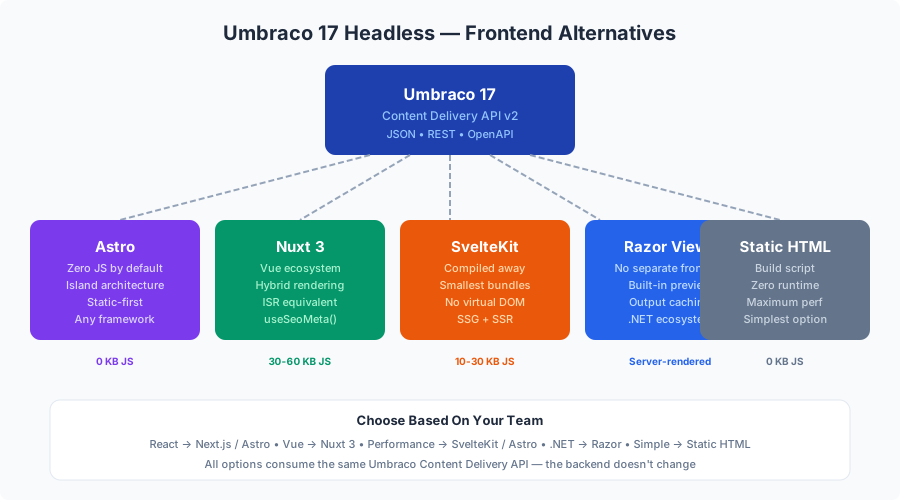
I’ve spent the last few months experimenting with alternative frontends for the same MarketingOS content model. Some surprised me. Some confirmed my biases. Here’s an honest comparison of five approaches, each with working code against the same Umbraco 17 Content Delivery API we built in the series.
The Ground Rules
Every alternative needs to support:
- Static or hybrid rendering — marketing sites should be fast
- Dynamic content from Umbraco — content editors publish, the site updates
- Block rendering — the Block List page builder from Part 2 must work
- SEO — metadata, structured data, sitemaps
- Reasonable developer experience — hot-reload, TypeScript, component model
The Umbraco backend stays identical. Same document types, same compositions, same blocks, same Content Delivery API. Only the frontend changes.
Option 1: Astro — The One I’d Actually Pick
If I were starting MarketingOS today and my team didn’t have React experience, I’d choose Astro. Here’s why.
Why Astro fits marketing websites perfectly:
- Zero JavaScript by default. Astro ships HTML. Not “server-rendered HTML that hydrates into a React app.” Literal static HTML with zero client-side JavaScript unless you explicitly add it. For marketing pages that are 90% static content, this is ideal.
- Island architecture. Interactive components (testimonial carousels, pricing toggles, contact forms) render as isolated “islands” of JavaScript. The rest of the page is pure HTML.
- Framework-agnostic components. You can write components in React, Vue, Svelte, or plain Astro. Mix and match within the same project.
- Built-in content collections, sitemaps, and RSS. Astro was built for content sites.
- Static-first with SSR option. Deploy as a static site or enable SSR for dynamic routes.
The Umbraco integration:
---
// src/pages/[...slug].astro
import BaseLayout from '../layouts/BaseLayout.astro';
import BlockRenderer from '../components/blocks/BlockRenderer.astro';
import { getPageByRoute, getAllRoutes } from '../lib/umbraco';

export async function getStaticPaths() {
  const routes = await getAllRoutes();
  return routes
    .filter(route => route !== '/')
    .map(route => ({
      params: { slug: route.replace(/^\//, '') },
    }));
}

const { slug } = Astro.params;
const page = await getPageByRoute(`/${slug}`);

if (!page) {
  return Astro.redirect('/404');
}

const blocks = page.properties.pageBlocks?.items ?? [];
const seo = page.properties.seoSettings;
---

<BaseLayout
  title={seo?.metaTitle || page.name}
  description={seo?.metaDescription || ''}
>
  <main>
    {blocks.map((block) => (
      <BlockRenderer block={block.content} />
    ))}
  </main>
</BaseLayout>
---
// src/components/blocks/BlockRenderer.astro
import HeroBlock from './HeroBlock.astro';
import FeatureGridBlock from './FeatureGridBlock.astro';
import FaqBlock from './FaqBlock.astro';
import CtaBlock from './CtaBlock.astro';
import TestimonialBlock from './TestimonialBlock.astro';
import PricingBlock from './PricingBlock.astro';
interface Props {
block: {
contentType: string;
properties: Record<string, unknown>;
};
}
const { block } = Astro.props;
const components: Record<string, any> = {
heroBlock: HeroBlock,
featureGridBlock: FeatureGridBlock,
faqBlock: FaqBlock,
ctaSectionBlock: CtaBlock,
testimonialBlock: TestimonialBlock,
pricingBlock: PricingBlock,
};
const Component = components[block.contentType];
---
{Component ? <Component properties={block.properties} /> : null}---
// src/components/blocks/HeroBlock.astro
interface Props {
properties: {
heading: string;
subheading?: string;
ctaText?: string;
ctaUrl?: string;
backgroundImage?: { url: string };
overlayOpacity: number;
alignment: 'left' | 'center' | 'right';
height: 'full' | 'large' | 'medium';
};
}
const { properties } = Astro.props;
const {
heading, subheading, ctaText, ctaUrl,
backgroundImage, overlayOpacity, alignment, height,
} = properties;
const heightMap = { full: '100vh', large: '80vh', medium: '60vh' };
---
<section
class={`hero hero--${alignment}`}
style={`min-height: ${heightMap[height]}`}
>
{backgroundImage && (
<img
src={backgroundImage.url}
alt=""
class="hero__bg"
loading="eager"
/>
)}
<div class="hero__overlay" style={`opacity: ${overlayOpacity / 100}`} />
<div class="hero__content container">
<h1>{heading}</h1>
{subheading && <p class="hero__sub">{subheading}</p>}
{ctaText && ctaUrl && (
<a href={ctaUrl} class="btn btn--primary btn--lg">{ctaText}</a>
)}
</div>
</section>
<style>
.hero {
position: relative;
display: flex;
align-items: center;
overflow: hidden;
}
.hero__bg {
position: absolute;
inset: 0;
width: 100%;
height: 100%;
object-fit: cover;
}
.hero__overlay {
position: absolute;
inset: 0;
background: #000;
}
.hero__content {
position: relative;
z-index: 1;
color: white;
padding: 5rem 0;
}
.hero--center .hero__content { text-align: center; }
.hero--right .hero__content { text-align: right; }
</style>Content freshness without ISR:
Astro doesn’t have ISR, but it has two approaches:
- Rebuild on webhook. Umbraco publishes content → webhook triggers a rebuild in your CI/CD. For a typical marketing site with 20-50 pages, an Astro build takes 5-15 seconds. Acceptable for most agencies.
- SSR mode with caching. Enable
output: 'server'oroutput: 'hybrid'in Astro, and use a CDN with cache headers. Content updates require cache invalidation, similar to ISR but manual.
// astro.config.mjs — hybrid mode
import { defineConfig } from 'astro/config';

export default defineConfig({
  output: 'hybrid',
  adapter: node({ mode: 'standalone' }),
});
---
// SSR page with cache control
export const prerender = false;
const page = await getPageByRoute(Astro.url.pathname);
Astro.response.headers.set('Cache-Control', 'public, s-maxage=60, stale-while-revalidate=300');
---Performance comparison:
| Metric | Next.js (ISR) | Astro (Static) |
|---|---|---|
| TTFB | 50-100ms (CDN) | 20-50ms (CDN) |
| JS Bundle | 40-80KB | 0KB (no interactive blocks) |
| Lighthouse Performance | 95-100 | 100 |
| Build time (50 pages) | 30-60s | 5-15s |
| Content update delay | ~1-5s (ISR) | ~30-60s (rebuild) |
Verdict: Astro is better for purely static marketing sites. Next.js wins when you need ISR, preview mode, or heavy interactivity.
Option 2: Nuxt 3 — The Vue Equivalent
If your team is a Vue shop, Nuxt 3 is the direct equivalent of Next.js. The concepts map almost 1:1:
| Next.js | Nuxt 3 |
|---|---|
| Server Components | Server-only components (*.server.vue) |
| ISR | Hybrid rendering with routeRules |
generateStaticParams | prerenderRoutes |
generateMetadata | useHead() / useSeoMeta() |
| App Router | File-based routing in pages/ |
next/image | <NuxtImg> with @nuxt/image |
The Umbraco integration:
<!-- pages/[...slug].vue -->
<script setup lang="ts">
const route = useRoute();
const slug = Array.isArray(route.params.slug)
  ? route.params.slug.join('/')
  : route.params.slug || '';

const { data: page } = await useFetch(
  `/api/umbraco/page`,
  { query: { route: `/${slug}` } }
);

if (!page.value) {
  throw createError({ statusCode: 404, message: 'Page not found' });
}

const seo = page.value.properties.seoSettings;

useSeoMeta({
  title: seo?.metaTitle || page.value.name,
  description: seo?.metaDescription || '',
  ogTitle: seo?.metaTitle || page.value.name,
  ogDescription: seo?.metaDescription || '',
});
</script>

<template>
  <main v-if="page">
    <BlockRenderer
      v-for="(block, index) in page.properties.pageBlocks?.items ?? []"
      :key="`${block.content.contentType}-${index}`"
      :block="block.content"
    />
  </main>
</template>
<!-- components/blocks/BlockRenderer.vue -->
<script setup lang="ts">
import HeroBlock from './HeroBlock.vue';
import FeatureGridBlock from './FeatureGridBlock.vue';
import FaqBlock from './FaqBlock.vue';
import CtaBlock from './CtaBlock.vue';
const props = defineProps<{
block: {
contentType: string;
properties: Record<string, unknown>;
};
}>();
const blockComponents: Record<string, any> = {
heroBlock: HeroBlock,
featureGridBlock: FeatureGridBlock,
faqBlock: FaqBlock,
ctaSectionBlock: CtaBlock,
};
const BlockComponent = computed(
() => blockComponents[props.block.contentType] || null
);
</script>
<template>
<component
v-if="BlockComponent"
:is="BlockComponent"
:properties="block.properties"
/>
</template>ISR equivalent in Nuxt 3:
// nuxt.config.ts
export default defineNuxtConfig({
  routeRules: {
    '/**': { isr: 60 }, // Revalidate every 60 seconds
    '/blog/**': { isr: 300 }, // Blog pages: 5 minutes
    '/api/**': { cache: false }, // No caching for API routes
  },
});
Nuxt 3’s routeRules achieve the same ISR behavior as Next.js. You can also use swr: true for stale-while-revalidate semantics or prerender: true for fully static routes.
Verdict: If your team knows Vue, Nuxt 3 is the obvious choice. The Umbraco integration is nearly identical to Next.js. The ecosystem is smaller but mature enough for production marketing sites.
Option 3: SvelteKit — The Performance Purist’s Choice
SvelteKit compiles away the framework at build time. There’s no virtual DOM, no runtime, no framework JavaScript in the browser. For marketing sites, this means the smallest possible JavaScript bundle.
<!-- src/routes/[...slug]/+page.server.ts -->
<script lang="ts">
  import type { PageServerLoad } from './$types';
  import { getPageByRoute } from '$lib/umbraco';
  import { error } from '@sveltejs/kit';

  export const load: PageServerLoad = async ({ params }) => {
    const slug = params.slug || '';
    const page = await getPageByRoute(`/${slug}`);

    if (!page) {
      throw error(404, 'Page not found');
    }

    return { page };
  };
</script>
<!-- src/routes/[...slug]/+page.svelte -->
<script lang="ts">
import type { PageData } from './$types';
import BlockRenderer from '$lib/components/blocks/BlockRenderer.svelte';
export let data: PageData;
const blocks = data.page.properties.pageBlocks?.items ?? [];
</script>
<svelte:head>
<title>{data.page.properties.seoSettings?.metaTitle || data.page.name}</title>
<meta
name="description"
content={data.page.properties.seoSettings?.metaDescription || ''}
/>
</svelte:head>
<main>
{#each blocks as block, index (block.content.contentType + index)}
<BlockRenderer block={block.content} />
{/each}
</main><!-- src/lib/components/blocks/BlockRenderer.svelte -->
<script lang="ts">
import HeroBlock from './HeroBlock.svelte';
import FeatureGridBlock from './FeatureGridBlock.svelte';
import FaqBlock from './FaqBlock.svelte';
import CtaBlock from './CtaBlock.svelte';
export let block: {
contentType: string;
properties: Record<string, unknown>;
};
const components: Record<string, any> = {
heroBlock: HeroBlock,
featureGridBlock: FeatureGridBlock,
faqBlock: FaqBlock,
ctaSectionBlock: CtaBlock,
};
$: Component = components[block.contentType];
</script>
{#if Component}
<svelte:component this={Component} properties={block.properties} />
{/if}SvelteKit ISR:
SvelteKit doesn’t have ISR built in like Next.js, but you can achieve the same effect:
// +page.server.ts
export const config = {
  isr: {
    expiration: 60, // seconds
  },
};
Or use the static adapter with webhook-triggered rebuilds, similar to Astro.
Verdict: SvelteKit produces the leanest output. The developer experience is excellent — Svelte’s reactivity model is intuitive and the compiler catches errors early. The tradeoff: smaller ecosystem, fewer Umbraco-specific examples, and hiring Svelte developers is harder than React or Vue.
Option 4: Umbraco with Razor Views — Skip the Frontend Entirely
Here’s the controversial take: for many marketing websites, you don’t need a separate frontend at all. Umbraco’s traditional Razor view engine is perfectly capable.
When this makes sense:
- Small agency with .NET developers, no React/Vue/Svelte expertise
- Single-site deployment (no multi-tenant requirement)
- Budget is tight — one project instead of two
- Content editors want instant preview (Razor preview works out of the box)
- No mobile app or multi-channel requirement
The Razor approach:
@* Views/LandingPage.cshtml *@
@inherits Umbraco.Cms.Web.Common.Views.UmbracoViewPage
@{
    Layout = "_Layout.cshtml";

    var seo = Model.Value<SeoSettings>("seoSettings");
    ViewData["Title"] = seo?.MetaTitle ?? Model.Name;
    ViewData["Description"] = seo?.MetaDescription ?? "";
}

<main>
    @foreach (var block in Model.Value<BlockListModel>("pageBlocks") ?? Enumerable.Empty<BlockListItem>())
    {
        @await Html.PartialAsync($"BlockList/_{block.Content.ContentType.Alias}", block)
    }
</main>
@* Views/Partials/BlockList/_heroBlock.cshtml *@
@model Umbraco.Cms.Core.Models.Blocks.BlockListItem
@{
var content = Model.Content;
var heading = content.Value<string>("heading");
var subheading = content.Value<string>("subheading");
var ctaText = content.Value<string>("ctaText");
var ctaUrl = content.Value<Link>("ctaUrl");
var bgImage = content.Value<MediaWithCrops>("backgroundImage");
var height = content.Value<string>("height") ?? "large";
var alignment = content.Value<string>("alignment") ?? "center";
}
<section class="hero hero--@alignment" style="min-height: @(height switch { "full" => "100vh", "large" => "80vh", _ => "60vh" })">
@if (bgImage != null)
{
<img src="@bgImage.GetCropUrl("hero")" alt="" class="hero__bg" loading="eager" />
}
<div class="hero__overlay"></div>
<div class="hero__content container">
<h1>@heading</h1>
@if (!string.IsNullOrEmpty(subheading))
{
<p class="hero__sub">@subheading</p>
}
@if (ctaUrl != null && !string.IsNullOrEmpty(ctaText))
{
<a href="@ctaUrl.Url" class="btn btn--primary btn--lg">@ctaText</a>
}
</div>
</section>Performance with Razor:
You won’t match the static-site performance of Astro or Next.js ISR, but with output caching in .NET 10, you can get close:
// Program.cs — output caching
builder.Services.AddOutputCache(options =>
{
    options.AddBasePolicy(builder =>
        builder.Expire(TimeSpan.FromMinutes(5)));

    options.AddPolicy("LandingPage", builder =>
        builder.Expire(TimeSpan.FromMinutes(1))
               .Tag("content"));
});

// Invalidate on publish
public class ContentPublishedHandler : INotificationHandler<ContentPublishedNotification>
{
    private readonly IOutputCacheStore _cache;

    public ContentPublishedHandler(IOutputCacheStore cache) => _cache = cache;

    public async Task Handle(ContentPublishedNotification notification, CancellationToken ct)
    {
        await _cache.EvictByTagAsync("content", ct);
    }
}
With output caching and a CDN like Cloudflare in front, TTFB drops to 50-200ms for cached responses. Not as fast as static HTML, but fast enough for most marketing sites.
What you lose:
- No static HTML — every first request hits the .NET server
- No multi-channel — the content is rendered server-side, not exposed as an API (unless you also enable the Content Delivery API for other consumers)
- Preview mode is built in (a genuine win)
- No React/Vue component ecosystem
- Tighter coupling between CMS and presentation
Verdict: Don’t dismiss this option. For a small agency with .NET skills and no need for multi-channel, Razor views with Umbraco are simpler, faster to develop, and have zero frontend build complexity. The “modern” tax of maintaining two projects, two Docker images, and a webhook integration isn’t always worth it.
Option 5: Static HTML with Vanilla JavaScript
The simplest possible approach: generate static HTML from Umbraco’s Content Delivery API using a build script. No framework, no bundler, no Node.js runtime.
When this makes sense:
- Extremely simple marketing sites (5-10 pages)
- Maximum performance (literally no JavaScript)
- Team has HTML/CSS skills but no framework experience
- Budget doesn’t justify framework complexity
A simple build script:
// build.ts — run with tsx or ts-node
import { writeFileSync, mkdirSync, existsSync } from 'fs';
import { join } from 'path';

const UMBRACO_URL = process.env.UMBRACO_URL || 'http://localhost:5000';
const OUTPUT_DIR = './dist';

async function fetchContent(endpoint: string) {
  const res = await fetch(
    `${UMBRACO_URL}/umbraco/delivery/api/v2${endpoint}`
  );
  return res.json();
}

function renderHero(props: Record<string, any>): string {
  return `
    <section class="hero" style="min-height: 80vh;">
      ${props.backgroundImage ? `<img src="${props.backgroundImage.url}" alt="" class="hero__bg">` : ''}
      <div class="hero__content container">
        <h1>${props.heading}</h1>
        ${props.subheading ? `<p>${props.subheading}</p>` : ''}
        ${props.ctaText ? `<a href="${props.ctaUrl}" class="btn">${props.ctaText}</a>` : ''}
      </div>
    </section>`;
}

function renderBlock(block: { contentType: string; properties: Record<string, any> }): string {
  const renderers: Record<string, (p: Record<string, any>) => string> = {
    heroBlock: renderHero,
    // Add more block renderers...
  };
  return renderers[block.contentType]?.(block.properties) ?? '';
}

function renderPage(page: any, template: string): string {
  const blocks = page.properties.pageBlocks?.items ?? [];
  const content = blocks
    .map((b: any) => renderBlock(b.content))
    .join('\n');

  return template
    .replace('{{title}}', page.properties.seoSettings?.metaTitle || page.name)
    .replace('{{description}}', page.properties.seoSettings?.metaDescription || '')
    .replace('{{content}}', content);
}

async function build() {
  const template = `<!DOCTYPE html>
<html lang="en">
<head>
  <meta charset="UTF-8">
  <meta name="viewport" content="width=device-width, initial-scale=1.0">
  <title>{{title}}</title>
  <meta name="description" content="{{description}}">
  <link rel="stylesheet" href="/styles.css">
</head>
<body>
  {{content}}
</body>
</html>`;

  const { items } = await fetchContent('/content?take=1000');

  for (const page of items) {
    const html = renderPage(page, template);
    const dir = join(OUTPUT_DIR, page.route.path);
    if (!existsSync(dir)) mkdirSync(dir, { recursive: true });
    writeFileSync(join(dir, 'index.html'), html);
    console.log(`Built: ${page.route.path}`);
  }
}

build();
This generates plain HTML files you can deploy to any static host — Cloudflare Pages, Netlify, S3, or even a simple Nginx server. No JavaScript runtime needed in production.
Verdict: Perfect for simple sites where developer experience matters less than simplicity and performance. You lose all framework niceties (components, routing, image optimization), but for a 5-page marketing site, those niceties might be overhead.
The Decision Matrix
| Criteria | Next.js | Astro | Nuxt 3 | SvelteKit | Razor | Static HTML |
|---|---|---|---|---|---|---|
| JS shipped | 40-80KB | 0KB* | 30-60KB | 10-30KB | 0KB (server) | 0KB |
| Content freshness | ISR (seconds) | Rebuild (30-60s) | ISR (seconds) | ISR/rebuild | Output cache | Rebuild |
| Preview mode | Webhook-based | Rebuild | Webhook-based | Rebuild | Built-in | None |
| TypeScript | Excellent | Excellent | Excellent | Excellent | Partial | Optional |
| SEO tooling | Built-in | Built-in | Built-in | Built-in | Manual | Manual |
| Multi-channel | Yes (API) | Yes (API) | Yes (API) | Yes (API) | No** | Yes (API) |
| Build complexity | Medium | Low | Medium | Medium | None | Low |
| Hosting cost | Node.js server | Static CDN | Node.js server | Node.js/Static | .NET server | Static CDN |
| Team skills needed | React | HTML/Any | Vue | Svelte | .NET/C# | HTML/CSS |
| Hiring pool | Large | Growing | Medium | Small | Large (.NET) | Universal |
* Without interactive islands ** Unless Content Delivery API is also enabled
My Recommendations
Choose Next.js when: You need ISR, your team knows React, you have interactive features (search, filtering, forms, dashboards), or you plan to build a mobile app from the same API.
Choose Astro when: Your site is mostly static, you want zero JavaScript by default, your team is framework-agnostic, or you’re already using Astro for other projects (like this blog you’re reading).
Choose Nuxt 3 when: Your team is a Vue shop. Don’t fight your team’s expertise.
Choose SvelteKit when: Performance is the top priority and your team is willing to invest in Svelte. The smallest bundles, the fastest runtime.
Choose Razor when: You’re a .NET shop, the site doesn’t need multi-channel, and you want the simplest possible architecture. One project, one deployment, built-in preview.
Choose static HTML when: The site is simple enough that a framework is overkill. Five pages, no interactivity, maximum performance.
The MarketingOS Content Delivery API works with all of these. That’s the power of headless — the content model and backend we built in Parts 1-2 of the series are frontend-agnostic. Swap the consumer, keep the content.
This is a companion post to the 9-part MarketingOS series on building a reusable marketing website template with Umbraco 17. The series uses Next.js, but the backend and content model work with any frontend.