Here’s the conversation that happens in every agency that manages a portfolio of Umbraco sites, at some point in their growth:
“We just migrated site A. Two weeks. £18,000. We’re about to start site B — same structure, same tech stack, different client. Another two weeks. Another £18,000.”
The code they wrote for site A sits in site A’s repository. It doesn’t help with site B. Every document type, every Block List element, every Surface Controller pattern, every CI/CD pipeline — recreated from scratch.
This is the agency productivity problem. And it doesn’t matter how good your developers are — if the unit of reuse is “ask someone who worked on a similar project,” you’re leaving significant margin on the table.
The Marketing OS framework is a structural approach to shared Umbraco infrastructure across a portfolio of sites. It’s not a SaaS product or a commercialized platform — it’s a set of architectural choices, shared NuGet packages, and shared patterns that reduce the per-site cost of every new project and migration.
AI makes this more achievable now than at any previous point, because AI can generate conformant code against a shared design system without needing to internalize the design system’s history and rationale first.
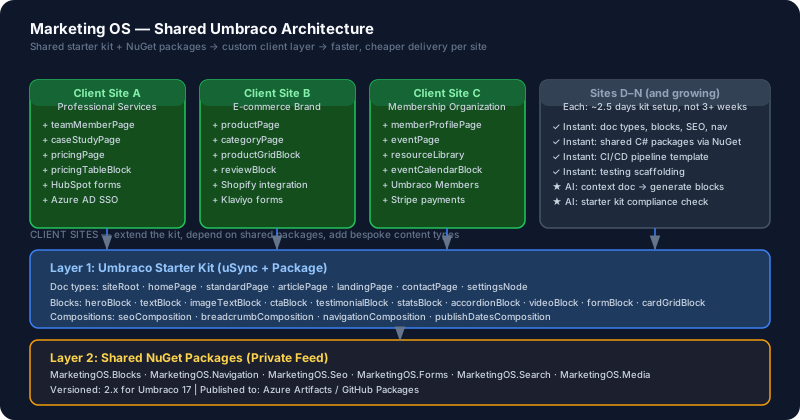
The Layers of the Marketing OS
The Marketing OS is composed of three layers, each building on the one below it:
Layer 1: Umbraco Starter Kit — shared document types, data types, and Block List elements that every new project begins with. Not a fixed set — a curated, versioned starting point that developers extend.
Layer 2: Shared NuGet Package Library — C# packages containing reusable infrastructure: Block renderers, View Components, service abstractions, middleware. Published to a private NuGet feed and consumed as dependencies.
Layer 3: AI-Accelerated Component Generation — AI uses the starter kit and shared package contracts as context to generate conformant implementations for new client-specific requirements without devs needing to hand-write boilerplate.
Layer 1: The Umbraco Starter Kit
The Starter Kit is an Umbraco installation with a curated set of pre-built content architecture. It’s distributed as an Umbraco package (.nupkg) or as a git template repository.
What the Starter Kit Includes
Document Types:
| Document Type | Purpose |
|---|---|
siteRoot | Root node with global nav, social links, default SEO |
homePage | Homepage with hero block area, feature blocks |
standardPage | Flexible page with full Block List content area |
articlePage | Blog/news/insight with rich body, tags, author |
landingPage | Conversion-focused, minimal nav, CTA blocks |
contactPage | Contact form, location, team grid |
settingsNode | Hidden settings with: reCAPTCHA keys, integrations, email config |
Block List Element Types:
| Element Type | Description |
|---|---|
heroBlock | Headline, subtitle, image, CTA button |
textBlock | Rich text body |
imageTextBlock | Left/right image + text column layout |
ctaBlock | Action card with heading, body, button |
testimonialBlock | Quote with photo, name, role, company |
statsBlock | Up to 4 metrics with labels |
accordionBlock | FAQ/expand-collapse group |
videoBlock | YouTube/Vimeo embed with poster image |
formBlock | Umbraco Forms integration block |
cardGridBlock | 2/3/4 column card grid |
Compositions (Reusable property groups):
| Composition | Properties |
|---|---|
seoComposition | Meta title, meta description, robots, OG image |
breadcrumbComposition | Breadcrumb title, hide from breadcrumb |
navigationComposition | Navigation label, hide from nav |
publishDatesComposition | Published date, updated date |
Rationale: Starting from this kit means every project begins from a tested baseline. Developers customize and extend; they don’t recreate the same 12 standard document types on every project.
Distributing the Starter Kit
# Create a new Umbraco project from the starter kit template
dotnet new umbraco-marketingos-starter -n MyClientSite

# Or install the uSync files from the kit into an existing site
usync import --source ./starter-kit/uSync/ --target ./uSync/
The starter kit is versioned — v2.0.0 for Umbraco 17, v1.x.x for Umbraco 13. When Umbraco updates, the kit gets a new major version. Projects that need the new version can pull the updated uSync files and apply the migration delta.
Layer 2: Shared NuGet Packages
The shared library lives in a monorepo, published to a private NuGet feed (Azure Artifacts, GitHub Packages, or self-hosted MyGet/BaGet).
Package Structure
MarketingOS.Umbraco/
├── MarketingOS.Umbraco.Core/          # Core services, interfaces — no Umbraco deps
├── MarketingOS.Umbraco.Blocks/        # Block renderers and partial views
├── MarketingOS.Umbraco.Forms/         # Form handling, Umbraco Forms extensions
├── MarketingOS.Umbraco.Navigation/    # Navigation builders, breadcrumb services
├── MarketingOS.Umbraco.Seo/           # SEO tag generation, sitemap, robots.txt
├── MarketingOS.Umbraco.Media/         # Image focal point, responsive image helpers
├── MarketingOS.Umbraco.Search/        # Examine-based search with faceting
└── MarketingOS.Umbraco.Testing/       # Shared testing utilities
Example: Block Renderer Package
The block renderer provides a standard interface for rendering Block List content:
// MarketingOS.Umbraco.Blocks — IBlockRenderer<T>
public interface IBlockRenderer<TBlock>
    where TBlock : IPublishedElement
{
    string BlockAlias { get; }
    IViewComponentResult Render(BlockListItem<TBlock> block);
}

// Per-block implementation in client project
public class HeroBlockRenderer : IBlockRenderer<HeroBlock>
{
    public string BlockAlias => "heroBlock";

    public IViewComponentResult Render(BlockListItem<HeroBlock> block)
    {
        var viewModel = new HeroBlockViewModel
        {
            Title = block.Content.Title,
            Subtitle = block.Content.Subtitle,
            BackgroundColor = block.Settings?.BackgroundColor ?? "#ffffff"
        };
        return View("~/Views/Partials/Blocks/HeroBlock.cshtml", viewModel);
    }
}
The base package handles block discovery, routing, and rendering dispatch. Client projects only implement the IBlockRenderer<T> interface for their specific blocks.
Registering Shared Packages
// Program.cs on client sites
builder.CreateUmbracoBuilder()
    .AddBackOffice()
    .AddWebsite()
    .AddMarketingOsBlocks()            // From shared package
    .AddMarketingOsNavigation()        // From shared package
    .AddMarketingOsSeo()               // From shared package
    .AddMarketingOsForms(options => {  // From shared package
        options.Provider = FormProvider.UmbracoForms;
        options.SendGridKey = builder.Configuration["SendGrid:ApiKey"];
    })
    .Build();
Version Governance
The shared packages follow semantic versioning. Client projects pin to a minor version:
<PackageReference Include="MarketingOS.Umbraco.Core" Version="2.1.*" />
<PackageReference Include="MarketingOS.Umbraco.Blocks" Version="2.1.*" />
Updates are communicated via a shared Changelog. When a new Umbraco version drops, the shared package maintainers update to the new Umbraco APIs, increment the major version, and projects update when they migrate.
Layer 3: AI-Accelerated Component Generation
With the starter kit and shared package contracts in place, AI can generate conformant implementations for new requirements dramatically faster.
The Key: AI Context Documents
For each project, maintain a short AI context document that describes:
- Which starter kit version the project uses
- Which shared packages are installed and their versions
- Project-specific document types added on top of the kit
- Front-end framework (HTML/CSS conventions, CSS class naming)
- Any project-specific constraints
# MySite AI Context

## Umbraco Setup
- Umbraco 17.x
- MarketingOS.Umbraco v2.1.x (all packages)
- Uses starter kit v2.0.0 as base

## Document Types
- Standard starter kit types present
- Added: `teamMemberPage` (name, role, bio, profileImage, linkedInUrl)
- Added: `productPage` (standard + pricing table block)

## Block List Elements
- Standard starter kit blocks present
- Added: `pricingTableBlock` (up to 5 pricing tiers)

## Frontend
- Tailwind CSS v4
- BEM naming for custom components
- Block CSS classes: .block-[alias] e.g. .block-hero, .block-cta
With this context, the prompt for a new block becomes precise and direct:
Using the AI context for MySite above, generate an Umbraco 17 implementation for a new
"testimonialGridBlock" that shows 1–6 testimonials in a responsive grid.

Requirements:
- Element type: testimonialItem (name, role, company, quote, profileImage)
- Block can show 2 or 3 columns (configured via settings type)
- Use IBlockRenderer<T> interface from MarketingOS.Umbraco.Blocks
- Follow existing block CSS class convention (.block-testimonial-grid)

Generate:
1. Element type property list (for uSync YAML)
2. uSync data type config for the block
3. C# record types for the element
4. IBlockRenderer implementation
5. Razor partial view
6. CSS foundation (Tailwind)
This prompt consistently produces output that conforms to the existing architecture. Without the AI context, developers would either write boilerplate from scratch or spend time aligning AI output with project conventions.
Cost Reduction: The Real Numbers
The economics of the Marketing OS compound over time. Here’s what the reduction looks like across a portfolio:
Per-Project Effort Comparison
| Phase | Bespoke Project | Marketing OS Project |
|---|---|---|
| Document type setup | 3–5 days | 0.5–1 day (extend starter kit) |
| Block List implementation | 4–8 days | 1–2 days (add to existing blocks) |
| Navigation + SEO | 2–4 days | 0 (shared package) |
| Forms integration | 1–3 days | 0.5 days (configure, not build) |
| CI/CD setup | 2–4 days | 0.5 days (clone pipeline template) |
| Testing scaffold | 1–2 days | 0 (shared testing package) |
| Total baseline | 13–26 days | 2.5–4.5 days |
That’s the baseline infrastructure. Client-specific work (custom design, unique content requirements, integrations) is additional — and it’s the same in both cases. But you’ve moved the baseline from 2–4 weeks to a day or two.
For a migration of a v8 site to v17 using the Marketing OS approach:
| Activity | Before Marketing OS | With Marketing OS |
|---|---|---|
| Fresh instance setup | 1–2 days | 0.5 days |
| Content type recreation | 3–6 days | 0.5–1 day (import starter kit, extend) |
| Front-end foundation | 3–5 days | 1 day (Starter Kit theme) |
| Block rendering | 3–5 days | 0.5 days |
| Shared services | 2–4 days | 0 |
| Total | 12–22 days | 2.5–3 days |
The remaining effort is the client-specific work: bespoke design, unique content types, external integrations. That’s where the actual custom value is being delivered.
Governance: The Marketing OS ADR Set
The Marketing OS itself needs governance. These are the ADRs that should be written before the first project uses the shared kit:
ADR-M001: Starter kit content type namespace convention Defines how document type aliases are structured to avoid collision between kit types and client-specific types.
ADR-M002: Shared package versioning policy Defines SemVer rules, breaking change policy, and supported Umbraco version ranges.
ADR-M003: AI context document standard Defines the format and required fields of the project AI context document.
ADR-M004: When to add to the shared kit vs. keep client-specific Decision rules: a pattern that appears in 3+ projects gets promoted to the shared kit.
This is Part 7 of 8 in the Umbraco AI-Powered Migration Playbook.
Series outline: