Eight Posts Later — Was It Worth It?
The answer came on a Tuesday afternoon. A client signed the contract at 2:15 PM. By 5:30 PM the same day, their marketing website was live. Not a placeholder. Not a “coming soon” page. A fully functional marketing site with their brand colors, their logo, a homepage, three landing pages, an about page, a contact form that worked, and a blog with two AI-generated articles that actually sounded like their company wrote them.
Three days later — after content revisions, SEO fine-tuning, and the client’s CEO changing the hero headline four times — the site was ready for their formal launch announcement. Total billable hours: 11. Total elapsed time from contract to production: 3 days.
For context, the site before MarketingOS would have taken 3-4 weeks and somewhere between $10,000 and $16,000. This one cost the client $1,650.
I sat in my home office staring at the Uptime Kuma dashboard showing the new site’s health check pinging back 200s. The Lighthouse score was 97. The client’s marketing director had already published a third blog post from the Umbraco backoffice without asking me a single question. That was the vindication moment — not the technology working, but the entire system working. Template, onboarding, deployment, handoff.
In Part 8, we set up infrastructure across self-hosted Ubuntu, AWS, and Azure with Terraform, monitoring, and alerting. Now it’s time to zoom out. This final post is about turning everything we’ve built into a reusable template, automating new client onboarding, analyzing the real cost savings, and being honest about what worked, what didn’t, and what I’d do differently.
The Template: What You Actually Get
MarketingOS isn’t a framework — it’s a template. That distinction matters. A framework tells you how to build things. A template gives you something already built that you customize. When you clone the MarketingOS repository, here’s what you’re looking at:
marketingos/
├── README.md                        # Setup guide (you're going to read this)
├── onboarding.sh                    # New client setup script
├── .env.example                     # Environment template
├── docker-compose.yml               # Full stack: Umbraco + Next.js + DB + Redis
├── docker-compose.override.yml      # Dev overrides
├── docker-compose.prod.yml          # Production overrides
│
├── backend/                         # Umbraco 17 headless CMS
│   ├── src/
│   │   ├── MarketingOS.Core/       # Domain models, services, content seeding
│   │   ├── MarketingOS.Api/        # API extensions, webhooks
│   │   └── MarketingOS.Web/        # Umbraco host, backoffice config
│   ├── tests/
│   │   ├── MarketingOS.Core.Tests/ # xUnit unit tests
│   │   └── MarketingOS.Api.Tests/  # Integration + Pact contract tests
│   ├── Dockerfile                  # Multi-stage .NET build
│   └── MarketingOS.sln
│
├── frontend/                        # Next.js 15 App Router
│   ├── src/
│   │   ├── app/                    # Pages, routes, layouts
│   │   ├── components/
│   │   │   ├── blocks/             # Umbraco block renderers (Hero, Features, etc.)
│   │   │   ├── layout/             # Header, Footer, Navigation
│   │   │   └── ui/                 # Buttons, Cards, Badges, Form elements
│   │   ├── lib/
│   │   │   ├── umbraco/            # API client, types, queries
│   │   │   ├── seo/                # Metadata, JSON-LD, sitemap generation
│   │   │   ├── ai/                 # Gemini content generation client
│   │   │   └── config/             # Multi-tenant configuration
│   │   └── styles/                 # Global CSS, theme variables
│   ├── tests/
│   │   ├── unit/                   # Jest component tests
│   │   ├── e2e/                    # Playwright end-to-end tests
│   │   ├── visual/                 # Visual regression snapshots
│   │   └── contract/               # Pact consumer tests
│   ├── Dockerfile                  # Multi-stage Node.js build
│   └── next.config.ts
│
├── infrastructure/                  # Deployment configs
│   ├── terraform/
│   │   ├── self-hosted/            # Ubuntu VPS setup
│   │   ├── aws/                    # ECS + RDS + CloudFront
│   │   └── azure/                  # App Service + SQL + Front Door
│   ├── nginx/                      # Reverse proxy configs
│   ├── ssl/                        # Let's Encrypt automation
│   └── monitoring/                 # Prometheus + Grafana + Uptime Kuma
│
├── content/                         # Starter content
│   ├── seed/                       # Default pages, blocks, media
│   ├── templates/                  # Content templates for AI generation
│   └── sample-briefs/              # Example client briefs for AI content
│
├── .github/
│   ├── workflows/
│   │   ├── ci.yml                  # Build, test, lint on PR
│   │   ├── deploy-staging.yml      # Deploy to staging on merge
│   │   └── deploy-production.yml   # Deploy to production on tag
│   └── dependabot.yml              # Automated dependency updates
│
└── docs/
    ├── ONBOARDING.md               # Client onboarding guide
    ├── CONTENT-GUIDE.md            # Editor documentation
    ├── CUSTOMIZATION.md            # Theme and feature configuration
    └── ARCHITECTURE.md             # Technical architecture decisions
The README.md is deliberately opinionated. It doesn’t give you five options for every decision — it tells you the recommended path and explains why. You can deviate, but you start with something that works.
The .env.example file contains every environment variable the system needs, grouped by service, with comments explaining each one:
# .env.example — copy to .env and fill in values

# ── Umbraco CMS ──────────────────────────────────────────
UMBRACO_ADMIN_EMAIL=admin@example.com
UMBRACO_ADMIN_PASSWORD=                    # Set a strong password
UMBRACO_DELIVERY_API_KEY=                  # Generate: openssl rand -hex 32
UMBRACO_PREVIEW_API_KEY=                   # Generate: openssl rand -hex 32
UMBRACO_WEBHOOK_SECRET=                    # Generate: openssl rand -hex 16

# ── Database ─────────────────────────────────────────────
DB_CONNECTION_STRING="Server=db;Database=marketingos;User=sa;Password=YOUR_PASSWORD;TrustServerCertificate=true"
DB_SA_PASSWORD=                            # SQL Server SA password

# ── Next.js Frontend ────────────────────────────────────
NEXT_PUBLIC_SITE_URL=https://example.com
NEXT_PUBLIC_UMBRACO_URL=http://cms:8080
UMBRACO_API_KEY=${UMBRACO_DELIVERY_API_KEY}
UMBRACO_PREVIEW_KEY=${UMBRACO_PREVIEW_API_KEY}
REVALIDATION_SECRET=                       # Generate: openssl rand -hex 16

# ── Client Branding ─────────────────────────────────────
CLIENT_NAME="Acme Corp"
CLIENT_PRIMARY_COLOR="#2563eb"
CLIENT_SECONDARY_COLOR="#7c3aed"
CLIENT_FONT_HEADING="Inter"
CLIENT_FONT_BODY="Inter"

# ── Feature Flags ───────────────────────────────────────
FEATURE_BLOG=true
FEATURE_CONTACT_FORM=true
FEATURE_AI_CONTENT=true
FEATURE_TRANSLATIONS=false
FEATURE_ANALYTICS=true

# ── AI Content Generation ──────────────────────────────
GEMINI_API_KEY=                            # Google AI Studio API key
GEMINI_MODEL=gemini-2.0-flash             # or gemini-2.0-pro for higher quality

# ── Monitoring (optional) ──────────────────────────────
GRAFANA_ADMIN_PASSWORD=
UPTIME_KUMA_URL=
ALERT_EMAIL=
ALERT_SLACK_WEBHOOK=
One-Command Onboarding: The onboarding.sh Script
The crown jewel of the template isn’t the architecture — it’s the onboarding script. Every minute of manual setup is a minute you’re billing the client and a minute where you might misconfigure something. The script doesn’t eliminate all manual work, but it reduces a 4-hour setup to about 15 minutes of answering prompts.
#!/usr/bin/env bash
set -euo pipefail

# MarketingOS — New Client Onboarding Script
# Usage: ./onboarding.sh

SCRIPT_DIR="$(cd "$(dirname "${BASH_SOURCE[0]}")" && pwd)"
source "${SCRIPT_DIR}/scripts/colors.sh"  # Terminal color helpers

echo ""
echo "╔══════════════════════════════════════════════════╗"
echo "║        MarketingOS — New Client Setup            ║"
echo "╚══════════════════════════════════════════════════╝"
echo ""

# ── Step 1: Client Information ──────────────────────────
info "Let's configure your new client site."
echo ""

read -p "Client name (e.g., 'Acme Corp'): " CLIENT_NAME
read -p "Client slug (e.g., 'acme-corp'): " CLIENT_SLUG
read -p "Production domain (e.g., 'acmecorp.com'): " CLIENT_DOMAIN
read -p "Primary brand color (hex, e.g., '#2563eb'): " PRIMARY_COLOR
read -p "Secondary brand color (hex, e.g., '#7c3aed'): " SECONDARY_COLOR
read -p "Heading font (default: 'Inter'): " HEADING_FONT
HEADING_FONT=${HEADING_FONT:-Inter}
read -p "Body font (default: 'Inter'): " BODY_FONT
BODY_FONT=${BODY_FONT:-Inter}
echo ""

# ── Step 2: Feature Selection ──────────────────────────
info "Feature selection (y/n for each):"
echo ""

read -p "  Enable blog? [Y/n]: " FEAT_BLOG
FEAT_BLOG=${FEAT_BLOG:-Y}

read -p "  Enable contact form? [Y/n]: " FEAT_CONTACT
FEAT_CONTACT=${FEAT_CONTACT:-Y}

read -p "  Enable AI content generation? [Y/n]: " FEAT_AI
FEAT_AI=${FEAT_AI:-Y}

read -p "  Enable translations? [y/N]: " FEAT_TRANSLATIONS
FEAT_TRANSLATIONS=${FEAT_TRANSLATIONS:-N}

read -p "  Enable analytics tracking? [Y/n]: " FEAT_ANALYTICS
FEAT_ANALYTICS=${FEAT_ANALYTICS:-Y}

echo ""

# ── Step 3: Block Selection ────────────────────────────
info "Which content blocks should be available to editors?"
echo "  (Press Enter to accept defaults — recommended blocks are pre-selected)"
echo ""

AVAILABLE_BLOCKS=(
  "hero:Hero Banner:Y"
  "features:Feature Grid:Y"
  "testimonials:Testimonials:Y"
  "cta:Call to Action:Y"
  "faq:FAQ Accordion:Y"
  "pricing:Pricing Table:N"
  "team:Team Members:N"
  "stats:Statistics Counter:N"
  "gallery:Image Gallery:N"
  "video:Video Embed:N"
  "logos:Logo Cloud / Partners:Y"
  "richtext:Rich Text:Y"
)

ENABLED_BLOCKS=()
for block_config in "${AVAILABLE_BLOCKS[@]}"; do
  IFS=':' read -r slug name default <<< "$block_config"
  read -p "  ${name}? [${default}]: " selection
  selection=${selection:-$default}
  if [[ "${selection^^}" == "Y" ]]; then
    ENABLED_BLOCKS+=("$slug")
  fi
done

echo ""
success "Selected blocks: ${ENABLED_BLOCKS[*]}"
echo ""

# ── Step 4: Generate Secrets ───────────────────────────
info "Generating security keys..."

DELIVERY_API_KEY=$(openssl rand -hex 32)
PREVIEW_API_KEY=$(openssl rand -hex 32)
WEBHOOK_SECRET=$(openssl rand -hex 16)
REVALIDATION_SECRET=$(openssl rand -hex 16)
DB_PASSWORD=$(openssl rand -base64 24 | tr -d '=/+' | head -c 32)
GRAFANA_PASSWORD=$(openssl rand -base64 16 | tr -d '=/+' | head -c 16)

success "Security keys generated."
echo ""

# ── Step 5: Generate .env File ─────────────────────────
info "Writing .env file..."

cat > "${SCRIPT_DIR}/.env" << ENVFILE
# MarketingOS — Generated for ${CLIENT_NAME}
# Created: $(date -u +"%Y-%m-%dT%H:%M:%SZ")

# Client
CLIENT_NAME="${CLIENT_NAME}"
CLIENT_SLUG="${CLIENT_SLUG}"

# Umbraco CMS
UMBRACO_ADMIN_EMAIL=admin@${CLIENT_DOMAIN}
UMBRACO_ADMIN_PASSWORD=ChangeThisPassword123!
UMBRACO_DELIVERY_API_KEY=${DELIVERY_API_KEY}
UMBRACO_PREVIEW_API_KEY=${PREVIEW_API_KEY}
UMBRACO_WEBHOOK_SECRET=${WEBHOOK_SECRET}

# Database
DB_CONNECTION_STRING="Server=db;Database=marketingos_${CLIENT_SLUG//[-]/_};User=sa;Password=${DB_PASSWORD};TrustServerCertificate=true"
DB_SA_PASSWORD=${DB_PASSWORD}

# Next.js
NEXT_PUBLIC_SITE_URL=https://${CLIENT_DOMAIN}
NEXT_PUBLIC_UMBRACO_URL=http://cms:8080
UMBRACO_API_KEY=${DELIVERY_API_KEY}
UMBRACO_PREVIEW_KEY=${PREVIEW_API_KEY}
REVALIDATION_SECRET=${REVALIDATION_SECRET}

# Branding
CLIENT_PRIMARY_COLOR="${PRIMARY_COLOR}"
CLIENT_SECONDARY_COLOR="${SECONDARY_COLOR}"
CLIENT_FONT_HEADING="${HEADING_FONT}"
CLIENT_FONT_BODY="${BODY_FONT}"

# Features
FEATURE_BLOG=$([[ "${FEAT_BLOG^^}" == "Y" ]] && echo "true" || echo "false")
FEATURE_CONTACT_FORM=$([[ "${FEAT_CONTACT^^}" == "Y" ]] && echo "true" || echo "false")
FEATURE_AI_CONTENT=$([[ "${FEAT_AI^^}" == "Y" ]] && echo "true" || echo "false")
FEATURE_TRANSLATIONS=$([[ "${FEAT_TRANSLATIONS^^}" == "Y" ]] && echo "true" || echo "false")
FEATURE_ANALYTICS=$([[ "${FEAT_ANALYTICS^^}" == "Y" ]] && echo "true" || echo "false")

# Enabled Blocks
ENABLED_BLOCKS="${ENABLED_BLOCKS[*]}"

# AI (fill in manually if AI content is enabled)
GEMINI_API_KEY=
GEMINI_MODEL=gemini-2.0-flash

# Monitoring
GRAFANA_ADMIN_PASSWORD=${GRAFANA_PASSWORD}
UPTIME_KUMA_URL=
ALERT_EMAIL=
ALERT_SLACK_WEBHOOK=
ENVFILE

success ".env file created."
echo ""

# ── Step 6: Generate Theme CSS ─────────────────────────
info "Generating theme variables..."

cat > "${SCRIPT_DIR}/frontend/src/styles/theme-client.css" << CSSFILE
/* Auto-generated theme for ${CLIENT_NAME} */
/* Do not edit directly — re-run onboarding.sh to regenerate */

:root {
  --color-primary: ${PRIMARY_COLOR};
  --color-primary-light: ${PRIMARY_COLOR}20;
  --color-primary-dark: color-mix(in srgb, ${PRIMARY_COLOR} 80%, black);
  --color-secondary: ${SECONDARY_COLOR};
  --color-secondary-light: ${SECONDARY_COLOR}20;

  --font-heading: '${HEADING_FONT}', system-ui, sans-serif;
  --font-body: '${BODY_FONT}', system-ui, sans-serif;
}
CSSFILE

success "Theme CSS generated at frontend/src/styles/theme-client.css"
echo ""

# ── Step 7: Configure Enabled Blocks ──────────────────
info "Configuring block registry..."

BLOCK_CONFIG="{"
for i in "${!ENABLED_BLOCKS[@]}"; do
  if [ $i -gt 0 ]; then BLOCK_CONFIG+=","; fi
  BLOCK_CONFIG+="\"${ENABLED_BLOCKS[$i]}\":true"
done
BLOCK_CONFIG+="}"

cat > "${SCRIPT_DIR}/frontend/src/lib/config/blocks.json" << BLOCKFILE
${BLOCK_CONFIG}
BLOCKFILE

success "Block configuration saved."
echo ""

# ── Step 8: Content Seeding ───────────────────────────
info "Seeding starter content..."

if [[ "${FEAT_AI^^}" == "Y" && -n "${GEMINI_API_KEY:-}" ]]; then
  info "AI content generation enabled — will generate content after Umbraco starts."
  echo "AI_SEED_ON_STARTUP=true" >> "${SCRIPT_DIR}/.env"
else
  info "Using template content (replace with client content after setup)."
  echo "AI_SEED_ON_STARTUP=false" >> "${SCRIPT_DIR}/.env"
fi

echo ""

# ── Step 9: Docker Build ─────────────────────────────
info "Building Docker images (this takes 3-5 minutes on first run)..."
echo ""

docker compose -f docker-compose.yml -f docker-compose.prod.yml build

success "Docker images built successfully."
echo ""

# ── Step 10: DNS Instructions ────────────────────────
info "Almost done! Configure DNS for ${CLIENT_DOMAIN}:"
echo ""
echo "  Add these DNS records at your domain registrar:"
echo ""
echo "  Type   Name    Value"
echo "  ────   ────    ─────"
echo "  A      @       <your-server-ip>"
echo "  CNAME  www     ${CLIENT_DOMAIN}"
echo ""
echo "  SSL will be provisioned automatically via Let's Encrypt"
echo "  when you start the stack."
echo ""

# ── Step 11: Start ───────────────────────────────────
read -p "Start the stack now? [Y/n]: " START_NOW
START_NOW=${START_NOW:-Y}

if [[ "${START_NOW^^}" == "Y" ]]; then
  info "Starting MarketingOS for ${CLIENT_NAME}..."
  docker compose -f docker-compose.yml -f docker-compose.prod.yml up -d

  echo ""
  success "MarketingOS is starting up!"
  echo ""
  echo "  Umbraco backoffice:  https://${CLIENT_DOMAIN}/umbraco"
  echo "  Frontend:            https://${CLIENT_DOMAIN}"
  echo "  Grafana:             https://${CLIENT_DOMAIN}:3000"
  echo ""
  echo "  Default admin login:"
  echo "    Email: admin@${CLIENT_DOMAIN}"
  echo "    Password: ChangeThisPassword123! (change immediately!)"
  echo ""

  warn "IMPORTANT: Change the default admin password immediately after first login."
else
  echo ""
  info "When you're ready, start with:"
  echo "  docker compose -f docker-compose.yml -f docker-compose.prod.yml up -d"
fi

echo ""
success "Onboarding complete for ${CLIENT_NAME}!"
echo ""
The script is intentionally verbose with its output. When you’re running this at 4 PM because a client wants to see something “by end of day,” you want to know exactly what’s happening and where things might go wrong. Silent scripts are debugging nightmares.
One thing I debated: should this be a CLI tool (Node.js, Go, Rust) or a bash script? I chose bash because (a) it works on every Linux and macOS machine without installing anything, (b) DevOps engineers can read and modify it without learning a framework, and (c) the logic is sequential prompts and file generation — there’s no complex state management that would benefit from a “real” programming language.
Customization Points
The template has four layers of customization, ordered from quickest to most involved.
Layer 1: Theme Configuration (5 minutes)
The onboarding script generates theme-client.css, but you can also edit it directly. The CSS custom properties cascade through every component:
/* frontend/src/styles/theme-client.css */
:root {
  /* Brand colors */
  --color-primary: #2563eb;
  --color-primary-light: #2563eb20;
  --color-primary-dark: color-mix(in srgb, #2563eb 80%, black);
  --color-secondary: #7c3aed;
  --color-secondary-light: #7c3aed20;

  /* Typography */
  --font-heading: 'Inter', system-ui, sans-serif;
  --font-body: 'Inter', system-ui, sans-serif;

  /* Component overrides */
  --header-height: 72px;
  --hero-min-height: 600px;
  --card-border-radius: 12px;
  --button-border-radius: 8px;

  /* Spacing scale */
  --section-padding: 80px;
  --container-max-width: 1200px;
}

/* Dark mode overrides (auto-applied via prefers-color-scheme or toggle) */
[data-theme="dark"] {
  --color-primary-light: #2563eb30;
  --color-secondary-light: #7c3aed30;
}
Every component in the library uses these variables. Change --color-primary and every button, link, heading accent, and focus ring updates automatically. No find-and-replace, no broken styles.
Layer 2: Feature Flags (10 minutes)
Feature flags control which capabilities are active for each client. They’re read at build time from environment variables and at runtime from a configuration file:
// frontend/src/lib/config/features.ts

export interface FeatureFlags {
  blog: boolean;
  contactForm: boolean;
  aiContent: boolean;
  translations: boolean;
  analytics: boolean;
}

export function getFeatureFlags(): FeatureFlags {
  return {
    blog: process.env.FEATURE_BLOG === 'true',
    contactForm: process.env.FEATURE_CONTACT_FORM === 'true',
    aiContent: process.env.FEATURE_AI_CONTENT === 'true',
    translations: process.env.FEATURE_TRANSLATIONS === 'true',
    analytics: process.env.FEATURE_ANALYTICS === 'true',
  };
}

// Usage in components:
// const features = getFeatureFlags();
// if (features.blog) { /* render blog navigation */ }
A client that doesn’t need a blog? Set FEATURE_BLOG=false and the blog routes, navigation links, and sitemap entries disappear. The Umbraco backoffice still has the Blog content type available (in case they change their mind), but the frontend doesn’t render those routes.
Layer 3: Block Selection (15 minutes)
Not every client needs every block. A law firm doesn’t need a Pricing Table block. A SaaS startup doesn’t need a Team Members grid. The blocks.json configuration controls which blocks appear in the Umbraco Block List editor:
{
  "hero": true,
  "features": true,
  "testimonials": true,
  "cta": true,
  "faq": true,
  "pricing": false,
  "team": false,
  "stats": false,
  "gallery": false,
  "video": false,
  "logos": true,
  "richtext": true
}
On the Umbraco side, a content seeding script reads this configuration and enables or disables the corresponding Block List configurations. On the Next.js side, the block renderer uses the same config to conditionally import components — disabled blocks aren’t included in the JavaScript bundle.
// frontend/src/components/blocks/BlockRenderer.tsx

import { lazy, Suspense } from 'react';
import blockConfig from '@/lib/config/blocks.json';
import type { UmbracoBlock } from '@/lib/umbraco/types';

// Lazy-load only enabled blocks
const blockComponents: Record<string, React.ComponentType<any>> = {};

if (blockConfig.hero) {
  blockComponents.hero = lazy(() => import('./HeroBlock'));
}
if (blockConfig.features) {
  blockComponents.features = lazy(() => import('./FeaturesBlock'));
}
if (blockConfig.testimonials) {
  blockComponents.testimonials = lazy(() => import('./TestimonialsBlock'));
}
if (blockConfig.cta) {
  blockComponents.cta = lazy(() => import('./CtaBlock'));
}
if (blockConfig.faq) {
  blockComponents.faq = lazy(() => import('./FaqBlock'));
}
if (blockConfig.pricing) {
  blockComponents.pricing = lazy(() => import('./PricingBlock'));
}
// ... remaining blocks

interface BlockRendererProps {
  blocks: UmbracoBlock[];
}

export function BlockRenderer({ blocks }: BlockRendererProps) {
  return (
    <>
      {blocks.map((block, index) => {
        const Component = blockComponents[block.contentType];
        if (!Component) {
          console.warn(`Unknown or disabled block type: ${block.contentType}`);
          return null;
        }
        return (
          <Suspense key={`${block.contentType}-${index}`} fallback={null}>
            <Component data={block.properties} />
          </Suspense>
        );
      })}
    </>
  );
}
Layer 4: SEO Defaults (10 minutes)
Each client gets their own SEO configuration that provides defaults for metadata, structured data, and social sharing:
// frontend/src/lib/config/seo.ts

export interface SeoDefaults {
  siteName: string;
  titleTemplate: string;           // e.g., "%s | Acme Corp"
  defaultDescription: string;
  defaultImage: string;            // og:image fallback
  organization: {
    name: string;
    url: string;
    logo: string;
    sameAs: string[];              // Social media profiles
  };
  locale: string;
  twitterHandle?: string;
}

export function getSeoDefaults(): SeoDefaults {
  return {
    siteName: process.env.CLIENT_NAME || 'MarketingOS',
    titleTemplate: `%s | ${process.env.CLIENT_NAME || 'MarketingOS'}`,
    defaultDescription: process.env.SEO_DEFAULT_DESCRIPTION || '',
    defaultImage: '/images/og-default.jpg',
    organization: {
      name: process.env.CLIENT_NAME || 'MarketingOS',
      url: process.env.NEXT_PUBLIC_SITE_URL || 'https://example.com',
      logo: '/images/logo.svg',
      sameAs: (process.env.SOCIAL_PROFILES || '').split(',').filter(Boolean),
    },
    locale: process.env.DEFAULT_LOCALE || 'en-US',
    twitterHandle: process.env.TWITTER_HANDLE,
  };
}
These defaults are used by the metadata generation system from Part 4 as fallbacks when individual pages don’t specify their own metadata.
Multi-Tenant Content Management
Here’s where things get interesting. When you have 5, 10, or 20 client sites all running on MarketingOS, how do you manage content in Umbraco?
There are two approaches, and I’ve used both.
Approach 1: Separate Instances (Simple, Recommended for <5 Sites)
Each client gets their own Umbraco instance. Separate database, separate Docker containers, separate backoffice URL. This is the default in the template.
Pros: Complete isolation. One client’s broken content import can’t affect another. Simple mental model — each backoffice is one site.
Cons: More infrastructure. Each instance needs ~512MB RAM. At 20 clients, you’re looking at 10GB of RAM just for CMS instances. Updates need to be applied per-instance.
Approach 2: Shared Instance with Content Trees (Complex, for 5+ Sites)
A single Umbraco instance hosts content for multiple clients using a hierarchical content tree:
Content Root
├── [Acme Corp]           ← Content tree for acme-corp.com
│   ├── Home
│   ├── Services
│   │   ├── Web Development
│   │   └── Consulting
│   ├── About
│   ├── Blog
│   │   ├── Post 1
│   │   └── Post 2
│   └── Contact
│
├── [Widget Inc]           ← Content tree for widgetinc.com
│   ├── Home
│   ├── Products
│   │   ├── Widget Pro
│   │   └── Widget Lite
│   ├── About
│   └── Contact
│
└── [Shared Content]       ← Reusable across all sites
    ├── Global Testimonials
    ├── Industry Statistics
    └── Compliance Text (Privacy Policy, Terms)
The key mechanism is Umbraco’s Member Groups and User Permissions. Each client team gets a user group that can only access their content tree branch:
// Backend content permission configuration
// Applied during onboarding via the Umbraco Management API

public class TenantPermissionService
{
    private readonly IUserGroupService _userGroupService;
    private readonly IContentService _contentService;

    public async Task SetupTenantPermissions(
        string clientSlug,
        int contentRootId,
        string[] editorEmails)
    {
        // Create a user group for this client
        var userGroup = new UserGroup
        {
            Alias = $"editors-{clientSlug}",
            Name = $"{clientSlug} Editors",
            Permissions = new[]
            {
                "browse",      // View content tree
                "update",      // Edit content
                "create",      // Create new content
                "publish",     // Publish content
                "unpublish",   // Unpublish content
                "media.upload" // Upload media
            }
        };

        // Restrict to client's content branch
        userGroup.StartContentId = contentRootId;

        // Restrict media access to client's folder
        var mediaFolder = await EnsureMediaFolder(clientSlug);
        userGroup.StartMediaId = mediaFolder.Id;

        await _userGroupService.SaveAsync(userGroup);

        // Add editors to the group
        foreach (var email in editorEmails)
        {
            await AddEditorToGroup(email, userGroup.Id);
        }
    }

    private async Task<IMedia> EnsureMediaFolder(string clientSlug)
    {
        // Create /Client-Name/ folder in media library
        // Each client can only see and upload to their own folder
        var folder = _contentService.GetByAlias($"media-{clientSlug}");
        if (folder == null)
        {
            folder = await CreateMediaFolder(clientSlug);
        }
        return folder;
    }
}
Media Library Organization
Media is the messiest part of multi-tenant CMS management. Without structure, you end up with 500 images in a flat folder and editors can’t find anything. Here’s the enforced structure:
Media Library
├── [Acme Corp]/
│   ├── Brand/
│   │   ├── logo.svg
│   │   ├── logo-dark.svg
│   │   └── favicon.ico
│   ├── Hero Images/
│   ├── Team Photos/
│   ├── Blog/
│   └── General/
│
├── [Widget Inc]/
│   ├── Brand/
│   │   ├── logo.svg
│   │   ├── logo-dark.svg
│   │   └── favicon.ico
│   ├── Product Photos/
│   ├── Blog/
│   └── General/
│
└── [Shared]/
    ├── Stock Photos/
    ├── Icons/
    └── Patterns/
The onboarding script creates this folder structure automatically. The [Shared] folder is readable by all client groups but only writable by admins. This is where you put common assets like stock photos and icon sets that multiple clients use.
Shared vs Client-Specific Content
Some content is universal. A privacy policy template. GDPR compliance text. Industry statistics that multiple clients cite. Rather than duplicating this content per client, the [Shared Content] tree holds reusable content blocks.
In the Next.js frontend, the content fetching layer checks the client’s own content tree first, then falls back to shared content:
// frontend/src/lib/umbraco/queries.ts

export async function getSharedContent(alias: string): Promise<UmbracoContent | null> {
  // First check client-specific content
  const clientContent = await fetchContent(
    `/content?filter=alias:${alias}&filter=ancestor:${TENANT_ROOT_ID}`
  );

  if (clientContent) return clientContent;

  // Fall back to shared content
  const sharedContent = await fetchContent(
    `/content?filter=alias:${alias}&filter=ancestor:${SHARED_ROOT_ID}`
  );

  return sharedContent;
}
This inheritance pattern means a client can override any shared content with their own version, or they can use the defaults. Privacy policy? Use the shared template. Want custom terms? Create your own under your content tree, and it takes priority.
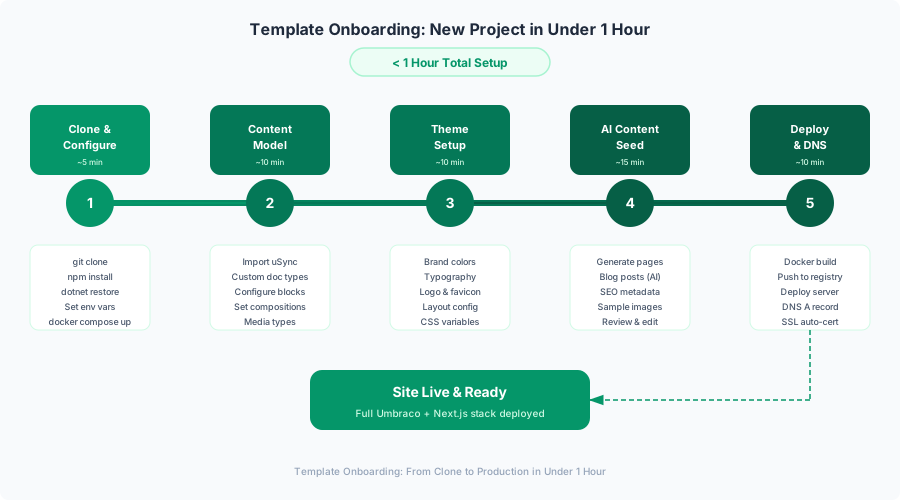
New Client Onboarding Workflow: Step by Step
Let me walk through the actual workflow for onboarding a new client. This is what happens in practice, not in theory.
Step 1: Clone and Configure (15 minutes)
# Clone the template (private GitHub repo)
git clone git@github.com:your-org/marketingos.git acme-corp-website
cd acme-corp-website

# Run the onboarding script
./onboarding.sh
The script asks the questions I showed earlier. Client name, domain, colors, features, blocks. When it finishes, you have a .env file, a theme CSS file, and a block configuration file — all customized for this client.
The 15-minute estimate includes reading the client’s brand guidelines to extract the right hex codes and font names. Most of the actual script runtime is the Docker build at the end.
Step 2: Content Model Customization (15 minutes)
After the Docker containers start, open the Umbraco backoffice and review the content model. The template includes all document types and block types, but you may want to adjust:
- Disable blocks that the client won’t use (the onboarding script pre-configures this, but verify in the backoffice)
- Add custom fields if the client has specific requirements (e.g., a “Industry” tag for a B2B client)
- Adjust validation rules for content fields (e.g., max character counts for headings)
In practice, this step is usually quick because the template’s content model is designed to cover 90% of marketing site needs. I only add custom fields when there’s a genuine business requirement, not when someone says “it might be nice to have.”
Step 3: Theme Setup (15 minutes)
The CSS custom properties handle colors and fonts, but there’s also:
- Logo upload — Drop the client’s logo SVG into the Umbraco media library and set it in Site Settings
- Favicon — Upload and configure in Site Settings
- OG image — The default social sharing image when a page doesn’t have its own
- Footer content — Company address, phone number, social links
These are all Umbraco content fields in the Site Settings document type, so non-technical team members can update them later without touching code.
Step 4: Initial Content Seeding with AI (15 minutes)
This is the step that turns “under an hour” from ambitious into achievable. If Gemini is configured, the AI content system from Part 5 generates initial page content from a client brief.
The brief is a simple text file:
# Client Brief: Acme Corp

## Company
Acme Corp is a B2B SaaS company providing project management tools
for mid-market construction companies. Founded 2019, 50 employees,
based in Austin, TX.

## Target Audience
Construction project managers, 35-55, managing teams of 10-200.
Pain points: paper-based processes, missed deadlines, cost overruns.

## Key Products/Services
- AcmePM Pro: Cloud project management platform
- AcmePM Field: Mobile app for on-site teams
- AcmePM Analytics: Reporting and forecasting dashboard

## Tone
Professional but not stuffy. Practical. Understands construction
isn't a Silicon Valley startup. Avoids jargon.

## Competitors
Procore, Buildertrend, CoConstruct
Feed this to the AI content generation endpoint:
curl -X POST http://localhost:8080/api/ai/seed \
  -H "Authorization: Bearer ${UMBRACO_DELIVERY_API_KEY}" \
  -H "Content-Type: application/json" \
  -d @content/sample-briefs/acme-corp.json
The system generates:
- Homepage — Hero heading, subheading, CTA text, feature highlights
- About page — Company story, mission, team section content
- Services/Products page — One landing page per product with feature descriptions
- Two blog posts — Industry-relevant articles positioning the client as a thought leader
- Contact page — Intro text, form labels, office information
The generated content is marked as “Draft” in Umbraco, so it needs human review before publishing. The AI provides a solid first draft — usually 70-80% ready for production. The client’s marketing team does a review pass, adjusts the tone, adds specific details the AI couldn’t know, and publishes.
Step 5: Deploy and DNS (15 minutes)
If you built during the onboarding script, the containers are already running locally. For production:
# Option A: Self-hosted (simplest)
ssh deploy@your-server "cd /opt/marketingos-acme && docker compose -f docker-compose.yml -f docker-compose.prod.yml up -d"

# Option B: AWS (from Part 8)
cd infrastructure/terraform/aws
terraform apply -var="client_slug=acme-corp" -var="domain=acmecorp.com"

# Option C: Azure (from Part 8)
cd infrastructure/terraform/azure
terraform apply -var="client_slug=acme-corp" -var="domain=acmecorp.com"
Point the domain’s DNS to the server IP (A record) or load balancer (CNAME). Let’s Encrypt provisions the SSL certificate automatically via Certbot. The nginx configuration (generated during onboarding) handles HTTPS termination and reverse proxying.
SSL provisioning typically takes 1-2 minutes after DNS propagation. Total time from “containers running” to “HTTPS site live” is usually under 10 minutes.
The Result
Under an hour from signed contract to a live website with real content. Not a proof of concept — a production site that scores 90+ on Lighthouse, has working SEO metadata, a functional contact form, and a CMS that the client’s team can use immediately.
The longest part? Waiting for Docker to build on the first run. Everything else is configuration, not construction.
Cost Analysis
Let me be transparent about the numbers. These are based on my actual project history — seven pre-MarketingOS sites and five post-MarketingOS sites.
Before MarketingOS: Custom Build Per Site
| Phase | Hours | Cost (at $125/hr) |
|---|---|---|
| Discovery & architecture | 8-16 | $1,000-$2,000 |
| CMS setup & content modeling | 16-24 | $2,000-$3,000 |
| Frontend development | 24-40 | $3,000-$5,000 |
| Design implementation | 16-32 | $2,000-$4,000 |
| Content creation | 16-32 | $2,000-$4,000 |
| Testing & QA | 8-16 | $1,000-$2,000 |
| Deployment & launch | 4-8 | $500-$1,000 |
| Total | 92-168 | $11,500-$21,000 |
Average: $15,000 per site. Timeline: 3-6 weeks.
The variance was enormous. A straightforward 5-page site for a consulting firm might take 3 weeks and $11,000. A 15-page site with a complex blog, multiple landing page variants, and integration with a CRM could push past $20,000 and take 6 weeks.
After MarketingOS: Template Deployment
| Phase | Hours | Cost (at $125/hr) |
|---|---|---|
| Onboarding & configuration | 1-2 | $125-$250 |
| Theme customization | 1-2 | $125-$250 |
| Content model tweaks | 1-2 | $125-$250 |
| AI content generation + review | 2-4 | $250-$500 |
| Content polish & client revisions | 4-8 | $500-$1,000 |
| Deployment & DNS | 1-2 | $125-$250 |
| Total | 10-20 | $1,250-$2,500 |
Average: $1,650 per site. Timeline: 1-3 days.
That’s an 89% cost reduction at the median and a time reduction from weeks to days.
But Wait — What About the Template Investment?
Building MarketingOS itself took approximately 320 hours. At my rate, that’s $40,000 of development time. Let’s include the ongoing costs:
| Item | Cost |
|---|---|
| Initial template development | $40,000 |
| Documentation and onboarding scripts | $3,000 |
| Testing infrastructure | $5,000 |
| CI/CD pipeline setup | $2,000 |
| Total investment | $50,000 |
The break-even point: if each site saves $13,350 (the difference between $15,000 and $1,650), the template pays for itself after 3.7 sites. I hit break-even on the fourth MarketingOS deployment. Everything after that is pure profit improvement.
Five sites in, the cumulative savings are $66,750 against a $50,000 investment. That’s a 33% ROI. By site ten, it’s $133,500 in savings — a 167% ROI.
Infrastructure Cost Comparison
Monthly hosting costs per site, based on actual bills:
| Provider | Setup | Monthly Cost | Includes |
|---|---|---|---|
| Self-hosted (Hetzner VPS) | $0 | $20-30 | 4GB RAM, 80GB SSD. Runs 3-5 sites. |
| Self-hosted (dedicated) | $0 | $40-60 | 32GB RAM, 500GB SSD. Runs 15-20 sites. |
| AWS (ECS + RDS) | $50 one-time | $80-120 | Per site. RDS is the expensive part. |
| Azure (App Service + SQL) | $50 one-time | $60-100 | Per site. Can use shared SQL elastic pool. |
For most of my clients, the self-hosted Hetzner VPS is the clear winner. $25/month for a VPS that comfortably runs 4 client sites, including the CMS, databases, and monitoring. That’s $6.25/month per site. Even with the overhead of managing the server myself, the cost savings are significant enough to justify it.
The AWS and Azure options make sense when clients require specific cloud compliance (SOC 2, HIPAA), or when they have existing cloud infrastructure and want the site managed within their own accounts.
Maintenance and Updates
A template is only as good as its maintenance story. Here’s how MarketingOS stays current.
Template Versioning
The template follows semantic versioning. Each client deployment tracks which template version it was deployed from:
// .marketingos-version.json (generated during onboarding)
{
  "templateVersion": "2.3.1",
  "deployedAt": "2026-02-15T14:30:00Z",
  "clientSlug": "acme-corp",
  "umbracoVersion": "17.0.2",
  "nextjsVersion": "15.2.1"
}
When the template updates, I publish a changelog and a migration guide. Minor versions (2.3.x) are non-breaking — component improvements, performance optimizations, new optional blocks. Minor bumps can be cherry-picked into existing deployments.
Major versions (3.0.0) might include breaking changes — a restructured content model, a new rendering approach, or a framework upgrade. These get detailed migration guides with step-by-step instructions and a compatibility matrix.
Automated Dependency Updates
Dependabot handles routine dependency updates across both stacks:
# .github/dependabot.yml
version: 2
updates:
  # .NET backend dependencies
  - package-ecosystem: "nuget"
    directory: "/backend"
    schedule:
      interval: "weekly"
      day: "monday"
    open-pull-requests-limit: 5
    labels:
      - "dependencies"
      - "backend"
    groups:
      umbraco:
        patterns:
          - "Umbraco.*"
      dotnet:
        patterns:
          - "Microsoft.*"
          - "System.*"

  # Node.js frontend dependencies
  - package-ecosystem: "npm"
    directory: "/frontend"
    schedule:
      interval: "weekly"
      day: "monday"
    open-pull-requests-limit: 5
    labels:
      - "dependencies"
      - "frontend"
    groups:
      next:
        patterns:
          - "next"
          - "next-*"
          - "@next/*"
      react:
        patterns:
          - "react"
          - "react-dom"
          - "@types/react*"

  # GitHub Actions
  - package-ecosystem: "github-actions"
    directory: "/"
    schedule:
      interval: "weekly"
    labels:
      - "dependencies"
      - "ci"
The CI pipeline runs the full test suite (unit, integration, contract, e2e) on every dependency update PR. If tests pass, I review and merge. If they fail, I investigate before updating client deployments.
Umbraco LTS Updates
Umbraco 17 is an LTS release with a 3-year support window. Patch updates (17.0.x) are applied monthly after verifying them against the test suite:
# Update Umbraco packages across the solution
cd backend
dotnet list package --outdated --include-prerelease=false | grep Umbraco
# Review what's changing, then:
dotnet add src/MarketingOS.Web/MarketingOS.Web.csproj package Umbraco.Cms --version 17.0.3
# Run tests
dotnet test
The contract tests from Part 6 are critical here. If an Umbraco update changes the Content Delivery API response shape even slightly, the Pact contract tests catch it before the change reaches any client’s production site.
Security Patching
Dependabot alerts for known vulnerabilities in dependencies. GitHub’s security advisories for .NET and npm packages. Docker base image updates for OS-level patches:
# Weekly security scan in CI
security-scan:
  runs-on: ubuntu-latest
  steps:
    - uses: actions/checkout@v4

    - name: Trivy vulnerability scan (backend)
      uses: aquasecurity/trivy-action@master
      with:
        scan-type: 'fs'
        scan-ref: './backend'
        severity: 'HIGH,CRITICAL'
        exit-code: '1'

    - name: Trivy vulnerability scan (frontend)
      uses: aquasecurity/trivy-action@master
      with:
        scan-type: 'fs'
        scan-ref: './frontend'
        severity: 'HIGH,CRITICAL'
        exit-code: '1'

    - name: Docker image scan
      uses: aquasecurity/trivy-action@master
      with:
        image-ref: 'marketingos-cms:latest'
        severity: 'HIGH,CRITICAL'
        exit-code: '1'
Series Recap: What We Built in 9 Parts
Here’s the full journey, in case you want to jump to a specific topic:
Part 1: Architecture & Setup — Why headless Umbraco 17 + Next.js 15 is the sweet spot for reusable marketing websites. Architecture Decision Records, Clean Architecture on .NET 10, Docker Compose for local development. The “why” behind every major technology choice.
Part 2: Content Modeling — Document types with compositions, the Block List page builder that lets marketers build pages without developer help, and configuring the Content Delivery API. The content model that makes the template reusable.
Part 3: Next.js Rendering — Server Components for zero-JS content pages, the Block Renderer pattern that maps Umbraco blocks to React components, ISR for instant content updates, and building a component library that scales across clients.
Part 4: SEO & Performance — Automated metadata from Umbraco fields, JSON-LD structured data, dynamic sitemaps, Core Web Vitals optimization. Getting to 95+ Lighthouse scores with real content.
Part 5: AI Content with Gemini — Using Gemini 2.0 for content generation from client briefs, AI-powered translations, SEO meta description optimization, and the human review workflow that prevents AI hallucinations from reaching production.
Part 6: Testing — xUnit for .NET backend, Jest for React components, Playwright for end-to-end flows, Pact contract tests between the Next.js consumer and Umbraco provider, and visual regression testing to catch CSS breakage.
Part 7: Docker & CI/CD — Multi-stage Docker builds for both .NET and Node.js, GitHub Actions pipelines with environment promotion (dev, staging, production), and the rollback strategy that saved us during a bad migration.
Part 8: Infrastructure — Self-hosted Ubuntu VPS, AWS ECS with RDS and CloudFront, Azure App Service with SQL and Front Door. Terraform for each option, plus monitoring with Prometheus, Grafana, and Uptime Kuma.
Part 9: Template & Retrospective (this post) — Onboarding automation, multi-tenant content management, cost analysis, and the honest retrospective.
The Honest Retrospective
Nine blog posts and 320 hours of development later, here’s what I actually think about MarketingOS. No sugar-coating.
What Worked
Headless architecture gave real flexibility. The separation between Umbraco (content) and Next.js (presentation) means I can redesign a client’s entire frontend without touching their content. When one client wanted to pivot from a corporate look to a bold startup aesthetic, it was a theme change and some component swaps — the content stayed exactly the same. No migration, no re-entry.
Block-based page builder — editors genuinely love it. This wasn’t a given. I’ve built “page builders” before that developers loved and editors hated. The Umbraco Block List approach hits a sweet spot: constrained enough that editors can’t break the design, flexible enough that they can build meaningful page variations. One client’s marketing coordinator built a new landing page for a product launch without filing a single support ticket. That’s the bar.
AI content generation was a legitimate force multiplier. Before MarketingOS, content creation was either “wait for the client to write it” (3 weeks) or “hire a copywriter” ($2,000-$5,000). With Gemini, the first draft happens in minutes. The quality isn’t perfect — it needs human editing for tone and specifics — but it turns a blank-page problem into an editing problem. Editing is faster than writing. For the five sites deployed so far, AI content generation has cut the “waiting for content” phase from weeks to days.
Contract testing with Pact caught real bugs. In the first two months of maintaining MarketingOS across multiple client sites, the Pact contract tests caught three breaking changes before they hit production. One was a field rename in an Umbraco content type that would have broken the Next.js rendering for every site using that block. Another was a change in the API’s date format during an Umbraco patch update. Without contract tests, these would have been production incidents. With them, they were CI failures that got fixed in the PR.
Docker deployment made infrastructure portable. “It works on my machine” is a meme, but “it works on any machine” is the real achievement. The same docker compose up command works on a Hetzner VPS, an AWS EC2 instance, and an Azure VM. When one client decided to move from self-hosted to AWS (their IT department required it for compliance), the migration was a database export/import and a DNS change. Total downtime: 12 minutes.
ISR was the right rendering strategy. Incremental Static Regeneration is perfect for marketing sites. Pages are static for performance, but content updates appear within seconds via on-demand revalidation webhooks from Umbraco. Editors don’t have to understand build pipelines or deployment cycles — they click “Publish” and the change is live. The mental model is simple, and simplicity matters for non-technical users.
What I’d Do Differently
Start with fewer blocks. I built 12 block types for the initial template: Hero, Features, Testimonials, CTA, FAQ, Pricing, Team, Stats, Gallery, Video, Logos, and Rich Text. Across five client deployments, editors consistently use 5-6 blocks. Hero, Features, CTA, FAQ, Testimonials, and Rich Text cover 90% of real-world marketing pages. Pricing and Team are used occasionally. Stats, Gallery, and Video have been enabled exactly once each. I should have launched with 6 blocks and added the others when clients actually asked for them. Every unused block is maintenance burden — it needs tests, documentation, visual regression baselines, and upgrade verification.
Invest more in content editor documentation. My technical documentation was solid — architecture docs, API references, deployment guides. But the people using the CMS day-to-day aren’t developers. They’re marketing coordinators and content managers. They don’t care about Docker compose files or ISR revalidation. They need documentation that says “Here’s how to add a new blog post” with screenshots, “Here’s how to change the hero image” with step-by-step instructions, and “Here’s what to do if something looks wrong” with a troubleshooting guide. I eventually created these, but I should have prioritized them from the start. The support ticket volume from editors was directly proportional to the quality of the editor-facing documentation.
Consider Vercel for Next.js hosting. I self-hosted Next.js to keep costs down and maintain full control. And it works. But Vercel exists for a reason. Their ISR implementation is battle-tested and handles edge cases that I’ve had to solve myself — cache invalidation across multiple regions, preview deployments for content staging, edge functions for A/B testing. For clients with budget for it, Vercel would have saved me 40-50 hours of DevOps work across the project. The self-hosted approach makes sense for cost-sensitive clients, but I should have had Vercel as a first-class deployment option from the beginning.
Start with separate deployments before shared infrastructure. I built the multi-tenant shared-instance approach early because I was thinking about scale. With 5 clients, it’s unnecessary complexity. Separate instances per client are simpler to reason about, simpler to debug, and simpler to maintain. The shared-instance approach is valuable at 10+ sites where infrastructure costs matter, but premature at 3-5. If I were starting over, I’d default to separate instances and add multi-tenancy as an optimization later.
What Was Over-Engineered
Full Terraform for single-server deployments. For the self-hosted option, Terraform provisions a VPS, configures the firewall, installs Docker, sets up nginx, and configures Let’s Encrypt. It’s beautiful infrastructure-as-code. It’s also massive overkill for a single VPS. A 50-line bash script would have accomplished the same thing in a quarter of the development time. I only needed Terraform for the AWS and Azure deployments where the resource graph is genuinely complex. For the self-hosted path, I should have kept it simple.
Custom Umbraco backoffice dashboard. I built a custom dashboard in the Umbraco backoffice that showed content statistics, recent changes, and AI content generation shortcuts. It took about 20 hours. The built-in Umbraco dashboard was perfectly adequate for v1. Not a single editor has mentioned the custom dashboard in feedback. They use the content tree, the media library, and the preview button. That’s it. Sometimes “not building a feature” is the best architecture decision.
Translation memory caching. In Part 5, I implemented a translation memory cache to avoid re-translating identical content through Gemini. It uses Redis to store source-target pairs with hashed keys and has a cache invalidation strategy based on content modification timestamps. Elegant? Yes. Necessary? Not with 5 clients, 2 of whom use translations, translating maybe 20 pages total. The Gemini API calls are cheap ($0.001 per 1K characters) and fast (sub-second). The caching infrastructure cost more in development time than the API calls it would save over the next decade. Classic premature optimization.
What Was Under-Engineered
Content preview mode. This one genuinely bit me. Editors need to see what their changes look like before publishing. The template has preview mode, but it was a bolted-on afterthought — a separate route that fetches draft content with the preview API key. It works, but it’s slow (no caching), doesn’t handle block-level previews (you preview the whole page or nothing), and the URL is ugly (/api/preview?slug=/services&secret=abc123). Two clients have complained about the preview experience. It should have been a first-class feature from the start, with a proper preview panel in the Umbraco backoffice that shows the Next.js rendering in an iframe with real-time updates. That’s on the roadmap for v3.
Media optimization pipeline. The template relies on Next.js’s next/image for image optimization, which is fine for the frontend. But editors upload 5MB PNGs from their marketing team’s Dropbox. Those 5MB images get stored in the Umbraco media library, backed up to the database, and transferred between the CMS and the frontend on every request before next/image optimizes them. I should have added server-side image processing on upload — resize to maximum dimensions, compress, convert to WebP, strip metadata. A 5MB PNG becomes a 200KB WebP. Multiply by 50 images per site, and the storage and bandwidth savings are significant. I’ve since added this using ImageSharp in the backend, but it should have been there from day one.
Editor onboarding documentation. I mentioned this in “what I’d do differently” but it deserves emphasis here because it was genuinely under-engineered, not just under-prioritized. The initial editor documentation was a README that said “Log in to the backoffice, click Content, create a new page.” That’s like telling someone to drive by saying “get in the car, turn the key, go.” The documentation needed:
- Video walkthroughs (or at minimum, annotated screenshot guides)
- A glossary of terms (“What’s a Block List? What’s a Document Type? What does ‘Publish’ vs ‘Save’ mean?”)
- A “first 30 minutes” onboarding flow that walks new editors through creating their first blog post
- A FAQ section based on real support tickets
I built all of this eventually, but the first two client deployments were rougher than they needed to be because editors felt lost in the CMS.
What’s Next for MarketingOS
The template isn’t finished — no template ever is. Here’s what’s on the roadmap, in rough priority order:
Umbraco Commerce Integration
Several clients have asked about adding simple e-commerce — a product page with a “Buy Now” button, a small merch store, or event ticket sales. Umbraco Commerce (formerly Vendr) integrates natively with Umbraco’s content tree. The plan is to add an optional e-commerce layer with product document types, a cart component in Next.js, and Stripe checkout integration. Not a full e-commerce platform — that’s Shopify’s job — but enough for marketing sites that want to sell a few things.
A/B Testing Framework
Marketing sites exist to convert visitors. Right now, the template serves one version of every page. The next step is a lightweight A/B testing framework that lets editors create page variants in Umbraco (different hero heading, different CTA text, different feature order) and split traffic between them. The analytics dashboard would track conversion rates per variant. Vercel’s edge middleware makes this straightforward for Vercel-hosted deployments. For self-hosted, it would run at the nginx level.
Analytics Dashboard
Google Analytics is fine, but a first-party analytics dashboard integrated into the Umbraco backoffice would give editors context about their content without leaving the CMS. Page views, time on page, scroll depth, CTA click-through rates — all visible right next to the content they’re editing. Plausible Analytics has a good API for this, and it’s privacy-friendly (no cookies, GDPR-compliant by default).
Headless Forms with Conditional Logic
The contact form works, but it’s basic — name, email, message, submit. Clients want forms with conditional fields (show “Company Size” only if they select “Business” for account type), multi-step wizards for lead qualification, and file upload fields for RFP submissions. Umbraco Forms supports this in the backoffice, but the headless rendering in Next.js needs work. The plan is a form renderer component that reads the form definition from the Umbraco Forms API and renders it with client-side validation and conditional visibility.
Multi-Language Routing
The translation system from Part 5 generates translated content, but the routing is rudimentary — translated pages live under /de/services, /fr/services, etc. with basic locale detection. A proper multi-language implementation needs:
hreflangtags for SEO- Locale-specific sitemaps
- Language switcher component with flag dropdown
- RTL support for Arabic/Hebrew
- URL slug translation (not just content translation)
Next.js 15’s internationalization support in the App Router handles most of this, but integrating it cleanly with Umbraco’s content structure requires careful content tree organization.
Closing: The Template Philosophy
Building MarketingOS took longer than building any single marketing website I’ve ever done. 320 hours is a lot of time. There were weeks where I questioned whether the template approach was worth it — whether I should just build each client site from scratch and move on.
The math settled the argument. After the fourth deployment, the template had paid for itself. After the fifth, it was generating more profit per site than the custom approach ever did. But the math isn’t even the best part.
The best part is the decisions.
Every decision in the template — which blocks to include, how to structure the content model, where to draw the line between flexible and structured, how to handle deployment, how to test, how to onboard — is a decision I only had to make once. And because I made it once with time to think, I made it better than I would have under deadline pressure on a single client project.
The content model is better because I designed it for reuse, not for one client’s quirky requirements. The block components are better because I tested them across multiple brand systems. The deployment pipeline is better because I had time to add contract tests and visual regression. The AI content generation is better because I iterated on the prompts across multiple client briefs.
That’s the template philosophy: invest in making decisions well, then encode those decisions so you don’t have to make them again. The code is the easy part. The decisions are the hard part. And a good template is really just a collection of good decisions.
If you’ve followed this series from Part 1 to Part 9, you have everything you need to build your own version of MarketingOS. Not necessarily the same stack — maybe you prefer WordPress over Umbraco, or Astro over Next.js, or OpenAI over Gemini. The specific technologies matter less than the patterns: headless architecture for flexibility, block-based content for editor empowerment, AI for content acceleration, contract tests for API stability, Docker for portability, and automation for repeatability.
Ship the first version. Deploy it for a real client. Collect feedback. Fix the things that matter. Ignore the things that don’t. Repeat.
That’s how you turn a side project into a production template that actually works.
This is Part 9, the final post in a 9-part series on building a reusable marketing website template with Umbraco 17 and Next.js. The series followed the development of MarketingOS, a template that reduces marketing website delivery from weeks to under an hour.
Series outline:
- Architecture & Setup — Why this stack, ADRs, solution structure, Docker Compose
- Content Modeling — Document types, compositions, Block List page builder, Content Delivery API
- Next.js Rendering — Server Components, ISR, block renderer, component library, multi-tenant
- SEO & Performance — Metadata, JSON-LD, sitemaps, Core Web Vitals optimization
- AI Content with Gemini — Content generation, translation, SEO optimization, review workflow
- Testing — xUnit, Jest, Playwright, Pact contract tests, visual regression
- Docker & CI/CD — Multi-stage builds, GitHub Actions, environment promotion
- Infrastructure — Self-hosted Ubuntu, AWS, Azure, Terraform, monitoring
- Template & Retrospective — Onboarding automation, cost analysis, lessons learned (this post)