A migration without a reliable deployment pipeline is a migration waiting to break in production.
The deployment infrastructure is also frequently underestimated during project scoping. Teams focus on the migration mechanics — the uSync exports, the code rewrites, the Block List conversions — and then try to bolt on deployment workflows at the end. This creates fragile pipelines, environment inconsistency, and last-minute firefighting on go-live day.
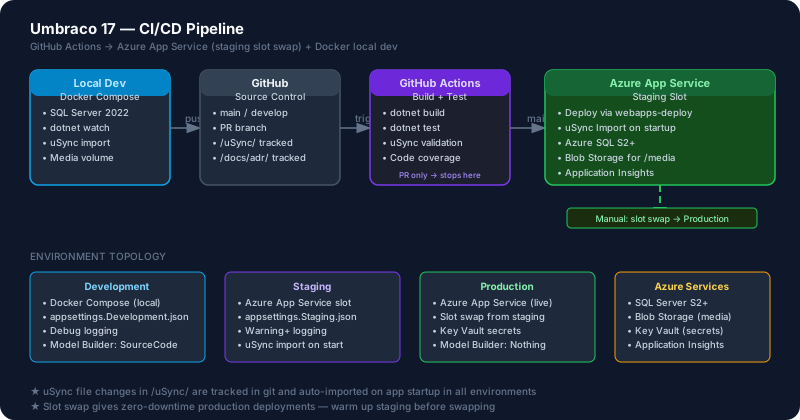
This post covers building CI/CD for Umbraco 17 properly: GitHub Actions for the main pipeline, Azure App Service with staging slots for zero-downtime deployments, Docker Compose for local development that matches production, and the specific Azure configuration Umbraco requires.
Azure App Service Configuration for Umbraco
Before writing a single YAML file, configure your Azure App Service correctly. Umbraco has specific requirements that are different from a standard ASP.NET Core application.
Required Application Settings
In your Azure App Service → Configuration → Application settings:
UMBRACO__CMS__GLOBAL__MAINDOMLOCK = FileSystemMainDomLock(For single-instance deployments. For multi-instance: use SqlMainDomLock)
UMBRACO__CMS__HOSTING__LOCALTEMPSTORAGELOACTION = EnvironmentTempUMBRACO__CMS__EXAMINE__LUCENEDIRECTORYFACTORY = SyncedTempFileSystemDirectoryFactoryASPNETCORE_ENVIRONMENT = ProductionWEBSITE_RUN_FROM_PACKAGE = 0(Umbraco does NOT support Run From Package — disable it explicitly)
Connection Strings
Set these in Azure App Service → Configuration → Connection strings or via environment variables:
ConnectionStrings__umbracoDbDSN = Server=myserver.database.windows.net;Database=mydb;...Use Azure Key Vault references for secrets in production:
@Microsoft.KeyVault(SecretUri=https://myvault.vault.azure.net/secrets/DbConnectionString/)Media Storage: Azure Blob Storage
For any production Umbraco site on Azure, move media to Azure Blob Storage. Azure App Services don’t have persistent file storage across deployments.
dotnet add package Umbraco.StorageProviders.AzureBlob// Program.cs
builder.CreateUmbracoBuilder()
.AddBackOffice()
.AddWebsite()
.AddDeliveryApi()
.AddAzureBlobMediaFileSystem() // Azure Blob for /media
.Build();// appsettings.json — Blob Storage configuration
{
"Umbraco": {
"Storage": {
"AzureBlob": {
"Media": {
"ConnectionString": "DefaultEndpointsProtocol=https;...",
"ContainerName": "umbraco-media",
"ContainerPublicAccess": "Blob"
}
}
}
}
}GitHub Actions: Full CI/CD Pipeline
This workflow runs on:
- PR to
develop: Build + Test only - Merge to
main: Build + Test + Deploy to Staging slot - Manual dispatch or tag: Deploy Staging → Production (slot swap)
# .github/workflows/umbraco-cicd.yml
name: Umbraco 17 CI/CD

on:
  push:
    branches: [main, develop]
  pull_request:
    branches: [main, develop]
  workflow_dispatch:
    inputs:
      deploy_to_production:
        description: 'Swap staging slot to production?'
        required: false
        default: 'false'

env:
  DOTNET_VERSION: '10.x'
  PROJECT_PATH: './src/MySite.Web/MySite.Web.csproj'
  PUBLISH_PATH: './publish'
  AZURE_WEBAPP_NAME: 'my-umbraco-site'

jobs:
  build-and-test:
    name: Build & Test
    runs-on: ubuntu-latest
    steps:
      - name: Checkout
        uses: actions/checkout@v4

      - name: Setup .NET ${{ env.DOTNET_VERSION }}
        uses: actions/setup-dotnet@v4
        with:
          dotnet-version: ${{ env.DOTNET_VERSION }}

      - name: Restore dependencies
        run: dotnet restore ${{ env.PROJECT_PATH }}

      - name: Build
        run: |
          dotnet build ${{ env.PROJECT_PATH }} \
            --configuration Release \
            --no-restore \
            /WarnAsError  # Treat warnings as errors for clean builds

      - name: Run tests
        run: |
          dotnet test ./tests/ \
            --configuration Release \
            --no-build \
            --logger "trx;LogFileName=test-results.trx" \
            --collect:"XPlat Code Coverage"

      - name: Upload test results
        uses: actions/upload-artifact@v4
        if: always()
        with:
          name: test-results
          path: '**/*.trx'

  deploy-staging:
    name: Deploy to Staging
    needs: build-and-test
    if: github.ref == 'refs/heads/main' && github.event_name == 'push'
    runs-on: ubuntu-latest
    environment: staging
    steps:
      - name: Checkout
        uses: actions/checkout@v4

      - name: Setup .NET ${{ env.DOTNET_VERSION }}
        uses: actions/setup-dotnet@v4
        with:
          dotnet-version: ${{ env.DOTNET_VERSION }}

      - name: Publish
        run: |
          dotnet publish ${{ env.PROJECT_PATH }} \
            --configuration Release \
            --output ${{ env.PUBLISH_PATH }} \
            --runtime linux-x64 \
            --self-contained false

      - name: Login to Azure
        uses: azure/login@v2
        with:
          client-id: ${{ secrets.AZURE_CLIENT_ID }}
          tenant-id: ${{ secrets.AZURE_TENANT_ID }}
          subscription-id: ${{ secrets.AZURE_SUBSCRIPTION_ID }}

      - name: Deploy to Staging Slot
        uses: azure/webapps-deploy@v3
        with:
          app-name: ${{ env.AZURE_WEBAPP_NAME }}
          slot-name: staging
          package: ${{ env.PUBLISH_PATH }}

      - name: Trigger uSync import on staging
        run: |
          curl -X POST \
            "https://${{ env.AZURE_WEBAPP_NAME }}-staging.azurewebsites.net/umbraco/api/usync/import" \
            -H "Authorization: Bearer ${{ secrets.USYNC_API_KEY }}" \
            -H "Content-Type: application/json" \
            -d '{"force": false}'

  promote-to-production:
    name: Promote Staging to Production
    needs: deploy-staging
    if: github.event.inputs.deploy_to_production == 'true'
    runs-on: ubuntu-latest
    environment: production
    steps:
      - name: Login to Azure
        uses: azure/login@v2
        with:
          client-id: ${{ secrets.AZURE_CLIENT_ID }}
          tenant-id: ${{ secrets.AZURE_TENANT_ID }}
          subscription-id: ${{ secrets.AZURE_SUBSCRIPTION_ID }}

      - name: Swap Staging → Production
        uses: azure/CLI@v2
        with:
          inlineScript: |
            az webapp deployment slot swap \
              --name ${{ env.AZURE_WEBAPP_NAME }} \
              --resource-group my-resource-group \
              --slot staging \
              --target-slot production
GitHub Secrets Required
AZURE_CLIENT_ID          — Service principal client ID
AZURE_TENANT_ID          — Azure tenant ID
AZURE_SUBSCRIPTION_ID    — Azure subscription ID
USYNC_API_KEY            — uSync API key from appsettings
For the Azure service principal, use OIDC (OpenID Connect) which doesn’t require storing a secret:
# Create service principal with OIDC federation
az ad app create --display-name "umbraco-cicd"
az ad sp create --id <app-id>
az role assignment create \
  --role "Contributor" \
  --assignee <service-principal-id> \
  --scope /subscriptions/<subscription-id>/resourceGroups/<resource-group>
uSync in the CI/CD Pipeline
uSync keeps your document types, data types, and settings in sync across environments. Integrate it into CI/CD so that schema changes deploy automatically.
Configure uSync Export on Commit
Add a git pre-commit hook or CI step that ensures uSync files are up-to-date:
# In your build job — validate uSync files are committed
- name: Check uSync sync status
  run: |
    # If uSync files have been modified but not committed, fail the build
    if git diff --name-only HEAD | grep -q "^uSync/"; then
      echo "Error: uSync files have been modified but not committed."
      echo "Run uSync export from backoffice and commit the changes."
      exit 1
    fi
Configure uSync Auto-Import on Startup
// appsettings.json
{
  "uSync": {
    "Settings": {
      "ImportOnStartup": true,
      "ExportOnSave": true,
      "BackOfficeHandlerNames": ["DocumentTypes", "DataTypes", "Templates"]
    }
  }
}
With ImportOnStartup: true, every time the Umbraco app restarts (i.e., after a deployment), uSync will automatically import any schema changes from the committed uSync files. This means your document types stay in sync with your codebase without backoffice intervention.
Docker Compose for Local Development
Every developer on the team should have a local environment that matches the production stack as closely as possible. Docker Compose provides this.
docker-compose.yml
version: '3.9'

services:
  sql:
    image: mcr.microsoft.com/mssql/server:2022-latest
    container_name: umbraco-sql
    environment:
      ACCEPT_EULA: "Y"
      MSSQL_SA_PASSWORD: "YourStrong!Password2024"
      MSSQL_PID: "Developer"
    ports:
      - "1433:1433"
    volumes:
      - sql-data:/var/opt/mssql
    healthcheck:
      test: ["CMD", "/opt/mssql-tools/bin/sqlcmd", "-S", "localhost",
             "-U", "sa", "-P", "YourStrong!Password2024", "-Q", "SELECT 1"]
      interval: 10s
      timeout: 5s
      retries: 5

  umbraco:
    build:
      context: .
      dockerfile: Dockerfile.dev
    container_name: umbraco-app
    ports:
      - "8080:8080"
    environment:
      ASPNETCORE_ENVIRONMENT: "Development"
      ConnectionStrings__umbracoDbDSN: >
        Server=sql;Database=UmbracoDev;User Id=sa;
        Password=YourStrong!Password2024;TrustServerCertificate=True;
      UMBRACO__CMS__GLOBAL__MAINDOMLOCK: "FileSystemMainDomLock"
    volumes:
      - ./uSync:/app/uSync          # uSync files from repo
      - media-data:/app/wwwroot/media  # Persistent media for local dev
    depends_on:
      sql:
        condition: service_healthy

volumes:
  sql-data:
  media-data:
Dockerfile.dev
FROM mcr.microsoft.com/dotnet/sdk:10.0 AS dev
WORKDIR /app
COPY . .
RUN dotnet restore src/MySite.Web/MySite.Web.csproj
EXPOSE 8080
CMD ["dotnet", "watch", "--project", "src/MySite.Web/MySite.Web.csproj", "run"]
# Start local dev environment
docker-compose up -d
# Watch logs
docker-compose logs -f umbraco
# Stop
docker-compose down.env.local for Developer Overrides
# .env.local (gitignored)
ADMIN_EMAIL=dev@local.com
ADMIN_PASSWORD=MyDevPassword123!
USYNC_AUTO_IMPORT=true
Environment Configuration Strategy
Umbraco 17 uses standard ASP.NET Core environment-based configuration. Use this layered approach:
appsettings.json                    — Shared, committed defaults
appsettings.Development.json        — Local dev overrides, committed (no secrets)
appsettings.Staging.json            — Staging overrides (committed, no secrets)
appsettings.Production.json         — Production structural config (committed, no secrets)
Azure App Settings                  — All secrets + environment-specific values (NOT in git)
// appsettings.Development.json
{
"Serilog": {
"MinimumLevel": { "Default": "Debug" }
},
"Umbraco": {
"CMS": {
"ModelsBuilder": {
"ModelsMode": "SourceCodeManual"
}
}
},
"uSync": {
"Settings": {
"ImportOnStartup": true,
"ExportOnSave": true
}
}
}// appsettings.Production.json
{
"Serilog": {
"MinimumLevel": { "Default": "Warning" }
},
"Umbraco": {
"CMS": {
"ModelsBuilder": {
"ModelsMode": "Nothing" // Don't regenerate models in production
}
}
},
"uSync": {
"Settings": {
"ImportOnStartup": true,
"ExportOnSave": false // Don't write back to disk in production
}
}
}Recommended Azure Resource Architecture
| Resource | SKU | Purpose |
|---|---|---|
| App Service Plan | P1v3 (min) | Hosting — P1v3 supports staging slots |
| Azure SQL | S2 (min per Umbraco docs) | Umbraco database |
| Azure Blob Storage | LRS Standard | Media files |
| Azure Key Vault | Standard | All secrets |
| Azure CDN | Standard | Static assets + media delivery |
| Application Insights | Standard | Monitoring + performance |
Cost optimization: For low-traffic sites, P1v3 can be scaled to B2/B3 during initial migration testing, then scaled up for production. Use auto-scale rules for traffic spikes.
This is Part 6 of 8 in the Umbraco AI-Powered Migration Playbook.
Series outline: