The Deploy That Took 45 Minutes (And the One That Takes 4)
It was 11:47 PM on a Thursday. The client’s product launch was at 9 AM Friday. I was SSH’d into a production Ubuntu server, running dotnet publish on my laptop, watching the output scroll past, waiting for the build to finish so I could SCP the binaries onto the server. The publish completed. I copied the files. Restarted the service. Checked the site. White screen.
Wrong connection string. The appsettings.Production.json on the server still had the staging database URL from last week’s testing. I opened nano, edited the file, restarted the service again. The site loaded, but the images were broken. The media path was pointing to a local directory that didn’t exist on the new server because I’d forgotten to create it and copy the uploads folder. Fifteen minutes to rsync the media. Restart again. Site loaded. But the Next.js frontend was still pointing to the old API URL because I’d hardcoded it in the .env.production file and forgot to update it after the DNS change.
Forty-five minutes. And that was a deployment where nothing truly went wrong. No failed database migrations, no dependency version mismatches, no “works on my machine” .NET SDK differences. Just the ordinary chaos of manual deployment.
That was the last manual deployment I ever did for MarketingOS.
Today, I push to main. Four minutes later, both Umbraco and the Next.js frontend are running in production with the correct configuration, the correct dependencies, the correct media mounts, and verified by automated smoke tests. The difference isn’t just speed. It’s confidence. I don’t hold my breath anymore when I deploy.
In Part 6, we built the testing foundation — xUnit for the backend, Jest for React components, Playwright for E2E, and Pact for contract tests between Umbraco’s Content Delivery API and the Next.js frontend. Those tests are the safety net. Docker and CI/CD are the trapeze. Let’s build both.
Why Docker for a CMS + Frontend Stack?
I get pushback on Docker from developers who’ve only worked with simple Node.js apps. “Just deploy to Vercel,” they say. And for a standalone Next.js site, they’re right. But MarketingOS isn’t a standalone Next.js site. It’s:
- An Umbraco 17 CMS running on .NET 10 with custom services
- A SQL Server 2022 database
- A Next.js 15 frontend with ISR that needs a running server
- A Redis instance for caching and ISR coordination
- Environment-specific configuration that changes between dev, staging, and production
When I was deploying manually, the “it works on my machine” problem was constant. My development machine ran .NET 10.0.2, the server had 10.0.1. My local SQL Server was 2022 Developer Edition, production was 2022 Standard. My Node.js was 22.4, the server had 22.1. Docker eliminates every single one of these discrepancies. The container is the deployment unit, and it carries its entire runtime with it.
Dockerizing Umbraco 17 for Production
In Part 1, I showed a development Dockerfile. That one prioritized hot-reload and debugging. This one prioritizes security, image size, and startup speed.
The Production Dockerfile
# backend/Dockerfile
# =============================================================================
# Stage 1: Build
# =============================================================================
FROM mcr.microsoft.com/dotnet/sdk:10.0-alpine AS build

WORKDIR /src

# Copy solution and project files first for layer caching
# This means `dotnet restore` only re-runs when dependencies change,
# not when source code changes.
COPY backend/MarketingOS.sln ./
COPY backend/src/MarketingOS.Domain/MarketingOS.Domain.csproj \
     ./src/MarketingOS.Domain/
COPY backend/src/MarketingOS.Application/MarketingOS.Application.csproj \
     ./src/MarketingOS.Application/
COPY backend/src/MarketingOS.Infrastructure/MarketingOS.Infrastructure.csproj \
     ./src/MarketingOS.Infrastructure/
COPY backend/src/MarketingOS.Web/MarketingOS.Web.csproj \
     ./src/MarketingOS.Web/

# Restore with locked mode to prevent unexpected package version changes
RUN dotnet restore --runtime linux-musl-x64

# Copy the rest of the source code
COPY backend/src/ ./src/

# Publish with trimming and single-file for smaller output
RUN dotnet publish src/MarketingOS.Web/MarketingOS.Web.csproj \
    --configuration Release \
    --runtime linux-musl-x64 \
    --no-restore \
    --output /app/publish \
    -p:PublishSingleFile=false \
    -p:PublishTrimmed=false \
    -p:DebugType=none \
    -p:DebugSymbols=false

# =============================================================================
# Stage 2: Runtime
# =============================================================================
FROM mcr.microsoft.com/dotnet/aspnet:10.0-alpine AS runtime

# Security: run as non-root user
RUN addgroup -S umbraco && adduser -S umbraco -G umbraco

# Install ICU for globalization support (Umbraco needs this)
RUN apk add --no-cache icu-libs icu-data-full

ENV DOTNET_SYSTEM_GLOBALIZATION_INVARIANT=false

WORKDIR /app

# Copy published output from build stage
COPY --from=build /app/publish .

# Create directories for Umbraco runtime data
RUN mkdir -p /app/umbraco/Data \
             /app/umbraco/Logs \
             /app/umbraco/mediacache \
    && chown -R umbraco:umbraco /app

# Health check endpoint
HEALTHCHECK --interval=30s --timeout=5s --start-period=60s --retries=3 \
    CMD wget --no-verbose --tries=1 --spider http://localhost:8080/api/keepalive/ping || exit 1

# Switch to non-root user
USER umbraco

EXPOSE 8080

ENV ASPNETCORE_URLS=http://+:8080
ENV ASPNETCORE_ENVIRONMENT=Production

ENTRYPOINT ["dotnet", "MarketingOS.Web.dll"]
A few things worth calling out:
Alpine base images. The SDK image is ~750MB, but our runtime image is ~110MB. Alpine gives us a minimal attack surface and smaller images, which means faster pulls in CI/CD. The trade-off is that we need linux-musl-x64 as the runtime identifier instead of linux-x64.
Layer caching for restore. Copying .csproj files first and running dotnet restore before copying source code is the single most impactful Docker optimization for .NET projects. In a typical dev cycle, your source code changes constantly but your NuGet dependencies change rarely. This means dotnet restore is cached 95% of the time, saving 30-60 seconds per build.
Non-root user. Running as root inside a container is the Docker equivalent of running chmod 777 on your server. If an attacker exploits a vulnerability in Umbraco or ASP.NET, they get root access to the container filesystem. Running as umbraco user limits the blast radius.
Health check. The HEALTHCHECK instruction tells Docker (and orchestrators like Docker Compose and Kubernetes) how to determine if the container is healthy. The 60-second start period gives Umbraco time to run its database migrations on first startup.
No debug symbols. The -p:DebugType=none -p:DebugSymbols=false flags strip debug information from the published output. This reduces the output size by 20-30% and eliminates any chance of leaking source file paths in stack traces.
Handling Umbraco Media
Umbraco stores uploaded media (images, PDFs, videos) on the local filesystem by default under /app/umbraco/Media. In a containerized world, this is a problem because container filesystems are ephemeral — when the container restarts, those files are gone.
There are two approaches:
Option 1: Docker volumes. Mount a persistent volume at /app/umbraco/Media. This works for single-server deployments and is what we use in Docker Compose. Simple, fast, no additional services required.
volumes:
  - umbraco-media:/app/umbraco/Media
Option 2: Azure Blob Storage or AWS S3. For multi-server or cloud deployments, use Umbraco’s media filesystem providers. This moves media off the local filesystem entirely.
// In Program.cs or Startup
builder.CreateUmbracoBuilder()
    .AddBackOffice()
    .AddWebsite()
    .AddDeliveryApi()
    .AddAzureBlobMediaFileSystem(options =>
    {
        options.ConnectionString = builder.Configuration
            .GetConnectionString("AzureBlobStorage");
        options.ContainerName = "umbraco-media";
    })
    .Build();
For MarketingOS, I use Docker volumes in development and staging, and Azure Blob Storage in production. The switch is a single configuration change — no code changes needed.
The Umbraco Global ID
One thing that catches people off guard with containerized Umbraco: if you run multiple instances (for load balancing), each instance needs the same Umbraco:CMS:Global:Id value. Otherwise, Umbraco treats each container as a separate server and you get cache synchronization issues, duplicate scheduled tasks, and general chaos.
{
  "Umbraco": {
    "CMS": {
      "Global": {
        "Id": "MarketingOS-Production-001"
      }
    }
  }
}
Set this via environment variable in your container: Umbraco__CMS__Global__Id=MarketingOS-Production-001. The double-underscore syntax is how ASP.NET Core maps environment variables to nested configuration keys.
.dockerignore for the Backend
# backend/.dockerignore
**/bin/
**/obj/
**/out/
**/.vs/
**/.vscode/
**/node_modules/
**/*.user
**/*.dbmdl
**/*.jfm
**/Thumbs.db

# Umbraco runtime data (rebuilt on startup)
**/umbraco/Data/
**/umbraco/Logs/
**/umbraco/mediacache/

# Test projects (not needed in production image)
**/tests/
**/*.Tests/
**/*.Tests.csproj

# Local environment files
**/.env
**/.env.*
**/appsettings.Development.json

# Git
**/.git
**/.gitignore

# Docker
**/Dockerfile*
**/docker-compose*
**/.dockerignore
The most important entry is the test projects. Without this, the build context includes all your test assemblies, test data files, and test dependencies — easily adding 50-100MB to the context sent to the Docker daemon.
Dockerizing Next.js for Production
Next.js with the standalone output mode is genuinely well-designed for Docker. The standalone build produces a self-contained directory with only the files needed to run the application — no node_modules bloat, no development dependencies, no source maps.
Next.js Config for Standalone
// frontend/next.config.ts
import type { NextConfig } from 'next';

const nextConfig: NextConfig = {
  output: 'standalone',
  images: {
    remotePatterns: [
      {
        protocol: 'https',
        hostname: process.env.UMBRACO_HOST || 'localhost',
        port: '',
        pathname: '/media/**',
      },
    ],
    formats: ['image/avif', 'image/webp'],
  },
  experimental: {
    optimizePackageImports: ['lucide-react'],
  },
};

export default nextConfig;
The Production Dockerfile
# frontend/Dockerfile
# =============================================================================
# Stage 1: Dependencies
# =============================================================================
FROM node:22-alpine AS deps

WORKDIR /app

# Install dependencies only when package files change
COPY frontend/package.json frontend/package-lock.json ./

# Use ci for reproducible installs
RUN npm ci --ignore-scripts

# =============================================================================
# Stage 2: Build
# =============================================================================
FROM node:22-alpine AS build

WORKDIR /app

# Copy dependencies from deps stage
COPY --from=deps /app/node_modules ./node_modules

# Copy source code
COPY frontend/ .

# Build arguments for environment variables needed at build time
ARG NEXT_PUBLIC_UMBRACO_API_URL
ARG NEXT_PUBLIC_SITE_URL
ARG UMBRACO_API_KEY

ENV NEXT_PUBLIC_UMBRACO_API_URL=$NEXT_PUBLIC_UMBRACO_API_URL
ENV NEXT_PUBLIC_SITE_URL=$NEXT_PUBLIC_SITE_URL
ENV UMBRACO_API_KEY=$UMBRACO_API_KEY

# Disable Next.js telemetry during build
ENV NEXT_TELEMETRY_DISABLED=1

RUN npm run build

# =============================================================================
# Stage 3: Runtime
# =============================================================================
FROM node:22-alpine AS runtime

WORKDIR /app

# Security: run as non-root user
RUN addgroup --system --gid 1001 nextjs \
    && adduser --system --uid 1001 nextjs

ENV NODE_ENV=production
ENV NEXT_TELEMETRY_DISABLED=1

# Copy only what's needed for runtime
# 1. Public assets (served directly)
COPY --from=build /app/public ./public

# 2. Standalone server (includes minimal node_modules)
COPY --from=build --chown=nextjs:nextjs /app/.next/standalone ./

# 3. Static assets (served by Next.js or CDN)
COPY --from=build --chown=nextjs:nextjs /app/.next/static ./.next/static

# Health check
HEALTHCHECK --interval=30s --timeout=5s --start-period=15s --retries=3 \
    CMD wget --no-verbose --tries=1 --spider http://localhost:3000/api/health || exit 1

USER nextjs

EXPOSE 3000

ENV PORT=3000
ENV HOSTNAME="0.0.0.0"

CMD ["node", "server.js"]
The three-stage approach is deliberate:
Stage 1 (deps): Only copies package.json and package-lock.json, then runs npm ci. This layer is cached until dependencies change. Since node_modules can be 300-500MB for a Next.js project, caching this stage saves significant build time.
Stage 2 (build): Copies dependencies from stage 1 and source code, then runs the Next.js build. Build-time environment variables are injected via ARG and ENV. The output: 'standalone' config produces a minimal server in .next/standalone that includes only the Node.js modules actually imported by the application.
Stage 3 (runtime): Starts from a clean node:22-alpine image. Copies only three things: public assets, the standalone server, and static assets. The result is a runtime image that’s typically 150-180MB — compared to 900MB+ if you just copied node_modules into a full Node image.
ISR Cache in Containers
Here’s a subtle problem: Next.js ISR stores its revalidation cache on the filesystem at .next/cache. In a container, that cache is ephemeral. If the container restarts, every page needs to be re-rendered on the first request. If you’re running multiple containers behind a load balancer, each one has its own cache — so users get inconsistent responses depending on which container handles the request.
The solution is an external cache handler. Next.js 15 supports custom cache handlers that can store the ISR cache in Redis:
// frontend/src/lib/cache-handler.ts
import { CacheHandler } from 'next/dist/server/lib/incremental-cache';
import { createClient } from 'redis';

const redis = createClient({
  url: process.env.REDIS_URL || 'redis://localhost:6379',
});

redis.connect().catch(console.error);

export default class RedisCacheHandler extends CacheHandler {
  async get(key: string) {
    const data = await redis.get(`next-cache:${key}`);
    if (!data) return null;
    return JSON.parse(data);
  }

  async set(key: string, data: any, ctx: { revalidate?: number | false }) {
    const ttl = typeof ctx.revalidate === 'number' ? ctx.revalidate : 60 * 60;
    await redis.set(`next-cache:${key}`, JSON.stringify(data), { EX: ttl });
  }

  async revalidateTag(tag: string) {
    const keys = await redis.keys(`next-cache:*`);
    for (const key of keys) {
      const data = await redis.get(key);
      if (data) {
        const parsed = JSON.parse(data);
        if (parsed.tags?.includes(tag)) {
          await redis.del(key);
        }
      }
    }
  }
}
Then reference it in next.config.ts:
const nextConfig: NextConfig = {
  output: 'standalone',
  cacheHandler: process.env.REDIS_URL
    ? require.resolve('./src/lib/cache-handler.ts')
    : undefined,
  // ... rest of config
};
This means all container instances share the same ISR cache. When Umbraco publishes new content and triggers a revalidation webhook, every container serves the updated page immediately.
.dockerignore for the Frontend
# frontend/.dockerignore
node_modules/
.next/
out/
coverage/
.env
.env.*
!.env.example
.git
.gitignore
Dockerfile*
docker-compose*
.dockerignore
*.md
!README.md
.vscode/
.idea/
tests/
__tests__/
e2e/
playwright-report/
test-results/
.husky/
Docker Compose: The Full Stack
Docker Compose turns “run these five commands in the right order with the right flags” into docker compose up. For MarketingOS, we have two Compose files: one for development and one for production-like environments.
Development Compose
# docker-compose.dev.yml
name: marketingos-dev

services:
  # =========================================================================
  # SQL Server 2022 — Umbraco database
  # =========================================================================
  sqlserver:
    image: mcr.microsoft.com/mssql/server:2022-latest
    container_name: marketingos-db
    environment:
      ACCEPT_EULA: "Y"
      MSSQL_SA_PASSWORD: "${DB_PASSWORD:-YourStrong!Passw0rd}"
      MSSQL_PID: Developer
    ports:
      - "1433:1433"
    volumes:
      - sqlserver-data:/var/opt/mssql
    healthcheck:
      test: /opt/mssql-tools18/bin/sqlcmd -S localhost -U SA -P "$${MSSQL_SA_PASSWORD}" -Q "SELECT 1" -C -N -l 5
      interval: 10s
      timeout: 5s
      retries: 10
      start_period: 30s
    networks:
      - marketingos

  # =========================================================================
  # Redis — caching, ISR cache sharing
  # =========================================================================
  redis:
    image: redis:7-alpine
    container_name: marketingos-redis
    ports:
      - "6379:6379"
    volumes:
      - redis-data:/data
    healthcheck:
      test: ["CMD", "redis-cli", "ping"]
      interval: 10s
      timeout: 5s
      retries: 5
    networks:
      - marketingos

  # =========================================================================
  # Umbraco 17 — headless CMS
  # =========================================================================
  umbraco:
    build:
      context: .
      dockerfile: backend/Dockerfile
      target: build
    container_name: marketingos-umbraco
    environment:
      ASPNETCORE_ENVIRONMENT: Development
      ASPNETCORE_URLS: http://+:8080
      ConnectionStrings__umbracoDbDSN: >-
        Server=sqlserver,1433;Database=MarketingOS;
        User Id=SA;Password=${DB_PASSWORD:-YourStrong!Passw0rd};
        TrustServerCertificate=true
      Umbraco__CMS__DeliveryApi__Enabled: "true"
      Umbraco__CMS__DeliveryApi__PublicAccess: "true"
      Umbraco__CMS__DeliveryApi__ApiKey: "${UMBRACO_API_KEY:-dev-api-key-12345}"
      Umbraco__CMS__Global__Id: "MarketingOS-Dev"
      REDIS_CONNECTION: "redis:6379"
    ports:
      - "8080:8080"
    volumes:
      - ./backend/src:/src/src
      - umbraco-media:/app/umbraco/Media
    depends_on:
      sqlserver:
        condition: service_healthy
      redis:
        condition: service_healthy
    healthcheck:
      test: wget --no-verbose --tries=1 --spider http://localhost:8080/api/keepalive/ping || exit 1
      interval: 15s
      timeout: 5s
      retries: 10
      start_period: 90s
    networks:
      - marketingos

  # =========================================================================
  # Next.js 15 — frontend
  # =========================================================================
  nextjs:
    build:
      context: .
      dockerfile: frontend/Dockerfile
      target: deps
    container_name: marketingos-frontend
    command: npm run dev
    environment:
      NEXT_PUBLIC_UMBRACO_API_URL: http://umbraco:8080
      NEXT_PUBLIC_SITE_URL: http://localhost:3000
      UMBRACO_API_KEY: "${UMBRACO_API_KEY:-dev-api-key-12345}"
      REDIS_URL: redis://redis:6379
    ports:
      - "3000:3000"
    volumes:
      - ./frontend/src:/app/src
      - ./frontend/public:/app/public
      - frontend-node-modules:/app/node_modules
    depends_on:
      umbraco:
        condition: service_healthy
    networks:
      - marketingos

volumes:
  sqlserver-data:
  redis-data:
  umbraco-media:
  frontend-node-modules:

networks:
  marketingos:
    driver: bridge
A few important patterns here:
Health check dependencies. The depends_on with condition: service_healthy ensures services start in the right order. SQL Server must be accepting connections before Umbraco starts (otherwise Umbraco fails to run migrations). Umbraco must be healthy before Next.js starts (otherwise ISR pre-rendering fails because the API isn’t available).
Volume mounts for hot-reload. In development, we mount the source directories directly into the containers. When you edit a .cs file locally, dotnet watch inside the Umbraco container picks up the change. When you edit a .tsx file, Next.js hot module replacement updates the browser. This gives you the fast feedback loop of local development with the consistency of containers.
Named volume for node_modules. The frontend-node-modules named volume prevents the local node_modules from overwriting the container’s node_modules. This is critical on Windows and macOS where native modules compiled for the host OS won’t work inside the Linux container.
Network isolation. All services communicate over the marketingos bridge network. The Next.js frontend reaches Umbraco at http://umbraco:8080 (using the service name as hostname), not http://localhost:8080. This matches how services communicate in production.
To spin up the development environment:
# First time — builds images and starts everything
docker compose -f docker-compose.dev.yml up --build

# Subsequent starts — reuses cached images
docker compose -f docker-compose.dev.yml up

# View logs for a specific service
docker compose -f docker-compose.dev.yml logs -f umbraco

# Rebuild a single service after Dockerfile changes
docker compose -f docker-compose.dev.yml up --build umbraco
Production-Like Compose
The production Compose file uses built images instead of bind mounts, adds resource limits, and puts a Traefik reverse proxy in front of everything for HTTPS termination and routing.
# docker-compose.prod.yml
name: marketingos-prod

services:
  # =========================================================================
  # Traefik — reverse proxy with automatic SSL
  # =========================================================================
  traefik:
    image: traefik:v3.2
    container_name: marketingos-proxy
    command:
      - "--api.dashboard=true"
      - "--providers.docker=true"
      - "--providers.docker.exposedbydefault=false"
      - "--entrypoints.web.address=:80"
      - "--entrypoints.websecure.address=:443"
      - "--entrypoints.web.http.redirections.entrypoint.to=websecure"
      - "--entrypoints.web.http.redirections.entrypoint.scheme=https"
      - "--certificatesresolvers.letsencrypt.acme.email=${ACME_EMAIL}"
      - "--certificatesresolvers.letsencrypt.acme.storage=/letsencrypt/acme.json"
      - "--certificatesresolvers.letsencrypt.acme.httpchallenge.entrypoint=web"
      - "--accesslog=true"
      - "--accesslog.format=json"
    ports:
      - "80:80"
      - "443:443"
    volumes:
      - /var/run/docker.sock:/var/run/docker.sock:ro
      - letsencrypt-data:/letsencrypt
    healthcheck:
      test: ["CMD", "traefik", "healthcheck"]
      interval: 30s
      timeout: 5s
      retries: 3
    networks:
      - marketingos
    restart: unless-stopped

  # =========================================================================
  # SQL Server 2022
  # =========================================================================
  sqlserver:
    image: mcr.microsoft.com/mssql/server:2022-latest
    container_name: marketingos-db
    environment:
      ACCEPT_EULA: "Y"
      MSSQL_SA_PASSWORD_FILE: /run/secrets/db_password
      MSSQL_PID: Standard
    secrets:
      - db_password
    volumes:
      - sqlserver-data:/var/opt/mssql
    deploy:
      resources:
        limits:
          memory: 2G
          cpus: "1.5"
        reservations:
          memory: 1G
          cpus: "0.5"
    healthcheck:
      test: /opt/mssql-tools18/bin/sqlcmd -S localhost -U SA -P "$$(cat /run/secrets/db_password)" -Q "SELECT 1" -C -N -l 5
      interval: 15s
      timeout: 5s
      retries: 10
      start_period: 30s
    networks:
      - marketingos
    restart: unless-stopped

  # =========================================================================
  # Redis
  # =========================================================================
  redis:
    image: redis:7-alpine
    container_name: marketingos-redis
    command: redis-server --requirepass "${REDIS_PASSWORD}" --maxmemory 256mb --maxmemory-policy allkeys-lru
    volumes:
      - redis-data:/data
    deploy:
      resources:
        limits:
          memory: 512M
          cpus: "0.5"
    healthcheck:
      test: ["CMD", "redis-cli", "-a", "${REDIS_PASSWORD}", "ping"]
      interval: 10s
      timeout: 5s
      retries: 5
    networks:
      - marketingos
    restart: unless-stopped

  # =========================================================================
  # Umbraco 17
  # =========================================================================
  umbraco:
    image: ghcr.io/${GITHUB_OWNER}/marketingos-umbraco:${IMAGE_TAG:-latest}
    container_name: marketingos-umbraco
    environment:
      ASPNETCORE_ENVIRONMENT: Production
      ASPNETCORE_URLS: http://+:8080
      ConnectionStrings__umbracoDbDSN: >-
        Server=sqlserver,1433;Database=MarketingOS;
        User Id=SA;Password=${DB_PASSWORD};
        TrustServerCertificate=true;Encrypt=true
      Umbraco__CMS__DeliveryApi__Enabled: "true"
      Umbraco__CMS__DeliveryApi__ApiKey_FILE: /run/secrets/umbraco_api_key
      Umbraco__CMS__Global__Id: "MarketingOS-Production"
      REDIS_CONNECTION: "redis:6379,password=${REDIS_PASSWORD}"
    secrets:
      - umbraco_api_key
    labels:
      - "traefik.enable=true"
      - "traefik.http.routers.umbraco.rule=Host(`cms.${DOMAIN}`)"
      - "traefik.http.routers.umbraco.entrypoints=websecure"
      - "traefik.http.routers.umbraco.tls.certresolver=letsencrypt"
      - "traefik.http.services.umbraco.loadbalancer.server.port=8080"
    volumes:
      - umbraco-media:/app/umbraco/Media
    deploy:
      resources:
        limits:
          memory: 1G
          cpus: "1.0"
        reservations:
          memory: 512M
          cpus: "0.25"
    depends_on:
      sqlserver:
        condition: service_healthy
      redis:
        condition: service_healthy
    healthcheck:
      test: wget --no-verbose --tries=1 --spider http://localhost:8080/api/keepalive/ping || exit 1
      interval: 30s
      timeout: 5s
      retries: 5
      start_period: 90s
    networks:
      - marketingos
    restart: unless-stopped

  # =========================================================================
  # Next.js 15
  # =========================================================================
  nextjs:
    image: ghcr.io/${GITHUB_OWNER}/marketingos-frontend:${IMAGE_TAG:-latest}
    container_name: marketingos-frontend
    environment:
      NEXT_PUBLIC_UMBRACO_API_URL: https://cms.${DOMAIN}
      NEXT_PUBLIC_SITE_URL: https://${DOMAIN}
      UMBRACO_API_KEY_FILE: /run/secrets/umbraco_api_key
      REDIS_URL: redis://:${REDIS_PASSWORD}@redis:6379
    secrets:
      - umbraco_api_key
    labels:
      - "traefik.enable=true"
      - "traefik.http.routers.nextjs.rule=Host(`${DOMAIN}`) || Host(`www.${DOMAIN}`)"
      - "traefik.http.routers.nextjs.entrypoints=websecure"
      - "traefik.http.routers.nextjs.tls.certresolver=letsencrypt"
      - "traefik.http.services.nextjs.loadbalancer.server.port=3000"
      - "traefik.http.middlewares.www-redirect.redirectregex.regex=^https://www\\.(.+)"
      - "traefik.http.middlewares.www-redirect.redirectregex.replacement=https://$${1}"
      - "traefik.http.middlewares.www-redirect.redirectregex.permanent=true"
      - "traefik.http.routers.nextjs.middlewares=www-redirect"
    deploy:
      resources:
        limits:
          memory: 512M
          cpus: "1.0"
        reservations:
          memory: 256M
          cpus: "0.25"
    depends_on:
      umbraco:
        condition: service_healthy
    healthcheck:
      test: wget --no-verbose --tries=1 --spider http://localhost:3000/api/health || exit 1
      interval: 30s
      timeout: 5s
      retries: 5
      start_period: 30s
    networks:
      - marketingos
    restart: unless-stopped

secrets:
  db_password:
    file: ./secrets/db_password.txt
  umbraco_api_key:
    file: ./secrets/umbraco_api_key.txt

volumes:
  sqlserver-data:
  redis-data:
  umbraco-media:
  letsencrypt-data:

networks:
  marketingos:
    driver: bridge
The production Compose file introduces several patterns worth discussing:
Traefik reverse proxy. Traefik automatically discovers services via Docker labels and provisions Let’s Encrypt SSL certificates. The cms.${DOMAIN} route goes to Umbraco, the root ${DOMAIN} goes to Next.js. No manual nginx configuration, no manual certificate renewal. Traefik handles HTTPS termination, www-to-non-www redirects, and load balancing.
Docker secrets. Instead of passing sensitive values as plain environment variables (which show up in docker inspect and process listings), we use Docker secrets mounted as files at /run/secrets/. The _FILE suffix convention tells services to read the value from a file. SQL Server supports MSSQL_SA_PASSWORD_FILE natively. For our own services, we read the secret file in application code.
Resource limits. Without memory limits, a single SQL Server process can consume all available memory on the host and kill other containers. The deploy.resources section prevents any single service from starving the others. These numbers are based on profiling a MarketingOS deployment serving ~50,000 monthly page views.
Restart policy. restart: unless-stopped means containers automatically restart after crashes or server reboots, but stay stopped if you explicitly stop them. This is what you want for production — self-healing without interfering with intentional maintenance.
To deploy with the production Compose:
# Set environment variables
export DOMAIN=clientsite.com
export GITHUB_OWNER=your-org
export IMAGE_TAG=abc123
export ACME_EMAIL=admin@clientsite.com
export DB_PASSWORD=$(cat secrets/db_password.txt)
export REDIS_PASSWORD=$(cat secrets/redis_password.txt)

# Pull latest images and start
docker compose -f docker-compose.prod.yml pull
docker compose -f docker-compose.prod.yml up -d

# Check health of all services
docker compose -f docker-compose.prod.yml ps
GitHub Actions CI/CD Pipeline
This is the piece that ties everything together. The CI/CD pipeline takes a commit on main and turns it into a deployed, verified production release. No SSH. No SCP. No praying.
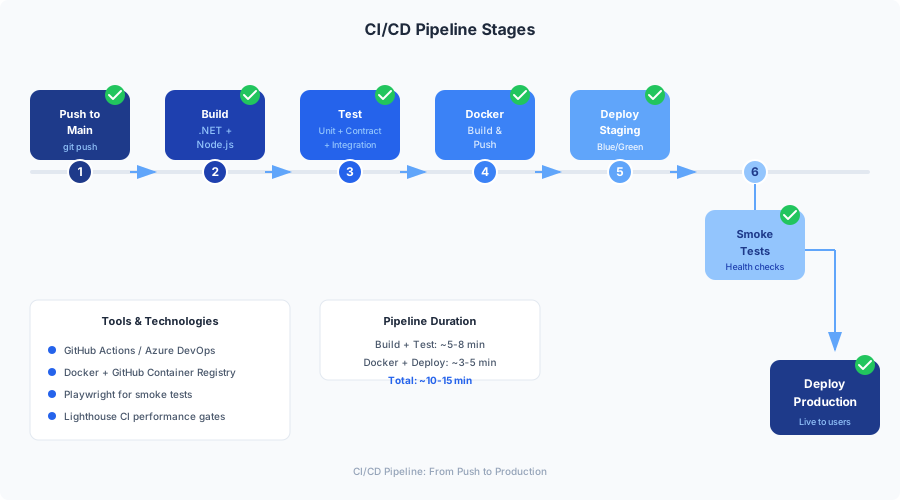
Pipeline Architecture
The pipeline has four phases:
- Build — Compile both projects, run unit tests, build Docker images
- Test — Contract tests, integration tests, Lighthouse, visual regression
- Deploy Staging — Push to staging environment, run smoke tests
- Deploy Production — Promote to production after staging verification
For pull requests, the pipeline runs phases 1 and 2 only. Deployment only happens on main.
The Complete Pipeline
# .github/workflows/ci-cd.yml
name: MarketingOS CI/CD

on:
  push:
    branches: [main]
  pull_request:
    branches: [main]

permissions:
  contents: read
  packages: write
  pull-requests: write
  checks: write

env:
  REGISTRY: ghcr.io
  UMBRACO_IMAGE: ghcr.io/${{ github.repository_owner }}/marketingos-umbraco
  NEXTJS_IMAGE: ghcr.io/${{ github.repository_owner }}/marketingos-frontend

# Cancel in-progress runs for the same branch
concurrency:
  group: ${{ github.workflow }}-${{ github.ref }}
  cancel-in-progress: ${{ github.event_name == 'pull_request' }}

jobs:
  # ===========================================================================
  # Phase 1: Build and Unit Test
  # ===========================================================================

  build-backend:
    name: Build & Test Backend
    runs-on: ubuntu-latest
    defaults:
      run:
        working-directory: ./backend

    steps:
      - name: Checkout
        uses: actions/checkout@v4

      - name: Setup .NET 10
        uses: actions/setup-dotnet@v4
        with:
          dotnet-version: "10.0.x"

      - name: Cache NuGet packages
        uses: actions/cache@v4
        with:
          path: ~/.nuget/packages
          key: nuget-${{ runner.os }}-${{ hashFiles('backend/**/*.csproj') }}
          restore-keys: nuget-${{ runner.os }}-

      - name: Restore dependencies
        run: dotnet restore

      - name: Build
        run: dotnet build --configuration Release --no-restore

      - name: Run unit tests
        run: >
          dotnet test
          --configuration Release
          --no-build
          --verbosity normal
          --logger "trx;LogFileName=test-results.trx"
          --collect:"XPlat Code Coverage"
          --results-directory ./TestResults

      - name: Publish test results
        uses: dorny/test-reporter@v1
        if: always()
        with:
          name: Backend Test Results
          path: backend/TestResults/**/*.trx
          reporter: dotnet-trx

      - name: Upload coverage
        uses: codecov/codecov-action@v4
        with:
          directory: backend/TestResults
          flags: backend
          token: ${{ secrets.CODECOV_TOKEN }}

  build-frontend:
    name: Build & Test Frontend
    runs-on: ubuntu-latest
    defaults:
      run:
        working-directory: ./frontend

    steps:
      - name: Checkout
        uses: actions/checkout@v4

      - name: Setup Node.js 22
        uses: actions/setup-node@v4
        with:
          node-version: "22"
          cache: "npm"
          cache-dependency-path: frontend/package-lock.json

      - name: Install dependencies
        run: npm ci

      - name: Lint
        run: npm run lint

      - name: Type check
        run: npx tsc --noEmit

      - name: Run unit tests
        run: npm run test -- --coverage --reporters=default --reporters=jest-junit
        env:
          JEST_JUNIT_OUTPUT_DIR: ./test-results

      - name: Publish test results
        uses: dorny/test-reporter@v1
        if: always()
        with:
          name: Frontend Test Results
          path: frontend/test-results/junit.xml
          reporter: jest-junit

      - name: Upload coverage
        uses: codecov/codecov-action@v4
        with:
          directory: frontend/coverage
          flags: frontend
          token: ${{ secrets.CODECOV_TOKEN }}

      - name: Build
        run: npm run build
        env:
          NEXT_PUBLIC_UMBRACO_API_URL: https://cms.staging.example.com
          NEXT_PUBLIC_SITE_URL: https://staging.example.com

  # ===========================================================================
  # Docker Image Builds
  # ===========================================================================

  docker-build:
    name: Build Docker Images
    runs-on: ubuntu-latest
    needs: [build-backend, build-frontend]

    steps:
      - name: Checkout
        uses: actions/checkout@v4

      - name: Set up Docker Buildx
        uses: docker/setup-buildx-action@v3

      - name: Login to GitHub Container Registry
        uses: docker/login-action@v3
        with:
          registry: ${{ env.REGISTRY }}
          username: ${{ github.actor }}
          password: ${{ secrets.GITHUB_TOKEN }}

      - name: Docker metadata (Umbraco)
        id: meta-umbraco
        uses: docker/metadata-action@v5
        with:
          images: ${{ env.UMBRACO_IMAGE }}
          tags: |
            type=sha,prefix=
            type=raw,value=latest,enable=${{ github.ref == 'refs/heads/main' }}
            type=ref,event=pr

      - name: Docker metadata (Next.js)
        id: meta-nextjs
        uses: docker/metadata-action@v5
        with:
          images: ${{ env.NEXTJS_IMAGE }}
          tags: |
            type=sha,prefix=
            type=raw,value=latest,enable=${{ github.ref == 'refs/heads/main' }}
            type=ref,event=pr

      - name: Build and push Umbraco image
        uses: docker/build-push-action@v6
        with:
          context: .
          file: backend/Dockerfile
          push: ${{ github.event_name != 'pull_request' }}
          tags: ${{ steps.meta-umbraco.outputs.tags }}
          labels: ${{ steps.meta-umbraco.outputs.labels }}
          cache-from: type=gha,scope=umbraco
          cache-to: type=gha,mode=max,scope=umbraco

      - name: Build and push Next.js image
        uses: docker/build-push-action@v6
        with:
          context: .
          file: frontend/Dockerfile
          push: ${{ github.event_name != 'pull_request' }}
          tags: ${{ steps.meta-nextjs.outputs.tags }}
          labels: ${{ steps.meta-nextjs.outputs.labels }}
          build-args: |
            NEXT_PUBLIC_UMBRACO_API_URL=https://cms.${{ vars.DOMAIN }}
            NEXT_PUBLIC_SITE_URL=https://${{ vars.DOMAIN }}
          cache-from: type=gha,scope=nextjs
          cache-to: type=gha,mode=max,scope=nextjs

  # ===========================================================================
  # Phase 2: Integration and Contract Tests
  # ===========================================================================

  contract-tests:
    name: Contract Tests (Pact)
    runs-on: ubuntu-latest
    needs: [build-backend, build-frontend]

    services:
      sqlserver:
        image: mcr.microsoft.com/mssql/server:2022-latest
        env:
          ACCEPT_EULA: "Y"
          MSSQL_SA_PASSWORD: "TestPassword123!"
        ports:
          - 1433:1433
        options: >-
          --health-cmd "/opt/mssql-tools18/bin/sqlcmd -S localhost -U SA -P TestPassword123! -Q 'SELECT 1' -C -N"
          --health-interval 10s
          --health-timeout 5s
          --health-retries 10
          --health-start-period 30s

    steps:
      - name: Checkout
        uses: actions/checkout@v4

      - name: Setup .NET 10
        uses: actions/setup-dotnet@v4
        with:
          dotnet-version: "10.0.x"

      - name: Setup Node.js 22
        uses: actions/setup-node@v4
        with:
          node-version: "22"
          cache: "npm"
          cache-dependency-path: frontend/package-lock.json

      # Step 1: Run consumer tests (Next.js generates Pact contracts)
      - name: Install frontend dependencies
        working-directory: ./frontend
        run: npm ci

      - name: Run Pact consumer tests
        working-directory: ./frontend
        run: npm run test:pact
        env:
          PACT_OUTPUT_DIR: ../pacts

      # Step 2: Verify contracts against Umbraco provider
      - name: Restore backend dependencies
        working-directory: ./backend
        run: dotnet restore

      - name: Run Pact provider verification
        working-directory: ./backend
        run: >
          dotnet test tests/MarketingOS.Tests.Pact
          --configuration Release
          --verbosity normal
        env:
          PACT_DIR: ../pacts
          ConnectionStrings__umbracoDbDSN: >-
            Server=localhost,1433;Database=MarketingOS_Test;
            User Id=SA;Password=TestPassword123!;
            TrustServerCertificate=true

  integration-tests:
    name: Integration Tests
    runs-on: ubuntu-latest
    needs: [docker-build]
    if: github.event_name == 'push' && github.ref == 'refs/heads/main'

    steps:
      - name: Checkout
        uses: actions/checkout@v4

      - name: Login to GitHub Container Registry
        uses: docker/login-action@v3
        with:
          registry: ${{ env.REGISTRY }}
          username: ${{ github.actor }}
          password: ${{ secrets.GITHUB_TOKEN }}

      - name: Start services with Docker Compose
        run: |
          export IMAGE_TAG=${{ github.sha }}
          export GITHUB_OWNER=${{ github.repository_owner }}
          docker compose -f docker-compose.ci.yml up -d --wait --wait-timeout 120

      - name: Wait for services to be healthy
        run: |
          echo "Waiting for Umbraco to be ready..."
          timeout 120 bash -c 'until curl -sf http://localhost:8080/api/keepalive/ping; do sleep 5; done'
          echo "Waiting for Next.js to be ready..."
          timeout 60 bash -c 'until curl -sf http://localhost:3000/api/health; do sleep 5; done'

      - name: Setup Node.js for E2E tests
        uses: actions/setup-node@v4
        with:
          node-version: "22"
          cache: "npm"
          cache-dependency-path: frontend/package-lock.json

      - name: Install Playwright
        working-directory: ./frontend
        run: |
          npm ci
          npx playwright install --with-deps chromium

      - name: Run E2E tests
        working-directory: ./frontend
        run: npx playwright test --project=chromium
        env:
          BASE_URL: http://localhost:3000
          UMBRACO_URL: http://localhost:8080

      - name: Upload Playwright report
        uses: actions/upload-artifact@v4
        if: always()
        with:
          name: playwright-report
          path: frontend/playwright-report/
          retention-days: 7

      - name: Tear down services
        if: always()
        run: docker compose -f docker-compose.ci.yml down -v

  lighthouse:
    name: Lighthouse CI
    runs-on: ubuntu-latest
    needs: [docker-build]
    if: github.event_name == 'push' && github.ref == 'refs/heads/main'

    steps:
      - name: Checkout
        uses: actions/checkout@v4

      - name: Login to GitHub Container Registry
        uses: docker/login-action@v3
        with:
          registry: ${{ env.REGISTRY }}
          username: ${{ github.actor }}
          password: ${{ secrets.GITHUB_TOKEN }}

      - name: Start services
        run: |
          export IMAGE_TAG=${{ github.sha }}
          export GITHUB_OWNER=${{ github.repository_owner }}
          docker compose -f docker-compose.ci.yml up -d --wait --wait-timeout 120

      - name: Wait for services
        run: |
          timeout 120 bash -c 'until curl -sf http://localhost:3000; do sleep 5; done'

      - name: Run Lighthouse CI
        uses: treosh/lighthouse-ci-action@v12
        with:
          urls: |
            http://localhost:3000/
            http://localhost:3000/about
            http://localhost:3000/blog
          configPath: ./lighthouserc.json
          uploadArtifacts: true

      - name: Tear down services
        if: always()
        run: docker compose -f docker-compose.ci.yml down -v

  # ===========================================================================
  # Phase 3: Deploy to Staging
  # ===========================================================================

  deploy-staging:
    name: Deploy to Staging
    runs-on: ubuntu-latest
    needs: [contract-tests, integration-tests, lighthouse]
    if: github.event_name == 'push' && github.ref == 'refs/heads/main'
    environment:
      name: staging
      url: https://staging.${{ vars.DOMAIN }}

    steps:
      - name: Checkout
        uses: actions/checkout@v4

      - name: Deploy to staging server
        uses: appleboy/ssh-action@v1
        with:
          host: ${{ secrets.STAGING_HOST }}
          username: ${{ secrets.STAGING_USER }}
          key: ${{ secrets.STAGING_SSH_KEY }}
          script: |
            cd /opt/marketingos

            # Pull new images
            export IMAGE_TAG=${{ github.sha }}
            export GITHUB_OWNER=${{ github.repository_owner }}
            docker compose -f docker-compose.prod.yml pull

            # Rolling update — brings up new containers before stopping old ones
            docker compose -f docker-compose.prod.yml up -d \
              --remove-orphans \
              --wait \
              --wait-timeout 180

            # Verify health
            docker compose -f docker-compose.prod.yml ps

      - name: Smoke test staging
        run: |
          echo "Running smoke tests against staging..."

          # Wait for deployment to settle
          sleep 15

          # Check homepage returns 200
          STATUS=$(curl -s -o /dev/null -w "%{http_code}" https://staging.${{ vars.DOMAIN }}/)
          if [ "$STATUS" != "200" ]; then
            echo "Homepage returned $STATUS, expected 200"
            exit 1
          fi

          # Check Umbraco API health
          STATUS=$(curl -s -o /dev/null -w "%{http_code}" https://cms.staging.${{ vars.DOMAIN }}/api/keepalive/ping)
          if [ "$STATUS" != "200" ]; then
            echo "Umbraco health check returned $STATUS, expected 200"
            exit 1
          fi

          # Check Content Delivery API
          STATUS=$(curl -s -o /dev/null -w "%{http_code}" \
            -H "Api-Key: ${{ secrets.UMBRACO_API_KEY }}" \
            https://cms.staging.${{ vars.DOMAIN }}/umbraco/delivery/api/v2/content)
          if [ "$STATUS" != "200" ]; then
            echo "Content Delivery API returned $STATUS, expected 200"
            exit 1
          fi

          echo "All smoke tests passed!"

  # ===========================================================================
  # Phase 4: Deploy to Production
  # ===========================================================================

  deploy-production:
    name: Deploy to Production
    runs-on: ubuntu-latest
    needs: [deploy-staging]
    if: github.event_name == 'push' && github.ref == 'refs/heads/main'
    environment:
      name: production
      url: https://${{ vars.DOMAIN }}

    steps:
      - name: Checkout
        uses: actions/checkout@v4

      - name: Deploy to production server
        uses: appleboy/ssh-action@v1
        with:
          host: ${{ secrets.PRODUCTION_HOST }}
          username: ${{ secrets.PRODUCTION_USER }}
          key: ${{ secrets.PRODUCTION_SSH_KEY }}
          script: |
            cd /opt/marketingos

            # Record current image tags for rollback
            docker compose -f docker-compose.prod.yml images --format json > /tmp/pre-deploy-images.json

            # Pull and deploy
            export IMAGE_TAG=${{ github.sha }}
            export GITHUB_OWNER=${{ github.repository_owner }}
            docker compose -f docker-compose.prod.yml pull
            docker compose -f docker-compose.prod.yml up -d \
              --remove-orphans \
              --wait \
              --wait-timeout 180

            # Verify all services healthy
            docker compose -f docker-compose.prod.yml ps

      - name: Smoke test production
        id: smoke-test
        continue-on-error: true
        run: |
          echo "Running production smoke tests..."
          sleep 15

          FAILED=0

          # Homepage
          STATUS=$(curl -s -o /dev/null -w "%{http_code}" https://${{ vars.DOMAIN }}/)
          if [ "$STATUS" != "200" ]; then
            echo "::error::Homepage returned $STATUS"
            FAILED=1
          fi

          # Check critical pages
          for path in "/about" "/blog" "/contact"; do
            STATUS=$(curl -s -o /dev/null -w "%{http_code}" "https://${{ vars.DOMAIN }}${path}")
            if [ "$STATUS" != "200" ]; then
              echo "::error::${path} returned $STATUS"
              FAILED=1
            fi
          done

          # Performance check — homepage should respond under 2 seconds
          TIME=$(curl -s -o /dev/null -w "%{time_total}" https://${{ vars.DOMAIN }}/)
          if (( $(echo "$TIME > 2.0" | bc -l) )); then
            echo "::warning::Homepage response time ${TIME}s exceeds 2s threshold"
          fi

          if [ "$FAILED" -eq 1 ]; then
            echo "smoke_failed=true" >> $GITHUB_OUTPUT
            exit 1
          fi

          echo "All production smoke tests passed!"

      - name: Rollback on failure
        if: steps.smoke-test.outcome == 'failure'
        uses: appleboy/ssh-action@v1
        with:
          host: ${{ secrets.PRODUCTION_HOST }}
          username: ${{ secrets.PRODUCTION_USER }}
          key: ${{ secrets.PRODUCTION_SSH_KEY }}
          script: |
            echo "ROLLING BACK — smoke tests failed"
            cd /opt/marketingos

            # Get previous image tags
            PREV_TAG=$(cat /tmp/pre-deploy-images.json | jq -r '.[0].Tag // "latest"')
            export IMAGE_TAG=$PREV_TAG
            export GITHUB_OWNER=${{ github.repository_owner }}

            docker compose -f docker-compose.prod.yml up -d \
              --remove-orphans \
              --wait \
              --wait-timeout 180

            echo "Rollback complete. Running on previous image: $PREV_TAG"

      - name: Notify on rollback
        if: steps.smoke-test.outcome == 'failure'
        uses: slackapi/slack-github-action@v1
        with:
          payload: |
            {
              "text": ":rotating_light: MarketingOS production deployment ROLLED BACK\nCommit: ${{ github.sha }}\nActor: ${{ github.actor }}\nSee: ${{ github.server_url }}/${{ github.repository }}/actions/runs/${{ github.run_id }}"
            }
        env:
          SLACK_WEBHOOK_URL: ${{ secrets.SLACK_WEBHOOK_URL }}
That’s a lot of YAML. Let me walk through the key design decisions.
Why These Four Phases?
Phase 1 (Build) runs on every push and PR. It catches compilation errors, type errors, linting issues, and unit test failures within seconds. Fast feedback. If this fails, nothing else runs.
Phase 2 (Test) runs more expensive tests. Contract tests verify that the Next.js frontend and Umbraco API agree on response shapes. Integration tests spin up the full Docker Compose stack and run Playwright E2E tests against it. Lighthouse CI catches performance regressions. These take 3-5 minutes but catch integration issues that unit tests miss.
Phase 3 (Deploy Staging) only runs on pushes to main (not PRs). It deploys to staging and runs smoke tests. The environment: staging setting in GitHub Actions enables environment protection rules — you can require manual approval, limit which branches can deploy, and set environment-specific secrets.
Phase 4 (Deploy Production) runs after staging verification. It includes automatic rollback: if smoke tests fail, the pipeline SSH’s back into the server and reverts to the previous image tag. This has saved me twice in production.
Docker Layer Caching in CI
The most expensive part of the pipeline is building Docker images. Without caching, the Umbraco image takes 3-4 minutes (NuGet restore + compile) and the Next.js image takes 2-3 minutes (npm install + build). With GitHub Actions cache:
cache-from: type=gha,scope=umbraco
cache-to: type=gha,mode=max,scope=umbraco
This stores Docker layer cache in GitHub Actions’ cache storage. On subsequent builds where only source code changed (not dependencies), the restore/install layers are cached and build time drops to 45-90 seconds. The mode=max flag caches all layers, not just the final image layers, which is important for multi-stage builds.
Concurrency Control
concurrency:
  group: ${{ github.workflow }}-${{ github.ref }}
  cancel-in-progress: ${{ github.event_name == 'pull_request' }}
This prevents two deployments from running simultaneously. If I push to main while a previous deployment is still running, the previous run continues (we don’t cancel deployments). But for PRs, we cancel the previous run — there’s no point running CI on an outdated PR commit when a new one is available.
Contract Tests as a Blocking Gate
The contract tests job is critical. In Part 6, we set up Pact consumer tests in the Next.js frontend that generate contract files describing what the frontend expects from Umbraco’s Content Delivery API. The provider verification runs those contracts against the actual Umbraco API.
If someone changes a property name in an Umbraco document type but forgets to update the Next.js type definitions, the contract test catches it in CI before it reaches staging. I’ve made this a required status check for merging PRs:
Repository Settings → Branches → Branch protection rules → main
  ✓ Require status checks to pass before merging
  ✓ Required checks:
    - Build & Test Backend
    - Build & Test Frontend
    - Contract Tests (Pact)
The Lighthouse Performance Budget
Lighthouse CI runs against the staging deployment and enforces performance budgets:
{
  "ci": {
    "collect": {
      "numberOfRuns": 3
    },
    "assert": {
      "assertions": {
        "categories:performance": ["error", { "minScore": 0.9 }],
        "categories:accessibility": ["error", { "minScore": 0.95 }],
        "categories:best-practices": ["error", { "minScore": 0.9 }],
        "categories:seo": ["error", { "minScore": 0.95 }],
        "first-contentful-paint": ["error", { "maxNumericValue": 1500 }],
        "largest-contentful-paint": ["error", { "maxNumericValue": 2500 }],
        "cumulative-layout-shift": ["error", { "maxNumericValue": 0.1 }],
        "total-blocking-time": ["error", { "maxNumericValue": 200 }]
      }
    },
    "upload": {
      "target": "temporary-public-storage"
    }
  }
}
This means a PR that introduces a large unoptimized image, a render-blocking script, or a layout shift will fail CI. The performance budget is the guardian that prevents the “it’s just one more script tag” erosion that plagues marketing sites over time.
Secrets Management
Secrets live in three places:
GitHub Secrets — for CI/CD pipeline use only. These include SSH keys for deployment, the Umbraco API key, container registry credentials, and Slack webhook URLs.
Repository Settings → Secrets and variables → Actions

Secrets:
  STAGING_HOST           — staging server IP
  STAGING_USER           — SSH user for staging
  STAGING_SSH_KEY        — private key for staging SSH
  PRODUCTION_HOST        — production server IP
  PRODUCTION_USER        — SSH user for production
  PRODUCTION_SSH_KEY     — private key for production SSH
  UMBRACO_API_KEY        — Content Delivery API key
  GEMINI_API_KEY         — Google Gemini API key for AI content
  CODECOV_TOKEN          — code coverage upload token
  SLACK_WEBHOOK_URL      — deployment notifications

Variables:
  DOMAIN                 — production domain (e.g., clientsite.com)
Docker secrets on the server — for runtime use by containers. These are plain text files in a restricted directory:
# On the production server
sudo mkdir -p /opt/marketingos/secrets
sudo chmod 700 /opt/marketingos/secrets

echo "YourProductionDbPassword" | sudo tee /opt/marketingos/secrets/db_password.txt
echo "your-production-api-key" | sudo tee /opt/marketingos/secrets/umbraco_api_key.txt

sudo chmod 600 /opt/marketingos/secrets/*.txt
Environment-specific config — for non-secret configuration that varies by environment. We use a .env file per environment:
# /opt/marketingos/.env (production)
DOMAIN=clientsite.com
GITHUB_OWNER=your-org
IMAGE_TAG=latest
ACME_EMAIL=admin@clientsite.com
REDIS_PASSWORD=a-strong-redis-password
DB_PASSWORD=YourProductionDbPassword
The separation matters. GitHub Secrets are encrypted at rest and masked in logs — they’re for CI/CD secrets that the pipeline needs during execution. Docker secrets are file-based and injected into containers at runtime — they’re for application secrets. And .env files are for non-sensitive configuration that’s still environment-specific.
Database Migrations: The Invisible Step
One thing I didn’t have to build: database migration orchestration. Umbraco 17 handles this automatically on startup. When the container starts and connects to the database, Umbraco checks the current schema version and runs any pending migrations. This is brilliant for containerized deployments because:
- You don’t need a separate migration step in CI/CD
- Rolling updates work — the new container migrates the database before accepting traffic
- The health check (
/api/keepalive/ping) only returns 200 after migrations complete
The one caveat: if a migration fails (schema conflict, timeout, etc.), the container enters a crash loop. The health check never passes, Docker reports the service as unhealthy, and the deployment stays on the old containers. This is actually the behavior you want — a failed migration shouldn’t take down the site.
For the Next.js frontend, there are no database migrations. But there is a subtlety with ISR: when you deploy a new frontend version, the ISR cache from the previous version may be stale or incompatible. The Redis cache handler we set up earlier helps here — we can flush the cache as part of deployment:
# In the deployment script, after bringing up new containers
docker compose -f docker-compose.prod.yml exec redis redis-cli -a ${REDIS_PASSWORD} FLUSHDB
This forces all pages to be re-rendered on the first request after deployment, using the new component code. The flash of “uncached” requests lasts about 30 seconds for a typical marketing site with 20-50 pages.
Putting It All Together: A Real Deployment
Let me walk through what happens when I merge a PR that updates the testimonial component’s layout:
-
0:00 — I click “Merge pull request” on GitHub.
-
0:02 — GitHub Actions triggers the CI/CD workflow. The
build-backendandbuild-frontendjobs start in parallel. -
0:15 — Backend build completes. NuGet restore was cached (no dependency changes), so only compilation and unit tests ran. 47 tests pass.
-
0:22 — Frontend build completes.
npm ciwas cached, lint passes, type check passes, 83 Jest tests pass, Next.js build succeeds. -
0:25 — Docker image builds start. Both images use cached layers for the dependency stages. Only the source code layer and final build are rebuilt. Umbraco image: 45 seconds. Next.js image: 38 seconds.
-
1:10 — Contract tests start. Pact consumer tests run in the frontend (15 seconds), then provider verification runs against a temporary Umbraco instance with a test database (30 seconds). All 12 contract interactions verified.
-
1:55 — Integration tests start. Docker Compose brings up the full stack in CI. Playwright runs 24 E2E tests against it. All pass.
-
2:30 — Lighthouse CI runs against the deployed stack. Performance: 96, Accessibility: 100, Best Practices: 95, SEO: 100. All within budget.
-
2:45 — Staging deployment begins. SSH into staging server, pull new images (~10 seconds, only changed layers), bring up new containers with
docker compose up -d. -
3:15 — Staging smoke tests pass. Homepage returns 200, Content Delivery API responds, critical pages load.
-
3:20 — Production deployment begins. Same process as staging.
-
3:50 — Production smoke tests pass. The testimonial component is live with the updated layout.
-
3:55 — Pipeline completes. Total time: 3 minutes 55 seconds.
No SSH. No manual file copying. No guessing about environment variables. No praying.
What I’d Do Differently
A few things I’ve learned since setting this up:
Start with Docker Compose, not Kubernetes. I see teams jump to Kubernetes for a CMS + frontend stack that runs on two servers. Docker Compose with Traefik handles 90% of the use cases. We’ll discuss Kubernetes in Part 8, but only for the scenarios that genuinely need it (multi-region, auto-scaling beyond 10 servers).
Don’t skip the CI Compose file. I initially tried to use the development Compose file in CI. It was a disaster — volume mounts don’t make sense in CI, environment variables were wrong, and the health check timeouts were too short for the slower CI runners. Create a dedicated docker-compose.ci.yml with CI-appropriate settings.
Cache everything aggressively. The single biggest improvement to pipeline speed was adding caching for NuGet packages, npm dependencies, and Docker layers. Before caching, the pipeline took 12 minutes. After: 4 minutes. The actions/cache and GitHub Actions cache for Docker Buildx are free and dramatically improve developer experience.
Make the rollback automatic. My first version required manual rollback. The one time I needed it, I was on a plane. Now it’s automatic: if smoke tests fail, rollback happens within 60 seconds. The Slack notification tells me it happened so I can investigate when I land.
What’s Next
We have containers. We have a pipeline. We have automatic deployment and rollback. But where do these containers actually run?
In Part 8, we’ll explore the infrastructure layer: deploying MarketingOS on a self-hosted Ubuntu VPS (the budget option), AWS with ECS Fargate (the scalable option), and Azure Container Apps (the Umbraco-friendly option). We’ll use Terraform for infrastructure as code, set up monitoring with Grafana and Prometheus, and configure alerting so we know about problems before clients do.
The Docker images and CI/CD pipeline we built today are infrastructure-agnostic. The same images run on a $10/month VPS and a $500/month AWS cluster. That’s the beauty of containers — the deployment target is a decision you can change without rebuilding your application.
This is Part 7 of a 9-part series on building a reusable marketing website template with Umbraco 17 and Next.js.
Series outline:
- Architecture & Setup — Why this stack, ADRs, solution structure, Docker Compose
- Content Modeling — Document types, compositions, Block List page builder, Content Delivery API
- Next.js Rendering — Server Components, ISR, block renderer, component library, multi-tenant
- SEO & Performance — Metadata, JSON-LD, sitemaps, Core Web Vitals optimization
- AI Content with Gemini — Content generation, translation, SEO optimization, review workflow
- Testing — xUnit, Jest, Playwright, Pact contract tests, visual regression
- Docker & CI/CD — Multi-stage builds, GitHub Actions, environment promotion (this post)
- Infrastructure — Self-hosted Ubuntu, AWS, Azure, Terraform, monitoring
- Template & Retrospective — Onboarding automation, cost analysis, lessons learned