I’ve built fourteen marketing websites in the last three years. Different clients, different industries, same story every time: a homepage with a hero banner, a few landing pages with feature grids and testimonials, a blog, a contact form, and an “About Us” page that nobody reads but everyone insists on having. Each one took four to eight weeks. Each one was built from scratch. Each one cost the client somewhere between $8,000 and $20,000.
The thirteenth site broke me. The client wanted a simple landing page — hero, three features, a testimonial carousel, and a CTA. I quoted two weeks and $6,000. My project manager raised an eyebrow. “Didn’t we build almost exactly this last month?” she asked. She was right. I had the previous project sitting in a Git repo. But the content model was different, the CSS was tangled with the client’s brand, the deployment was hand-configured on a different server, and the AI-generated copy was wired directly to a specific Gemini API key. Reusing it would have taken almost as long as starting fresh.
That’s when I decided to build MarketingOS — a reusable marketing website template that could spin up a new client site in under an hour instead of under a month. This is the story of how I built it, the architecture decisions I made, and the honest trade-offs that come with building something meant to be reused.
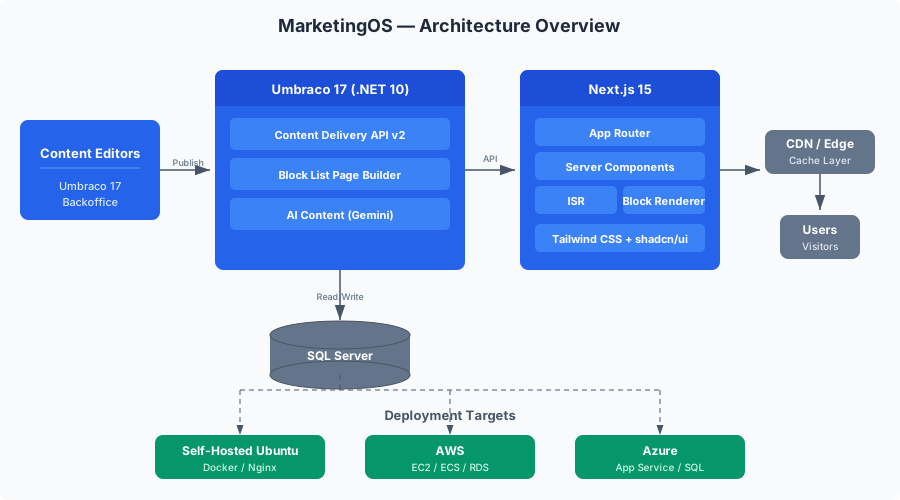
This is Part 1 of a 9-part series. By the end, we’ll have a production-ready marketing template with a headless Umbraco 17 CMS, a Next.js 15 frontend with ISR and Server Components, Gemini AI for content generation and translation, comprehensive testing with contract tests, Docker deployment, and infrastructure options from self-hosted Ubuntu to AWS and Azure. But first, we need to understand why this particular stack.
Why Not Just WordPress?
Let me address the elephant in the room. WordPress powers 43% of the web. It has thousands of themes. You can spin up a marketing site in hours with a purchased template. Why am I building something from scratch with Umbraco and Next.js?
Three reasons:
Performance. A Next.js site with ISR serves static HTML from a CDN. Time to First Byte is under 50ms. A WordPress site with plugins, even with caching, typically serves dynamic PHP responses at 200-800ms TTFB. For marketing sites, Core Web Vitals directly impact search rankings. Google’s own data shows that when LCP goes from 1s to 3s, bounce rates increase by 32%.
Content editing experience. Umbraco’s backoffice is genuinely pleasant. Block List and Block Grid editors let marketers build pages visually without touching code. WordPress Gutenberg is good, but Umbraco’s document type system with compositions means I can define exactly what fields appear for each content type — no more “custom fields” plugins that break on updates.
Cost at scale. WordPress hosting with managed security, CDN, and decent performance runs $30-100/month per site. A self-hosted Umbraco instance serving headless content to static Next.js sites can handle 10+ sites from a single $20/month VPS. The math changes fast when you’re managing a dozen client sites.
I also considered Contentful, Sanity, and Strapi. Contentful’s pricing at scale is eye-watering — the $489/month plan is where most agencies land once they have a few editors. Sanity’s GROQ query language has a learning curve. Strapi is excellent but lacks the maturity of Umbraco’s content editing experience. Umbraco has been around since 2005, is open-source, runs on .NET (which my team already knows), and has a proper headless API built in since v12.
Why Umbraco 17 LTS Specifically
Umbraco 17 landed in January 2026 as the latest Long-Term Support release. Here’s what matters for MarketingOS:
Built on .NET 10 LTS. Both the CMS and the runtime are LTS, meaning three years of security patches and bug fixes without major version upgrades. For agency work, stability is a feature.
Content Delivery API v2. The headless API has matured significantly. It now supports output caching, content expansion, filtering, sorting, and pagination out of the box. API key authentication lets us expose draft content for preview mode without complex OAuth flows.
Load-balanced backoffice. For the first time, you can run the Umbraco backoffice across multiple servers. This matters when multiple editors from different client teams are editing content simultaneously.
Developer MCP for AI. Umbraco 17 ships with Model Context Protocol support, which means AI tools can interact with the content model programmatically. We’ll use this in Part 5 when we integrate Gemini for content generation.
UTC date handling. All dates are now consistently UTC with timezone-aware pickers. Sounds minor, but if you’ve ever debugged a scheduled publish that fired at the wrong time because of timezone confusion, you’ll appreciate this.
// appsettings.json — enabling the Content Delivery API
{
  "Umbraco": {
    "CMS": {
      "DeliveryApi": {
        "Enabled": true,
        "PublicAccess": true,
        "ApiKey": "your-secret-api-key-here",
        "RichTextOutputAsJson": true
      },
      "GlobalSettings": {
        "UseHttps": true
      }
    }
  }
}
Why Next.js 15 with App Router
The frontend of MarketingOS is a Next.js 15 application using the App Router. Here’s the reasoning:
Server Components by default. Marketing pages are mostly static content. With Server Components, we ship zero JavaScript for pages that don’t need interactivity. A hero banner, feature grid, and testimonial section render as pure HTML — no hydration, no client-side JavaScript bundle. The result is a 40-60KB page instead of a 200KB+ SPA.
Incremental Static Regeneration (ISR). This is the killer feature for a headless CMS setup. Pages are pre-rendered at build time, but when content changes in Umbraco, we can revalidate individual pages without rebuilding the entire site. Combined with on-demand revalidation via webhooks, content updates appear within seconds.
Image optimization. The next/image component handles responsive images, lazy loading, format conversion (WebP/AVIF), and CDN caching automatically. For marketing sites heavy on hero images and product photography, this is table stakes for performance.
Hybrid rendering. Some pages are fully static (marketing landing pages). Some need server-side rendering (preview mode for editors). Some have client-side interactivity (contact forms, testimonial carousels). The App Router lets us mix these strategies per route.
// next.config.ts
import type { NextConfig } from 'next';

const nextConfig: NextConfig = {
  output: 'standalone',
  images: {
    remotePatterns: [
      {
        protocol: 'https',
        hostname: process.env.UMBRACO_HOST || 'localhost',
        port: '',
        pathname: '/media/**',
      },
    ],
    formats: ['image/avif', 'image/webp'],
  },
  experimental: {
    optimizePackageImports: ['lucide-react'],
  },
};

export default nextConfig;
Architecture Decision Records
Before writing code, I documented the key decisions. Here are the ADRs that shaped MarketingOS:
ADR-001: Headless Umbraco over Traditional Razor Views
Context: Umbraco supports both traditional server-rendered Razor views and a headless Content Delivery API.
Decision: Use Umbraco purely as a headless CMS. The frontend is a separate Next.js application.
Reasoning:
- Decoupled deployment: frontend and CMS can be updated independently
- Performance: static HTML from CDN vs server-rendered .NET responses
- Multi-channel: the same content API can serve web, mobile apps, and digital signage
- Team skills: frontend developers work in React/Next.js, not Razor syntax
- Template reuse: the Next.js frontend is the reusable template; Umbraco provides content
Trade-off: Preview mode requires additional wiring (webhooks + draft API). Traditional Umbraco preview works out of the box.
ADR-002: Clean Architecture for the Umbraco Backend
Context: The Umbraco backend needs custom logic: AI content generation, multi-tenant management, webhook handling, and content validation.
Decision: Structure the .NET solution using Clean Architecture with separate Domain, Application, Infrastructure, and Web projects.
Reasoning:
- Custom services (AI content, translation) need testable isolation
- Infrastructure can be swapped (SQL Server today, PostgreSQL later)
- Domain logic (content validation rules, tenant management) stays independent of Umbraco APIs
- Follows the same patterns as our other .NET projects (consistency across the agency)
Trade-off: More projects and more ceremony than a single Umbraco Web project. Worth it for testability and reuse.
ADR-003: Next.js App Router over Pages Router
Context: Next.js supports both the legacy Pages Router and the newer App Router.
Decision: Use the App Router exclusively.
Reasoning:
- Server Components reduce JavaScript bundle dramatically
- Streaming SSR for faster perceived loading
- Layout nesting for consistent marketing page structure
generateMetadatafor dynamic SEO from CMS content- This is the direction Next.js is heading; Pages Router is maintenance-mode
Trade-off: Some community packages still only support Pages Router. We avoid those or write wrappers.
ADR-004: Monorepo with Separate Deploy Pipelines
Context: The Umbraco backend and Next.js frontend are separate applications.
Decision: Single Git repository with two top-level directories (/backend and /frontend). Separate CI/CD pipelines for each.
Reasoning:
- Shared documentation, README, and configuration
- Atomic commits when content model changes require frontend updates
- Shared TypeScript types generated from Umbraco’s OpenAPI spec
- Contract tests run against both in CI
- Separate deploy pipelines because they have different cadences and targets
Trade-off: Larger repository. Requires careful .dockerignore and build context management.
The MarketingOS Solution Structure
Umbraco Backend (.NET 10)
The backend follows Clean Architecture. Here’s the project layout:
backend/
├── src/
│   ├── MarketingOS.Domain/
│   │   ├── Tenants/
│   │   │   ├── Tenant.cs
│   │   │   ├── TenantId.cs
│   │   │   └── TenantConfiguration.cs
│   │   ├── Content/
│   │   │   ├── ContentValidationRule.cs
│   │   │   └── ContentQualityScore.cs
│   │   └── Common/
│   │       ├── Entity.cs
│   │       └── ValueObject.cs
│   ├── MarketingOS.Application/
│   │   ├── AiContent/
│   │   │   ├── Commands/
│   │   │   │   ├── GenerateBlogDraft.cs
│   │   │   │   ├── GenerateMetaDescription.cs
│   │   │   │   └── TranslateContent.cs
│   │   │   ├── Queries/
│   │   │   │   └── GetGenerationHistory.cs
│   │   │   └── IAiContentService.cs
│   │   ├── Tenants/
│   │   │   ├── Commands/
│   │   │   │   └── CreateTenant.cs
│   │   │   └── Queries/
│   │   │       └── GetTenantConfiguration.cs
│   │   └── Common/
│   │       ├── ICommand.cs
│   │       ├── IQuery.cs
│   │       └── Behaviors/
│   │           └── ValidationBehavior.cs
│   ├── MarketingOS.Infrastructure/
│   │   ├── AiContent/
│   │   │   └── GeminiContentService.cs
│   │   ├── Persistence/
│   │   │   ├── MarketingOsDbContext.cs
│   │   │   └── Configurations/
│   │   └── DependencyInjection.cs
│   └── MarketingOS.Web/
│       ├── Program.cs
│       ├── Composers/
│       │   └── MarketingOsComposer.cs
│       ├── Controllers/
│       │   └── WebhookController.cs
│       ├── appsettings.json
│       └── Dockerfile
├── tests/
│   ├── MarketingOS.Domain.Tests/
│   ├── MarketingOS.Application.Tests/
│   ├── MarketingOS.Infrastructure.Tests/
│   └── MarketingOS.Api.Tests/
├── MarketingOS.sln
└── docker-compose.yml
The key insight: Umbraco is installed in the MarketingOS.Web project. All custom logic lives in the other layers, tested independently of Umbraco. The MarketingOsComposer wires up the Clean Architecture services into Umbraco’s dependency injection.
// MarketingOS.Web/Composers/MarketingOsComposer.cs
using MarketingOS.Application;
using MarketingOS.Infrastructure;
using Umbraco.Cms.Core.Composing;

namespace MarketingOS.Web.Composers;

public class MarketingOsComposer : IComposer
{
    public void Compose(IUmbracoBuilder builder)
    {
        builder.Services
            .AddApplication()
            .AddInfrastructure(builder.Config);
    }
}
// MarketingOS.Application/DependencyInjection.cs
using Microsoft.Extensions.DependencyInjection;
namespace MarketingOS.Application;
public static class DependencyInjection
{
public static IServiceCollection AddApplication(this IServiceCollection services)
{
services.AddMediatR(cfg =>
{
cfg.RegisterServicesFromAssembly(typeof(DependencyInjection).Assembly);
cfg.AddOpenBehavior(typeof(ValidationBehavior<,>));
});
services.AddValidatorsFromAssembly(typeof(DependencyInjection).Assembly);
return services;
}
}// MarketingOS.Infrastructure/DependencyInjection.cs
using Microsoft.Extensions.Configuration;
using Microsoft.Extensions.DependencyInjection;
using MarketingOS.Application.AiContent;
namespace MarketingOS.Infrastructure;
public static class DependencyInjection
{
public static IServiceCollection AddInfrastructure(
this IServiceCollection services,
IConfiguration configuration)
{
services.AddDbContext<MarketingOsDbContext>(options =>
options.UseSqlServer(
configuration.GetConnectionString("MarketingOS")));
services.AddScoped<IAiContentService, GeminiContentService>();
services.AddHttpClient<GeminiContentService>(client =>
{
client.BaseAddress = new Uri(
configuration["Gemini:BaseUrl"]
?? "https://generativelanguage.googleapis.com");
});
return services;
}
}Next.js Frontend
The frontend is a Next.js 15 project with App Router:
frontend/
├── src/
│   ├── app/
│   │   ├── layout.tsx
│   │   ├── page.tsx
│   │   ├── [...slug]/
│   │   │   └── page.tsx
│   │   ├── blog/
│   │   │   ├── page.tsx
│   │   │   └── [slug]/
│   │   │       └── page.tsx
│   │   ├── api/
│   │   │   └── revalidate/
│   │   │       └── route.ts
│   │   ├── sitemap.xml/
│   │   │   └── route.ts
│   │   └── robots.txt/
│   │       └── route.ts
│   ├── components/
│   │   ├── blocks/
│   │   │   ├── BlockRenderer.tsx
│   │   │   ├── HeroBlock.tsx
│   │   │   ├── FeatureGridBlock.tsx
│   │   │   ├── TestimonialBlock.tsx
│   │   │   ├── CtaBlock.tsx
│   │   │   ├── PricingBlock.tsx
│   │   │   ├── FaqBlock.tsx
│   │   │   └── ContactFormBlock.tsx
│   │   ├── layout/
│   │   │   ├── Header.tsx
│   │   │   ├── Footer.tsx
│   │   │   └── Breadcrumbs.tsx
│   │   ├── seo/
│   │   │   └── JsonLd.tsx
│   │   └── ui/
│   │       ├── Button.tsx
│   │       ├── Card.tsx
│   │       ├── Container.tsx
│   │       └── Section.tsx
│   ├── lib/
│   │   ├── umbraco/
│   │   │   ├── client.ts
│   │   │   ├── types.ts
│   │   │   └── queries.ts
│   │   └── config.ts
│   └── styles/
│       └── globals.css
├── public/
├── next.config.ts
├── tailwind.config.ts
├── tsconfig.json
├── Dockerfile
└── package.json
The lib/umbraco/ directory is the integration layer — typed API client, auto-generated types from the Umbraco OpenAPI spec, and query functions for each content type. The components/blocks/ directory mirrors the Block List blocks defined in Umbraco. The BlockRenderer.tsx component maps block aliases to React components.
// frontend/src/lib/umbraco/client.ts
const UMBRACO_URL = process.env.UMBRACO_URL || 'http://localhost:5000';
const UMBRACO_API_KEY = process.env.UMBRACO_API_KEY || '';

interface FetchOptions {
  preview?: boolean;
  revalidate?: number;
}

export async function umbracoFetch<T>(
  endpoint: string,
  options: FetchOptions = {}
): Promise<T> {
  const { preview = false, revalidate = 60 } = options;

  const headers: Record<string, string> = {
    'Content-Type': 'application/json',
  };

  if (preview) {
    headers['Api-Key'] = UMBRACO_API_KEY;
    headers['Preview'] = 'true';
  }

  const response = await fetch(
    `${UMBRACO_URL}/umbraco/delivery/api/v2${endpoint}`,
    {
      headers,
      next: { revalidate: preview ? 0 : revalidate },
    }
  );

  if (!response.ok) {
    throw new Error(
      `Umbraco API error: ${response.status} ${response.statusText}`
    );
  }

  return response.json() as Promise<T>;
}
// frontend/src/lib/umbraco/queries.ts
import { umbracoFetch } from './client';
import type { UmbracoPage, UmbracoBlogPost, UmbracoPagedResult } from './types';
export async function getPageByRoute(
route: string,
preview = false
): Promise<UmbracoPage | null> {
try {
return await umbracoFetch<UmbracoPage>(
`/content/item/${route}`,
{ preview, revalidate: 60 }
);
} catch {
return null;
}
}
export async function getHomePage(
preview = false
): Promise<UmbracoPage | null> {
return getPageByRoute('/', preview);
}
export async function getBlogPosts(
page = 1,
pageSize = 10
): Promise<UmbracoPagedResult<UmbracoBlogPost>> {
return umbracoFetch<UmbracoPagedResult<UmbracoBlogPost>>(
`/content?filter=contentType:blogPost&sort=createDate:desc&skip=${(page - 1) * pageSize}&take=${pageSize}`
);
}
export async function getAllRoutes(): Promise<string[]> {
const result = await umbracoFetch<UmbracoPagedResult<UmbracoPage>>(
'/content?take=1000'
);
return result.items.map(item => item.route.path);
}Docker Compose for Local Development
The entire stack runs locally with Docker Compose. This is the development configuration:
# docker-compose.yml
services:
  umbraco:
    build:
      context: ./backend
      dockerfile: src/MarketingOS.Web/Dockerfile
      target: development
    ports:
      - "5000:8080"
    environment:
      - ASPNETCORE_ENVIRONMENT=Development
      - ASPNETCORE_URLS=http://+:8080
      - ConnectionStrings__umbracoDbDSN=Server=sqlserver;Database=MarketingOS;User Id=sa;Password=YourStr0ngP@ssword;TrustServerCertificate=true
      - ConnectionStrings__MarketingOS=Server=sqlserver;Database=MarketingOS;User Id=sa;Password=YourStr0ngP@ssword;TrustServerCertificate=true
      - Umbraco__CMS__DeliveryApi__Enabled=true
      - Umbraco__CMS__DeliveryApi__PublicAccess=true
      - Umbraco__CMS__DeliveryApi__ApiKey=dev-api-key-change-in-production
      - Gemini__ApiKey=${GEMINI_API_KEY}
      - Gemini__Model=gemini-2.0-flash
    volumes:
      - umbraco-media:/app/wwwroot/media
    depends_on:
      sqlserver:
        condition: service_healthy
    networks:
      - marketingos

  sqlserver:
    image: mcr.microsoft.com/mssql/server:2022-latest
    ports:
      - "1433:1433"
    environment:
      - ACCEPT_EULA=Y
      - SA_PASSWORD=YourStr0ngP@ssword
    volumes:
      - sqlserver-data:/var/opt/mssql
    healthcheck:
      test: /opt/mssql-tools18/bin/sqlcmd -S localhost -U sa -P "YourStr0ngP@ssword" -C -Q "SELECT 1" || exit 1
      interval: 10s
      timeout: 5s
      retries: 5
    networks:
      - marketingos

  frontend:
    build:
      context: ./frontend
      dockerfile: Dockerfile
      target: development
    ports:
      - "3000:3000"
    environment:
      - UMBRACO_URL=http://umbraco:8080
      - UMBRACO_API_KEY=dev-api-key-change-in-production
      - NEXT_PUBLIC_SITE_URL=http://localhost:3000
    volumes:
      - ./frontend/src:/app/src
      - ./frontend/public:/app/public
    depends_on:
      - umbraco
    networks:
      - marketingos

  redis:
    image: redis:7-alpine
    ports:
      - "6379:6379"
    networks:
      - marketingos

volumes:
  sqlserver-data:
  umbraco-media:

networks:
  marketingos:
    driver: bridge
One docker compose up and you have:
- Umbraco 17 at
http://localhost:5000with the Content Delivery API enabled - SQL Server 2022 for Umbraco’s database
- Next.js 15 at
http://localhost:3000with hot-reload via volume mounts - Redis for caching (used later for ISR cache sharing)
The target: development in the Dockerfile stages means we use a development-optimized image with hot-reload support. The production Dockerfile (covered in Part 7) uses multi-stage builds to produce minimal runtime images.
# backend/src/MarketingOS.Web/Dockerfile
# Development stage — used by Docker Compose
FROM mcr.microsoft.com/dotnet/sdk:10.0 AS development
WORKDIR /src
COPY ["MarketingOS.sln", "."]
COPY ["src/MarketingOS.Domain/MarketingOS.Domain.csproj", "src/MarketingOS.Domain/"]
COPY ["src/MarketingOS.Application/MarketingOS.Application.csproj", "src/MarketingOS.Application/"]
COPY ["src/MarketingOS.Infrastructure/MarketingOS.Infrastructure.csproj", "src/MarketingOS.Infrastructure/"]
COPY ["src/MarketingOS.Web/MarketingOS.Web.csproj", "src/MarketingOS.Web/"]
RUN dotnet restore
COPY . .
WORKDIR /src/src/MarketingOS.Web
ENTRYPOINT ["dotnet", "watch", "run", "--urls", "http://+:8080"]

# Build stage — used for production
FROM mcr.microsoft.com/dotnet/sdk:10.0 AS build
WORKDIR /src
COPY ["MarketingOS.sln", "."]
COPY ["src/MarketingOS.Domain/MarketingOS.Domain.csproj", "src/MarketingOS.Domain/"]
COPY ["src/MarketingOS.Application/MarketingOS.Application.csproj", "src/MarketingOS.Application/"]
COPY ["src/MarketingOS.Infrastructure/MarketingOS.Infrastructure.csproj", "src/MarketingOS.Infrastructure/"]
COPY ["src/MarketingOS.Web/MarketingOS.Web.csproj", "src/MarketingOS.Web/"]
RUN dotnet restore
COPY . .
RUN dotnet publish "src/MarketingOS.Web/MarketingOS.Web.csproj" \
    -c Release -o /app/publish --no-restore

# Runtime stage — minimal production image
FROM mcr.microsoft.com/dotnet/aspnet:10.0 AS runtime
WORKDIR /app
RUN addgroup --system appgroup && adduser --system --ingroup appgroup appuser
COPY --from=build /app/publish .
USER appuser
EXPOSE 8080
HEALTHCHECK --interval=30s --timeout=5s --retries=3 \
    CMD curl -f http://localhost:8080/api/keepalive/ping || exit 1
ENTRYPOINT ["dotnet", "MarketingOS.Web.dll"]
# frontend/Dockerfile
# Development stage
FROM node:22-alpine AS development
WORKDIR /app
COPY package*.json ./
RUN npm ci
COPY . .
EXPOSE 3000
CMD ["npm", "run", "dev"]
# Dependencies stage
FROM node:22-alpine AS deps
WORKDIR /app
COPY package*.json ./
RUN npm ci --production
# Build stage
FROM node:22-alpine AS build
WORKDIR /app
COPY package*.json ./
RUN npm ci
COPY . .
RUN npm run build
# Runtime stage — standalone Next.js
FROM node:22-alpine AS runtime
WORKDIR /app
ENV NODE_ENV=production
RUN addgroup --system --gid 1001 nodejs && \
adduser --system --uid 1001 nextjs
COPY --from=build /app/public ./public
COPY --from=build --chown=nextjs:nodejs /app/.next/standalone ./
COPY --from=build --chown=nextjs:nodejs /app/.next/static ./.next/static
USER nextjs
EXPOSE 3000
ENV PORT=3000
ENV HOSTNAME="0.0.0.0"
CMD ["node", "server.js"]The Data Flow
Let me trace a request through the system so the architecture makes sense:
- User visits
https://client-site.com/servicesin their browser - CDN/Edge checks for a cached version. If the ISR revalidation window hasn’t passed, serves the cached HTML immediately (sub-50ms TTFB)
- Next.js Server (if cache miss or revalidation needed) calls
getPageByRoute('/services')which hits the Umbraco Content Delivery API - Umbraco API returns JSON with the page’s document type, properties, and block content
- Block Renderer maps each block in the response to a React Server Component (HeroBlock, FeatureGridBlock, etc.)
- HTML is generated server-side with zero client JavaScript for static blocks
- ISR cache is updated so the next request serves the fresh content instantly
- Interactive blocks (testimonial carousel, contact form) hydrate as client component islands
When a content editor publishes changes in Umbraco:
- Umbraco webhook fires on the
ContentPublishedevent - Next.js revalidation API receives the webhook with the page’s URL path
- ISR cache is invalidated for that specific path
- Next request triggers a fresh render with the updated content
This means content updates appear on the live site within seconds, without a full rebuild.
First Steps: Getting the Projects Running
Here’s the quickest path to a running MarketingOS stack:
# Create the monorepo structure
mkdir MarketingOS && cd MarketingOS
mkdir backend frontend

# Set up the Umbraco backend
cd backend
dotnet new umbraco -n MarketingOS.Web --friendly-name "Admin" \
    --email "admin@marketingos.dev" --password "Admin1234!" \
    --connection-string "Server=localhost;Database=MarketingOS;User Id=sa;Password=YourStr0ngP@ssword;TrustServerCertificate=true"

# Create Clean Architecture projects
dotnet new classlib -n MarketingOS.Domain
dotnet new classlib -n MarketingOS.Application
dotnet new classlib -n MarketingOS.Infrastructure

# Create solution and add references
dotnet new sln -n MarketingOS
dotnet sln add src/MarketingOS.Domain/MarketingOS.Domain.csproj
dotnet sln add src/MarketingOS.Application/MarketingOS.Application.csproj
dotnet sln add src/MarketingOS.Infrastructure/MarketingOS.Infrastructure.csproj
dotnet sln add src/MarketingOS.Web/MarketingOS.Web.csproj

# Wire up project references (Dependency Rule)
dotnet add src/MarketingOS.Application reference src/MarketingOS.Domain
dotnet add src/MarketingOS.Infrastructure reference src/MarketingOS.Application
dotnet add src/MarketingOS.Web reference src/MarketingOS.Infrastructure

# Move to frontend
cd ../frontend
npx create-next-app@latest . --typescript --tailwind --eslint \
    --app --src-dir --import-alias "@/*"
After running docker compose up, you’ll have both projects running. Open http://localhost:5000/umbraco to access the Umbraco backoffice and start creating content types.
What’s Next
We’ve established why Umbraco 17 + Next.js is the right stack for reusable marketing websites, documented our architecture decisions, set up the Clean Architecture backend structure, and got the full development environment running in Docker.
But the architecture is just scaffolding. The real value of MarketingOS is in the content model — the document types, compositions, and blocks that make it possible for marketers to build pages without developer intervention.
In Part 2, we’ll design the content model for marketing websites: document types with SEO, Hero, and Navigation compositions, a Block List page builder with Hero, Feature Grid, Testimonial, CTA, Pricing, FAQ, and Contact Form blocks, and the Content Delivery API configuration that exposes everything as typed JSON. We’ll also set up automatic TypeScript type generation from Umbraco’s OpenAPI spec, so the frontend always stays in sync with the content model.
The content model is the product. Get it wrong, and every site built from the template inherits the friction. Get it right, and new client sites are just configuration.
This is Part 1 of a 9-part series on building a reusable marketing website template with Umbraco 17 and Next.js. The series follows the development of MarketingOS, a template that reduces marketing website delivery from weeks to under an hour.
Series outline:
- Architecture & Setup — Why this stack, ADRs, solution structure, Docker Compose (this post)
- Content Modeling — Document types, compositions, Block List page builder, Content Delivery API
- Next.js Rendering — Server Components, ISR, block renderer, component library, multi-tenant
- SEO & Performance — Metadata, JSON-LD, sitemaps, Core Web Vitals optimization
- AI Content with Gemini — Content generation, translation, SEO optimization, review workflow
- Testing — xUnit, Jest, Playwright, Pact contract tests, visual regression
- Docker & CI/CD — Multi-stage builds, GitHub Actions, environment promotion
- Infrastructure — Self-hosted Ubuntu, AWS, Azure, Terraform, monitoring
- Template & Retrospective — Onboarding automation, cost analysis, lessons learned