The warning has been on the radar for years. Most agencies ignored it until it became an emergency.
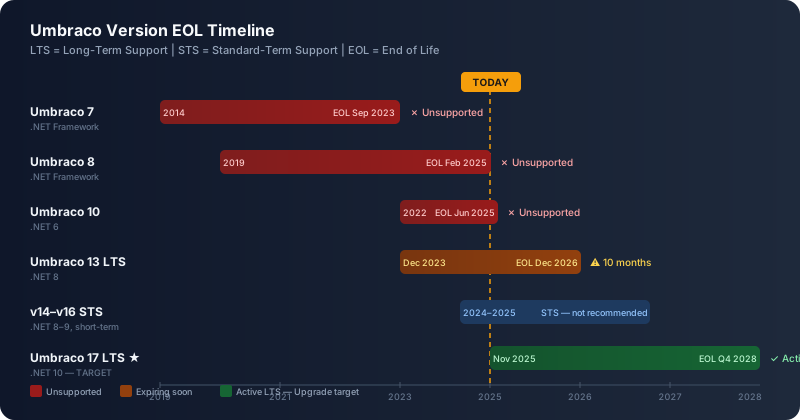
Umbraco 8 reached end-of-life on February 24, 2025. No more security patches. No more bug fixes. No community support. If you’re running an Umbraco 8 site for a client right now, you’re running an unsupported CMS on a production workload.
And Umbraco 13 — the version many teams migrated to as a safe harbor — hits its own end-of-life in December 2026.
For agencies managing a portfolio of Umbraco sites, this isn’t a single migration project. It’s a wave. And the question isn’t whether to migrate — it’s whether you can afford to build a workflow that makes the economics work.
This is the start of a practical, workflow-first series on AI-assisted Umbraco migration. Not vendor marketing. Not theory. A tech lead’s field guide to moving legacy Umbraco sites to Umbraco 17 LTS — with AI reducing the cost enough to make projects your clients couldn’t previously afford suddenly viable.
The EOL Landscape: What You’re Running On
Here’s the current state of Umbraco version support:
| Version | .NET Runtime | Status | EOL Date |
|---|---|---|---|
| Umbraco 7 | .NET Framework | Unsupported | September 2023 |
| Umbraco 8 | .NET Framework | Unsupported | February 2025 |
| Umbraco 10 | .NET 6 | Unsupported | June 2025 |
| Umbraco 13 | .NET 8 (LTS) | Active | December 2026 |
| Umbraco 14 | .NET 8 | STS only | ~June 2025 |
| Umbraco 15 | .NET 9 | STS only | ~May 2026 |
| Umbraco 16 | .NET 9 | STS only | ~December 2026 |
| Umbraco 17 | .NET 10 (LTS) | Active — Target | Q4 2028 |
The pattern is clear: if you’re not on v13 or v17, you’re already outside the security boundary. If you’re on v13, you have less than two years.
What “EOL” Actually Means for a Client Site
End-of-life for a CMS version isn’t an abstract risk. It’s a concrete business problem:
Security vulnerabilities will not be patched. When a CVE is discovered in Umbraco’s media handler, or a dependency (TinyMCE, Lucene.NET, AngularJS) reports a vulnerability, the Umbraco team patches supported versions. Unsupported versions get nothing. You are responsible for that exposure.
NuGet packages drift out of compatibility. Your existing integration packages — payment gateways, search providers, analytics connectors — will start requiring newer Umbraco versions for their own updates. You’ll face a choice: freeze your integrations, or migrate.
Developer availability shrinks. Finding a .NET Framework developer willing to work on Umbraco 7 or 8 code is already harder than it was two years ago. Every month that passes narrows your hiring and contracting options.
AngularJS is dead. Umbraco 7 and 8 backoffices run on AngularJS, which reached end-of-life in December 2021. Any custom backoffice extensions you built — custom property editors, dashboards, sections — are built on a framework with active CVEs and no maintainer. This isn’t theoretical risk; it’s a liability.
What Umbraco 17 Actually Delivers
Umbraco 17, released November 27, 2025, is the culmination of Project Bellissima — a two-year effort to modernize Umbraco’s core architecture. It’s an LTS release supported until Q4 2028, built on .NET 10 LTS.
Understanding what changed matters for your migration planning, because some of these changes affect how you estimate and scope the work.
The backoffice is completely rewritten. AngularJS is gone. The new backoffice is built with Web Components and TypeScript. For content editors, it’s faster and more accessible. For developers with custom backoffice extensions, it means rewriting those extensions using the new extension model. This is often the largest hidden cost in a v7 or v8 migration.
TinyMCE is replaced by Tiptap. The default Rich Text Editor is now Tiptap, an open-source editor with better extensibility and no licensing concerns. If you have custom TinyMCE plugins or configuration, they’ll need to be rebuilt.
HybridCache replaces the custom cache layer. Umbraco 17 uses the HybridCache API (introduced in .NET 9), giving you a layered caching system backed by memory and distributed cache. This improves performance for high-traffic sites without custom configuration.
The backoffice supports load balancing. Previous versions had constraints on running the backoffice across multiple servers. Umbraco 17 runs the full backoffice in a load-balanced setup, which matters for enterprise clients who require HA configurations.
Developer MCP is built in. Umbraco 17 ships with a Model Context Protocol server for developers, giving AI tools like Claude and GitHub Copilot direct API access to your Umbraco instance — content types, properties, routes, media — during development. This is a genuine accelerator for AI-assisted development.
Nested Content is gone. The Nested Content property editor, deprecated since v10, is completely removed. Any content using Nested Content must be migrated to Block List before (or during) the upgrade. This is the single most common source of migration complexity in v7/v8 projects.
Why AI Changes the Economics
The reason agencies have been deferring Umbraco migrations isn’t technical. It’s financial. The honest conversation goes like this:
“We have 12 Umbraco 8 sites. Each one has custom property editors, custom page types, Nested Content, and a bespoke front-end theme. A proper migration quote is £15,000–£40,000 per site. The client’s annual retainer is £3,000. The math doesn’t work.”
AI doesn’t make that math work by magic. But it shifts enough of the cost that the conversation becomes possible.
Here’s where AI actually reduces migration effort:
Codebase analysis. Analyzing a complex Umbraco project to understand content types, template dependencies, and custom code patterns used to take 3–5 days. With AI, a developer can feed in project files, Razor views, and document type exports and get a structured analysis in hours. Not perfect — but a starting point that dramatically reduces the analysis phase.
NestedContent inventory. Running AI against your database export or uSync output to identify every usage of Nested Content, map it to document types, and generate a migration plan for Block List conversion. What would have been a manual audit becomes a prompt and a review.
Boilerplate code generation. Umbraco migrations involve a lot of repetitive code: property converters, view components, migration runners, content service helpers. AI handles the mechanical generation. Developers handle the domain-specific logic.
Documentation of hidden logic. Every legacy Umbraco project has undocumented customizations — why a specific route override exists, what a particular startup extension does, which content types are actually in use versus orphaned. AI reads the code and produces structured documentation. Not always right, but much faster to correct than to write from scratch.
Test scaffolding. Integration tests for Umbraco content rendering, controller tests, front-end smoke tests — AI generates the scaffolding that would otherwise eat a developer’s afternoon.
The result: migrations that used to require 8 weeks now take 3–4 weeks. Projects that clients couldn’t afford become viable. The agency portfolio problem — 12 sites, all needing migration — becomes a workflow problem, not a budget problem.
The Three Migration Scenarios
Your starting version determines your path to v17. These are meaningfully different projects:
Scenario A: Umbraco 13 → 17 (Direct Upgrade)
This is a supported, direct upgrade. You’re staying in the .NET Core ecosystem, updating NuGet packages, regenerating models via Model Builder, addressing breaking changes in the new backoffice extension model, and migrating any remaining Nested Content. For a well-maintained v13 site, this can be a 2–5 day project. For a complex site with custom backoffice sections, expect 2–4 weeks.
Scenario B: Umbraco 8 → 17 (Fresh Instance Migration)
Umbraco 8 runs on .NET Framework. Umbraco 17 runs on .NET 10. There is no in-place upgrade path across this architectural boundary. The recommended approach: create a fresh Umbraco 17 instance, use uSync Migrations to export and transform content from v8, reimport into v17, and rewrite all custom code in .NET. This is a real migration project, not an upgrade. Expect 3–10 weeks depending on content complexity, custom property editors, and front-end customization level.
Scenario C: Umbraco 7 → 17 (Multi-Step or Full Rebuild)
Umbraco 7 requires either a sequential migration (v7 → v8 → v13 → v17, stepping through each major version’s content migration tools) or a full rebuild with content reimport. The sequential approach preserves more database state but takes longer. The full rebuild approach is cleaner but requires all content to be exportable. For sites with complex media libraries, custom property editors, and legacy Examine/Lucene index configurations, expect 8–20 weeks.
We’ll cover each path in detail in Part 3.
The Agency Portfolio Problem
If you’re managing 10, 20, or 50 Umbraco sites, individual project economics aren’t the only concern. System-level efficiency across the portfolio is.
This is what we call the Umbraco Marketing OS problem — and we’ll devote Part 7 entirely to it. The short version: agencies that treat every Umbraco site as a bespoke project will be doing bespoke migrations. Agencies that build shared infrastructure (shared document type libraries, shared front-end components, shared CI/CD pipelines, shared testing scaffolds) can dramatically reduce per-site migration cost.
AI makes this more achievable than it’s ever been. Generating standard components from a design system, producing ADRs for recurring architectural decisions, running automated audits across multiple sites — these are exactly the kinds of repetitive, high-volume tasks where AI assistance compounds.
What This Series Covers
- Part 2: AI-assisted project assessment and estimation — what to measure, how to score complexity, and what the assessment phase outputs
- Part 3: The migration paths in detail — v7, v8, and v13 to v17, with uSync Migrations, Umbraco Deploy, and the NestedContent→BlockList workflow
- Part 4: Modernizing code, content types, and templates — the Razor view migration, Model Builder, and clean architecture for Umbraco
- Part 5: AI agents in your Umbraco workflow — prompt patterns, ADR templates, and using Umbraco 17’s built-in Developer MCP
- Part 6: CI/CD for Umbraco — GitHub Actions to Azure App Service, Docker for local dev, environment parity
- Part 7: The Marketing OS framework — shared infrastructure for agencies managing multiple Umbraco sites
- Part 8: Testing, QA, and go-live — integration baselines, content smoke tests, feature flags, and rollback strategy
This is Part 1 of 8 in the Umbraco AI-Powered Migration Playbook.
Series outline: