The phone call came on a Monday morning.
“We’re joining a new project next week,” my tech lead said. “They want to migrate a .NET Framework 4.6 application to .NET 10. Oh, and my friend’s team? They’re migrating a WPF desktop app to a web application. Same timeline. Same budget pressure. Same boss.”
That was the moment I understood that this wasn’t just a technical migration. It was a test of whether a small, mostly-junior team — with AI as our secret weapon — could deliver what would have taken a larger team twice as long and three times the budget just two years ago.
This is that story. And this is the playbook we built from it.
The Legacy Migration Crisis Nobody Talks About
There are millions of .NET Framework applications still running in production. Banks. ERPs. Internal tools. Desktop applications wrapped in WPF that businesses depend on daily. Every one of them is a ticking clock — security vulnerabilities pile up, modern libraries won’t install, hiring developers who want to work on .NET Framework 4.x is getting harder every quarter.
Meanwhile, the official Microsoft roadmap is clear: .NET Framework is in maintenance mode. No new features. Security patches only. The future is .NET 8, .NET 10, and beyond.
Most companies know they need to migrate. Most companies don’t do it because of a simple equation: the cost is too high and the risk is too scary.
A typical enterprise .NET Framework migration used to require:
- 6-18 months of development time
- Specialist consultants who understand both old and new
- Extensive testing to catch behavioral regressions
- Significant budget — often $200K-$500K for a medium-sized application
And WPF-to-web? That was practically a full rewrite. Feature-parity, UI redesign, new mental model — the bill often exceeded building the web app from scratch.
That math has fundamentally changed. And the catalyst is AI.
The Numbers That Made Our Boss Listen
When we sat down with our boss and client to propose using AI tools to drive this migration, we didn’t lead with “it’s exciting technology.” We led with data.
Here’s what we showed them:
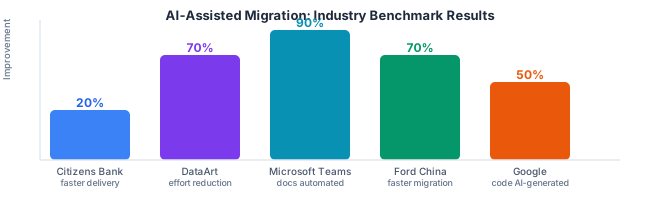
Citizens Bank integrated Microsoft Copilot into their engineering workflows for code conversions, documentation, and test generation. Their result: 20% productivity increase across engineering teams. That’s not a side project — that’s enterprise-scale, production code, with real accountability.
DataArt and a sports game application used GitHub Copilot to migrate 500,000 lines of code. Cost reduction: up to 70%. The work that would have taken a large team many months was compressed significantly.
Microsoft’s own Teams product used GitHub Copilot App Modernization to upgrade several projects from .NET 6 to .NET 8. Result: hours instead of weeks. Their internal teams dogfooded the tool and reported it publicly.
Ford China modernized middleware applications using the same GitHub Copilot toolchain. Nearly 70% reduction in time and effort.
Google (yes, Google) used AI-powered tooling for an internal migration and reported AI generating 74% of code changes across 500+ modifications, reducing migration time by 50%.
These aren’t startup blog posts or vendor marketing. These are documented, named companies with measurable outcomes. When we showed our boss this list, the conversation shifted from “can we afford to use AI?” to “can we afford not to?”
Our Situation: Two Migrations, One Small Team, One Deadline
Let me introduce the cast of characters — all fictional names, real frustrations:
Nguyen — that’s me. Tech lead. The only person on the team who’s spent serious time with AI tools. Responsible for the .NET Framework 4.6 → .NET 10 migration.
Linh — my teammate. Junior developer, two years of experience, strong work ethic, zero experience with AI coding assistants. Part of both migration tracks.
Minh — Nguyen’s friend, tech lead on the WPF → Web migration track. His team needs to take a Windows desktop application and turn it into a web application using React and Next.js.
The Boss — budget conscious, deadline driven, genuinely supportive if you can make a business case. His opening position: “Use AI to go faster and spend less, but don’t sacrifice quality.”
The Client — wants 80% test coverage minimum. Has been burned by big migrations before. Trusts code with tests; does not trust code they can’t verify.
And then the reality of what we walked into. Because nobody warns you about this part.
Six Things Nobody Warned Us About
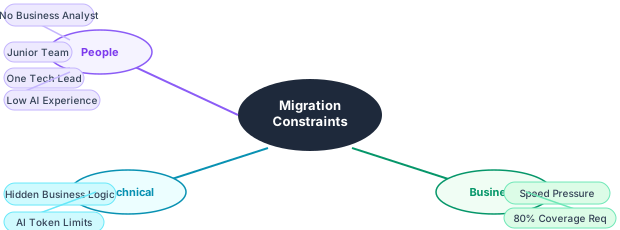
We knew migration was hard. We didn’t know it was this hard. Here are the six constraints that shaped everything we did:
1. No Business Analyst
There was no BA on this project. No product owner with domain expertise. No one to ask “what does this 800-line CalculatePremium method actually do in business terms?” We had to extract requirements from code that had accumulated 10 years of undocumented logic changes.
AI turned out to be surprisingly useful here — not as a replacement for a BA, but as a research assistant that could read the code and generate hypothesis documentation that humans could then validate. But it required new workflows we had to invent as we went.
2. Hidden Business Logic
This is the dirty secret of every legacy migration: the real business rules aren’t in the spec documents (if they still exist). They’re in if-statements added in 2015. They’re in database triggers nobody remembers writing. They’re in special-case handlers with comments like // TODO: check with finance team.
AI is excellent at reading code and explaining what it does. It’s dangerous when it confidently makes assumptions about why it does it. We learned this the hard way.
3. Junior Team + One Tech Lead
This was our team composition: one tech lead (me), one junior developer who was eager to learn. No mid-level buffer. When I was in the weeds on a gnarly migration problem, Linh was on her own. When Linh didn’t know how to use AI tools effectively, there was no one else to ask.
This shaped our whole approach. We needed structured workflows that Linh could follow independently, not just “use AI and figure it out.”
4. AI Token Limits Are Real
Nobody in the blog posts about AI productivity talks about what happens when your legacy codebase is too big for the AI’s context window. But it happens constantly in large migrations.
You try to pass in a 2,000-line service class for analysis. The AI cuts it off. You get partial analysis that misses the dependencies at line 1,847. You don’t know it’s partial because the AI doesn’t say “I only read half of your file.” It just… replies confidently about what it saw.
We had to develop chunking strategies, summary documents, and context management techniques that we’ll cover in detail in later parts of this series.
5. Speed vs. 80% Test Coverage
Our client’s requirement was non-negotiable: 80% test coverage on the migrated code. Our boss’s requirement was also non-negotiable: deliver fast. These two things were in tension.
The breakthrough was realizing AI could generate test scaffolding at a speed that humans couldn’t match. The bottleneck shifted from “writing tests” to “reviewing AI-generated tests” — which is much faster, but only if you have the workflow right.
6. Team AI Resistance Disguised as Skepticism
Linh wasn’t resistant to AI in principle. She was resistant because she’d tried GitHub Copilot once, gotten suggestions that were wrong three times in a row, and concluded: “It’s not reliable enough to trust.” That’s not resistance. That’s a valid conclusion from bad onboarding.
Teaching Linh to use AI effectively was as important as any technical migration decision I made. I’ll write an entire post on this (Part 5), because I think it’s the thing most tech leads get wrong.
The 40-30-30 Migration Model
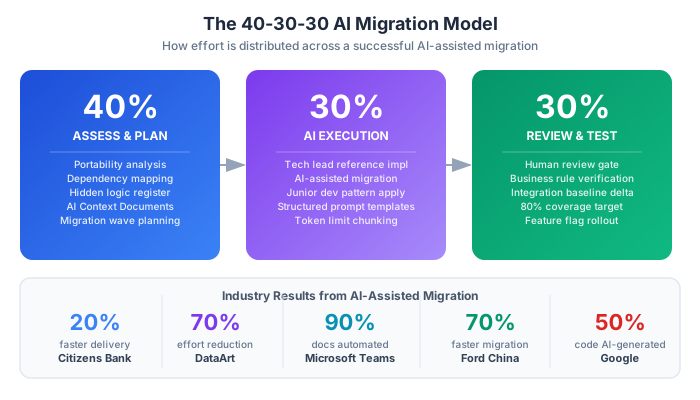
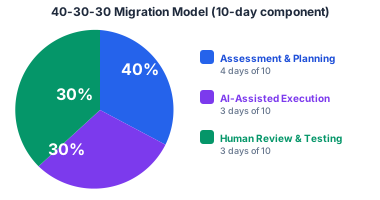
Through this project, we arrived at what I now call the 40-30-30 Migration Model. It’s not universal, but it reflects the reality of AI-assisted legacy work better than anything else I’ve seen.
40% Assessment and Planning. Before a single line of code is migrated, you need to understand what you have. Dependency graphs. Compatibility reports. Hidden business logic documentation. Risk matrices. Migration sequence planning (which components go first, why). In our experience, this phase is systematically underestimated. Teams rush to “start migrating” before they understand the landscape. The AI tools are genuinely useful here — but only if you give them the right inputs.
30% AI-Assisted Execution. This is the actual migration work: converting project files, replacing deprecated APIs, restructuring code, generating tests, fixing build errors. AI handles the bulk of the mechanical transformation. A competent AI tool can do in minutes what would take a developer hours — updating a thousand NuGet package references, converting HttpContext.Current patterns to the new middleware model, generating xUnit tests from existing code. But “handles the bulk” doesn’t mean “handles all of it.” Complex logic, especially undocumented business logic, requires human judgment at every step.
30% Human Review and Testing. This is the phase that determines whether you ship something that works or something that looks like it works. Every line of AI-generated or AI-transformed code must be reviewed by a human who understands the domain. Every test case generated by AI must be checked against actual business requirements. Performance baselines must be compared. The client’s 80% coverage requirement means nothing if the tests are testing the wrong things.
What does this look like in practice? If a migration component takes 10 days of work:
- 4 days: assessment, documentation, planning
- 3 days: AI-assisted execution with human oversight
- 3 days: review, testing, validation, fixing edge cases
That’s not faster-through-sloppiness. That’s faster-through-intelligence applied at the right moments.
Why This Series Exists
I’ve read dozens of blog posts about AI productivity and migration tools. Most of them fall into two categories:
The vendor posts that show you the happy path: run the tool, it works, celebrate.
The skeptics posts that tell you AI is overhyped and real migration still requires expert humans.
Both miss the nuance. AI tools for migration are genuinely powerful under the right conditions with the right workflow. But they will let you down — sometimes catastrophically — if you don’t understand their failure modes.
This series documents what we actually learned. Not the happy path. Not the doom narrative. The realistic, detailed, workflow-first account of what AI-assisted migration looks like when you’re a small team with a junior developer, no BA, a token limit problem, and a client who wants 80% test coverage.
Here’s what’s coming:
- Part 2: The full AI Migration Workflow framework — Phase by phase, with tools, team roles, and prompt patterns
- Part 3: Technical deep-dive on .NET Framework 4.6 → .NET 10 with AI — the actual migration steps, the blockers, the prompt patterns that work
- Part 4: WPF to Web with React/Next.js — how Minh’s team separated UI from business logic and used AI to accelerate what would have been a full rewrite
- Part 5: The human side — teaching Linh to use AI effectively, earning the client’s trust, managing the boss’s expectations
- Part 6: Measurement — how to prove AI is actually working when your boss asks for numbers
- Part 7: Lessons learned — what we got wrong, what we’d do differently, and what comes next
Where to Start If You’re Reading This Before Your Migration Begins
If you’re about to start a similar project, here’s the single most important thing you can do before touching any code:
Run the .NET Portability Analyzer on your entire solution and save the output.
It takes 30 minutes. It gives you a compatibility report showing exactly which APIs are incompatible with modern .NET, which NuGet packages need updating, and where the migration friction will be highest. That report becomes the input for your AI planning session in Phase 1.
For WPF projects: draw your layer diagram before anything else. Where is the business logic? Where is it tightly coupled to WPF UI components? Which parts of your data models can survive a port to a web API? Answering these questions on a whiteboard before opening any AI tool is the difference between a strategic migration and an expensive guessing game.
The rest of this series will fill in everything between that starting point and a working, tested, production-ready modern application.
Let’s get to work.
This is Part 1 of a 7-part series: The AI-Powered Migration Playbook.
Series outline:
- Why AI Changes Everything — The business case, case studies, and our migration scenario (this post)
- The AI Migration Workflow — A five-phase framework for teams (Part 2)
- .NET Framework 4.6 → .NET 10 with AI — Technical deep-dive (Part 3)
- WPF to Web with React/Next.js — UI migration with AI (Part 4)
- The Human Side — Team dynamics, upskilling, and trust (Part 5)
- Measuring Success — ROI, quality metrics, and reporting (Part 6)
- Lessons Learned — Anti-patterns and the road ahead (Part 7)