I’ve read a lot of articles about AI-assisted development that skip the human part entirely. They show you the prompts, the tool integrations, the productivity numbers — and then leave you to figure out how all of this works with an actual team of actual people who have actual fears about AI.
This post is the one I wish I’d had before the project started. It covers everything we learned about the people side of AI-assisted migration: teaching someone new to AI tools, managing the boss’s contradictory expectations, and keeping a client who’s been burned before from losing trust in your process.
The Problem with “Just Use AI”
When Linh joined the project, I made the mistake that almost every tech lead makes: I told her to “use AI to speed things up.”
That instruction is nearly useless. Here’s why.
Linh had tried GitHub Copilot before. She’d gotten three suggestions in a row that were subtly wrong — the code compiled, but it used a deprecated API in one case and referenced a class from the wrong namespace in another. She’d accepted them all initially, noticed the problems in code review, felt embarrassed, and concluded that AI wasn’t reliable.
Her conclusion was entirely rational given her experience. And it was wrong — not because AI is always reliable (it isn’t), but because her experience was the result of using AI without a validation workflow. She’d trusted suggestions without reviewing them. When they were wrong, the failure looked like “AI is wrong” rather than “the review process was missing.”
The lesson: AI resistance in junior developers is almost always a symptom of bad onboarding, not technical incompetence or stubbornness.
My job as tech lead wasn’t to tell Linh AI is good actually. It was to give her a workflow that made AI trustworthy by making it reviewable.
How We Taught Linh to Use AI Effectively
We did this in three weeks. Here’s the sequence:
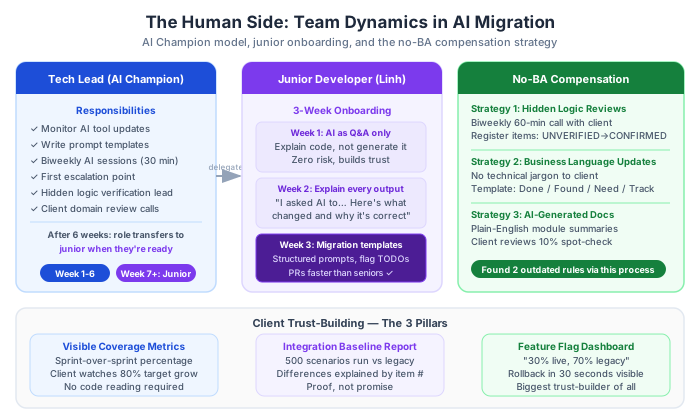
Week 1: AI as a question-answering tool, not a code generator
Linh spent the first week using AI only to understand the legacy codebase — not to produce migration code. Her AI interactions were:
- “Explain what this method does in plain English”
- “What does this design pattern do and why might it have been used in 2015?”
- “What’s the difference between
Task.Resultandawait? Why isTask.Resultdangerous in an ASP.NET context?”
This built her confidence that AI could be trusted as a knowledgeable explainer, while keeping the risk low. She wasn’t shipping AI-generated code. She was using AI to accelerate her own learning about the legacy system.
Week 2: AI with the “explain your output” rule
I introduced a rule: every AI-generated code snippet Linh used had to be accompanied by her own explanation of what it does. Not copy-paste. Understand-then-use.
Her code review comments changed from “AI generated this” to “I asked AI to convert this async pattern. Here’s what it changed: the .Result call was replaced with proper await, a CancellationToken parameter was added, and ConfigureAwait(false) was added since this is library code. I verified this matches our reference implementation in CustomerRepository_NEW.cs.”
That level of comment meant she actually understood the change. It also meant I could review faster — because she’d already done the explanation work.
Week 3: Structured prompt templates for migration tasks
Only in week 3 did Linh start using AI for migration execution. But she wasn’t free-styling prompts. She was using the structured templates from the AI Context Document (covered in Part 2), with explicit rules about what to flag for tech lead review.
The structured prompt turned an unconfident “I asked AI and got this, not sure if it’s right” into a confident “I followed the template, AI produced this output, I verified it against the reference implementation, and I flagged two TODOs for your review.”
By week 3, Linh’s PRs were faster to review than most senior developer PRs I’ve seen, because her process made the AI’s work transparent and her own reasoning explicit.
The AI Champion Model
For any team adopting AI in a migration project, appoint an AI Champion — one person whose explicit responsibility is:
- Staying current on AI tool capabilities and updates
- Developing prompt templates and AI Context Documents for the team
- Running short sessions (30 min, every 2 weeks) to share what they’ve learned
- Being the first escalation point when someone’s AI interaction produces confusing results
The AI Champion doesn’t have to be the tech lead (though it often is initially). The important thing is that it’s one person’s job, not everyone’s vague responsibility. When AI is everyone’s responsibility, no one actually improves the workflow. When it’s one person’s responsibility, the prompts get better, the templates get refined, and the team accumulates repeatable practices.
In our project, I was the AI Champion. After 6 weeks, Linh knew the workflows well enough that I could pass the role to her for the remaining time — which freed me to focus on architecture and the hard-to-delegate problems.
Dealing with “AI Will Replace Us”
This fear is common. I’ve heard it from developers at all experience levels. It’s also, in the context of a migration project, counterproductive — because it leads to passive AI adoption where developers technically use AI but don’t invest in learning it well.
Here’s what I actually said to Linh when the topic came up:
“On this project, AI is doing the work that would otherwise be blocked by not having enough experienced developers. Without AI, we couldn’t take on this project at this team size and timeline. With AI, we can. So the question isn’t ‘will AI replace you’ — the question is ‘will working with AI make you more valuable?’ And working with AI well is a skill that took me months to develop. You’re going to develop it on this project, and that makes you more valuable to the next project, and the one after that.”
This isn’t spin. It’s true. The developers who learn to work effectively with AI are not replaced by AI — they’re amplified. The developers at risk are the ones who refuse to learn, just as developers who refused to learn Git or cloud deployment became increasingly hard to hire 10 years ago.
But you can’t just say this. You have to make it real by actually investing in upskilling — structured learning time, prompt templates they own, space to experiment without penalty for imperfect output.
The “No BA” Problem — And How We Compensated
Having no business analyst on a migration project is a serious risk. The BA’s job in any technical project is to be the translator between business intent and technical implementation. Without one, you have:
- Technical teams making business decisions they’re not qualified to make
- Business decisions buried in legacy code that nobody alive can explain
- Client conversations that go sideways because the technical team speaks a different language than the stakeholders
We compensated with three practices:
1. The Hidden Logic Review Meeting
Every two weeks, we scheduled a 60-minute meeting with the client stakeholder. Our input: the Hidden Logic Register entries marked “UNVERIFIED” since the last meeting. Their job: confirm, correct, or escalate each one.
This meeting became the most valuable recurring event on the project. Not because the client loved documentation. Because it forced a conversation about business rules that hadn’t been spoken aloud in years. Twice, the client said “oh, that rule changed — let me find the email from 2019.” We found the change. The migration preserved the correct current behavior rather than the outdated code behavior.
2. Structured Client Updates in Business Language
Our progress updates to the boss and client were never technical. They followed this template:
## Migration Progress Update — Week N

### Completed This Week
- [X] Order Management module: migrated, 847 tests passing, 83% coverage
- [X] Customer Profile: migrated, confirmed 2 hidden business rules with
  accounting team

### Things We Found (and need your input on)
- The premium surcharge rule (HCM region, policy year < 2019):
  Still applies? Has anything changed?

### Next Week
- Payment Processing module (high risk — contains integration with Stripe v2)
- Will need 30 minutes of your time to review 4 hidden logic items

### Overall Progress
- 47% of components migrated
- 0 production rollbacks since feature flag deployment started
- Current test coverage: 81% (above 80% target)
For our project, we had 12 unverified hidden logic items. Catching up took an extra-long session and slowed down two sprints.
No technical jargon. No architecture diagrams. Just: what’s done, what we found, what we need, and whether we’re on track. The boss forwarded these updates to the client without modification. Trust was maintained because progress was visible.
3. AI-Assisted Legacy Documentation
For every migrated module, we used AI to generate a “business behavior document” — a plain-English summary of what the module does that a non-technical person could read and verify. The client reviewed 10% of these spot-check style. Finding problems in the documentation meant finding problems in the migration assumptions before they became production bugs.
Generate a plain-English description of what this class does, written
for a non-technical business stakeholder. Describe:
1. What business function does this serve?
2. When does it run and what triggers it?
3. What business rules does it enforce?
4. What happens when it fails?

Use business terminology, not technical terms. If you're uncertain
about any business intent, say so explicitly.

[paste class]
The 90-Day Adoption Framework
For teams starting their first AI-assisted migration, we recommend a 90-day adoption plan. Not because AI takes 90 days to learn. Because changing team habits takes 90 days.
Days 1-30: Foundation
- AI Champion identified
- All team members go through the “AI as question-answerer” phase (not code generators)
- First prompt templates created and documented
- First AI Context Document written
Days 30-60: Structured Execution
- Team uses prompt templates for migration execution
- Weekly 30-minute sessions: “what worked, what didn’t in AI usage this week”
- Junior developers submit PRs with AI explanation comments
- Tech lead tracks: how much time is human vs AI in each migration task?
Days 60-90: Refinement and Scale
- Prompt templates revised based on what actually worked
- Junior developer becoming AI Champion (gradual transition)
- Measuring AI impact on velocity vs pre-AI baseline
- Identifying remaining human-only tasks and protecting those from AI pressure
By day 90, AI usage should feel normal, not exciting or scary. That’s when it becomes a sustainable part of how the team works.
What the Client Needs to Trust the Process
Our client had been burned before. A previous vendor had used AI tools to rapidly generate a migration, shipped it, and found production bugs in the first month that required a partial rollback. The client associated “AI-assisted” with “untested.”
Three things rebuilt that trust:
Visible test coverage metrics: Every sprint, we reported the running test coverage number. The client could see it increasing. When it hit 80%, they knew — without reading code — that the goal was met.
The integration baseline delta: We showed the client the report from our integration baseline testing. “We ran your production system against 500 representative inputs. Here’s the comparison. The migrated system produced identical outputs in 498 cases. These 2 cases were differences we intentionally changed based on the hidden logic review — see items #14 and #17 in the register.”
Feature flags with rollback: We showed the client the feature flag dashboard. “As of today, 30% of real traffic is running through the migrated Order Management module. The legacy module handles the other 70%. If we see any issues, we can toggle this switch and 100% of traffic goes back to legacy within 30 seconds. No emergency deployment, no manual intervention.”
The feature flag was the single biggest trust-builder. It made “we can roll back instantly” not a promise but a demonstrated capability.
This is Part 5 of a 7-part series: The AI-Powered Migration Playbook.
Series outline: