In Part 1, I introduced our team and our situation: a .NET Framework 4.6 migration, a WPF-to-web migration, one tech lead, one junior developer, a client demanding 80% test coverage, and no business analyst.
I also introduced the 40-30-30 model: 40% assessment and planning, 30% AI-assisted execution, 30% human review and testing.
Now I want to make that concrete. Because “40% planning” is meaningless without knowing what you’re planning, who does it, and what tools you use. This post is the operational framework — the actual workflow we built and refined over the course of both migrations.
Why Most AI Migration Attempts Fail
Before we get into our framework, let’s name the failure modes. I’ve seen teams try AI-assisted migration and give up within two weeks. Here’s why:
Failure Mode 1: Starting with AI Instead of Assessment
The team opens GitHub Copilot, pastes in a legacy class, asks it to “migrate this to .NET 8,” and gets back something that looks reasonable. They ship it. Three weeks later they discover it silently dropped a validation rule that’s been in place since 2014. The fix takes longer than the original migration would have.
The problem isn’t the AI. It’s the missing assessment phase. The AI had no context for what the code was supposed to do, only what it did.
Failure Mode 2: No Human Review Gate
Teams trust AI output because it compiles and the tests pass. But AI-generated tests often test the AI’s own assumptions, not the actual business requirements. The regression happens in production, not in CI.
Failure Mode 3: One Person Using AI, Everyone Else Watching
Tech lead uses AI, goes fast, produces a lot of code. Junior developer can’t understand what was done or why. When the tech lead is on vacation and something breaks, nobody can debug it. The AI was a productivity accelerator for one person, not a team capability.
Failure Mode 4: Token Limit Amnesia
The AI analyzes your codebase in chunks. Each chunk loses context from the previous one. The migration plan the AI produced in session 1 is subtly different from the code it generates in session 47. Without a documentation strategy to maintain context, you end up with inconsistent architecture across a migrated codebase.
Our framework is designed to address all four of these failures explicitly.
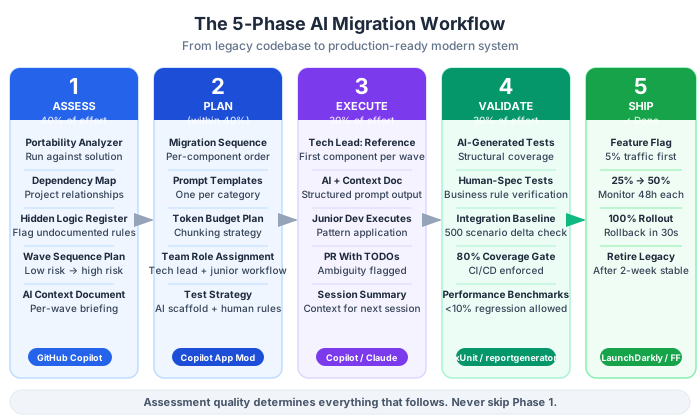
The Five-Phase AI Migration Workflow
Phase 1: Assess (40% of total effort)
Goal: Know exactly what you have before you touch anything.
Who does it: Tech lead drives, junior developer participates and documents.
Why junior involvement matters: If only the tech lead understands the legacy system, you have a single point of failure. Linh joining the assessment sessions meant she understood why decisions were made, not just what was decided. When I was unavailable, she could make informed choices.
Tools:
- .NET Portability Analyzer — run against your entire solution. Export the report. This becomes your migration map.
- GitHub Copilot / Claude Code — for reading and summarizing legacy code modules
- Mermaid / draw.io — for drawing the dependency graph you couldn’t see before
- A simple spreadsheet — for tracking assessment status per component
What you’re producing:
1. The Dependency Map
Every project in your solution. Every external NuGet package. Every third-party integration. Every database connection. Prioritize by change frequency and business criticality. The spreadsheet format:
| Component | Risk (H/M/L) | AI Compatible? | External Deps | Hidden Logic | Notes |
|---|---|---|---|---|---|
| PaymentService | High | Partial | Stripe SDK v2, legacy COM | Yes | Has 3 undocumented override rules |
| EmailTemplate | Low | Yes | None | No | Pure string manipulation |
2. The Hidden Logic Register
This is specific to our pain point of no BA. For every component that has unclear or undocumented logic, create a register entry:
## Hidden Logic: CalculatePremium (InsuranceService.cs, line 847)

**What the code does**: Applies a 12% surcharge when PolicyType == "C" AND
CustomerRegion == "HCM" AND PolicyYear < 2019.

**Why we think it does this**: Likely a regional tax adjustment from 2018. Need
to confirm with client before migrating.

**Risk**: HIGH — if this rule is wrong, financial calculations are wrong.

**Action**: Schedule domain review call with client before migrating this component.
This document is your substitute for a BA. It’s not perfect, but it gives you a record of what you found, what you assumed, and what needs human confirmation.
3. The Migration Sequence Plan
Order matters. You can’t migrate a service that depends on a repository you haven’t migrated yet. Use the dependency map to sequence components:
Wave 1: Pure business logic classes (no external deps)
Wave 2: Repository classes (after DB abstraction layer)
Wave 3: Service classes (after repositories)
Wave 4: API/controller layer (last)
AI prompt pattern for assessment:
I have a legacy .NET Framework 4.6 codebase and I need your help
understanding it before migrating. Here is [Component Name]:

[Paste component code]

Please:
1. Summarize what this component does in plain English
2. List all external dependencies (NuGet packages, services, databases)
3. Identify any logic that looks like it encodes business rules
4. Flag anything that will likely break in .NET 10
5. Rate migration complexity: Low / Medium / High and explain why

Important: Be explicit about assumptions. If you're unsure what a piece
of logic is doing, say so — don't guess.
That last line is critical. Without it, the AI will confidently invent explanations for undocumented code. The “be explicit about assumptions” prompt dramatically increases the quality of the analysis.
Phase 2: Plan (still within the 40%)
Goal: Convert the assessment into a concrete migration plan that a junior developer can execute.
Who does it: Tech lead produces the plan. Junior developer reviews and asks clarifying questions.
Critical output: The AI Context Document
This is the single most important document we created. It addresses the token limit problem directly.
When you start a new AI session to work on a specific component, you need to give the AI enough context to make good decisions — without pasting in your entire codebase (which won’t fit anyway). The AI Context Document is a curated, compressed summary of the context the AI needs for each migration wave.
## AI Context Document: Wave 2 — Repository Layer

### What we're migrating
The data access layer. Three repository classes: CustomerRepository,
PolicyRepository, ClaimRepository. All currently using ADO.NET directly.
Target: Dapper ORM with IDbConnection abstraction.

### Architecture decisions already made
- Using .NET 10 Minimal API
- Clean Architecture: Domain → Application → Infrastructure → API
- Connection strings now in appsettings.json (not app.config)
- All repositories must implement async/await (no synchronous DB calls)

### Patterns to follow
- See [CustomerRepository_NEW.cs] as the canonical example
- Repository constructor takes IDbConnectionFactory (not connection string directly)
- All methods return Result<T> not throwing exceptions

### Known risks for this wave
- PolicyRepository has 2 stored procedure calls that use output parameters
- ClaimRepository queries a linked server — needs special handling

### What NOT to change
- Business logic stays in services, not repositories
- Do not add caching — that's a separate phase
Every time you start a new session for that wave, you paste this document first. The AI now has the architectural constraints, the pattern examples, and the known risks — without needing the entire codebase.
Sprint breakdown
Decompose the migration into 1-2 week sprints based on waves. Assign each sprint to a specific team member. For a junior developer, the sprint assignment must include:
- Which components to migrate
- Which AI Context Document to use
- Which existing patterns to follow (with examples)
- What to do if they encounter something unexpected (escalate to tech lead, don’t improvise)
Phase 3: AI-Assisted Execution (30% of total effort)
Goal: Execute the migration using AI as the primary code generator, with humans directing and reviewing.
Who does it: Both tech lead and junior developer, with different AI usage patterns.
The Tech Lead’s AI usage: Strategic and architectural. Use AI to explore migration approaches, generate skeleton structures, analyze complex legacy logic, and produce reference implementations that become the patterns for the team.
The Junior Developer’s AI usage: Tactical and pattern-following. Given a clear AI Context Document and a reference implementation, Linh uses AI to apply the same pattern to additional components. She’s not free-styling — she’s executing a workflow with AI assistance.
This distinction is key. We did not hand Linh a vague instruction like “migrate the repository layer with AI.” We gave her:
- The AI Context Document for Wave 2
- The
CustomerRepository_NEW.csreference implementation (that I had already migrated and reviewed) - A specific prompt template to use
- Explicit criteria for when to stop and escalate
Here is the actual prompt template we gave Linh:
Context: [Paste the AI Context Document]

Reference implementation: [Paste CustomerRepository_NEW.cs]

Task: Migrate PolicyRepository.cs to .NET 10 following the exact same
pattern as CustomerRepository_NEW.cs.

Here is the legacy PolicyRepository.cs:
[Paste file]

Requirements:
- Follow every architectural decision in the Context Document
- Match the pattern in the reference implementation exactly
- For the stored procedure calls (lines 234-267 and 445-478), flag them
  with a TODO comment instead of migrating them — those need tech lead review
- After migrating, list any questions or concerns you have about the output

Do NOT make any architectural decisions that aren't specified above.
If something isn't covered, add a TODO comment and flag it.
That last section — “if something isn’t covered, add a TODO comment” — meant Linh was never stuck making architectural decisions she wasn’t qualified to make. And I could quickly scan for TODO comments when reviewing her PRs instead of reading every line.
Managing token limits in execution
Here’s our token limit strategy for large files:
Chunked analysis: For files larger than ~500 lines, we’d analyze in chunks:
- Chunk 1: Class header, constructor, and dependencies (let AI understand the context)
- Chunk 2: First group of methods
- Chunk 3: Next group of methods
- Synthesis: Ask AI to produce the migrated class based on the chunked analysis
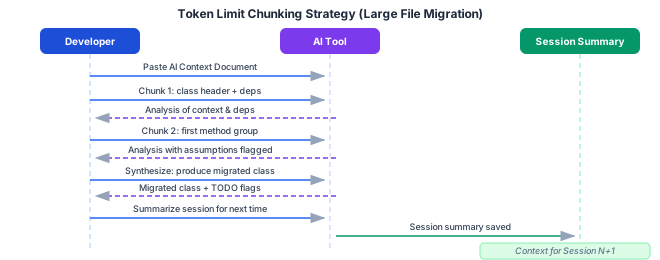
Running summary technique: At the end of each significant AI session, we asked the AI to produce a “session summary” — a brief document of what was analyzed, what decisions were made, and what remains. This became the context for the next session.
Please summarize this session:
1. What components were analyzed
2. What migration decisions were made (and why)
3. What questions remain unresolved
4. What the next session should start with

This summary will be used to start the next AI session.
Common AI execution tasks by type:
| Task | AI Capability | Notes |
|---|---|---|
.csproj file conversion to SDK-style | Excellent | Almost no human review needed |
| NuGet package updates | Good | Verify compatibility manually |
HttpContext.Current → Middleware | Good | Pattern is well-known to AI |
AppDomain usage removal | Good | AI knows the replacement patterns |
| Custom serialization logic | Medium | Needs careful review |
| Hidden business logic | Poor | DO NOT delegate to AI |
| Database-stored procedures | Poor | Human analysis required |
| COM Interop | Very poor | Manual migration only |
Phase 4: Validate (within the 30% review phase)
Goal: Ensure migrated code is correct, tested, and meets the 80% coverage requirement.
This is where we recovered from AI’s biggest blind spot: tests that test AI assumptions, not business requirements.
Here’s the problem. When you ask AI to generate tests for migrated code, it generates tests that verify the code does what the AI thinks it should do. If the AI misunderstood a business rule during migration, the test will pass — and the rule will be wrong.
Our solution: a two-layer testing approach.
Layer 1: AI-generated tests for structure and behavior
Ask AI to generate tests for:
- Happy path scenarios (valid inputs, expected outputs)
- Null checks and boundary conditions
- Exception handling paths
- Integration with dependent components
These tests are generated quickly and cover mechanical correctness.
Layer 2: Human-written tests for business rules from the Hidden Logic Register
Every entry in our Hidden Logic Register has a corresponding test case written by a human (or explicitly dictated by a human to AI with the exact assertion they want):
Write a test that verifies the following business rule:
"When PolicyType == 'C' AND CustomerRegion == 'HCM' AND PolicyYear < 2019,
a 12% surcharge must be applied."

Do not determine the logic from the code. Write the test based on this
specification exactly.
This decouples the test from the AI’s interpretation of the code and ties it to the business requirement.
Performance validation
Every migrated component needs a performance baseline comparison. We used BenchmarkDotNet for server-side components. The rule: if performance degraded by more than 10% compared to the legacy baseline, it went back for review before shipping.
.NET 10 is significantly faster than .NET Framework 4.6 in most scenarios — but sometimes migration shortcuts (like switching from a synchronous pattern to async/await incorrectly) can introduce overhead. Catch these before they reach production.
Phase 5: Ship (the final 30%)
Goal: Get migrated components into production safely, with the ability to roll back.
Feature flags for selective activation
Don’t deploy migrated code as a big-bang replace. Use feature flags to activate migrated components for a subset of traffic first:
// In .NET 10 Minimal API
app.MapPost("/api/policies", async (CreatePolicyRequest req, IFeatureFlags flags, ISender sender) =>
{
    if (flags.IsEnabled("UseNewPolicyService"))
        return await sender.Send(new CreatePolicyCommand(req));

    return await legacyPolicyHandler.Handle(req); // fallback
});
Start at 5% traffic. Monitor. If error rates are stable, increase to 25%, then 50%, then 100%. If something breaks, toggle the flag off. No emergency deployment needed.
CI/CD updates
Your CI pipeline needs to reference the .NET 10 SDK. Simple, but forgotten more often than you’d think:
- uses: actions/setup-dotnet@v3
  with:
    dotnet-version: '10.0.x'
The rollback safety net
Keep the legacy application deployable for 30 days after the new version goes live. Use deployment slots (Azure App Service) or blue-green deployments. First time you need this, you’ll be grateful. Every time after that, you’ll maintain it without question.
Team Role Definitions
Here’s how we structured roles around this workflow:
| Role | Primary Responsibilities | AI Usage |
|---|---|---|
| Tech Lead | Assessment, architecture, AI Context Documents, reference implementations, PR review | Heavy: exploration, analysis, complex migration |
| Junior Developer | Pattern-based execution, test generation, documentation | Structured: prompt templates, specific tasks |
| Both | PR reviews, validation testing, phase 4 business rule tests | Shared review responsibility |
One insight that changed everything: the tech lead’s most leveraged time is producing AI Context Documents and reference implementations, not doing the migration themselves.
If I spent 2 hours producing a perfect reference implementation of CustomerRepository_NEW.cs and a clear AI Context Document, Linh could use those to migrate 5 more repositories with AI assistance in the same time it would have taken me to migrate 2. My 2 hours multiplied into 5 components correctly migrated.
That’s the team multiplier effect. The tech lead architects and patterns; AI + junior developer execute at scale.
What a Day Looks Like
For concreteness, here’s a realistic day in Phase 3 execution:
Linh’s day:
- 9:00 AM: Open AI session with Wave 2 Context Document
- 9:05 AM: Use prompt template to migrate
PolicyRepository.cs - 9:45 AM: Review output, add tests, flag 2 TODOs for tech lead
- 10:00 AM: Open PR, mark TODOs in PR description
- 10:15 AM: Move to next component on sprint board
Nguyen’s day:
- 9:00 AM: Review 3 Linh PRs from yesterday — check architecture compliance, review TODOs
- 10:00 AM: Handle 2 escalated complex cases (stored procedure migration, COM interop analysis)
- 11:30 AM: Update AI Context Document for Wave 3 based on what we learned in Wave 2
- 1:00 PM: Architecture call with client re: 2 hidden logic items from the register
- 2:00 PM: Produce reference implementation for Wave 3 service layer pattern
- 3:30 PM: Update the running session summary document
This is not “the AI does everything.” It’s “the AI does the mechanical work, humans do the thinking, and the junior developer can actually contribute meaningfully without being in over their head.”
What’s Next
In Part 3, we go deep on the .NET Framework 4.6 → .NET 10 migration specifically: the exact sequence of steps, the common blockers you’ll hit, the prompt patterns for each phase, and how we handled the cases where AI couldn’t help.
If you’re starting a migration project right now, the single most valuable thing you can do today is create your first AI Context Document for your highest-risk component. Don’t migrate anything yet. Just write the document. It will clarify your thinking in ways that save you from expensive mistakes in execution.
This is Part 2 of a 7-part series: The AI-Powered Migration Playbook.
Series outline:
- Why AI Changes Everything — The business case and our scenario (Part 1)
- The AI Migration Workflow — Five phases, roles, and tools (this post)
- .NET Framework 4.6 → .NET 10 with AI — Technical deep-dive (Part 3)
- WPF to Web with React/Next.js — UI migration with AI (Part 4)
- The Human Side — Team dynamics, upskilling, and trust (Part 5)
- Measuring Success — ROI, quality metrics, and reporting (Part 6)
- Lessons Learned — Anti-patterns and the road ahead (Part 7)