Every project ends with a retrospective. Usually it happens in a meeting room with sticky notes, and the insights die with the meeting summary document.
This post is our retrospective done in public — because I think the lessons from this specific project are more valuable shared than archived.
We ran two parallel migrations: .NET Framework 4.6 → .NET 10 with AI, and WPF → React/Next.js with AI. Small team. No BA. Junior developer learning AI tools simultaneously. A client requiring 80% test coverage. A boss who wanted fast and quality simultaneously.
Here’s what we got wrong, what surprised us, what we’re proud of, and where we think this is all going.
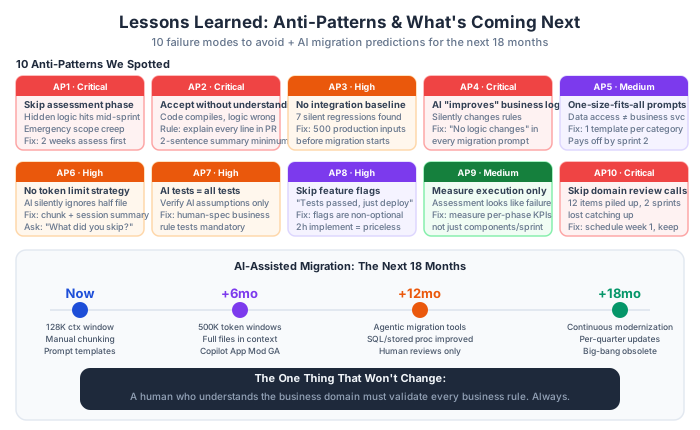
Ten Anti-Patterns We Either Made or Watched Others Make
Anti-pattern 1: Starting migration without an assessment phase
The instinct is to prove progress quickly. “Let’s migrate the first module this week.” The result: you discover the first module has 3 hidden business rules, 2 incompatible NuGet packages, and COM interop, halfway through the sprint. Now you’re behind schedule and the boss is asking why.
We invested two weeks in pure assessment before migrating a single file. That felt slow. It made everything after it faster and more confident.
Anti-pattern 2: Using AI as a replacement for understanding
The most dangerous failure mode: accepting AI output you don’t understand. The code compiles. The tests pass. But you couldn’t explain in your own words why a specific line does what it does.
We instituted a rule: no PR merged where the author couldn’t explain every line. Not line-by-line over 30 minutes — a 2-sentence summary of what the change does and why it was done that way. This sounds tedious. It’s actually very fast once it’s a habit (writing the summary takes 2 minutes), and it catches the cases where someone accepted AI output they didn’t actually understand.
Anti-pattern 3: Not having integration baseline tests
Before migration, run your system against representative production inputs and save the outputs. After migration, run against the same inputs and diff. Any difference is a regression candidate.
We found 7 regressions this way that would have shipped to production. The integration baseline is cheap to set up and priceless to have.
Anti-pattern 4: Letting AI change business logic “improvements”
When you ask AI to migrate a method, it sometimes helpfully suggests improvements — refactoring the business logic, combining conditions, simplifying formulas. Every single one of these is dangerous until explicitly verified.
The fix: always include in your migration prompts: “Do NOT change any business logic. If you see an opportunity to improve code quality, note it in a comment but don’t implement it. Migration only.”
Anti-pattern 5: One-size-fits-all AI prompts
We started with generic prompts. We discovered quickly that migrating a data access class, a business service, and a configuration module each needs its own prompt template. Spending an hour to write a specific template for each category pays for itself by sprint 2.
Anti-pattern 6: No token limit strategy
Paste a 2,000-line class into your AI tool. Watch it silently analyze only the first 1,200 lines because that’s where the context window fills up. Get output that ignores everything in the second half of the file.
The fix: chunking strategy + running session summaries. Never assume the AI saw everything you gave it. Always ask it to confirm what it analyzed and what it skipped. (Yes, you can ask: “What was in the code I showed you that you didn’t include in your analysis?” and it will tell you.)
Anti-pattern 7: Treating AI-generated tests as equivalent to human-designed tests
AI-generated tests verify that code does what the AI thinks it should do. They’ll pass even if the AI misunderstood the business requirement.
Human-designed tests (or human-specified tests written by AI from an explicit specification) verify that code does what the business requires. Both types belong in your test suite. The 80% coverage target doesn’t mean much if all 80% is AI-generated against AI-assumed behavior.
Anti-pattern 8: Skipping the feature flag step in production rollout
“Our integration tests all passed, let’s just deploy.” Three weeks later, there’s an edge case in production data that wasn’t in the test scenarios, and you’re doing an emergency rollback.
Feature flags are not optional in migration. The ability to say “we can roll back in 30 seconds without a deployment” is worth the 2 hours it takes to implement. Every time.
Anti-pattern 9: Measuring only execution velocity
If you only measure “components migrated per sprint,” your assessment phase looks like failure. If you measure across all phases — assessment quality, execution velocity, test coverage, regression rate, client confidence — you get an honest picture of progress.
Measure what matters at each phase, not just the one metric that’s visible.
Anti-pattern 10: Skipping the client domain review calls
When you have no BA, the client stakeholder has to fill that role for hidden logic verification. Schedule recurring domain review calls from week 1. Don’t let the hidden logic register pile up. Don’t try to resolve business rule questions via email (it takes 5 email threads to get an answer you’d get in 3 minutes on a call).
We almost made this mistake when a stakeholder from our client side went on vacation. We pushed two domain review calls back. When she returned, we had 12 unverified hidden logic items. Catching up took an extra-long session and slowed down two sprints.
What Surprised Us: Where AI Was Better Than Expected
Code explanation quality: We expected AI to be mediocre at explaining 10-year-old legacy code without documentation. It was excellent. Given a complex legacy class, AI could produce plain-English summaries that matched what the original developer almost certainly intended. This made the no-BA situation manageable.
Test scaffolding speed: AI can produce a test file with 80% of the needed test cases — happy path, null checks, boundary conditions — in about 3 minutes. The remaining 20% (business rule tests) takes human specification and careful review. But starting from 80% rather than 0% is a genuine acceleration.
Consistency in pattern application: Once you give AI a reference implementation and a clear instruction to follow it, it follows it reliably across multiple applications of the same pattern. Linh migrated 15 repository classes with AI using the same template, and they were all architecturally consistent. Achieving that consistency from a human on their own, working fast, is harder than it sounds.
Documentation generation: AI-generated business behavior documents (plain-English summaries of what legacy modules do) turned out to be accurate enough for client review in 80% of cases. The other 20% needed clarification but gave us a starting point for the conversation.
What Surprised Us: Where AI Was Worse Than Expected
Handling undocumented stored procedures: When AI encountered a stored procedure call with complex parameter sets and no comments, it would sometimes produce plausible-sounding explanations that were wrong. We caught these because we cross-referenced with the database team and the hidden logic register. Without that process, some would have shipped undetected.
Token limit awareness: AI does not warn you when it’s running out of context window. It doesn’t say “I only analyzed the first 1,200 lines of your 2,000-line file.” It just produces output based on what it saw, presenting it as if it analyzed the whole thing. This is the most dangerous failure mode we encountered — false completeness with no warning signal.
COM Interop: Complete failure. AI had no useful guidance for migrating COM Interop dependencies. This required specialist research and manual rewriting in every case. Don’t include COM Interop in your AI-assisted migration scope.
Cross-cutting concerns missed without explicit instruction: AI would correctly migrate a service class, but miss that the service had an implicit dependency on a static logging utility that no longer exists in the new architecture. The code compiled fine. The logging was silently dropped. Only our PR review process caught it.
What We’re Proud Of
We shipped on time. We hit 82% average test coverage (above the 80% target). We had zero production rollbacks after feature flag deployment. The client’s trust, which started low, finished high enough that they’ve asked us to scope the phase 2 migration already.
The junior developer (Linh) on the team could — by project end — produce migration PRs that passed review without major rework. That’s not a given for a junior developer on a complex legacy migration. It happened because we invested in structured AI workflows that let her be effective without being in over her head.
And we wrote this series, which is our attempt to give the next team starting a similar project a 6-week head start on the workflow knowledge we had to develop from scratch.
Where This Is Going: The Next 18 Months
AI-assisted migration will get significantly better in the next 18 months, and the improvements will mostly address the pain points we experienced:
Longer context windows: Models with 200K-1M+ token context windows will largely solve the chunking problem. You’ll be able to pass entire legacy files, or even entire modules, without losing context between chunks. This alone will meaningfully improve migration quality.
Agentic migration tools: GitHub Copilot App Modernization (which already exists) is the early version of what will become a much more capable agentic migration system. Instead of prompting AI to do individual tasks, you’ll configure an agent that analyzes your codebase, generates a migration plan, executes it incrementally, runs tests, and prompts you only when it encounters ambiguity. The human stays in the loop for decisions, but the execution loop is largely automated.
Better stored procedure and database understanding: Current models are weak on complex SQL. This is improving. In 18 months, AI will handle most stored procedure migrations that currently require manual specialist work.
Continuous modernization: The future state isn’t a big migration project every 5-10 years. It’s AI-assisted continuous modernization — your codebase stays current incrementally, quarter by quarter, with AI handling the mechanical updates and humans focusing on the business logic decisions. The 18-month .NET Framework migration becomes a rolling 2-sprint-per-quarter process.
The One Thing That Won’t Change
No matter how good the AI tools get, one thing will remain essential: a human who deeply understands the business domain must validate every business rule that touches important decisions.
AI can tell you what the code does. AI can migrate how it does it. AI cannot tell you whether it’s correct for the business context — whether that hidden 12% surcharge is still valid law or an outdated rule that should have been removed in 2021.
The integration baseline, the hidden logic register, and the domain review calls with your client — these exist not because AI is bad, but because business truth doesn’t live in code. It lives in people’s heads, in regulations, in client experiences, in decisions that were made for reasons nobody documented.
That human responsibility doesn’t get automated. It gets clearer when you have better AI tools, because you spend less time on the mechanical work and more time on the things that actually require judgment.
After this project, I’m a genuine believer in AI-assisted migration. Not because it’s magic — it’s not. But because a small team with the right workflow and the right AI tools can now take on migration projects that would have required a larger, more expensive team just two years ago. That’s a real change in what’s possible for organizations that need to modernize but have been stuck by the cost of doing so.
The playbook works. Now go run it.
This is Part 7 of 7 in the AI-Powered Migration Playbook series.
Complete series:
- Why AI Changes Everything — The business case and our migration scenario (Part 1)
- The AI Migration Workflow — Five phases, roles, and tools (Part 2)
- .NET Framework 4.6 → .NET 10 with AI — Technical deep-dive (Part 3)
- WPF to Web with React/Next.js — UI migration with AI (Part 4)
- The Human Side — Team dynamics, upskilling, and trust (Part 5)
- Measuring Success — ROI, quality metrics, and reporting (Part 6)
- Lessons Learned — Anti-patterns and the road ahead (this post)
If you’re starting a similar migration, the most useful things to read first are Part 2 (the workflow framework) and Part 5 (the human side). The technical details in Part 3 and 4 matter, but workflow and team dynamics determine whether the technical details ever get properly applied.