The most common reason Umbraco migrations go over budget is not the migration itself. It’s the discovery that happens during the migration of complexity that wasn’t visible during scoping.
The NestedContent usage that nobody documented. The custom property editor built in 2017 that stores data in a format the migration tools can’t parse. The 400 pages of content that are all live but half of them are orphaned. The custom Examine index that has no equivalent configuration in v17.
Assessment is how you find these things before they become incidents. And AI is how you can afford to do assessment thoroughly enough to actually surface them — rather than doing a quick walkthrough and hoping for the best.
This post covers the structured assessment process we use for Umbraco migration projects, what AI handles well, what it doesn’t, and how to produce an assessment document that makes your estimate defensible.
The Assessment Mindset
Assessment is not a pre-sales activity. It’s a technical deliverable.
An assessment document produced before the migration starts:
- Defines scope with enough precision to produce a reliable estimate
- Identifies the specific technical risks that will drive the most complexity
- Creates the foundation for the AI Context Documents that will guide migration execution (we’ll cover those in Part 5)
- Gives the client a clear picture of what they’re buying
Some agencies treat assessment as a billable phase (correct — it’s real work). Others roll it into the migration quote and absorb the cost. Either way, skipping it trades upfront comfort for downstream pain.
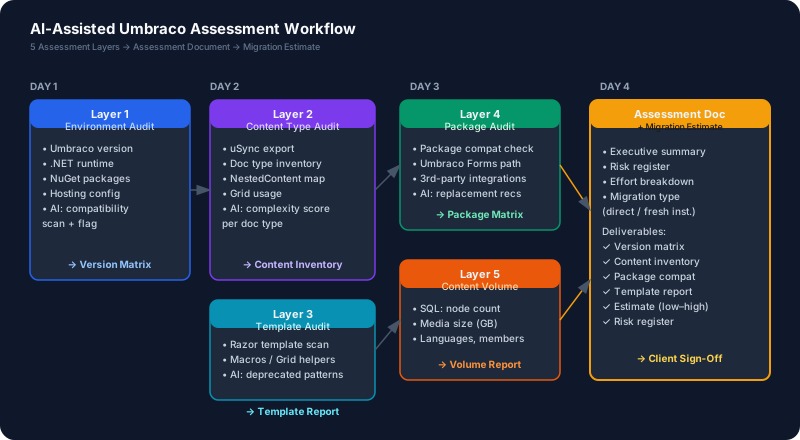
The Five Assessment Layers
For any Umbraco migration, you need to audit five distinct areas. Each one produces specific outputs that feed into your estimate.
Layer 1: Version & Environment Audit
What to capture:
- Current Umbraco version (exact patch number, not just major version)
- .NET runtime version
- Hosting: IIS, Azure App Service, shared hosting, Docker
- SQL Server version
- Current .NET target framework in
.csprojfiles
AI prompt to use:
I'm auditing a legacy Umbraco project before migration. Here are the relevant project files:

[Paste .csproj contents, web.config or appsettings.json, and startup files]

Please extract:
1. Exact Umbraco version and all Umbraco package versions
2. .NET target framework
3. Key NuGet package references and their versions
4. Any hosting-specific configuration you can identify
5. Anything that looks like it may have compatibility issues with .NET 8+ or Umbraco 17
The AI will pull out every package reference, flag deprecated packages, and tell you which ones have known compatibility issues. What takes a developer an hour to scan manually, AI does in minutes.
Output: Version matrix spreadsheet — one row per package, with current version, latest version, compatibility status.
Layer 2: Content Type & Property Editor Audit
This is where migration complexity hides. Every custom document type and property editor you have is a migration task.
What to capture:
- All document types (from Document Type tree or uSync export)
- All data types and property editors in use
- Special attention: Nested Content, Grid Layout, legacy pickers (Multi Node Tree Picker, Content Picker, Media Picker — older API versions)
- Custom property editors (any locally developed ones)
- Member types and their properties
Using uSync for the audit:
If the source site has uSync installed, you can export the entire schema to disk. If not, you can export directly from the backoffice:
Umbraco Backoffice → Settings → Data Types → ExportOnce exported, feed the configuration files to AI:
Here is the uSync export of all document types and data types from our Umbraco project
(XML files attached).

Please analyze and tell me:
1. How many document types exist and list them
2. Which document types use Nested Content property editors?
3. Which document types use Grid Layout?
4. Which document types use deprecated property editors (Media Picker v2, Content Picker v2,
   Multi-Node Tree Picker — older API)?
5. Any document types with unusual inheritance chains or compositions
6. Estimate migration complexity per document type: Simple / Medium / Complex
Output: Content type inventory with complexity scores. This is the data that drives 40% of your estimate.
What counts as complex:
| Property Editor | Migration Complexity | Tool Available |
|---|---|---|
| Nested Content | High | uSync Migrations |
| Grid Layout | High | uSync Migrations (from Aug 2024) |
| Legacy pickers (v8 API) | Medium | Umbraco Deploy migrators |
| Custom property editors | Very High | Manual rewrite required |
| Standard editors (textstring, richtext, etc.) | Low | Direct |
Layer 3: Template & Front-End Audit
Every Razor .cshtml template in a legacy Umbraco project uses the Umbraco surface controller pattern, the IPublishedContent API, and Umbraco tag helpers. The specific API surface changes between v8, v13, and v17.
What to look for:
- Total template count
- Templates using
@Html.GetGridHtml()— this helper is gone in v14+ - Templates using
@Html.RenderMacro()— Macros are removed in v14+ - Templates using
@CurrentPage— replaced with@Modelin v8+ - Custom surface controllers
- Any AngularJS backoffice views (custom property editors, custom dashboard sections)
AI prompt:
I am auditing Razor templates from an Umbraco 8 project. Here are the template files:

[Paste template content or list of template files]

Please identify:
1. Any usage of @Html.GetGridHtml() or grid rendering helpers
2. Any usage of @Html.RenderMacro() or macro-based content
3. Any usage of deprecated Umbraco tag helpers or extension methods
4. Any reference to AngularJS components or UmbEditors
5. Patterns that will need to change for Umbraco 17 compatibility
Critical flag: Macros are completely removed from Umbraco. If your site uses macros for navigation, content areas, or dynamic includes, every one of those needs to be replaced with a View Component or Razor partial. This can be significant work.
Output: Template audit report — total count, deprecated patterns found, estimated rewrite effort per category.
Layer 4: Package & Integration Audit
Third-party packages break migrations. Not always, but often enough that you need to know before you start.
What to check:
- Every NuGet package in the solution
- For each: is there a v17-compatible version available?
- Common offenders: custom search providers (Examine configurations), e-commerce packages, form packages, authentication providers
- Umbraco Forms: check the Forms package version separately — it has its own upgrade path
Key packages to check immediately:
| Package | Notes |
|---|---|
| Umbraco.Forms | Must match Umbraco version. v8 Forms → v17 Forms is a major migration |
| Examine | API changed between v8 and v10. Check your custom indexes |
| uCommerce / Vendr | Check compatibility matrix explicitly |
| Any AngularJS-based packages | Need full rebuild for new backoffice |
| Authentication/SSO providers | May need updates for new identity model |
AI prompt:
Here is my NuGet packages list from an Umbraco 8 project:

[Paste packages.config or .csproj PackageReference list]

For each Umbraco-related and CMS-integration package:
1. State whether it has an Umbraco 17 compatible version
2. If yes, what is the latest compatible version?
3. If no, what is the recommended alternative?
4. Flag any packages that are end-of-life or unmaintained
Output: Package compatibility matrix — critical vs. manageable vs. requires replacement.
Layer 5: Content Volume & Media Audit
Content volume determines two things: how long data migration runs take, and whether the client needs a phased cutover strategy.
What to capture:
- Total published content node count
- Total media item count and total storage size
- Languages/cultures if multilingual
- Member count (if member portal exists)
- Any Umbraco Forms submission data that needs to be preserved
Why it matters for estimation:
A site with 200 nodes migrates in seconds with uSync. A site with 50,000 nodes plus 40GB of media needs a staged migration plan with scheduled runs, verification passes, and downtime windows. These are completely different projects even if the code complexity is identical.
Output: Content inventory table with volume numbers.
The AI Assessment Playbook
Here’s the practical flow for running an AI-assisted assessment on a real project:
Day 1 — Environment walkthrough (2–4 hours)
- Clone the repository
- Run the current site locally (or get access to staging)
- Generate uSync export from backoffice
- Run .NET Portability Analyzer if on .NET Framework
- Feed all configuration files to AI with the Version Audit prompt
Day 2 — Content type and template deep dive (3–5 hours)
- Feed uSync export to AI with the Content Type Audit prompt
- Run the Template Audit prompt against all
.cshtmlfiles - Document every Nested Content usage found (this is your migration task list)
- Identify macro usages (each one is a replacement task)
Day 3 — Packages, integrations, content volume (2–3 hours)
- Run Package Audit prompt
- Database query for content/media volume:
-- Content node count
SELECT COUNT(*) FROM umbracoNode WHERE nodeObjectType = 'C66BA18E-EAF3-4CFF-8A22-41B16D66A972'

-- Media count
SELECT COUNT(*) FROM umbracoNode WHERE nodeObjectType = 'B796F64C-1F99-4FFB-B886-4BF4BC011A9C'

-- Nested Content usage (look for these property editor aliases)
SELECT COUNT(*) FROM cmsPropertyType
WHERE propertyEditorAlias = 'Umbraco.NestedContent'- Check existing test coverage (if any)
- Document hosting setup and deployment process
Day 4 — Assessment document (1–2 hours)
Compile everything into the assessment document. This is what you present to the client and use to produce your estimate.
The Estimation Framework
With a complete assessment, estimation becomes a structured exercise, not a gut-feel exercise.
We use a complexity tier system with time ranges validated against real projects:
Tier 1: Umbraco 13 → 17 (Direct Upgrade)
| Factor | Low | Medium | High |
|---|---|---|---|
| Document types | < 20, standard editors | 20–50, some custom | 50+, complex compositions |
| Custom backoffice | None | Dashboards only | Custom property editors |
| Package compatibility | All compatible | 1–2 need updates | Major packages incompatible |
| Template complexity | Standard Razor | Some custom helpers | Heavy custom rendering |
| Content volume | < 5k nodes | 5k–50k nodes | 50k+ nodes |
Effort range:
- Low: 3–5 days
- Medium: 2–4 weeks
- High: 4–8 weeks
Tier 2: Umbraco 8 → 17 (Fresh Instance)
Start from Tier 1 estimates and add:
- +1–2 weeks: .NET Framework → .NET 10 code rewrite
- +3–10 days: uSync migration and content import runs
- +1–3 days per: custom property editor that needs complete rebuild
- +1–2 weeks (if): Umbraco Forms data migration required
- +5 days (if): Multilingual content with culture-specific rules
Tier 3: Umbraco 7 → 17
Start from Tier 2 and add:
- +3–5 days: v7 → v8 database upgrade and content migration tool
- +2–5 days: AngularJS backoffice extension rewrite
- Additional risk buffer: 20–30% (v7 projects frequently have undocumented customizations)
Risk Multipliers
Apply these to your base estimate:
| Risk Factor | Multiplier |
|---|---|
| No existing test coverage | 1.2× |
| No existing documentation | 1.15× |
| Active development during migration | 1.3× |
| Multiple environments to manage | 1.1× |
| Client requires zero-downtime cutover | 1.25× |
| External integrations (APIs, payment, SSO) | +3–5 days per integration |
Assessment Document Template
Your assessment document should contain:
## Umbraco Migration Assessment: [Project Name]

### Executive Summary
- Source version: Umbraco X.X.X on .NET X
- Target version: Umbraco 17 on .NET 10
- Migration type: [Direct upgrade / Fresh instance]
- Estimated effort: X–Y weeks
- Key risks: [Top 3 risks identified]

### Environment Audit
[Table: Package name, current version, target version, compatibility status]

### Content Type Inventory
[Table: Document type, property editors, complexity tier, migration task]

### Nested Content / Grid Usage
[List every doc type with NestedContent, estimated Block List migration effort]

### Template Audit
[Count by pattern: Standard / Uses deprecated helpers / Macro-based / Custom controllers]

### Package Compatibility
[Table: Critical packages, compatibility status, action required]

### Content Volume
- Published nodes: X
- Media items: X (X GB)
- Languages: X
- Members: X

### Risk Register
[Table: Risk, probability, impact, mitigation]

### Estimate Breakdown
[Table: Phase, tasks, days low, days high]
This document is a deliverable. It should be reviewed by the client, signed off, and version-controlled in the project repository.
What AI Gets Right — and What It Doesn’t
AI handles well:
- Scanning large volumes of configuration and code
- Cross-referencing package versions against known compatibility
- Generating structured output from semi-structured input (XML, legacy config files)
- Producing the first draft of the assessment document
AI does not handle well:
- Understanding why a customization exists (domain knowledge required)
- Predicting migration complexity for custom property editors with unusual storage formats
- Estimating the effort required by an editor to re-enter content (a human judgment call)
- Making reliability judgments about third-party packages that aren’t well-known
The assessment phase requires a developer who understands Umbraco architecture. AI speeds up the mechanical parts — scanning, cataloging, cross-referencing. The judgment calls remain human.
This is Part 2 of 8 in the Umbraco AI-Powered Migration Playbook.
Series outline: