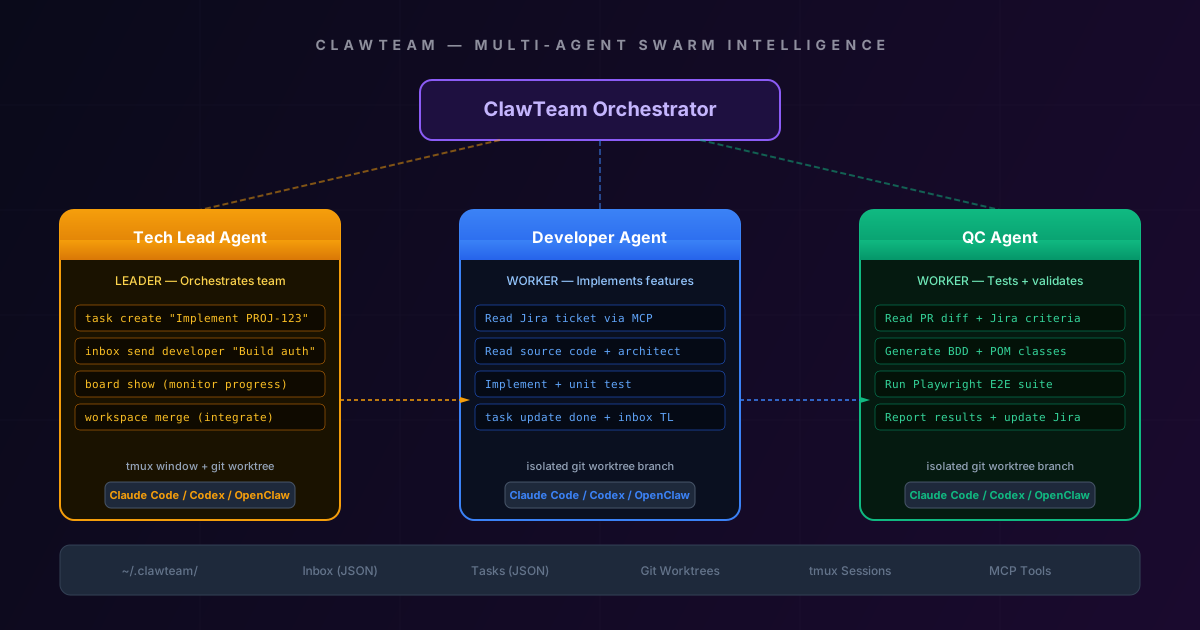
You are one person. Your project needs a tech lead, two developers, and a QC engineer.
ClawTeam lets you run all four — simultaneously — on a single laptop.
This is not a metaphor. ClawTeam is an open-source framework from HKUDS (The University of Hong Kong Data Science Lab) that orchestrates multiple AI coding agents — Claude Code, OpenAI Codex CLI, OpenClaw, or any CLI-based agent — into a coordinated swarm. Each agent gets its own git worktree, its own tmux session, its own task queue, and its own inbox. They communicate through JSON files on your filesystem. No cloud server required.
This guide covers everything: architecture, installation, security hardening, performance tuning, quality control, and a complete workflow for running Dev + QC + Tech Lead on a solo complex project.
Table of Contents
- What Is ClawTeam and Why It Matters
- Architecture: How the Swarm Works
- Prerequisites and Installation
- Security: The Real Risks and How to Mitigate Them
- Performance: Running Multiple Agents on One Machine
- Quality: When AI Does Not Understand
- The Solo Complex Project Workflow
- Dev Agent Setup and Workflow
- QC Agent Setup and Workflow
- Tech Lead Agent Setup and Workflow
- Full Team Orchestration: End-to-End
- ClawTeam vs NanoClaw vs Claude Code Teams
- Production Checklist
- Conclusion
What Is ClawTeam and Why It Matters
ClawTeam is an Agent Swarm Intelligence framework. The core idea: instead of one AI agent doing everything sequentially, you create a team of specialized agents that work in parallel, each with a clear role and isolated workspace.
graph TB
    subgraph "Traditional: One Agent"
        A1[You] -->|prompt| A2[Single Agent]
        A2 -->|sequential| A3[Read ticket]
        A3 --> A4[Design]
        A4 --> A5[Implement]
        A5 --> A6[Test]
        A6 --> A7[Review]
        A7 --> A8[Deploy]
    end

    subgraph "ClawTeam: Agent Swarm"
        B1[You] -->|configure| B2[Tech Lead Agent]
        B2 -->|parallel| B3[Dev Agent 1]
        B2 -->|parallel| B4[Dev Agent 2]
        B2 -->|parallel| B5[QC Agent]
        B3 -->|inbox| B2
        B4 -->|inbox| B2
        B5 -->|inbox| B2
    end

    style A2 fill:#1e293b,stroke:#475569,color:#94a3b8
    style B2 fill:#1e1040,stroke:#8b5cf6,color:#c4b5fd
    style B3 fill:#0a1020,stroke:#3b82f6,color:#93c5fd
    style B4 fill:#0a1020,stroke:#3b82f6,color:#93c5fd
    style B5 fill:#051a10,stroke:#10b981,color:#6ee7b7
Why this matters for a solo developer:
| Aspect | Single Agent | ClawTeam Swarm |
|---|---|---|
| Parallelism | Sequential — one task at a time | 3-5 agents working simultaneously |
| Context window | One agent holds ALL context (overflows) | Each agent holds only ITS role’s context |
| Isolation | All changes in one branch = merge conflicts with yourself | Each agent in its own git worktree = clean merges |
| Quality | Agent reviews its own code (bias) | QC agent reviews Dev agent’s code (separation of concerns) |
| Throughput | 1x | 3-5x on multi-core machines |
The key insight: specialization reduces hallucination. A Dev agent that only needs to understand implementation context produces higher-quality code than a general agent that’s also tracking test strategy, deployment config, and project management.
Architecture: How the Swarm Works
ClawTeam has no central server. Everything runs through the filesystem.
graph TD
    subgraph "~/.clawteam/"
        T[teams/] --> TC[my-project/config.toml]
        TS[tasks/] --> TSF[my-project/task-001.json<br/>task-002.json<br/>task-003.json]
        I[inboxes/] --> IF[tech-lead/inbox.json<br/>developer/inbox.json<br/>qc/inbox.json]
        W[workspaces/] --> WF[my-project/dev-1/<br/>my-project/qc/]
    end

    subgraph "Git Repository"
        M[main branch]
        M --> WT1["clawteam/my-project/dev-1<br/>(worktree)"]
        M --> WT2["clawteam/my-project/qc<br/>(worktree)"]
        M --> WT3["clawteam/my-project/tech-lead<br/>(worktree)"]
    end

    subgraph "tmux Sessions"
        S1["clawteam-tech-lead<br/>(Claude Code)"]
        S2["clawteam-developer<br/>(Claude Code)"]
        S3["clawteam-qc<br/>(Claude Code)"]
    end

    TC -.->|reads config| S1
    TC -.->|reads config| S2
    TC -.->|reads config| S3
    TSF -.->|claim tasks| S2
    TSF -.->|claim tasks| S3
    IF -.->|check messages| S1

    style T fill:#1e1040,stroke:#8b5cf6,color:#c4b5fd
    style TS fill:#172040,stroke:#2563eb,color:#bfdbfe
    style I fill:#1a1200,stroke:#f59e0b,color:#fcd34d
    style W fill:#051a10,stroke:#10b981,color:#6ee7b7
Core Components
1. Team Config (config.toml) — Defines the team: which agents, their roles, which CLI tool they use, and their system prompts.
2. Task Board (JSON files) — A Kanban board stored as JSON. Tasks have IDs, statuses (todo, in_progress, done, blocked), assignees, dependencies, and descriptions. Any agent can read the board; agents claim and update their own tasks.
3. Inbox System (JSON files) — Point-to-point messaging. When the Dev agent finishes a task, it writes a message to the Tech Lead’s inbox. The Tech Lead reads it, reviews, and responds. All messages are JSON with timestamps.
4. Workspaces (Git Worktrees) — Each agent gets its own directory linked to a separate git branch. This is the magic: agents can edit files simultaneously without conflicts. The Tech Lead merges branches when work is complete.
5. tmux Backend — Each agent runs in its own tmux window. ClawTeam sends keystrokes to tmux to control agents. You can tmux attach to watch any agent work in real time.
How Agents Communicate
sequenceDiagram
    participant TL as Tech Lead
    participant DEV as Developer
    participant QC as QC Agent

    TL->>TL: Create task-001.json (status: todo)
    TL->>DEV: inbox: "Implement login API"
    DEV->>DEV: Claim task-001 (status: in_progress)
    DEV->>DEV: Work in worktree branch
    DEV->>DEV: git commit + push
    DEV->>TL: inbox: "task-001 done, PR ready"
    DEV->>DEV: Update task-001 (status: done)
    TL->>QC: inbox: "Review PR for task-001"
    QC->>QC: Checkout dev branch in QC worktree
    QC->>QC: Generate BDD tests
    QC->>QC: Run Playwright E2E
    QC->>TL: inbox: "All tests pass, approved"
    TL->>TL: Merge dev branch to main
This is filesystem-based coordination — no HTTP servers, no databases, no Docker containers. Just JSON files and git branches. That is why it runs on a personal laptop.
Prerequisites and Installation
System Requirements
| Component | Minimum | Recommended |
|---|---|---|
| CPU | 4 cores | 8+ cores (agents run in parallel) |
| RAM | 8 GB | 16+ GB |
| Disk | 10 GB free | 20+ GB (multiple worktrees) |
| OS | macOS / Linux | macOS (M-series) or Ubuntu 22+ |
| Python | 3.10+ | 3.12+ |
| Git | 2.30+ | Latest |
| tmux | 3.0+ | Latest |
Step-by-Step Installation
1. Install system dependencies:
# macOS
brew install tmux git python@3.12

# Ubuntu/Debian
sudo apt update && sudo apt install -y tmux git python3.12 python3.12-venv
2. Install ClawTeam:
pip install clawteam3. Verify installation:
clawteam --version
clawteam doctor  # checks tmux, git, python versions
4. Install your agent CLI (at least one):
# Claude Code (recommended — best coding performance as of March 2026)
npm install -g @anthropic-ai/claude-code

# OpenAI Codex CLI
npm install -g @openai/codex

# OpenClaw (open-source, no API key needed for local models)
pip install openclaw
5. Set API keys:
# For Claude Code
export ANTHROPIC_API_KEY="sk-ant-..."

# For Codex
export OPENAI_API_KEY="sk-..."

# For OpenClaw with local models — no key needed
6. Create your first team:
mkdir my-project && cd my-project
git init

clawteam init --template solo-fullstack
This creates ~/.clawteam/teams/my-project/config.toml with a pre-configured 3-agent team.
Security: The Real Risks and How to Mitigate Them
This is the section most guides skip. ClawTeam gives AI agents direct access to your filesystem and terminal. That demands serious attention to security.
Risk Assessment
graph LR
    subgraph "HIGH RISK"
        R1["skip_permissions=true<br/>(default!)"]
        R2["No auth on inbox<br/>(any process can write)"]
        R3["Full filesystem access<br/>(rm -rf possible)"]
    end

    subgraph "MEDIUM RISK"
        R4["API keys in environment<br/>(all agents see them)"]
        R5["No audit log<br/>(actions not tracked)"]
        R6["Git push without review<br/>(code reaches remote)"]
    end

    subgraph "LOW RISK"
        R7["CPU/RAM exhaustion<br/>(too many agents)"]
        R8["Disk fill from worktrees<br/>(each is full clone)"]
    end

    style R1 fill:#7f1d1d,stroke:#ef4444,color:#fca5a5
    style R2 fill:#7f1d1d,stroke:#ef4444,color:#fca5a5
    style R3 fill:#7f1d1d,stroke:#ef4444,color:#fca5a5
    style R4 fill:#78350f,stroke:#f59e0b,color:#fcd34d
    style R5 fill:#78350f,stroke:#f59e0b,color:#fcd34d
    style R6 fill:#78350f,stroke:#f59e0b,color:#fcd34d
    style R7 fill:#1e293b,stroke:#475569,color:#94a3b8
    style R8 fill:#1e293b,stroke:#475569,color:#94a3b8
The skip_permissions Problem
By default, ClawTeam sets skip_permissions=true in agent configs. This means Claude Code (or Codex) runs with --dangerously-skip-permissions, bypassing all safety prompts. The agent can:
- Delete any file on disk
- Run arbitrary shell commands
- Install packages
- Access network resources
- Read your SSH keys and API tokens
Mitigation strategies:
# config.toml — HARDENED configuration
[team]
name = "my-project"
skip_permissions = false  # CHANGE THIS FIRST

[agents.tech-lead]
role = "leader"
cli = "claude-code"
# Add explicit permission boundaries
allowed_commands = ["git", "npm", "node", "npx"]
blocked_paths = ["~/.ssh", "~/.aws", "~/.config/gh"]
Security Hardening Checklist
1. Disable skip_permissions:
# In config.toml
skip_permissions = false
Yes, agents will pause more often asking for permission. That is the point. You can pre-approve specific patterns:
# Pre-approve safe operations
[permissions]
auto_approve = [
    "git status",
    "git diff",
    "git add",
    "git commit",
    "npm test",
    "npm run build",
    "npx playwright test"
]
2. Isolate API keys per agent:
# Don't export globally. Set per-agent in config:
[agents.developer]
env = { ANTHROPIC_API_KEY = "sk-ant-dev-key..." }

[agents.qc]
env = { ANTHROPIC_API_KEY = "sk-ant-qc-key..." }
This way, if an agent is compromised, only one API key is exposed. Use separate API keys with different spending limits.
3. Block sensitive directories:
[security]
blocked_paths = [
    "~/.ssh",
    "~/.aws",
    "~/.config/gh",
    "~/.gnupg",
    "~/.env",
    "/etc/passwd"
]
4. Enable audit logging:
ClawTeam doesn’t have built-in audit logging. Add it yourself:
# Create a wrapper script: ~/.clawteam/audit-wrapper.sh
#!/bin/bash
echo "[$(date -u +%Y-%m-%dT%H:%M:%SZ)] AGENT=$CLAWTEAM_AGENT CMD=$*" >> ~/.clawteam/audit.log
exec "$@"
# In config.toml
[agents.developer]
shell_wrapper = "~/.clawteam/audit-wrapper.sh"5. Git push protection:
# .git/hooks/pre-push (make executable)
#!/bin/bash
BRANCH=$(git symbolic-ref HEAD 2>/dev/null | sed 's|refs/heads/||')
if [[ "$BRANCH" == "main" || "$BRANCH" == "master" ]]; then
    echo "BLOCKED: Direct push to $BRANCH from ClawTeam agent"
    exit 1
fi
6. Run in a VM or container (maximum isolation):
# Use a lightweight VM for the entire ClawTeam session
# On macOS with OrbStack:
orb create ubuntu clawteam-sandbox
orb shell clawteam-sandbox
# Install ClawTeam inside the VM
Security Decision Matrix
| Scenario | Recommendation |
|---|---|
| Personal side project, trusted code | skip_permissions = true is acceptable |
| Client project with sensitive data | skip_permissions = false + blocked paths + audit log |
| Production codebase with secrets | Run in VM/container + separate API keys + git push hooks |
| Team evaluation / demo | skip_permissions = false + pre-approved commands only |
Performance: Running Multiple Agents on One Machine
Three AI agents running simultaneously means three concurrent API calls, three tmux sessions, and three git worktrees. Here’s how to keep your laptop responsive.
Resource Allocation
graph LR
    subgraph "Your Laptop (16GB RAM)"
        OS["OS + Apps<br/>4 GB"]
        TL["Tech Lead Agent<br/>~2 GB"]
        DEV["Developer Agent<br/>~3 GB"]
        QC["QC Agent<br/>~3 GB"]
        BUF["Buffer<br/>4 GB"]
    end

    style OS fill:#1e293b,stroke:#475569,color:#94a3b8
    style TL fill:#1a1200,stroke:#f59e0b,color:#fcd34d
    style DEV fill:#0a1020,stroke:#3b82f6,color:#93c5fd
    style QC fill:#051a10,stroke:#10b981,color:#6ee7b7
    style BUF fill:#1e1040,stroke:#8b5cf6,color:#c4b5fd
Performance Optimization Tips
1. Stagger agent startup:
Don’t start all agents simultaneously. The initial context loading (reading the codebase) is the most resource-intensive phase.
# Start Tech Lead first (reads project, creates tasks)
clawteam agent start tech-lead

# Wait 30 seconds for task creation
sleep 30

# Start workers
clawteam agent start developer
clawteam agent start qc
2. Limit concurrent file operations:
[performance]
max_concurrent_agents = 3  # Don't exceed your CPU core count / 2
agent_poll_interval = 5000  # ms between inbox checks (default 2000)
worktree_cleanup = true  # Auto-delete merged worktrees
3. Use shallow worktrees for large repos:
# Instead of full worktree (copies entire history)
git worktree add --detach ../worktree-dev

# Use shallow worktree
git worktree add --detach -b clawteam/dev ../worktree-dev
cd ../worktree-dev
git fetch --depth=50 origin main
4. Monitor resource usage:
# Quick dashboard — add to your shell
alias ct-stats='echo "=== ClawTeam Resource Usage ===" && \
  ps aux | grep -E "claude|codex|openclaw" | grep -v grep | \
  awk "{printf \"%-20s CPU: %s%%  MEM: %s%%\n\", \$11, \$3, \$4}"'
5. API cost control:
| Agent | Model | Estimated Cost/Hour | Recommendation |
|---|---|---|---|
| Tech Lead | Claude Sonnet 4 | $2-5/hr | Use Sonnet (good balance) |
| Developer | Claude Sonnet 4 | $3-8/hr | Use Sonnet for coding |
| QC | Claude Haiku 3.5 | $0.50-1/hr | Haiku is enough for test generation |
# Per-agent model selection
[agents.tech-lead]
model = "claude-sonnet-4-20250514"

[agents.developer]
model = "claude-sonnet-4-20250514"

[agents.qc]
model = "claude-3-5-haiku-20241022"  # Cheaper, sufficient for test gen
Total estimated cost: $5-14/hour for a 3-agent team. Compare that to hiring three engineers.
Quality: When AI Does Not Understand
This is the hardest problem. AI agents can write syntactically correct code that is semantically wrong. They can generate tests that pass but don’t actually validate the requirement. Here is how to prevent that.
The Five Quality Failure Modes
graph TD
    Q1["1. Misunderstood Requirement<br/>Agent builds wrong feature"] --> FIX1["Fix: Structured Jira tickets<br/>+ acceptance criteria in prompt"]
    Q2["2. Hallucinated API<br/>Agent calls non-existent endpoint"] --> FIX2["Fix: Feed actual API docs<br/>via MCP or context file"]
    Q3["3. Superficial Tests<br/>Tests pass but miss edge cases"] --> FIX3["Fix: BDD scenarios with<br/>explicit negative cases"]
    Q4["4. Context Overflow<br/>Agent forgets earlier decisions"] --> FIX4["Fix: CLAUDE.md + smaller<br/>focused tasks"]
    Q5["5. Merge Conflicts<br/>Agents edit same files"] --> FIX5["Fix: Task dependencies +<br/>clear file ownership"]

    style Q1 fill:#7f1d1d,stroke:#ef4444,color:#fca5a5
    style Q2 fill:#7f1d1d,stroke:#ef4444,color:#fca5a5
    style Q3 fill:#78350f,stroke:#f59e0b,color:#fcd34d
    style Q4 fill:#78350f,stroke:#f59e0b,color:#fcd34d
    style Q5 fill:#1e293b,stroke:#475569,color:#94a3b8
    style FIX1 fill:#052e16,stroke:#059669,color:#a7f3d0
    style FIX2 fill:#052e16,stroke:#059669,color:#a7f3d0
    style FIX3 fill:#052e16,stroke:#059669,color:#a7f3d0
    style FIX4 fill:#052e16,stroke:#059669,color:#a7f3d0
    style FIX5 fill:#052e16,stroke:#059669,color:#a7f3d0
Prevention Strategy 1: The CLAUDE.md File
Every ClawTeam project should have a CLAUDE.md at the repo root. This is the persistent memory that every agent reads on startup.
# CLAUDE.md — Project Intelligence File

## Project Overview
E-commerce platform. Next.js 15 frontend, .NET 10 API, PostgreSQL.
Deployed on AWS ECS Fargate. CI/CD via GitHub Actions.

## Architecture Rules
- All API endpoints follow REST conventions
- Authentication via JWT tokens stored in httpOnly cookies
- Database access ONLY through Entity Framework — no raw SQL
- All new endpoints MUST have integration tests

## File Ownership (for ClawTeam agents)
- /src/api/** → Developer Agent
- /src/tests/** → QC Agent
- /src/infrastructure/** → Tech Lead only
- /docs/** → Tech Lead only

## Common Mistakes to Avoid
- DO NOT use localStorage for auth tokens (security violation)
- DO NOT add new NuGet packages without Tech Lead approval
- DO NOT modify docker-compose.yml (infrastructure change)
- All dates MUST be UTC in the API, local in the frontend

## API Endpoints (actual, not hallucinated)
- POST /api/auth/login → { email, password } → { token }
- GET /api/products?page=1&size=20 → { items[], total }
- POST /api/orders → { items[], shippingAddress } → { orderId }
Prevention Strategy 2: Structured Task Descriptions
Bad task description (will cause hallucination):
"Implement user authentication"Good task description (prevents hallucination):
{
  "id": "task-001",
  "title": "Implement login API endpoint",
  "description": "Create POST /api/auth/login endpoint",
  "acceptance_criteria": [
    "Accepts JSON body: { email: string, password: string }",
    "Returns 200 with JWT token on success",
    "Returns 401 with error message on invalid credentials",
    "Returns 429 after 5 failed attempts in 15 minutes",
    "JWT token expires in 24 hours",
    "Password is verified using BCrypt"
  ],
  "files_to_modify": [
    "src/api/Controllers/AuthController.cs",
    "src/api/Services/AuthService.cs",
    "src/api/Models/LoginRequest.cs"
  ],
  "dependencies": [],
  "test_requirements": "Unit tests for AuthService + integration test for the endpoint"
}
Prevention Strategy 3: QC Agent as Quality Gate
The QC agent should NEVER just run existing tests. It should:
- Read the task’s acceptance criteria
- Generate NEW tests based on those criteria
- Run all tests (new + existing)
- Report failures with root cause analysis
# QC agent system prompt
[agents.qc]
system_prompt = """
You are a QC Engineer. Your job is to FIND BUGS, not confirm things work.

For every task you review:
1. Read the acceptance criteria from the task JSON
2. Generate BDD scenarios that test EACH criterion
3. Generate NEGATIVE test cases (what should NOT happen)
4. Generate edge case tests (empty input, max length, special chars)
5. Run all tests
6. If ANY test fails, report to Tech Lead with:
   - Which acceptance criterion failed
   - Expected vs actual behavior
   - Suggested fix

NEVER approve a task without running tests.
NEVER write tests that only test the happy path.
"""
Prevention Strategy 4: Human Review Checkpoints
Even with AI agents, humans must review at critical points:
[workflow]
# Require human approval at these gates
human_review_required = [
    "before_merge_to_main",
    "before_deploy",
    "on_security_related_changes",
    "on_database_migrations"
]

# Auto-approve for low-risk changes
auto_approve = [
    "documentation_updates",
    "test_additions",
    "code_formatting"
]
The Solo Complex Project Workflow
Here is the complete workflow for one person running a 3-agent team on a complex project.
Phase 1: Project Setup (30 minutes, one-time)
# 1. Initialize project
cd ~/projects/my-saas
git init

# 2. Create CLAUDE.md (most important file)
cat > CLAUDE.md << 'EOF'
# Project: My SaaS Platform
## Stack: Next.js 15, .NET 10 API, PostgreSQL, Redis
## Deploy: AWS ECS Fargate
## Rules:
- TypeScript strict mode
- All API responses follow JSend format
- Tests required for all new endpoints
- No direct database queries — use repositories
EOF

# 3. Initialize ClawTeam
clawteam init --name my-saas --agents 3

# 4. Configure team (see next sections for details)
vim ~/.clawteam/teams/my-saas/config.toml

# 5. Start the team
clawteam team start my-saas
Phase 2: Sprint Execution (Ongoing)
graph TD
    YOU["YOU (Human)"] -->|"1. Write Jira tickets<br/>with acceptance criteria"| JIRA[Jira Board]
    JIRA -->|"2. Tech Lead reads tickets"| TL[Tech Lead Agent]
    TL -->|"3. Creates tasks<br/>+ assigns to Dev"| DEV[Developer Agent]
    TL -->|"4. Creates test tasks<br/>+ assigns to QC"| QC[QC Agent]
    DEV -->|"5. Implements + commits"| PR[Pull Request]
    QC -->|"6. Generates + runs tests"| PR
    TL -->|"7. Reviews + merges"| MAIN[main branch]
    MAIN -->|"8. CI/CD deploys"| PROD[Production]
    YOU -->|"9. Review PR before merge<br/>(human checkpoint)"| PR

    style YOU fill:#1e1040,stroke:#8b5cf6,color:#c4b5fd
    style TL fill:#1a1200,stroke:#f59e0b,color:#fcd34d
    style DEV fill:#0a1020,stroke:#3b82f6,color:#93c5fd
    style QC fill:#051a10,stroke:#10b981,color:#6ee7b7
    style PROD fill:#052e16,stroke:#059669,color:#a7f3d0
Your Daily Routine (30 minutes/day)
| Time | Action | Duration |
|---|---|---|
| Morning | Review overnight PRs, approve/reject | 10 min |
| Morning | Write 2-3 Jira tickets for the day | 10 min |
| Evening | Check agent progress, unblock any stuck tasks | 10 min |
That’s it. The agents do the rest.
Dev Agent Setup and Workflow
Configuration
[agents.developer]
role = "worker"
cli = "claude-code"
model = "claude-sonnet-4-20250514"
name = "developer"

system_prompt = """
You are a Senior Developer. Your workflow for EVERY task:

1. READ the task from ~/.clawteam/tasks/. Parse the acceptance criteria carefully.
2. READ CLAUDE.md for project rules and architecture.
3. READ the relevant source files listed in the task.
4. DESIGN your approach — write a brief plan as a comment in the task JSON.
5. IMPLEMENT the feature in your git worktree branch.
6. WRITE unit tests that cover each acceptance criterion.
7. RUN tests: npm test (frontend) or dotnet test (backend).
8. If tests fail, fix and re-run. Do NOT mark task done with failing tests.
9. COMMIT with conventional commit message: feat(scope): description
10. UPDATE task status to 'done'.
11. SEND message to tech-lead inbox: "Task {id} complete. PR ready for review."

RULES:
- Never modify files outside your task's file_to_modify list
- Never push directly to main
- If blocked, set task to 'blocked' and message tech-lead
"""

[agents.developer.workspace]
worktree_prefix = "clawteam/dev"
auto_branch = true
Developer Agent Workflow in Action
sequenceDiagram
    participant TB as Task Board
    participant DEV as Dev Agent
    participant FS as Filesystem
    participant GIT as Git
    participant TL as Tech Lead Inbox

    DEV->>TB: Read task-001.json
    Note over DEV: Parse acceptance criteria
    DEV->>FS: Read CLAUDE.md
    DEV->>FS: Read src/api/Controllers/
    Note over DEV: Design approach
    DEV->>FS: Write AuthController.cs
    DEV->>FS: Write AuthService.cs
    DEV->>FS: Write AuthController.Tests.cs
    DEV->>DEV: Run: dotnet test
    alt Tests Pass
        DEV->>GIT: git add + commit
        DEV->>TB: Update task-001 → done
        DEV->>TL: "Task-001 complete, PR ready"
    else Tests Fail
        DEV->>DEV: Analyze failure
        DEV->>FS: Fix code
        DEV->>DEV: Re-run tests
    end
Example: Dev Agent Processing a Login Feature
When the Dev agent picks up a task, here’s what actually happens in the tmux session:
[Dev Agent] Reading task-001.json...
[Dev Agent] Task: Implement POST /api/auth/login
[Dev Agent] Acceptance criteria: 6 items
[Dev Agent] Reading CLAUDE.md... JWT auth, BCrypt, REST conventions
[Dev Agent] Reading existing AuthController.cs... file not found, creating new
[Dev Agent] Reading existing models... found User.cs, need LoginRequest.cs

[Dev Agent] Plan:
  1. Create LoginRequest.cs model
  2. Create AuthService.cs with BCrypt verification
  3. Create AuthController.cs with POST /login endpoint
  4. Add rate limiting (5 attempts / 15 min)
  5. Write unit tests for AuthService
  6. Write integration test for endpoint

[Dev Agent] Implementing... (writing files)
[Dev Agent] Running: dotnet test --filter "Auth"
[Dev Agent] Results: 8 passed, 0 failed
[Dev Agent] Committing: feat(auth): implement login endpoint with rate limiting
[Dev Agent] Task-001 → done
[Dev Agent] Message sent to tech-lead: "Task-001 complete"
QC Agent Setup and Workflow
Configuration
[agents.qc]
role = "worker"
cli = "claude-code"
model = "claude-3-5-haiku-20241022"  # Cost-effective for test generation
name = "qc"

system_prompt = """
You are a Senior QC Engineer specializing in automated testing.

Your workflow for EVERY task:

1. READ the task from ~/.clawteam/tasks/. The task will reference a completed dev task.
2. READ the acceptance criteria from the ORIGINAL dev task.
3. READ the PR diff (git diff main...clawteam/dev-branch).
4. GENERATE BDD scenarios in Gherkin format covering:
   - Happy path for each acceptance criterion
   - Negative cases (invalid input, unauthorized, rate limits)
   - Edge cases (empty strings, max lengths, special characters, Unicode)
5. GENERATE Page Object Model classes for any UI tests.
6. IMPLEMENT test files using Playwright (E2E) or Jest (unit).
7. RUN the full test suite.
8. If tests fail:
   - Determine if it's a bug in the code or a bug in the test
   - If code bug: message dev agent with details
   - If test bug: fix and re-run
9. COMMIT test files.
10. REPORT results to tech-lead:
    - Total tests: X passed, Y failed
    - Coverage: Z%
    - Any security concerns found in code review

NEVER approve code without running tests.
ALWAYS include negative test cases.
"""

[agents.qc.workspace]
worktree_prefix = "clawteam/qc"
auto_branch = true
BDD Example: What the QC Agent Generates
For the login endpoint task, the QC agent generates:
Feature: User Login API
  As a registered user
  I want to authenticate via the login endpoint
  So that I can access protected resources

  Scenario: Successful login with valid credentials
    Given a registered user with email "user@example.com" and password "SecureP@ss1"
    When I send POST /api/auth/login with email "user@example.com" and password "SecureP@ss1"
    Then the response status should be 200
    And the response body should contain a JWT token
    And the JWT token should expire in 24 hours

  Scenario: Login with invalid password
    Given a registered user with email "user@example.com"
    When I send POST /api/auth/login with email "user@example.com" and password "WrongPassword"
    Then the response status should be 401
    And the response body should contain error "Invalid credentials"

  Scenario: Login with non-existent email
    When I send POST /api/auth/login with email "nobody@example.com" and password "AnyPassword1"
    Then the response status should be 401
    And the response body should contain error "Invalid credentials"
    # Note: Same error as wrong password — no user enumeration

  Scenario: Rate limiting after failed attempts
    Given a registered user with email "user@example.com"
    When I send 5 failed login attempts for "user@example.com" within 15 minutes
    And I send POST /api/auth/login with valid credentials for "user@example.com"
    Then the response status should be 429
    And the response body should contain error "Too many attempts"

  Scenario: Login with empty email
    When I send POST /api/auth/login with email "" and password "SomePassword1"
    Then the response status should be 400
    And the response body should contain validation error for "email"

  Scenario: Login with SQL injection attempt
    When I send POST /api/auth/login with email "'; DROP TABLE Users;--" and password "x"
    Then the response status should be 401
    And the database should not be affected
QC Agent Workflow Diagram
sequenceDiagram
    participant TL as Tech Lead Inbox
    participant QC as QC Agent
    participant GIT as Git
    participant TEST as Test Runner
    participant DEV as Dev Inbox

    QC->>TL: Read inbox — "Review task-001"
    QC->>GIT: git diff main...clawteam/dev
    Note over QC: Analyze 247 lines changed
    QC->>QC: Generate 6 BDD scenarios
    QC->>QC: Generate POM classes
    QC->>QC: Write Playwright test files
    QC->>TEST: npx playwright test

    alt All Pass
        QC->>TL: "Task-001: 6/6 tests pass. Approved."
    else Some Fail
        QC->>DEV: "Task-001: Rate limiting test fails.<br/>Expected 429, got 200 after 5 attempts.<br/>Check RateLimitMiddleware registration."
        QC->>TL: "Task-001: 5/6 pass, 1 fail. Sent details to dev."
    end
Tech Lead Agent Setup and Workflow
The Tech Lead is the orchestrator. It reads project requirements, breaks them into tasks, assigns them, monitors progress, reviews PRs, and merges code.
Configuration
[agents.tech-lead]
role = "leader"
cli = "claude-code"
model = "claude-sonnet-4-20250514"
name = "tech-lead"

system_prompt = """
You are a Senior Tech Lead managing a team of AI agents.

Your responsibilities:

PLANNING:
1. Read Jira tickets or project requirements
2. Break each feature into atomic tasks with:
   - Clear title
   - Acceptance criteria (testable)
   - Files to modify (explicit list)
   - Dependencies on other tasks
3. Create tasks in ~/.clawteam/tasks/
4. Assign tasks to developer or qc agents via inbox

MONITORING:
5. Check task board every 60 seconds
6. If a task is blocked, investigate and unblock
7. If a task has been in_progress > 30 minutes, check on the agent

REVIEW:
8. When dev marks task done, review the git diff
9. Check: Does the code match acceptance criteria?
10. Check: Are there obvious security issues?
11. If approved, assign QC review task
12. If QC approves, merge to main

RULES:
- Never implement features yourself — delegate to dev agent
- Never write tests yourself — delegate to qc agent
- Always verify acceptance criteria are met before merging
- Create task dependencies to prevent merge conflicts
  (e.g., task-002 depends on task-001 if they touch same files)
"""

[agents.tech-lead.workspace]
worktree_prefix = "clawteam/lead"
auto_branch = true
Task Dependency Management
graph TD
    T1["Task-001<br/>Auth Service<br/>(no deps)"] --> T3["Task-003<br/>Protected Routes<br/>(depends: 001)"]
    T2["Task-002<br/>User Profile API<br/>(no deps)"] --> T3
    T3 --> T4["Task-004<br/>E2E Test Suite<br/>(depends: 001, 002, 003)"]
    T1 --> T5["Task-005<br/>Auth Unit Tests<br/>(depends: 001)"]
    T2 --> T6["Task-006<br/>Profile Unit Tests<br/>(depends: 002)"]

    style T1 fill:#0a1020,stroke:#3b82f6,color:#93c5fd
    style T2 fill:#0a1020,stroke:#3b82f6,color:#93c5fd
    style T3 fill:#0a1020,stroke:#3b82f6,color:#93c5fd
    style T4 fill:#051a10,stroke:#10b981,color:#6ee7b7
    style T5 fill:#051a10,stroke:#10b981,color:#6ee7b7
    style T6 fill:#051a10,stroke:#10b981,color:#6ee7b7
The Tech Lead creates this dependency graph. Agents with the developer role work on blue tasks. Agents with the qc role work on green tasks. Tasks only become available when their dependencies are marked done.
This prevents merge conflicts — the most common failure mode in multi-agent development.
Full Team Orchestration: End-to-End
Here is the complete sequence for a feature going from Jira ticket to production.
sequenceDiagram
    participant YOU as You (Human)
    participant TL as Tech Lead
    participant DEV as Developer
    participant QC as QC Agent
    participant GIT as Git / GitHub

    YOU->>TL: "Implement user authentication feature"
    Note over TL: Reads requirement, plans tasks

    TL->>TL: Create task-001 (Auth Service)
    TL->>TL: Create task-002 (User Profile)
    TL->>TL: Create task-003 (Protected Routes, deps: 001,002)
    TL->>TL: Create task-005 (Auth Tests, deps: 001)
    TL->>TL: Create task-006 (Profile Tests, deps: 002)
    TL->>TL: Create task-004 (E2E Suite, deps: 001,002,003)

    TL->>DEV: "Start task-001 and task-002 (parallel)"

    par Parallel Execution
        DEV->>DEV: Implement Auth Service (task-001)
        DEV->>GIT: Commit to clawteam/dev-001
    and
        DEV->>DEV: Implement User Profile (task-002)
        DEV->>GIT: Commit to clawteam/dev-002
    end

    DEV->>TL: "Tasks 001 and 002 complete"

    par QC + Dev in Parallel
        TL->>QC: "Test task-001 and task-002"
        QC->>QC: Generate + run auth tests (task-005)
        QC->>QC: Generate + run profile tests (task-006)
    and
        TL->>DEV: "Start task-003 (deps satisfied)"
        DEV->>DEV: Implement Protected Routes
    end

    QC->>TL: "Auth tests: 6/6 pass. Profile tests: 4/4 pass."
    DEV->>TL: "Task-003 complete"

    TL->>QC: "Run E2E suite (task-004)"
    QC->>QC: Generate + run full E2E
    QC->>TL: "E2E: 15/15 pass. All clear."

    TL->>GIT: Merge all branches to main
    TL->>YOU: "Feature complete. 3 PRs merged. 25 tests passing."

    YOU->>GIT: Review final diff (human checkpoint)
    YOU->>GIT: Approve + deploy
Watching It Happen in Real Time
Open a terminal with tmux panes to watch all agents:
# Split your terminal into 4 panes
tmux new-session -s watch

# Pane 1: Tech Lead
tmux send-keys "tmux attach -t clawteam-tech-lead" Enter

# Pane 2: Developer
tmux split-window -h
tmux send-keys "tmux attach -t clawteam-developer" Enter

# Pane 3: QC
tmux split-window -v
tmux send-keys "tmux attach -t clawteam-qc" Enter

# Pane 4: Task board
tmux select-pane -t 0
tmux split-window -v
tmux send-keys "watch -n 5 clawteam board show" Enter
You’ll see all three agents working simultaneously in their own panes, with the task board updating in real time.
ClawTeam vs NanoClaw vs Claude Code Teams
| Feature | ClawTeam | NanoClaw | Claude Code Teams |
|---|---|---|---|
| Source | Open-source (HKUDS) | Commercial + OSS core | Anthropic built-in |
| Architecture | Filesystem JSON | Docker containers | In-process |
| Agent isolation | Git worktrees | MicroVM sandbox | Git worktrees |
| Agents supported | Claude, Codex, OpenClaw, any CLI | NanoClaw agents only | Claude Code only |
| Communication | JSON inbox files | API + webhook | SendMessage tool |
| Server required | No (local filesystem) | Yes (Docker daemon) | No |
| Setup time | 10 minutes | 30 minutes | 5 minutes |
| Security | Manual (you configure) | Containerized (built-in) | Anthropic-managed |
| Cost | API costs only | API + compute costs | API costs only |
| Max agents | Limited by hardware | Limited by containers | ~10 per session |
| Best for | Solo dev, custom workflows | Production teams, sandboxing | Quick team tasks |
Decision Flowchart
graph TD
    START["Need multi-agent development?"] -->|Yes| Q1{"Need Docker-level<br/>sandbox isolation?"}
    Q1 -->|Yes| NANO["Use NanoClaw<br/>(container isolation)"]
    Q1 -->|No| Q2{"Need to mix different<br/>AI providers?<br/>(Claude + Codex + OpenClaw)"}
    Q2 -->|Yes| CLAW["Use ClawTeam<br/>(agent-agnostic)"]
    Q2 -->|No| Q3{"Need maximum simplicity<br/>+ Anthropic support?"}
    Q3 -->|Yes| CLAUDE["Use Claude Code Teams<br/>(built-in)"]
    Q3 -->|No| CLAW

    style NANO fill:#172040,stroke:#2563eb,color:#bfdbfe
    style CLAW fill:#1e1040,stroke:#8b5cf6,color:#c4b5fd
    style CLAUDE fill:#1a1200,stroke:#f59e0b,color:#fcd34d
My recommendation for a solo developer on a personal laptop: Start with Claude Code Teams (simplest setup, lowest friction). Graduate to ClawTeam when you need custom workflows, mixed providers, or more than 3-4 agents. Use NanoClaw only when you need container-level isolation for security-sensitive work.
Production Checklist
Before running ClawTeam on any real project, verify every item:
Security
-
skip_permissions = falsein config.toml - Blocked paths configured (
~/.ssh,~/.aws,~/.config/gh) - Separate API keys per agent (different spending limits)
- Git pre-push hook blocks direct push to main
- Audit logging wrapper installed
-
.envfiles in.gitignore
Quality
-
CLAUDE.mdwritten with project rules, architecture, API docs - Task descriptions include acceptance criteria (not just title)
- QC agent prompt requires negative test cases
- Human review checkpoint before merge to main
- File ownership defined (prevents agents editing same files)
Performance
- No more agents than CPU cores / 2
- Agent poll interval set to 5000ms+
- Worktree cleanup enabled
- API cost alerts configured per key
- Resource monitoring in place
Workflow
- Task dependencies defined to prevent merge conflicts
- Tech Lead agent configured as leader (not worker)
- Dev agent has clear “done” criteria (tests must pass)
- QC agent generates tests from acceptance criteria (not from code)
- Merge strategy decided (squash vs merge commits)
Conclusion
ClawTeam turns your personal laptop into a development team.
The key takeaways:
-
Specialization beats generalization. A focused Dev agent produces better code than an agent trying to do everything. A dedicated QC agent catches bugs that the Dev agent would miss.
-
Filesystem coordination is elegant. No servers, no Docker, no Kubernetes. JSON files and git worktrees are all you need for 3-5 agent teams.
-
Security is your responsibility. ClawTeam defaults are permissive. Harden them before touching real projects.
-
Quality comes from structure. Detailed task descriptions with acceptance criteria prevent hallucination more effectively than any prompt engineering trick.
-
Start small. Run a 2-agent team (Dev + QC) on a side project this week. Add the Tech Lead when you’re comfortable. Scale to 5 agents when you trust the workflow.
The era of “one developer, one IDE, one terminal” is ending. The future is “one developer, one swarm, unlimited throughput.”
Set it up this weekend. Your Monday self will thank you.
Built and tested on: MacBook Pro M3 Max, 36GB RAM, running ClawTeam 0.4.x with Claude Code as the agent backend. Total API cost for a 4-hour development session: approximately $18.