What if your development team ran 24 hours a day, seven days a week — reviewing pull requests at 3am, generating test cases before you wake up, and deploying verified features before your morning standup?
That is not a hypothetical. That is what a properly configured NanoClaw agent team does today.
This guide is a practical field manual. It covers three concrete workflows — for Developers, QC Engineers, and Tech Leads — and shows you how to evolve each one from fully manual to fully autonomous. The diagrams are ready for client presentations. The code blocks are ready to copy and run. The explanations are designed so you can apply them in your team this week.
Who This Is For
- Tech Leads looking to reduce the operational burden on their teams while maintaining quality
- Developers who want to stop context-switching between Jira, GitHub, and CI/CD tools
- QC Engineers who write the same BDD scenarios over and over and know there is a better way
- Engineering Managers evaluating AI agent adoption for client presentations or board decks
The Three Maturity Levels
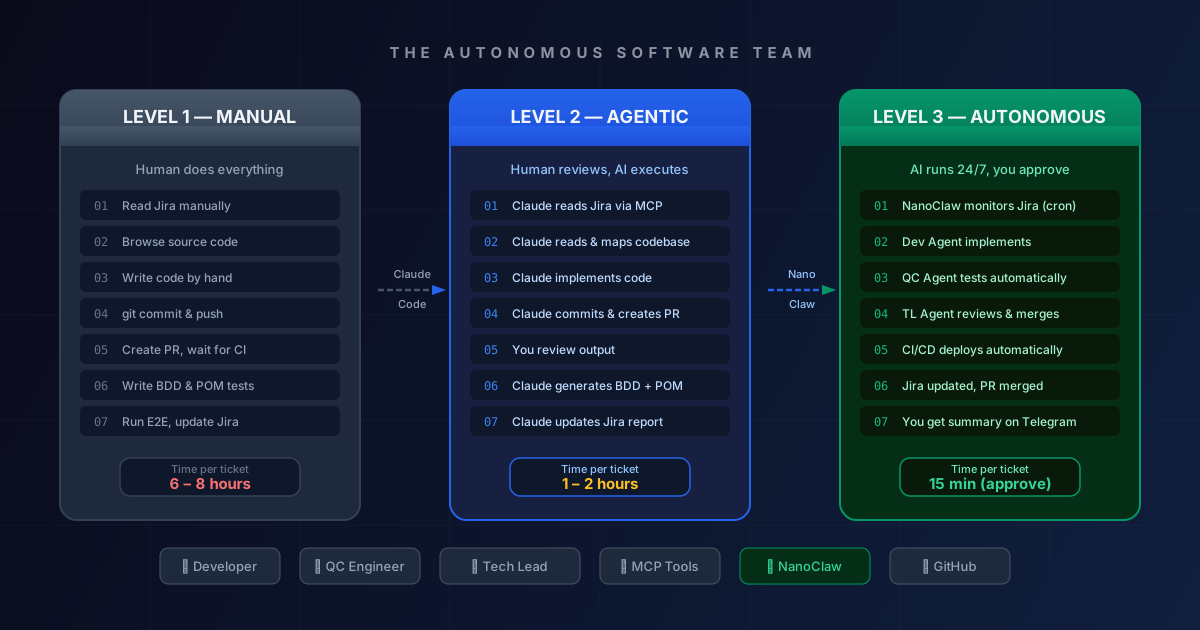
Everything in this guide maps to three levels of automation maturity:
graph LR
    A["🔵 Level 1<br/>Manual<br/>6-8 hrs/ticket"] -->|"+ Claude Code"| B["🟡 Level 2<br/>Agentic<br/>1-2 hrs/ticket"]
    B -->|"+ NanoClaw"| C["🟢 Level 3<br/>Autonomous<br/>15 min/ticket"]
    style A fill:#1e293b,stroke:#475569,color:#94a3b8
    style B fill:#172040,stroke:#2563eb,color:#bfdbfe
    style C fill:#052e16,stroke:#059669,color:#a7f3d0
Level 1 — Manual: Your current state. Humans read tickets, write code, write tests, click through Jira updates. Productive but slow and bottlenecked on human availability.
Level 2 — Agentic: Claude Code handles execution. You handle direction and review. The agent reads the ticket, reads the codebase, writes code, runs tests, creates the PR. You review the output instead of producing it. Roughly 60-70% time reduction.
Level 3 — Autonomous: NanoClaw orchestrates a team of specialized agents running on a schedule. Tickets move from “To Do” to “Done” while you sleep. You approve, not operate. Roughly 90% time reduction.
Section 1: Architecture Overview
Before diving into individual workflows, it helps to see how all the pieces connect.
The Team Topology
graph TB
    TL["🧭 Tech Lead Agent<br/>(Orchestrator)"]
    DEV["💻 Developer Agent<br/>(Builder)"]
    QC["🧪 QC Agent<br/>(Validator)"]

    subgraph Tools
        JIRA["Jira / Linear"]
        GH["GitHub"]
        CI["CI/CD Pipeline"]
        TG["Telegram / Slack"]
    end

    TL -->|"assigns tickets"| DEV
    TL -->|"assigns PRs for testing"| QC
    DEV -->|"creates PRs"| GH
    QC -->|"comments + test reports"| GH
    GH -->|"triggers"| CI
    CI -->|"results"| TL
    JIRA -->|"requirements"| DEV
    JIRA -->|"requirements"| QC
    TL -->|"daily summary"| TG
    TL -->|"updates status"| JIRA
Tool Ecosystem Reference
| Tool | Layer | Purpose |
|---|---|---|
| NanoClaw | Platform | Containerized agent runtime, scheduling, messaging integration |
| OpenClaw | Platform | Open-source autonomous agent, higher privileges |
| Claude Code | AI Engine | Agentic coding terminal (Level 2) |
| Claude Agent SDK | Foundation | Powers NanoClaw’s reasoning |
| MCP | Integration | Universal tool connectors (GitHub, Jira, filesystem) |
| GitHub | VCS | Code hosting, PRs, CI/CD triggers |
| Jira / Linear | PM | Requirements, sprint tracking, ticket status |
| Playwright | Testing | E2E test runner used by QC agent |
| Telegram / Slack | Messaging | Agent reports and alerts channel |
Section 2: Developer Workflow
The full developer pipeline from requirement to deployed feature.
2.1 The Complete Developer Pipeline
graph TD
    A["📋 Read Requirement<br/>from Jira"] --> B["🔍 Read Source Code<br/>& Architecture"]
    B --> C["📐 Document Design<br/>Decision"]
    C --> D["⌨️ Implement Code"]
    D --> E["📦 Commit to GitHub"]
    E --> F["🔀 Create Pull Request"]
    F --> G["👀 Code Review"]
    G --> H["🚀 CI/CD Deploy"]
    H --> I["🧪 E2E Test"]
    I --> J["✅ Update Jira Ticket"]
2.2 Level 1: Manual Developer Workflow
This is the baseline. Every step requires human attention, tool-switching, and context rebuilding every morning.
Daily checklist:
- Open Jira, find tickets assigned to you in the current sprint
- Read the requirement, acceptance criteria, and any linked designs
- Open your IDE, navigate to the relevant code areas
- Check architectural patterns in existing code to ensure consistency
- Write the implementation
- Write or update unit tests
- Stage, commit, and push:
git commit -m "feat(auth): JWT token refresh [PROJ-123]" - Create the PR manually:
gh pr create --title "..." --body "Closes PROJ-123" - Wait for CI to complete, address any failures
- Request review from Tech Lead
- After approval, merge and verify deployment
- Update Jira ticket to “Done”
The cost: 6-8 hours per ticket. Most of that time is reading context, context-switching between tools, and waiting.
2.3 Level 2: Agentic with Claude Code
At Level 2, you delegate execution to Claude Code. You provide direction; Claude handles implementation.
Setup: Make sure your project has a CLAUDE.md with project context:
# CLAUDE.md

## Project Context
- Stack: Node.js + TypeScript + Prisma + PostgreSQL
- Architecture: Clean Architecture (domain/application/infrastructure layers)
- Testing: Jest for unit, Playwright for E2E
- Jira project key: PROJ

## Conventions
- Feature branches: feature/PROJ-{number}-{short-description}
- Commit format: feat(scope): description [PROJ-{number}]
- PR template: always reference the Jira ticket
- TypeScript: strict mode, no any, functional style preferred

## MCP Tools Available
- github: PR creation, code review
- jira: ticket reading and updating
- filesystem: full repo access
Now your Claude Code prompt becomes simple:
claude "Read the Jira ticket PROJ-123. Understand the requirement and
acceptance criteria. Read the relevant source files in src/auth/. Write
a design note in DECISIONS.md. Implement the feature. Write unit tests.
Commit to a feature branch and create a PR. Update the Jira ticket to
'In Review'."
Claude Code will:
- Connect to Jira via MCP and read the full ticket
- Map the codebase and identify which files to change
- Write a design decision note
- Implement the feature following your existing patterns
- Commit with the correct message format
- Create the PR with the Jira link in the description
- Update the ticket status
Your role: Review the PR output. Approve or request changes.
For code review, use:
claude "Review PR #87. Check against our architecture patterns in
CLAUDE.md. Flag any security issues, performance concerns, or test
coverage gaps. Post your findings as a PR review comment."
2.4 Level 3: Autonomous with NanoClaw
At Level 3, you configure NanoClaw once and the dev agent runs on a schedule — finding tickets, implementing them, and reporting back without you initiating anything.
Send this to NanoClaw on Telegram:
@Claude Schedule a daily task at 9:00 AM Vietnam time:

CONTEXT: You are a Developer Agent for team [team-name].

1. Check Jira for tickets in the current sprint with status "Ready for Dev"
   assigned to "dev-agent@company.com"
2. For each ticket (process max 3 per run):
   a. Read the requirement, acceptance criteria, and any linked Figma/design
   b. Read the relevant source files using the filesystem MCP
   c. Write a brief design decision to docs/decisions/PROJ-{id}.md
   d. Implement the feature following patterns in CLAUDE.md
   e. Run unit tests: npm test -- --testPathPattern={feature}
   f. Commit to feature/PROJ-{id} branch
   g. Create a PR linking the Jira ticket
   h. Move ticket to "In Review" in Jira
3. Send a summary to this Telegram chat with:
   - PRs created (with links)
   - Any tickets that had blockers or ambiguities
   - Unit test results summary
The NanoClaw Dev Agent Sequence:
sequenceDiagram
    participant Cron as ⏰ NanoClaw Cron
    participant Agent as 💻 Dev Agent
    participant Jira as 📋 Jira API
    participant GH as 🐙 GitHub
    participant CI as 🚀 CI/CD
    participant TG as 📱 Telegram

    Cron->>Agent: Trigger 9:00 AM
    Agent->>Jira: Fetch "Ready for Dev" tickets
    Jira-->>Agent: PROJ-123, PROJ-124
    loop Each ticket
        Agent->>Jira: Read full ticket + criteria
        Agent->>GH: Clone repo, read source files
        Agent->>Agent: Design + Implement + Test
        Agent->>GH: Commit feature branch
        Agent->>GH: Create PR with Jira link
        Agent->>CI: Pipeline triggers automatically
        CI-->>Agent: Pass / Fail status
        Agent->>Jira: Move to "In Review"
    end
    Agent->>TG: Summary: 2 PRs created, 0 blockers
2.5 Developer Workflow Comparison
| Step | 🔵 Manual | 🟡 Agentic (Claude Code) | 🟢 Autonomous (NanoClaw) |
|---|---|---|---|
| Read requirements | Open Jira, read manually | claude "summarize PROJ-123" | Auto-fetched via Jira MCP on schedule |
| Read source code | Navigate IDE | Claude reads + summarizes structure | Agent reads via filesystem MCP |
| Design decision | Write doc manually | Claude drafts, you review | Agent writes to docs/decisions/ |
| Implement feature | Write code | Claude implements, you review | Agent implements autonomously |
| Commit + PR | git commit && gh pr create | Claude commits + creates PR | Agent commits + creates PR |
| Code review | Manual line-by-line | /review command | Tech Lead Agent reviews |
| CI/CD | Wait for pipeline | Same | Agent monitors pipeline |
| E2E test | Run manually | Claude runs tests | Agent triggers E2E suite |
| Update Jira | Click manually | Claude updates via Jira MCP | Agent updates automatically |
| Your time | 6–8 hours | 1–2 hours | 15 min (approve PR) |
Section 3: QC Engineer Workflow
The QC pipeline from requirements to automated test suite, committed and reporting in Jira.
3.1 The Complete QC Pipeline
graph TD
    A["📋 Read Requirements<br/>from Jira / Linear"] --> B["🔍 Read Source Code<br/>for Feature / PR"]
    B --> C["📝 Generate BDD<br/>Scenarios"]
    C --> D["🏗️ Generate Page<br/>Object Models"]
    D --> E["👀 Review Test Cases"]
    E --> F["📦 Commit Test Code"]
    F --> G["▶️ Run E2E Tests"]
    G --> H["📊 Update Report<br/>in Jira"]
3.2 Level 1: Manual QC Workflow
Manual QC work involves reading requirements carefully, writing Gherkin scenarios from scratch, building POM classes based on the UI, running the suite, and copying test results back into Jira.
Example manual BDD scenario for a JWT refresh feature:
# features/auth/token-refresh.feature
# Manually written by QC engineer

Feature: JWT Token Refresh
  As a logged-in user
  I want my session to renew automatically
  So that I am not logged out unexpectedly

  Background:
    Given I am logged in with valid credentials
    And the API is running

  Scenario: Token refreshes automatically before expiry
    Given my access token expires in 30 seconds
    When I wait 25 seconds without any action
    Then a refresh request should be made to "/auth/refresh"
    And I should still be authenticated

  Scenario: Expired token redirects to login
    Given my access token has already expired
    When I make an API request to "/api/profile"
    Then I should receive a 401 response
    And I should be redirected to the login page
Manual POM class:
// pages/auth/LoginPage.ts
// Manually written by QC engineer

export class LoginPage {
  constructor(private page: Page) {}

  async goto() {
    await this.page.goto('/login');
  }

  async login(email: string, password: string) {
    await this.page.fill('[data-testid="email-input"]', email);
    await this.page.fill('[data-testid="password-input"]', password);
    await this.page.click('[data-testid="login-button"]');
  }

  async getErrorMessage() {
    return this.page.textContent('[data-testid="error-message"]');
  }
}
The cost: Each new feature requires 2-4 hours of BDD writing, POM building, and test verification.
3.3 Level 2: Agentic with Claude Code
At Level 2, Claude Code reads the PR diff and the Jira requirement, then generates both the BDD scenarios and POM classes for you to review.
QC CLAUDE.md context file:
# CLAUDE.md (QC Project)

## Test Stack
- Framework: Playwright + TypeScript
- BDD: Cucumber.js with Gherkin
- Reporting: Allure Report
- Base URL: process.env.BASE_URL

## Conventions
- BDD files: features/{module}/{feature-name}.feature
- POM files: pages/{module}/{PageName}.page.ts
- Test data: fixtures/{module}.json
- Step definitions: steps/{module}/{feature}.steps.ts

## POM Pattern
- Constructor receives Playwright Page object
- Methods are async, return void or specific types
- Use data-testid selectors, never CSS class selectors
- Wrap multi-step actions in semantic method names

## BDD Pattern
- One Feature file per user story
- Background section for shared setup
- Scenario Outline for data-driven cases
- Tag scenarios: @smoke @regression @{ticket-number}
QC agent prompt:
claude "QC task for PR #87 (PROJ-123 — JWT Token Refresh):

1. Read the Jira ticket PROJ-123 for acceptance criteria
2. Read the PR diff to understand what changed in src/auth/
3. Read the current login page HTML at http://localhost:3000/login to
   identify correct selectors
4. Generate BDD scenarios in features/auth/token-refresh.feature
   covering all acceptance criteria + edge cases
5. Generate Playwright POM classes in pages/auth/ for any new or
   changed pages, following patterns in pages/
6. Generate step definitions in steps/auth/token-refresh.steps.ts
7. Run the new tests: npx playwright test features/auth/token-refresh
8. Report results and any failing tests with screenshots"
3.4 Level 3: Autonomous with NanoClaw
The NanoClaw QC agent watches for new PRs, automatically generates tests, runs them, and reports back — no human trigger needed.
Send this to NanoClaw on Telegram:
@Claude Schedule a task that runs every 30 minutes during business hours:

CONTEXT: You are a QC Agent. When PRs are labeled "needs-qa", generate
and run automated tests.

1. Check GitHub for PRs labeled "needs-qa" that haven't been processed
2. For each new PR:
   a. Read the linked Jira ticket for requirements and acceptance criteria
   b. Read the PR diff to understand the scope of changes
   c. If the PR includes UI changes, take a screenshot of the affected page
   d. Generate BDD scenarios following conventions in CLAUDE.md
   e. Generate Playwright POM classes for new/changed pages
   f. Commit test code to branch: test/PROJ-{ticket-number}
   g. Run E2E suite: npx playwright test --project=chromium
   h. If ALL tests pass:
      - Comment on PR: "✅ QA Passed — {N} tests, 0 failures"
      - Update Jira ticket: add test coverage note, move to "Ready for Review"
   i. If ANY tests fail:
      - Comment on PR with failure details and attached screenshots
      - Update Jira: "⚠️ QA Failed — see PR #XX for details"
      - Alert this Telegram chat immediately
3. Post daily QA summary at 5:30 PM to #qa-reports Slack channel
The NanoClaw QC Agent Sequence:
sequenceDiagram
    participant Cron as ⏰ NanoClaw Cron
    participant QC as 🧪 QC Agent
    participant GH as 🐙 GitHub
    participant Jira as 📋 Jira API
    participant PW as 🎭 Playwright
    participant Slack as 💬 Slack

    Cron->>QC: Trigger every 30 min
    QC->>GH: Fetch PRs labeled "needs-qa"
    GH-->>QC: PR #87, PR #88
    loop Each unprocessed PR
        QC->>Jira: Read linked ticket + criteria
        QC->>GH: Read PR diff
        QC->>QC: Generate BDD scenarios
        QC->>QC: Generate POM classes
        QC->>GH: Commit test code to test/PROJ-XXX
        QC->>PW: npx playwright test
        PW-->>QC: Results + screenshots
        alt Tests passed
            QC->>GH: Comment "✅ QA Passed"
            QC->>Jira: Update status + coverage note
        else Tests failed
            QC->>GH: Comment with failure details
            QC->>Jira: Flag issue + attach screenshots
        end
    end
    QC->>Slack: Daily QA summary at 5:30 PM
3.5 QC Workflow Comparison
| Step | 🔵 Manual | 🟡 Agentic (Claude Code) | 🟢 Autonomous (NanoClaw) |
|---|---|---|---|
| Read requirements | Open Jira, read ticket | Claude reads ticket via MCP | Auto-read when PR labeled “needs-qa” |
| Read source/PR | Checkout branch, navigate | Claude reads PR diff | Agent reads diff via GitHub MCP |
| Generate BDD | Write Gherkin manually | Claude generates from criteria | Agent generates automatically |
| Generate POM | Write class manually | Claude generates from page HTML | Agent generates + introspects live UI |
| Review test cases | Manual review | You review Claude’s output | Tech Lead agent reviews |
| Commit test code | git commit manually | Claude commits | Agent commits to test/PROJ-{n} branch |
| Run E2E | npx playwright test | Claude runs tests | Agent triggers Playwright autonomously |
| Update Jira | Manual ticket update | Claude updates via MCP | Agent updates with pass/fail + note |
| Your time | 3–4 hours | 45–60 min | 0 (alert only on failure) |
Section 4: Tech Lead Workflow
The Tech Lead does not implement. The Tech Lead orchestrates, reviews architectural decisions, removes blockers, and ensures quality. At Level 3, this role becomes about approval and exception handling rather than daily execution.
4.1 Tech Lead Daily Cycles
graph TB
    TL["🧭 Tech Lead Agent"]

    subgraph Morning["☀️ Morning Cycle (8:00 AM)"]
        A["Check Jira sprint progress"] --> B["Assign tickets to Dev Agent"]
        B --> C["Review overnight PRs"]
        C --> D["Architectural decisions on blockers"]
    end

    subgraph Continuous["🔄 Continuous Cycle"]
        E["Monitor CI/CD results"] --> F["Review Dev Agent PRs"]
        F --> G["Trigger QC Agent on ready PRs"]
        G --> H["Approve/Reject after QC passes"]
        H --> I["Escalate blockers to human TL"]
    end

    subgraph Evening["🌙 Evening Cycle (6:00 PM)"]
        J["Review day's deployments"] --> K["Update sprint burndown"]
        K --> L["Send daily summary to Telegram"]
    end

    TL --> A
    TL --> E
    TL --> J
4.2 Level 1: Manual Tech Lead
The daily reality of a manual Tech Lead workflow:
- 9:00 AM standup: manually check Jira, gather blockers
- 10:00–11:00 AM: review 3-5 PRs with detailed comments
- 11:00 AM–12:00 PM: architecture discussions with developers
- Afternoon: respond to Slack questions, unblock developers
- 5:00 PM: update sprint board, send status to manager
Total execution time: 5-6 hours daily on process, not strategy.
4.3 Level 2: Agentic Tech Lead
Claude Code handles PR review depth, and you spend time on approvals and architectural judgment.
PR review:
claude "Review PR #87 (PROJ-123 — JWT Token Refresh).

Check against:
1. Architecture patterns in docs/architecture/auth-design.md
2. Security: injection attacks, token storage, HTTPS enforcement
3. Performance: N+1 queries, missing indexes, unnecessary DB calls
4. Test coverage: are all acceptance criteria from PROJ-123 covered?
5. Code style: TypeScript strict compliance, our naming conventions

Generate a structured PR review with: summary, required changes (blocking),
suggestions (non-blocking), and a pass/fail recommendation."
Sprint planning assistance:
claude "It's sprint planning. Read all Jira tickets in the backlog tagged
'sprint-ready'. For each ticket:
1. Estimate complexity (S/M/L/XL)
2. Identify technical dependencies
3. Flag any tickets with ambiguous requirements
4. Suggest a sprint order based on dependencies

Output as a sprint planning table I can share with the team."
4.4 Level 3: Autonomous Tech Lead — NanoClaw Team Swarm
This is the full Level 3 setup. The Tech Lead agent orchestrates the entire team using NanoClaw’s multi-agent capabilities.
The NanoClaw team swarm config:
@Claude Set up an autonomous development team with these three agents:

=== TECH LEAD AGENT (runs daily at 8:00 AM) ===
1. Read Jira sprint board — find "Ready for Dev" tickets
2. For each unassigned ticket: send message to Dev Agent:
   "Implement ticket PROJ-{id}: {title}"
3. Every hour: check GitHub for new PRs from Dev Agent
4. For each new PR: verify it has passing CI, then send message to QC Agent:
   "Test PR #{number} for ticket PROJ-{id}"
5. When QC Agent reports "passed":
   - Review the PR for architecture compliance
   - If approved: merge and deploy
   - If issues: send feedback to Dev Agent
6. At 6:00 PM: post daily summary to Telegram:
   - Tickets completed today
   - PRs merged
   - Any open blockers needing human attention

=== DEV AGENT (responds to Tech Lead messages) ===
- Read the assigned ticket via Jira MCP
- Read relevant source code
- Implement the feature
- Run unit tests
- Commit and create PR
- Report back: "PR #{number} ready for review: {url}"

=== QC AGENT (responds to Tech Lead messages) ===
- Read the PR and linked Jira ticket
- Generate BDD scenarios and POM classes
- Run Playwright E2E suite
- Report back: "PR #{number}: {pass_count} passed, {fail_count} failed"
- If failures: attach screenshots and error logs
The Full Autonomous Team — The “Money Diagram”:
sequenceDiagram
    participant Cron as ⏰ 8:00 AM Cron
    participant TL as 🧭 Tech Lead Agent
    participant DEV as 💻 Dev Agent
    participant QC as 🧪 QC Agent
    participant GH as 🐙 GitHub
    participant Jira as 📋 Jira
    participant CI as 🚀 CI/CD
    participant TG as 📱 Telegram

    Cron->>TL: Morning trigger
    TL->>Jira: Fetch sprint "Ready for Dev" tickets
    Jira-->>TL: PROJ-123, PROJ-124
    TL->>DEV: "Implement PROJ-123: JWT Token Refresh"
    DEV->>Jira: Read full requirements
    DEV->>GH: Read source code
    DEV->>DEV: Design + Implement + Unit Test
    DEV->>GH: Create PR #87
    DEV->>TL: "PR #87 ready: https://github.com/.../87"
    TL->>CI: Verify CI passes on PR #87
    CI-->>TL: ✅ All checks passed
    TL->>QC: "Test PR #87 for PROJ-123"
    QC->>Jira: Read acceptance criteria
    QC->>GH: Read PR diff
    QC->>QC: Generate BDD + POM + run E2E
    QC->>TL: "PR #87: 14/14 tests passed ✅"
    TL->>TL: Architecture review of PR #87
    TL->>GH: Approve + Merge PR #87
    TL->>CI: Deploy to staging
    CI-->>TL: ✅ Deployed successfully
    TL->>Jira: Move PROJ-123 to "Done"
    TL->>TG: "Daily summary: 2 tickets shipped, 0 blockers"
4.5 Tech Lead Workflow Comparison
| Activity | 🔵 Manual | 🟡 Agentic | 🟢 Autonomous |
|---|---|---|---|
| Sprint planning | 2-hour meeting | Claude generates plan, you refine | TL Agent assigns tickets automatically |
| PR review | Manual, 30-60 min each | Claude reviews, you approve | TL Agent reviews architecture, auto-merges on pass |
| QC coordination | Ping QC engineer manually | Claude coordinates via messages | TL Agent triggers QC Agent automatically |
| CI/CD monitoring | Check dashboard manually | Claude monitors and alerts | Agent monitors, only escalates failures |
| Jira updates | Manual status updates | Claude updates via MCP | All agents update Jira as part of their workflow |
| Daily standup | Prepare manually | Claude generates summary | Agent sends summary to Telegram at 6 PM |
| Strategic time | ~2 hours/day | ~4 hours/day | ~6 hours/day |
The Level 3 Tech Lead is a strategic role — focused on architecture, mentoring, client relationships, and exception handling. The operational work is delegated.
Section 5: MCP Integration Reference
MCP (Model Context Protocol) is the universal connector that lets agents interact with your existing tools. Think of it as the API layer between your agents and the world.
Required MCP Servers
| MCP Server | npm Package | Used By | Key Capabilities |
|---|---|---|---|
| GitHub | @modelcontextprotocol/server-github | Dev, QC, TL | Create PRs, read diffs, comment, merge |
| Filesystem | @modelcontextprotocol/server-filesystem | Dev, QC | Read/write repo files, navigate codebase |
| Jira | jira-mcp-server | Dev, QC, TL | Read tickets, update status, add comments |
| Playwright | playwright-mcp-server | QC | Browser automation for E2E (built-in with Playwright 1.50+) |
| Slack | @modelcontextprotocol/server-slack | TL | Post summaries, send alerts |
MCP Configuration File
Create mcp-config.json in your project root:
{
  "mcpServers": {
    "github": {
      "command": "npx",
      "args": ["-y", "@modelcontextprotocol/server-github"],
      "env": {
        "GITHUB_TOKEN": "${GITHUB_TOKEN}"
      }
    },
    "filesystem": {
      "command": "npx",
      "args": [
        "-y",
        "@modelcontextprotocol/server-filesystem",
        "/workspace/your-project"
      ]
    },
    "jira": {
      "command": "npx",
      "args": ["-y", "jira-mcp-server"],
      "env": {
        "JIRA_BASE_URL": "https://yourteam.atlassian.net",
        "JIRA_API_TOKEN": "${JIRA_API_TOKEN}",
        "JIRA_EMAIL": "agent@yourteam.com"
      }
    },
    "slack": {
      "command": "npx",
      "args": ["-y", "@modelcontextprotocol/server-slack"],
      "env": {
        "SLACK_BOT_TOKEN": "${SLACK_BOT_TOKEN}",
        "SLACK_TEAM_ID": "${SLACK_TEAM_ID}"
      }
    }
  }
}
Store secrets in environment variables or a .env file — never hard-code tokens.
Loading MCP Config in NanoClaw
Once your mcp-config.json is ready, tell NanoClaw where to find it:
@Claude Load MCP configuration from /workspace/your-project/mcp-config.json
and confirm which servers are connected.
NanoClaw will initialize the MCP servers and confirm connectivity to each tool. From that point forward, all agents in the session have access to GitHub, Jira, and your filesystem automatically.
Section 6: NanoClaw vs OpenClaw — Which to Use
Both NanoClaw and OpenClaw are purpose-built for autonomous agent workflows, but they make different trade-offs.
Decision Flowchart
graph TD
    A{"Production team<br/>or client project?"} -->|Yes| B[NanoClaw]
    A -->|Personal/prototype| C{"Need system-level<br/>access?"}
    C -->|Yes, e.g. running Docker,<br/>accessing OS tools| D[OpenClaw]
    C -->|No| E{"Need WhatsApp<br/>integration?"}
    E -->|Yes| B
    E -->|No| F{"Prefer open-source<br/>full auditability?"}
    F -->|Yes| D
    F -->|No| B

    style B fill:#052e16,stroke:#059669,color:#a7f3d0
    style D fill:#172040,stroke:#2563eb,color:#bfdbfe
Feature Comparison
| Dimension | NanoClaw | OpenClaw |
|---|---|---|
| Security model | Docker MicroVM sandbox — isolated per task | Higher system privileges — full OS access |
| Codebase size | ~3,900 LOC, 15 files — highly auditable | Open-source, larger surface |
| Messaging | WhatsApp, Telegram, Slack, Discord, Gmail | Signal, Telegram, Discord, WhatsApp |
| Scheduling | Built-in cron + interval + one-time | Built-in cron |
| Agent teams | Multi-agent team/swarm support | Single agent primarily |
| MCP support | Yes | Yes |
| Best for | Production teams, client-facing, regulated environments | Prototyping, personal automation, dev machines |
| Adoption | 20,000+ GitHub stars | Growing open-source community |
Recommendation:
- Use NanoClaw for your Dev/QC/Tech Lead workflow automation in production — the sandbox isolation protects your codebase from runaway agents, and the audit trail satisfies compliance requirements
- Use OpenClaw for personal productivity scripts, local machine automation, or rapid prototyping where you need OS-level tool access
Section 7: Quick Start Guide — 30 Minutes to Your First Agent
Quick Start 1: Dev Agent (15 minutes)
What you’ll have: A NanoClaw agent that reads your Jira tickets and creates PRs.
Step 1: Add a CLAUDE.md to your repo root (copy the template from Section 2.3 and customize it).
Step 2: Set up GitHub and Jira MCP servers (copy the config from Section 5 and add your tokens).
Step 3: Message NanoClaw:
@Claude Test connection: read the 3 most recent Jira tickets in project
PROJ with status "To Do" and summarize each one in one sentence.
If it works, you have Jira connectivity.
Step 4: Schedule the dev agent:
@Claude Schedule a task daily at 9:00 AM: pick the highest-priority
"Ready for Dev" Jira ticket assigned to "dev-agent", read the codebase,
implement the feature, and create a PR. Report here when done.
Step 5: Assign a ticket to “dev-agent” in Jira and wait until 9:00 AM tomorrow.
Quick Start 2: QC Agent (15 minutes)
What you’ll have: A NanoClaw agent that generates BDD scenarios and runs Playwright tests for every new PR.
Step 1: Add a QC-specific CLAUDE.md to your test project (copy from Section 3.3 and customize).
Step 2: Add GitHub and Playwright MCP servers to your config.
Step 3: Test connectivity:
@Claude List open PRs in repo {owner}/{repo} that are labeled "needs-qa".Step 4: Schedule the QC agent:
@Claude Every 30 minutes, check for PRs labeled "needs-qa". For each:
read the Jira ticket, generate BDD scenarios and POM classes, run
Playwright, comment on the PR with results. Alert me here on failures.
Step 5: Label any open PR “needs-qa” and watch the agent run within 30 minutes.
Quick Start 3: Full Team (30 minutes)
What you’ll have: All three agents coordinating — Dev implements, QC tests, TL reviews and merges.
This builds on the previous two setups.
Step 1: Message NanoClaw to set up the team:
@Claude Create a three-agent team:
- Tech Lead: runs at 8 AM, assigns tickets to Dev Agent, coordinates QC
- Dev Agent: responds to TL messages, implements tickets, creates PRs
- QC Agent: responds to TL messages, tests PRs, reports results

Use the full configuration I'll paste below.
[paste the config from Section 4.4]
Step 2: Move a ticket to “Ready for Dev” in Jira and wait for the 8 AM trigger.
Step 3: Monitor the Telegram group — the TL agent will post progress updates as the team works.
Section 8: Production Considerations
Before rolling this out to your full team, address these areas:
Security
| Risk | Mitigation |
|---|---|
| Leaked API tokens | Store in env vars, rotate every 90 days, use scoped tokens |
| Agent pushing bad code | Require CI pass before merge, add branch protection rules |
| Runaway agent loop | Set max-tickets-per-run limit in every agent config |
| Data exfiltration | Use NanoClaw’s MicroVM sandbox — filesystem is isolated |
| Unauthorized Jira changes | Create a dedicated service account for agents with limited permissions |
Cost Estimation
Each Claude API call costs approximately:
- Reading a Jira ticket: ~$0.01 (small context)
- Reading source files + implementing: ~$0.15–$0.50 (large context)
- Generating BDD + POM + running tests: ~$0.10–$0.30
- Full Dev + QC + TL cycle per ticket: ~$0.50–$1.00
At 10 tickets per sprint, daily agent runs cost approximately $5–10/day — a fraction of 1 hour of engineering time.
Monitoring
@Claude Schedule a daily health check at 7:50 AM (before agents run):
1. Verify Jira MCP is connected
2. Verify GitHub MCP is connected
3. Confirm no failed tasks from yesterday
4. If any check fails, alert me and pause the day's agent runs
Human-in-the-Loop Guardrails
Even at Level 3, keep humans in the loop for:
- Merging to main/production — require explicit approval for any merge to protected branches
- Breaking architecture changes — TL Agent should flag these and pause, not proceed
- Ambiguous requirements — agent should ask the human TL, not guess
- Test failures above threshold — if more than 20% of tests fail, alert and stop instead of proceeding
Add this to your TL Agent config:
If you encounter any of the following, DO NOT PROCEED — send an
alert to Telegram and wait for human approval:
- A PR that changes more than 500 lines of code
- A PR that modifies database schema files
- A ticket with acceptance criteria marked "needs discussion"
- More than 2 consecutive test failures on the same PR
Rollback Strategy
# If an agent creates a bad PR or merges unwanted code:

# 1. Revert the merge commit
git revert -m 1 {merge-commit-hash}
git push origin main

# 2. Disable the NanoClaw schedule temporarily
# Message: "@Claude pause all scheduled tasks for 24 hours"

# 3. Review what went wrong in the agent's reasoning
# Check the Telegram summary messages for context

# 4. Update CLAUDE.md with the guardrail that was missing
# 5. Re-enable the schedule
# Message: "@Claude resume all paused tasks"
Section 9: Conclusion
The three workflows in this guide — Developer, QC, and Tech Lead — represent the same fundamental shift described in a previous post about AI Phase 2: moving from asking AI questions to delegating complete workflows to autonomous agents.
The practical path forward:
This week — Start Level 2:
- Add CLAUDE.md to your main project
- Connect GitHub and Jira via MCP
- Use Claude Code to implement your next ticket instead of writing it yourself
- Review the output instead of producing it
This month — Graduate to Level 3:
- Schedule a Dev Agent to pick up tickets every morning
- Schedule a QC Agent to test every PR labeled “needs-qa”
- Let the Tech Lead Agent coordinate the first full end-to-end cycle
- Monitor, adjust the guardrails, build trust
This quarter — Full autonomy:
- Run the full three-agent team on your sprint
- Measure the difference in delivery speed and human hours
- Present the results to your manager and clients with the diagrams from this guide
The tools are ready. The workflow patterns are documented. The only thing standing between your current state and a 10x more productive engineering team is the decision to start.
Move one ticket to “Ready for Dev.” Label one PR “needs-qa.” Let the agents run overnight. See what you wake up to.
References & Further Reading
- NanoClaw GitHub Repository — Platform docs, MCP setup, agent configuration
- Anthropic: Building Effective Agents — The Observe → Think → Act architecture
- Model Context Protocol Documentation — Official MCP server registry and setup guides
- Playwright MCP Server — Official Playwright MCP integration (built into Playwright 1.50+)
- LangChain State of Agent Engineering 2026 — Industry adoption data
- Harvard Data Science Review: The Agent-Centric Enterprise — 10-20x productivity research
- Claude Code Documentation — Agentic coding reference
- GitHub MCP Server — Official GitHub integration
- Cucumber BDD Documentation — Gherkin syntax reference
- PwC: AI Agent Survey 2026 — Enterprise adoption statistics