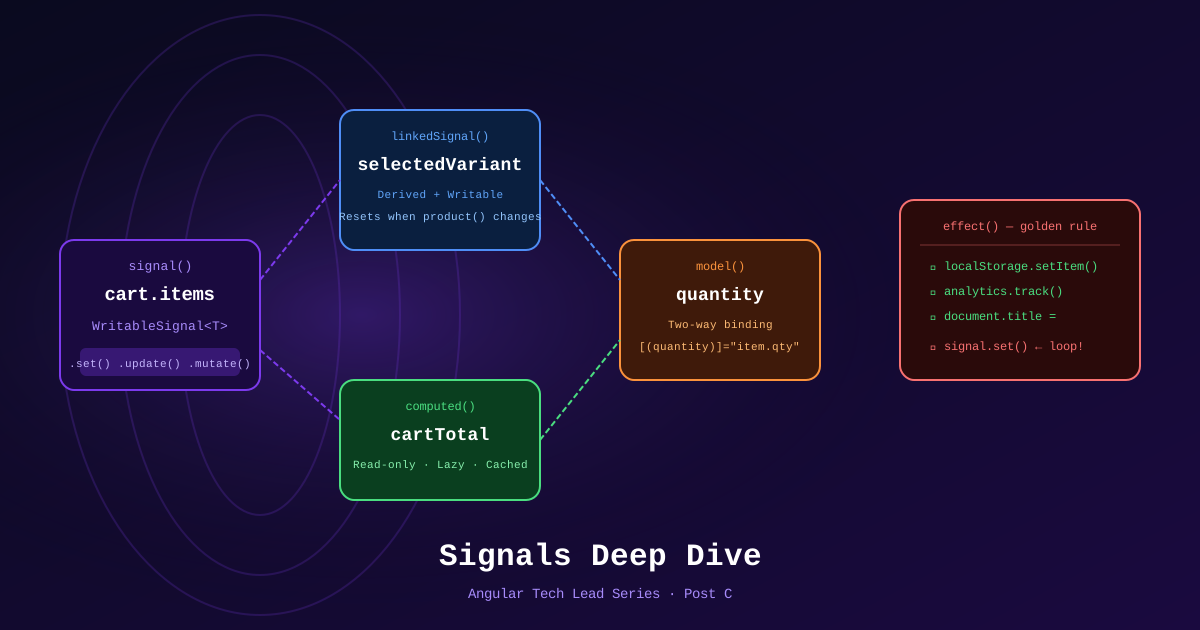
You’ve learned signal(), computed(), and effect(). You’re using them correctly for basic state. But the sharp edges — linkedSignal(), the effect() mutation trap, model() for two-way binding — are the difference between an Angular developer and an Angular 21 native.
This post covers the advanced Signals primitives that experienced .NET developers and Angular developers miss.
linkedSignal() — When computed() Isn’t Enough
computed() creates a signal that derives its value from other signals. It’s read-only — you can never call .set() on it.
linkedSignal() creates a signal that derives its default value from other signals, but can also be written to directly.
The ecommerce use case: selected size/color variant
@Injectable({ providedIn: 'root' })
export class ProductVariantStore {
  product = signal<Product | null>(null);

  // ❌ computed() — cannot be overridden by user interaction
  // selectedVariant = computed(() => this.product()?.variants[0] ?? null);

  // ✅ linkedSignal() — defaults to first variant, but user can pick another
  selectedVariant = linkedSignal(() => this.product()?.variants[0] ?? null);

  selectVariant(variant: Variant) {
    this.selectedVariant.set(variant); // user choice overrides the default
  }

  loadProduct(product: Product) {
    this.product.set(product);
    // selectedVariant automatically resets to variants[0] because
    // the linked computation re-runs when product() changes
  }
}
Why this matters: Without linkedSignal(), you’d need a separate boolean isUserSelected flag to track whether to use the derived value or the user override. linkedSignal() removes that complexity.
Typed form with linkedSignal:
export class CheckoutComponent {
  private cart = inject(CartService);

  // Shipping country defaults to 'SA' from user profile, but is editable
  shippingCountry = linkedSignal(() =>
    inject(ProfileService).profile()?.defaultCountry ?? 'SA'
  );

  // Computed shipping cost reacts to country changes
  shippingCost = computed(() =>
    SHIPPING_RATES[this.shippingCountry()] ?? 25
  );
}
model() — Two-Way Bindable Signal Inputs
model() creates a signal that functions as both an input AND an output — enabling two-way binding from parent components.
// QuantitySelectorComponent
@Component({
  selector: 'app-qty-selector',
  template: `
    <button (click)="decrement()">−</button>
    <span>{{ quantity() }}</span>
    <button (click)="increment()">+</button>
  `,
  changeDetection: ChangeDetectionStrategy.OnPush,
})
export class QuantitySelectorComponent {
  quantity = model(1);  // Default value is 1
  max = input(99);

  increment() {
    if (this.quantity() < this.max()) {
      this.quantity.update(q => q + 1);
    }
  }
  decrement() {
    if (this.quantity() > 1) this.quantity.update(q => q - 1);
  }
}
Parent usage with two-way binding:
<!-- CartItemComponent -->
<app-qty-selector [(quantity)]="item.qty" [max]="item.maxQty" />
Under the hood, [(quantity)] desugars into:
<app-qty-selector [quantity]="item.qty" (quantityChange)="item.qty = $event" />model() generates both the quantity input and quantityChange output automatically.
The effect() Golden Rule
effect() is the most misused Signal primitive. The rule is simple and absolute:
effect()is for side effects to external systems only. Never useeffect()to update other signals.
❌ The mutation trap
@Component({...})
export class ProductListComponent {
  filter = signal<FilterState>({ category: null, page: 1 });
  pageTitle = signal('All Products');

  constructor() {
    // ❌ WRONG — writing a signal inside effect() causes:
    // 1. Potential infinite loops
    // 2. Unpredictable update order
    // 3. Angular dev mode throws ExpressionChangedAfterItHasBeenChecked
    effect(() => {
      const category = this.filter().category;
      this.pageTitle.set(category ? `Category: ${category}` : 'All Products'); // ❌
    });
  }
}
✅ Use computed() for derived signal values
@Component({...})
export class ProductListComponent {
  filter = signal<FilterState>({ category: null, page: 1 });

  // ✅ Derived value — always consistent, no loops
  pageTitle = computed(() =>
    this.filter().category
      ? `Category: ${this.filter().category}`
      : 'All Products'
  );
}
✅ effect() for legitimate side effects only
constructor() {
  // ✅ OK: writing to localStorage (external system)
  effect(() => {
    localStorage.setItem('cart', JSON.stringify(this.cart.items()));
  });

  // ✅ OK: sending analytics event (external system)
  effect(() => {
    const product = this.selectedProduct();
    if (product) this.analytics.trackProductView(product.id);
  });

  // ✅ OK: updating document title (DOM, external to Angular)
  effect(() => {
    document.title = `${this.product()?.name ?? 'Products'} | TechShop`;
  });
}
toSignal() — Bridging RxJS to Signals
When you have an RxJS Observable (e.g., from SignalR, WebSocket, or older services), toSignal() converts it to a readable Signal.
@Injectable({ providedIn: 'root' })
export class InventoryRealtimeService {
  private hub = new signalR.HubConnectionBuilder()
    .withUrl('/hubs/inventory')
    .build();

  private stockUpdates$ = new Subject<StockUpdate>();

  // Signal auto-subscribes and tracks current value
  latestUpdate = toSignal(this.stockUpdates$.asObservable(), {
    initialValue: null
  });

  constructor() {
    this.hub.on('InventoryUpdated', (update: StockUpdate) => {
      this.stockUpdates$.next(update);
    });
    this.hub.start();
  }
}
Component usage — no subscription management needed:
export class ProductDetailComponent {
  private inventory = inject(InventoryRealtimeService);
  product = input.required<Product>();

  // Reacts to real-time stock updates without subscribe()
  currentStock = computed(() => {
    const update = this.inventory.latestUpdate();
    return update?.productId === this.product().id
      ? update.stockQty
      : this.product().stockQty;
  });
}
takeUntilDestroyed() — Clean RxJS Subscriptions
When you must use subscribe() (e.g., for side effects that toSignal() can’t handle), use takeUntilDestroyed() instead of complex ngOnDestroy teardown.
@Component({...})
export class OrderTrackingComponent {
  private destroyRef = inject(DestroyRef);
  private orderStatus = signal<OrderStatus | null>(null);

  ngOnInit() {
    // ✅ Automatically unsubscribes when component is destroyed
    this.orderService.statusUpdates$.pipe(
      filter(update => update.orderId === this.orderId()),
      takeUntilDestroyed(this.destroyRef)  // no ngOnDestroy needed
    ).subscribe(update => {
      this.orderStatus.set(update.status);
    });
  }
}
Can also be used outside ngOnInit (injection context):
constructor() {
  // Works directly in constructor — injection context is active
  this.orderService.statusUpdates$.pipe(
    takeUntilDestroyed()  // no destroyRef needed in injection context
  ).subscribe(update => this.orderStatus.set(update.status));
}
Signal Debugging
In development, use effect() for debugging:
// Temporary debug — traces all Signal reads
effect(() => {
  console.log('Filter changed:', this.filter());
  console.log('Products:', this.products());
  console.log('Loading:', this.isLoading());
});
Angular DevTools (Chrome extension) also shows Signal dependency graphs — which signals depend on which, and how often they fire.
References
- Angular Signals Guide — angular.dev
- linkedSignal API — angular.dev
- model() input — angular.dev
- toSignal — angular.dev
- takeUntilDestroyed — angular.dev
- effect() — Best Practices
Part of the Angular Tech Lead Series — Back to main series overview