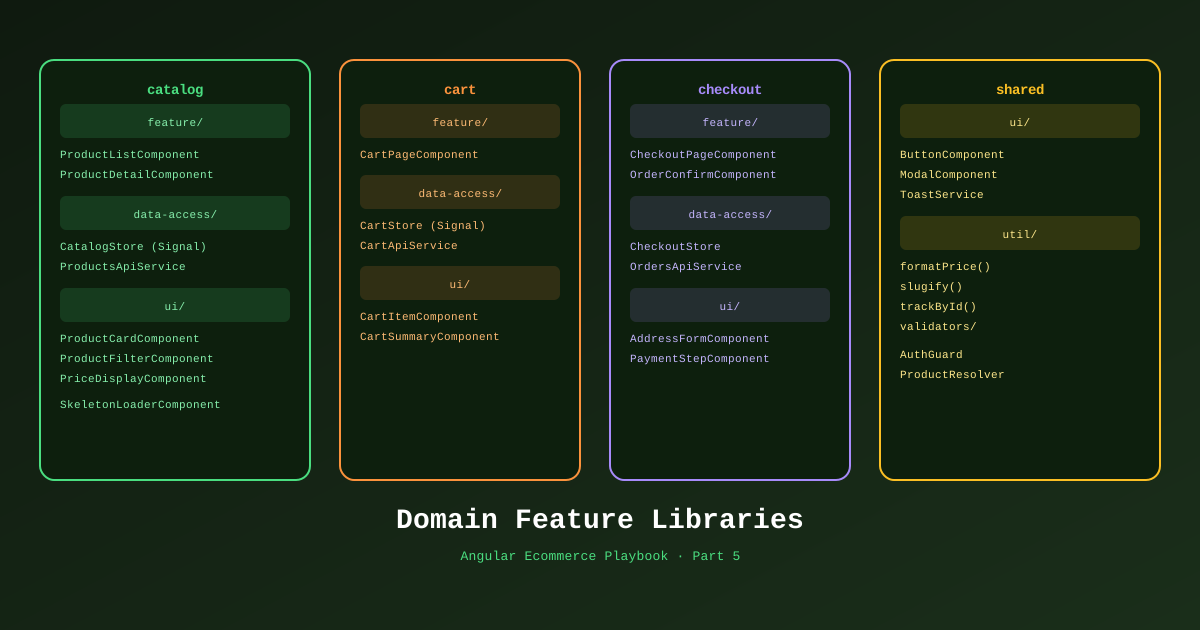
Theory only gets you so far. At some point you have to build a product page, wire up a shopping cart, and make the checkout form work correctly on the first try. This is that part.
Part 5 of the Angular Ecommerce Playbook covers the core ecommerce features: product catalog (with SSR for SEO), product search, cart management with Signals, and multi-step checkout. We’ll use TechShop as the working example throughout.
📊 Download: Ecommerce Domain Flow Diagram (draw.io)
The Type Contract: Mirror Your .NET Domain
Before writing any Angular component, define TypeScript types that mirror the .NET 10 domain models. These are generated by Kiota (Part 4), but it’s worth showing the mapping explicitly.
// libs/shared/api-client/src/lib/generated/models/product.ts
// Auto-generated by Kiota — DO NOT EDIT
export interface Product {
  id: string;
  slug: string;
  name: string;
  description: string;
  price: number;
  compareAtPrice: number | null;
  stockQty: number;
  images: ProductImage[];
  category: ProductCategory;
  tags: string[];
  specs: Record<string, string>;
  isInStock: boolean;
  createdAt: string; // ISO 8601
}
The .NET 10 domain entity (generated from):
// TechShop.Domain/Entities/Product.cs
public sealed class Product : AggregateRoot<ProductId>
{
    public ProductSlug Slug { get; private set; }
    public string Name { get; private set; }
    public Money Price { get; private set; }
    public Money? CompareAtPrice { get; private set; }
    public int StockQty { get; private set; }
    // ...
}
Product Catalog
The Data-Access Library
// libs/catalog/data-access/src/lib/product.store.ts
import { Injectable, inject, signal, computed } from '@angular/core';
import { resource } from '@angular/core';
import { TechShopApiClient } from '@techshop/shared/api-client';
import type { Product, ProductFilter } from '@techshop/shared/api-client';

@Injectable({ providedIn: 'root' })
export class ProductStore {
  private readonly api = inject(TechShopApiClient);

  // Filter state — changes drive the resource reload automatically
  readonly filter = signal<ProductFilter>({
    page: 1,
    pageSize: 24,
    category: null,
    minPrice: null,
    maxPrice: null,
    inStockOnly: false,
    sortBy: 'relevance',
  });

  // resource() re-fetches whenever filter() changes
  readonly productsResource = resource({
    request: () => this.filter(),
    loader: async ({ request }) =>
      await this.api.products.get({ queryParameters: request })
  });

  // Derived signals
  readonly products = computed(() => this.productsResource.value()?.items ?? []);
  readonly totalCount = computed(() => this.productsResource.value()?.totalCount ?? 0);
  readonly isLoading = this.productsResource.isLoading;
  readonly error = this.productsResource.error;

  // Filter actions
  setCategory(category: string | null) {
    this.filter.update(f => ({ ...f, category, page: 1 }));
  }

  setPriceRange(min: number | null, max: number | null) {
    this.filter.update(f => ({ ...f, minPrice: min, maxPrice: max, page: 1 }));
  }

  nextPage() {
    this.filter.update(f => ({ ...f, page: f.page + 1 }));
  }
}
Product List Component (SSR Ready)
// libs/catalog/feature-product-list/src/lib/product-list.component.ts
import { Component, inject, ChangeDetectionStrategy } from '@angular/core';
import { ProductStore } from '@techshop/catalog/data-access';
import { ProductCardComponent } from '@techshop/shared/ui';
import { JsonLdService } from '@techshop/shared/seo'; // Structured data for Google

@Component({
  selector: 'ts-product-list',
  standalone: true,
  changeDetection: ChangeDetectionStrategy.OnPush,
  imports: [ProductCardComponent],
  template: `
    <div class="product-grid">
      @if (store.isLoading()) {
        <ts-product-grid-skeleton count="24" />
      }

      @for (product of store.products(); track product.id) {
        <ts-product-card [product]="product" />
      } @empty {
        <p class="empty-state">No products match your filters.</p>
      }
    </div>

    @defer (on viewport) {
      <!-- Recommendations only load when user scrolls near them -->
      <ts-product-recommendations [category]="currentCategory()" />
    } @placeholder {
      <div class="recommendations-placeholder" style="height: 400px"></div>
    }
  `,
})
export class ProductListComponent {
  readonly store = inject(ProductStore);

  readonly currentCategory = computed(() => this.store.filter().category);
}
The @defer (on viewport) block means product recommendations are only loaded when the user scrolls to that section — no manual IntersectionObserver code, no extra HTTP requests on initial load.
Cart: Pure Signals, No NgRx
For cart state, we don’t need NgRx. Cart state is:
- Local to the session (not persisted to DB until checkout)
- Read by multiple components (header badge, cart drawer, checkout)
- Simple: add, remove, update quantity, clear
Signals in an injectable service handle this perfectly:
// libs/cart/data-access/src/lib/cart.service.ts
import { Injectable, signal, computed } from '@angular/core';

export interface CartItem {
  productId: string;
  slug: string;
  name: string;
  price: number;
  imageUrl: string;
  qty: number;
  maxQty: number; // From .NET StockQty
}

@Injectable({ providedIn: 'root' })
export class CartService {
  // Single source of truth
  private readonly _items = signal<CartItem[]>(
    JSON.parse(localStorage.getItem('cart') ?? '[]')
  );

  // Derived state — computed once, Angular knows the dependencies
  readonly items = this._items.asReadonly();
  readonly itemCount = computed(() =>
    this._items().reduce((sum, item) => sum + item.qty, 0)
  );
  readonly subtotal = computed(() =>
    this._items().reduce((sum, item) => sum + item.price * item.qty, 0)
  );
  readonly isEmpty = computed(() => this._items().length === 0);

  add(product: CartItem): void {
    this._items.update(items => {
      const existing = items.find(i => i.productId === product.productId);
      if (existing) {
        return items.map(i =>
          i.productId === product.productId
            ? { ...i, qty: Math.min(i.qty + 1, i.maxQty) }
            : i
        );
      }
      return [...items, { ...product, qty: 1 }];
    });
    this.persist();
  }

  remove(productId: string): void {
    this._items.update(items => items.filter(i => i.productId !== productId));
    this.persist();
  }

  updateQty(productId: string, qty: number): void {
    this._items.update(items =>
      items.map(i =>
        i.productId === productId
          ? { ...i, qty: Math.max(1, Math.min(qty, i.maxQty)) }
          : i
      )
    );
    this.persist();
  }

  clear(): void {
    this._items.set([]);
    localStorage.removeItem('cart');
  }

  contains(productId: string): boolean {
    return this._items().some(i => i.productId === productId);
  }

  private persist(): void {
    localStorage.setItem('cart', JSON.stringify(this._items()));
  }
}
Cart in the Header
@Component({
  selector: 'ts-header',
  standalone: true,
  imports: [RouterLink],
  template: `
    <header>
      <a routerLink="/" class="logo">TechShop</a>
      <nav>
        <a routerLink="/cart" class="cart-icon">
          🛒
          @if (cart.itemCount() > 0) {
            <span class="badge">{{ cart.itemCount() }}</span>
          }
        </a>
      </nav>
    </header>
  `,
})
export class HeaderComponent {
  readonly cart = inject(CartService);
}
Every time cart.itemCount() changes, only the header component rerenders. Not the entire app. This is the zoneless + Signals performance story made concrete.
Multi-Step Checkout
The checkout flow is one of the most complex UX challenges in ecommerce. Angular’s Reactive Forms shine here.
// libs/cart/feature-checkout/src/lib/checkout.component.ts
import { Component, inject, signal } from '@angular/core';
import { FormBuilder, ReactiveFormsModule, Validators } from '@angular/forms';

type CheckoutStep = 'shipping' | 'payment' | 'review';

@Component({
  selector: 'ts-checkout',
  standalone: true,
  imports: [ReactiveFormsModule],
  template: `
    <!-- Step indicator -->
    <ol class="steps">
      @for (step of steps; track step) {
        <li [class.active]="currentStep() === step"
            [class.completed]="isCompleted(step)">
          {{ step | titlecase }}
        </li>
      }
    </ol>

    @switch (currentStep()) {
      @case ('shipping') {
        <ts-shipping-form
          [form]="checkoutForm.controls.shipping"
          (next)="goToStep('payment')"
        />
      }
      @case ('payment') {
        <ts-payment-form
          [form]="checkoutForm.controls.payment"
          (next)="goToStep('review')"
          (back)="goToStep('shipping')"
        />
      }
      @case ('review') {
        <ts-order-review
          [form]="checkoutForm.value"
          [cart]="cart.items()"
          [total]="cart.subtotal()"
          (confirm)="placeOrder()"
          (back)="goToStep('payment')"
        />
      }
    }
  `,
})
export class CheckoutComponent {
  private fb = inject(FormBuilder);
  private cart = inject(CartService);
  private orderService = inject(OrderService);

  readonly steps: CheckoutStep[] = ['shipping', 'payment', 'review'];
  readonly currentStep = signal<CheckoutStep>('shipping');
  readonly completedSteps = signal<Set<CheckoutStep>>(new Set());

  checkoutForm = this.fb.group({
    shipping: this.fb.group({
      fullName: ['', Validators.required],
      address: ['', Validators.required],
      city: ['', Validators.required],
      country: ['', Validators.required],
      postalCode: ['', [Validators.required, Validators.pattern(/^\d{5}(-\d{4})?$/)]],
    }),
    payment: this.fb.group({
      // Stripe Elements handles actual card fields — we store the payment intent
      paymentIntentId: ['', Validators.required],
    }),
  });

  goToStep(step: CheckoutStep): void {
    this.completedSteps.update(s => new Set([...s, this.currentStep()]));
    this.currentStep.set(step);
  }

  isCompleted(step: CheckoutStep): boolean {
    return this.completedSteps().has(step);
  }

  async placeOrder(): Promise<void> {
    if (this.checkoutForm.invalid) return;

    await this.orderService.create({
      ...this.checkoutForm.value,
      items: this.cart.items(),
    });

    this.cart.clear();
  }
}
Order Tracking
Once an order is placed, the user wants to track it. We use SignalR (from Part 4) for real-time status updates:
// libs/orders/feature-order-detail/src/lib/order-detail.component.ts
@Component({
  selector: 'ts-order-detail',
  standalone: true,
  template: `
    <h1>Order #{{ order().id }}</h1>

    <!-- Order status timeline -->
    <ol class="status-timeline">
      @for (status of orderStatuses; track status.label) {
        <li [class.completed]="isStatusReached(status.key)">
          {{ status.label }}
          @if (isStatusReached(status.key)) {
            <span class="timestamp">{{ getStatusTime(status.key) | date:'medium' }}</span>
          }
        </li>
      }
    </ol>

    <!-- Real-time indicator -->
    @if (realtimeService.latestUpdate()?.orderId === order().id) {
      <div class="realtime-badge">🔴 Live tracking</div>
    }
  `,
})
export class OrderDetailComponent implements OnInit {
  readonly order = input.required<Order>();
  readonly realtimeService = inject(OrderRealtimeService);
  // ...
}
References
- Angular @defer — Official Docs
- resource() API — angular.dev
- Angular @for control flow
- Angular Reactive Forms — Validators
- NgOptimizedImage — angular.dev
- Stripe Elements + Angular Integration
- SignalR hub groups
- Draw.io Diagram: Ecommerce Domain Flow
This is Part 5 of 11 in the Angular Ecommerce Playbook. ← Part 4: .NET 10 Integration | Part 6: State Management →