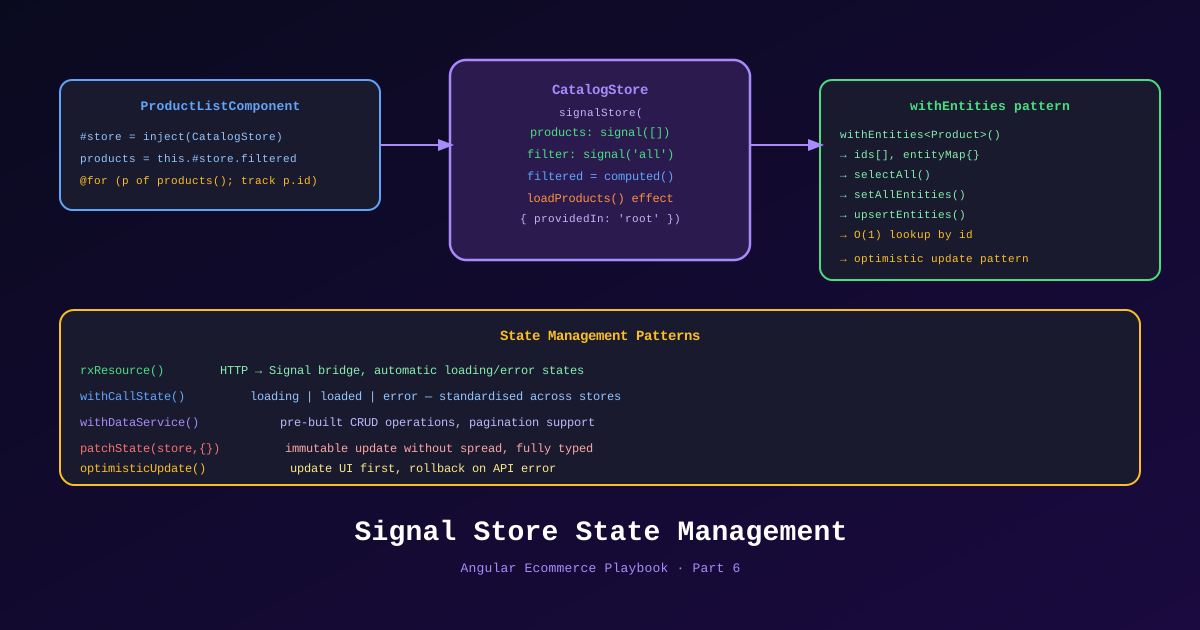
State management is Angular’s most debated topic. NgRx vs. Signals. Signals vs. Services. Redux pattern vs. signal stores. The debate often produces more heat than light, because the answer depends entirely on the complexity of your state — not on which library is “correct.”
This is Part 6 of the Angular Ecommerce Playbook. We’ll cut through the debate with a concrete decision matrix for TechShop, show actual implementations of each approach, and answer the question I get in every team review: when does NgRx actually pay for itself?
📊 Download: State Management Decision Diagram (draw.io)
The Decision Matrix
| State Scenario | Recommendation |
|---|---|
| Component-local UI state (loading spinner, modal open) | signal() in component |
| Feature-level shared state (product filter, current tab) | signal() in injectable service |
| Cross-feature global state (auth user, cart, notifications) | Injectable service with signals |
| Complex async state with optimistic updates, undo | NgRx Signals Store |
| Complex cross-feature state with time-travel debugging | NgRx Signals Store |
| State that needs to survive hydration (SSR → CSR) | TransferState + signal |
The pattern I follow: start with signals in services. Add NgRx Signals Store when you hit one of these triggers:
- State needs rollback / undo (e.g., optimistic cart updates that fail)
- Multiple feature teams need independent state slices with clear ownership
- You need developer tools to inspect state history during debugging
For most ecommerce projects, auth + cart + notifications in injectable services is enough. Add NgRx for orders if concurrent modifications become a real problem.
Level 1: Component Signals
The simplest state — belongs only to one component:
@Component({
  selector: 'ts-product-filter',
  standalone: true,
  template: `
    <div class="filter-panel" [class.open]="isPanelOpen()">
      <button (click)="togglePanel()">
        Filters {{ isPanelOpen() ? '▲' : '▼' }}
      </button>
      @if (isPanelOpen()) {
        <!-- Filter form -->
      }
    </div>
  `,
})
export class ProductFilterComponent {
  // Local signal — only this component cares about it
  readonly isPanelOpen = signal(false);

  togglePanel(): void {
    this.isPanelOpen.update(open => !open);
  }
}
No service. No store. Just a signal. This is the correct choice for 60% of your state.
Level 2: Injectable Service with Signals
Shared state that multiple components need:
// libs/shared/auth/src/lib/auth.service.ts
// (shown in Part 4, abbreviated here for the pattern)

@Injectable({ providedIn: 'root' })
export class AuthService {
  private readonly _user = signal<AuthUser | null>(null);

  // Public read-only signals
  readonly user = this._user.asReadonly();
  readonly isAuthenticated = computed(() => this._user() !== null);
  readonly isAdmin = computed(() => this._user()?.role === 'admin');

  setUser(user: AuthUser): void {
    this._user.set(user);
  }

  logout(): void {
    this._user.set(null);
  }
}
Components consume it:
// Header component — reacts to auth state
@Component({ /* ... */ })
export class HeaderComponent {
  readonly auth = inject(AuthService);
  // template: @if (auth.isAuthenticated()) { ... }
}

// Protected route — same service, different consumer
@Component({ /* ... */ })
export class AccountComponent {
  readonly auth = inject(AuthService);
  // template: {{ auth.user()?.displayName }}
}
Both components share the same AuthService instance (singleton on providedIn: 'root'). When a user logs in, both components update automatically. No manual event dispatch. No subscription management.
Level 3: NgRx Signals Store
NgRx 19 (released alongside Angular 21) introduced the Signals Store — a new, Signals-native state management approach that replaces the Redux-style reducers with a more intuitive API. This is different from classic NgRx (which is still available and valid for complex cases).
The Ecommerce Order Feature
The order management feature is where NgRx Signals Store earns its place. Orders need:
- Optimistic updates (update status locally before API confirms)
- Undo if the API call fails
- Loading states per order (not globally)
- Time-travel debugging for customer support
// libs/orders/data-access/src/lib/order.store.ts
import { patchState, signalStore, withComputed, withMethods, withState } from '@ngrx/signals';
import { withEntities, setEntity, updateEntity, removeEntity } from '@ngrx/signals/entities';
import { inject } from '@angular/core';
import { tapResponse } from '@ngrx/operators';
import { TechShopApiClient } from '@techshop/shared/api-client';
import type { Order } from '@techshop/shared/api-client';

// State shape
interface OrderState {
  isLoading: boolean;
  error: string | null;
  selectedOrderId: string | null;
}

export const OrderStore = signalStore(
  { providedIn: 'root' },

  // Entity adapter handles collection CRUD
  withEntities<Order>(),

  withState<OrderState>({
    isLoading: false,
    error: null,
    selectedOrderId: null,
  }),

  withComputed(({ entities, selectedOrderId }) => ({
    selectedOrder: computed(() =>
      entities().find(o => o.id === selectedOrderId()) ?? null
    ),
    pendingOrders: computed(() =>
      entities().filter(o => o.status === 'pending')
    ),
    totalRevenue: computed(() =>
      entities().reduce((sum, o) => sum + o.total, 0)
    ),
  })),

  withMethods((store, api = inject(TechShopApiClient)) => ({
    async loadOrders() {
      patchState(store, { isLoading: true, error: null });

      try {
        const result = await api.orders.get();
        if (result?.items) {
          patchState(store, setAllEntities(result.items));
        }
      } catch (err) {
        patchState(store, { error: 'Failed to load orders' });
      } finally {
        patchState(store, { isLoading: false });
      }
    },

    async cancelOrder(orderId: string) {
      // Optimistic update — change local state immediately
      patchState(store, updateEntity({ id: orderId, changes: { status: 'cancelling' } }));

      try {
        await api.orders.byId(orderId).cancel.post();
        patchState(store, updateEntity({ id: orderId, changes: { status: 'cancelled' } }));
      } catch (err) {
        // Rollback — restore original status
        patchState(store, updateEntity({ id: orderId, changes: { status: 'pending' } }));
        // Notify user
        throw err;
      }
    },

    selectOrder(orderId: string | null) {
      patchState(store, { selectedOrderId: orderId });
    },
  }))
);
Using the store in components:
@Component({
  selector: 'ts-order-list',
  standalone: true,
  providers: [OrderStore], // Scoped to this component tree (not global)
  template: `
    @if (store.isLoading()) {
      <ts-spinner />
    } @else {
      @for (order of store.entities(); track order.id) {
        <ts-order-row
          [order]="order"
          (cancel)="store.cancelOrder(order.id)"
          (select)="store.selectOrder(order.id)"
        />
      }
    }
    <p class="totals">Total revenue: {{ store.totalRevenue() | currency }}</p>
  `,
})
export class OrderListComponent implements OnInit {
  readonly store = inject(OrderStore);

  ngOnInit() {
    this.store.loadOrders();
  }
}
NgRx Signals Store vs. Classic NgRx
| Feature | NgRx Signals Store | Classic NgRx |
|---|---|---|
| Boilerplate | Low | High (actions, reducers, effects, selectors) |
| Learning curve | Medium | High |
| DevTools support | ✅ (NgRx DevTools 19) | ✅ (mature) |
| Code splitting | ✅ Component-scoped stores | Partial |
| RxJS required | Optional | Required |
| Angular version req | 19+ | Any |
For new Angular 21 projects: start with NgRx Signals Store. Only reach for classic NgRx if you need battle-tested DevTools integration for a very large, very complex state graph (50+ slices, 10+ effects).
The Auth + Cart + Notifications Pattern
For TechShop, the final state architecture:
State Architecture
├── auth/                  Injectable Signal Service  (1 instance, global)
├── cart/                  Injectable Signal Service  (1 instance, persistent)
├── notifications/         Injectable Signal Service  (1 instance, global)
├── catalog/               resource() per component   (ephemeral, SSR safe)
├── orders/                NgRx Signals Store         (optimistic updates, complex)
└── account/               Injectable Signal Service  (1 instance, session-scoped)
The key insight: not everything needs a store. The catalog data comes from the server each time and doesn’t need to live in client state — resource() handles it. The cart is simple enough for a signal service. Orders have complex, mutation-heavy state — NgRx Signals Store earns its place there.
OnPush + Signals: The Performance Default
Angular 21 with zoneless is fast by default, but explicitly using ChangeDetectionStrategy.OnPush on every component is still a best practice — it documents intent and prevents regressing if Zone.js is ever re-introduced.
@Component({
  changeDetection: ChangeDetectionStrategy.OnPush,
  // ...
})
export class ProductCardComponent {
  // With OnPush + Signals, this component only rerenders when
  // product() changes — not on parent rerenders
  readonly product = input.required<Product>();
  readonly isInCart = computed(() => this.cart.contains(this.product().id));
}
In a product grid with 48 items, adding one to the cart with the OnPush pattern + Signals means only the one product card that changed rerenders. Without it, all 48 cards check for changes.
References
- NgRx Signals Store — ngrx.io
- NgRx 19 Release Notes
- withEntities — NgRx Signals Entities
- Angular Signals — Computed
- Angular resource() API
- ChangeDetectionStrategy.OnPush with Signals
- Draw.io Diagram: State Management Decision
This is Part 6 of 11 in the Angular Ecommerce Playbook. ← Part 5: Ecommerce Domain | Part 7: Angular SSR Storefront →