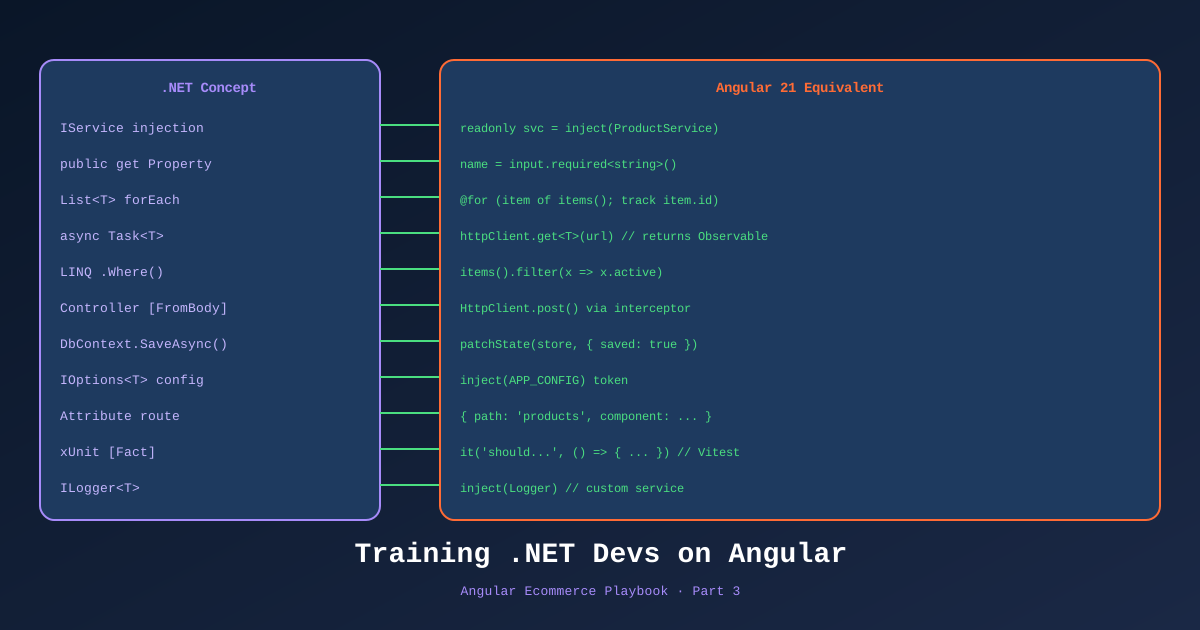
The worst onboarding experience for a .NET developer is being handed an Angular tutorial written for JavaScript developers. It assumes you don’t know what dependency injection is. It explains interfaces like you’ve never seen one. It uses toy examples with no connection to patterns you’ve spent years using.
The best onboarding is a set of deliberately chosen analogies that meet you where you are.
This is Part 3 of the Angular Ecommerce Playbook. We have three .NET developers joining the TechShop Angular project. They understand Clean Architecture, SOLID principles, and type safety. They do not yet understand Angular. Here’s the curriculum I’ve run through with them — structured as mapping sessions rather than tutorials.
Expected time to productive Angular contribution: 4–6 weeks with this approach.
📊 Download: .NET-to-Angular Mental Model Diagram (draw.io)
Week 1: The Mental Model Map
Dependency Injection: Almost Identical
This is the first win. Angular’s DI system and .NET’s DI system are conceptually identical. Both use a service container. Both support singleton, scoped, and transient lifetimes. Both inject through constructor parameters (or, in Angular 21, through inject()).
| .NET | Angular 21 |
|---|---|
services.AddSingleton<ICartService, CartService>() | { provide: CartService, useClass: CartService } in root |
services.AddScoped<IOrderRepository>() | @Injectable({ providedIn: 'root' }) (singleton in SPA) |
Constructor injection: public MyClass(IService svc) | inject(): readonly svc = inject(MyService) |
IServiceProvider | Injector |
IOptions<T> | InjectionToken<T> |
The Angular 21 way to inject:
// Angular 21 — use inject() instead of constructor injection
import { inject, Injectable } from '@angular/core';
import { CartDataAccess } from './cart.data-access';

@Injectable({ providedIn: 'root' })
export class CartService {
  // inject() replaces constructor injection — same concept, different syntax
  private readonly cartData = inject(CartDataAccess);
  private readonly apiClient = inject(TechShopApiClient);
}
The .NET equivalent for the developer:
// What the .NET dev already knows
public class CartService(ICartRepository cartRepo, ITechShopApi api)
{
    // Primary constructor DI
}
Session exercise: Ask each developer to convert a .NET service with constructor DI to an Angular injectable service using inject(). Takes 15 minutes and builds immediate confidence.
Interfaces: TypeScript Does It Differently
In .NET, you define an IProductRepository interface and implement it in a ProductRepository class. The DI container binds the interface to the implementation. When unit testing, you inject a mock.
In TypeScript/Angular, there are no runtime interfaces. TypeScript interfaces are compile-time only — erased at runtime. Angular can’t bind an interface to an implementation because interfaces don’t exist when the app runs.
The Angular equivalent of the repository pattern:
// The interface (compile-time only — TypeScript erases this at runtime)
export interface IProductRepository {
  getAll(filter: ProductFilter): Observable<Product[]>;
  getBySlug(slug: string): Observable<Product | null>;
}

// The injection token (runtime — this IS the injectable key)
export const PRODUCT_REPOSITORY =
  new InjectionToken<IProductRepository>('ProductRepository');

// The real implementation
@Injectable()
export class ApiProductRepository implements IProductRepository {
  private api = inject(TechShopApiClient);

  getAll(filter: ProductFilter) {
    return from(this.api.products.get({ queryParameters: filter }));
  }

  getBySlug(slug: string) {
    return from(this.api.products.bySlug(slug).get());
  }
}

// The mock (in tests)
export class MockProductRepository implements IProductRepository {
  getAll = () => of([]);
  getBySlug = () => of(null);
}
In app.config.ts:
providers: [
  { provide: PRODUCT_REPOSITORY, useClass: ApiProductRepository },
]
In tests:
providers: [
  { provide: PRODUCT_REPOSITORY, useClass: MockProductRepository },
]
.NET dev insight: InjectionToken is the runtime replacement for what typeof(IInterface) is in .NET’s DI container. Once this click happens, everything about Angular’s DI model makes sense.
Components: Not Controllers, Not Pages
.NET devs often think of components as controllers. They’re not. A component is closer to a ViewModel + View combined. The TypeScript class is the ViewModel; the template is the View; there’s no separate Controller layer.
// This ENTIRE file is one component — ViewModel + View combined
@Component({
  selector: 'ts-product-card',
  standalone: true,
  imports: [CurrencyPipe, NgOptimizedImage],
  template: `
    <article class="product-card">
      <img
        [ngSrc]="product().imageUrl"
        [alt]="product().name"
        width="300"
        height="300"
        priority
      />
      <h3>{{ product().name }}</h3>
      <p>{{ product().price | currency:'USD' }}</p>
      @if (isInCart()) {
        <button class="btn-secondary" (click)="removeFromCart()">Remove</button>
      } @else {
        <button class="btn-primary" (click)="addToCart()">Add to Cart</button>
      }
    </article>
  `,
})
export class ProductCardComponent {
  // Input: equivalent to a property on a ViewModel that the parent sets
  readonly product = input.required<Product>();

  // Service injection — just like .NET DI
  private readonly cartService = inject(CartService);

  // Derived state — like a computed property in C# (but reactive)
  readonly isInCart = computed(() =>
    this.cartService.contains(this.product().id)
  );

  addToCart() {
    this.cartService.add(this.product());
  }

  removeFromCart() {
    this.cartService.remove(this.product().id);
  }
}
.NET dev mapping:
@Component→ class with attributes (like[ApiController])template→ Razor view (.cshtml), but co-located with the classinput()→ property set by the parent (like a view model property)computed()→ C#getproperty that derives from other state(click)="method()"→ event handler binding
Week 2: Signals vs. RxJS
This is where most .NET developers get lost if not guided correctly. There are two reactivity systems in Angular 21, and knowing when to use each is critical.
The Short Answer
| Scenario | Use |
|---|---|
| Local component state | Signals |
| Derived/computed state | Signals (computed()) |
| HTTP requests | resource() API (Signals) or RxJS Observable |
| Complex async sequences | RxJS |
| Router events | RxJS (router is still Observable-based) |
@Input that changes over time | Signals (input()) |
| Real-time SignalR streams | RxJS → convert to Signal with toSignal() |
The key insight: Signals are synchronous. Observables are asynchronous. Use Signals for state that exists right now. Use Observables for things that arrive over time.
Signals — The .NET Analogy
For a .NET developer, a Signal<T> is like a combination of:
- A property with a backing field (holds the current value)
- An
INotifyPropertyChangedimplementation (notifies dependents automatically) - A computed property that auto-recalculates when its dependencies change
import { signal, computed, effect } from '@angular/core';

// Like a field with INotifyPropertyChanged built in
const searchQuery = signal('');
const products = signal<Product[]>([]);

// Like a computed property — re-evaluates when searchQuery or products change
const filteredProducts = computed(() =>
  products().filter(p =>
    p.name.toLowerCase().includes(searchQuery().toLowerCase())
  )
);

// Like a subscription or event handler — runs when dependencies change
// Use effect() sparingly — mostly for logging and side effects to external systems
effect(() => {
  analytics.track('search', { query: searchQuery() });
});

// Update state
searchQuery.set('laptop');       // set() — replace the whole value
searchQuery.update(q => q + '!'); // update() — transform current value
RxJS — Only When You Need It
.NET developers sometimes gravitate toward RxJS because it resembles LINQ or Reactive Extensions. This instinct leads to:
// ❌ Overusing Observables — this .NET dev has never been burned by this yet
products$: Observable<Product[]> = this.http.get<Product[]>('/api/products').pipe(
  map(products => products.filter(p => p.inStock)),
  catchError(err => { this.error$.next(err); return EMPTY; })
);
The Angular 21 way for a HTTP call — using the resource() API:
// ✅ Angular 21 resource() API — async data with Signals
import { resource, inject } from '@angular/core';

export class ProductListComponent {
  private api = inject(TechShopApiClient);

  // resource() handles loading, error, and data states automatically
  productsResource = resource({
    request: () => ({ category: this.selectedCategory() }),
    loader: async ({ request, abortSignal }) => {
      // The actual HTTP call — .NET devs will find this familiar
      return await this.api.products.get({
        queryParameters: { category: request.category },
        // abortSignal integrates with Angular's request cancellation
      });
    }
  });

  // Access loading/error/data as signals
  // productsResource.isLoading() — boolean Signal
  // productsResource.error()    — error Signal
  // productsResource.value()    — data Signal
}
When you must use RxJS: Real-time SignalR, router events, complex debounce/throttle patterns, and merging multiple streams. Convert to Signals at the component boundary using toSignal():
import { toSignal } from '@angular/core/rxjs-interop';
import { HubConnectionBuilder } from '@microsoft/signalr';

@Injectable({ providedIn: 'root' })
export class InventoryRealtimeService {
  private connection = new HubConnectionBuilder()
    .withUrl('/hubs/inventory')
    .build();

  // Observable of inventory updates from SignalR
  private inventoryUpdates$ = new Observable<InventoryUpdate>(subscriber => {
    this.connection.on('InventoryUpdated', update => subscriber.next(update));
    this.connection.start();
    return () => this.connection.stop();
  });

  // Expose as Signal for components — components don't need to know about SignalR
  readonly lastUpdate = toSignal(this.inventoryUpdates$);
}
Week 3: Forms, Guards, and Common Mistakes
Reactive Forms — More Familiar Than Template-Driven
.NET devs who’ve done MVC or Razor Pages tend to prefer Reactive Forms because they define the form model in TypeScript (the class), not in the template. This is the right call.
import { FormBuilder, Validators, ReactiveFormsModule } from '@angular/forms';
import { inject, Component } from '@angular/core';

@Component({
  standalone: true,
  imports: [ReactiveFormsModule],
  template: `
    <form [formGroup]="form" (ngSubmit)="submit()">
      <input formControlName="email" type="email" />
      @if (form.controls.email.errors?.['required']) {
        <span class="error">Email is required</span>
      }
      <input formControlName="password" type="password" />
      <button type="submit" [disabled]="form.invalid">Sign In</button>
    </form>
  `,
})
export class LoginFormComponent {
  // FormBuilder is the Angular equivalent of a model binder
  private fb = inject(FormBuilder);

  form = this.fb.group({
    email: ['', [Validators.required, Validators.email]],
    password: ['', [Validators.required, Validators.minLength(8)]],
  });

  submit() {
    if (this.form.valid) {
      // form.value is strongly typed in Angular 14+ strict mode
      console.log(this.form.value); // { email: string, password: string }
    }
  }
}
Note on Signal Forms: Angular 21 includes a developer preview of Signal Forms, a new forms API built entirely on Signals. It’s not production-ready in early 2026 — use Reactive Forms for production. Watch the Angular 2026 roadmap for stabilization.
Route Guards: Equivalent to ASP.NET Authorization Middleware
// libs/shared/auth/src/lib/auth.guard.ts
import { inject } from '@angular/core';
import { CanActivateFn, Router } from '@angular/router';
import { AuthService } from './auth.service';

// Functional guard — no class needed (Angular 15+)
export const authGuard: CanActivateFn = (route, state) => {
  const auth = inject(AuthService);
  const router = inject(Router);

  if (auth.isAuthenticated()) {
    return true;
  }

  // Redirect to login with returnUrl (like ASP.NET's ReturnUrl pattern)
  return router.createUrlTree(['/login'], {
    queryParams: { returnUrl: state.url }
  });
};
.NET dev mapping: This is exactly like [Authorize] or a custom IAuthorizationMiddleware. Same concept: check a condition before allowing navigation, redirect if not met.
The 5 Most Common .NET-to-Angular Mistakes
1. Trying to subscribe to Observable<T> in the component class manually
// ❌ The .NET dev instinct — manual subscription management
this.products$ = this.productService.getAll().subscribe(products => {
  this.products = products; // And forgetting to unsubscribe
});

// ✅ Use resource() for HTTP or async pipe in template
// Angular handles subscription lifecycle automatically
2. Mutating signal values directly
// ❌ Doesn't work — signals are immutable by reference
const items = signal<CartItem[]>([]);
items().push(newItem); // The signal didn't "see" this change

// ✅ Always use set() or update()
items.update(current => [...current, newItem]);
3. Using async/await in Angular template expressions
// ❌ This won't work in an Angular template
// {{ await somePromise }}

// ✅ Use resource() if you need async data in a template signal
const data = resource({ loader: async () => await fetchData() });
// Then in template: {{ data.value() }}
4. Importing CommonModule in standalone components
// ❌ Old Module-era habit — CommonModule is not needed
@Component({
  imports: [CommonModule], // Huge, imports everything

// ✅ Import only what you use
@Component({
  imports: [NgIf, NgFor, CurrencyPipe], // Tree-shakeable
  // Or just use @if / @for control flow — no import needed
5. Writing business logic in components
// ❌ The MVC controller instinct
export class ProductListComponent {
  addToCart(product: Product) {
    if (this.cart.items.length >= 50) throw new Error('Cart full');
    this.cart.items.push(product);
    this.http.post('/api/cart', this.cart).subscribe();
    this.analytics.track('add_to_cart', product);
    this.router.navigate(['/cart']);
  }
}

// ✅ Components only coordinate; services own the logic
export class ProductListComponent {
  private cartService = inject(CartService);

  addToCart(product: Product) {
    this.cartService.add(product); // CartService handles all the rest
  }
}
The Training Schedule
Here’s the 4-week structured curriculum:
| Week | Focus | Deliverable |
|---|---|---|
| 1 | DI, Components, Template Syntax | First standalone component with inject() |
| 2 | Signals, resource(), RxJS basics | Feature implementation with signal store |
| 3 | Forms, Guards, Routing | Full feature with auth guard and reactive form |
| 4 | Testing with Vitest, E2E with Playwright | Same feature with 80% test coverage |
The pairing model: each .NET developer is paired with an Angular developer for weeks 1-2. In weeks 3-4, they work independently with code review from the Angular-experienced pair.
The most common feedback from .NET developers after 4 weeks: “Angular’s DI and Clean Architecture analogy makes sense — I just needed the right map.”
References
- Angular Signals Guide — angular.dev
- resource() API — angular.dev
- Angular Dependency Injection — angular.dev
- Angular Reactive Forms — angular.dev
- Signal Forms (Developer Preview) — Angular Blog
- toSignal() interop — angular.dev
- Angular Router Guards — angular.dev
- Vitest — angular.dev Testing Guide
- Draw.io Diagram: .NET-to-Angular Mental Model
This is Part 3 of 11 in the Angular Ecommerce Playbook. ← Part 2: Project Setup | Part 4: .NET 10 Integration →