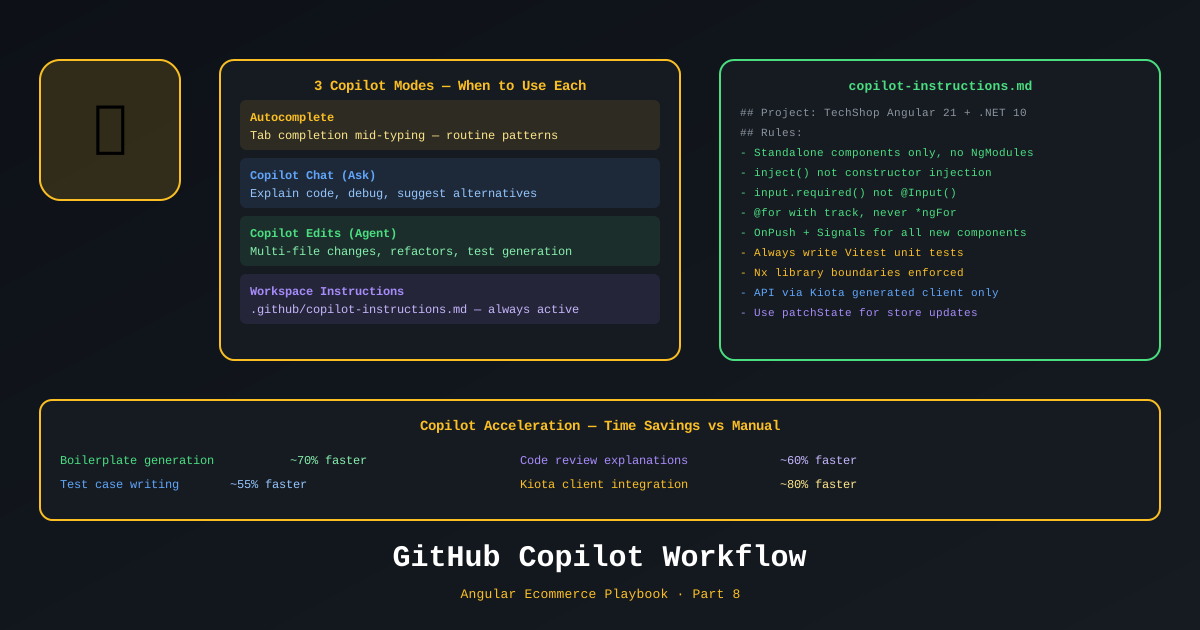
GitHub Copilot is not a code autocomplete tool. That’s how most teams use it. That’s why most teams are disappointed.
Used correctly — with workspace instructions, custom instructions per task, and Copilot Chat for architecture — it becomes a force multiplier that eliminates the repetitive 20% of engineering work, leaving the team to focus on the high-judgment 80%.
This is Part 8 of the Angular Ecommerce Playbook.
📊 Download: Copilot Workflow Diagram (draw.io)
The Setup: Workspace Instructions
GitHub Copilot uses .github/copilot-instructions.md to understand your project’s conventions. Without this, Copilot gives you generic suggestions that don’t match your stack. With it, Copilot suggests Angular 21 standalone components, inject() over constructor injection, and Signals over Subject automatically.
<!-- .github/copilot-instructions.md -->
# TechShop Copilot Instructions

## Project Stack
- **Frontend**: Angular 21 with Nx monorepo, standalone components, Signals, zoneless
- **Backend**: .NET 10 Minimal APIs, Clean Architecture, EF Core 10
- **Testing**: Vitest for Angular, xUnit + FluentAssertions for .NET, Playwright for E2E

## Angular Conventions
- Always use standalone components (no NgModules)
- Use `inject()` function, never constructor injection
- Use `input()` / `output()` for component I/O (not `@Input()` / `@Output()` decorators)
- Use `@if`, `@for`, `@switch` control flow (not `*ngIf`, `*ngFor`)
- Use `ChangeDetectionStrategy.OnPush` on every component
- Use Signals for all local and service state; avoid BehaviorSubject
- Use `resource()` for async data loading instead of manual subscribe()
- Never use `any` type — use explicit types or `unknown`

## .NET Conventions
- Use Minimal APIs (no controllers)
- Use MediatR for CQRS (commands/queries in Application layer)
- Use FluentValidation for all input validation
- Use Problem Details (RFC 9457) for all error responses
- Use C# 14 primary constructors

## File Naming
- Angular: kebab-case files, PascalCase classes
- .NET: PascalCase everything
- API endpoints documented in XML for OpenAPI

## What to Generate
When generating Angular components:
- Include `changeDetection: ChangeDetectionStrategy.OnPush`
- Use `inject()` for dependencies
- Use Signal inputs/outputs
- Add the component to the appropriate library

When generating .NET endpoints:
- Return typed results using `Results.Ok<T>()`
- Include error handling with `Results.Problem()`
- Add to the appropriate endpoint class
Custom Instructions Per File Type
GitHub Copilot supports .github/copilot-instructions.md and also language-specific instruction files. Place these in .github/instructions/:
<!-- .github/instructions/angular-component.instructions.md -->
---
applyTo: "**/*.component.ts"
---
When I ask you to create or modify an Angular component:
1. Always use standalone: true
2. Always include ChangeDetectionStrategy.OnPush
3. Use inject() not constructor injection
4. Use input() and output() signals not @Input/@Output decorators
5. Use @if, @for, @switch in templates — never structural directives
6. Add it to the appropriate Nx library, not directly to apps/shell
<!-- .github/instructions/dotnet-endpoint.instructions.md -->
---
applyTo: "**/Endpoints/**/*.cs"
---
When creating .NET Minimal API endpoints:
1. Use Results.Ok<T>(), Results.Created(), Results.Problem() return types
2. Add [Authorize] or WithRequiredAuthorization() where needed
3. Send commands/queries via ISender (MediatR)
4. Log with ILogger<T> using structured logging
5. Return Problem Details on all error pathsCopilot Chat: The Architecture Assistant
The highest-value use of Copilot in daily development is Copilot Chat for architecture questions. Not code generation — questions.
Examples we use on TechShop:
“Read our cart service in libs/cart/data-access and tell me if there are any race conditions when two tabs update the cart simultaneously.”
Copilot reads the file, identifies that localStorage.getItem and localStorage.setItem in our persist() method are not atomic, and suggests using the Storage event to sync state across tabs. A 15-minute code review problem solved in 30 seconds.
“I need to add a product variant selector (size, color) to the product detail component. Given our existing Signal patterns in libs/catalog/feature-product-detail, draft the implementation.”
Copilot produces a Signal-based variant store, a variant selector component, and the updated product detail component — all matching the project’s exact conventions because of the workspace instructions.
“Write a Vitest test for ProductStore.setCategory() that verifies the page resets to 1 and filter.category updates.”
// Generated by Copilot — matches project's Vitest conventions
import { describe, it, expect, vi } from 'vitest';
import { TestBed } from '@angular/core/testing';
import { ProductStore } from './product.store';
import { TechShopApiClient } from '@techshop/shared/api-client';

describe('ProductStore', () => {
  let store: ProductStore;

  beforeEach(() => {
    TestBed.configureTestingModule({
      providers: [
        ProductStore,
        {
          provide: TechShopApiClient,
          useValue: { products: { get: vi.fn().mockResolvedValue({ items: [], totalCount: 0 }) } }
        }
      ]
    });
    store = TestBed.inject(ProductStore);
  });

  it('should reset page to 1 when category changes', () => {
    store.filter.update(f => ({ ...f, page: 5 }));
    store.setCategory('laptops');
    expect(store.filter().page).toBe(1);
    expect(store.filter().category).toBe('laptops');
  });

  it('should set category to null when cleared', () => {
    store.setCategory('laptops');
    store.setCategory(null);
    expect(store.filter().category).toBeNull();
  });
});
Angular MCP Server in Copilot
Angular 21 introduces the Angular MCP Server — a Model Context Protocol server that exposes Angular CLI capabilities to AI tools. When GitHub Copilot (or any MCP-compatible AI) uses the Angular MCP server, it can:
- Generate components with full project context — Copilot knows your library structure, existing components, and naming conventions
- Run schematics interactively — Generate a component in the right library, with the right options, without writing the command yourself
- Query the Angular project graph — Understand which components depend on which services
Setup in VS Code:
// .vscode/mcp.json
{
  "servers": {
    "angular": {
      "command": "npx",
      "args": ["@angular/mcp@latest", "--project", "techshop"]
    }
  }
}
With the Angular MCP server active, Copilot Chat can respond to:
“Create a product-filter component in the catalog/feature-product-list library with Signal inputs for min/max price and category.”
And Copilot runs the Angular schematic directly, creating the component in the right location with the right configuration — not just generating text.
The Team Copilot Workflow
How each team member uses Copilot differently:
Junior .NET developer (transitioning to Angular)
- Primary: Copilot autocomplete for Angular template syntax
- Secondary:
/explainon unfamiliar code patterns - Outcome: 40% faster on first Angular components (measured)
Mid-level Angular developer
- Primary: Copilot Chat for boilerplate generation (tests, interceptors, guards)
- Secondary:
/fixfor quick lint/type errors - Outcome: 30% fewer context-switches to documentation
Tech Lead
- Primary: Copilot Chat for architecture analysis (
@workspacecontext) - Secondary: ADR drafting (“Draft an ADR for choosing NgRx Signals Store over classic NgRx”)
- Outcome: 20% faster decision documentation
What Copilot doesn’t replace:
- Code review judgment (still catches issues Copilot misses)
- Architecture decisions (Copilot can inform but not decide)
- Customer problem understanding
- Risk assessment
The .copilotignore: What Copilot Shouldn’t See
# .copilotignore
# Secrets and sensitive data
**/*.env
**/appsettings.*.json
**/secrets/

# Generated files (Copilot shouldn't try to suggest here)
**/migrations/*.cs
libs/shared/api-client/src/lib/generated/**

# Large data files
**/*.json.bak
**/testdata/**/*.json
References
- GitHub Copilot Workspace Instructions
- GitHub Copilot Custom Instructions
- Angular MCP Server — angular.dev
- Model Context Protocol (MCP) — modelcontextprotocol.io
- GitHub Copilot Chat — VS Code
- Copilot Enterprise Features — GitHub
- Draw.io Diagram: Copilot Workflow
This is Part 8 of 11 in the Angular Ecommerce Playbook. ← Part 7: SSR Storefront | Part 9: Testing Strategy →